

Overview
This reference architecture shows how to build an ETL pipeline for a fictional interplanetary travel company. It ingests booking data, transforms it into a daily revenue report per destination in DuckDB, and validates the output with data quality checks before publishing it as an asset for downstream consumers. A single Apache Airflow® Dag orchestrates the entire flow: ingest, transform, validate, publish. Using a local DuckDB file makes this architecture a lightweight way to get started with an ETL pipeline without provisioning any external infrastructure. Because the pipeline uses Airflow’s common SQL operators (SQLExecuteQueryOperator, SQLColumnCheckOperator), it is warehouse-agnostic by design. These operators rely on DB-API 2.0, Python’s standard database interface, so the same Dag works with Snowflake, BigQuery, Postgres, or any other compliant database by changing only the Airflow connection. For production workloads, replace the local DuckDB file with a cloud-hosted option like MotherDuck or swap DuckDB for a traditional data warehouse entirely, without changing the Dag logic.
Architecture
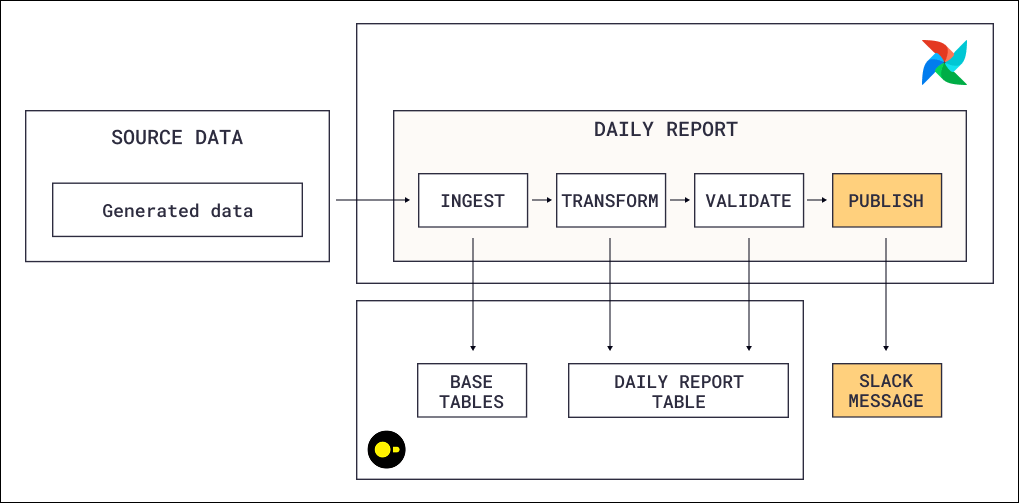
@daily schedule and executes four tasks in sequence:
- Ingest: The first task calls
SQLExecuteQueryOperatorwith a Jinja-templated SQL file that generates booking and payment records. Each run produces a configurable number of bookings (params.n_bookings), each with a random customer, route, passenger count, and optional promo code discount. The fare calculation happens inline in SQL:passengers x base_fare x planet_multiplier x (1 - discount_pct). - Transform: A second
SQLExecuteQueryOperatorruns an aggregation query that joins bookings with routes, destinations, payments, and promo codes. It groups the data by report date and destination, classifying each trip as active or completed and summing passengers, gross fares, discounts, net fares, and paid amounts. The result is upserted into adaily_planet_reporttable using ON CONFLICT DO UPDATE, so re-runs for the same date overwrite rather than duplicate data. - Validate: A
SQLColumnCheckOperatorruns data quality checks on the report table before any downstream work proceeds. It validates thatplanet_namehas no nulls and at least three distinct values, and thattotal_passengershas no nulls and a minimum value of one. If any check fails, the task fails and the asset isn’t published. - Publish: After validation passes, the Dag publishes a
daily_reportasset. Any downstream Dag that schedules on this asset (for example, a Dag that formats the report for a dashboard or sends a Slack summary) only triggers when fresh, validated data is available.
Airflow features
- Data-aware scheduling: The Dag publishes a
daily_reportasset after successful validation. Downstream Dags schedule themselves on this asset, so they only trigger when fresh, quality-checked data is available. This decouples producers from consumers without hard-coded cross-Dag dependencies. - Data quality checks:
SQLColumnCheckOperatorvalidates the report table before the asset is published. Checks include non-null constraints on destination names, distinct value thresholds (at least three destinations), and minimum passenger counts. Failed checks block the asset update, which prevents downstream Dags from triggering on bad data. See Run data quality checks using SQL check operators for detailed usage of all available SQL check operators. - Jinja templating in SQL: The Dag uses two distinct approaches to dynamic SQL. The ingestion step uses
paramswith Jinja loops and conditionals to control the SQL structure itself (how many bookings to generate per run). The transformation step usesparametersto pass the execution date as a database-level bound parameter ($reportDate), which preserves type safety and protects against SQL injection. This separation, Jinja for structure, parameters for values, is a best practice for any SQL-heavy pipeline. - Airflow retries: All tasks are configured to automatically retry after a set delay to handle transient failures when interacting with the database.
- Modularization: SQL queries are stored in the
include/sqlfolder and referenced by task usingtemplate_searchpath. The Dag file contains only orchestration logic (task definitions, dependencies, parameters), while the business logic lives entirely in SQL files. This separation makes the SQL independently testable and reusable across Dags. - Idempotent design: The transformation query uses ON CONFLICT DO UPDATE (upsert) keyed on report date and destination. Re-running the Dag for the same date produces the same result without duplicating rows, making the pipeline safe to retry or backfill at any time.
params vs parameters in SQLExecuteQueryOperatorThe
SQLExecuteQueryOperator supports two ways to pass values into SQL, and this architecture uses both:params: Used for Jinja template rendering. Values are accessed in SQL files using{{ params.param_name }}and rendered as strings by default. Useparamswhen the SQL structure itself needs to change, such as looping to generate a variable number of INSERT statements or conditionally including SQL clauses. Note thatparamsaren’t templated themselves.parameters: Used for database-level parameterized queries. Values are passed directly to the database driver using syntax like$param_nameor%(param_name)s, preserving native Python types (integers, floats, booleans). Useparameterswhen passing values into a fixed SQL structure, especially user-provided values, since the database driver handles escaping and type safety. Note thatparametersare templated, so you can use Airflow macros like{{ ds }}in their values.
params for structural flexibility (Jinja), parameters for safe value binding (database driver).Considerations
- DuckDB concurrency: DuckDB supports concurrent reads but only a single writer at a time. Tasks that write to DuckDB should be sequenced with explicit dependencies or use
max_active_tis_per_dagrun=1to avoid write conflicts. For production workloads with multiple concurrent writers, consider MotherDuck (managed DuckDB) or a traditional cloud warehouse. - Portability: Because DuckDB is file-based and runs embedded, the entire pipeline is portable and runs identically on a laptop, in CI, or on Astro without provisioning external infrastructure. This makes it well-suited for development, testing, and small-scale analytics. For larger datasets, swap DuckDB for a cloud warehouse like Snowflake or BigQuery. The Dag code, SQL files, and data quality checks stay the same since Airflow’s common SQL operators work with any DB-API 2.0 compliant database. Only the Airflow connection changes.
- Data quality as a gate: Placing the validation step before the asset publication means downstream consumers never see invalid data. This is a deliberate tradeoff: a validation failure blocks the entire downstream chain. For pipelines where partial results are acceptable, consider separating blocking checks (which stop the pipeline) from non-blocking checks (which send a notification but allow the pipeline to continue).