

Why use Airflow with pgvector?
Pgvector allows you to store objects alongside their vector embeddings and to query these objects based on their similarity. Vector embeddings are key components of many modern machine learning models such as LLMs or ResNet. Integrating PostgreSQL with pgvector and Airflow into one end-to-end machine learning pipeline allows you to:- Use Airflow’s data-driven scheduling to run operations involving vectors stored in PostgreSQL based on upstream events in your data ecosystem, such as when a new model is trained or a new dataset is available.
- Run dynamic queries based on upstream events in your data ecosystem or user input via Airflow params on vectors stored in PostgreSQL to retrieve similar objects.
- Add Airflow features like retries and alerts to your pgvector operations.
- Check your vector database for the existence of a unique key before running potentially costly embedding operations on your data.
Time to complete
This tutorial takes approximately 30 minutes to complete (reading your suggested book not included).Assumed knowledge
To get the most out of this tutorial, make sure you have an understanding of:- The basics of pgvector. See the README of the pgvector repository.
- Basic SQL. See SQL Tutorial.
- Vector embeddings. See Vector Embeddings.
- Airflow fundamentals, such as writing DAGs and defining tasks. See Get started with Apache Airflow.
- Airflow decorators. Introduction to the TaskFlow API and Airflow decorators.
- Airflow connections. See Managing your Connections in Apache Airflow.
Prerequisites
- The Astro CLI.
- An OpenAI API key of at least tier 1 if you want to use OpenAI for vectorization. If you don’t want to use OpenAI, you can adapt the
create_embeddingsfunction at the start of the DAG to use a different vectorizer.
The example code from this tutorial is also available on GitHub.
Step 1: Configure your Astro project
-
Create a new Astro project:
-
Add the following two packages to your
requirements.txtfile to install the pgvector Airflow provider and the OpenAI Python client in your Astro project: -
This tutorial uses a local PostgreSQL database running in a Docker container. To add a second PostgreSQL container to your Astro project, create a new file in your project’s root directory called
docker-compose.override.ymland add the following. Theankane/pgvectorimage builds a PostgreSQL database with pgvector preinstalled. -
To create an Airflow connection to the PostgreSQL database, add the following to your
.envfile. If you are using the OpenAI API for embeddings you will need to update theOPENAI_API_KEYenvironment variable.
Step 2: Add your data
The DAG in this tutorial runs a query on vectorized book descriptions from Goodreads, but you can adjust the DAG to use any data you want.-
Create a new file called
book_data.txtin theincludedirectory. -
Copy the book description from the
book_data.txtfile in Astronomer’s GitHub for a list of great books.
Step 3: Create your DAG
-
In your
dagsfolder, create a file calledquery_book_vectors.py. -
Copy the following code into the file. If you want to use a vectorizer other than OpenAI, make sure to adjust both the
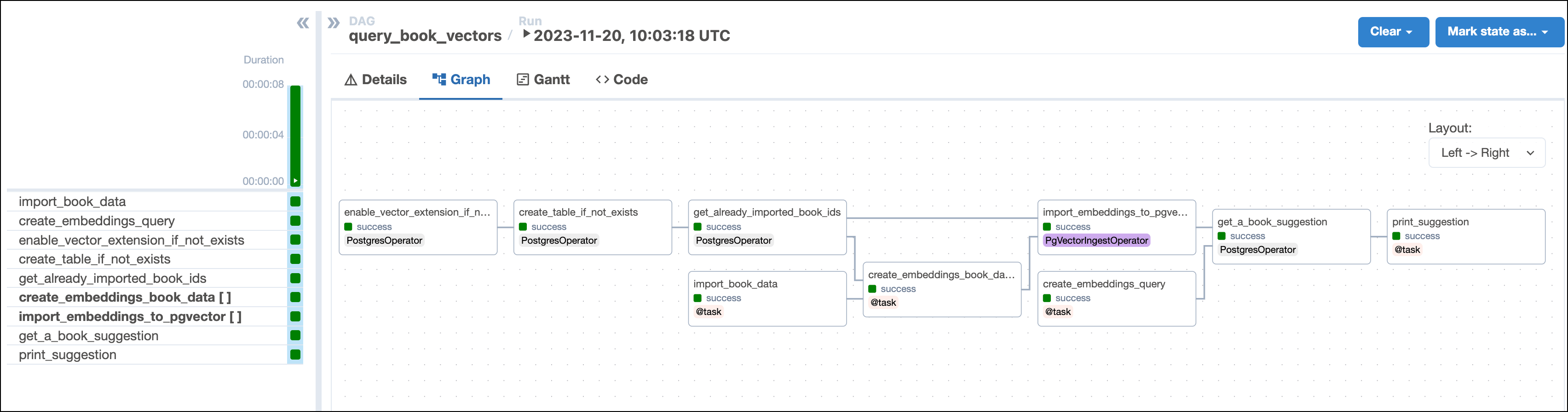
create_embeddingsfunction at the start of the DAG and provide the correctMODEL_VECTOR_LENGTH.This DAG consists of nine tasks to make a simple ML orchestration pipeline.- The
enable_vector_extension_if_not_existstask uses aPostgresOperatorto enable the pgvector extension in the PostgreSQL database. - The
create_table_if_not_existstask creates theBooktable in PostgreSQL. Note theVECTOR()datatype used for thevectorcolumn. This datatype is added to PostgreSQL by the pgvector extension and needs to be defined with the vector length of the vectorizer you use as an argument. This example uses the OpenAI’stext-embedding-ada-002to create 1536-dimensional vectors, so we define the columns with the typeVECTOR(1536)using parameterized SQL. - The
get_already_imported_book_idstask queries theBooktable to return allbook_idvalues of books that were already stored with their vectors in previous DAG runs. - The
import_book_datatask uses the@taskdecorator to read the book data from thebook_data.txtfile and return it as a list of dictionaries with keys corresponding to the columns of theBooktable. - The
create_embeddings_book_datatask is dynamically mapped over the list of dictionaries returned by theimport_book_datatask to parallelize vector embedding of all book descriptions that haven’t been added to theBooktable in previous DAG runs. Thecreate_embeddingsfunction defines how the embeddings are computed and can be modified to use other embedding models. If all books in the list have already been added to theBooktable, then all mapped task instances are skipped. - The
create_embeddings_querytask applies the samecreate_embeddingsfunction to the desired book mood the user provided via Airflow params. - The
import_embeddings_to_pgvectortask uses thePgVectorIngestOperatorto insert the book data including the embedding vectors into the PostgreSQL database. This task is dynamically mapped to import the embeddings from one book at a time. The dynamically mapped task instances of books that have already been imported in previous DAG runs are skipped. - The
get_a_book_suggestiontask queries the PostgreSQL database for the book that is most similar to the user-provided mood using nearest neighbor search. Note how the vector of the user-provided book mood (query_vector) is cast to theVECTORdatatype before similarity search:ORDER BY vector <-> CAST(%(query_vector)s AS VECTOR). - The
print_book_suggestiontask prints the book suggestion to the task logs.
- The
Step 4: Run your DAG
-
Run
astro dev startin your Astro project to start Airflow and open the Airflow UI atlocalhost:8080. -
In the Airflow UI, run the
query_book_vectorsDAG by clicking the Play button. Then, provide the Airflow param for the desiredbook_mood.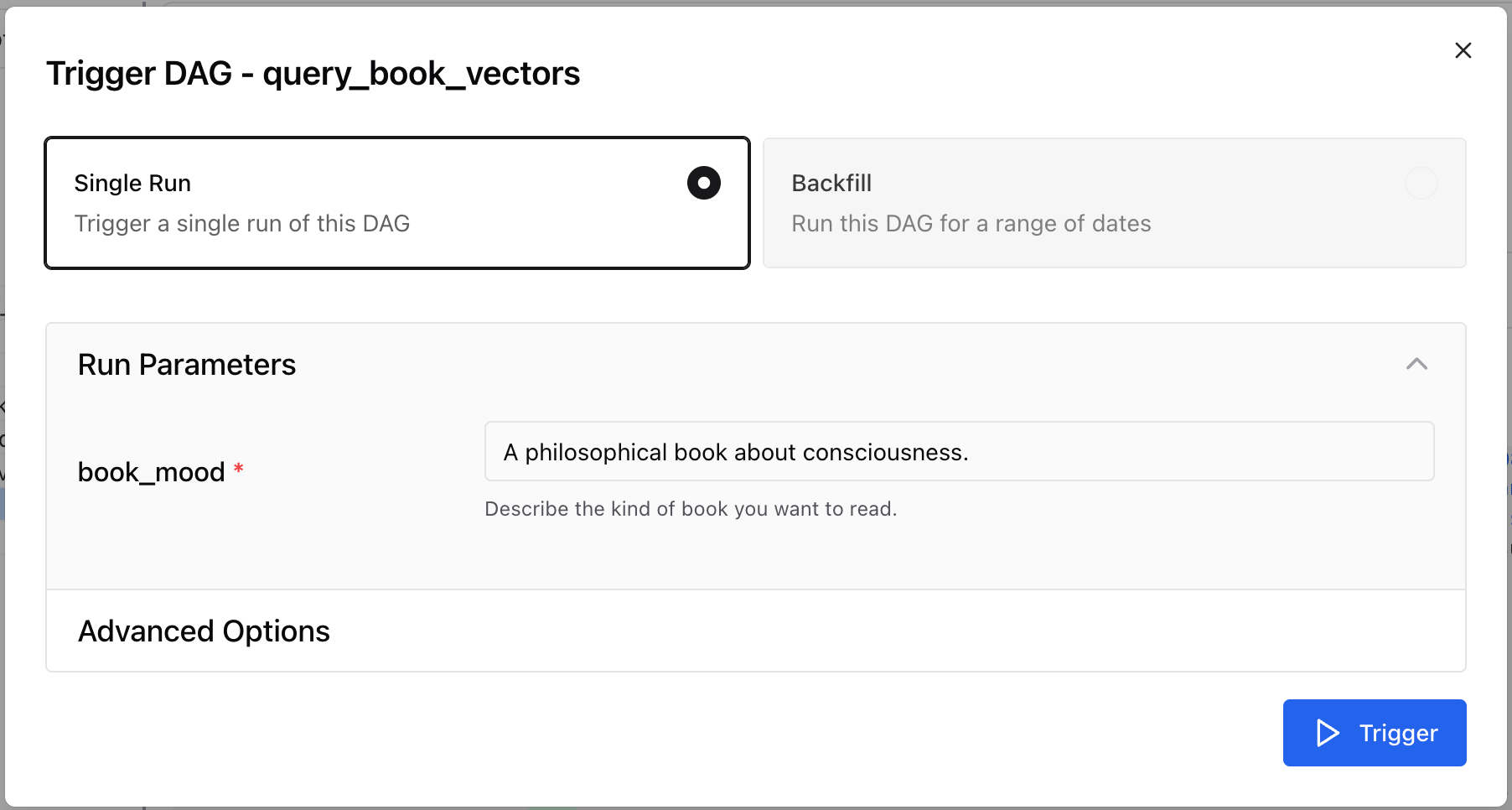
-
View your book suggestion in the task logs of the
print_book_suggestiontask:
Step 5: (Optional) Fetch and read the book
- Go to the website of your local library and search for the book. If it is available, order it and wait for it to arrive. You will likely need a library card to check out the book.
- Make sure to prepare an adequate amount of tea for your reading session. Astronomer recommends Earl Grey, but you can use any tea you like.
- Enjoy your book!