

schedule with a cron expression, a timedelta object, or a preset Airflow schedule. Recent versions of Airflow have added new ways to schedule DAGs, including data-aware scheduling with datasets and the option to define complex custom schedules with timetables.
In this guide, you’ll learn Airflow scheduling concepts and the different ways you can schedule a DAG.
Assumed knowledge
To get the most out of this guide, you should have an existing knowledge of:- Basic Airflow concepts. See Introduction to Apache Airflow.
- Configuring Airflow DAGs. See Introduction to Airflow DAGs.
- Date and time modules in Python3. See the Python documentation on the
datetimepackage.
Scheduling concepts
To gain a better understanding of DAG scheduling, it’s important that you become familiar with the following terms and parameters:- Data Interval: A property of each DAG run that represents the period of data that each task should operate on. For example, for a DAG scheduled hourly, each data interval begins at the top of the hour (minute 0) and ends at the close of the hour (minute 59). The DAG run is typically executed at the end of the data interval.
- Logical Date: The start of the data interval. It doesn’t represent when the DAG will be executed. Prior to Airflow 2.2, this was referred to as the execution date.
- Timetable: A DAG property that dictates the data interval and logical date for each DAG run and determines when a DAG is scheduled.
- Run After: The earliest time the DAG can be scheduled. This date is shown in the Airflow UI, and may be the same as the end of the data interval depending on your DAG’s timetable.
- Backfilling and Catchup: Related to scheduling. To learn more, see DAG Runs.
execution_date concept was deprecated in Airflow 2.2. If you’re using an older version of Airflow and need more information about execution_date, see What does execution_date mean?.
Parameters
The following parameters ensure your DAGs run at the correct time:data_interval_start: Defines the start date and time of the data interval. A DAG’s timetable will return this parameter for each DAG run. This parameter is created automatically by Airflow, or is specified by the user when implementing a custom timetable.data_interval_end: Defines the end date and time of the data interval. A DAG’s timetable will return this parameter for each DAG run. This parameter is created automatically by Airflow, or is specified by the user when implementing a custom timetable.schedule: Defines when a DAG will be run. This value is set at the DAG configuration level. It accepts cron expressions, timedelta objects, timetables, and lists of datasets. The defaultscheduleistimedelta(days=1), which runs the DAG once per day if noscheduleis defined. If you trigger your DAG externally, set thescheduletoNone.start_date: The timestamp after which the first data interval for this DAG can start. Make sure this is set to be a date in the past, at least one full data interval before the first intended DAG run. For example if your DAG runs daily, thestart_dateshould be at least one full day before the first intended run. See the example below for more information.end_date: The last date your DAG will be executed. This parameter is optional.
In Airflow 2.3 and earlier,
schedule_interval is used instead of the schedule parameter and it only accepts cron expressions or timedelta objects.Example
To demonstrate how these concepts work together, consider a DAG that is scheduled to run every 5 minutes. Looking at the most recent DAG run, the logical date is2022-08-28 22:37:33, which is displayed in the Data interval start field in the following image. The logical date is also included in the Run ID field and identifies the DAG run in the Airflow metadata database. The value in the Data interval end field is 5 minutes later.
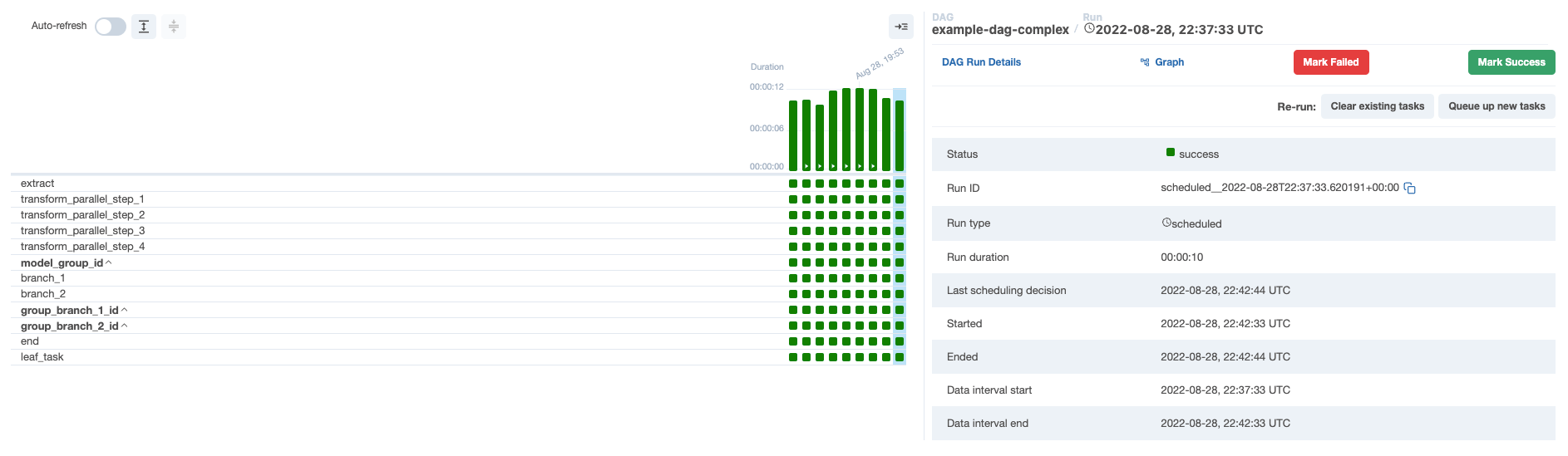
2022-08-28 22:42:33, which is shown as the Next Run value in the Airflow UI. This is 5 minutes after the previous logical date, and the same value shown in the Data interval end field of the previous DAG run. If you hover over Next Run, you can see that the Run After value, which is the date and time that the next DAG run will actually start, matches the value in the Data interval end field:

- DAG run 1 (
scheduled__2022-08-28T22:37:33.620191+00:00) has a logical date of2022-08-28 22:37:33, a data interval start of2022-08-28 22:37:33and a data interval end of2022-08-28 22:42:33. This DAG run will actually start at2022-08-28 22:42:33. - DAG run 2 (
scheduled__2022-08-28T22:42:33.617231+00:00) has a logical date of2022-08-28 22:42:33, a data interval start of2022-08-28 22:42:33and a data interval end of2022-08-28 22:47:33. This DAG run will actually start at2022-08-28 22:47:33.
Cron-based schedules
For pipelines with straightforward scheduling needs, you can define aschedule in your DAG using:
- A cron expression.
- A cron preset.
- A timedelta object.
Set a cron-based schedule
Cron expressions
You can pass any cron expression as a string to theschedule parameter in your DAG. For example, if you want to schedule your DAG at 4:05 AM every day, you would use schedule='5 4 * * *'.
If you need help creating the correct cron expression, see crontab guru.
Cron presets
Airflow can utilize cron presets for common, basic schedules. For example,schedule='@hourly' will schedule the DAG to run at the beginning of every hour. For the full list of presets, see Cron Presets. If your DAG doesn’t need to run on a schedule and will only be triggered manually or externally triggered by another process, you can set schedule=None.
Timedelta objects
If you want to schedule your DAG on a particular cadence (hourly, every 5 minutes, etc.) rather than at a specific time, you can pass atimedelta object imported from the datetime package to the schedule parameter. For example, schedule=timedelta(minutes=30) will run the DAG every thirty minutes, and schedule=timedelta(days=1) will run the DAG every day.
Don’t make your DAG’s schedule dynamic (for example,
datetime.now())! This will cause an error in the Scheduler.Cron-based schedules and the logical date
Airflow was originally developed for extract, transform, and load (ETL) with the expectation that data is constantly flowing in from some source and then will be summarized at a regular interval. However, if you want to summarize data from Monday, you need to wait until Tuesday at 12:01 AM. This shortcoming led to the introduction of timetables in Airflow 2.2. Each DAG run has alogical_date that is separate from the time that the DAG run is expected to begin. A DAG run isn’t actually allowed to run until the logical_date for the following DAG run has passed. If you’re running a daily DAG, the Monday DAG run won’t execute until Tuesday. In this example, the logical_date is Monday 12:01 AM, even though the DAG run won’t actually begin until Tuesday 12:01 AM.
If you want to pass a timestamp to the DAG run that represents the earliest time at which this DAG run can started, use {{ next_ds }} from the jinja templating macros.
Astronomer recommends that you make each DAG run idempotent (able to be re-run without changing the result) which precludes using datetime.now().
Limitations of cron-based schedules
The relationship between a DAG’sschedule and its logical_date leads to particularly unintuitive results when the spacing between DAG runs is irregular. The most common example of irregular spacing is when DAGs run only during business days from Monday to Friday. In this case, the DAG run with a Friday logical_date won’t run until Monday, even though the data from Friday is available on Saturday. A DAG that summarizes results at the end of each business day can’t be set using only schedule. In Airflow 2.2 and earlier, you must schedule the DAG to run every day (including Saturday and Sunday) and include logic in the DAG to skip all tasks on the days the DAG doesn’t need to run.
The following are the limitations of a traditional schedule:
- Schedule a DAG at different times on different days. For example, 2:00 PM on Thursdays and 4:00 PM on Saturdays.
- Schedule a DAG daily except for holidays.
- Schedule a DAG at multiple times daily with uneven intervals. For example, 1:00 PM and 4:30 PM.
Data-aware scheduling
With Datasets, you can make Airflow aware of updates to data objects. Using that awareness, Airflow can schedule other DAGs when there are updates to these datasets. To create a dataset-based schedule, pass the names of the dataset(s) to theschedule parameter. Airflow 2.9 added the ability to define conditional logic for your dataset schedules, as well as the option to combine timetables with dataset-based schedules.
- Simple
- Conditional
- Time
dataset1 and dataset2 is updated at least once.
Timetables
Timetables, introduced in Airflow 2.2, address the limitations of cron expressions and timedelta objects by allowing users to define their own schedules in Python code. All DAG schedules are ultimately determined by their internal timetable and if a cron expression or timedelta object isn’t suitable, you can define your own. Custom timetables can be registered as part of an Airflow plugin. They must be a subclass ofTimetable, and they should contain the following methods, both of which return a DataInterval with a start and an end:
next_dagrun_info: Returns the data interval for the DAG’s regular scheduleinfer_manual_data_interval: Returns the data interval when the DAG is manually triggered
Continuous timetable
You can run a DAG continuously with a pre-defined timetable. To use the ContinuousTimetable, set the schedule of your DAG to"@continuous" and set max_active_runs to 1.
Example custom timetable
For this implementation, you’ll run your DAG at 6:00 and 16:30. Because this schedule has run times with differing hours and minutes, it can’t be represented by a single cron expression. You’ll implement this schedule with a custom timetable. To start, you need to define thenext_dagrun_info and infer_manual_data_interval methods. The time the DAG runs (run_after) should be the end of the data interval since the interval doesn’t have any gaps. To run a DAG that at 6:00 and 16:30, you have the following alternating intervals:
- Run at 6:00: Data interval is from 16:30 on the previous day* to 6:00 on the current day.
- Run at 16:30: Data interval is from 6:00 to 16:30 on the current day.
next_dagrun_info method to provide Airflow with the logic to calculate the data interval for scheduled runs. The method also contains logic to handle the DAG’s start_date, end_date, and catchup parameters. To implement the logic in this method, you use the Pendulum package. The method is shown in the following example:
- If there was a previous run for the DAG:
- If the previous DAG run started at 6:00, then the next DAG run should start at 16:30 and end at 6:00 the next day.
- If the previous DAG run started at 16:30, then the DAG run should start at 6:00 the next day and end at 16:30 the next day.
- If it is the first run of the DAG:
- Check for a start date. If there isn’t one, the DAG can’t be scheduled.
- Check if
catchup=False. If so, the earliest date to consider should be the current date. Otherwise it is the DAG’s start date. - The first DAG run should always start at 6:00. Update the time of the interval start to 6:00 and the end to 16:30.
- If the DAG has an end date, don’t schedule the DAG after that date has passed.
infer_manual_data_interval method. The code appears similar to the following example:
- The current time is between 6:00 and 16:30: In this case, the data interval is from 16:30 the previous day to 6:00 the current day.
- The current time is after 16:30 but before midnight: In this case, the data interval is from 6:00 to 16:30 the current day.
- The current time is after midnight but before 6:00: In this case, the data interval is from 6:00 to 16:30 the previous day.
Timetable class which will make up your Airflow plugin. The following example is a full custom timetable plugin:
schedule parameter (in pre-2.4 Airflow you will need to use the timetable parameter):
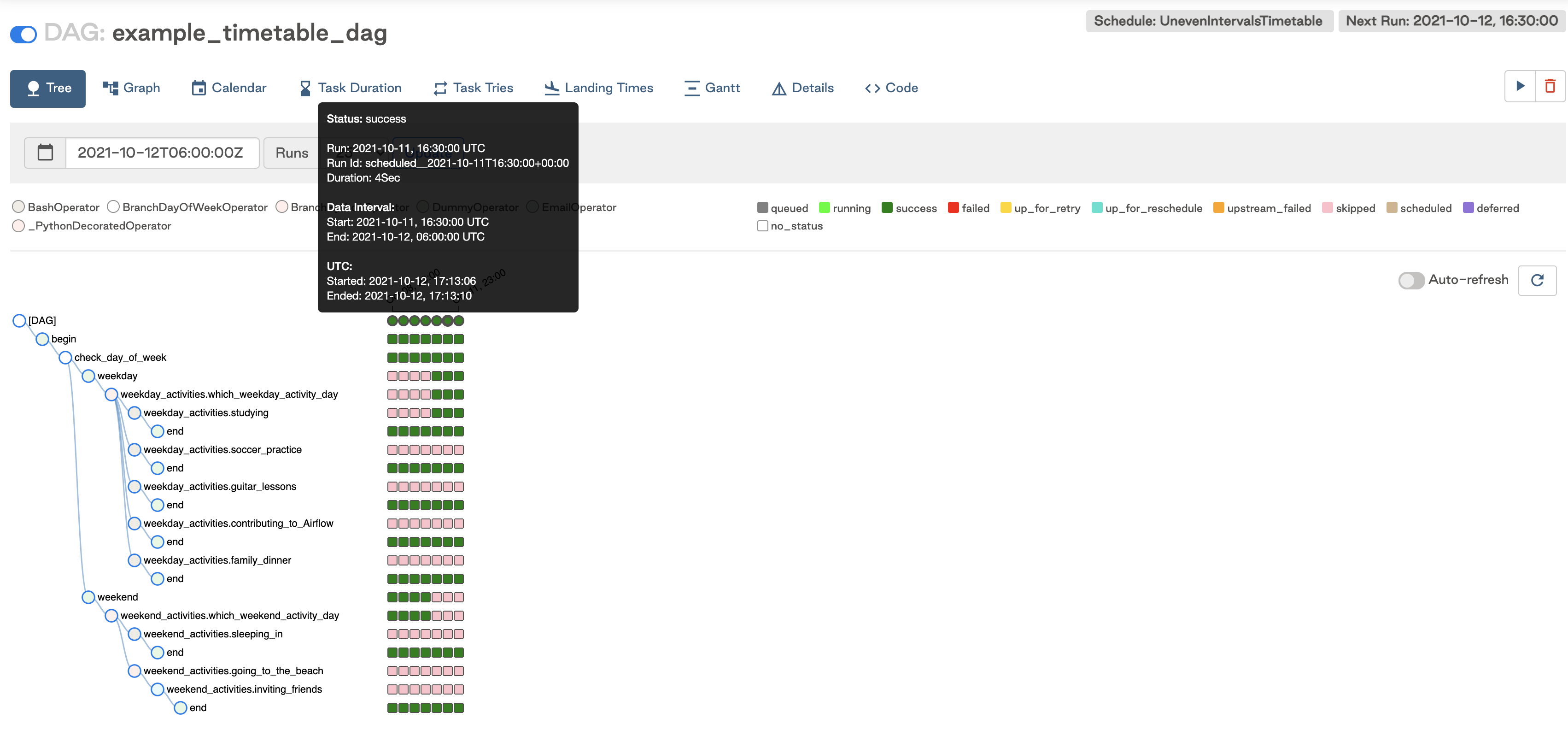
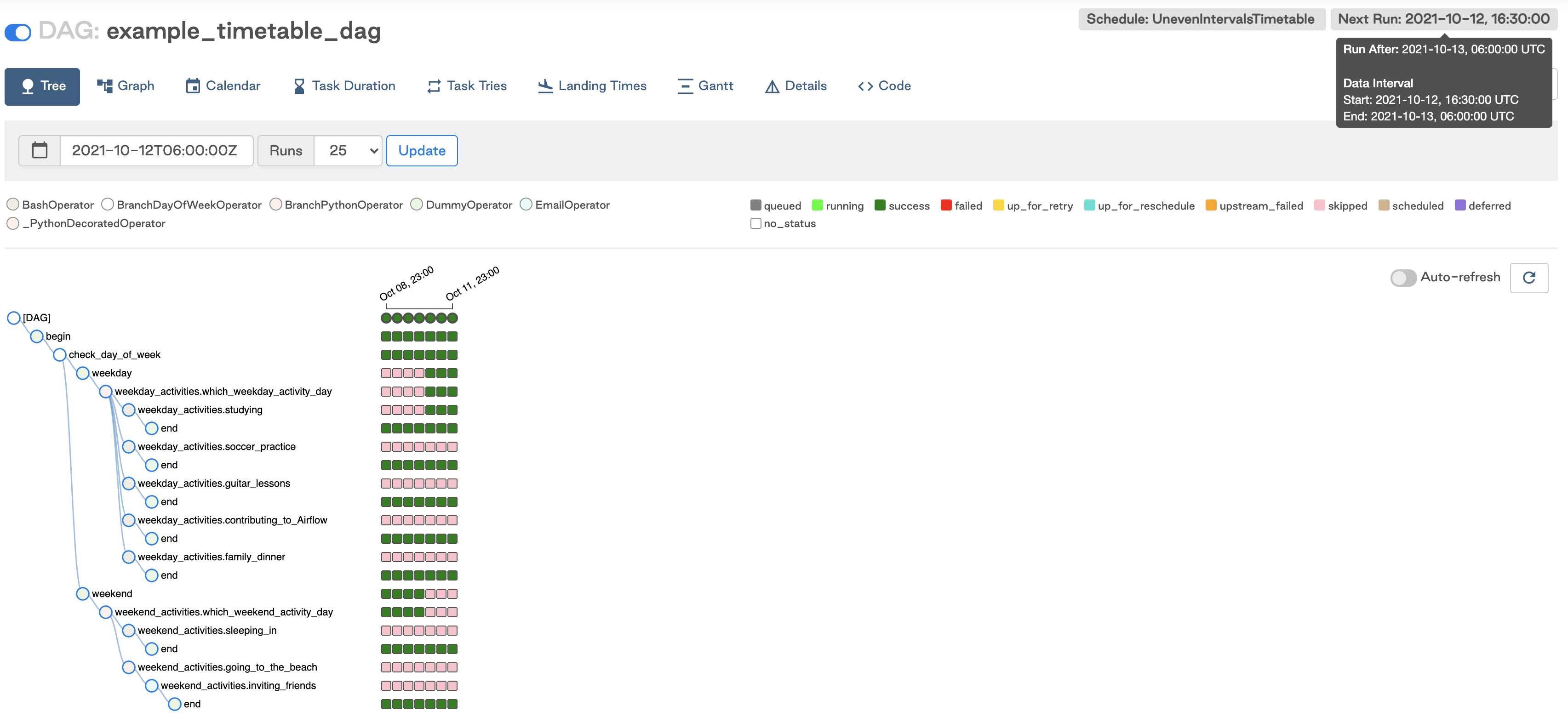
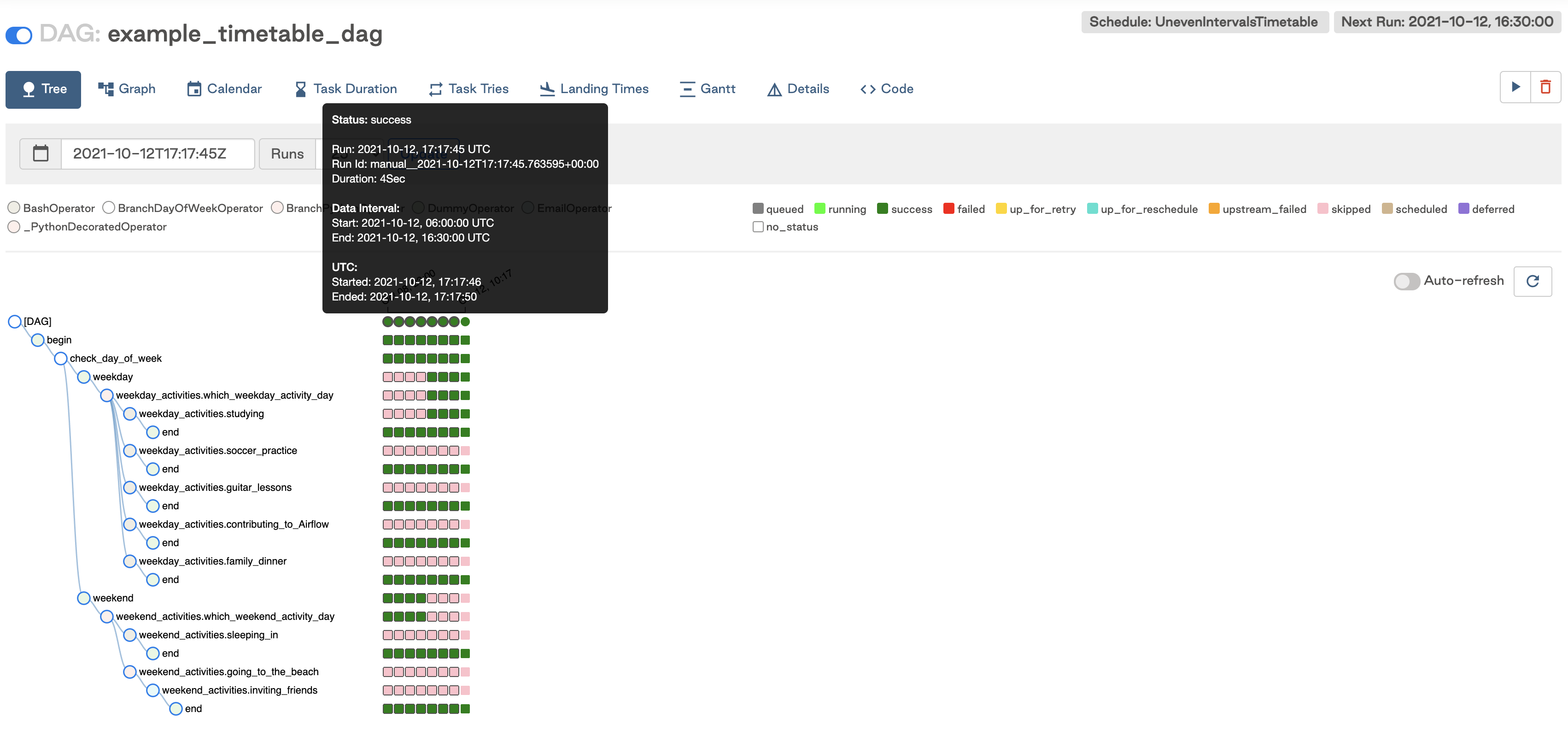
next_dagrun_info method doesn’t return a data_interval_start that is earlier than your DAG’s start_date. This will result in tasks not being executed for that DAG run.
Current limitations
There are some limitations to keep in mind when implementing custom timetables:- Timetable methods should return the same result every time they are called (for example, avoid things like HTTP requests). They aren’t designed to implement event-based triggering.
- Timetables are parsed by the scheduler when creating DAG runs, so avoid slow or lengthy code that could impact Airflow performance.