

Overview
Apache Kafka® is one of the most widely adopted platforms for real-time event streaming. Many data teams need to process the events flowing through Kafka in batches to use them in analytics, machine learning, and other pipelines that Airflow orchestrates, or run Airflow Dags in reaction to specific events in a Kafka topic. This reference architecture shows two patterns for integrating Kafka with Airflow:- Event-driven pattern: Trigger a Dag as soon as a specific event message arrives in a Kafka topic.
- Standard pattern: Land streaming data in object storage, where Airflow picks it up for batch processing at scale.
Event-driven pattern
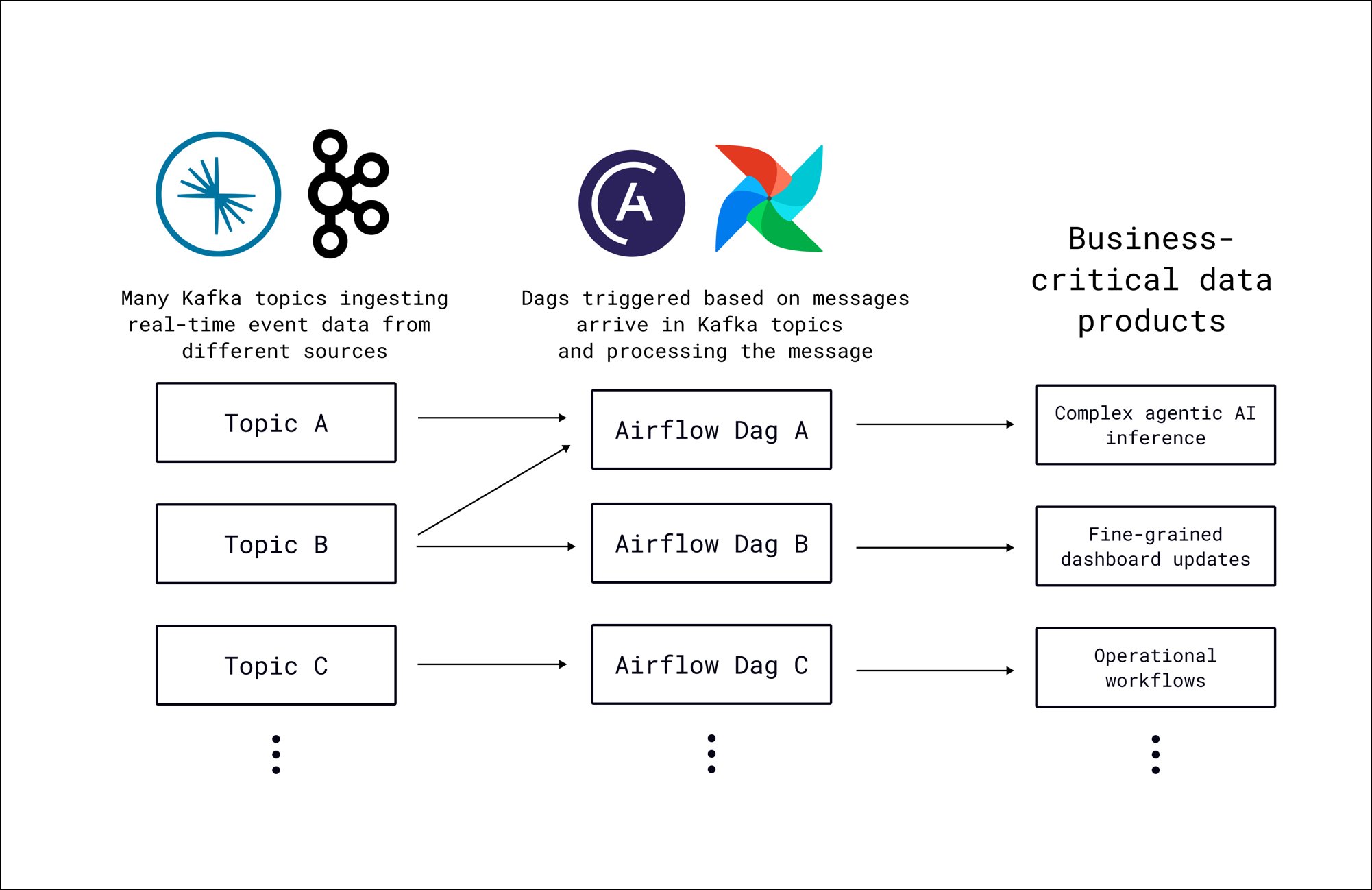
- Kafka topics: Multiple topics ingest real-time event data from different sources, such as application events, IoT sensors, or third-party APIs.
- Airflow Dags: Each Dag is associated with one or more Kafka topics through an AssetWatcher. When the watcher detects a new message, it creates an AssetEvent that triggers the Dag. The message payload is available to tasks through the Airflow context.
- Downstream data products: The triggered Dags produce business-critical outputs such as agentic AI inference results, fine-grained dashboard updates, or operational workflow executions.
Standard pattern
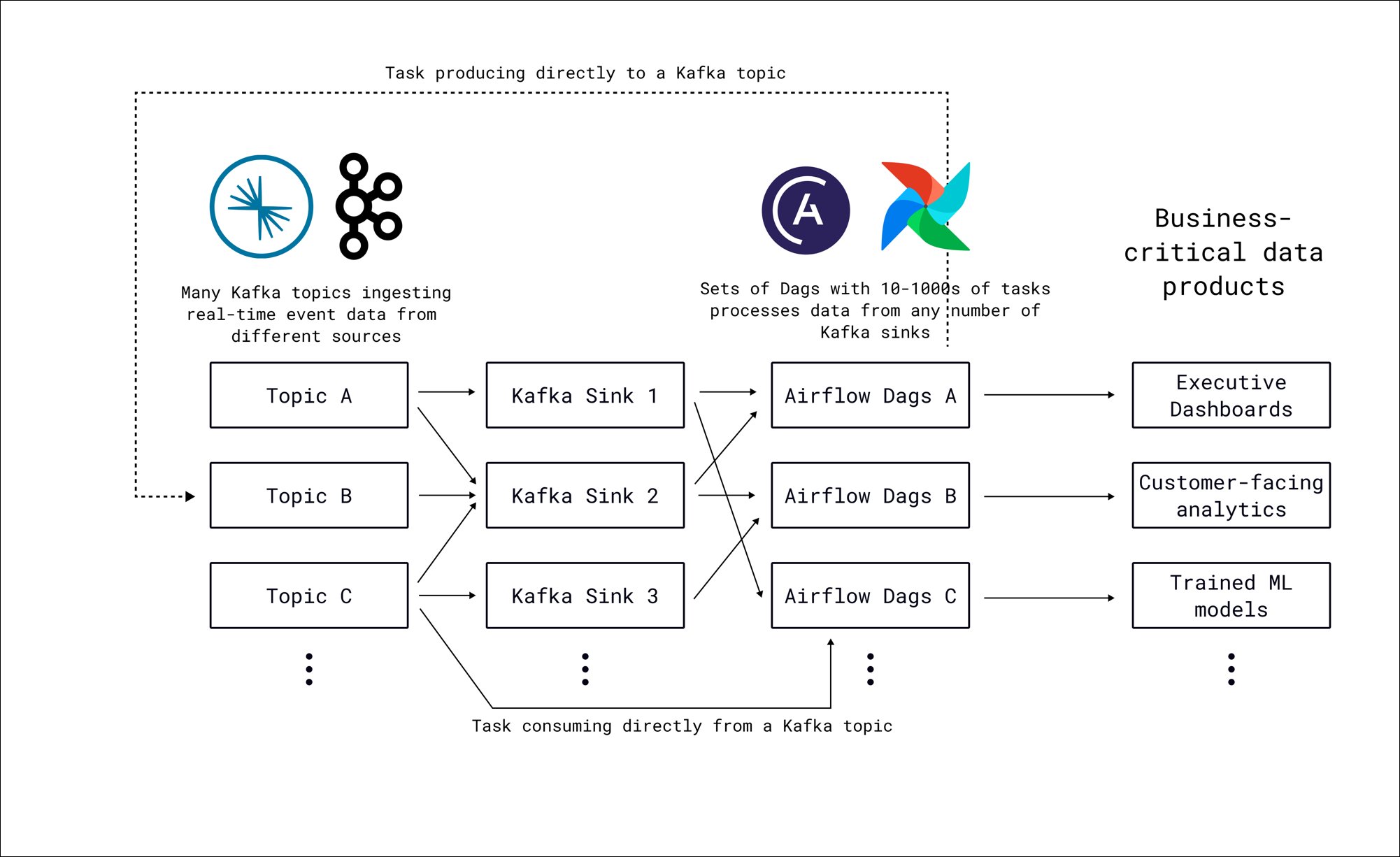
- Kafka topics: Multiple topics ingest real-time event data from different sources, identical to the event-driven pattern.
- Kafka Sinks: Kafka Connect sink connectors consume messages from topics and write them to object storage in batches. Each sink can pull from one or more topics.
- Airflow Dags: Sets of Dags with tens to thousands of tasks process data from any number of Kafka sinks. Deferrable operators detect new files in storage without occupying worker slots, and dynamic task mapping parallelizes processing across files. Tasks can also produce messages directly back to Kafka topics or consume directly from them using the Airflow Kafka provider.
- Downstream data products: Dags produce outputs such as executive dashboards, customer-facing analytics, or trained ML models.
Airflow features
- Event-driven scheduling: In the event-driven pattern, an AssetWatcher with a
MessageQueueTriggerpolls Kafka topics for new messages. When a message arrives, the watcher creates an AssetEvent that triggers the associated Dag, passing the message payload through the Airflow context. - Data-aware scheduling: Both patterns use assets to connect producers and consumers. In the event-driven pattern, Kafka messages update assets that trigger Dags. In the standard pattern, Dags can publish assets after processing completes, starting downstream Dags when the data is ready.
- Dynamic task mapping: In the standard pattern, dynamic task mapping parallelizes file processing from object storage. The number of mapped tasks is determined at runtime based on the amount of files that have been landed in object storage, with options to create one dynamically mapped task instance per file or per subdirectory.
- Airflow Kafka provider: In the standard pattern, the
ProduceToTopicOperatorandConsumeFromTopicOperatorenable direct bidirectional communication between Airflow tasks and Kafka topics. Tasks can consume messages from Kafka as part of a processing pipeline or produce results back to a topic for consumption by other systems. - Deferrable operators: In the standard pattern, deferrable operators such as the
S3KeySensorindeferrable=Truemode detect new files written by Kafka Sinks. The deferrable operator hands off polling to the triggerer, freeing the worker slot until new data appears.
Considerations
- Choosing between patterns: The event-driven pattern triggers a Dag run per message with lower latency, which suits use cases that require immediate processing of individual events. The standard pattern batches messages through Kafka Sinks and processes them in bulk, which is more efficient and allows you to compute aggregates over the data. Many production architectures use both patterns for different topics based on the downstream requirements.
- Kafka Sink configuration and Dag schedules: In the standard pattern, two factors affect how often Dags are triggered. The Dag schedule determines how often a new Dag run starts, with its first task waiting in
deferrablemode for new data in the object storage location. The batch size and flush interval of your Kafka Sinks determine how often new data arrives there. For highly irregular patterns, consider a@continuousschedule withmax_active_runs=1so there is always exactly one Dag run ready to process new data as soon as it arrives. - Scaling the event-driven pattern: Each message in the event-driven pattern triggers a separate Dag run. At high message rates, this can create many concurrent Dag runs. Configure concurrency limits and pool slots to match your infrastructure capacity, and consider switching to the standard pattern for topics with sustained high throughput.