Apache Airflow® trigger rules

Trigger rules are used to determine when a task should run in relation to the previous task. By default, Apache Airflow® runs a task when all directly upstream tasks are successful. However, you can change this behavior using the trigger_rule parameter in the task definition.

Trigger rules define whether a task runs based on its direct upstream dependencies. To learn how to set task dependencies, see the Manage task and task group dependencies in Airflow guide.

Define a trigger rule

You can override the default trigger rule by setting the trigger_rule parameter in the task definition.

1# from airflow.sdk import chain, task
2
3@task
4def upstream_task():
5 return "Hello..."
6
7@task(trigger_rule="all_success")
8def downstream_task():
9 return " World!"
10
11chain(upstream_task(), downstream_task())
1# from airflow.providers.standard.operators.empty import EmptyOperator
2# from airflow.sdk import chain
3
4upstream_task = EmptyOperator(task_id="upstream_task")
5downstream_task = EmptyOperator(
6 task_id="downstream_task",
7 trigger_rule="all_success"
8)
9chain(upstream_task, downstream_task)

Trigger rules in Airflow

The following trigger rules are available:

  • all_success: (default) The task runs only when all upstream tasks have succeeded.
  • all_done: The task runs once all upstream tasks are done with their execution.
  • all_done_min_one_success: The task runs once all upstream tasks are done with their execution and at least one upstream task has succeeded. Note that skipped does not count as done for this rule and will cause the downstream task to be skipped as well.
  • all_failed: The task runs only when all upstream tasks are in a failed or upstream_failed state.
  • all_skipped: The task runs only when all upstream tasks have been skipped.
  • always: The task runs as soon as the Dag run starts, independently of the status of any upstream tasks.
  • none_failed: The task runs only when all upstream tasks have succeeded or been skipped.
  • none_failed_min_one_success: The task runs only when all upstream tasks are not in the state failed or upstream_failed, and at least one upstream task has succeeded.
  • none_skipped: The task runs only when no upstream task is in a skipped state.
  • one_done: The task runs as soon as at least one upstream task has either succeeded or failed.
  • one_failed: The task runs as soon as at least one upstream task is in failed or upstream_failed state.
  • one_success: The task runs as soon as at least one upstream task has succeeded.
  • all_done_setup_success: Special trigger rule used in teardown tasks. The task runs when all upstream tasks have finished and at least one directly connected setup task has been successful. See the Use setup and teardown tasks in Airflow guide for more information.

You can define a Dag in which any task failure stops the Dag execution by setting the Dag parameter fail_fast to True. This will set all tasks that are still running to failed and mark any tasks that have not run yet as skipped, as soon as any task in the Dag fails. Note that you cannot have any trigger rule other than all_success (and all_done_setup_success) in a Dag with fail_fast set to True and that teardown tasks are exempt and will still run.

Branching and trigger rules

One common scenario where you might need to implement trigger rules is if your Dag contains conditional logic such as branching. In these cases, for the task directly after the branches, none_failed_min_one_success or none_failed are likely more helpful than all_success, because unless all branches are run, at least one upstream task will always be in a skipped state.

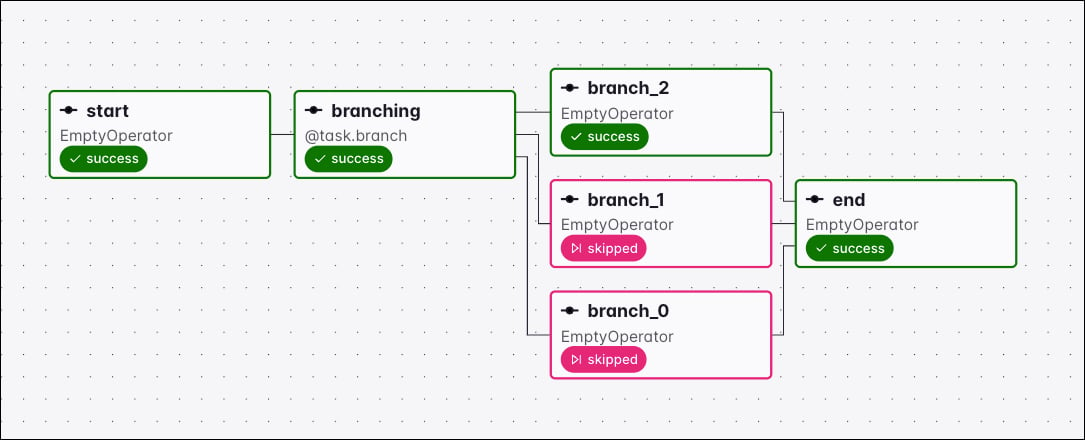
In the following example Dag there is a simple branch with a downstream task that needs to run if either of the branches are followed. With the all_success rule, the end task never runs because all but one of the branch tasks is always ignored and therefore doesn’t have a success state. If you change the trigger rule to none_failed_min_one_success, then the end task can run so long as one at least one of the branches has succeeded and none of the branches have failed.
1import random
2from airflow.sdk import dag, task
3from airflow.providers.standard.operators.empty import EmptyOperator
4
5
6@dag
7def branching_dag():
8 # EmptyOperators to start and end the DAG
9 start = EmptyOperator(task_id="start")
10 end = EmptyOperator(task_id="end", trigger_rule="none_failed_min_one_success")
11
12 # Branching task
13 @task.branch
14 def branching(**kwargs):
15 branches = ["branch_0", "branch_1", "branch_2"]
16 return random.choice(branches)
17
18 branching_task = branching()
19
20 start >> branching_task
21
22 # set dependencies
23 for i in range(0, 3):
24 d = EmptyOperator(task_id="branch_{0}".format(i))
25 branching_task >> d >> end
26
27
28branching_dag()

This image shows the resulting Dag:

Branch Dependencies

Traditional Syntax
1import random
2from airflow.sdk import DAG
3from airflow.providers.standard.operators.empty import EmptyOperator
4from airflow.providers.standard.operators.python import BranchPythonOperator
5
6
7def return_branch(**kwargs):
8 branches = ["branch_0", "branch_1", "branch_2"]
9 return random.choice(branches)
10
11
12with DAG(dag_id="branching_dag"):
13 # EmptyOperators to start and end the DAG
14 start = EmptyOperator(task_id="start")
15 end = EmptyOperator(task_id="end", trigger_rule="none_failed_min_one_success")
16
17 # Branching task
18 branching = BranchPythonOperator(task_id="branching", python_callable=return_branch)
19
20 start >> branching
21
22 # set dependencies
23 for i in range(0, 3):
24 d = EmptyOperator(task_id="branch_{0}".format(i))
25 branching >> d >> end

Airflow trigger rules in detail

all_success

This is the default trigger rule. A task with the trigger rule all_success only runs when all upstream tasks have succeeded.
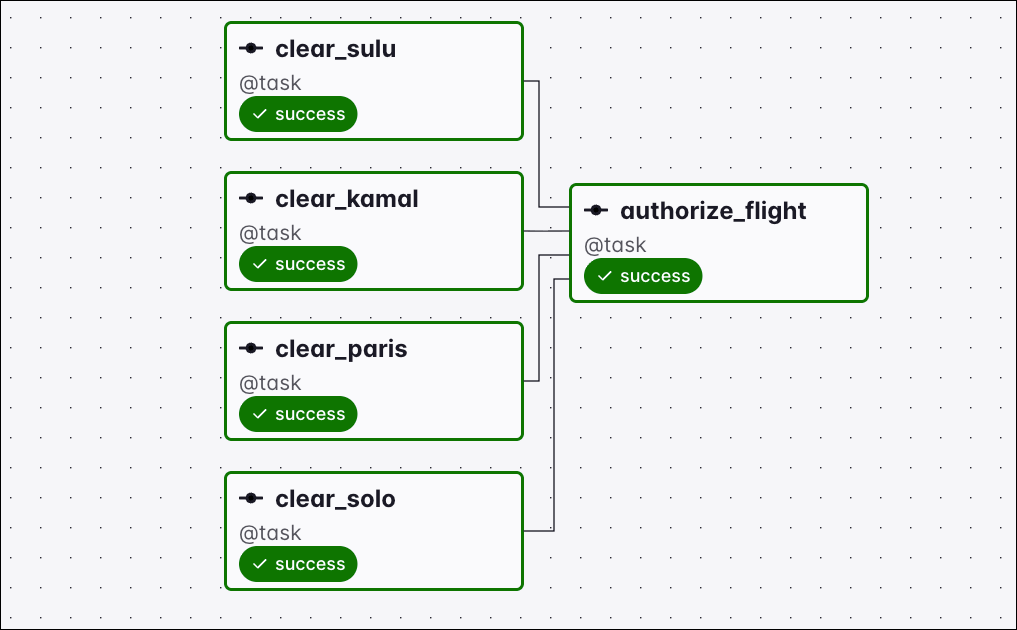
Graph view of a Dag where all four upstream tasks succeeded and the downstream authorize_flight task ran with the all_success trigger rule

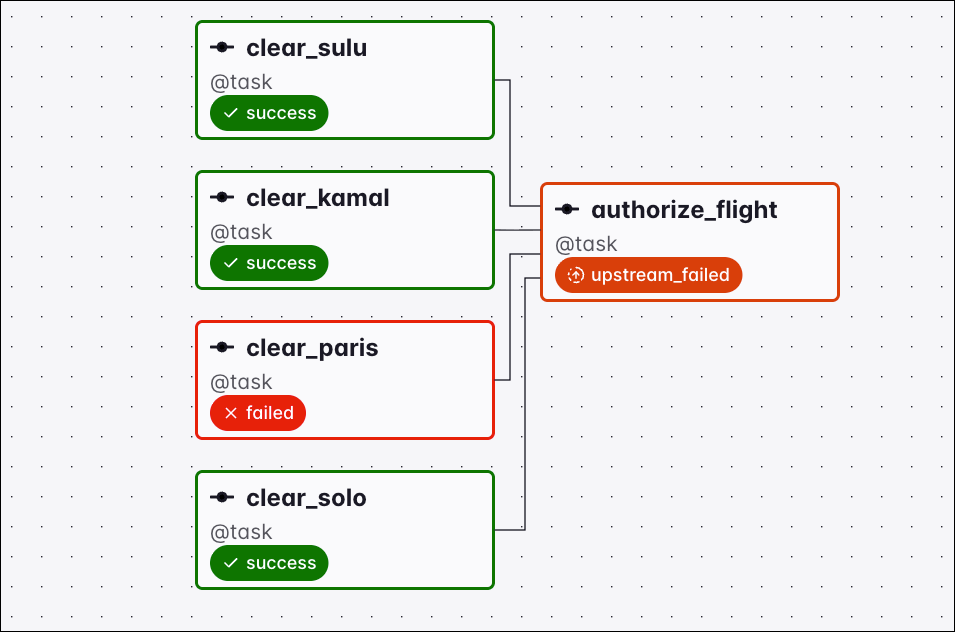
As soon as any upstream tasks are in the state of failed, upstream_failed, the downstream task is set to the state upstream_failed and does not run.

Graph view of a Dag where the clear_paris task failed, setting the downstream authorize_flight task to upstream_failed under the all_success trigger rule

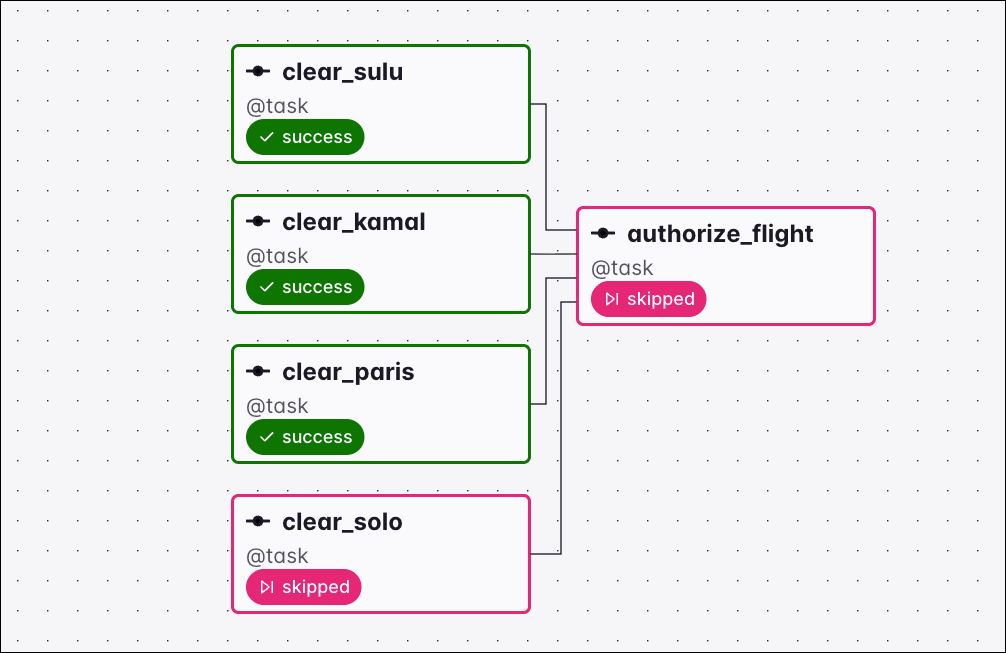
Similarly, as soon as any upstream task is in the state skipped, the downstream task is set to the state skipped and does not run.

Graph view of a Dag where the clear_solo task was skipped, setting the downstream authorize_flight task to skipped under the all_success trigger rule

If a task with the trigger rule all_success has one upstream task that is skipped and one that is failed / upstream_failed, whether the downstream task is set to skipped or upstream_failed depends on which of the upstream tasks finishes first. If the first upstream task that is not successful ends with the state skipped the downstream task is skipped, if it ends in failed or upstream_failed the downstream task is set to upstream_failed. If both upstream tasks, skipped and failed/upstream_failed finish in the same scheduler evaluation period, the downstream task will be set to upstream_failed.

all_done

The all_done trigger rule will make a task wait until all upstream tasks are done with their execution.
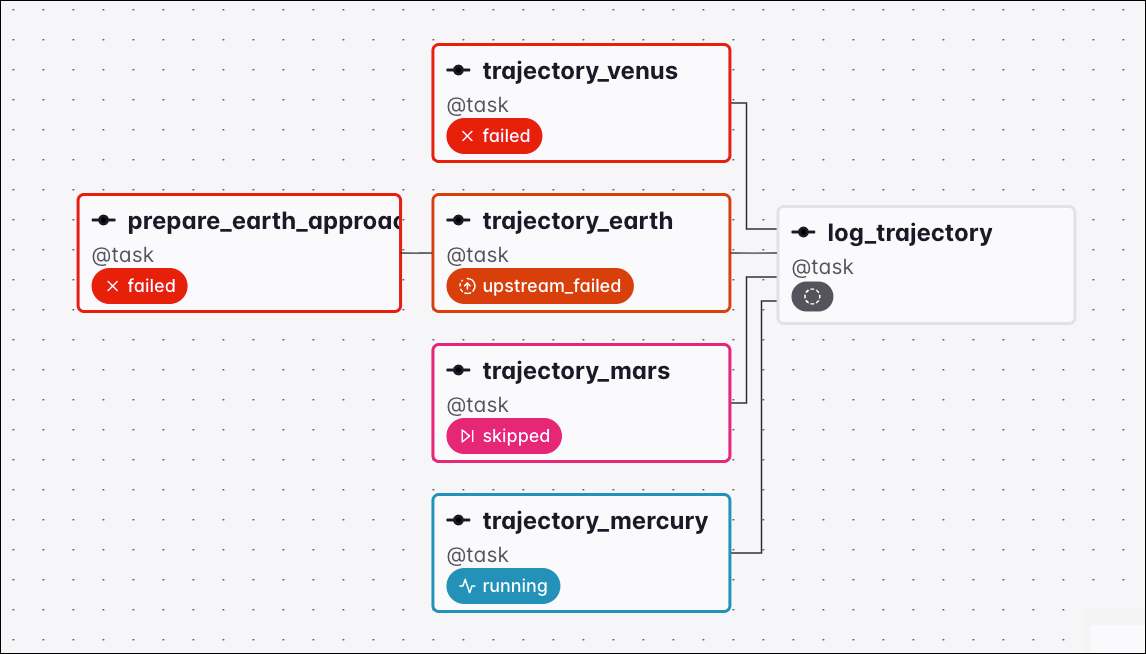
Graph view of a Dag where the trajectory_mercury task is still running, so the downstream log_trajectory task has no status yet and waits under the all_done trigger rule

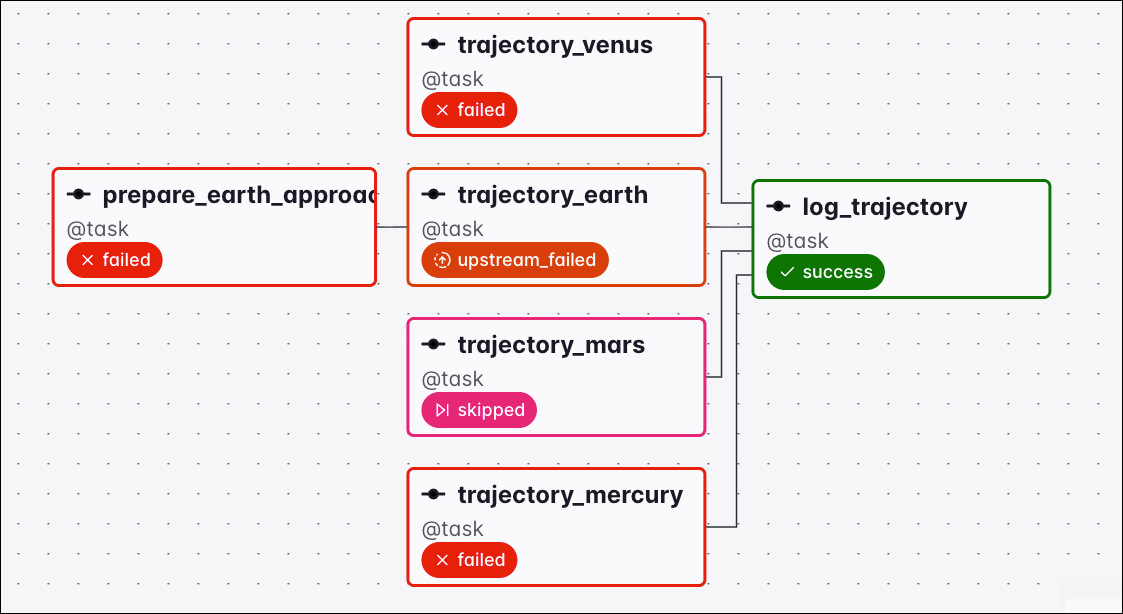
As soon as all tasks finish, no matter what their state is, the downstream task will run.

Graph view of a Dag where the upstream tasks finished in failed, upstream_failed, and skipped states and the downstream log_trajectory task still ran under the all_done trigger rule

all_failed

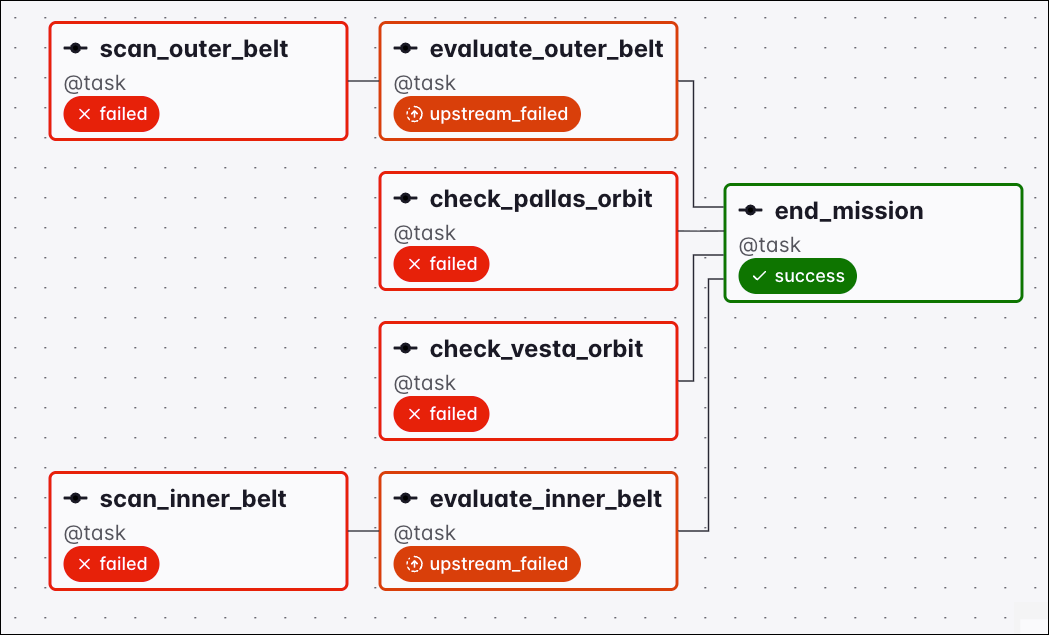
The all_failed trigger rule will make a task wait until all upstream tasks are in a failed or upstream_failed state.
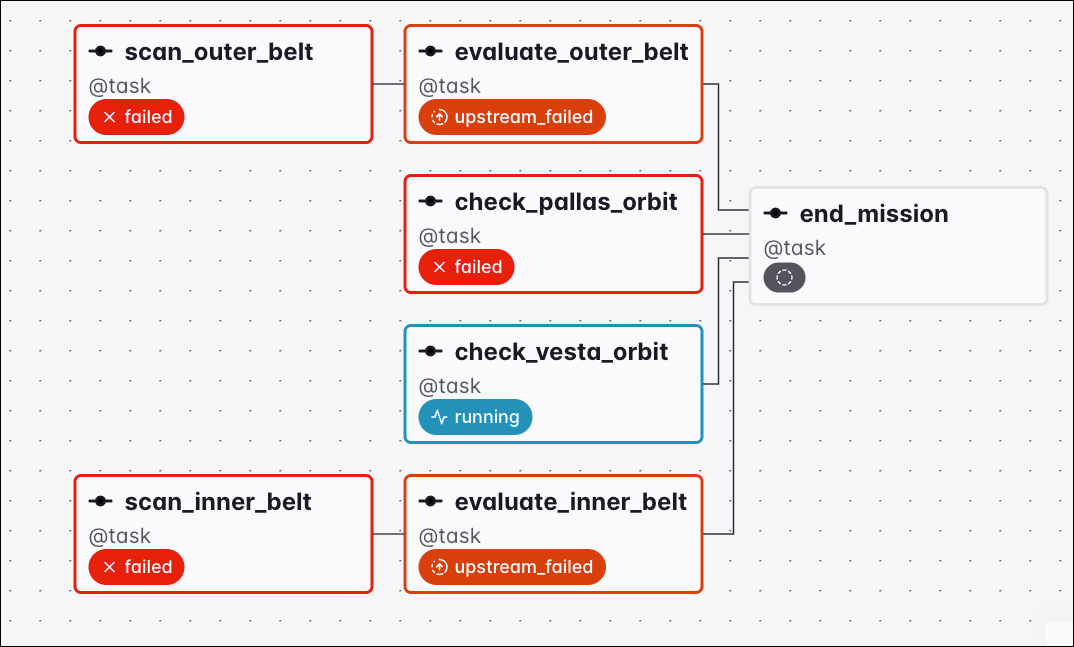
Graph view of a Dag where the check_vesta_orbit task is still running, so the downstream end_mission task has no status yet and waits under the all_failed trigger rule

Graph view of a Dag where all upstream tasks are in failed or upstream_failed states and the downstream end_mission task ran under the all_failed trigger rule

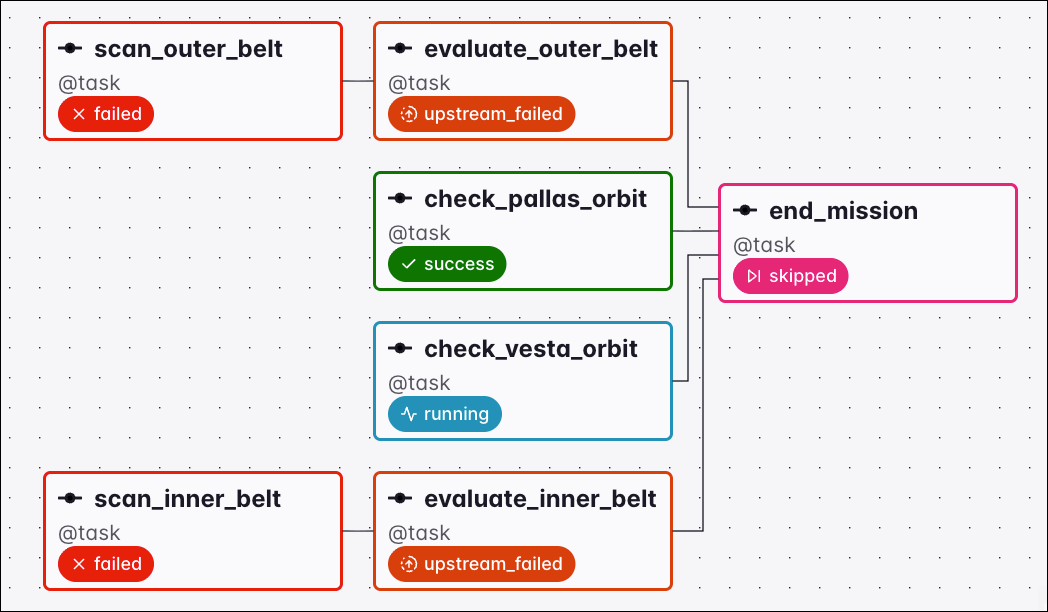
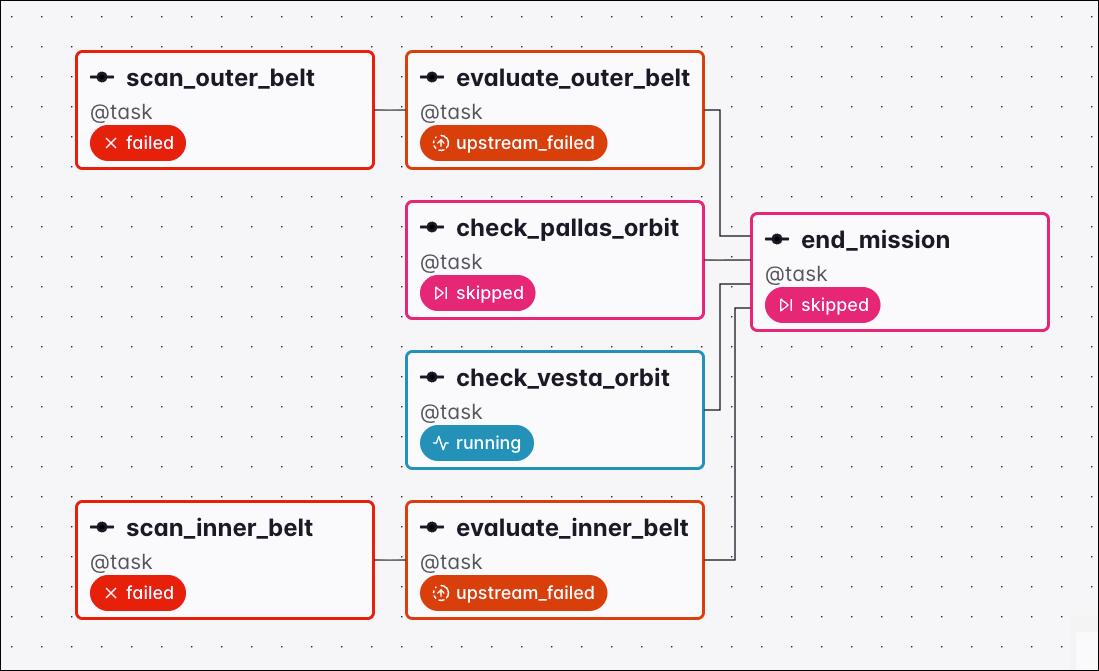
As soon as any upstream task is in the state success or skipped, the downstream task is set to the state skipped and does not run.

Graph view of a Dag where the check_pallas_orbit task succeeded, setting the downstream end_mission task to skipped under the all_failed trigger rule

Graph view of a Dag where the check_pallas_orbit task was skipped, setting the downstream end_mission task to skipped under the all_failed trigger rule

all_skipped

A task with the trigger rule all_skipped waits for all its upstream tasks to be skipped.
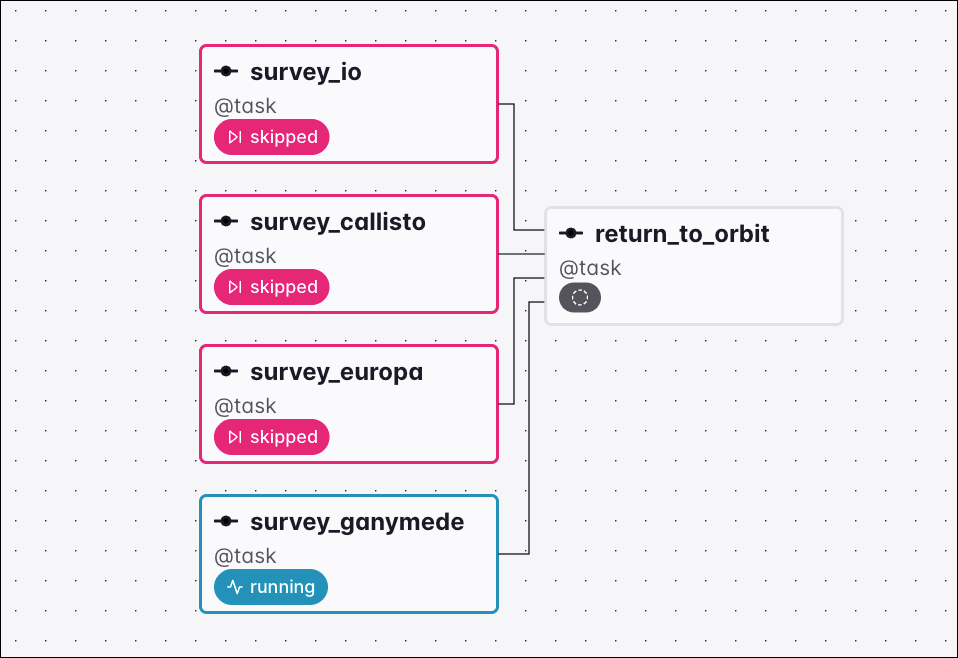
Graph view of a Dag where three survey tasks are skipped and survey_ganymede is still running, so the downstream return_to_orbit task has no status yet and waits under the all_skipped trigger rule

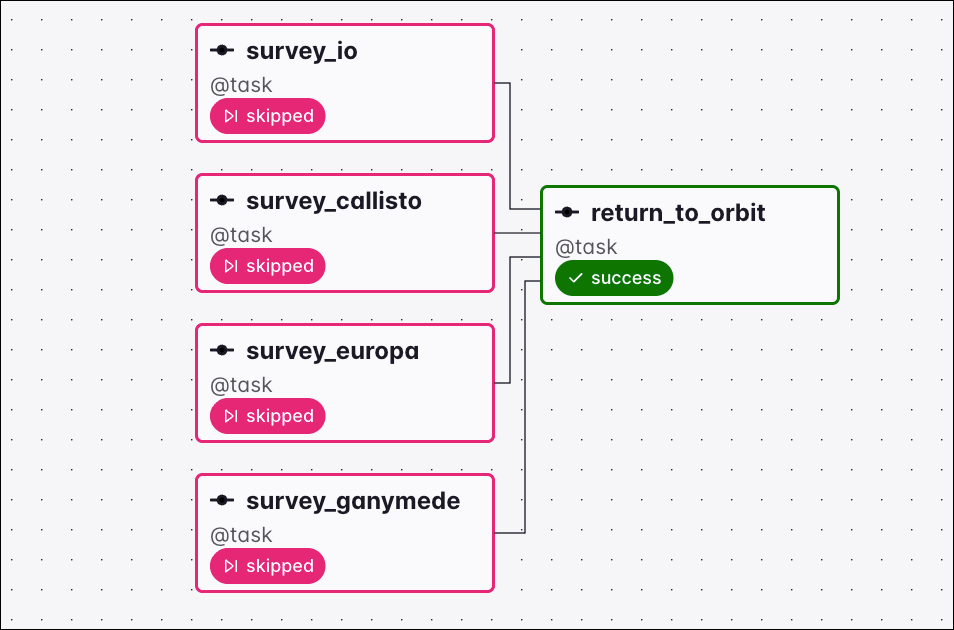
Graph view of a Dag where all four survey tasks are skipped and the downstream return_to_orbit task ran under the all_skipped trigger rule

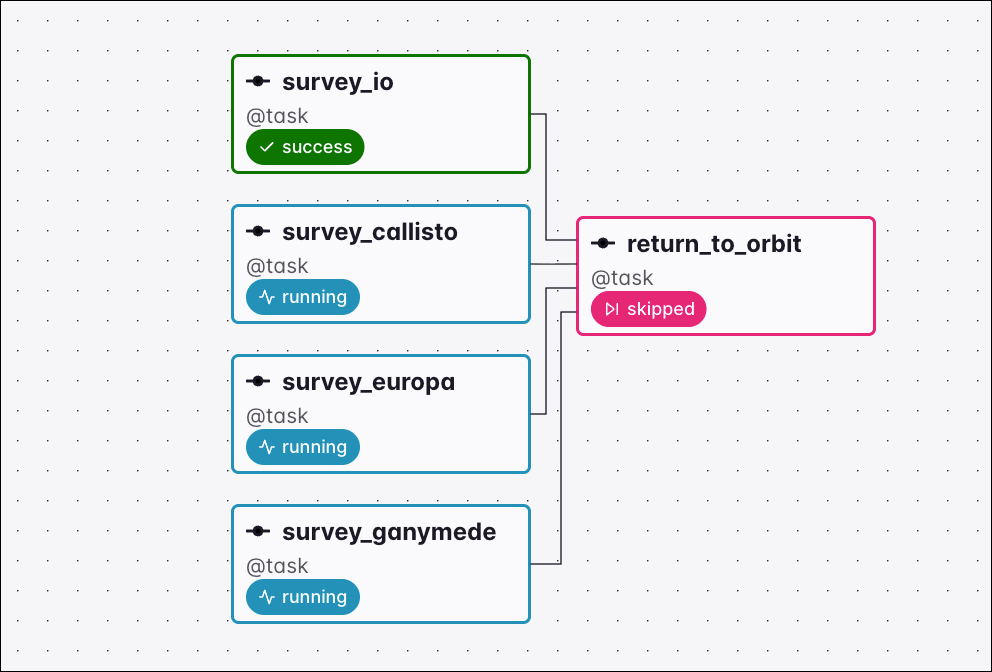
As soon as any upstream task is in the state success, failed, or upstream_failed, the downstream task with the trigger rule all_skipped is set to the state skipped and does not run.

Graph view of a Dag where the survey_io task succeeded, setting the downstream return_to_orbit task to skipped under the all_skipped trigger rule

all_done_min_one_success

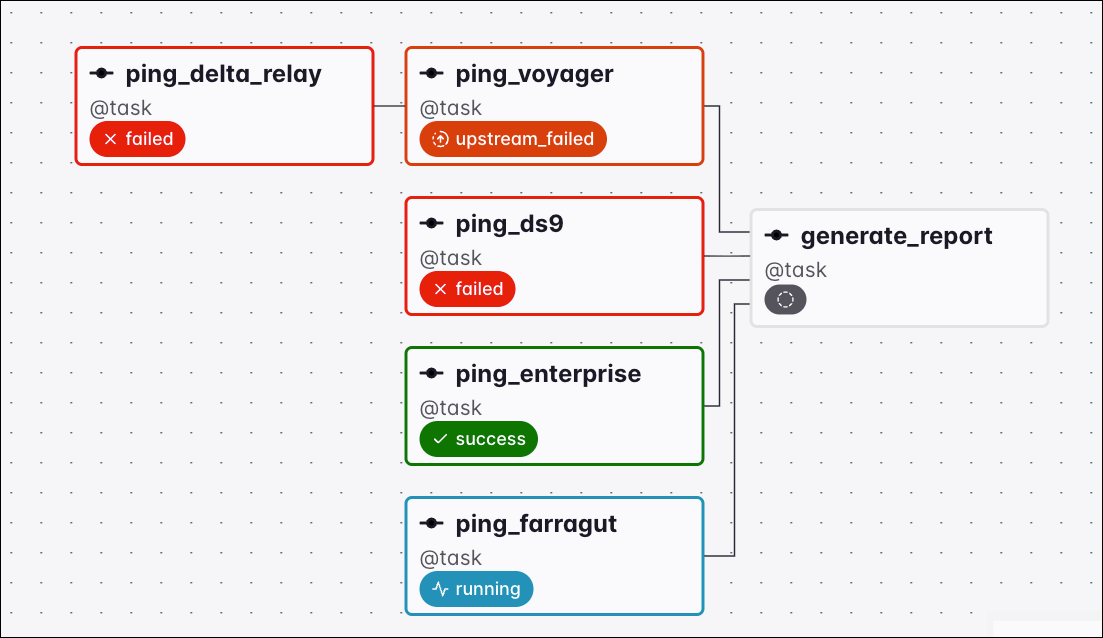
Tasks using the all_done_min_one_success trigger rule run only when three conditions are met:

  1. All upstream tasks are in either success, failed or upstream_failed state.
  2. At least one upstream task is in the success state.
  3. No upstream task is in the skipped state.

Graph view of a Dag where ping_delta_relay and ping_ds9 failed, ping_voyager is upstream_failed, ping_enterprise succeeded, and ping_farragut is still running, so the downstream generate_report task has no status yet and waits under the all_done_min_one_success trigger rule

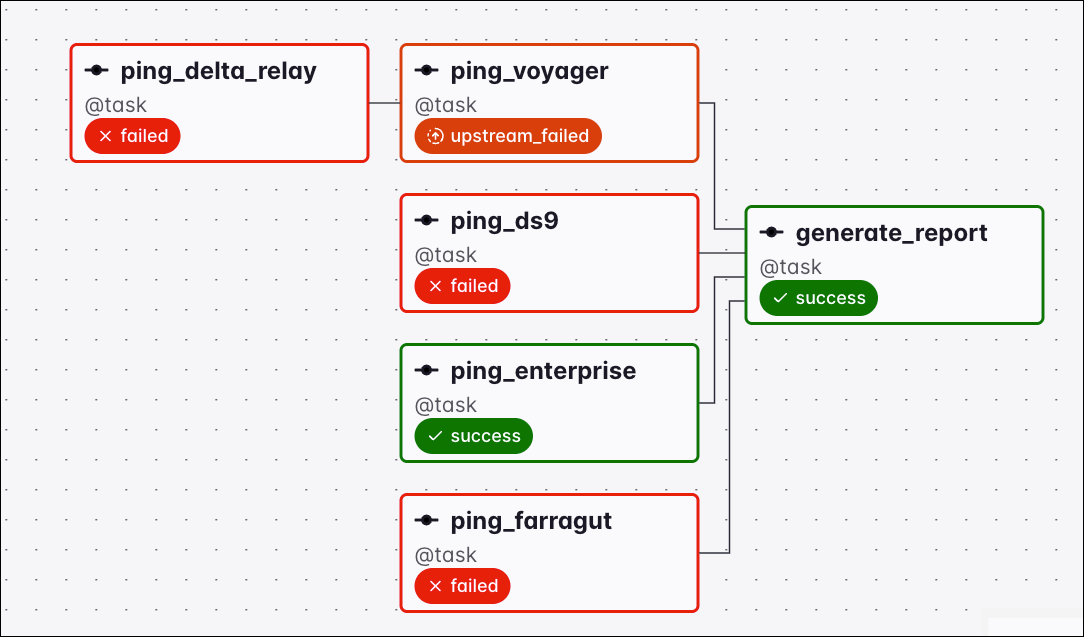
Graph view of a Dag where all upstream tasks finished with ping_enterprise succeeded and the others failed or upstream_failed, so the downstream generate_report task ran under the all_done_min_one_success trigger rule

If all upstream tasks finish in either failed or upstream_failed state, the task using the all_done_min_one_success trigger rule is set to upstream_failed.
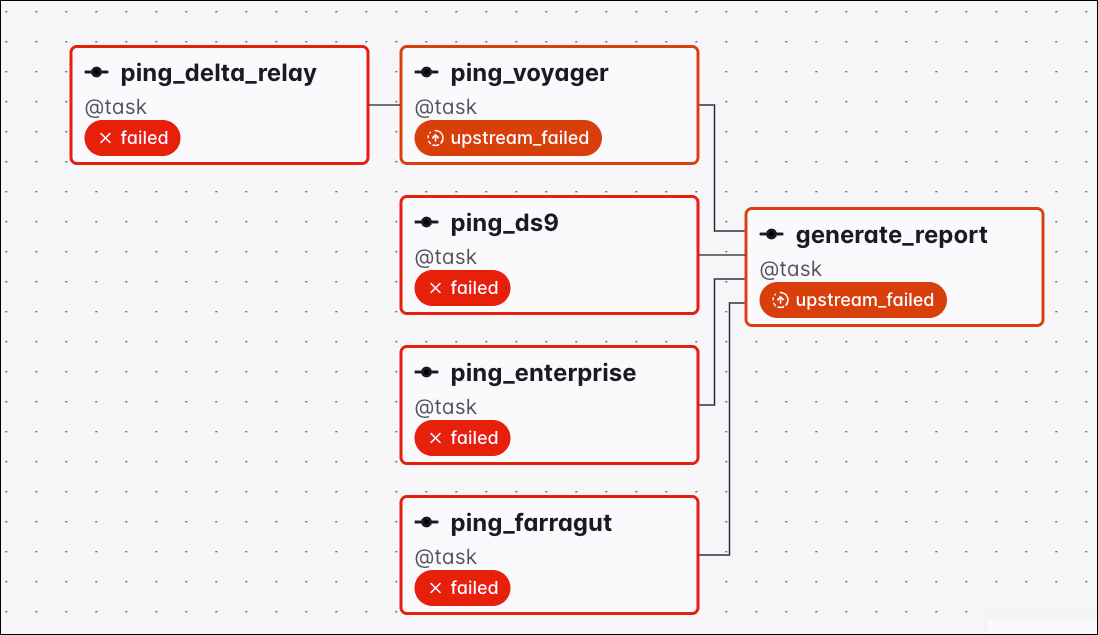
Graph view of a Dag where all upstream tasks finished in failed or upstream_failed states, setting the downstream generate_report task to upstream_failed under the all_done_min_one_success trigger rule

As soon as any upstream task is in a skipped state the task using the all_done_min_one_success trigger rule is skipped as well.
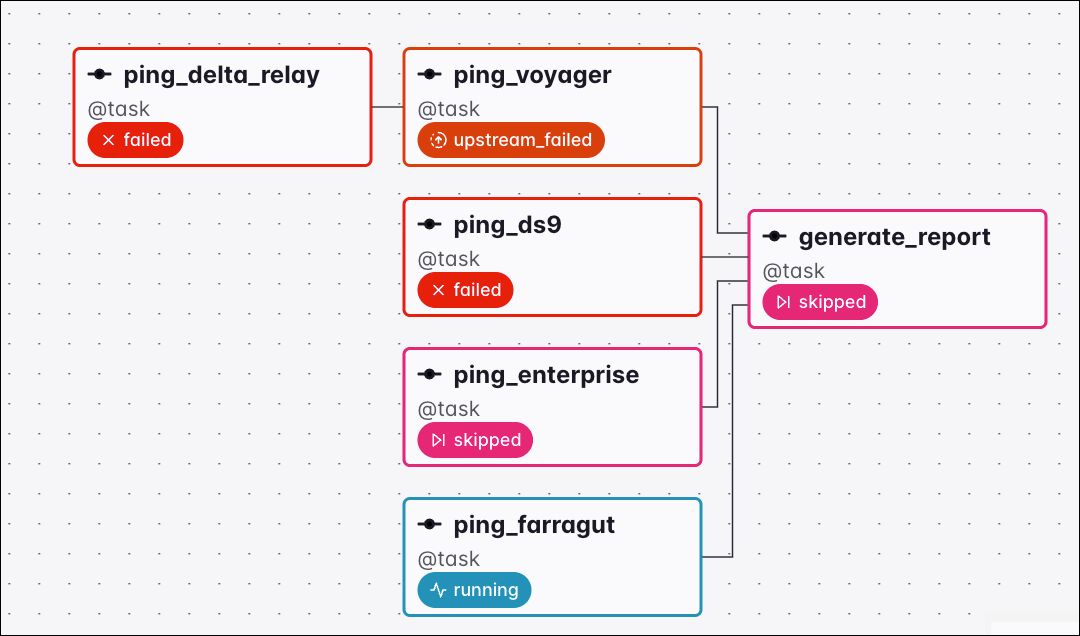
Graph view of a Dag where the ping_enterprise task was skipped, setting the downstream generate_report task to skipped under the all_done_min_one_success trigger rule

always

A task with the trigger rule always runs as soon as the Dag run is started, regardless of the state of its upstream tasks.
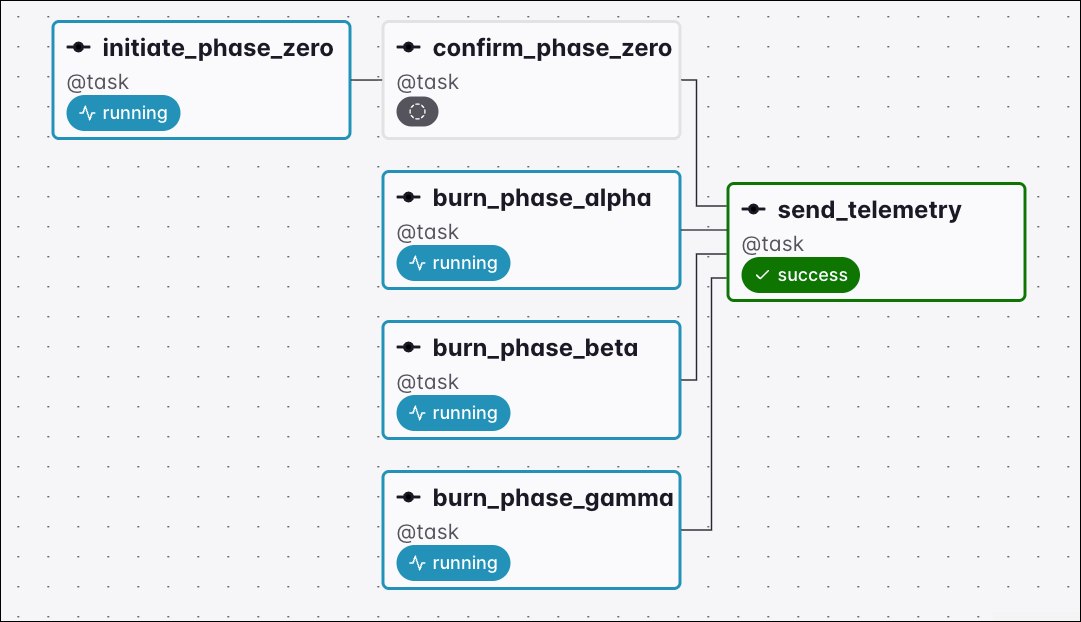
Graph view of a Dag where the downstream send_telemetry task already succeeded while all its upstream tasks are still running or have no status yet under the always trigger rule

none_failed

The none_failed trigger rule makes a task run only when all upstream tasks have either succeeded or been skipped.
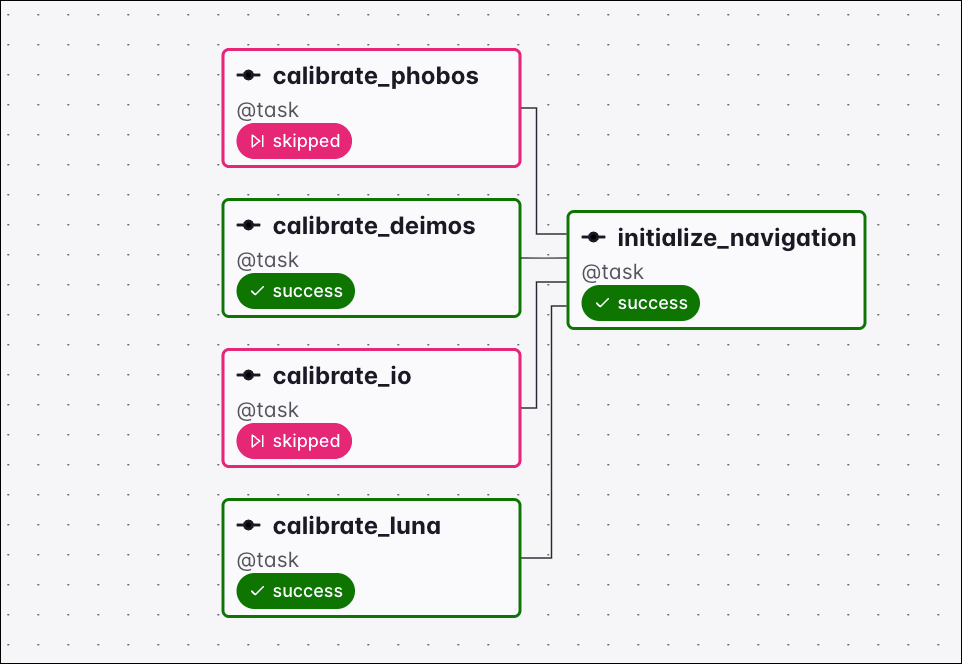
Graph view of a Dag where calibrate_phobos and calibrate_io are skipped and calibrate_deimos and calibrate_luna succeeded, so the downstream initialize_navigation task ran under the none_failed trigger rule

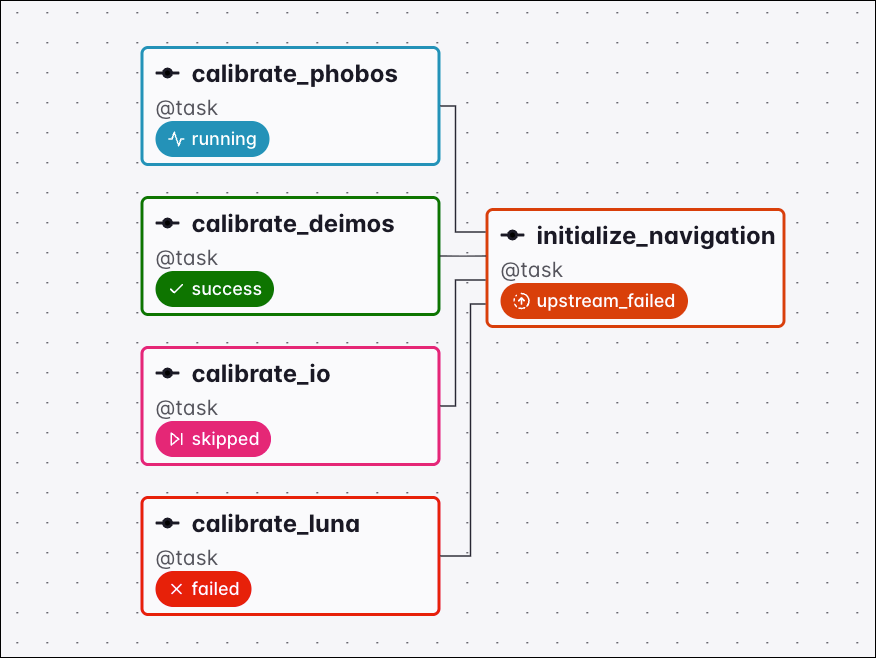
As soon as any upstream task is in the state failed or upstream_failed, the downstream task is set to the state upstream_failed and does not run.

Graph view of a Dag where the calibrate_luna task failed, setting the downstream initialize_navigation task to upstream_failed under the none_failed trigger rule

none_failed_min_one_success

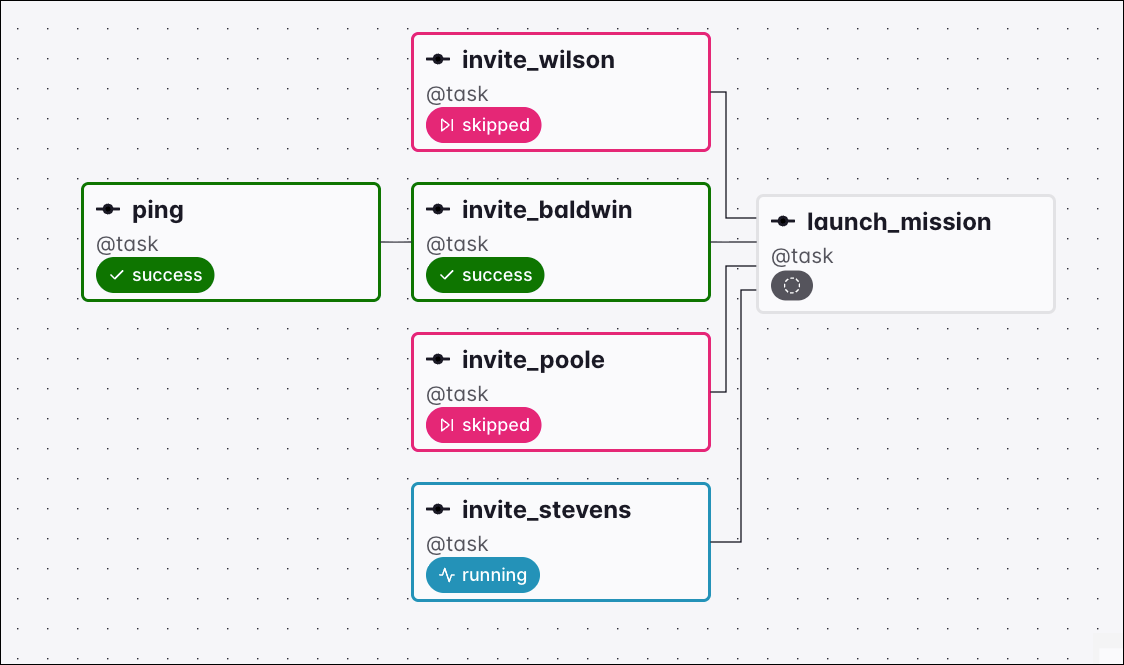
Tasks using the none_failed_min_one_success trigger rule run only when three conditions are met:

  1. All upstream tasks are finished.
  2. No upstream tasks are in the failed or upstream_failed state.
  3. At least one upstream task is in the success state.

Graph view of a Dag where invite_stevens is still running, so the downstream launch_mission task has no status yet and waits under the none_failed_min_one_success trigger rule

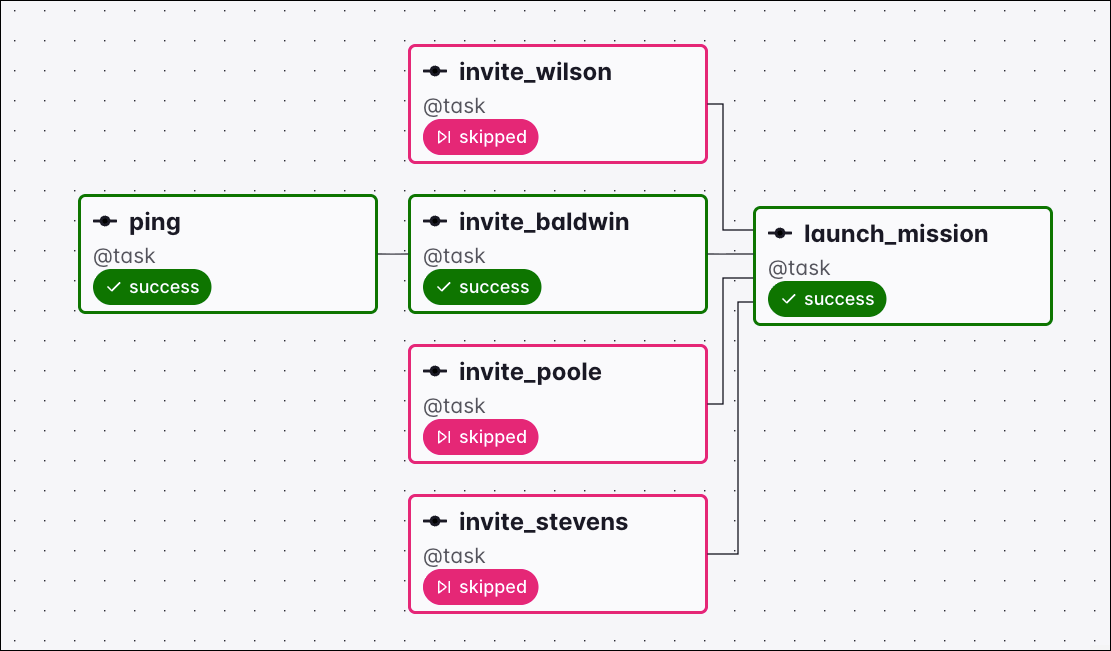
Graph view of a Dag where ping and invite_baldwin succeeded and the remaining invite tasks are skipped, so the downstream launch_mission task ran under the none_failed_min_one_success trigger rule

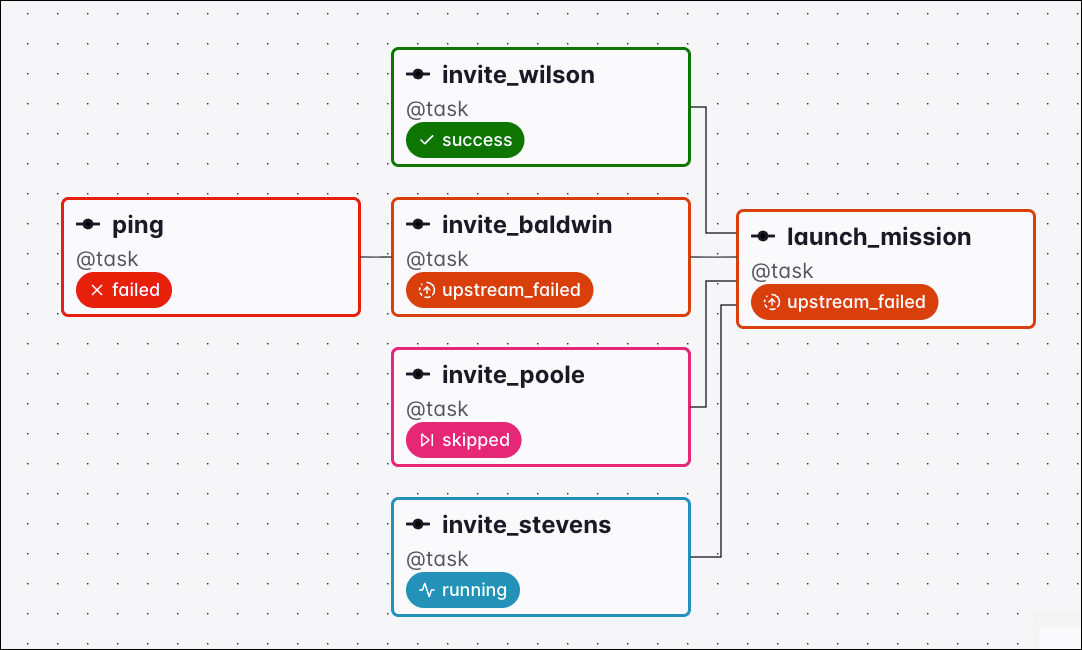
If any upstream task is in the failed or upstream_failed state, the downstream task is set to the state upstream_failed and does not run.

Graph view of a Dag where the ping task failed, setting invite_baldwin and the downstream launch_mission task to upstream_failed under the none_failed_min_one_success trigger rule

If all upstream tasks are in the skipped state, the downstream task is set to the state skipped and does not run.

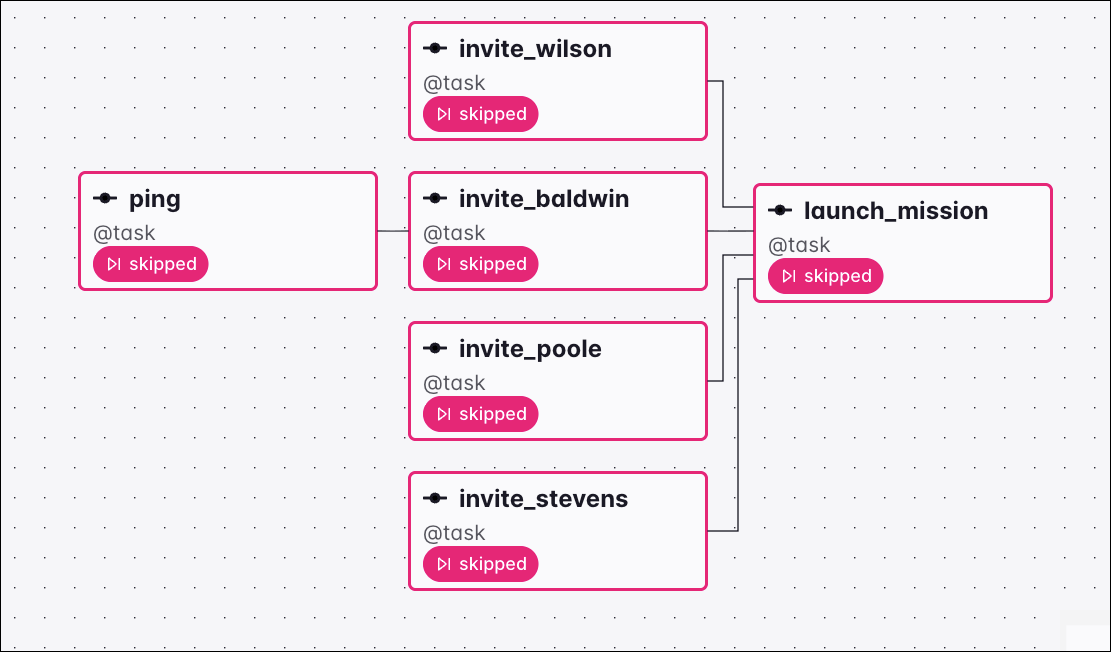
Graph view of a Dag where all upstream tasks are skipped, setting the downstream launch_mission task to skipped under the none_failed_min_one_success trigger rule

none_skipped

Tasks using the none_skipped trigger rule run only when no upstream task is in the skipped state. Upstream tasks can be in any other state: success, failed, or upstream_failed.
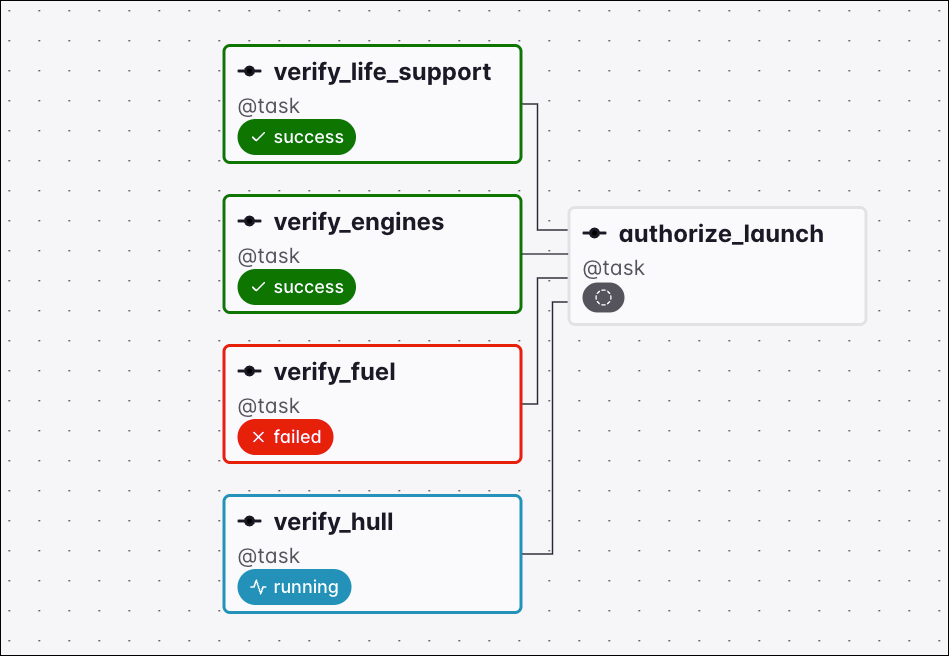
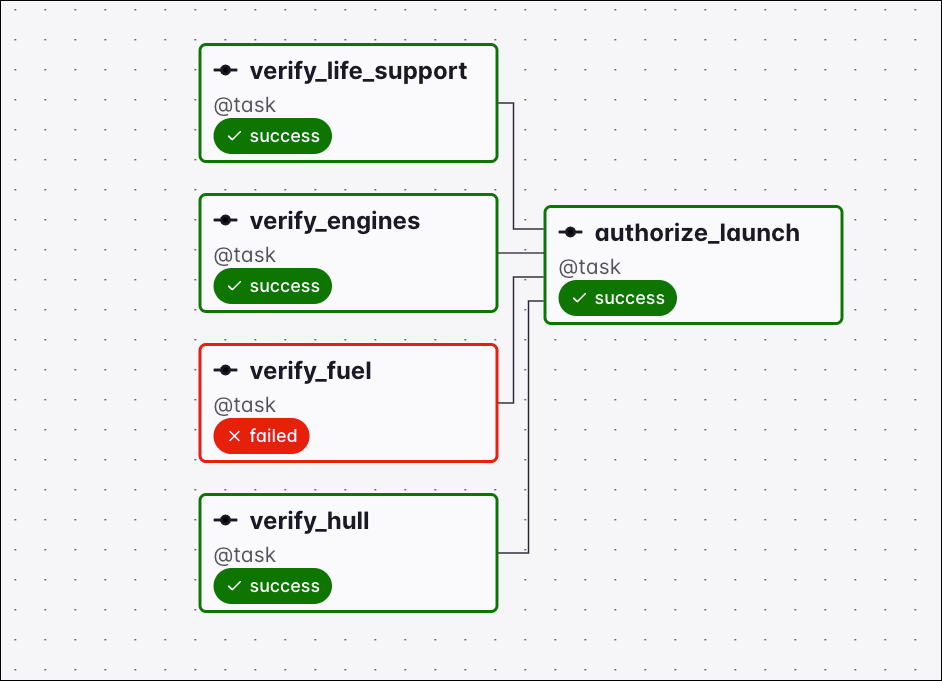
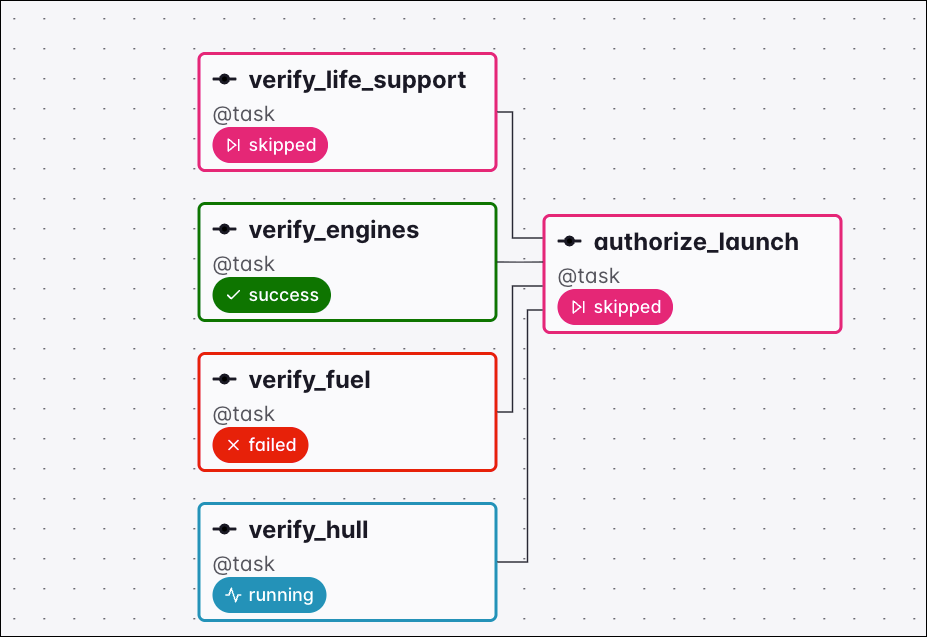
Graph view of a Dag where verify_hull is still running, so the downstream authorize_launch task has no status yet and waits under the none_skipped trigger rule

Graph view of a Dag where the verify tasks finished in success and failed states with none skipped, so the downstream authorize_launch task ran under the none_skipped trigger rule

If any upstream task is in the skipped state, the downstream task is set to the state skipped and does not run.

Graph view of a Dag where the verify_life_support task was skipped, setting the downstream authorize_launch task to skipped under the none_skipped trigger rule

one_done

The one_done trigger rule makes a task run as soon as at least one of its upstream tasks is in either the success or failed state. Upstream tasks with skipped or upstream_failed states are not considered “done”.

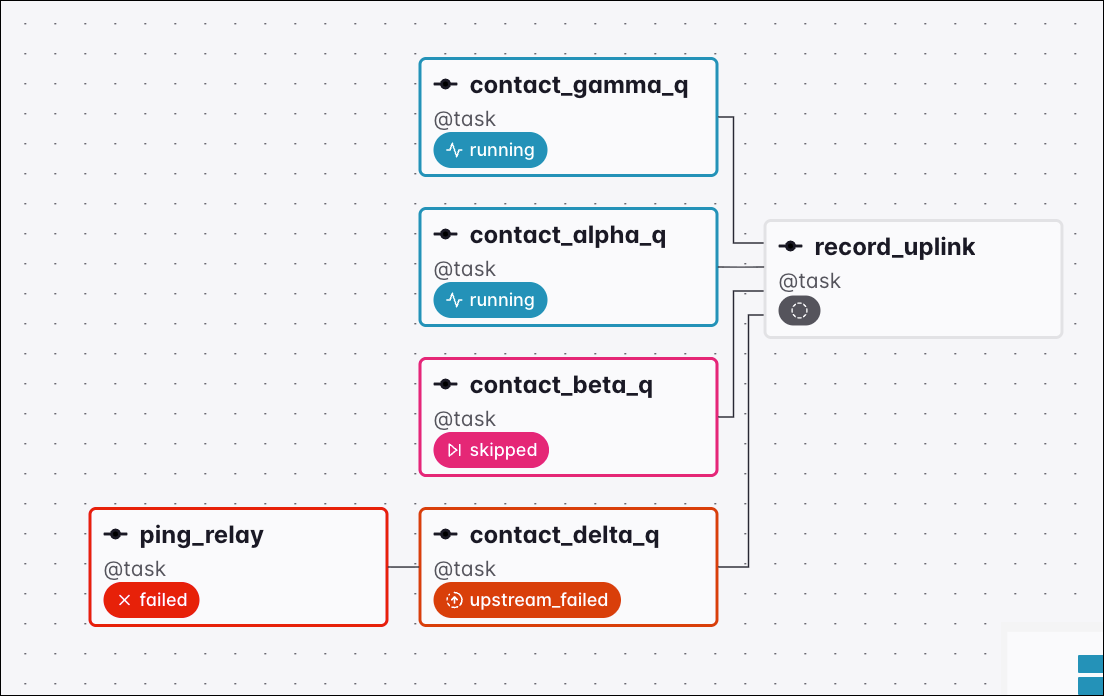
Graph view of a Dag where contact_gamma_q and contact_alpha_q are running, contact_beta_q is skipped, and contact_delta_q is upstream_failed, so no upstream task is success or failed yet and the downstream record_uplink task waits under the one_done trigger rule

Once one upstream task finishes (either in the success or failed state), the downstream task runs.
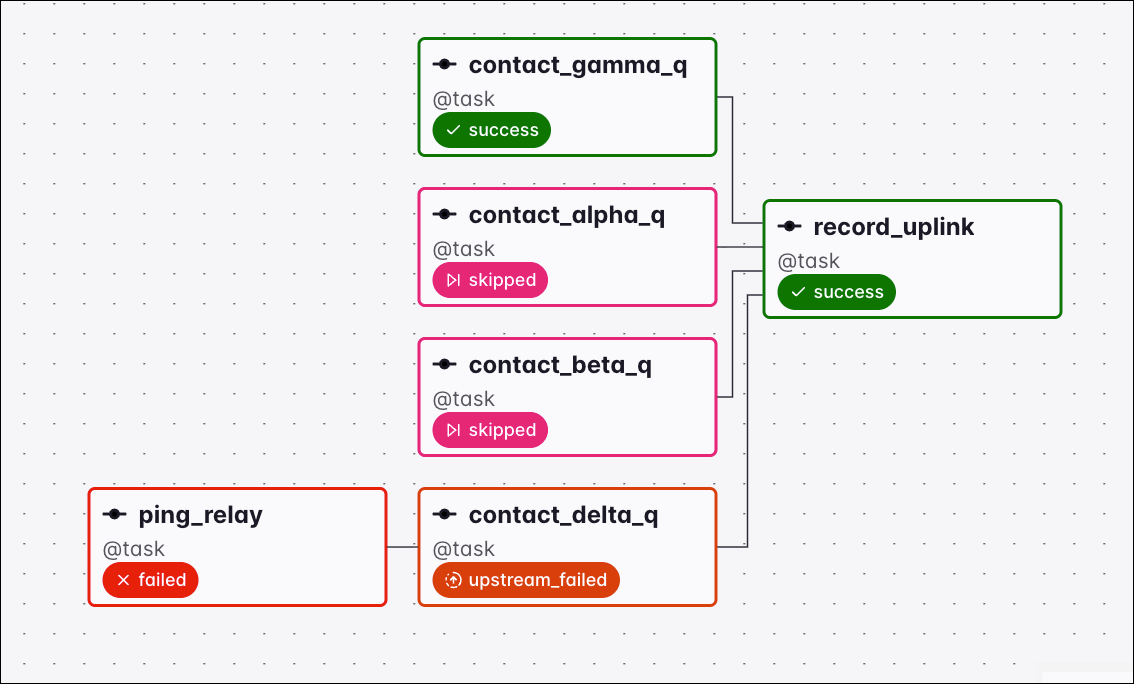
Graph view of a Dag where contact_gamma_q succeeded while the other upstream tasks are skipped or upstream_failed, so the downstream record_uplink task ran under the one_done trigger rule

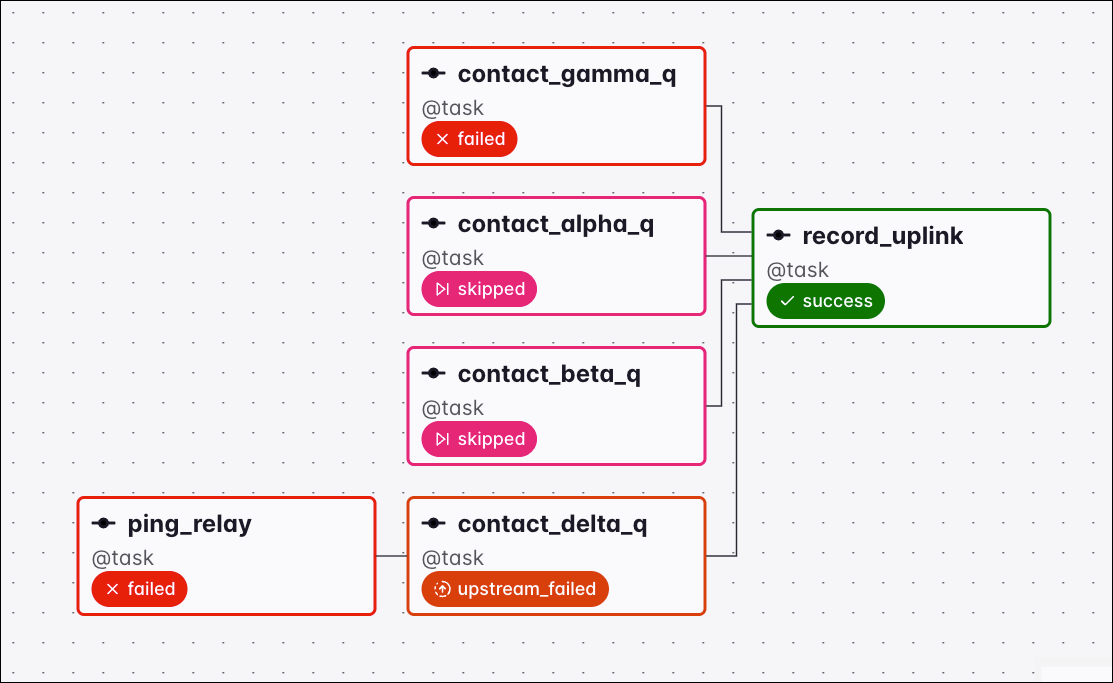
Graph view of a Dag where contact_gamma_q failed while the other upstream tasks are skipped or upstream_failed, so the downstream record_uplink task ran under the one_done trigger rule

If all upstream tasks are either in skipped or upstream_failed states, the downstream task with the one_done trigger rule is set to the state skipped.
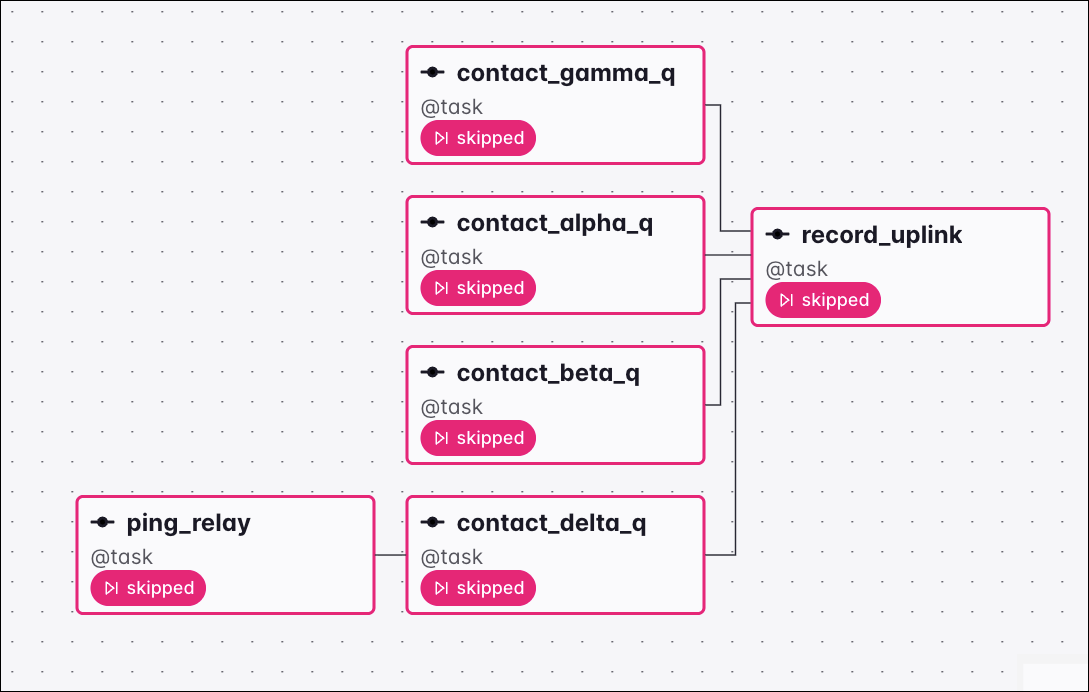
Graph view of a Dag where all upstream tasks are skipped, setting the downstream record_uplink task to skipped under the one_done trigger rule

one_failed

The one_failed trigger rule will make a task run as soon as at least one of its upstream tasks is in either the failed or upstream_failed state.
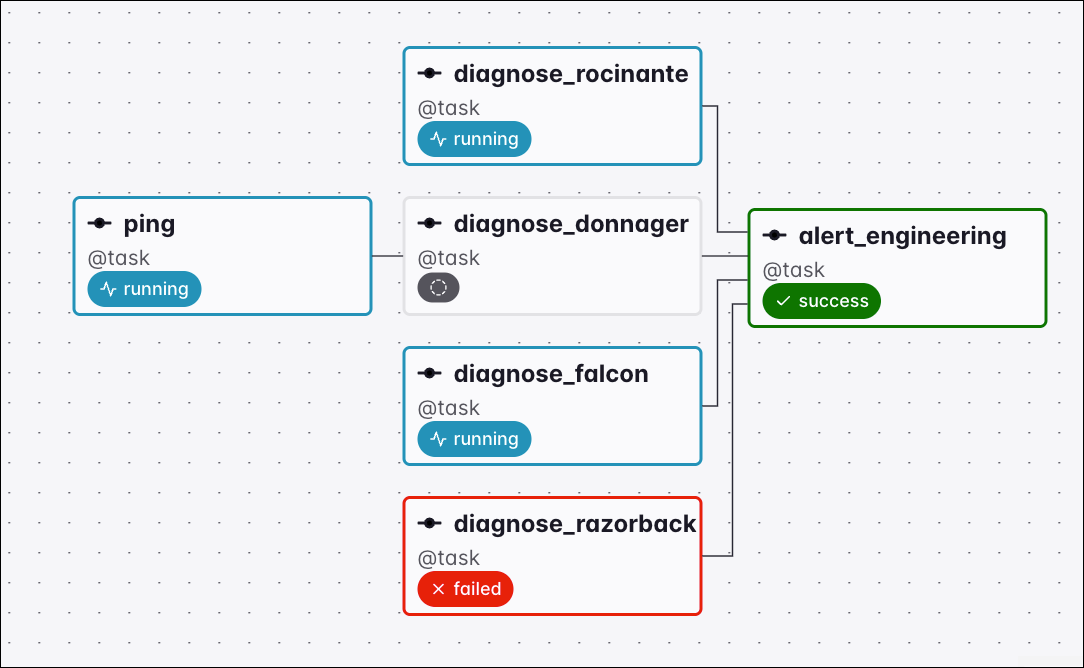
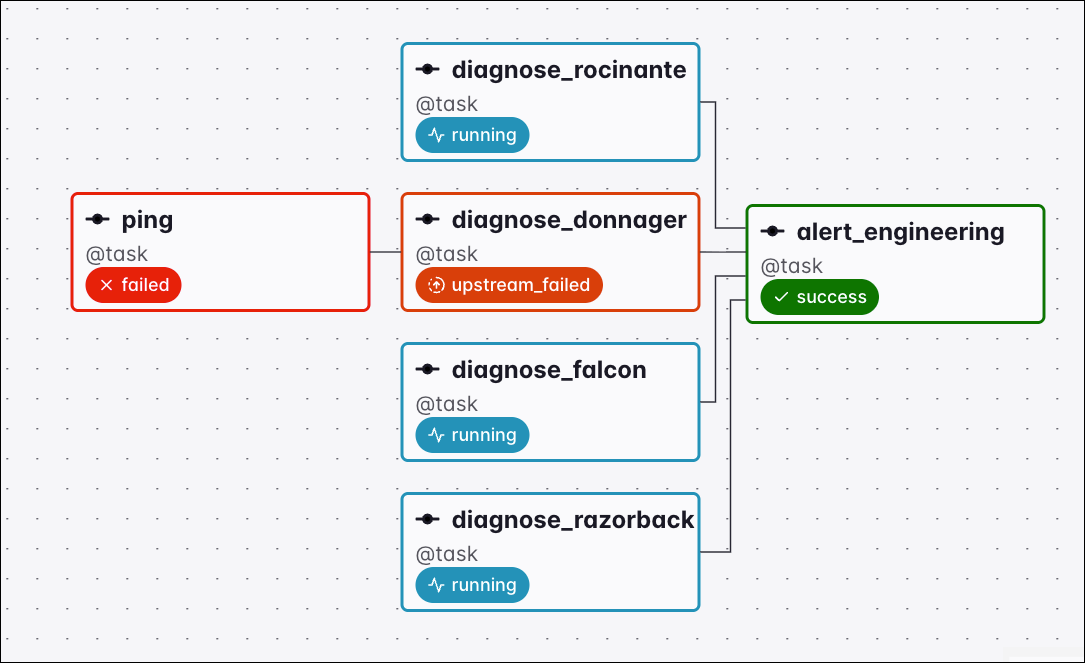
Graph view of a Dag where diagnose_razorback failed while the other upstream tasks are still running, so the downstream alert_engineering task ran under the one_failed trigger rule

Graph view of a Dag where ping failed, setting diagnose_donnager to upstream_failed, so the downstream alert_engineering task ran under the one_failed trigger rule

If all upstream tasks have completed and none of them are in the failed or upstream_failed state, the downstream task will be set to the state skipped.
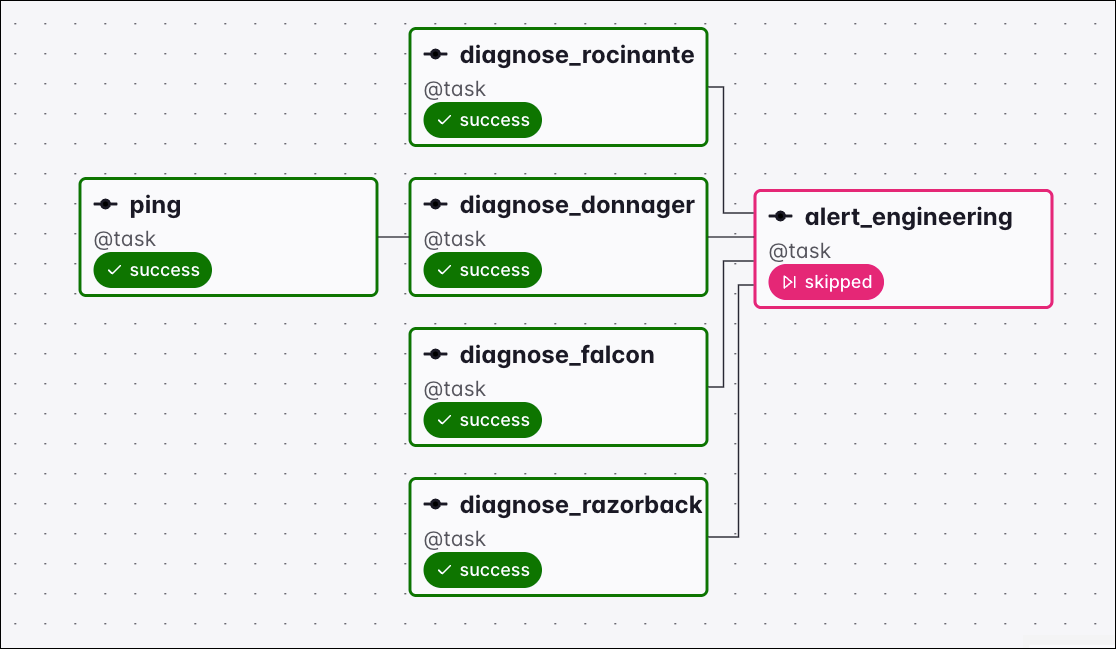
Graph view of a Dag where all upstream tasks succeeded with none failed or upstream_failed, setting the downstream alert_engineering task to skipped under the one_failed trigger rule

one_success

The one_success trigger rule will make a task run as soon as at least one of its upstream tasks is in the success state.
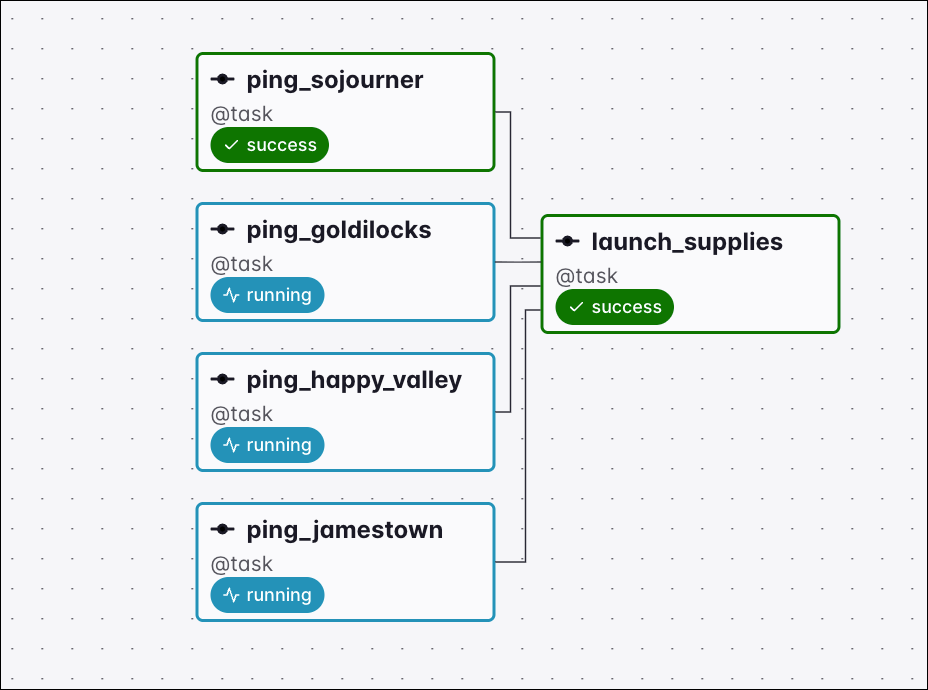
Graph view of a Dag where ping_sojourner succeeded while the other upstream tasks are still running, so the downstream launch_supplies task ran under the one_success trigger rule

If all upstream tasks have been skipped, the downstream task with the one_success trigger rule is set to the state skipped as well.
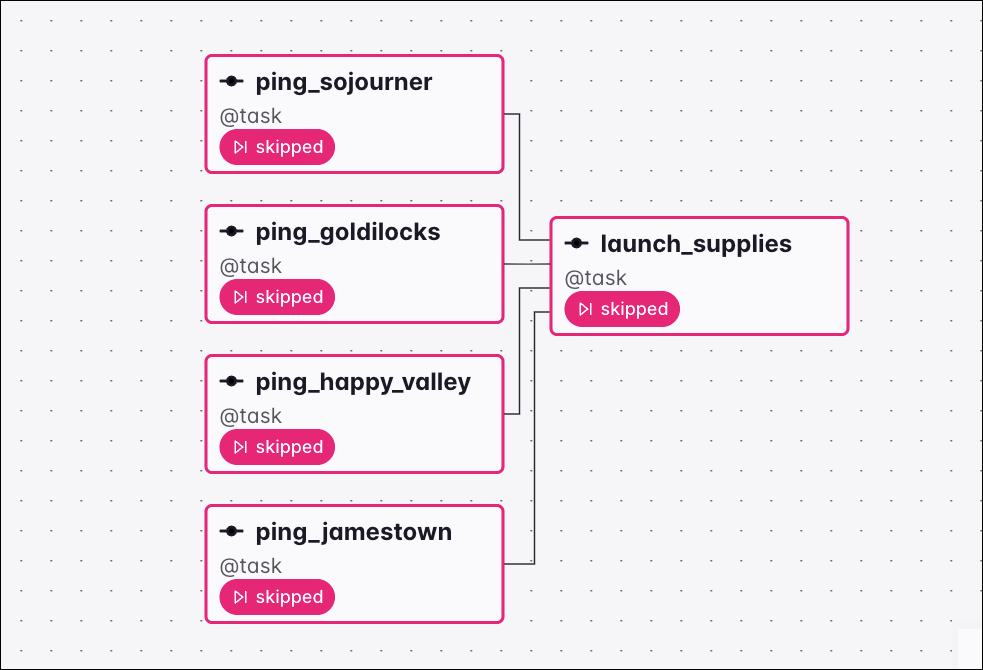
Graph view of a Dag where all upstream tasks are skipped, setting the downstream launch_supplies task to skipped under the one_success trigger rule

If all upstream tasks have completed and at least one of them is in the failed or upstream_failed state, the downstream task will be set to the state upstream_failed.
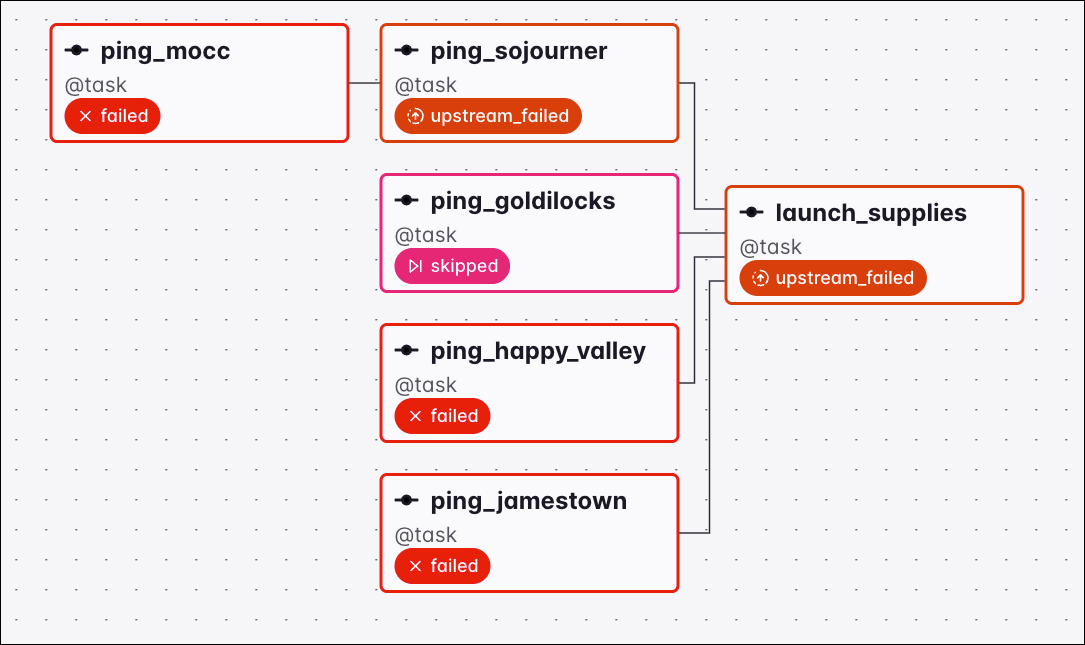
Graph view of a Dag where the upstream tasks finished with failures and a skip but no success, setting the downstream launch_supplies task to upstream_failed under the one_success trigger rule