

Assumed knowledge
To get the most out of this guide, you should have an understanding of:- Airflow DAGs. See Introduction to Airflow DAGs.
- Airflow operators. See Operators 101.
Best practices for storing information in Airflow
Airflow variables store key-value pairs or short JSON objects that need to be accessible in your whole Airflow instance. They are Airflow’s runtime configuration concept and defined using theairflow.model.variable object.
There are some best practices to keep in mind when using Airflow variables:
- Airflow variables should be used for information that is runtime dependent but doesn’t change too frequently.
- You should avoid using Airflow variables outside of tasks in top-level DAG code, as they will create a connection to the Airflow metastore every time the DAG is parsed, which can lead to performance issues. See DAG writing best practices in Apache Airflow.
- If you do use Airflow variables in top-level DAG code, use the Jinja template syntax so that your Airflow variables are only rendered when a task executes.
- Airflow variables are encrypted with Fernet when they are written to the Airflow metastore. To mask Airflow variables in the UI and logs, include a substring indicating a sensitive value in your Airflow variable name. See Hiding sensitive information.
- Environment variables store small pieces of information that are available to the whole Airflow environment. There is no direct way to see environment variables in the Airflow UI but they can be accessed using
os.getenv("MY_ENV_VAR")inside of Airflow DAGs and tasks. Environment variables are very versatile, as they can be used to both store arbitrary information and configure Airflow. One advantage of using environment variables is that you can include their creation in your CI/CD process. They are also often used to store credentials for local development. - Params can be used to store information specific to a DAG or DAG run. You can define defaults for params at the DAG or task level and override them at runtime. Params aren’t encrypted and shouldn’t be used to store secrets.
- XComs can be used to pass small pieces of information between Airflow tasks. Use XComs when the information is likely to change with each DAG run and mostly needs to be accessed by individual tasks in or outside of the DAG from within which the XCom is created. Default XComs aren’t encrypted and shouldn’t be used to store secrets.
Create an Airflow variable
There are several ways to create Airflow variables:- Using the Airflow UI
- Using the Airflow CLI.
- Using an environment variable.
- Programmatically from within an Airflow task.
Use the Airflow UI
To create an Airflow variable in the UI, click the Admin tab and select Variables. Then click the + button and enter a key, value and an optional description for your Airflow variable. You also have the option to Import Variables from a file.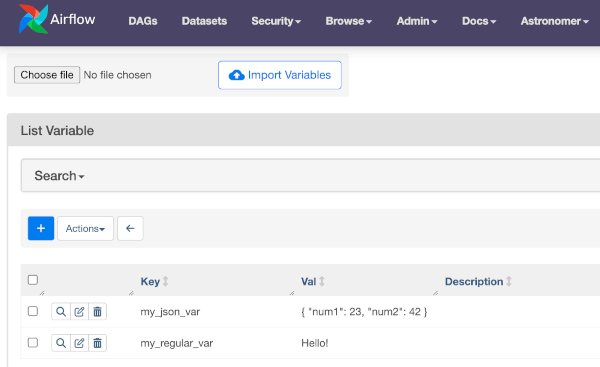
Use the Airflow CLI
The Airflow CLI contains options to set, get and delete Airflow variables. To create an Airflow variable via the CLI, use the following command:Use environment variables
To set Airflow variables using an environment variable, create an environment variable with the prefixAIRFLOW_VAR_ and the name of the Airflow variable you want to set. For example:
-
Variable.get('<VAR_NAME>', '<default-value>'): This method is recommended as it is the most secure way to fetch secret values. However, if used in top-level DAG code or as an argument in the operator, this method can affect the performance because it makes a request to the Airflow metadata database every time your DAGs are parsed, which can occur every 30 seconds. An alternative approach is to use the Jinja template{{ var.value.get(<var_name>, '<default-value>') }}, which is evaluated only at runtime. See DAG writing best practices for more information about avoiding repeated requests in top level code. -
os.getenv('AIRFLOW_VAR_<VAR_NAME>','<default-value>'): This method is faster because it reduces the number of Airflow metadata database requests. However, it’s less secure. Astronomer doesn’t recommend usingos.getenvwith secret values because retrieving environment variables with this method can print them to your logs.
<default_value> with a default value.
To learn more about how to set environment variables on Astro, see Environment Variables.
Programmatically from a DAG or task
Lastly, you can programmatically set Airflow variables within your Airflow tasks using theVariable model. If you want to serialize a JSON value, make sure to set serialize_json=True.
.update() method.
Retrieve an Airflow variable
To programmatically retrieve an Airflow variable, you can either use the.get() method of the Airflow variable model or you can pull the Airflow variable value directly from the Airflow context.
When retrieving a JSON serialized Airflow variable, make sure to set deserialize_json=True in the .get() method or access the json key from the var dictionary in the Airflow context.
get and list commands.
Hide sensitive information in Airflow variables
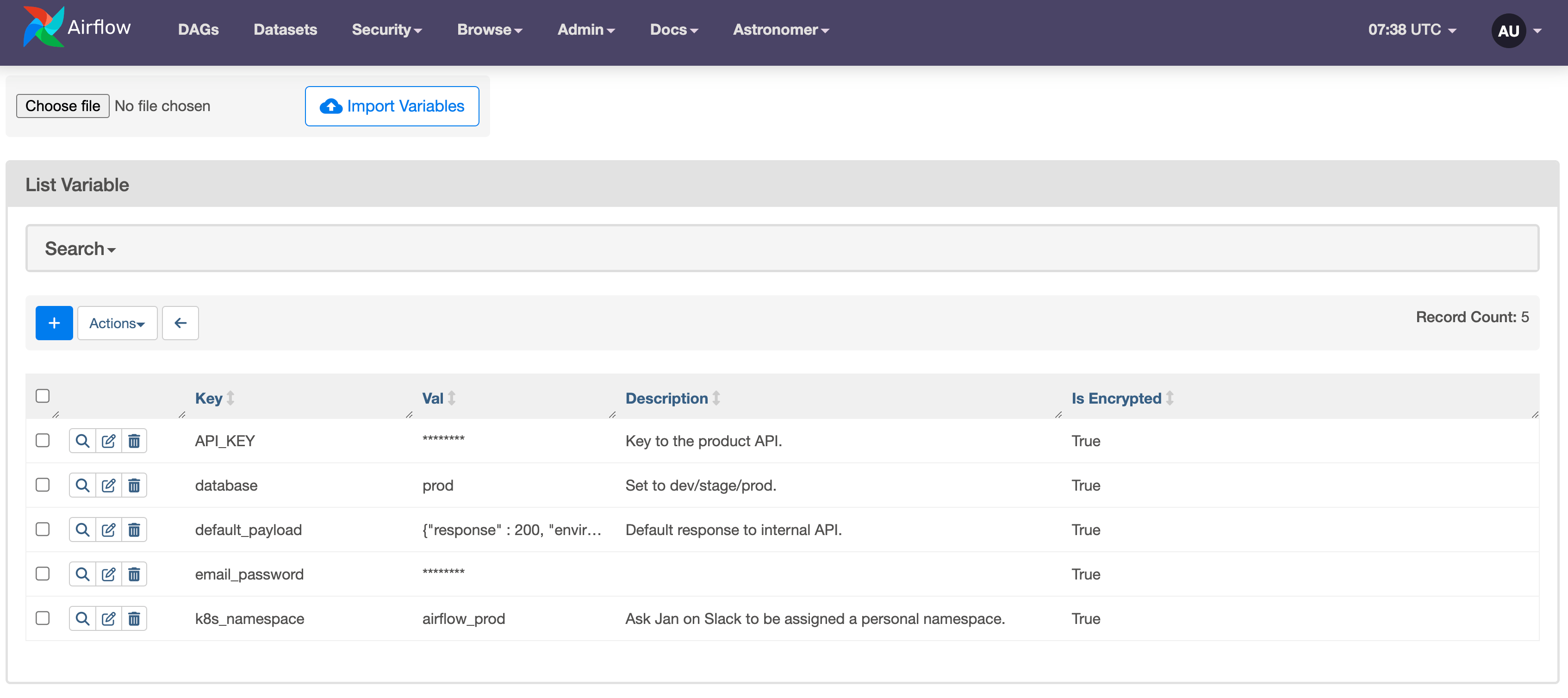
Airflow variables are Fernet encrypted in the Airflow metastore. As seen in the screenshot at the beginning of this guide, some Airflow variables are additionally masked in the Airflow UI and logs. By default, thehide_sensitive_var_conn_fields configuration is set to True, which automatically masks all Airflow variables that contain the following strings:
access_tokenapi_keyapikeyauthorizationpassphrasepasswdpasswordprivate_keysecrettoken
sensitive_var_conn_names configuration. See Masking sensitive data.
On Astro you can also manually mark Airflow variables as secrets when creating them as an environment variable. See Set environment variables on Astro.
If you need to access the same sensitive information in several Airflow instances, consider using a Secrets Backend.