

partition_key attached to it, and a partitioned asset event is an asset event that has a partition_key attached to it. Any string can be a partition key, with time-based partition keys being the most common. Partition keys can be used in tasks in a partitioned Dag run to partition data, for example in a SQL statement.
In this guide, you’ll learn:
- When to use partitioned Dag runs and asset events.
- How to create a partitioned Dag run.
- How to create a partitioned asset event.
- How to schedule a Dag based on partitioned asset events.
Assumed knowledge
To get the most out of this guide, you should have an existing knowledge of:- Airflow scheduling concepts. See Schedule Dags in Airflow.
- Basic asset-based scheduling. See Basic asset-based scheduling in Apache Airflow®.
When to use partitions
Situations in which you should consider using partitioned Dag runs and asset events are:- When you want to process data from a specific time period in every Dag run. For example, if you have a Dag that runs once a day and should always process the data from the previous day.
- When you have a Dag that is scheduled based on asset events, within which you want to process data from a specific time period. You can use the
partition_keyto partition the data inside of the downstream Dag run. Thepartition_keypropagates from the upstream Dag run to the downstream Dag run, and you can adjust its grain with partition key mappers. - When you want to process data for a specific segment in manual or API-triggered Dag runs. For example, if your Dag generates a report for a specific department, you can set a different
partition_keyfor each Dag run in the Trigger Dag run config or the API request body.
Create a partitioned Dag run
A partitioned Dag run is a Dag run with apartition_key attached to it. There are four ways to create a partitioned Dag run:
-
By running a Dag manually in the Airflow UI and attaching a
partition_keyin the Trigger Dag run config.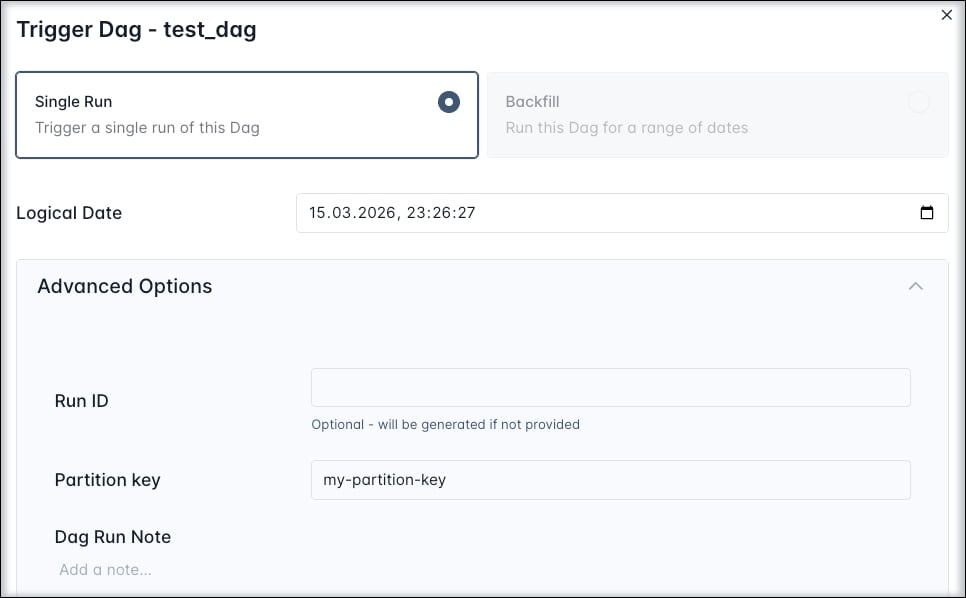
-
By running a Dag using the Airflow REST API and attaching a
partition_keyin the request body. -
By fulfilling the asset schedule condition of a Dag that uses the
PartitionedAssetTimetabletimetable. -
By using the
CronPartitionTimetabletimetable. Note that only Dag runs of the typescheduledandbackfillare partitioned, manual runs aren’t, unless you are providing apartition_keyin the Trigger Dag run config.
CronPartitionTimetable
TheCronPartitionTimetable is a timetable that creates partitioned Dag runs with an automatic partition_key attached that is based on the run_after timestamp of each scheduled and backfilled Dag run.
run_offset parameter to the CronPartitionTimetable instance. The offset is relative to the cron expression, for example if your Dag runs once every hour, a run_offset of -12 will offset the partition key by 12 hours. The Dag run with the run id 2026-03-16T09:00:00 will have a partition key of 2026-03-15T21:00:00.
Create a partitioned asset event
A partitioned asset event is an asset event that has apartition_key attached to it. There are four ways to create a partitioned asset event:
-
By updating an asset manually in the Airflow UI and providing a
partition_keyin the Asset Event creation dialog.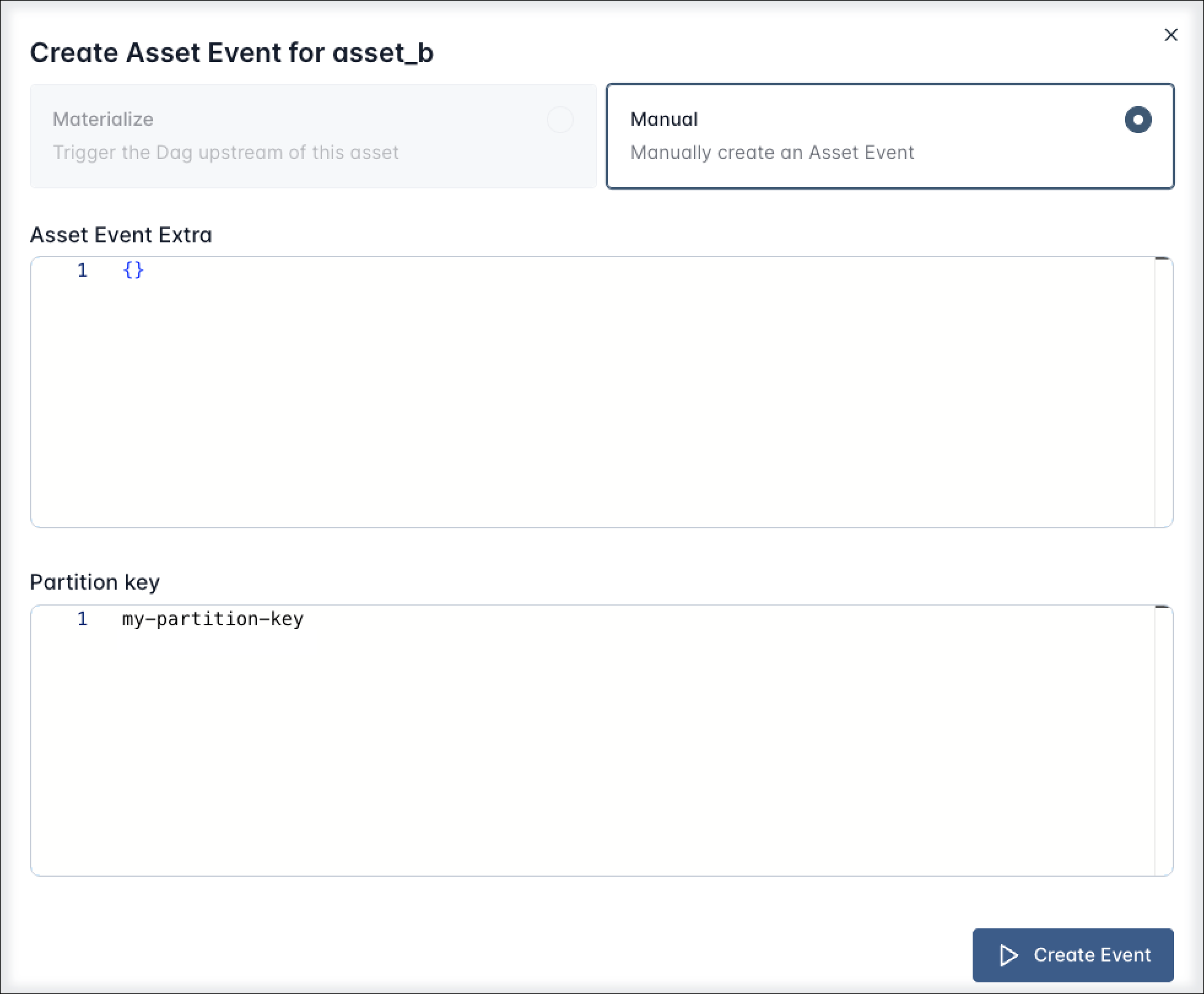
-
By updating an asset using the Airflow REST API and providing a
partition_keyin the request body. -
By updating an asset using the
outletsparameter of a task in a Dag that is scheduled using aCronPartitionTimetabletimetable. -
(Airflow 3.3+) By updating an asset using the
outletsparameter of a task and using the.add_partitionsmethod on the asset event object inside the task to add one or morepartition_keyvalues to the asset event. See Create partitions in a task.
Partitioned asset events created by a task in a Dag scheduled with a
CronPartitionTimetable or by using the add_partitions method are intended for partition-aware downstream scheduling, and don’t trigger non-partition-aware Dags.CronPartitionTimetable timetable. In every scheduled or backfilled run of this Dag, successful completion of the my_task_partitioned_upstream task will create a partitioned asset event for the my_partitioned_asset asset. The partition_key will be the run_after timestamp of the Dag run.
Create partitions in a task
In Airflow 3.3+ you can assignpartition_key values at runtime from within your task code, using the .add_partitions method of the asset event fetched from the Airflow context.
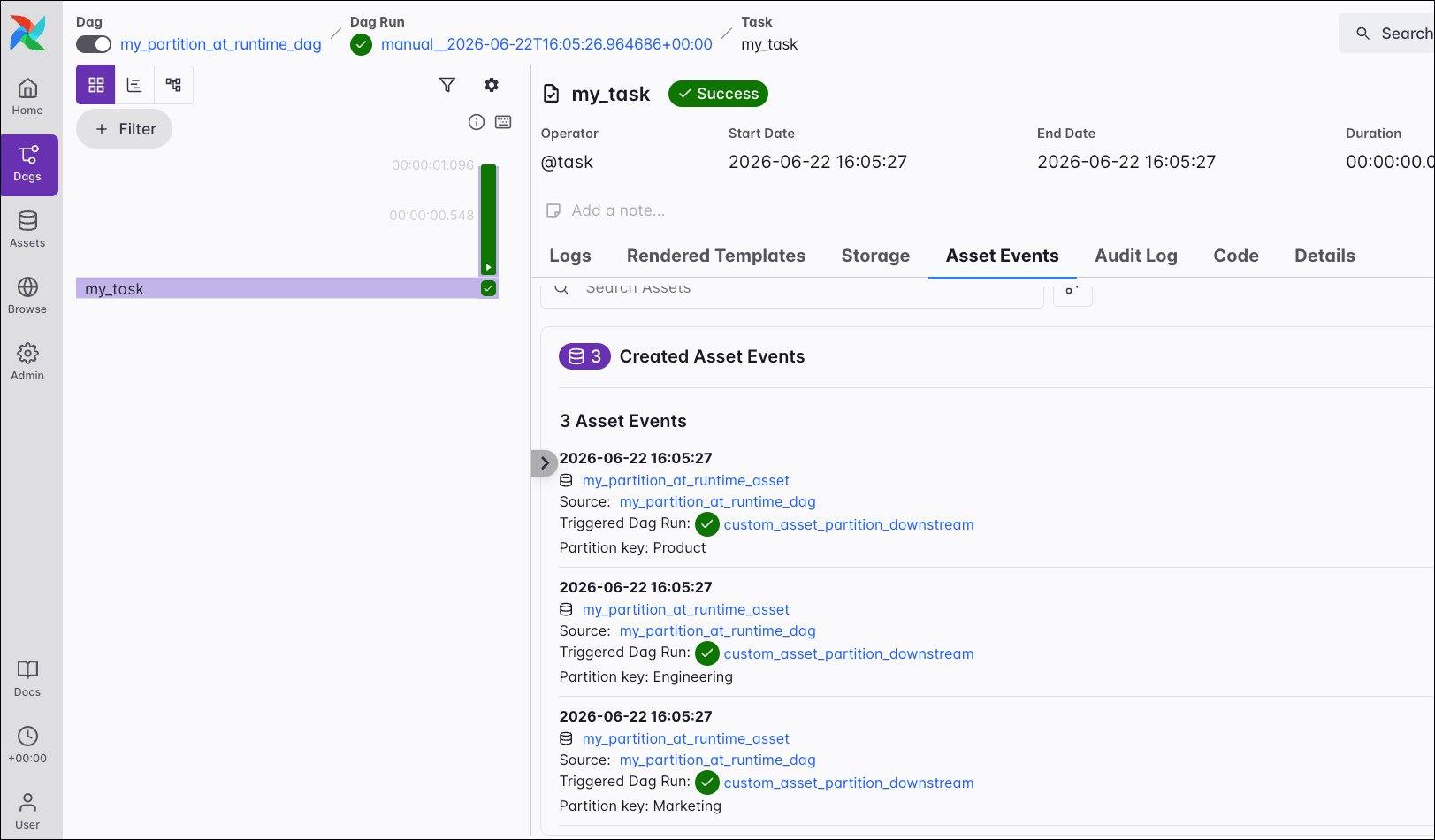
The example Dag below contains one task (my_task) that updates one asset my_partition_at_runtime_asset, creating 3 asset events at runtime, each with a different partition key. In this example the task chooses 3 random values from the list of departments.
my_partition_at_runtime_asset were created, each with a different partition key value.
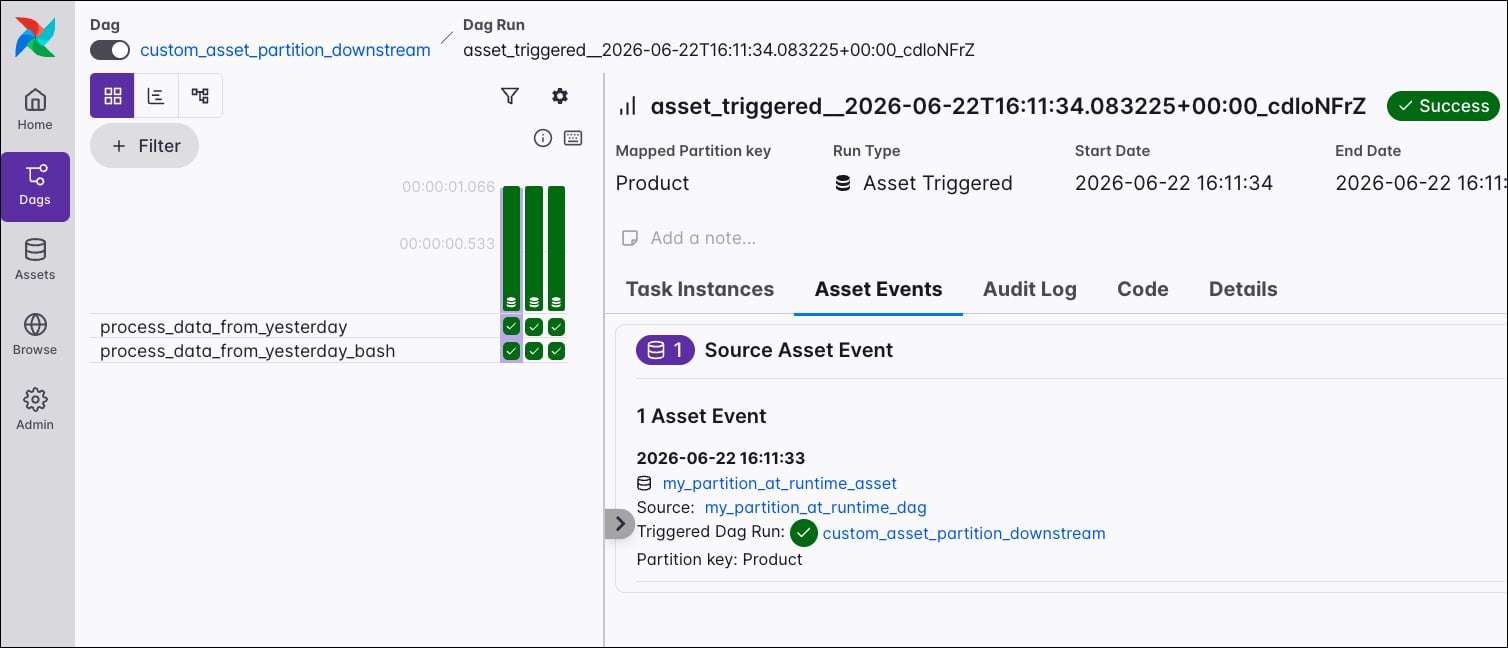
my_partition_at_runtime_asset asset will start 3 runs, one for each partition key.
Schedule on a partitioned asset
To schedule a Dag on a partitioned asset, you set itsschedule parameter to an instance of PartitionedAssetTimetable.
my_partitioned_asset is updated by a partitioned asset event. It won’t run based on regular asset events produced for the my_partitioned_asset asset.
You can modify the grain of the partition key by providing a partition key mapper to the PartitionedAssetTimetable instance.
For example, to partition the data by day, you can use the StartOfDayMapper to normalize the partition key to the day in the format YYYY-MM-DD. See Partition key mappers for more information on the available partition key mappers.
Combined partitioned asset schedules
You can combine multiple assets in a singlePartitionedAssetTimetable instance to create a composite asset schedule using the same logical expressions (AND (&) plus OR (|)) as when creating a conditional asset schedule with regular assets.
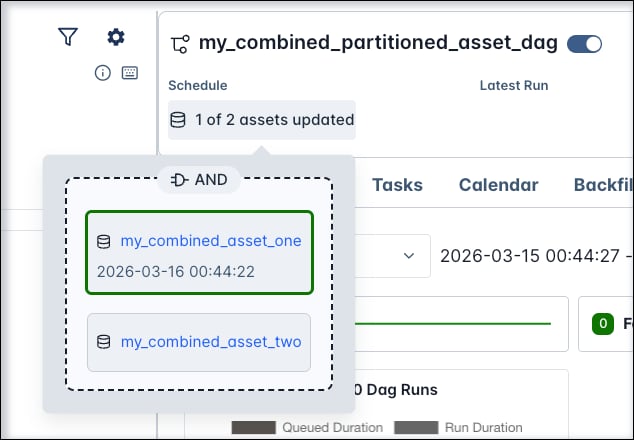
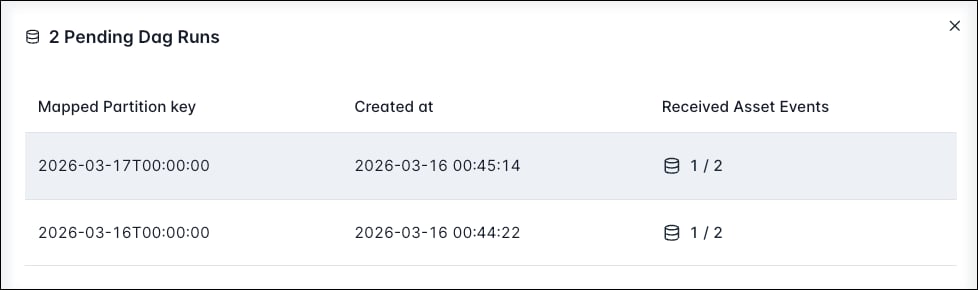
my_combined_asset_one and my_combined_asset_two are updated with a partitioned asset event sharing the same partition key. Note that queued partitioned asset events for other partition keys are not reset by this.
You can use different partition key mappers for each asset in the PartitionedAssetTimetable, see Partition key mappers.
Partition keys
Partition keys are strings attached to partitioned Dag runs and asset events. You can use them in tasks in a partitioned Dag run to partition data, for example in a SQL statement.Access partition keys
Thepartition_key can be accessed inside any task in a partitioned Dag run from within the Airflow context or by using Jinja templating.
partition_date in partitioned Dag runs to format the date directly, for example with ds to convert the full key into yyyy-mm-dd format.
Partition key mappers
Partition key mappers are used to modify the partition key of a Dag run. You can use them to change the grain of the partition key, to map composite keys segment by segment, to create one-to-many or many-to-one patterns, or to validate that keys are in a fixed allow-list.One-to-one mappers
The following one-to-one partition key mappers are available:IdentityMapper: keeps keys unchanged. Default mapper.- Temporal mappers change the grain of the partition key:
StartOfHourMapper: normalizes time keys to the hour in the formatYYYY-MM-DDTHH, for example the partition key2026-03-16T09:37:51is mapped to2026-03-16T09.StartOfDayMapper: normalizes time keys to the day in the formatYYYY-MM-DD(2026-03-16T09:37:51->2026-03-16)StartOfWeekMapper: normalizes time keys to the week in the formatYYYY-MM-DD (W%V)(2026-03-16T09:37:51->2026-03-16 (W12))StartOfMonthMapper: normalizes time keys to the month in the formatYYYY-MM(2026-03-16T09:37:51->2026-03)StartOfQuarterMapper: normalizes time keys to the quarter in the formatYYYY-Q<n>(2026-03-16T09:37:51->2026-Q1). The quarters are based on the calendar year, Q1 starts in January, Q2 in April, Q3 in July, and Q4 in October.StartOfYearMapper: normalizes time keys to the year in the formatYYYY(2026-03-16T09:37:51->2026).
ProductMapper: maps composite keys segment by segment, applying one mapper per segment and then rejoining the mapped segments. For example, with the keyFinance|2026-03-16T09:00:00,ProductMapper(IdentityMapper(), StartOfDayMapper())producesFinance|2026-03-16. See Composite partition keys.AllowedKeyMapper: validates that keys are in a fixed allow-list and passes the key through unchanged if valid. For example,AllowedKeyMapper(["Marketing", "Finance", "Sales"])accepts only those department keys and rejects all others.
PartitionedAssetTimetable by providing a default_partition_mapper parameter.
partition_mapper_config parameter of the PartitionedAssetTimetable instance to a dictionary of asset instances and partition key mappers.
PartitionedAssetTimetable.
When chaining several Dags with a partitioned asset schedule, the partition key mappers need to be identical for all Dags after the first one in the chain. For example a Dag which uses a
StartOfDayMapper will fail the task producing to the next asset in the chain if the next Dag in the chain uses a StartOfWeekMapper.Composite partition keys
Composite partition keys are partition keys that are composed of multiple segments, separated by| delimiters. For example, the partition key Finance|2026-03-16T09:00:00|Revenue is a composite partition key with three segments: Finance, 2026-03-16T09:00:00, and Revenue.
You can use the ProductMapper partition key mapper to map composite keys segment by segment, applying one mapper per segment and then rejoining the mapped segments. For example, with the key Finance|2026-03-16T09:00:00, ProductMapper(IdentityMapper(), StartOfDayMapper()) produces Finance|2026-03-16.
The given composite partition key needs to match the number of segments in the
ProductMapper instance and needs to be valid for all mappers in the ProductMapper instance in order to trigger a Dag run. Invalid composite partition keys cause an error.One-to-many: FanOutMapper
The FanOutMapper, introduced in Airflow 3.3, creates multiple downstream Dag runs based on one partitioned asset event.
The FanOutMapper uses an upstream_mapper to normalize the upstream key to its period start, a window instance that enumerates the elements in that period, and an optional downstream_mapper to format each element.
The available windows are HourWindow, DayWindow, WeekWindow, MonthWindow, QuarterWindow, and YearWindow. Each window provides a default downstream_mapper, except HourWindow and custom windows, for which you need to set a downstream_mapper explicitly.
For example, if your asset my_asset gets updated once a day and you’d like to create 24 Dag runs, each Dag run processing the data for one hour in the day, you can use the FanOutMapper with the upstream_mapper=StartOfDayMapper(), which normalizes the often irregular partition key (for example: 2026-06-22T03:19:23) to the start of the day (2026-06-22) and then use the DayWindow to fan out to create a set of 24 Dag runs, with hourly partition keys (2026-06-22T00, 2026-06-22T01, …, 2026-06-22T23).
By default the maximum number of partitions a
FanOutMapper can create is 1000. You can adjust this setting for your entire Airflow instance with the AIRFLOW__SCHEDULER__PARTITION_MAPPER_MAX_DOWNSTREAM_KEYS configuration variable, and override it for individual FanOutMapper instances with the max_downstream_keys parameter. If the number of partitioned Dag runs that would be created by a partitioned asset event exceed max_downstream_keys, no Dag runs are created for that partitioned asset event and the audit logs of the upstream Dag log a partition fan-out exceeded event.Many-to-one: RollupMapper
The RollupMapper, introduced in Airflow 3.3, is the inverse of the FanOutMapper. It maps multiple upstream partition keys to one downstream partition key, creating a single downstream Dag run once all expected upstream keys have arrived. It takes an upstream_mapper to normalize each upstream key to the downstream grain and a window instance that declares the full set of upstream keys required for a given downstream key.
For example, if my_asset gets updated every hour and you want a downstream Dag to run as soon as all 24 partitions for a day have been updated, you can use the RollupMapper with the StartOfDayMapper as upstream_mapper and the DayWindow as the window.
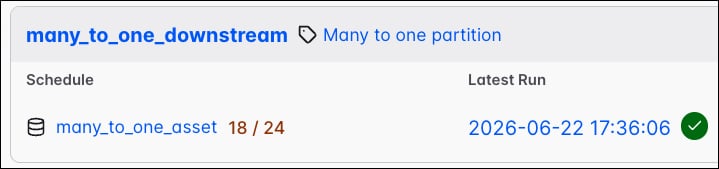
wait_policy=WaitForAll(). You can also set wait_policy=MinimumCount(n=5), which means the downstream Dag runs as soon as 5 partition keys for the window have arrived.
SegmentWindow
The RollupMapper also supports categorical rollups, where a fixed set of string segment keys roll up into one downstream partition key. Pair a FixedKeyMapper, which collapses every upstream key onto one fixed downstream key, with a SegmentWindow, which declares the set of segment keys that make up the downstream partition. The downstream Dag run is triggered once every segment key in the window has arrived. For example, in the code sample below, the Legal and Sales segment keys roll up into one legal_and_sales downstream Dag run.