

Overview
Education teams managing certification programs juggle three workstreams: responding to student tickets (badge issuance, exam extensions, coupon validation, invoice generation), generating enrollment and certification reports for customers, and answering internal questions about education data. This architecture uses Airflow to orchestrate a multi-agent AI system that automates all three — processing Zendesk tickets through a human-in-the-loop pipeline, producing on-demand customer education reports from Snowflake, and letting employees query education data conversationally using Slack. Airflow sits at the center of this system, coordinating six Dags that react to external events from Zendesk, Slack, and an SQS message queue. Rather than running on a fixed schedule, assets and asset watchers make the system event-driven: a Slack message or a new ticket triggers a Dag run within seconds, and cross-Dag asset dependencies chain the processing stages together without manual orchestration.Architecture
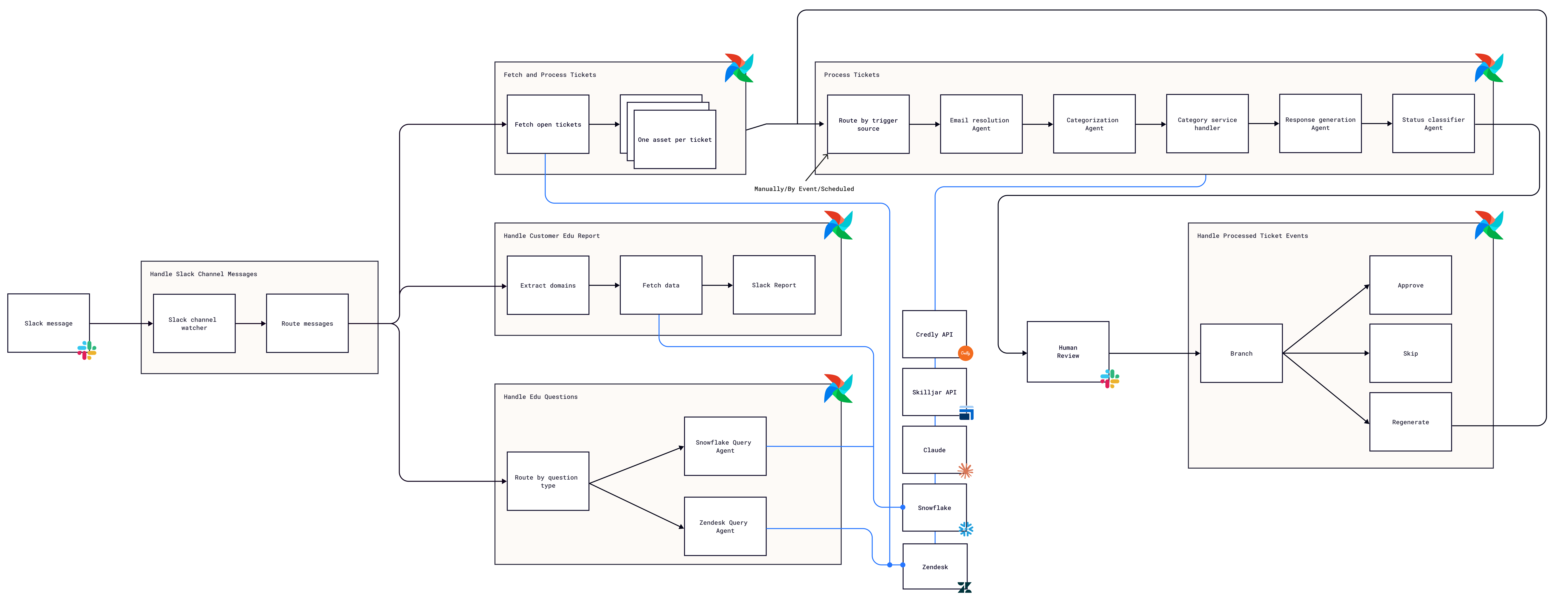
- Ticket ingestion: A daily Dag fetches open Zendesk tickets and emits one asset event per ticket. A separate asset watcher monitors an SQS queue for Slack interaction payloads (Approve, Regenerate, Skip), triggering a Slack event handler Dag that either posts approved responses to Zendesk, re-enters the processing pipeline with reviewer feedback, or skips the ticket.
- AI agents: Multiple Pydantic AI agents powered by Claude handle each stage of the pipeline — categorization (mapping tickets to 11 categories with confidence scores), email disambiguation (resolving cross-account requests), coupon extraction and validation, name extraction for badge corrections, response generation (using an academy handbook as context), and status classification (solved, pending, or open).
- Service handlers: Deterministic handlers dispatch actions based on the ticket category — querying Snowflake for exam results, issuing Credly badges, extending Skilljar deadlines, generating PDF invoices, or merging student accounts.
- Human review loop: Every generated response is posted to Slack with Approve, Regenerate, and Skip buttons. Reviewer actions flow through SQS back into Airflow, where an event handler Dag branches on the action type: approve updates the Zendesk ticket directly, regenerate re-enters the processing pipeline with feedback to refine both categorization and response quality, and skip leaves the ticket for manual handling.
- Data query interface: A custom trigger watches a Slack channel for bot mentions. A routing Dag classifies each message — domain URLs trigger a group analytics Dag for customer enrollment metrics, while free-text questions trigger a data query Dag where an LLM-powered branch routes to either a Snowflake or Zendesk agent to answer the question in-thread.
Airflow features
- Assets and asset watchers: Six assets connect six Dags into an event-driven graph.
fetch_and_process_ticketsemitsprocess_ticket_assetto trigger processing; the Slack event handler emitsregenerate_ticket_assetto re-trigger the same Dag with reviewer feedback as asset metadata; the Slack channel router emitsgroup_summary_assetorslack_data_query_assetdepending on message type. Two asset watchers bridge external systems: aMessageQueueTriggerpolls SQS for Slack interaction payloads, and a customSlackChannelTriggerpolls Slack channels for bot mentions — both create Dag runs without polling from task code. - Dynamic task mapping:
process_a_ticket.expand(ticket_id=ticket_ids)creates one mapped task instance per Zendesk ticket, with the count determined at runtime by the daily fetch query. The same pattern applies to group summaries, whereprocess_domain.expand_kwargs(domain_data)maps one task group per customer domain. - Branching:
@task.branchroutes ticket processing based on the trigger source — new ticket, regeneration with feedback, or manual trigger with a ticket ID parameter. The Slack event handler uses the same pattern to dispatch approve, regenerate, and skip actions to separate task paths. - LLM branching:
@task.llm_branchin the data query Dag uses Claude to decide whether a Slack question should be answered by querying Snowflake (education platform data) or Zendesk (support ticket data), routing to the appropriate downstream task without writing custom classification logic. - Task groups: The group summary Dag wraps per-domain processing — domain lookup, report building, onboarding metrics, and Slack posting — in a
@task_groupthat maps dynamically over each customer domain.
Considerations
- Human-in-the-loop granularity: This architecture routes every Zendesk ticket response through Slack review before posting. For high-confidence categories (badge issuance after a verified exam pass), you could skip review and post directly to Zendesk, reserving human review for low-confidence or sensitive categories like refunds.
- Deterministic post-classification: Once the AI categorizes a ticket, the service handlers that process it are entirely deterministic — issuing a badge, extending a deadline, or validating a coupon are predictable operations with known steps. There is no point in using AI when you already know what to do. AI handles the ambiguity (what does this ticket need?), and code handles the execution (do it). This keeps the pipeline fast, reliable, and auditable where it matters most.
- Agent model selection: The categorization and response agents use Claude Sonnet for a balance of speed and accuracy. If classification accuracy drops for edge cases, switching the categorizer to a more capable model while keeping the response agent on Sonnet preserves throughput where it matters.
- Asset watcher polling frequency: Both asset watchers use custom triggers — the SQS watcher polls every 5 seconds and the Slack channel watcher every 10 seconds. Lower intervals improve responsiveness but increase API calls. Tune these based on your ticket volume and SLA requirements.
Next steps
- To learn more about connecting Airflow to external event sources, see Assets and asset watchers. For patterns around orchestrating AI agents with Airflow, see LLM branching.