@asset syntax in Apache Airflow®

The @asset decorator is a shorthand to create one Dag with one task that updates an asset. This decorator is used in the asset-oriented approach to writing Dags which constitutes a mindset shift to put the data asset front and center. Whether you use the asset-oriented or task-oriented approach to writing Dags is a matter of preference. Dags created using the asset-oriented approach are shown like any other Dag in the Airflow UI.

In this guide, you’ll learn:

  • How to use @asset to create a Dag with one task that updates an asset.
  • How to use @asset.multi to create a Dag with one task that updates multiple assets.

If you are looking for instructions on how to use asset-based scheduling in Airflow with the Asset object, see Basic asset-based scheduling in Apache Airflow®, as well as Advanced asset-based scheduling.

The @asset decorator is an example of a Dag authoring paradigm (asset-oriented) that is different from the task-oriented approach. To learn more about different Dag authoring paradigms, check out the free Apache Airflow® orchestration paradigms ebook.

Assumed knowledge

To get the most out of this guide, you should have an existing knowledge of:

Using @asset

The following code snippet defines a Dag with the Dag ID my_asset that runs on a @daily schedule. It contains one task with the task ID my_asset that, upon successful completion updates an asset with the name my_asset.

1from airflow.sdk import asset
2
3@asset(schedule="@daily")
4def my_asset():
5 # your task logic here
6 pass

You can schedule assets based on other assets to create data-centric pipelines. Since each @asset decorator creates one Dag, data needs to be passed between tasks using cross-Dag XComs. The following shows the same simple ETL pipeline accomplished using the asset-oriented and the task-oriented approach.

Asset
1from airflow.sdk import asset
2
3
4@asset(schedule="@daily")
5def extracted_data():
6 return {"a": 1, "b": 2}
7
8
9@asset(schedule=extracted_data)
10def transformed_data(context):
11
12 data = context["ti"].xcom_pull(
13 dag_id="extracted_data",
14 task_ids="extracted_data",
15 key="return_value",
16 include_prior_dates=True,
17 )
18 return {k: v * 2 for k, v in data.items()}
19
20
21@asset(schedule=transformed_data)
22def loaded_data(context):
23
24 data = context["task_instance"].xcom_pull(
25 dag_id="transformed_data",
26 task_ids="transformed_data",
27 key="return_value",
28 include_prior_dates=True,
29 )
30 summed_data = sum(data.values())
31 print(f"Summed data: {summed_data}")
Task
1from airflow.sdk import Asset, dag, task
2
3
4@dag(schedule="@daily")
5def extract_dag():
6
7 @task(outlets=[Asset("extracted_data")])
8 def extract_task():
9 return {"a": 1, "b": 2}
10
11 extract_task()
12
13
14extract_dag()
15
16
17@dag(schedule=[Asset("extracted_data")])
18def transform_dag():
19
20 @task(outlets=[Asset("transformed_data")])
21 def transform_task(**context):
22 data = context["ti"].xcom_pull(
23 dag_id="extract_dag",
24 task_ids="extract_task",
25 key="return_value",
26 include_prior_dates=True,
27 )
28 return {k: v * 2 for k, v in data.items()}
29
30 transform_task()
31
32
33transform_dag()
34
35
36@dag(schedule=[Asset("transformed_data")])
37def load_dag():
38
39 @task
40 def load_task(**context):
41 data = context["ti"].xcom_pull(
42 dag_id="transform_dag",
43 task_ids="transform_task",
44 key="return_value",
45 include_prior_dates=True,
46 )
47 summed_data = sum(data.values())
48 print(f"Summed data: {summed_data}")
49
50 load_task()
51
52
53load_dag()

The code above creates three Dags that depend on each other, each containing one task that updates one asset:
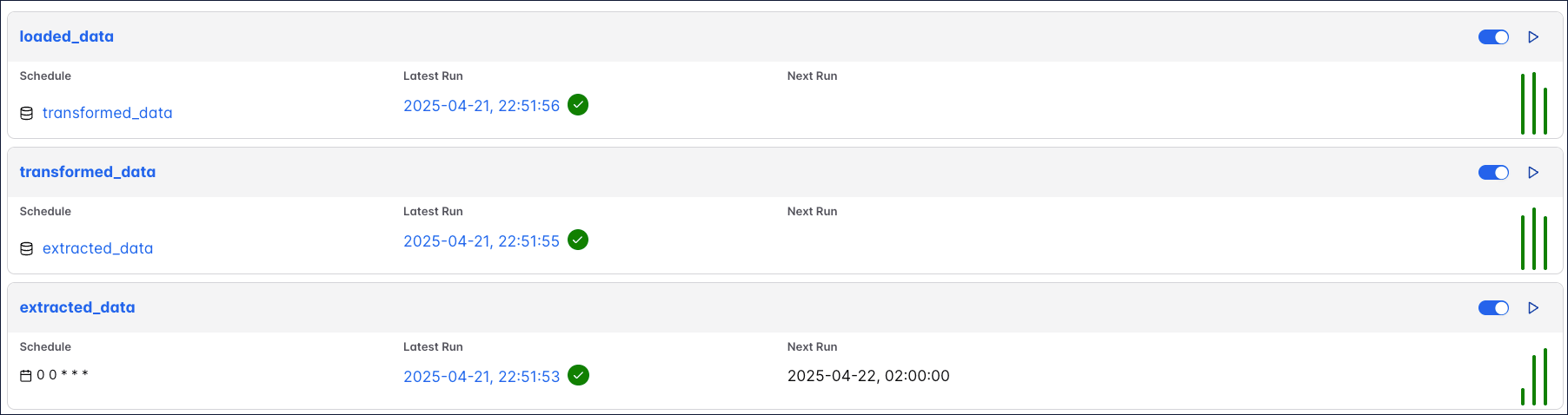
DAGs view showing 3 DAGs.

@asset.multi

To update several assets from the same Dag written with the asset-oriented approach, you can use @asset.multi. The code example below will create one Dag with the Dag ID my_multi_asset that contains one task called my_multi_asset that, upon successful completion, updates two assets with the names asset_a and asset_b.

1from airflow.sdk import Asset, asset
2
3@asset.multi(schedule="@daily", outlets=[Asset("asset_a"), Asset("asset_b")])
4def my_multi_asset():
5 pass