

- AI model evals: evaluate the direct output of the AI. Is a produced asset factually correct? Did the agent solve its task successfully? See AI model evals.
- AI product evals: these evaluations are closer to the business outcome and measure the results of the entire AI data product. Does using the AI-generated ads lead to more conversions? Are customers using our AI features and seeing value in them?
- Dag graph
- Code
For a full explanation of this Dag see Example: evaluate a support ticket agent.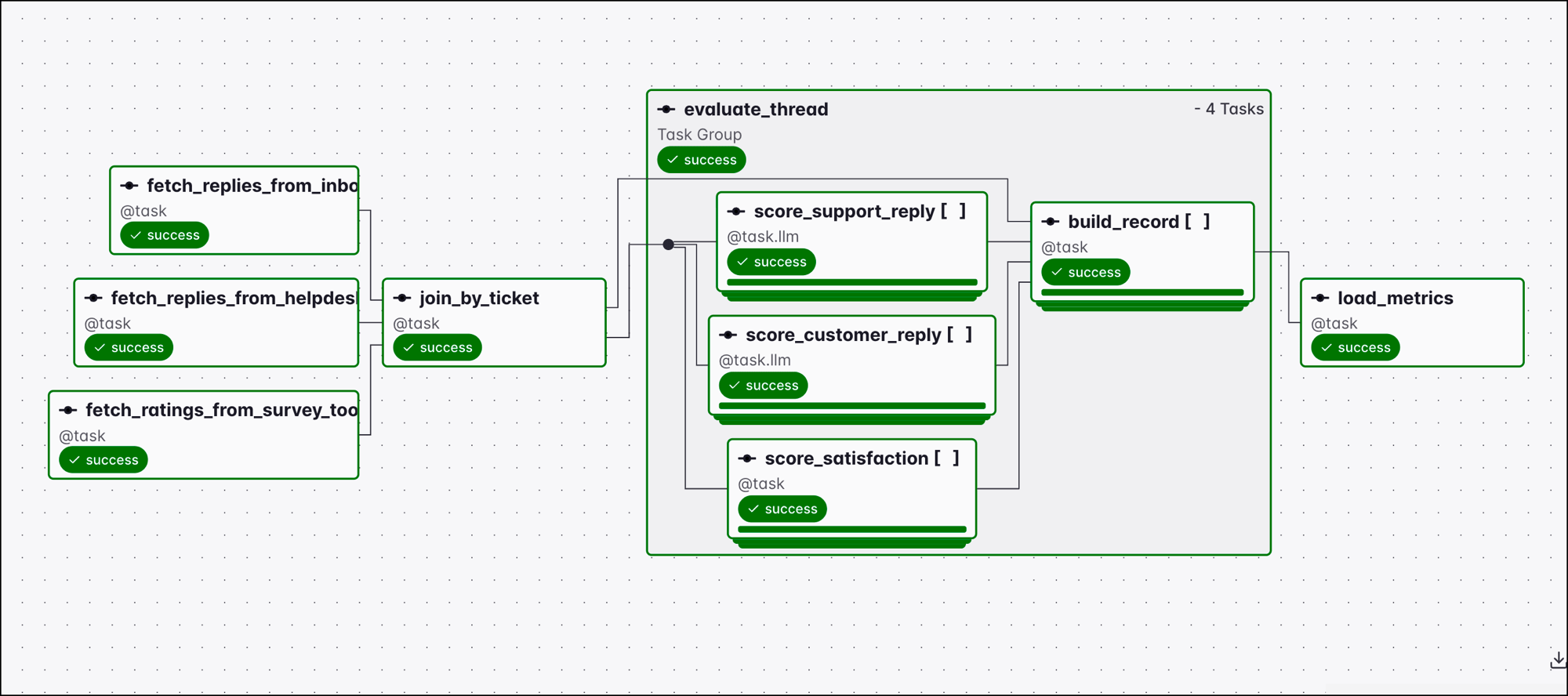
- Why to use Airflow for AI product evals
- What AI outputs you can evaluate with Airflow
- AI product evals with Airflow
- An example AI product evals Airflow pipeline for a support ticket agent
Assumed knowledge
To get the most out of this guide, you should have existing knowledge of:- Airflow basics. See Introduction to Apache Airflow®.
- Basic familiarity with LLMs and AI agents.
Why Airflow for AI product evals
Evaluating AI means extracting AI output and feedback signals from various systems, transforming structured signals, using LLMs to assess signals in unstructured data, computing a score, associating the outcome with the input settings of your AI application, and writing the results of the evaluation to a central location. This type of pipeline, in essence extracting, transforming, and loading data, is exactly what Airflow excels at.- Tool agnostic: AI eval signals need to be collected from different external systems. Airflow can connect to any system that has an API, with many pre-built modules available in Airflow providers.
- Extensive scheduling options: AI evals need to run at regular intervals as well as in reaction to events like switching to a new model version. Airflow offers extensive scheduling options including time-based schedules, asset-driven, and event-driven scheduling.
- Backfills: AI eval signals are created over time. Some (AI model eval signals) appear as soon as the AI task finishes, while others might only appear weeks or months later (like a customer response). With Airflow you can backfill an eval Dag to compute newly discovered eval signals for historic data.
- Dynamic task mapping: In many cases, you’ll want to evaluate many AI outputs in parallel. Dynamic task mapping lets you create one parallel task instance per AI output you are assessing.
- AI tasks in eval pipelines: Signals in unstructured data, like the sentiment of a customer’s reply, benefit from an LLM to score them. Airflow can orchestrate that model call in the same pipeline. See Classification and routing.
- Alerting: AI evaluations are run on a constant schedule to monitor AI data product performance. If the evaluation shows a decline in outcome, you can use Airflow notifications and Astro alerts to send a notification to the correct team.
- Dag bundle versioning: An eval result is only actionable if you know which model, prompt, and settings produced it. Prompts and model configuration are defined in Dag code, and versioned Dag bundles allow you to track which version of that code a Dag run used.
- Reliability: Evals need to keep running over long periods of time. Retries, alerting, and monitoring apply to eval pipelines the same as to any other Dag.
- One place for related pipelines: Eval pipelines read from the same sources as the rest of your data pipelines. ETL, context engineering, AI, and MLOps pipelines already run in Airflow and use the same connections and warehouses.
What AI outputs can you evaluate with Airflow?
Any AI output, wherever the model runs, should be evaluated on a regular cadence against business metrics and KPIs, and ultimately to assess ROI. AI data products can generally be classified into:- LLM-derived AI data products:
- Text drafted for a person to send: support replies, sales outreach, release notes. See Generation with human approval.
- Classifications and routing decisions: ticket categories, priorities, lead scores, content moderation labels. See Classification and routing.
- Extracted structured data: fields pulled from contracts, invoices, or call transcripts. See Extraction of structured data.
- Generated code and queries: pull requests, SQL, configuration, migrations. See Text-to-SQL.
- Summaries and reports: meeting notes, account summaries, incident write-ups. See Summarization.
- Translations and localized content. See Transformation.
- Recommendations and rankings: personalized product suggestions, search result ordering, content feeds.
- Agent-derived data products:
- Answers to open questions about your data: a report created based on several queries, for example for ad-hoc data questions. See Data exploration agent, and Building Kepler, Astronomer’s internal data assistant for examples.
- Retrieval quality: which chunks a query returned, and whether they contained the answer.
- Actions an agent took in an external system: an account tier upgrade, a refund, a support ticket escalation. See Support ticket agent, and AI-powered education operations with Apache Airflow® for examples.
- Code changes proposed by a group of agents: pull requests from a bug report or feature request. See Agentic software development, and the Together AI case study for agents authoring dbt models and Dags.
- Diagnoses: root-cause analyses and suggested fixes. See Root-cause analysis and self-healing pipelines and How to use Otto to automatically investigate Dag failures and PR a fix.
- Complex, customer-facing AI products: several agents behind one AI data product, each with its own output and requiring its own AI eval pipeline. See the Booking.com case study.
You don’t need to run AI inside Airflow to run evals in Airflow. A chat app, a coding assistant, and an agent deployed in a microservice all produce output and downstream effects that a Dag can collect and score. Orchestrating the AI in Airflow as well gives you easier access to information about model input, settings, and output.
AI product evals with Airflow
A product eval scores what happened after the output was used, so the signals come from the systems your stakeholders work in: ticketing, CRM, source control, product analytics, or billing. Some are available as structured data, such as ratings, click-through rate, or even emoji reactions on a social post. Other signals are unstructured, for example, whether a person edited the output before using it, the sentiment of a customer reply, or downstream reviews. Those signals arrive minutes to months after the AI produced the output, which is why you need to gather them continuously using Airflow Dags with similar structures to ETL use cases, extracting, transforming, and loading this data into a central location for further processing and scoring over time.There are two modes for AI evals:Offline evaluation means running eval pipelines on a separate schedule from the AI data product. Common patterns for offline evals are running the AI against a fixed test set of inputs and comparing the outputs against a golden dataset of best-in-class outputs, or running scheduled batches of AI product evals after gathering signals further downstream, such as customer behavior over time after interaction with the AI data product.Online evaluation scores AI output during live runs of the pipeline, for example in AI-as-a-judge or human-in-the-loop steps within an AI orchestration pipeline. Online evals offer the possibility to act on the evaluation result in the live pipeline, for example preventing a bad AI output from being sent to a customer.
Example: evaluate a support ticket agent
An AI agent drafts replies to incoming tickets, a human reviews them, and the approved reply is sent to the customer, all orchestrated with an Airflow Dag using Agent orchestration. This pipeline creates an AI data product, the response to the customer, that needs to be evaluated regularly to ensure correctness, quality, and high customer satisfaction.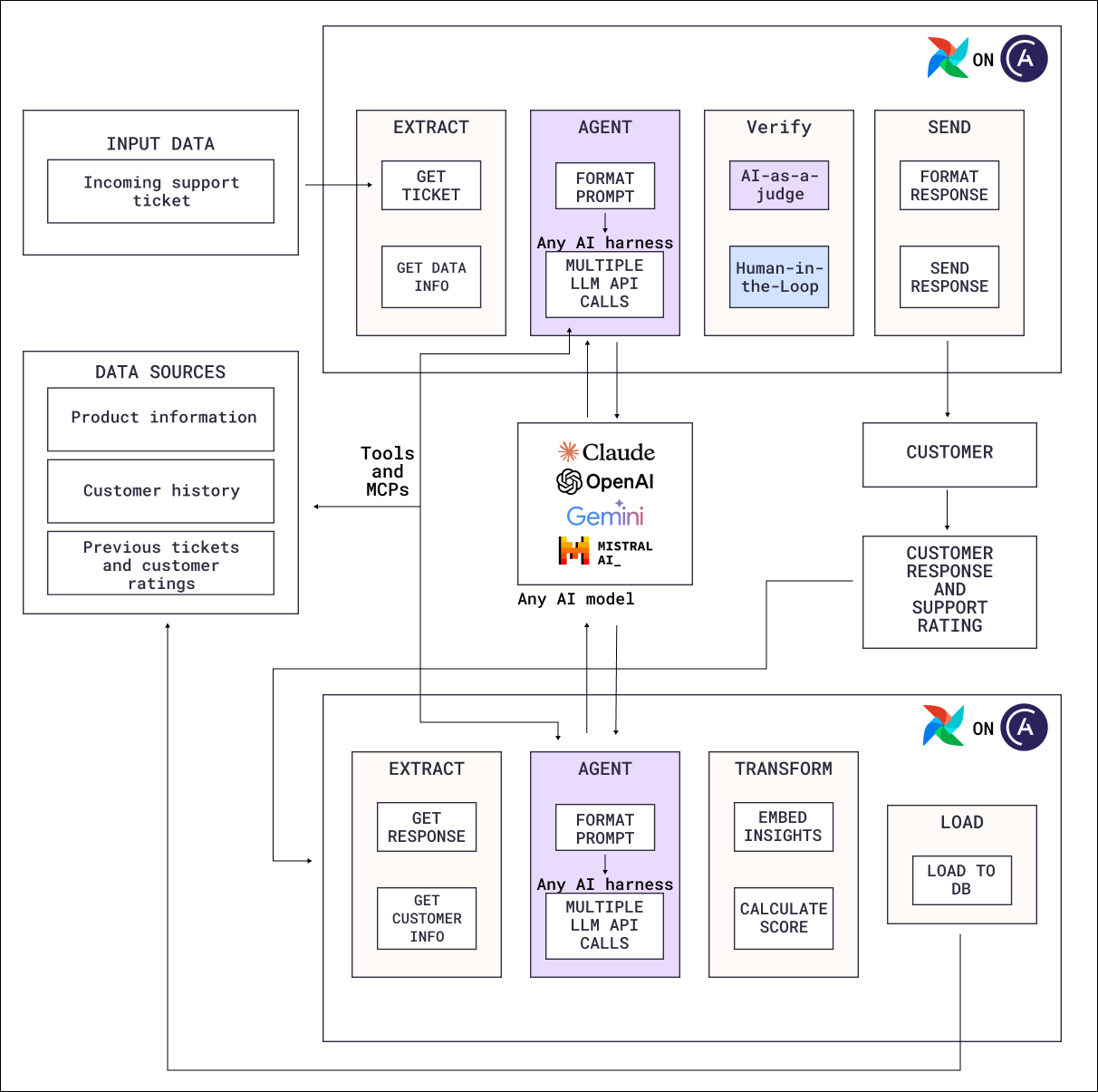
- Dag graph
- Code
- Extract:
fetch_replies_from_helpdeskretrieves the reply the first Dag sent to the customer,fetch_replies_from_inboxthe customer’s answer, andfetch_ratings_from_survey_toolthe survey ratings. Each task connects to a different system. - Join:
join_by_ticketinner-joins the three sources onticket_id, so a ticket without both a customer reply and a survey response is dropped. - Score: the
evaluate_threadtask group is mapped over the joined threads with.expand(), to score each thread in parallel. The task group contains three AI product evals:score_support_reply: a@task.llmjudge scores the agent’s reply for accuracy, whether it answers what the customer asked, and tone.score_customer_reply: a second AI judge reads the customer’s answer for sentiment, whether they consider the request handled, and escalation risk.score_satisfactionis an AI product eval that needs no model call, because the survey ratings are already numeric. A plain@taskcomputes a per-dimension score, an average, and whether the customer counts as a detractor.build_recordcombines the thread and the three scores into one row.
- Load:
load_metricswrites one row per ticket withwrite_eval_records, then the daily rates withwrite_metrics: accuracy, relevance, poor tone, positive sentiment, satisfied, high escalation risk, detractor, and average satisfaction per dimension.
Because the join drops tickets that are missing either signal, every rate
load_metrics computes describes customers who responded, which is a biased subset. Report each metric alongside the response rate over the total number of tickets.- Reviewer edits: edited text shows what was wrong with the original. A human-in-the-loop task records both the decision and the edited output, which an eval Dag can read from XCom.
- Reopens and escalations: whether the ticket was reopened or escalated to a human agent after the reply was sent. Signals like this can appear days or even weeks later and are best handled by a separate Dag that checks for any new information relevant to existing records on a regular cadence.
Next steps
- Evaluate the output of the AI itself with AI model evals.
- Run a single model inference as a task with LLM orchestration with Apache Airflow®.
- Give a model tools and multi-step reasoning with Agent orchestration.
- Add human decisions and capture their output with Human-in-the-loop workflows with Apache Airflow®.