Building Kepler
15 min read |
At Astronomer, data questions don't come from one place. Product managers want to understand feature adoption. Sales needs customer-specific context. Finance needs confidence in key metrics like ARR. Marketing wants to understand how campaigns are performing.
Historically, many of these questions flowed through the data team. They often showed up as ad hoc requests that came before any formal data product was built. They were happy to help by writing one-off queries, pointing people to the right tables, or sharing the tribal knowledge needed to navigate the warehouse. They did this because it helped unblock real business decisions.
The problem wasn't that people were asking "too many" questions. It was that access to data, definitions, and institutional knowledge didn't scale with the company.
We weren't looking to replace the data team or eliminate collaboration. We needed a way to open the front door to our data, give people confidence in what they were looking at, and let them explore and ask better questions on their own, all while relying on a foundation of trusted data, documentation, and quality checks.
So we started building Kepler - a Slackbot and CLI tool that answers ad hoc questions about our data for anyone at Astronomer.
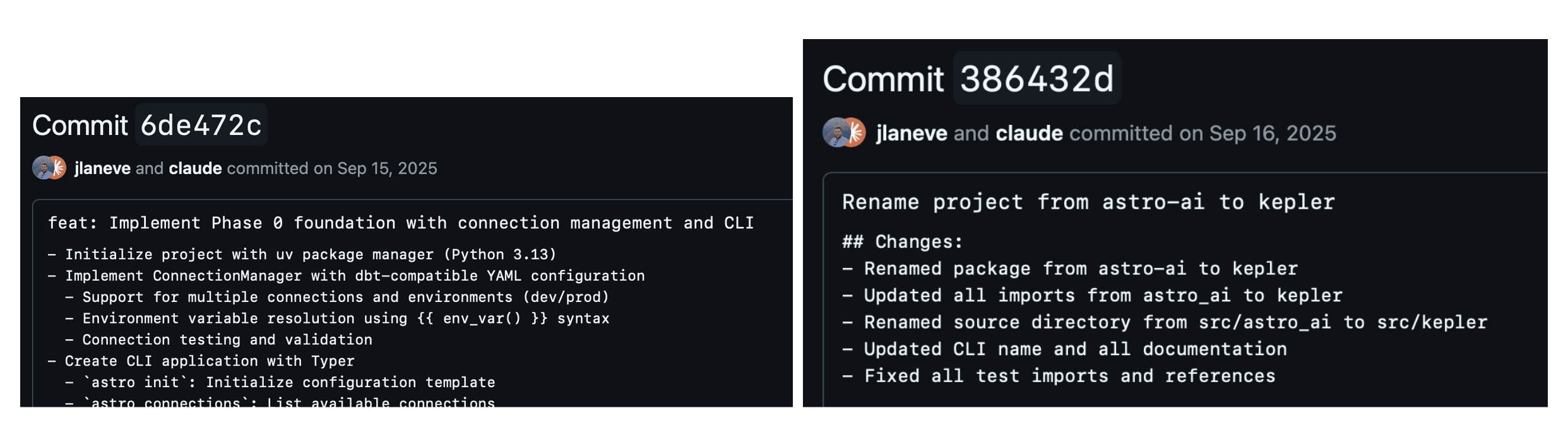
We started this in September under the name astro-ai and very quickly renamed it to Kepler. Fun fact: OpenAI's internal data analyst is also named Kepler!
Context is everything
Most text-to-SQL projects start with the LLM. Feed it a schema, then ask it to write a query. This works for demos with five tables, but fails when you have tens of thousands of tables and the model has to guess which ones are relevant. Loading this much context into a system prompt degrades LLMs' performance and latency, never mind wasting unnecessary tokens with irrelevant context. For our warehouse, the performance degradation was noticeable—the agent would go through multiple iterations of querying the wrong tables and even hallucinate asset names. The model wasn't broken, it just didn't have the right context to make good decisions.
The breakthrough came when we stopped focusing on generation and started focusing on context. An LLM can write excellent SQL if you give it the right tables. The hard problem isn't SQL generation, it's discovery. No amount of prompt engineering can fix this.
A common response to this problem is to build an explicit semantic layer. In theory, you hand that layer to the LLM and it knows what everything means. However, in practice, semantic layers require significant upfront investment and ongoing maintenance. Teams need to create their own definitions, keep definitions in sync as their warehouse evolves, and convince the organization to actually use the layer. Many teams don't have the bandwidth, and the result is a partial, stale abstraction that creates more confusion than it resolves.
We took a different approach. Instead of an explicit semantic layer, we infer semantics from what already exists: warehouse metadata, orchestration code (via Airflow), and BI tool code. The definitions, assumptions, and business rules are already captured in these artifacts. They just aren't organized in a way an LLM can efficiently use.
To solve this, we built a context layer: a structured, search-optimized DuckDB index over the knowledge that already exists in our warehouse and orchestration and BI codebases.
Part 1: Tables and descriptions
Before any of this worked, we had to invest in documentation. Over the past few years, the data team made it a priority to make data assets self-describing and to make it easy for data engineers to add context as they build. Table and column descriptions aren't an afterthought or a separate documentation step; they're embedded directly into our pipelines, as described in their earlier post on building data pipelines like assembly lines.
That foundation turned out to be critical. Because definitions, assumptions, and business rules are already captured close to the code, Kepler can use that context to do meaningful matching and prioritization when deciding where to look.
The foundation of the context layer is schema metadata from Snowflake i.e. table names, column names, data types. This provided the agent the ability to semantically search across all relevant fields in our warehouse. On top of that, we layered on enrichments:
Table and column comments: Snowflake lets you attach COMMENT metadata to tables and columns. We index these alongside the schema. A table comment like "Excludes test accounts, includes only customers with at least one paid deployment" becomes searchable context that helps the agent choose between similar-looking tables.
Table popularity: We count how many times each table appears in the lineage graph. How many code files reference it and how many downstream tables depend on it. Tables that are heavily referenced get boosted in search results. This helps surface actively-used tables over deprecated ones.
Row counts: Basic cardinality from Snowflake's information schema. Helps the agent understand table size and make decisions about joins.
These enrichments live alongside the schema and get indexed for search. When someone asks about "revenue," we don't just match on table names. We also match on columns and comments and prioritize tables that are actually used in production code.
Part 2: Code
Schema metadata alone isn't enough to answer many of the questions people actually ask. When someone wants to know where a table comes from, whether it can be trusted, or how it's produced, the answer isn't in Snowflake. It lives in code.
Our orchestration and BI codebases are full of DAGs, SQL transforms, and data pipelines that encode how data is built and how it flows through the warehouse. When someone asks "what populates this table?", they're really asking to see the pipeline, the upstream dependencies, and the logic that produced it. Schema metadata can't answer that. Code can.
To capture this context, we crawl our repositories and parse SQL statements. The indexer extracts SQL from multiple patterns, triple-quoted strings, .execute() calls, variable assignments, f-strings, and raw .sql files, then parses each statement to extract table references.
For each query, we build a lineage graph linking code to the tables it touches. We then index them to make them fully traversable.
dags/mrr_pipeline.py:
  ├── references: PROD.CORE.SUBSCRIPTIONS
  ├── references: PROD.CORE.CUSTOMERS
  └── references: PROD.ANALYTICS.MRR_DAILY
Why code context matters:
Schema metadata tells you what exists, and code tells you how it works–all of the assumptions that are baked in that you wouldn't know from a table name alone.
Consider a table called PAGE_VIEWS. The schema tells you it has columns like user_id, page_url, and viewed_at. But the pipeline code reveals the real story: it filters out internal employee traffic, it only counts logged-in sessions, and it deduplicates within a 30-second window. Without reading the code, an LLM might write a query that double-counts views or includes test traffic—and the numbers would look plausible but be wrong.
This kind of latent knowledge lives everywhere in data pipelines. A revenue table might exclude trial accounts. A usage metric might be calculated daily but lagged by 48 hours. A customer dimension might join on organization_id rather than user_id because of how the product handles multi-tenancy. These are the details that experienced data engineers carry in their heads. Code makes them explicit and searchable.
Before we had lineage, "can I trust this table?" was answered with tribal knowledge. Now the agent can show you:
- Which pipeline creates the data
- What upstream tables it depends on
- What filters and exclusions are applied in the transform logic
- What business rules are encoded in the SQL
Search with the discovery subagent
With a rich context layer, search becomes the critical capability. Before the agent can write SQL, it needs to find the right tables.
Hybrid search
Finding the right table out of hundreds requires more than keyword matching. Someone asking about "revenue" might need a table called MRR_BY_CUSTOMER. Someone asking about "how many people use feature X" might need PRODUCT_EVENTS, not FEATURE_USAGE. The gap between how people describe what they want and how tables are actually named is the core search problem.
We use hybrid search that combines three signals through Reciprocal Rank Fusion (RRF):
- Exact and keyword matching. Straightforward name and text matching against table names, column names, and descriptions. This handles the simple cases like when someone asks about "customers" and there's a table called
CUSTOMERS. - Semantic search. Each entity in the index gets an embedding generated from a rich text representation that combines the entity type, fully qualified name, description, and row count into a single string. This lets the search understand that "monthly recurring revenue" is semantically related to a table called
MRR_DAILY, even though the words don't overlap. - Usage-based boosting. Not all tables are equally important. We use table usage to determine a table's importance, defined by how many pipelines read from it and how many downstream tables depend on it. Tables that are heavily used in production code get a logarithmic boost in search results. This means actively maintained and used tables surface above deprecated or experimental ones.
RRF is the key to making these signals work together. Each ranker produces its own ranked list, and RRF combines them based on rank position rather than raw scores. The result is a fused ranking that's better than any individual signal.
The discovery subagent
Search alone isn't always enough. Sometimes you need to explore: list schemas, inspect table definitions, check what columns exist, trace lineage upstream.
We built a discovery subagent that runs autonomously before the main agent acts. When you ask "what's our MRR?", the discovery subagent iterates: search for MRR-related tables, inspect the top candidates, and pick the most relevant results. The discovery subagent progressively discovers relevant context by iteratively refining search queries and decides when it has enough context.
User: What's our MRR?

Discovery subagent:
  → search_tool("MRR", entity_types=["table"]) → 4 tables
  → get_table_info("MRR_BY_CUSTOMER") → active, updated daily
  → get_table_info("MRR_HISTORICAL") → deprecated, last update 2023 mrr_pipeline.py
  → Return context to main agent

Main agent: [writes SQL against MRR_BY_CUSTOMER]
The main agent receives curated context, not raw search results. It doesn't have to guess which table is correct, the discovery subagent has already figured that out. By keeping discovery an entirely separate subagent, we have the option to use a faster and specialized model for discovery while keeping the main agent's context clean and focused.
Persisting execution
Once the discovery subagent finds the right tables, the main agent needs to actually run code. We gave it a persistent Jupyter kernel that stays alive across the session. Variables persist, DataFrames stay in memory, and the agent can build on previous results.
The kernel lives in an isolated environment with data analysis packages pre-installed: polars, pandas, numpy, matplotlib. When the agent writes Python code, it executes in this kernel and gets back structured results, output, errors, execution status.
Why this matters:
- Iterative analysis. The agent can query data, inspect the results, transform them, and query again. A question like "what's driving the MRR increase?" might involve multiple queries and transformations before arriving at the answer.
- Rich data manipulation. SQL is great for querying, but for complex prompts requiring pivots, statistical analysis, visualization, Python is very powerful.
- State across turns. When you ask a follow-up question, the agent doesn't start from scratch. The DataFrame from the previous query is still in memory.
The kernel also handles package installation. If the agent needs a package that isn't pre-installed, it can add it to the environment and import it.
Repeatability with Playbooks
After a few months of internal use, we noticed patterns. Similar types of queries kept coming up, usage analytics, revenue breakdowns, etc., but the agent would respond in slightly different ways or follow different approaches to answer these prompts.
We built playbooks to capture successful analysis patterns.
Distillation
A common workflow for our data team when using Kepler involves the user refining their question through conversation, arriving at working SQL, then getting the answer they need. We used this flow to distill and persist these patterns as playbooks.
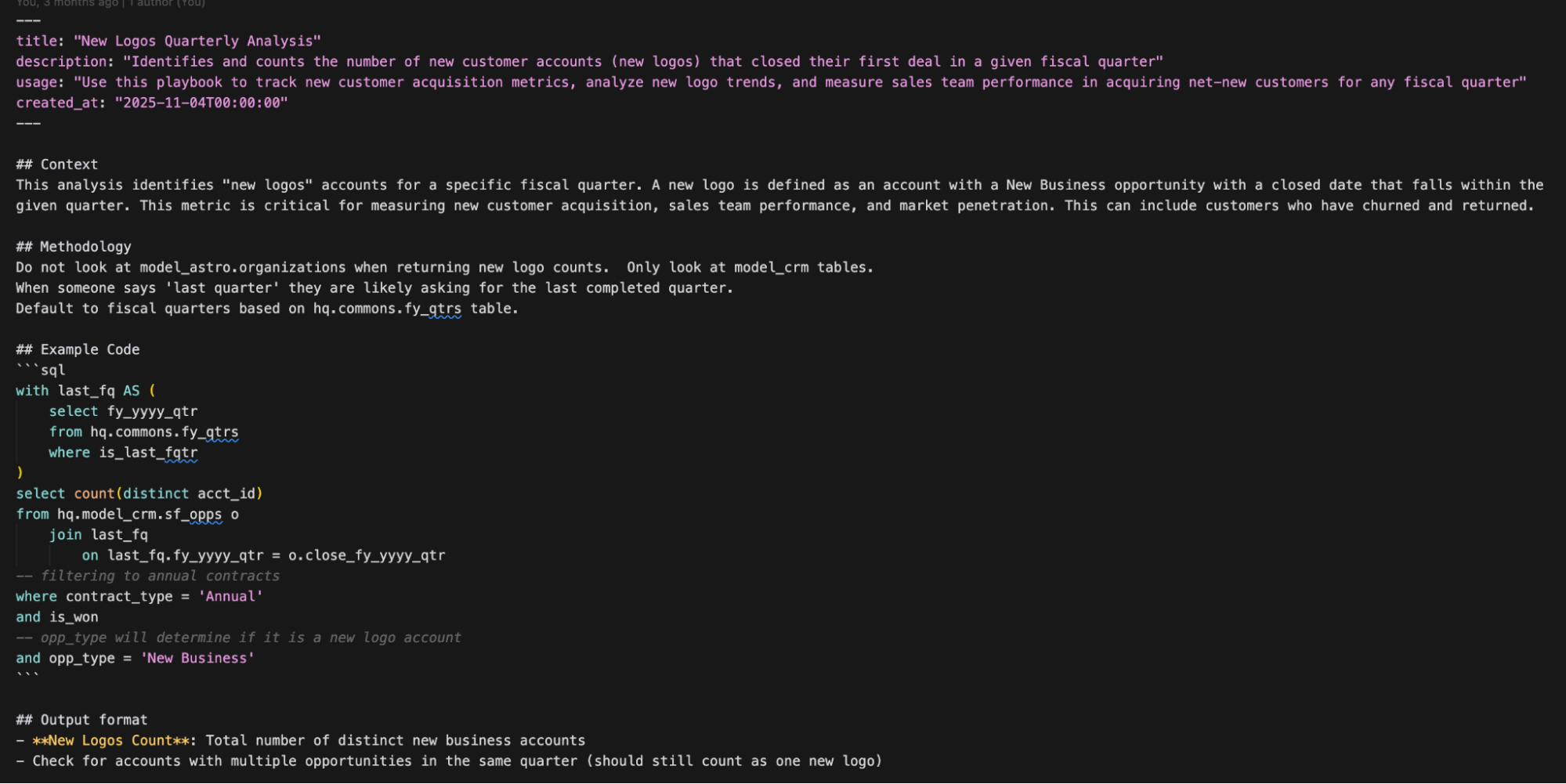
The distillation process uses an LLM to review the session and extract reusable patterns. It takes the recent conversation turns and the code cells that executed successfully, then generates a structured playbook with:
- Title and description: what this playbook helps you do
- Context: when to use it, what assumptions it makes
- Methodology: step-by-step approach (which tables, what joins, what filters)
- Example code: the SQL that actually worked
- Output format: what the results should look like
This is different from documentation. Playbooks are generated from successful interactions and approved by a human. It captures what worked, including non-obvious details like "exclude test accounts" and details that were previously latent and calls them out explicitly. The LLM extracts these details from the conversation. It sees the back-and-forth where the user corrected the agent or refined the approach.
Searching playbooks
Playbooks get stored in the same DuckDB index as tables and code, with embeddings generated from their title and description. The discovery subagent searches them using the same hybrid search.
When users ask "how do I calculate ARR?," the discovery subagent searches playbooks alongside tables. If someone already figured out the right methodology,which tables to join, what exclusions to apply, you get that context before the main agent even starts writing SQL.
Playbooks build trust
When we initially released Kepler internally, we tracked and monitored hundreds of real user interactions to see where Kepler succeeded–and more importantly, where it failed. When Kepler responded with incorrect answers or those that caused user confusion, we wrote playbooks to harden Kepler's response to those types of questions in the future. This creates a feedback loop that improves performance and builds trust.
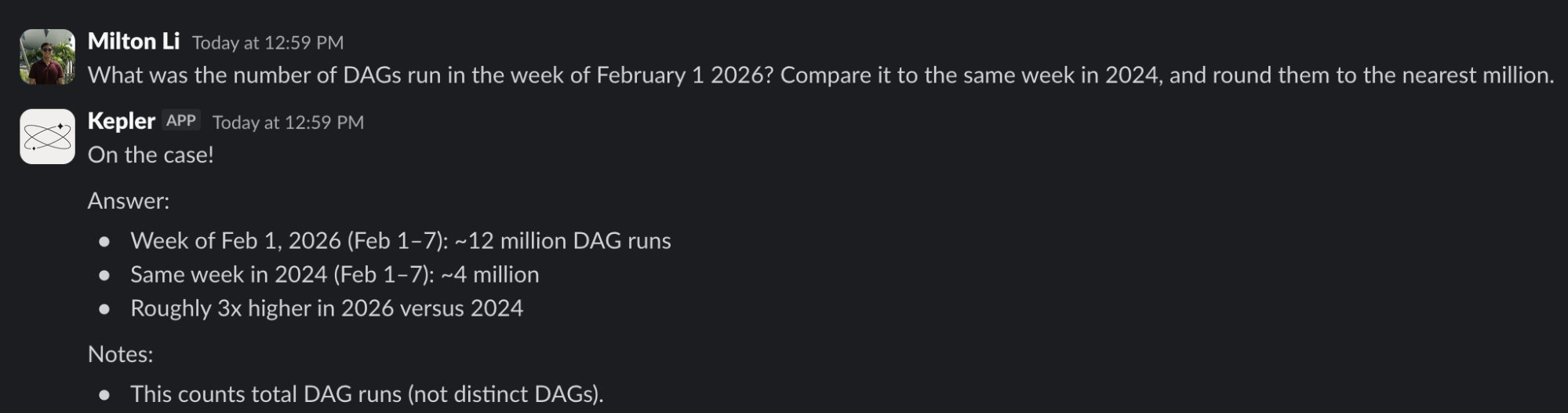
Kepler's Impact
As more Astronomers started using Kepler, we saw a shift. People who previously wouldn't touch SQL began exploring metrics on their own. Conversations with the data team became more focused and higher-leverage. Follow-up questions built on shared context instead of starting from scratch.
Kepler didn't eliminate the need for data expertise. It amplified it by embedding our best practices, definitions, and hard-earned lessons directly into the discovery process. That's what made data feel accessible without making it fragile.
- Total unique users: 93 Astronomers (~1/3 of our company!)
- Queries answered: 3,416
- Most asked topics: Customer Usage and Performance, Financials, Feature Adoption, Customer Cost Deep Dives, Competitive Intelligence
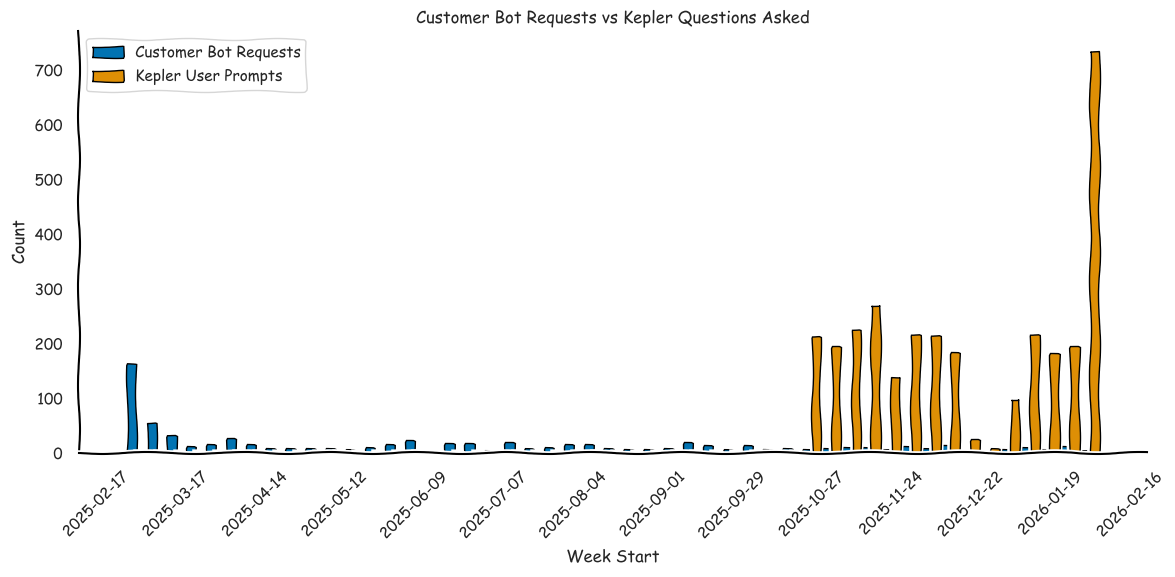
A year ago, before we had Kepler, the data team had built a customer bot to automatically share a small set of core customer metrics. It worked well for quick answers, but it broke down as soon as people wanted to ask follow-up questions or dig into specifics.
Kepler removed that ceiling. By letting people ask what they wanted and iterate freely, engagement grew far beyond what a predefined metrics bot could support.
From Kepler to Open Source
A couple months into building Kepler, we realized that the core components of this tool were not specific to Astronomer. The search problem, 'which table do I use?' and the lineage problem, 'what populates this?' are universal. Every data team with more than a dozen tables faces these challenges.
So we extracted the reusable patterns into our agent tooling repository, an open source toolkit for data engineers working with Airflow and data warehouses.
Part of the reason we created the open source repo is because we believe that almost any company with engineering resources and a data team should have the ability to build their own version of Kepler. Buying an "AI Data Analyst" off the shelf won't work unless you've laid the foundation of your data platform. We're focused on making the lives of data engineers better by making Astronomer the best and easiest way to run Airflow, manage your data platform, and make them agent-ready.
What's Next for Kepler
Kepler has already changed the way Astronomers interact with data, but we're far from done. Here's what we're doing next:
Rebuilding Kepler on Claude Code SDK
Kepler was originally built on a general-purpose LLM framework, which served us well for rapid prototyping and iteration. As the open source tooling has matured, we've been rebuilding Kepler using our open source project on top of the Claude Code SDK. Claude Code's agent infrastructure gives us a more robust foundation for tool orchestration, context management, and multi-step reasoning. Building on Claude Code allows us to focus on providing the agent with the unique capabilities enabled with Astro.
Iterating on Playbooks
Playbooks are powerful because they capture what worked at a specific point in time, but data platforms evolve. A playbook written six months ago might reference a table that no longer exists or use an outdated methodology. We're building automated sweeping that periodically review and update playbooks against the current state of the warehouse. Keeping memory up-to-date is especially important at our scale, where the warehouse is constantly evolving.
Automating Kepler Insights
The current model for executing Kepler relies on the user to ask questions to get insights–instead we want to flip this model to allow the agent to generate and surface insights to the user on its own. This shifts the work of uncovering important insights from users to agents that can run 24/7 and deliver results via Slack (or any other channel) automatically.

Get started free.
OR
By proceeding you agree to our Privacy Policy, our Website Terms and to receive emails from Astronomer.