Editor’s note: This post was originally published on April 22, 2025, and was updated in November 2026, to include resources for upgrading from Airflow 2 and information on recent Airflow 3.x releases.
Apache Airflow® 3 has arrived, marking a transformative milestone in the 10 year history of one of the world’s most popular open source projects, trusted by more than 77,000 organizations globally. Over the past decade, Airflow has grown into the global standard for data orchestration, empowering data teams worldwide to programmatically author, schedule, and monitor workflows with precision and scalability.
Now, with its biggest release yet, Airflow 3 reimagines data orchestration for the AI era with greater ease of use, stronger security, and the ability to run tasks anywhere, at any time. This release brings highly requested community-driven features like DAG Versioning, event-driven scheduling, a redesigned modern UI, and high-performance backfills. The significant improvements to Airflow’s backend code structure are the driving force behind this major release: Airflow 3 has a new distributed architecture that decouples task execution from direct metadata database connections, allowing for remote execution while enhancing security and operational agility for your mission-critical data pipelines.
In this post, we’ll walk you through the context of why this major release is so important for Airflow users, an overview of the most important new features, key steps to get started, and an overview of the minor releases since 3.0. If you’re ready to get started with Airflow 3 now, the Practical Guide to Apache Airflow® 3 provides step-by-step instructions, real-world examples, and code snippets to help you implement new features in production.
Why make a major release now?
A lot has changed in the data ecosystem since Airflow 2.0 was released in 2020. Since then, data teams have gone from managing mostly ETL and ELT workflows that provide data for internal decision making and dashboards, to powering business-critical applications and data products with increasingly complex pipelines. Airflow has exploded in popularity as the use cases it supports expanded. In fact, in 2024 Airflow was downloaded more times than all previous years combined!
While Airflow has continued to evolve in the past four years with minor releases from 2.1 through 2.10 bringing big features like dynamic task mapping and datasets, the rise of generative AI and other new use cases necessitated a fundamental change in Airflow’s architecture. The 2026 State of Apache Airflow® report, based on the largest data engineering survey to date, reflects this evolution: > 90 % of users say Airflow is important to their business, > 85% say they plan to use Airflow more for revenue generating use cases over the next year, and 25% use Airflow for MLOps or GenAI use cases.
Technologies that sit at the center of a stack powering business-critical applications need to evolve quickly in order to help businesses stay competitive and to help developers stay productive. Airflow 3 is doing exactly that, designed to meet these demands with major improvements in both its architecture and functionality. Major releases also allow for breaking changes, giving the developers of Airflow the chance to clean up tech debt and make sure the project is leveraging the latest technologies. This ensures Airflow will be well positioned to enable organizations to handle large-scale and high-complexity data workflows that support everything from AI applications to mission-critical business processes for years to come.
With that context, let’s dive into some of the three key themes of this release, and how you can make the most of the biggest new features.
Easier to use than ever
One of the biggest benefits of an open source project like Airflow is that it is community-driven. Millions of global users and thousands of contributors get to help drive the direction of the project. And when developers in many different roles, working in different industries, and with different use cases and implementations reach consensus and consistently ask for the same things, those features get prioritized.
Some of the most widely requested community features to-date have been prioritized and developed for Airflow 3. Collectively they lead to a rethinking of the Airflow user experience. Whether you are an experienced Airflow user or new to the technology, features like DAG versioning, the new UI, and scheduler-managed backfills are designed to make you more productive and manage your pipelines more effectively.
Let’s look at some of these key features in more detail.
DAG Versioning
DAG versioning is one of the most highly requested and anticipated features of this release. Many developers (including Astronomer’s DevRel team!) have struggled with the phenomenon of removing a task in a DAG and losing all its history - according to the Airflow UI, it might as well have never existed. This simple scenario is just one of many common pipeline updates that can cause confusion, difficult troubleshooting, and in some cases even audit or compliance issues when there was no history of that change retained in Airflow.
DAG versioning solves these challenges in a simple and traceable way: each DAG run is tied to a specific snapshot of code, and versions of the DAG are maintained in the Airflow UI. Learn more in the Airflow 3.0 webinar.

This feature helps prevent confusion as DAGs evolve over time, speeds up troubleshooting for task failures that occurred in prior versions of the DAG, and aids in maintaining compliance requirements. Usage is simple: DAG versioning happens automatically with the local DAG bundle, just use the dropdown menu in the graph view to see previous versions of your DAG code. You can also configure a Git DAG bundle, which gives you more functionality like rerunning previous versions of the DAG. For Astro users, DAG versioning is available out of the box, with no configuration required. For more details, see our DAG versioning guide.
Backfills
Another frequently requested Airflow feature that was delivered in Airflow 3 is backfills, or rather, fully-supported backfills. Reliably re-processing historical or missed data is one of the most common needs when orchestrating data, but it can be surprisingly difficult and time consuming. Backfills were possible in Airflow 2, but they had to be triggered from the CLI, could easily be terminated if your session was lost (not fun if you’re backfilling hundreds or even thousands of DAG runs), and were not visible in the UI.
In Airflow 3, backfills are first-class citizens managed by the scheduler, triggered through the UI or API. You can monitor everything directly in the UI, and even pause or cancel jobs mid-run.

At Astronomer, we have seen some very clever workarounds to get better backfill functionality in Airflow 2, and even implemented some ourselves. But these approaches can be fragile, which is less than ideal for the large-scale historical recalculations often needed for use cases like machine learning retraining or data integrity checks. Now, you can have confidence that your backfills will run consistently, even if they take hours or days to complete. For best practices on using Dag versioning and backfills in Airflow 3, check out our deep dive webinar, Optimizing your Airflow Developer Experience: Exploring Dag Versioning and Backfills.
UI modernization
Every Airflow release, major or minor, comes with UI updates. But the refresh in Airflow 3, which brings a modern, React-based UI, is the biggest in Airflow’s history. The key takeaway with this update is ease of use: for experienced users, everyday tasks are smoother and faster, and for new users, the UI is less complex and more intuitive.

One of the UI changes we’re most excited about is easier access to task logs. Checking the logs, especially of a failed task, is one of the most common actions Airflow users take. In Airflow 2, this took multiple clicks: into the DAG, into the task instance, and then the logs tab. In Airflow 3, only one click is needed, and failure logs are shown in the DAG overview.

We’re also pretty excited about the new dark mode, which you can see in the gif above. Dark mode got a soft launch in Airflow 2.10, but is now officially supported and fully built out. By the time you’ve reached late afternoon on Friday, your eyes will be thanking you.
Stronger security with task isolation
Airflow powers business-critical applications for the largest organizations in the world–including those in industries that manage sensitive data like finance and healthcare–so its security posture is paramount.
One of the most consequential enhancements in Airflow 3 is the decoupling of task execution from other Airflow system components, which has a primary benefit of greater security. Rather than having worker processes write directly to the Airflow metadata database, tasks call an API server to receive and report job statuses.
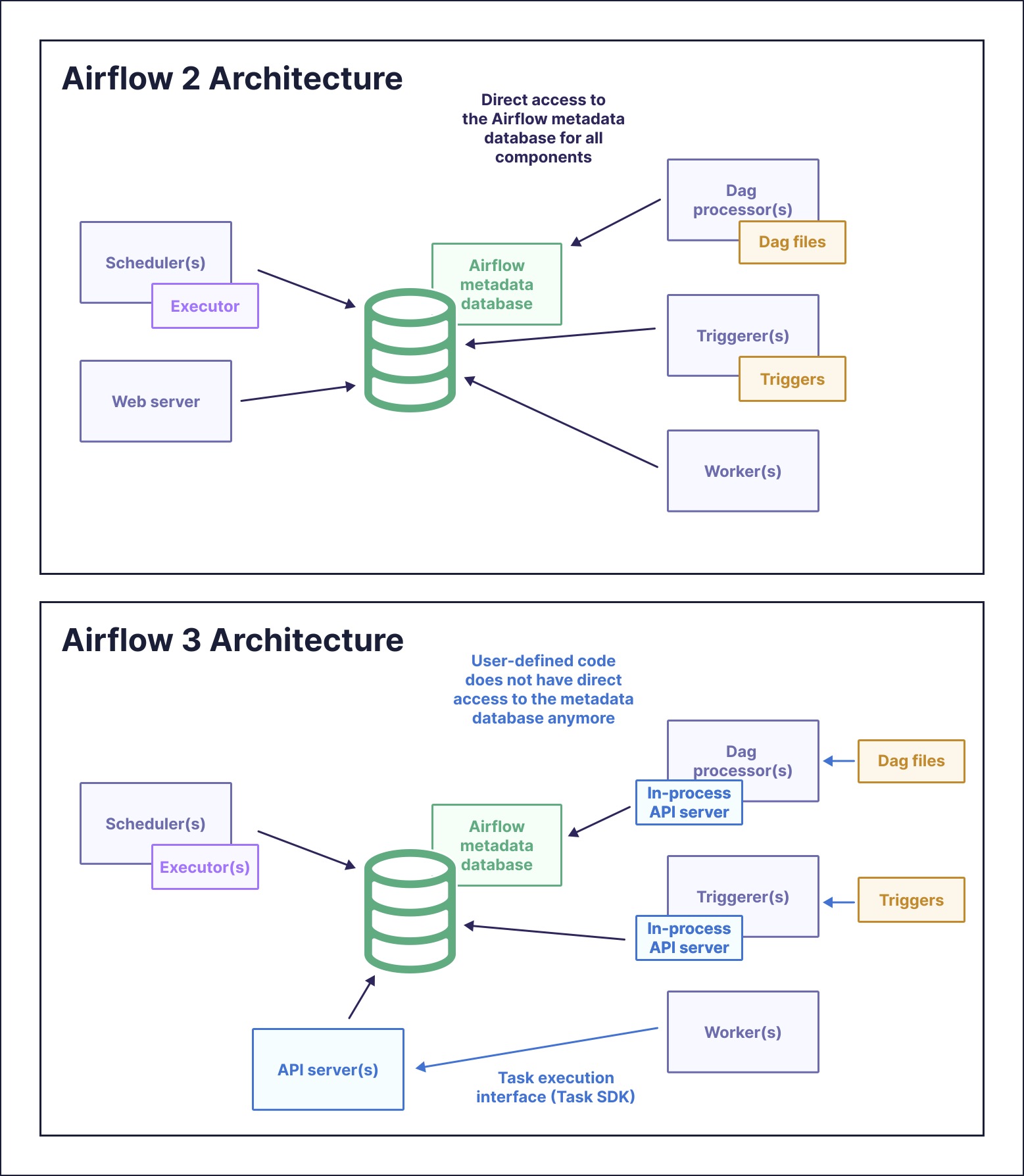
By removing direct metadata database access from worker processes, Airflow 3 sharply reduces potential vulnerabilities. Instead of granting broad privileges to each worker, you can enforce minimal privilege via secure API calls that are easier to monitor and audit. This is a foundational under-the-hood architectural change that lays the groundwork for a host of new capabilities, including the ability to run tasks anywhere.
Run anywhere, at any time
With task execution decoupled from Airflow system components, Airflow 3 opens the door to remote execution and event-driven scheduling. This broadening of how Airflow DAGs can run supports data teams working with global, heterogeneous data environments. Airflow has long been known for its extensive flexibility, but with the ability to run your pipelines anywhere, at any time, you’re free to implement any use case.
Remote execution
Remote execution in Airflow 3 enables tasks to run securely in environments outside of where your Airflow infrastructure lives. Situations where you might want to use remote execution include running tasks that need access to/use sensitive data that cannot leave a secured environment, such as an on-prem server, or running tasks that require specialized compute, for example, a GPU or TPU machine to train neural networks. When using remote execution, only the information essential for running the task, such as scheduling details and heartbeat pings, is available to Airflow system components; everything else stays within the remote environment.
There are two ways you can leverage remote execution in this release:
- Users working with open source Airflow can choose the EdgeExecutor for their Airflow instance. This executor is part of the Edge provider package, so make sure that is installed in your environment.
- Astro customers can use Remote Execution Agents. This allows tasks to run in user-managed hardware or private clouds with only outbound connections to Astro’s Orchestration Plane. For a technical deep dive into remote execution architecture and security benefits, watch our Remote Execution and Task Isolation webinar. For implementation details, see the Remote Execution configuration guide.
With remote execution, sensitive data stays local, making it an ideal choice for highly regulated industries or multi-regional teams.
Assets and event-driven scheduling
Now that your tasks can be run anywhere, another key axis of control is when they will run. Airflow 2 already came with a variety of scheduling options beyond simple cron-based time schedules. Datasets in particular, originally introduced in Airflow 2.4, provided a simple way of creating cross-dag dependencies that were data-aware, meaning your DAGs ran when the data they needed was updated, not based on a guess of what time that would happen.
Airflow 3 brings the next evolution of data awareness with assets, an expansion upon the foundational feature of datasets. An asset is a collection of logically related data, and the asset-oriented approach to creating pipelines in Airflow 3 allows you to write DAGs by defining the desired asset in a function, decorated with @asset. Assets can have a name, URI, and any extra information, and functions can return multiple assets. The benefit here is DAGs that are built around the movement of your data, making them more efficient, and easier to write and understand .
from airflow.sdk import asset


@asset(schedule="@daily")
def raw_quotes():
    """
    Extracts a random set of quotes.
    """
    import requests

    r = requests.get(
        "https://zenquotes.io/api/quotes/random"
    )
    quotes = r.json()

    return quotes
Built on top of the new asset class is the concept of asset watchers, which continuously (and asynchronously) check whether a message queue receives any messages. This is the most powerful option for event-driven scheduling in Airflow to-date! 3.0 will include full support out of the box for Amazon SQS, and now that the groundwork is done, other message queues will likely be a fast-follow in future releases. To learn how to build event-driven workflows in production, watch our webinar on building event-driven workflows with Apache Airflow. For more details on implementing asset-centric pipelines, check out our guide.
Support for Inference Execution
Inference execution is the process of using a trained machine learning (ML) or artificial intelligence (AI) model to make predictions, decisions, or solve tasks based on new, unseen data. This process occurs after the model has been trained and is ready for deployment in a production environment. Inference execution is a critical phase in the ML lifecycle, as it represents the actual application of the model to solve real-world problems and generate actionable insights from new data.
Event-driven scheduling, described above, enables on-demand execution of inference tasks without being constrained by predefined schedules. Additionally, Airflow 3 removes the unique constraint on a DAG run’s logical date, which supports inference execution use cases by allowing for simultaneous DAG runs. This is particularly useful for scenarios where multiple inference requests need to be processed concurrently. To explore how to orchestrate any AI model with Airflow, check out A Data Engineer’s Guide to AI Orchestration with Apache Airflow®.
Get started
There is far more in Airflow 3 than we can cover in a single blog post, and one of the best ways to learn more is to try it out for yourself!
Astro is the best place to run Airflow
Whether you are just wanting to play around with the new release or are ready to use it in production, the easiest way to get started is to spin up a new Deployment running 3.0 on Astro. If you aren’t an Astronomer customer, you can start a free trial with up to $500 in free credits.
Astronomer was a major contributor to the 3.0 release, driving implementation of some of the big features described here like task isolation, DAG versioning, and the updated UI. We always offer day-zero support for new releases on Astro, because we want Airflow users to get the latest and greatest from the project right away. Today, Astro is the only managed Airflow service where you can run Airflow 3, giving you access to all of the new features, support from the team that is developing those features, and without having to worry about managing your Airflow infrastructure.
Upgrading and other resources
As with any major software update, upgrading is a process. There are breaking changes you’ll need to be aware of, and in order to upgrade your existing Airflow Deployment, including on Astro, you will need to be on at least version 2.6.2.
Astronomer has you covered through every stage of your migration from Airflow 2.X. We provide multiple resources to help with your upgrade: start with our upgrading guide to understand the breaking changes, reference the upgrading eBook for in-depth, step-by-step upgrade instructions, and watch Airflow experts demo how to upgrade to Airflow 3 in production with real lessons learned and tips you can use right away.
Conclusion
We are thrilled for this giant leap forward for the Airflow project, and are so thankful to the entire Airflow developer community for their work in delivering this release. As we’ve described in this post, many of the changes in 3.0 lay groundwork that will be built on significantly in releases to come. While recognizing this huge milestone, we’re also excited for what’s next.
10 years ago, Airflow was used almost exclusively for internal dashboards and running it reliably often required frequent manual intervention. Today, Airflow is powering everything from production AI and MLOps workflows to continuous compliance in highly-regulated industries to sophisticated revenue-generating solutions that are driving entire businesses. We can’t wait to see what data teams are able to build on the incredible new foundation of Airflow 3!
Since Airflow 3.0, a steady cadence of minor releases has added capabilities like human-in-the-loop approvals, asset partitions, durable execution, and ongoing UI enhancements. Watch our Airflow 3.x release webinars for a deep-dive into each feature:
- Airflow 3.0 marked the beginning of an exciting new era with Dag Versioning, Backfills, task isolation, remote execution, and more.
- Airflow 3.1 introduced Human in the Loop for interactive approvals and Expanded plugins interface.
- Airflow 3.2 brought asset partitions, updated integrations, and UI enhancements.
- Airflow 3.3 introduced durable execution for data and AI workloads, Task State Management, and Pluggable Retries.
- Airflow 3.4 (coming December 2026) will bring loops, Dag folders, custom task colors, and additional innovations.
Ready to go deeper on Airflow 3? Build your skills with free courses at Astronomer Academy, then watch the Airflow 3 Certification Crash Course to prep for the official Airflow 3 Fundamentals exam.