When people ask me why Airflow is still the most widely used orchestrator after more than ten years, my answer usually comes down to the community. A project this old could easily have settled into maintenance mode. Instead, Airflow development has actually accelerated, delivering a new minor release every few months since 3.0. That frequent release cadence is a big part of why Airflow has kept up with the times and can take on new types of workloads as they evolve. Right now, of course, the biggest new type of workload is AI.
At their core, AI workflows often aren’t so different from the pipelines data engineers have always built: get some data, do something with it, pass the result somewhere else. But when you get into a nuanced implementation, they require some new patterns and capabilities. An LLM output might need several rounds of revision before it's considered good enough, an agent might need a human to approve a tool call, and the code that runs the agent might not be written in Python at all. Airflow 3.4, which was released on November 6th, continues the momentum in the project to address these new needs (with functionality that, I might add, is also helpful for a variety of other use cases). Task loops, the headline feature in 3.4, let you repeat a set of tasks during a Dag run until a condition is met. Full Dags can now be written in TypeScript, Go, or Java. And the Common AI provider, which is now at version 1.0 as of a couple of weeks ago, gives you operators and toolsets built specifically for LLM and agent tasks.
We’ll go through those features, as well as the other highlights of 3.4, in the rest of this post.
Task loops (AIP-111)
Before we get into when and how to use task loops, let’s address the (small) elephant in this release: are Dags not DAGs anymore? Data pipelines in Airflow have always been called “DAGs” (or more recently “Dags”), which comes from the mathematical term “directed, acyclic, graph” after which Airflow pipelines were modeled. Of course the “A”, acyclic, means essentially “no loops”. But the transition from using the acronym to proper noun “Dag” happened in the Airflow project some time ago, to reflect the fact that Airflow has evolved well beyond the literal data structure implied by a directed, acyclic, graph (even features like dynamic task mapping technically break the DAG model).
The purpose of having an acyclic component to the data pipeline model in Airflow was to prevent a pipeline that by definition would run in an infinite loop. Task loops actually don’t break this paradigm (which we’ll get into below), but in any case, savvy data engineers may point out that this rule was never fully enforceable; nothing except good sense would prevent you from writing an infinite loop within your @task Python code. All that to say, Dags are still called Dags, but we encourage you to think of them as data pipelines and not worry about any underlying mathematics or lack thereof.
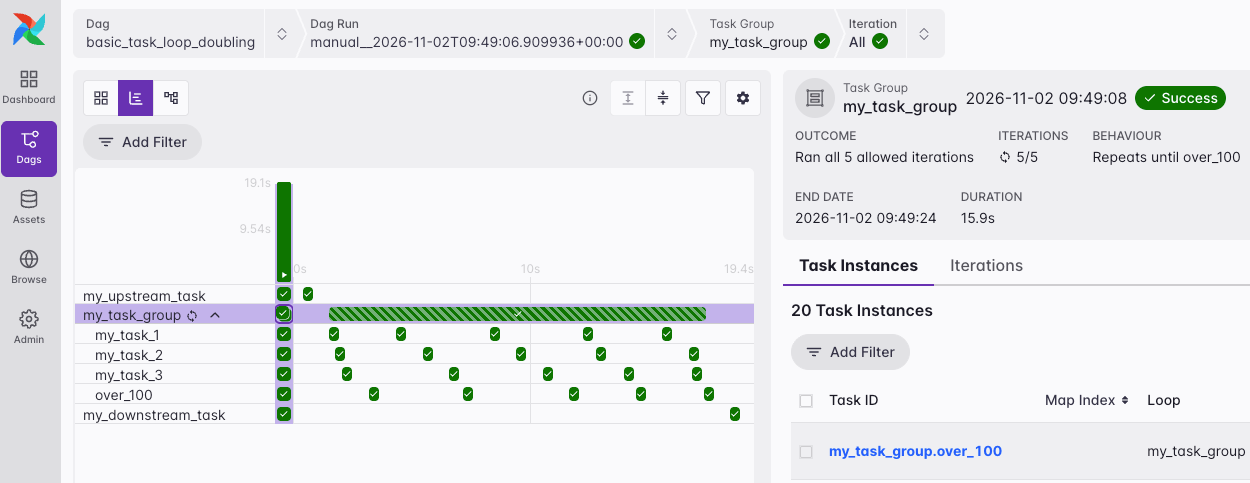
Now that that’s out of the way, what exactly is this feature? Task loops allow you to run the tasks in a task group repeatedly during a Dag run until a certain condition is met or a maximum number of iterations have been reached. Those latter two guardrails should keep you from accidentally running an infinite loop in your Dag. Good use cases for this feature include:
- Improving an LLM output over several iterations: e.g. one task generates a draft, another evaluates it, and the loop repeats until the result passes the evaluation.
- Processing nested data one level at a time, for example a folder tree or parent-child records, where each iteration uses the IDs returned by the previous one.
- Processing a large dataset in chunks, using the offset or cursor returned by the previous iteration, until the entire dataset is processed.
- Training a machine learning model, where each iteration trains the model for one or more epochs and evaluates it, until the validation loss stops improving or a target metric is met.
Task loops are easy to implement. Simply add the .loop() method to your task group function call. You must define a max_iterations, and can optionally define an until function with logic on when to complete the loop.
In the following example, a task group containing three tasks is repeated until a number that is doubled in each iteration exceeds 100 or the loop has run five times.
from airflow.sdk import dag, task, task_group, chain


# function for the until condition
def over_100(*, loop):
    loop_result = loop.result["doubled_number"]
    print(f"Loop result: {loop_result}")
    return loop_result > 100  # Loop stops if True


@dag
def basic_task_loop_doubling():

    @task
    def my_upstream_task():
        import random

        return random.randint(1, 10)

    @task_group
    def my_task_group(my_number):
        @task
        def my_task_1(my_number, *, loop):
            return my_number if loop.index == 1 else loop.previous["doubled_number"]

        @task
        def my_task_2(my_number):
            print(f"Still looping, the number is: {my_number}")

        @task
        def my_task_3(my_number):
            return {"doubled_number": my_number * 2}

        _my_task_1 = my_task_1(my_number)
        _my_task_2 = my_task_2(my_number=_my_task_1)
        _my_task_3 = my_task_3(my_number=_my_task_1)

        # this dependency is needed because looped task groups need a singular final task
        chain(_my_task_2, _my_task_3)

    @task
    def my_downstream_task(my_results):
        print(my_results[-1])

    _my_upstream_task = my_upstream_task()

    _my_task_group = my_task_group.partial(my_number=_my_upstream_task).loop(
        max_iterations=5, until=over_100
    )

    _my_downstream_task = my_downstream_task(_my_task_group["my_task_3"].output)


basic_task_loop_doubling()
Multi-language updates and new TypeScript SDK (AIP-85)
Airflow has been building a foundation to allow users to write Dags in languages other than Python since the 3.0 release. In Airflow 3.3, we got the first language Task SDKs, for Java and Go. With them, you could write the logic of individual tasks in either language. A Python Dag declared those tasks with @task.stub, and a task handler in Java or Go ran the code. For teams with existing Java or Go code, this was a big step, because it meant they could orchestrate that code with Airflow without rewriting it in Python or using a more complex method like the KubernetesPodOperator.
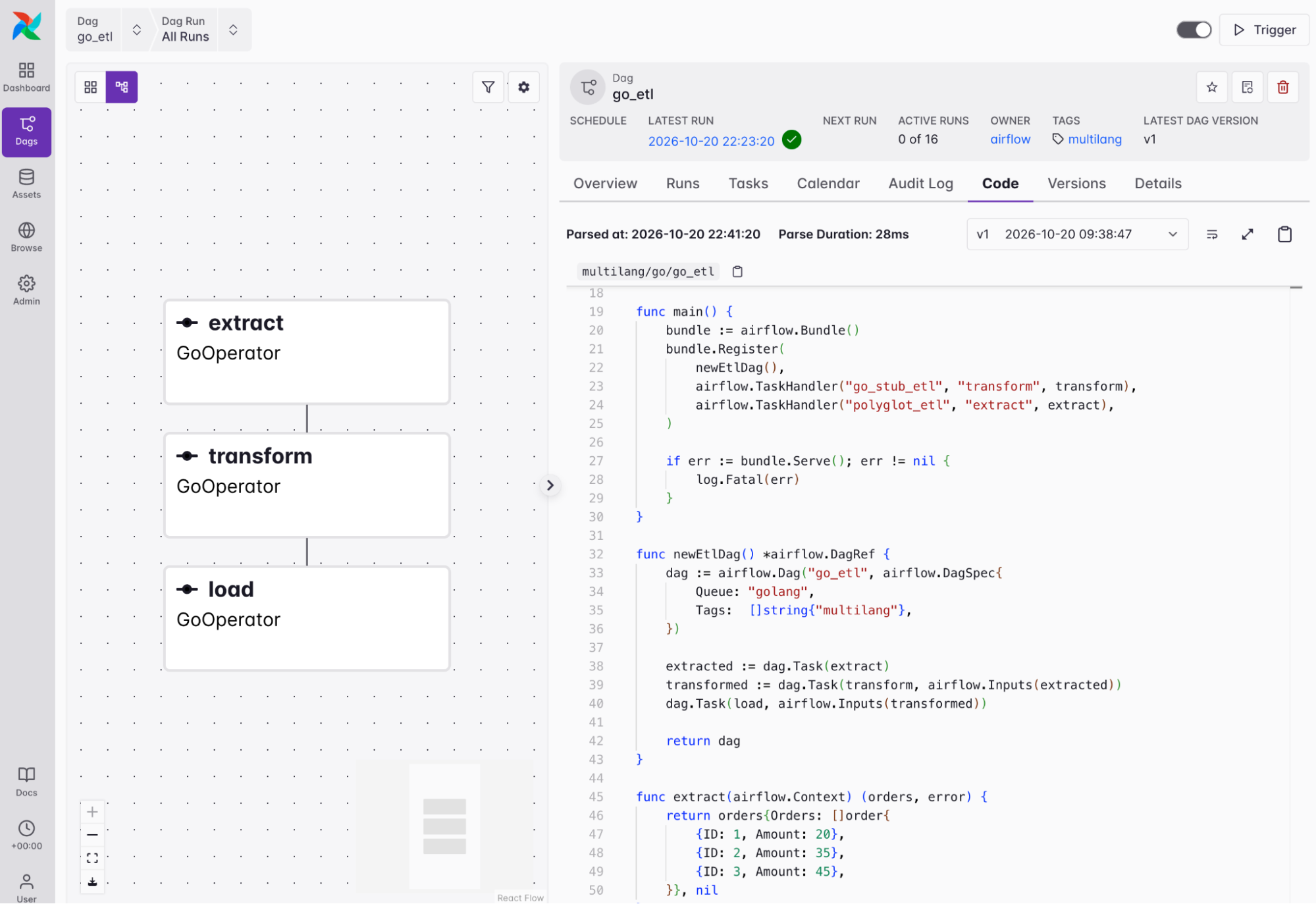
Airflow 3.4 takes this a step further: you can now write the whole Dag, including the schedule, tasks, and dependencies, in Go or TypeScript, with no Python file involved, with support for full Java Dags coming soon. Under the hood, a new Dag Importer lets the Dag processor read Dag files that aren’t Python. The language SDK builds your Dag into a single file (a Go executable, a Java jar, or a TypeScript .min.mjs file), you put that file in your Dag bundle, and Airflow schedules the Dag and shows it in the UI like any Python Dag.
The TypeScript SDK in particular ties into the AI orchestration theme of this release. A lot of the code that calls LLMs and runs agents is written in TypeScript (the OpenAI, Anthropic, and Vercel AI SDKs, LangChain.js, and Mastra all support it), and the teams who write that code aren’t always the same teams who own the data pipelines. If your agent code is already written in TypeScript, you can now schedule and orchestrate it with Airflow.
If you’ve written TaskFlow Dags in Python, a TypeScript Dag will look pretty familiar. Here is a simple ETL example:
interface Order {
  id: number;
  amount: number;
}

interface OrderData {
  orders: Order[];
}

const dag = new Dag("typescript_etl", { tags: ["multilang"], queue: "typescript" });

const extract = dag.task(function extract(): OrderData {
  return {
    orders: [
      { id: 1, amount: 20 },
      { id: 2, amount: 35 },
      { id: 3, amount: 45 },
    ],
  };
});

const transform = dag.task(function transform({ data }: { data: OrderData }): number {
  return data.orders.reduce((sum, order) => sum + order.amount, 0);
});

const load = dag.task(function load({ total }: { total: number }): void {
  console.log(`Total order amount: ${total}`);
});

load({ total: transform({ data: extract() }) });

await new Bundle(dag).serve();
dag.task turns a function into a task, and the task ID is the function’s name. Like in a Python Dag, passing the result of one task call into another sets the dependency and passes the value between tasks as an XCom.
Here’s an another example of that same Dag, written in Go, in the Airflow UI:
Stub tasks are still available too, and they now support TypeScript. They’re the way to go if your Dag needs features that TypeScript Dags can’t express yet (like assets, or setup and teardown tasks), or if you want to mix Python tasks with tasks in other languages in one Dag. Note that the Dag Importer and all of the language SDKs are experimental in 3.4, so the APIs may change.
For full examples in Go, and TypeScript, including how to configure the coordinators and run them on Astro, see our guide.
Common AI provider 1.0 release
While technically not part of Airflow 3.4, the Common AI provider is one of the biggest pieces of the ecosystem making Airflow a great choice for orchestrating AI workflows, and just a couple weeks ago it released version 1.0.0, moving from mostly experimental to a stable part of your production toolbox (note that some newer features are still considered experimental, and they are marked in the docs.
Importantly, the provider now supports Airflow 2.11 as well as Airflow 3, so if you haven’t upgraded yet you can still start using it. In addition, here are some of the biggest additions in 1.0:
- Support for more agent frameworks. Common AI toolsets now work with the OpenAI Agents SDK, Anthropic’s tool runner, Strands, and Google ADK. You can keep the framework you already use and get Airflow connections, guardrails, and observability for your tools.
- Rebuilt durable execution. With durable=True on AgentOperator, a retried agent task replays the model and tool calls that already finished instead of running them again. This is now built on a new AirflowDurability capability, and it works with code mode. Before a retry, Airflow lists the tools that will run again.
- Approval for tool calls. A person can approve an agent’s individual tool calls before they run. You can define which tool calls require approvals and which do not.
- More sandbox backends. SandboxToolset can now be used with OpenSandbox, OpenShell, Islo, and Boat backends, and Modal gets a dedicated provider with a ModalHook and connection type. A sandbox toolset can attach to a sandbox that another task provisioned, and files the agent builds in a sandbox can be exported to object storage.
- Usage budgets that count across retries. On Airflow 3.3+, usage_limits adds up usage from every attempt of a task instead of giving each retry a fresh budget, and spend from failed runs is counted too. The AgentOperator also caches repeated prompts by default if the model provider supports caching and reports cache token counts in its usage XCom.
- New and safer toolsets. ObjectStorageToolset lets agents read files on object storage. HookToolset can pin arguments to values the model isn’t allowed to choose. Secrets are masked in tool results before the model sees them. The SQL toolsets return a limited summary for very wide tables instead of every column.
- Model tab in the UI. The task instance page has a basic new Model tab for Common AI tasks, showing information like model type, number of tool calls, and tokens used.
This builds on earlier releases, which added features like human approval gates for LLM operators, sandboxed shell and file access for agents, durable agent execution failover across model providers, LLM-backed retry policies, and OpenTelemetry tracing. Overall, the Common AI provider has come a long way in the past six months, significantly expanding how easily Airflow can be used for AI orchestration.
Note: if you’re upgrading from Common AI 0.x, read the changelog first. 1.0 includes several breaking changes.
Other notable features and improvements
As always with Airflow minor releases, there are many other new features and improvements included. Here are some of our highlights:
- Gracefully pause Dags by draining. Dags have a new draining scheduling state. When you drain a Dag, the scheduler stops creating new scheduled and asset-triggered runs but lets queued and in-progress runs finish. When the last one completes, the Dag moves to paused automatically.
- New AssetAndTimeSchedule timetable. This is a companion to AssetOrTimeSchedule that combines an asset condition with a time-based schedule, running a Dag once both are fulfilled.
- More flexible retry policies. Retry policies were added in 3.3, and 3.4 extends them. The new ChainRetryPolicy composes several policies and evaluates them in order. Retry policies can now also reschedule a task without using up one of its retries.
- Custom graph colors. The ui_color and ui_fgcolor attributes on operators and task groups color the graph view again, as they did in Airflow 2. Values can be hex codes, CSS color names, or theme tokens that adapt to light and dark mode.
- Dag version diffs. Airflow can now compare serialized versions of a Dag, which shows you what changed between two versions.
- Plugins scoped to specific Dags, tasks, and assets. Plugin tabs and views can be limited to the Dags, tasks, or assets they apply to. React plugins can now render in Dag and task overviews, and plugins can add or override UI translations.
- UI quality-of-life updates. These include a Mark as Skipped action for task instances, a slowest tasks chart on the Dag Overview, a recent configurations dropdown in the Trigger Dag form, and a user settings page for UI defaults that apply across pages. The Dags list now has preset filters and multi-column sort, and the Connections list has a Duplicate action.
Of course this list is non-exhaustive, and there may be other things in 3.4 that are important for your team or use case. Always read the release notes!
Get started
Whether you just want to test some of the new features or run 3.4 in production, the easiest way to get started is to spin up a new Deployment on Astro. If you are not yet an Astronomer customer, you can start a free trial.
Astronomer contributes heavily to OSS Airflow, including for this release, and Astro is the first managed Airflow service to support 3.4. That means you get access to the latest features right away, with support from the same team that is actively building Airflow.
If you are still on Airflow 2 (which is now past end of life), check out our upgrading ebook for help getting to Airflow 3.
Wrapping up
In summary: Airflow keeps up with new types of workloads because the project keeps moving. Each of the big features in 3.4 addresses a pattern that shows up in AI workflows, whether that’s an LLM output that needs another pass, agent code that’s written in TypeScript, or a tool call that needs a person to sign off before it runs. But none of them are only useful for AI. Task loops work just as well for paging through an API or training a model until it converges, and plenty of teams have Go or Java code they’d like to orchestrate without wrapping it in Python. Regardless of the type of workflow you’re orchestrating, we’re excited to see what you will build with 3.4.
As always, we owe a huge thanks to all of the Apache Airflow contributors who got 3.4 across the line. If you want to learn more about the release, you can check out the full release notes, and join us for our Introducing Airflow 3.4 webinar where we’ll give you a full overview and live demo of new features.
