Durable execution with Apache Airflow®
29 min read |
What happens when the machine running your task dies halfway through?
A worker starts a two hour Spark job and then dies. The Spark job keeps running, but the retry doesn't know its id, so it submits a second one. Now two jobs write the same table and you pay for both. Or an agent makes nineteen model and tool calls and the twentieth times out, and the retry pays for all nineteen again.
If you've run Airflow for a while, you have probably already built a fix for this yourself. A table of offsets. A Variable holding a cursor. One task split into a "submit" task and a "wait" task, purely so a job id survives a crash. Each of those gives a task a little memory that Airflow didn't provide.
That memory has a name: durable execution. Apache Airflow has always been durable between tasks: clear a failed run and it picks up from the task that failed, not from the beginning. What it could not do was survive a crash inside a long running task. A job that died at minute forty of a fifty minute run started again at minute zero. With Airflow 3.3, that stops being a workaround. Airflow's durability boundary moves down a level, from between tasks to inside one, which is what long running tasks needed all along, AI agents included.
TL;DR: durable execution arrived already
Airflow was already durable between tasks. Airflow 3.3 makes it durable inside a task, so a long running one can resume from what it already finished instead of starting over.
And mostly, it is not something you build. It arrived in three tiers, and you benefit from the first one without changing your code!
Tier 1, the operators you already use. SparkSubmitOperator, DatabricksSubmitRunOperator, DatabricksRunNowOperator, BigQueryInsertJobOperator, SnowflakeSqlApiOperator, RedshiftDataOperator, GlueJobOperator and KubernetesPodOperator all record the running job's identity before they start waiting on it. If the worker dies, the retry reattaches to the job that is still running instead of submitting a second one and paying for both. The durable parameter defaults to True on Airflow 3.3, so this is something you get by upgrading.
That list is the expensive half of most platforms: the warehouse query, the Spark job, the Databricks run, the pod. And it keeps growing.
# The retry reattaches to the same pod instead of launching a second one.
KubernetesPodOperator(task_id="train_model", ...)  # durable=True is the default
Tier 2, durable flag for AI agents. For AI agents, durable=True caches each model response and each tool result as it completes, so a retry replays what finished and pays only for what did not. This one is opt in.
@task.agent(durable=True, retries=3)  # replays finished steps, skips the token bill
def investigate(product: str): ...
Tier 3, for your own code. When the long-running work is yours rather than an operator's, the store is a get and a set, scoped to the task instance and surviving every retry.
@task(retries=3)
def load(task_state_store=None):
    done = task_state_store.get("done", default=0)  # 0 on the first attempt

    for i, batch in enumerate(batches[done:], start=done):
        _load(batch)
        task_state_store.set("done", i + 1)         # the retry resumes here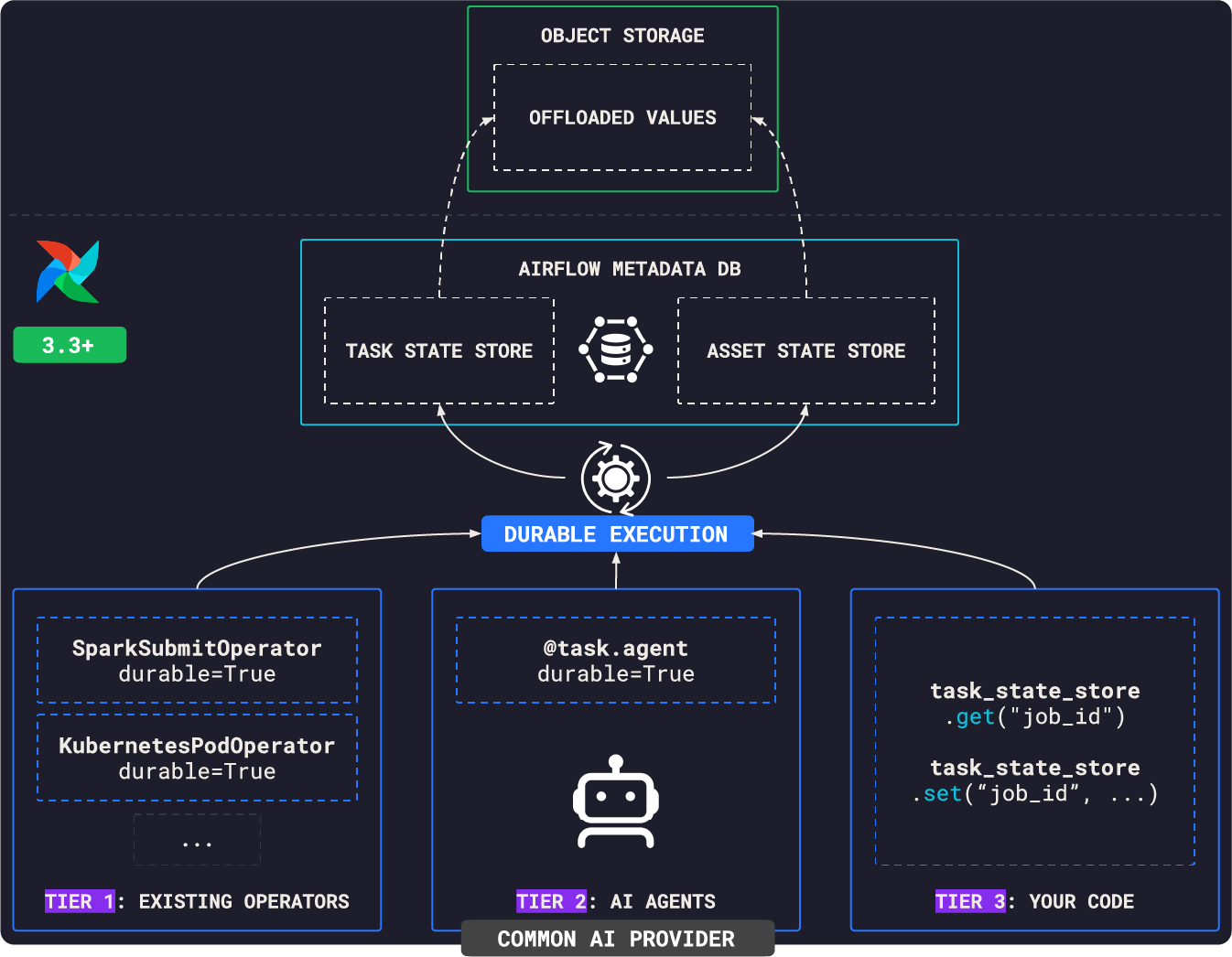
Generally, use cases for durable execution with Apache Airflow fall into three groups:
- Data engineering. Managing external jobs, such as Spark jobs, through failures. The offset table you’ve maintained for years or the watermark stored in an Airflow Variable.
- ML engineering. Recovering a 50-epoch fine-tuning run at epoch 38 by resuming from the last checkpoint that finished writing.
- AI engineering. Recovering an agent that fails on step 20 without rerunning all 20 steps.
The rest of this post discusses the details of each tier, and when to reach for which.
Things will break, durable execution makes that fine, even on Mars
Let's take a step back to understand the reason why durable execution is so valuable in certain orchestration scenarios.
Perseverance is NASA's Mars rover, rolling through Jezero crater since 2021, looking for signs the crater once held microbial life, and drilling rock cores to leave behind for a future mission to actually bring home. Nobody at NASA would ever put it this way, but it also runs one of the most expensive step-by-step sequences you'll find anywhere, and it turns out to be a good way to understand the value of durable execution.
Somewhere behind Perseverance's sample caching system sits a sequence that looks, if you squint, similar to a Dag. Position the drill. Abrade the rock's weathered surface. Blow the dust away. Photograph the fresh rock. Drill the core. Retract the bit. Seal the tube. Stow it in the rover's belly.
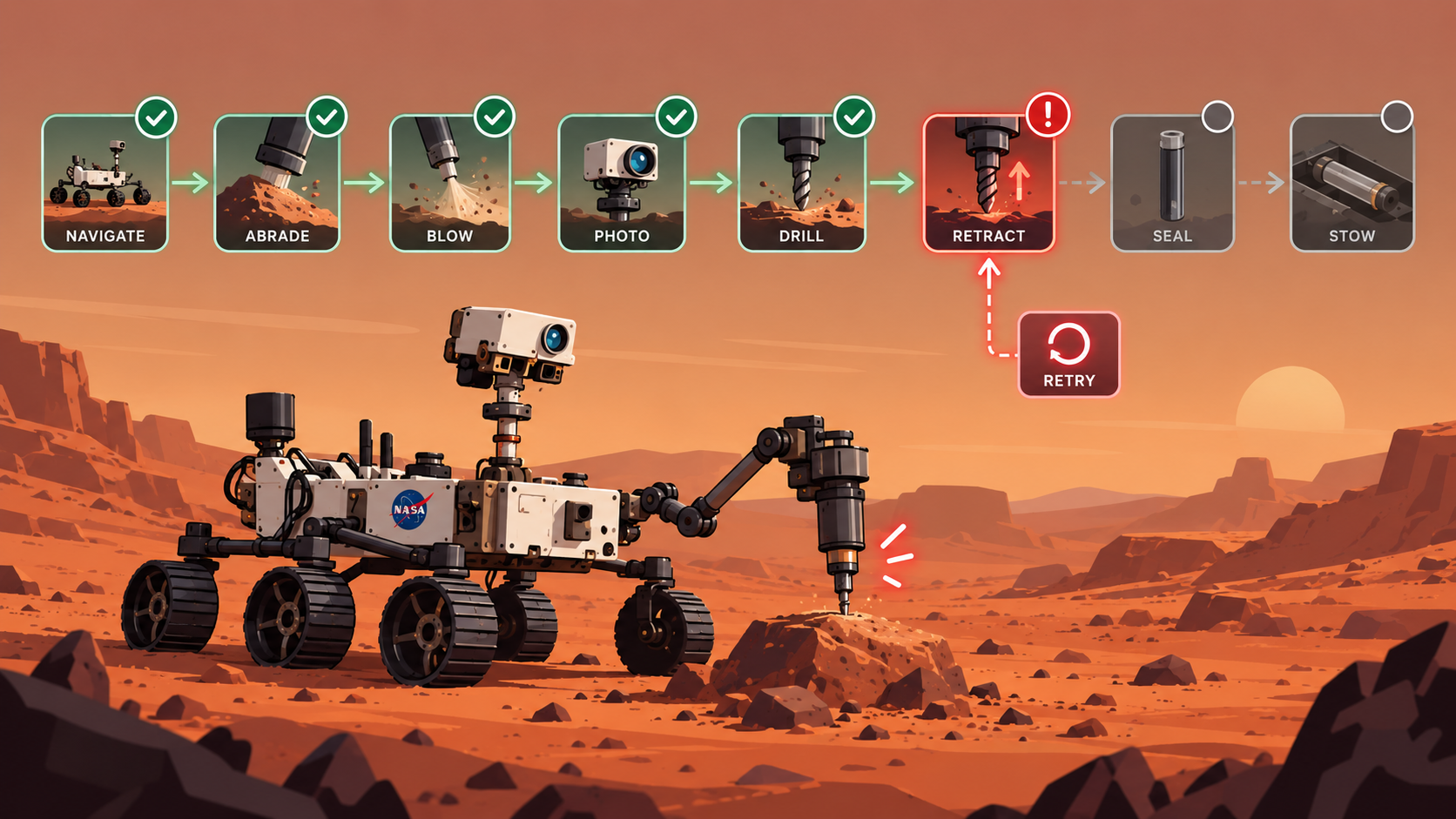
None of those steps is cheap to run twice and a round trip signal to Earth can take twenty minutes depending on where the planets are, so nobody's watching this live, let alone reaching in to fix a stuck step. Whatever runs onboard has to decide, on its own, whether to pick up where it left off or start over.
Now imagine that sequence really did run as a Dag, and step six, retracting the bit and sealing the tube, faults out partway through. A system with no memory of what already happened treats this exactly like nothing ran at all. Reposition. Re-abrade a rock surface that's already been disturbed. Spend another sol's power and schedule redoing the first five steps, on a bit that's already partially spent.
Things will break, but durable execution makes that okay. Work resumes in a new process, picking up from what already finished rather than starting again from nothing.
What durable execution actually means
The term gets used loosely, so it's worth being precise before going further. From a data engineering perspective, instead of the typical marketing story.
Temporal, the company most associated with popularizing this idea, describes durable execution as "crash proof execution". True, but it doesn't say how. A more useful description comes from independent research into how Temporal and Cadence actually work under the hood: state is never snapshotted, it's reconstructed by replaying an append only log of everything that happened. The workflow code has to be deterministic, meaning given the same history it always makes the same calls in the same order, because the whole system depends on being able to replay it and get the same answer.
Diagrid's engineering team adds another perspective: durable execution also requires something to reliably detect that a process has died, from outside that process, because "you cannot reliably tell a dead process from a slow one" from the inside. That's why this belongs in orchestration below your application code, not in a try/except block inside it.
Dominik Tornow, who spent two years as a principal engineer at Temporal before founding Resonate, strips it down further than any vendor page will. The defining property is "the ability to suspend on one process and resume on another process". No event log, no replay, no determinism requirement. Those are implementations of the property, not the property itself.
Put together, a working definition:
Durable execution is the property that a program interrupted on one process can resume on another, from the last outcome it managed to record rather than from the beginning. The crash is not made free. It is made proportional: you pay again for whatever was in flight when the process died, and for nothing that had already been confirmed.
Four places to put the boundary
Durable execution is a promise about recovery, not a single implementation. Systems differ mainly in where progress becomes durable: a whole function, a named step inside a function, a state in a state machine, or a task attempt.
| Approach | Examples | Recovery | Main constraint |
|---|---|---|---|
| Replayed orchestration code | Temporal, Azure Durable Functions | Run the orchestration code again and feed it results from its history | The orchestration code must be deterministic |
| Checkpointed steps in a function | Restate, Inngest, DBOS, Cloudflare Workflows | Invoke the function again, returning saved results at completed steps | Side effects belong in durable steps, and step identity must stay valid |
| Declared state machine | AWS Step Functions | The service advances stored state without replaying your code | Control flow is limited to the service's state machine language |
| Explicit task checkpoints | Airflow | A retry reads saved state or reconnects to saved external work | Code resumes only from state the task or operator actually recorded |
Those describe the interface a developer sees, not four separate implementations. The checkpointed-step systems replay functions too. They just ask you to mark the smaller units whose results have to survive.
One limit is shared by all four. None of them can make an external side effect and its own state update a single atomic write, unless the external system joins the transaction. A crash can always leave the durable execution system unsure whether the external call landed. Idempotency keys, stable job ids and status checks still matter everywhere. What differs is only where each design puts that uncertainty: replay systems at activity boundaries, state machines at task states, Airflow at task attempts and the checkpoints you pick inside them.
There's a another aspect that definition leaves implicit, and it matters more in orchestration than anywhere else.
Durability is not only a property of your program. It's a property of the systems your program is driving.
A Temporal workflow is mostly durable with respect to itself. An Airflow task usually isn't doing the work at all: it submits a Spark job, starts a pod, runs a query on a warehouse. What "resume" means is decided on the far side of that boundary. Reattaching to a Spark driver, reconnecting to a running pod and picking up a Python loop at record 8,001 are three different mechanics with three different failure modes, and no single abstraction covers them.
There's a second reason replay doesn't fit. Airflow tasks are not deterministic by default. Data tasks inspect whatever files and partitions exist right now. Training code shuffles batches and initialises weights randomly. Agent control flow depends on what the model just said. Turning each of those operations into a replayable activity would change how the task is written and deployed, which is a steep price for a Dag that mostly needs to remember one job id.
That's why what follows comes in two shapes rather than one. Operators that already know how to reconnect to the specific system they talk to, and a plain API for when the long-running thing is your own code.
One more perspective from my time as a data engineer: I spent years working on stream processing, and early system designs often got one distinction wrong: exactly-once versus at-least-once processing. The same distinction applies here. Durable execution means at least once, not exactly once.
The system guarantees a step will complete, not that it completes exactly once. If a step has a side effect (sending an email, charging a card, submitting a job) the caller still needs to make that side effect safe to repeat. Durable execution moves the remembering out of your code. It does not remove your responsibility for idempotency.
Temporal states "relatively few of the systems typically referred to as workflow engines actually provide Durable Execution." It's a fair line, and it's the one most often pointed at Airflow. It's also less damning than it sounds, because it measures the wrong thing.
Airflow has always been durable. Clear a failed run and it continues from the task that failed, not from the beginning. Every task boundary is a checkpoint, and has been for a decade. What Airflow did not have was durability inside a task. A task that died at minute forty of a fifty minute job started again at minute zero, because nothing it had accomplished in between was written down anywhere that survived.
So 3.3 is not Airflow becoming durable. It's Airflow moving its durability boundary down a level, from between tasks to inside one.
It also explains why XCom was never the answer, though plenty of teams tried. Airflow clears a task's XComs at the start of every retry, which is correct for passing data downstream and useless for surviving a crash. The gap that leaves is the reason task state exists at all.
Data orchestration's default tool now does intra-task durable execution too, for agentic workloads and classic data engineering alike.
AIP-103 gives Airflow a durable execution journal
With AIP-103, Airflow can now keep a journal. The journal comes in the form of two new tables in the metadata database: task_state_store and asset_state_store.
The task state store is a key value store scoped to one task instance, identified by dag_id, run_id, task_id, and map_index. It survives worker crashes and retries within the same Dag run. It includes a value column, an expires_at column that's null by default meaning "never automatically cleaned up," and a unique constraint on (dag_run_id, task_id, map_index, key), so a mapped task's hundred parallel instances each get their own private journal instead of sharing one.
The asset state store works differently. It's scoped to an asset, not a run, so it persists across runs and can be read from a completely different Dag than the one that wrote it. It has no expiry column at all. It only disappears when the asset itself is deactivated. That makes it the right home for a running watermark.
Task state store for durable execution
Both the task state store and XCom store small pieces of data attached to an individual task instance. The main difference is that Airflow clears XComs on retries, while task state entries persist.
The task state store has four methods, each with an async variant: get, set, delete and clear, alongside aget, aset, adelete and aclear for use inside an async task.
You reach it in two ways. In TaskFlow style, declare task_state_store as a parameter on the decorated function and Airflow injects it. Anywhere else, pull it out of the context as context["task_state_store"].
Values have to be JSON compatible: str, int, float, bool, list, dict. None is rejected with a ValueError.
The set method takes one keyword-only extra, retention, which can be:
- a
timedelta, expiring that long after the write NEVER_EXPIRE(fromairflow.sdk), or- omitted, which falls back to
[state_store] default_retention_days.
Note that it takes a timedelta, not a number of days, so retention=7 raises a TypeError. And the expiry timestamp is computed on the worker at write time, not by the server, so changing default_retention_days later does nothing to rows that already exist.
Having the run_id within the scope means the store survives worker crashes and retries within the same Dag run. However, the next run has a different run_id, so it starts with an empty store.
The task state store is for finishing the attempt you started, not for remembering last Tuesday.
map_index being in the scope means a mapped task's hundred parallel instances each get their own private journal, and clear() only clears the index that called it.
Here's the pattern in an example Dag:
@task(retries=2, retry_delay=timedelta(seconds=5))
def run_job(task_state_store=None, ti=None):
    job_id = task_state_store.get("job_id")
    if job_id:
        print(f"Try {ti.try_number}: reattaching to existing job: {job_id}")
    else:
        job_id = _submit_job()
        task_state_store.set("job_id", job_id, retention=NEVER_EXPIRE)
        raise RuntimeError(
            f"Simulated failure after submitting {job_id}. The next retry will reattach."
        )

    result = _poll_job(job_id)
    task_state_store.set("status", "complete")
    return result["rows_written"]
Behind the scenes
The task_state_store injected into your task function is an instance of TaskStateStoreAccessor, bound to the task instance's UUID and scope (dag_id, run_id, task_id and map_index). Every call on it goes through scoped execution API endpoints:
{GET,PUT,DELETE} /execution/store/ti/{ti_id}/{key}
DELETE           /execution/store/ti/{ti_id}
There's also a public REST API for task state store, meant for dashboards or debugging tools running outside a task, under /dags/{dag_id}/dagRuns/{dag_run_id}/taskInstances/{task_id}/state-store. The UI exposes the same entries on the task instance under the Storage tab, where you can add, edit, delete, and clear them by hand.
The pluggable backend, and why it matters more than it looks
The state store has a pluggable backend, and it's the least known thing about it. Anything subclassing BaseStoreBackend can be the storage layer.
There are two distinct places to swap it, and they behave differently:
[state_store] backendreplaces the persistence layer outright. Point it at object storage and reads and writes go straight there. Nothing lands in the metadata database, not even a reference.[workers] state_store_backendruns in the worker and offloads. The row still exists, and itsvaluecolumn holds either the JSON itself or a path pointing at the real payload. Thecommon.io state_store_objectstorage_thresholddecides which, and at its default of0everything offloads.
That matters for where this is going. A task-scoped journal in a metadata row is the right shape for a job id or an offset. It is the wrong shape for an agent's working memory, which is larger, lives longer, and has no reason to stop at the edge of the task or the Dag that created it. An agent spanning several tasks, or several Dags, needs its context somewhere those boundaries do not apply, and somewhere sized for it: object storage, say, rather than a TEXT column. The pluggable backend is what makes that a configuration choice rather than a rewrite.
Treat that as direction rather than a shipping feature. What exists today is the seam. It is worth knowing it's there, and it will have a strong impact on productionizing AI projects in the future.
Configuring the task state store
The most important setting is therefore the state store backend, which defaults to airflow.state.metastore.MetastoreBackend and persists task and asset state in the Airflow metadata database.
To enable object storage for task and asset state store, set state_store_backend in the [workers] section to airflow.providers.common.io.state_store.backend.StateStoreObjectStorageBackend, and set common.io state_store_objectstorage_path to the desired base location. The connection id is obtained from the user part of the URL, e.g. state_store_objectstorage_path = s3://conn_id@mybucket/task-state/.
| Config key | Default | What it controls |
|---|---|---|
[state_store] backend | airflow.state.metastore.MetastoreBackend | Swappable storage backend, must subclass BaseStoreBackend |
[state_store] default_retention_days | 30 | Age at which an unretained key expires, 0 disables time based cleanup |
[state_store] clear_on_success | False | Auto clears a task's state on success, does not touch asset state |
[state_store] max_value_storage_bytes | 65535 | Enforced on the public REST API only, worker writes are only warned about |
[workers] state_store_backend | empty | Worker side backend class. When set, only a reference reaches the Execution API and the metadata database |
[common.io] state_store_objectstorage_path | empty | Base location, connection id read from the user part of the URL |
Batch size, offload threshold and compression are tuning knobs rather than decisions, and are covered in the configuration reference and the object storage backend docs.
Asset state store for durable execution
The asset state store is essentially the same key-value interface, for a neighbouring problem.
The scope is an asset, not a run. State written by one Dag can be read by a completely different Dag on a completely different schedule. There's no retention parameter at all, and rows aren't subject to default_retention_days. The only automatic cleanup is an orphan sweep that removes rows once the asset itself is deactivated.
Access goes through injecting asset_state_store or getting it from the context via context["asset_state_store"], subscripted by the asset object, because a task can declare several inlets and outlets and Airflow won't guess which one you meant:
@task(inlets=[ORDERS], outlets=[ORDERS])
def load(asset_state_store=None):
    state = asset_state_store[ORDERS]
    watermark = state.get("watermark", default="2026-01-01T00:00:00+00:00")
    records = _fetch_records(since=watermark)
    state.set("watermark", datetime.now(tz=timezone.utc).isoformat())
    return len(records)
With exactly one concrete inlet or outlet you can skip the subscript and call get and set directly on the accessor. With more than one, that shorthand raises a ValueError. With none at all, touching context["asset_state_store"] raises a KeyError, which is how you find out the asset was never declared.
Where this gets more interesting: asset watchers
The watermark above is the small version of this. The larger one is event-driven scheduling. An AssetWatcher runs a trigger that watches an external source, a queue, an S3 prefix, an Iceberg table, and updates the asset when something arrives, which schedules the Dag that consumes it.
Those triggers run in the Triggerer, outside any task, so until 3.3 they had nowhere durable to keep their position.
In 3.3, BaseEventTrigger gained an asset_state_store attribute that the triggerer injects before run() is called, which gives a watcher somewhere to record how far it has read. The Iceberg trigger already ships this way, keeping a watermark so a restart resumes from the last commit it saw rather than rescanning the table, with a comment that could be this post's thesis: the watermark survives, the constructor argument only seeds the first run.
That is the same guarantee as everything else here, moved one layer out. A watcher's offset surviving a triggerer restart is the difference between replaying a queue and silently skipping whatever landed during the gap.
Go back to the definition: resuming from the last outcome that got recorded, rather than from the beginning. The task state store does exactly that. The asset state store does something related, it makes the next run cheaper rather than the current attempt survivable. It answers "where did we stop" across runs, not "did I already submit this job" inside one. A watermark is not crash recovery, but the reason a crash costs you one increment instead of a full reload.
What you already get for free
Before any of the API above matters, check whether you need it at all. A growing set of operators already do this for you, and on Airflow 3.3 they do it by default.
| Operator | Provider | Since | What it saves |
|---|---|---|---|
SparkSubmitOperator | apache.spark | 6.2.0 | Driver id, YARN application id, or Kubernetes driver pod |
KubernetesPodOperator | cncf.kubernetes | 10.20.0 | Pod name and namespace |
BigQueryInsertJobOperator | google | 22.3.0 | Job id |
DatabricksSubmitRunOperator, DatabricksRunNowOperator | databricks | 7.17.0 | Run id |
SnowflakeSqlApiOperator | snowflake | 6.15.0 | Statement handles |
RedshiftDataOperator | amazon | 9.33.0 | Statement id |
GlueJobOperator | amazon | 9.35.0 | Job run id |
LivyOperator | apache.livy | 4.6.0 | Batch id |
All of them take durable, and all of them default it to True on Airflow 3.3. The right hand column is the thesis in miniature: eight operators, eight different things worth remembering. A single abstraction was never going to cover that, which is why the common durable option replaced a drawer of operator-specific ones like reattach_on_restart and resume_glue_job_on_retry.
That list grows! The Airflow Registry carries a durable badge on the operators that qualify, which stays current in a way a blog post cannot. Below Airflow 3.3 the parameter is inert, so upgrading the provider alone changes nothing.
KubernetesPodOperator persists the running pod's name and namespace to the task state store before it starts waiting on it, then reconnects to that exact pod on retry instead of launching a second one. The behavior is activated via the durable parameter, which defaults to True since Airflow 3.3, and it supersedes the older reattach_on_restart, which is now deprecated. If you run KPO on 3.3, you have this already and you did nothing to get it.
SparkSubmitOperator does the same through ResumableJobMixin, from Spark provider 6.2.0 onwards, recording the Kubernetes driver status and reattaching rather than resubmitting.
The mixin is the general form. On retry it reads the persisted external id and branches three ways: if the job is still active it reconnects and keeps polling, if the job already succeeded it skips both submission and polling and returns the result immediately, and if the job failed it resubmits fresh. Its durable also defaults to True, which is worth noting because it's the opposite of the agent flag further down. For external jobs you opt out. For agents you opt in.
One footgun worth knowing before you set the flag. durable covers the synchronous path only. Every operator in that table except SparkSubmitOperator is also deferrable, and the operators branch on it directly:
def execute(self, context):
    if not self.deferrable:
        self.execute_resumable(context)   # the durable path
Set deferrable=True and the Triggerer already tracks the job across the wait, so durable does nothing at all. If you flip durable=True on a deferred BigQuery task expecting crash safety, you get the Triggerer's behaviour, which is usually what you wanted anyway, just not for the reason you think.
The workaround it replaces
A classic workaround before Airflow became durable, was to split the work into two parts. One task submits the job and pushes the id to XCom, and a second task, a sensor, polls until it finishes. EmrAddStepsOperator feeding EmrStepSensor is the textbook pair, and plenty of teams have hand-rolled their own version for whatever system they happen to run.
It works, but also has two costs that get underrated.
The first is ownership. A custom sensor is a piece of code with your name on it that has to keep working across Airflow upgrades, forever, for a problem that was never your business to solve.
The second is quieter and worse. A green submit task tells you the API call succeeded. It does not tell you the job succeeded. To know that you have to look at the sensor, which means anyone reading the Dag's history needs to know which of the two tasks actually has the answer. Whoever is on call has to know that too.
A resumable task collapses both into one. The task turns green when the external job actually finished, and the id survives a crash without an XCom hop in the middle.
Durable execution for data engineering
None of what follows is a new problem. Every team with a few hundred Dags has already solved these with workarounds.
The duplicate external job. A task submits a Spark job and polls it. The worker dies at minute forty. The retry submits a second job while the first is still running, and now two clusters are writing the same table and you're paying for both. There are several systems where this applies: a Spark job, a BigQuery query, a Kubernetes batch pod, an EMR step. Anything where the operator's real work is submit, poll, collect.
8,000 of 10,000 records. The run fails at record 8,001, the retry starts at one, and either you reprocess everything or you built an offset table years ago and have been carrying it ever since. Write the offset after each batch, read it back on retry, and that table stops being yours to maintain.
Page 901 of 1000. Same problem, different currency. A paginated pull against a rate-limited vendor API, where every retry re-spends quota you already paid for. Some of those quotas reset monthly, which turns one bad afternoon into a bad month.
The cursor living in an Airflow Variable. This is a classic workaround. An incremental load needs to know where the last run stopped, so the watermark goes into a Variable, or a Postgres table nobody documented, or the name of the last file written. Asset state store puts it on the asset itself, where the downstream Dags that care can read it directly.
Not knowing how far it got. A six hour task is running and the only signal you have is that it hasn't failed yet. Write progress as you go and it's readable through the REST API and the UI while the task is still running, without standing up a metrics pipeline for the sake of one number.
Durable execution for ML engineering
Fourteen hours into a fifty epoch fine tune, a training task on a preemptible GPU node gets reclaimed at epoch 38. Durable execution will save you a lot of time in this scenario.
Two rules cover almost everything here.
The store holds the pointer, not the payload. Weights, optimizer state and RNG state are gigabytes, and they belong in object storage or on a shared volume, which is where your framework already writes them. max_value_storage_bytes defaults to 65535. What goes in the task state store is the URI of the last checkpoint and the epoch it belongs to.
Record the pointer after the write returns, never before. A checkpoint file existing is not the same as a checkpoint being finished. A crash partway through a multi-gigabyte write can leave a file that a loader accepts without complaining. Writing first and recording second is what turns "there is a file" into "there is a checkpoint", which is the definition doing its work: the last outcome it managed to record.
@task(retries=3, retry_delay=timedelta(minutes=2))
def fine_tune(task_state_store=None):
    last = task_state_store.get("checkpoint")  # None on the first attempt
    model, start = _resume(last) if last else (_new_model(), 0)

    for epoch in range(start, 50):
        _train_one_epoch(model, epoch)
        uri = _save_checkpoint(model, epoch)   # returns once the file is written
        task_state_store.set("checkpoint", {"uri": uri, "epoch": epoch + 1})
That ordering is the same problem as the submit-then-persist race, with the same answer: write first, record second, and accept that the window between them is where you pay twice.
Whether you need any of this depends on your checkpoint path. PyTorch Lightning's last.ckpt and Hugging Face's resume_from_checkpoint=True already resume from a fixed directory with Airflow knowing nothing at all. The store earns its place when the path is not fixed, an MLflow run id or a timestamped folder, and when you want the epoch readable through the REST API and the UI while the job is still running. Over fourteen hours that is the difference between "it hasn't failed yet" and "it is on epoch 38 of 50".
Durable execution for AI engineering
This section uses the Airflow Common AI provider. For more information, have a look at our AI orchestration guide.
An agent task is where the cost of forgetting gets obvious fastest. A single @task.agent might make twelve model round trips and eight tool calls before it returns. A failure on the twentieth step and Airflow's retry re-runs all twenty. You pay the whole token bill a second time, wait out the whole wall clock a second time, and every tool that already did its job does it again.
The Common AI provider offers the durable=True flag on AgentOperator or @task.agent, which turns on step-level caching: each model response and each tool result is recorded as it completes, so a retry replays the finished steps and only makes live calls for the ones that never returned. It defaults to False, so this is opt-in.
In Common AI 0.7.0, that cache became the AIP-103 task state store on Airflow 3.3 and newer, with no configuration at all. Before 0.7.0 it still persists to ObjectStorage and you have to set [common.ai] durable_cache_path yourself, or the task raises a ValueError at runtime. The agent feature and the state store feature shipped separately and then grew into each other, which is worth knowing when you read older material about either one. Check the Airflow Registry to learn about the latest version of the provider.
Keep in mind, with no retries configured, durable=True buys you nothing, because nothing ever replays. Airflow's retry mechanism is still what makes a retry happen.
The following example orchestrates a durable AI agent using Airflow:
class Finding(BaseModel):
    # ...

@task.agent(
    retries=3,
    retry_delay=timedelta(seconds=10),
    llm_conn_id="pydantic_default",
    output_type=Finding,
    durable=True,
    enable_tool_logging=True,
    usage_limits=UsageLimits(request_limit=20, input_tokens_limit=60_000, output_tokens_limit=8_000),
    toolsets=[
        SQLToolset(
            db_conn_id="snowflake_default",
            allowed_tables=["customers", "bookings", "payments"],
            max_rows=50,
        )
    ],
    system_prompt="You are a revenue analyst who derives insights from sales data"
)
def investigate(product: str):
    return f"Review revenue across all planets for the product: {product}"
Before any step is replayed, its stored fingerprint is compared against the current request. For a model step that covers the model, the message history, the settings and the tools. For a tool step it covers the tool name, the arguments and the call id. If anything moved since the failed attempt, the entry is discarded, a warning is logged, and that step runs live.
Changing an LLM step invalidates the tool results that came after it, because re-running it produces fresh tool call ids. So editing a system prompt between attempts doesn't leave you with a half-replayed run stitched to stale tool output. Everything downstream of the edit collapses and re-runs. That's the right behaviour, and it's also the reason not to treat this as a cache whose contents you can predict casually.
What to reach for and when
The following table gives you a brief overview of the discussed features and when to reach out for them:
| Situation | Reach for |
|---|---|
| Passing a result to the next task in the same run | XCom, unchanged, this is what it's for |
| A task submits an external job and needs to survive a crash mid poll | Task state store |
| A value needs to persist across separate Dag runs, tied to a dataset rather than a run | Asset state store |
| A long training run needs to resume from its last confirmed checkpoint | Task state store, holding the checkpoint URI and epoch, never the weights |
| An agent makes several expensive LLM or tool calls per task | AgentOperator(durable=True) or @task.agent(durable=True), paired with normal retries |
| An agent's tool calling pattern is a fixed sequence you can name ahead of time | Decompose into separate mapped tasks instead, skip the cache entirely |
| A durable operator that is also deferrable | Pick one. With deferrable=True the Triggerer owns the wait and durable has no effect |
| Anything with a side effect that must never repeat | Idempotent design in your own code, neither mechanism removes that requirement |
Apache Airflow is designed to evolve, so it became durable
Apache Airflow started in October 2014 as one team's answer to scheduling problems at Airbnb. It became an Apache Software Foundation top level project in January 2019, and the State of Airflow 2026 report, taking data from the largest survey of data engineers ever run, at over 5,800 respondents across 122 countries, found that 88 percent of users would recommend it to someone else, backed by more than 46,000 GitHub stars and over 3,600 contributors. It became the default answer to "how do we orchestrate this."
Being the default answer comes with an obligation: when a new class of workload shows up, you either adapt or watch someone else become the new default.
The same survey found GenAI and MLOps use cases already running in production for 32 percent of Airflow users, five points higher than the year before, and 62 percent among Astro customers. The Common AI provider is a direct answer to that pressure, and says so in terms of the API bill: a ten step agent task that fails on step eight should not re-run all ten.
AIP-103 is not, and it's worth being accurate about why, because the real story is better. Its three stated motivating patterns are watermarking, reconnecting to a running external job, and checkpointing progress inside a long task. None of them mention agents. The pressure that produced it was long-running external compute, Spark first and Databricks close behind, where other engines had been the better answer for years. It was built for the problems in the data engineering section. It just turned out to be the substrate the agent cache needed.
This isn't the first time Airflow has done this. The TaskFlow API, dynamic task mapping, deferrable operators, asset-aware scheduling: each one showed up because enough real Dags needed it, not because a roadmap said so first. And that is why Airflow remains the default answer, while now offering durable execution combined with its vast ecosystem.