

Overview
Summarizing long texts is a common first use case for LLM orchestration. The summary surfaces the facts needed for an executive report, or helps decide which documents warrant a detailed read by a person. This architecture summarizes legal documents to assist paralegals in the discovery phase of a case. It runs ad hoc, as soon as a new case needs to be processed and its documents are available. The pipeline ingests long-form dense documents, formats them into the user prompt, summarizes each one into a structured output, and sends the results to a paralegal who decides which documents to read in full and include in the case. Every task is dynamically mapped over the list of input documents, so the case determines the task count at runtime.Architecture
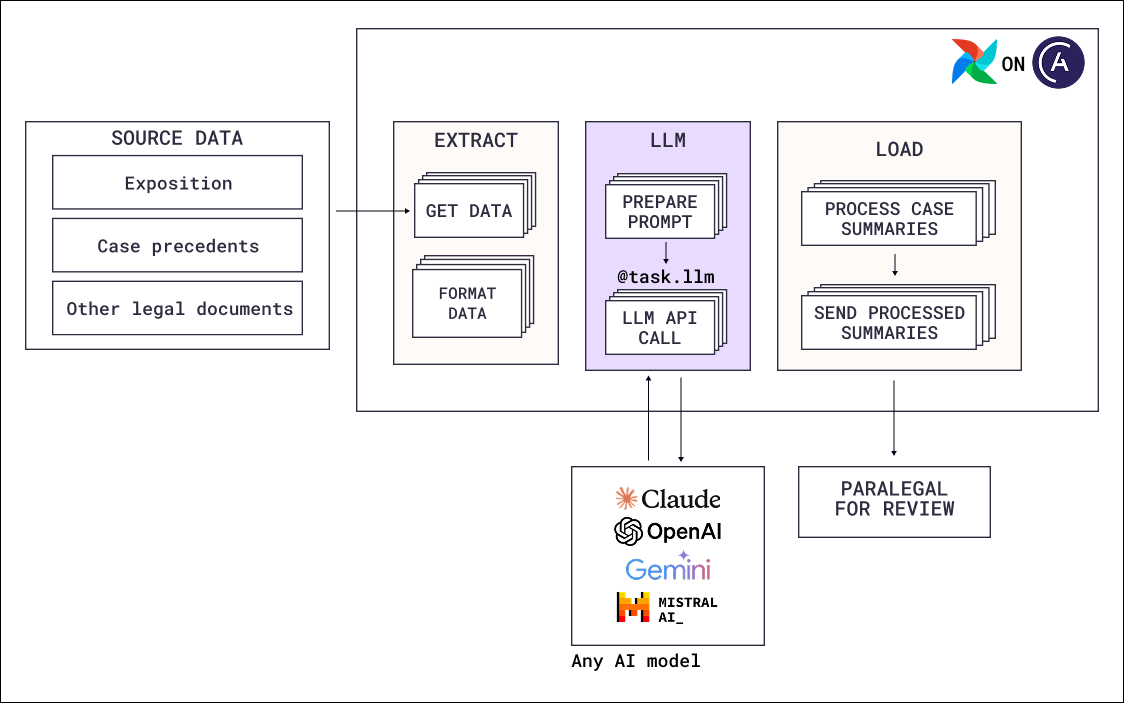
- Extract: Deterministic tasks fetch each document for the case, such as expositions, case precedents, and other legal filings, and format it into the user prompt. Any context the model needs that is not in the document itself, for example the case number or the matter type, is assembled here.
- Transform: A single model call per document summarizing the text and returning a structured output with a set of pre-defined fields such as “flag_for_review”.
- Load: Deterministic tasks process the summaries and sends them to the paralegal.
Airflow features
- Dynamic task mapping: Every task in the pipeline is mapped over the list of documents for the case, so the number of task instances is determined at runtime by how many documents the case contains. Each document is summarized independently.
@task.llm: Runs the summarization as a single model call.- Structured output: The
output_typeis a Pydantic model, so every summary contains the same fields, and downstream tasks can branch or filter based on them. The@task.llmharness validates the fields before the value is pushed to XCom.
Considerations
- Use a single LLM call for pure summarization. Summarization needs no tools and no multi-step reasoning, so a single call is both cheaper and faster at the volume a discovery phase requires.
- Add a chunking step if documents exceed the context window. Chunking is done upstream of the model call, as part of context engineering, and the chunk summaries then need a reduction step to combine them into one summary per document.
- Decide whether human review belongs inside the pipeline. In this architecture human review happens after the Dag ran, because every step after the summary is done by a person. When downstream actions are automatic and depend on the review, move the review into the Dag with a human-in-the-loop operator so the pipeline waits for the decision and then acts on it.
- Ask the model to cite its sources in the output schema. Especially for use cases with legal and compliance implications you need to be able to quickly verify claims against the source document.
- Set usage limits. One task instance per document means cost per Dag run varies with how many documents the case contains.
usage_limitson the model call limits requests and tokens per task instance.
Next steps
- Look up decorator and operator parameters in Orchestrate AI tasks with Apache Airflow® and the Common AI provider.
- Move the paralegal review into the Dag with Human-in-the-loop workflows with Airflow.
- Read the AI Orchestration with Apache Airflow® eBook for the full set of AI orchestration patterns.
- Deploy the Airflow pipelines with a free trial of Astro.