

Overview
Retrieval augmented generation (RAG) is one of the most widely used patterns for giving an LLM access to information it was not originally trained on. Implementing it needs an indexing pipeline that fetches new content, chunks it, embeds it, and loads it into a vector database. What is in that database can then be queried in several ways: by giving an agent a similarity search tool, or by an upstream task in an LLM pipeline that runs the search deterministically and attaches the result to the user prompt. This architecture uses the second approach against the knowledge base of an eCommerce store. A daily Dag embeds new information about customers and products and writes it to a vector database. A second Dag, triggered when a customer completes a purchase, uses the products in that purchase to retrieve related items, then gives that context to an LLM to generate a personalized recommendation shown on the customer’s account page.Architecture
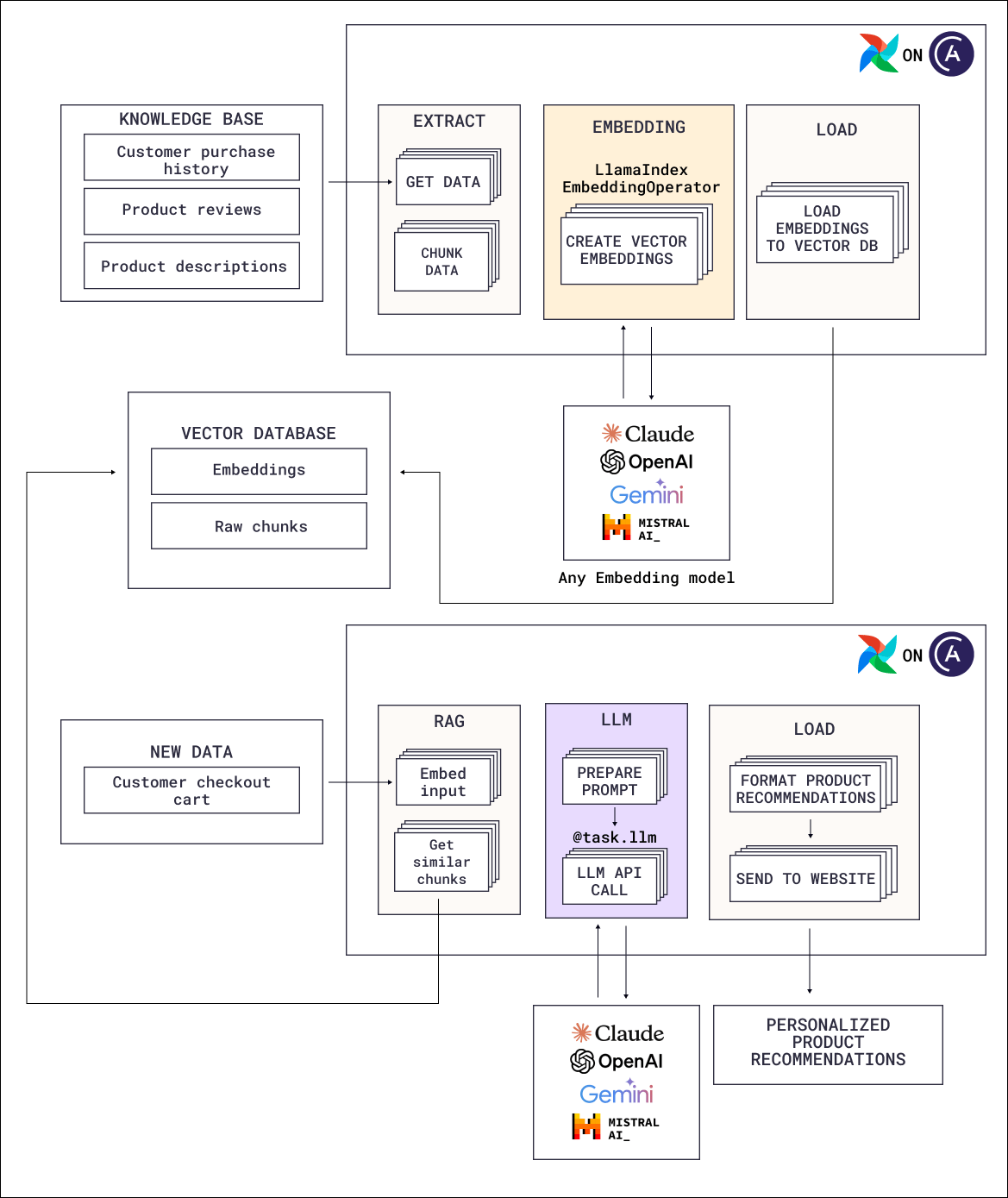
- Product descriptions, catalog updates, and customer interaction data are extracted and chunked.
- Each chunk is embedded using an embedding model. The diagram shows the
LlamaIndexEmbeddingOperatorof the Common AI provider, but you can also use custom code calling an embedding model from a@taskdecorated task. - Embeddings are written to the vector database along with the source text, and metadata such as the source record ID and a last-updated timestamp.
- The descriptions of the recently purchased products are embedded by the same model, to be used as the query input.
- A task upstream of the LLM runs the similarity search, retrieving information related to the newly purchased products.
- The retrieved items are formatted into context and passed to the LLM alongside the customer’s purchase.
- The LLM generates a short recommendation message, which is published to the customer’s account dashboard.
Airflow features
- Dynamic task mapping: Chunking, embedding, and loading are all mapped over the list of chunks, creating one parallel task instance per chunk or chunk batch at runtime.
- Event-driven scheduling: Runs the retrieval Dag on a purchase event.
@task.llm: Generates the recommendation text from the retrieved context.- Automatic retries: Embedding calls often fail due to rate limits, Airflow automatically retries transient failures according to your provided retry policy.
Considerations
- Retrieve deterministically when you know what to look up. Giving an agent a search tool makes sense when the query depends on reasoning. Here the query is always “items similar to what this customer just bought”, so the search can be one deterministic upstream task.
- Store metadata you will need for invalidation. A source record ID and a last-updated timestamp help you assess which records might need updating or to be deleted over time.
- Chunk on record and paragraph boundaries. Use chunking libraries to create sensible chunks for example per subsection in a document or per paragraph.
- Decide what happens when retrieval returns nothing useful. A similarity search always returns its nearest neighbours, however far away they are. Set a distance threshold to avoid odd recommendations if a customer buys a more unusual product.
Next steps
- Look up decorator and operator parameters in Orchestrate AI tasks with Apache Airflow® and the Common AI provider.
- Combine vector similarity with keyword matching in Hybrid search.
- Build a RAG pipeline hands-on with the Orchestrating Workflows for GenAI Applications course on DeepLearning.AI.
- Read the AI Orchestration with Apache Airflow® eBook for the full set of AI orchestration patterns.
- Deploy the Airflow pipelines with a free trial of Astro.