

Overview
Complex data is often better assessed from several perspectives than from one. When you assign different toolsets and system prompts to a group of AI agents evaluating the same input, they will often surface different aspects that a single agent may have overlooked in an overall assessment. This architecture evaluates a startup’s application for venture capital funding. Six agents assess the same application from different executive perspectives, from the CTO agent evaluating technical feasibility to the CFO agent plotting a potential path to profitability. Once all six have finished, an LLM step combines the assessments into one report, which needs to pass an AI-as-a-judge task and a human-in-the-loop task before a reply is sent to the applying startup.Architecture
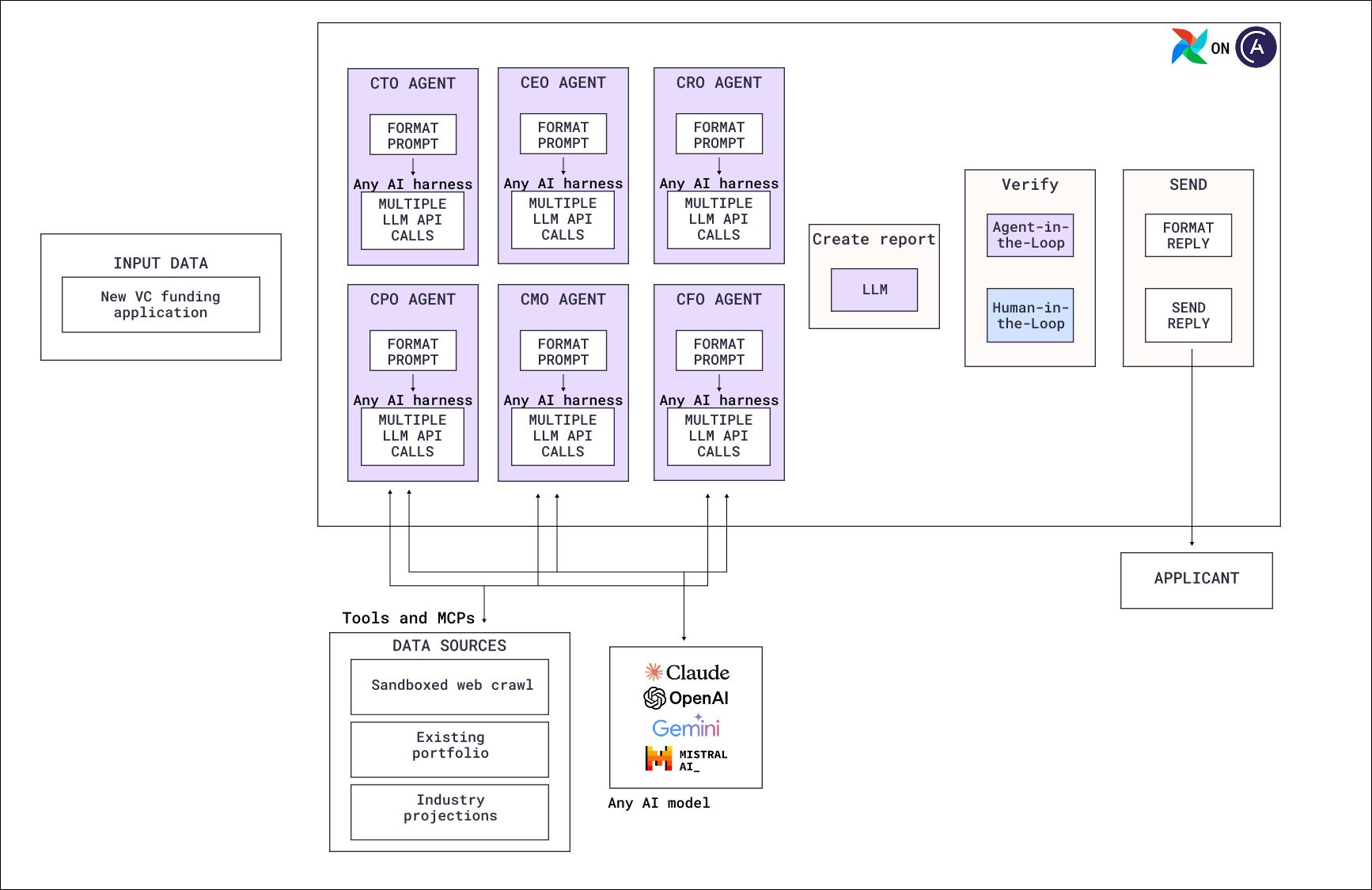
- Input data: The new funding application, which every agent in the council receives in full.
- Council agents: Six agent tasks running in parallel, one per executive perspective: CTO, CEO, CRO, CPO, CMO, and CFO. Each runs its own tool-calling loop on any AI harness, and each has a system prompt defining the role it assesses from.
- Shared data sources: All six agents use the same three sources through tools and MCP servers: a read-only web crawl for public information about the startup and its market, the fund’s existing portfolio for overlap and conflicts, and industry projections.
- Report creation: A single LLM call combines the six assessments into one report.
- Verification and send: AI-as-a-judge scores the combined report, then a human-in-the-loop task waits for a human to verify the report is ready to send. Finally, deterministic tasks format and send the reply to the applicant.
Airflow features
@task.agent: Runs each council member as its own task, so each has its own system prompt, logs, toolsets, and usage limits.- Toolsets: Give the agents access to the web crawl, the portfolio, the projections, and a shared communication location through MCP servers, Airflow hooks, or custom toolsets.
@task.llm: Report consolidation and the AI-as-a-judge step each only need one model call.- Human-in-the-loop: Pauses the Dag until a human confirms the reply is ready to send to the applicant.
- Task groups: Group the six agents so the council reads as one unit in the Airflow UI.
Considerations
- Make the perspectives different. Six agents with near-identical prompts produce six near-identical assessments. Ideally each role has an explicit set of criteria to evaluate against, defined in a rubric as it would be for AI model evals.
- Decide whether the agents should see each other’s work. A council where every agent works independently gives you six uncorrelated views. One where they share an inbox lets a CFO agent respond to the CTO agent’s feasibility concern, at the cost of the assessments no longer being independent. Note that if agents are waiting for messages from each other, you should set a
tool_calls_limitto prevent infinite back-and-forth loops. - Sandbox anything that fetches external content. The application and the web crawl are both text you don’t control and, in the worst case, could be malicious. Give read-only access to an allowlisted set of webpages, and don’t give the agent with web access, or any agent downstream of it, the ability to perform potentially destructive actions.
- A human takes responsibility. A funding decision communicated to an applicant is high stakes and hard to retract. This is an example of a pipeline where a human-in-the-loop step is mandatory.
- Limit spend per agent. Define
usage_limitson each agent task to limit requests, tokens, and tool calls. See Control.
Next steps
- Look up decorator and toolset parameters in Orchestrate AI tasks with Apache Airflow® and the Common AI provider.
- Add human review tasks with Human-in-the-loop workflows with Airflow.
- Compare the other multi-agent pattern, where one agent splits work into different pieces for each worker, in Agentic software development.
- Read the AI Orchestration with Apache Airflow® eBook for the full set of AI orchestration patterns.
- Deploy the Airflow pipelines with a free trial of Astro.