until a condition is met or it has run max_iterations times. You can use the result of a previous iteration in the next iteration.
In this guide, you’ll learn:
- When to use task loops, and how they compare to dynamic task mapping, retries, and dynamic Dag generation.
- How to loop a task group with
.loop(),max_iterations, anduntil. - How to use information about the current and previous iteration in your tasks.
- How to pass loop results to tasks outside of the loop.
- How trigger rules and reruns work in a loop.
- Which combinations with other Airflow features are supported.
- Two example Dags: one that processes a hierarchy one level per iteration, and one that improves AI-generated text with a human-in-the-loop review.
Assumed knowledge
To get the most out of this guide, you should have an understanding of:- Airflow Dags. See Introduction to Apache Airflow® Dags.
- Airflow task groups. See Airflow task groups.
- Passing data between tasks. See Pass data between tasks.
- Airflow trigger rules. See Apache Airflow® trigger rules.
When to use task loops
You can use loops to repeat any number and combination of sequential and parallel tasks in a task group during a Dag run. After all tasks in the task group are executed, a gate task determines whether another iteration of the loop runs. The loop continues until either a condition is fulfilled or the maximum number of iterations have been performed.Task loops can’t deadlock a Dag or run forever. Airflow creates the task instances of the next iteration only after the gate task of the current iteration has finished, so the Dag graph has no circular dependencies. Every loop also has an upper limit on the number of iterations, because
max_iterations is a required parameter.- Improving an LLM output over several iterations: one task generates a draft, another evaluates it, and the loop repeats until the result passes the evaluation. The evaluation can be structured using human-in-the-loop tasks, AI-as-a-judge, or deterministic evaluations. See Example: Improve AI output with HITL.
- Processing nested data one level at a time, for example a folder tree or parent-child records, where each iteration uses the IDs returned by the previous one. See Example: Deterministically process a hierarchy.
- Processing a large dataset in chunks, using the offset or cursor returned by the previous iteration, until the entire dataset is processed.
- Training a machine learning model, where each iteration trains the model for one or more epochs and evaluates it, until the validation loss stops improving or a target metric is met.
- Repeating a calculation until the result is within a target threshold or converges.
Task loops vs. other features
You can combine some of these features. For example, you can use dynamically mapped tasks inside a looped task group, and you can set retries on tasks inside a loop and on dynamically mapped tasks. Other combinations, such as a looped task group inside a dynamically mapped task group, aren’t possible. See Limitations and compatibility.
Creating Dags or tasks programmatically is sometimes called dynamic Dag generation. This is a different concept from task loops and dynamic task mapping. With dynamic Dag generation, you use Python code, for example a
for loop in the Dag file, to create tasks or Dags based on information that is available when the Dag file is parsed. The Dag has the same tasks in every Dag run. See Dynamically generate Dags.Task loop basics
This section covers how to define a task loop, how tasks access information about the current iteration, and a basic example.Basic task loop syntax
To loop a task group, add the.loop method to your task group function call.
.loop method has two parameters:
max_iterations(mandatory): requires a positive integer that limits how often the loop can repeat.until(optional): takes a callable that determines whether the loop should continue. Airflow adds this function as the final gate task of the loop, with the function name as the task ID, or__loop_gateif the function has no name. If the value returned by theuntilfunction isn’t a boolean, the task fails.
until function is provided, the loop runs for the number of iterations defined by max_iterations and then ends, with the gate task marked as success.
If an until function is given, the loop continues as long as the function returns False. If the function returns True, the loop ends with the gate task marked as success. If the loop has run max_iterations times and the until function still returns False, the loop ends with the gate task marked as failed.
If you have tasks downstream of your loop that should run even if the loop fails or ends at
max_iterations without the until function returning True, adjust the trigger rules of those downstream tasks..partial method. To override task group parameters, you can use .override. These values are passed for all iterations of the loop.
return_value key is the iteration’s result (loop.result).
Access loop information
Inside the task group loop, you can access information about the loop contained in the Airflow contextcontext["loop"] from within any task in the loop, including the until function.
loop.index: The iteration that the task instance belongs to. Starts at 1.loop.max_iterations: Themax_iterationsvalue set in.loop()for this task group.loop.previous: The XCom pushed under thereturn_valuekey of the task group’s terminal task in the previous iteration. This value isNoneon iteration1.loop.result: The XCom pushed under thereturn_valuekey of the task group’s terminal task in the current iteration, which theuntilcallable typically uses to determine whether to stop. This value isNoneif the terminal task in this iteration hasn’t run yet.
Simple task loop example
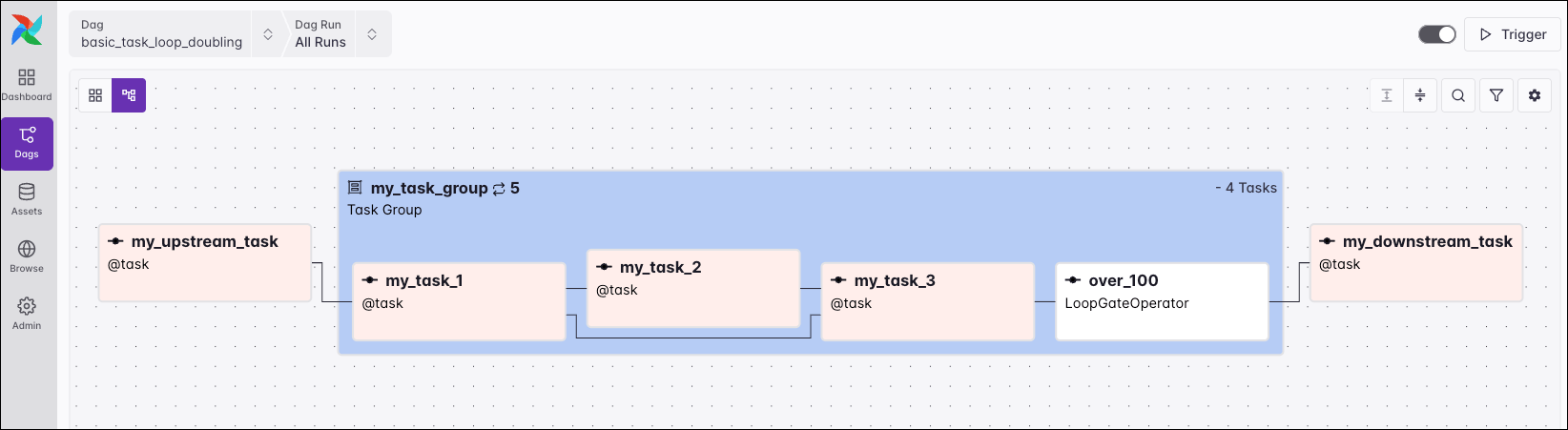
In the following example, a task group containing three tasks is repeated until a number that is doubled in each iteration exceeds 100 or the loop has run five times.my_task_group, which contains the three tasks defined in the Dag code and the over_100 gate task that Airflow creates from the until function. Outside of the looped task group, there is one upstream task and one downstream task.
my_upstream_task task picks a random number between 1 and 10 that is doubled until the result is over 100.
For example, if the random number picked is 8:
- Iteration
1of the loop usesmy_number=8and produces a result of16; theover_100function returnsFalseand the next iteration starts. - Iteration
2of the loop usesmy_number=16and produces a result of32; theover_100function returnsFalseand the next iteration starts. - Iteration
3of the loop usesmy_number=32and produces a result of64; theover_100function returnsFalseand the next iteration starts. - Iteration
4of the loop usesmy_number=64and produces a result of128; theover_100function returnsTrueand the loop exits.
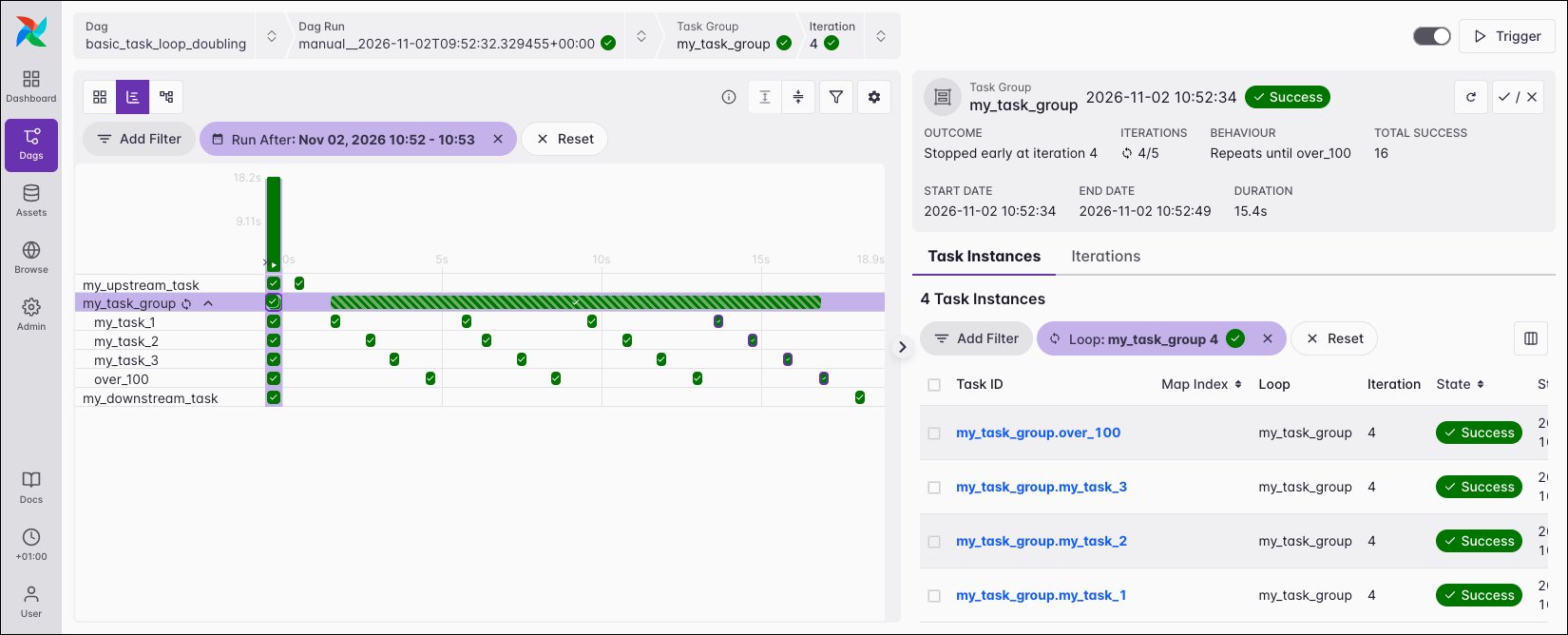
my_downstream_task prints the value pushed to XCom by the my_task_3 task in the last task loop iteration, which is 128.
In the Gantt view, you can see the tasks in my_task_group repeat sequentially. Each task appears four times, once for each of iterations 1 to 4. my_downstream_task starts after the gate task of iteration 4 returns True.
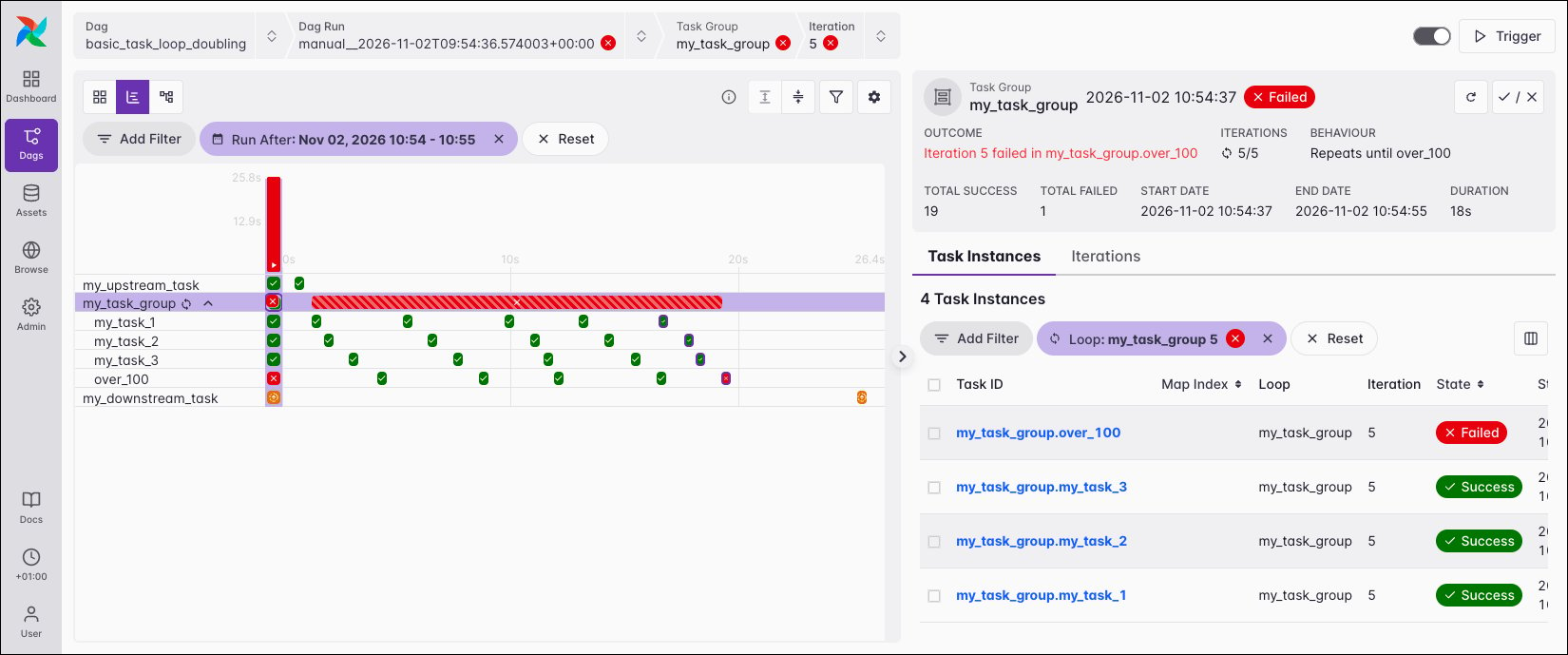
max_iterations value of 5, which limits the loop to five iterations. For example, if my_upstream_task returns 1, iteration 5 returns 32 after doubling five times, which is still below 100. The over_100 function returns False in the last allowed iteration, so the over_100 gate task fails with a LoopMaxIterationsExceeded error.
Advanced concepts
until function
If you add a docstring to the until function, Airflow shows it as the Behaviour of the looped task group in the Airflow UI and as the documentation of the gate task. Use it to describe the stop condition, as shown in the deterministic example.
loop, the until function can accept any other key of the Airflow context as a keyword argument, for example params or ti. The following Dag stops the loop once the result is at least the threshold value set in the Dag’s params, which means you can change the stop condition when triggering a Dag run.
until function. In the following Dag, my_fetch_threshold_task returns the threshold, and the until function uses ti.xcom_pull to compare each iteration’s result against it.
Use loop results outside the loop
To pass the results of a looped task group to a downstream task, index the task group object with the task ID of its terminal task and use.output. The downstream task receives one value per iteration, in iteration order. Use [-1] to get the result of the last iteration and len() to get the number of iterations that ran.
[-1] returns the result of the last mapped task instance in the last iteration, and len() is the number of iterations multiplied by the number of mapped task instances.
For more information, see the Airflow documentation.
Trigger rules and reruns
Tasks inside a looped task group behave like any other Airflow task. Keep the following points in mind:- Trigger rules work as usual, including for the gate task. You can’t configure the gate task directly. It takes its
trigger_ruleandretriesfrom thedefault_argsof the Dag or of the looped task group, for example@task_group(default_args={"retries": 2}). - If the terminal task of an iteration is skipped or fails, the gate task doesn’t run and no further iteration is created. Tasks downstream of the looped task group are skipped or set to
upstream_failedunless you adjust their trigger rules, for example tonone_failedorall_done. - A retry happens within the same iteration and doesn’t count toward
max_iterations. - If the
untilfunction raises an exception, the gate task fails and is retried according to itsretries. Ifuntilreturns a value that isn’t a boolean, or the loop ends atmax_iterationswithoutuntilreturningTrue, the gate task fails without retrying. - Manually marking the gate task as successful ends the loop without evaluating the
untilfunction. Downstream tasks run as ifuntilhad returnedTrue.
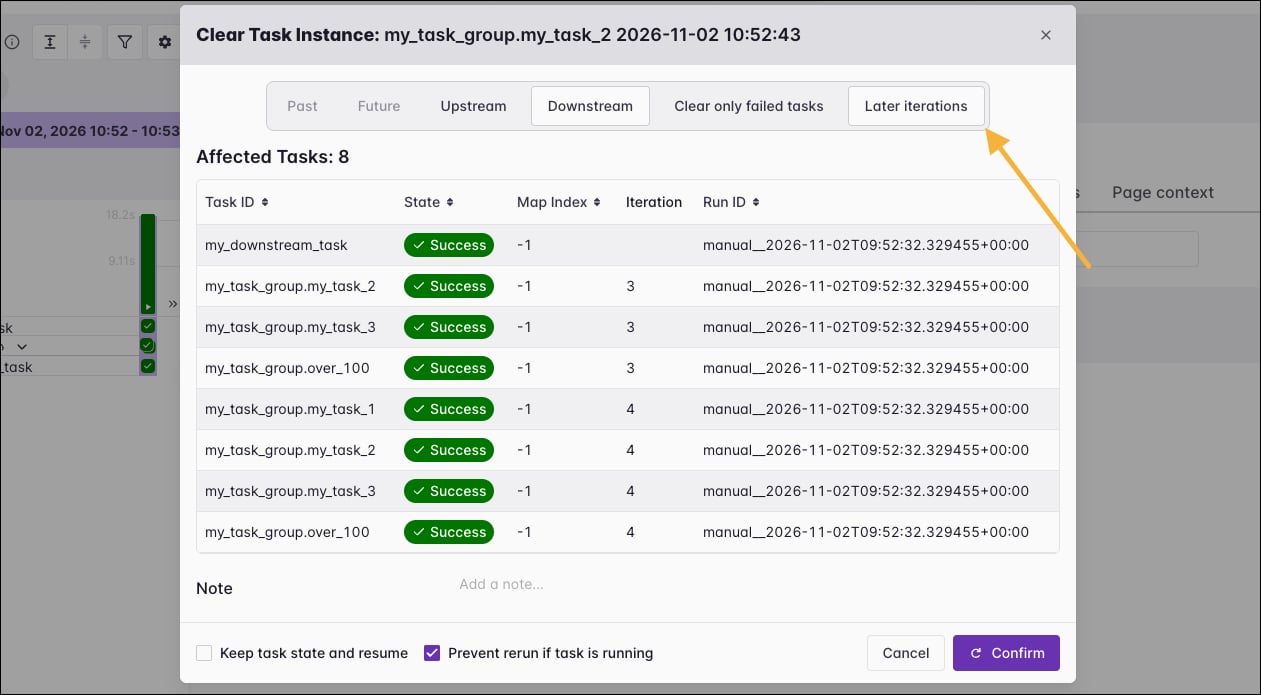
max_iterations. If you deselect it, later iterations are kept as they are.
Limitations and compatibility
The following table shows which combinations of task loops with dynamic task mapping and task groups are supported.
You can’t pull XCom from previous Dag runs for tasks inside a loop. Calling
xcom_pull with include_prior_dates=True for a task inside a loop raises an error.
If you use a custom XCom backend, it must store values with the store_value() method instead of serialize_value() to support task loops. See Use a custom XCom backend class. If you use the Object Storage XCom Backend, you need a version of the Common IO provider later than 1.10.1.
Common errors
The following import errors might occur when you try to define a task loop:
The
LoopMaxIterationsExceeded error is raised when the until function still returned False in the last allowed iteration according to the max_iterations limit. The gate task fails and tasks downstream of the looped task group are set to upstream_failed. This is intended behavior. To run downstream tasks regardless of the outcome of the looped task group, change the trigger rule of the downstream tasks, for example to all_done.
Example: Deterministically process a hierarchy
The following Dag processes a nested hierarchy one level per iteration, from a company down to individual assets. This pattern is common when you load parent-child records, for example to build a knowledge graph, and each level needs the results of the level above it.walk_level, including the hierarchy_ends gate task:
- The
seedtask reads thedepthparam, which sets how many levels the hierarchy has in this Dag run. - In each iteration, the
populatetask usesloop.previousto extend the path of the level above and creates a node for the current level. Typically, this task would query the child records of the previous level’s IDs. - The
decidetask is the terminal task. It returns the populated level and whether another level exists below it. - The
hierarchy_endsgate task stops the loop when there is no further level.max_iterations=MAX_LEVELSlimits the loop to eight levels. - The
mergetask receives the result of every iteration through_walk_level["decide"].outputand combines the nodes into one hierarchy.
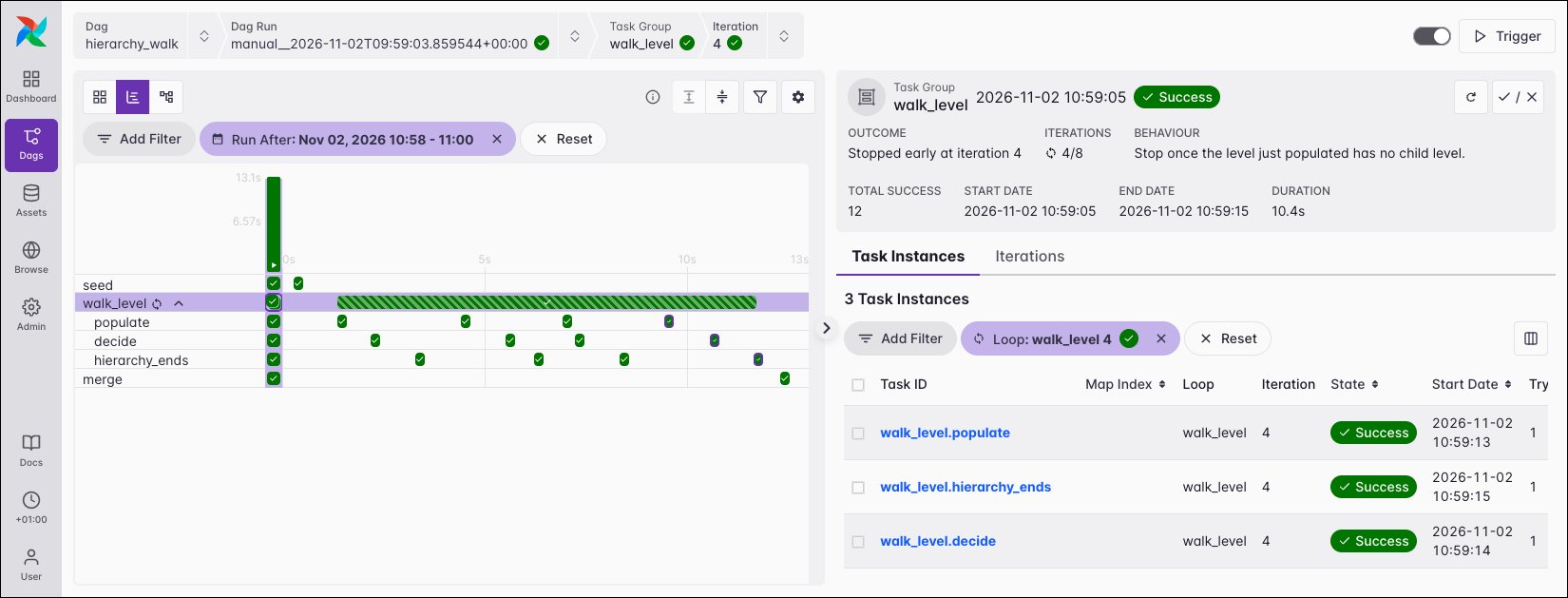
depth of 4. The loop stopped after iteration 4, after 4 of the 8 allowed iterations. The Behaviour field shows the docstring of the hierarchy_ends function, and the Iteration filter shows the task instances of iteration 4.
Example: Improve AI output with HITL
The following Dag drafts a reply to a customer support ticket with an AI agent and loops until a human approves the reply or escalates the ticket. It uses the@task.agent decorator from the Common AI provider and a human-in-the-loop task. To run it, you need version 1.0 or later of the Common AI provider and an LLM connection with the ID pydanticai_default.
draft_support_reply, including the review_finished gate task:
- The
fetch_tickettask returns the support ticket. - In each iteration, the
gather_feedbacktask collects the reviewer feedback and the previous draft fromloop.previous. In iteration1, there is no feedback yet. - The
draft_replytask uses an AI agent to write the reply. Theoutput_typemakes the agent return aTicketResponseobject with a summary, the reply, a priority, a confidence score, and suggested tags. - The
review_replytask waits until a human chooses Approve, Request changes, or Escalate to CRE in the Airflow UI. The optionalfeedbackparam lets the reviewer describe the changes they want. Without a response within 4 hours, the task selects Escalate to CRE. - The
record_reviewtask is the terminal task. It returns the draft, the decision, and the feedback. - The
review_finishedgate task stops the loop unless the reviewer chose Request changes. If the reviewer requests changes in all five iterations, the gate task fails with aLoopMaxIterationsExceedederror. - The
handle_tickettask uses the last iteration’s result to either send the reply or escalate the ticket.
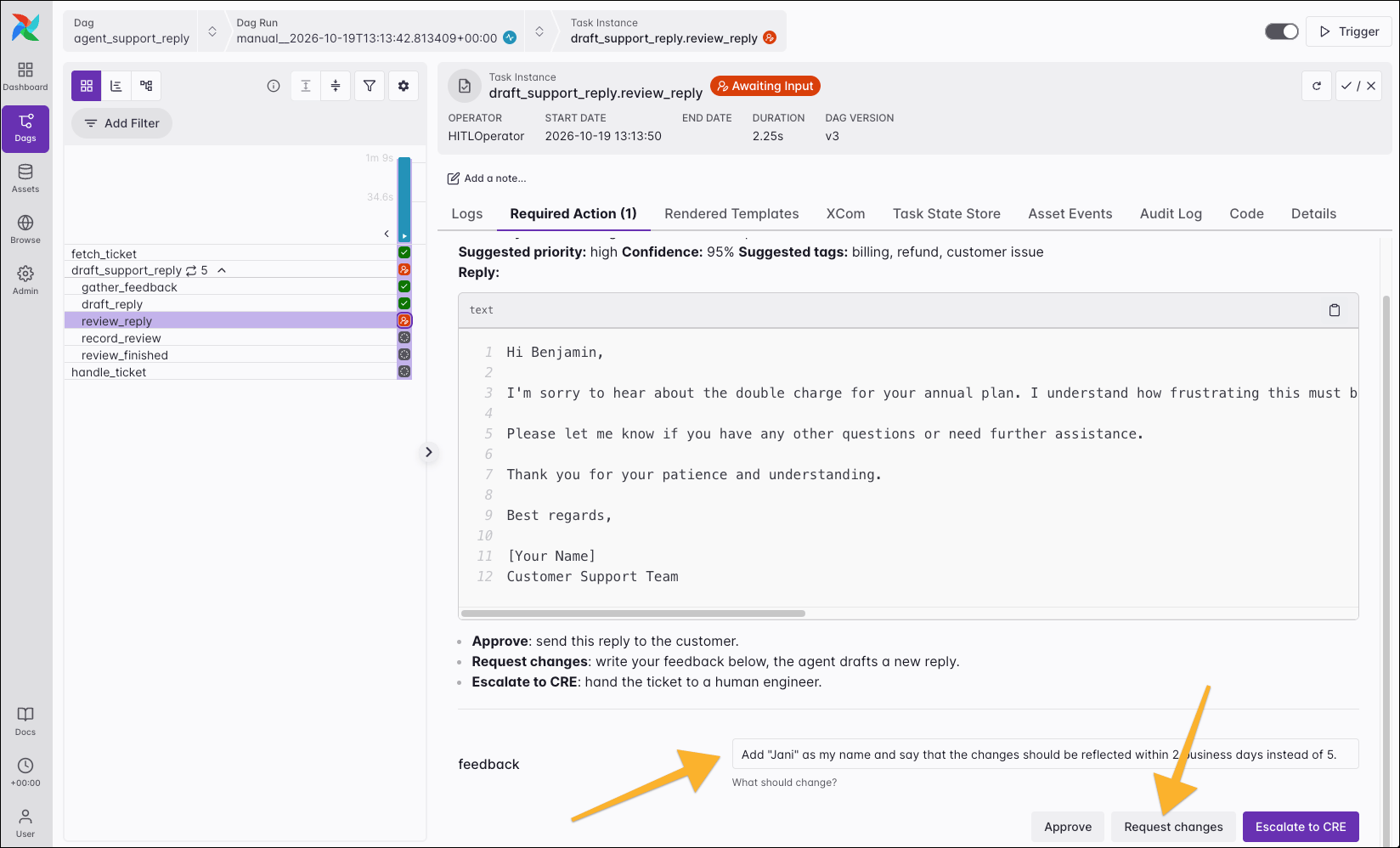
review_reply task in the first iteration of the loop. The first draft says that fixing the issue takes 5 to 7 days. In the feedback field, the reviewer asks the agent to change this to 2 business days and to sign the reply with the name Jani, then chooses Request changes.
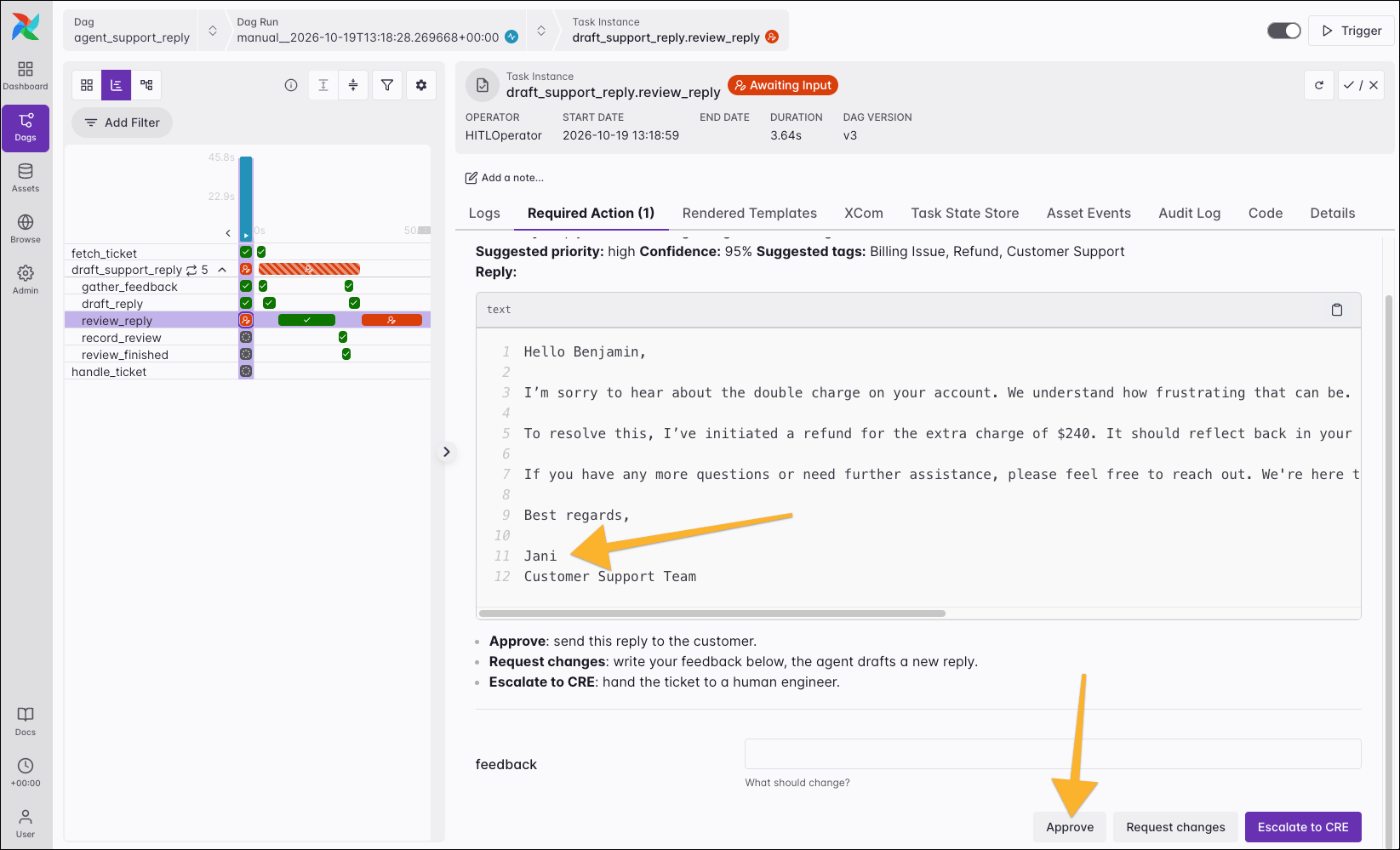
gather_feedback task passes the feedback and the previous draft to the agent. The new draft is signed with the name Jani and states that the issue will be resolved in 2 business days. The reviewer chooses Approve, which ends the loop.