Introducing Apache Airflow® 3.3
10 min read |
You’re probably here to read about a list of features in the new Airflow release. Don’t worry, we’ll get to that shortly, but for a minute, allow me to be philosophical. After more than 7 years working as a data engineer or with data engineers, I’ve come to the conclusion that most of data engineering (maybe actually any type of engineering?) is about managing failures. On the outside it might seem like a strange way of thinking about it, but as a data engineer most of your time is spent trying to figure out what you, or your pipelines, will do when you’re no longer in the realm of hypothetical/on-paper and something goes sideways.
Because really, it’s easy to design and implement a system that doesn’t have to deal with failures or edge cases. I’m not in any way trying to minimize the work of architecting and building data pipelines. Rather, I think the hardest part of that work comes from trying to make sure those pipelines are resilient. We could all easily write messy Dag code that doesn’t follow best practices and brute forces whatever logic we’re trying to implement. And if we never had to worry about things like resource utilization, changing schemas, authentication, performance optimization, or working with others, our messy code could probably run happily forever.
Unfortunately, that’s not the world that we live in, and we know that not only is proactively anticipating failures a very important part of designing data pipelines, reacting to and mitigating actual failures is something that takes a lot of data engineers’ time (sometimes literally keeping them up at night). This is one big reason people use orchestration tools like Airflow; having an orchestrator that is built to be resilient and monitorable makes our jobs infinitely easier.
Now, back to our main programming: my point of that philosophical aside was to highlight the importance of some of the new features in Airflow 3.3, which was released on July 6th. Airflow minor releases always come with a variety of new features, improvements, and bug fixes, designed to address the evolving needs of the Airflow community. 3.3 has a lot of great stuff in it, and some of the headlining features, including the task state store and pluggable retries, were implemented specifically to make Airflow more resilient and make managing failures easier. Based on my previous argument about managing failures being a huge part of the job, the potential for positive day-to-day impact for users is high.
I’ll get into those features, as well as the other highlights of 3.3, in the rest of this post (no more philosophical asides, I promise).
Task State Store (AIP-103)
A common pattern in Airflow is having a task that kicks off something long-running and external (a Spark job, a model fine-tune, a bulk load) and then polls until it's done. If the worker running that task dies partway through, the task retries, but the external job doesn't know about that. It keeps running. Airflow ends up submitting a new one on the retry, and you have two jobs going until someone notices and cleans up.
Airflow 3.3 introduces the task state store to handle this kind of scenario. Tasks can save small pieces of information that persist across retries, so a later attempt of the same task can reconnect to a running external job or resume from an intra-task checkpoint (like the last page or offset processed) instead of starting over. This is different from XComs, which get cleared on retries.
You can use the task state store in your task code by accessing the relevant task context in a Python function (either with a @task decorated function or a PythonOperator) or using the execute method of a custom operator.
@task(retries=10, retry_delay=duration(minutes=10))
def run_ssh_command(launch_cmd, check_cmd, out_file, **context):
    tss = context["task_state_store"]
    remote_pid = tss.get("remote_pid")

    if remote_pid is None:
        _, remote_pid = _ssh_exec(launch_cmd.replace("{out_file}", out_file))
        tss.set("remote_pid", remote_pid)

    print(f"Reconnecting to remote PID {remote_pid} from a previous attempt.")
    exit_status, output = _ssh_exec(
        check_cmd.replace("{pid}", remote_pid).replace("{out_file}", out_file)
    )
    print(f"Remote job output: {output}")
    if exit_status != 0:
        raise RuntimeError(f"Remote job {remote_pid} failed with exit status {exit_status}.")
The store gives you get, set, delete, and clear methods, and lets you set per-entry retention (a timedelta, NEVER_EXPIRE, or the environment setting of 30 days by default).
If you're writing custom operators that submit one long-running external job and poll for it, there's also an even cleaner path with the new ResumableJobMixin. You inherit from the mixin, implement six methods that describe how to interact with your external system (submit, status, poll, and so on), and the retry-safe reconnection is handled for you. The SparkSubmitOperator in the Apache Spark provider (6.2.0+) already uses it, so if you're running Spark jobs from Airflow, you will get this behavior by default.
There's also a sibling asset state store, which attaches persistent state to an Airflow asset rather than a task instance. Useful for cases like remembering the last processed offset on an ingest asset that multiple tasks read from and write to.
Both stores are exposed in the Airflow UI. The task state store under a new Storage tab on the task instance view and the asset store in the details of an asset selected in an asset graph. Of course, the contents of both stores are accessible through the REST API as well, so you can view or edit entries without touching your Dag code.
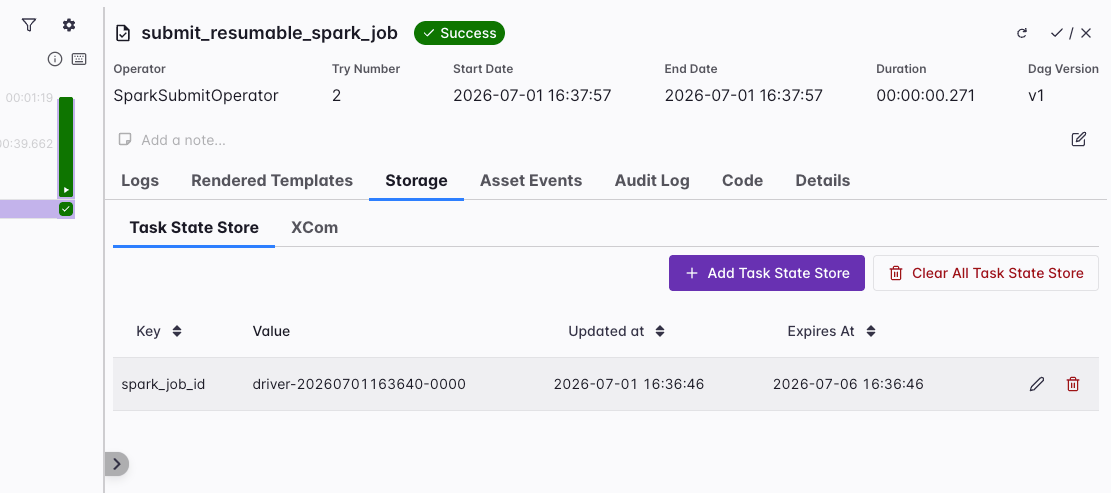
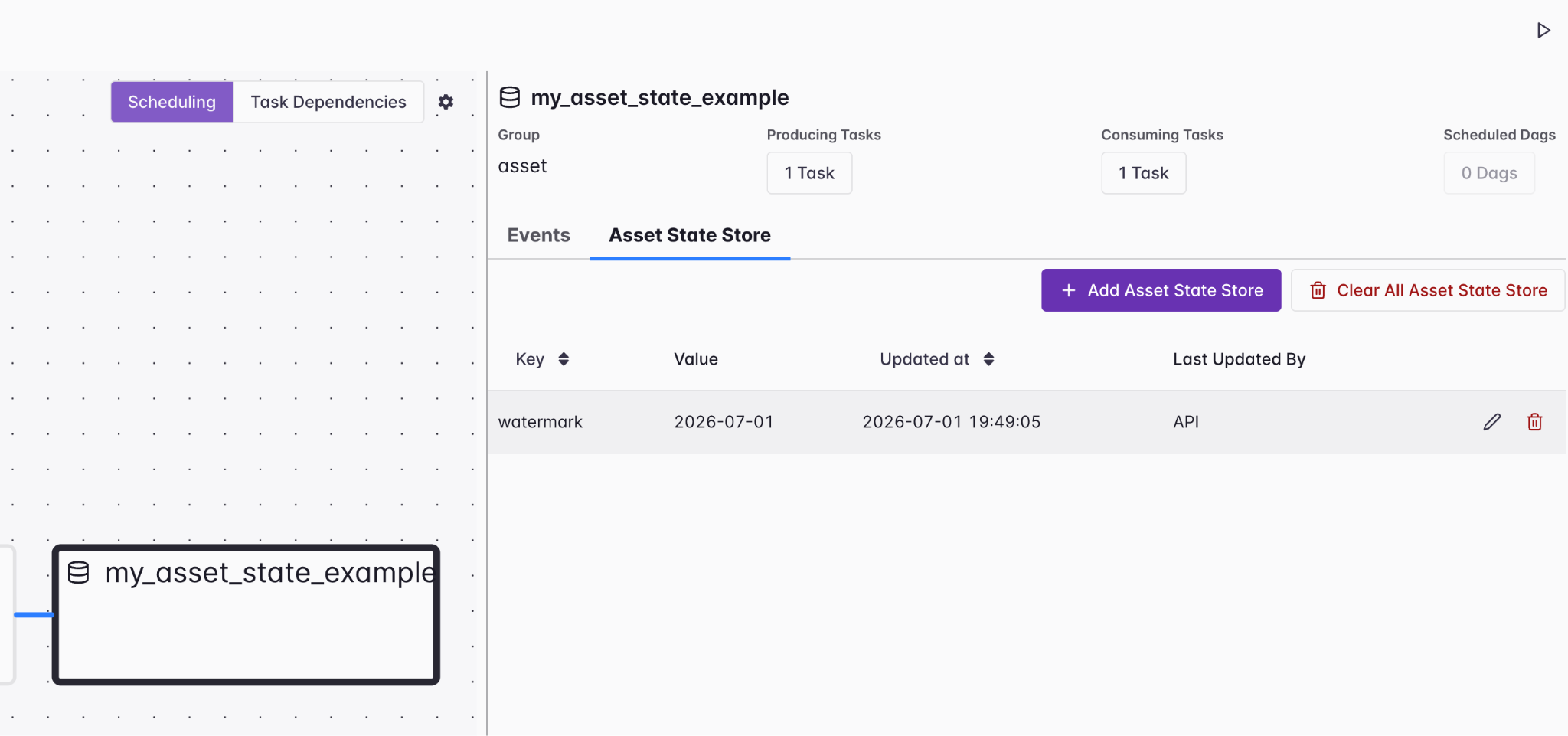
Note that the task and asset state stores are marked experimental in 3.3, so the API may change based on user feedback. For more, check out our task state store guide and the asset state store section in the advanced asset scheduling guide.
Pluggable retries with retry_policy (AIP-105)
Retry support has always been a core feature of Airflow, as you would expect of any orchestration tool. Setting retries and an appropriate delay with the option of an exponential backoff would likely mitigate most transient failures, like an API being down or a database being locked by another process.
But not all failures are transient, and in many cases, retrying a task multiple times is simply a waste of resources. 3.3 fixes this, by allowing you to attach a retry policy that determines whether, when, and how a task is retried based on the type of failure that occurs. For exceptions that you know may be transient (like a 503 error), you can retry the task multiple times with a defined delay. For exceptions that require manual intervention (like an authentication issue), you can fail the task immediately.
For example, if your task runs queries in Snowflake, you can retry if you hit an operational error (usually caused by something like a temporary network issue). But if you hit a programming error, likely the result of a problem with your SQL, you can fail the task immediately.
SNOWFLAKE_RETRY_POLICY = ExceptionRetryPolicy(
    rules=[
        RetryRule(
            exception="snowflake.connector.errors.OperationalError",
            action=RetryAction.RETRY,
            retry_delay=timedelta(minutes=2),
            reason="Transient connection or warehouse issue",
        ),
        RetryRule(
            exception="snowflake.connector.errors.ProgrammingError",
            action=RetryAction.FAIL,
            reason="SQL or compilation error, query edit needed",
        ),
    ],
)
For more complex decisions, you can also subclass RetryPolicy and implement your own evaluate() method. For more on this feature, see our rerunning Dags guide.
LLM-backed retry decisions
In addition to the retry policy feature in core Airflow, the Common AI provider as of version 0.3.0 includes an LLMRetryPolicy that uses a language model to classify failures and decide whether to retry. It uses the PydanticAIHook to get structured output from the LLM, with declarative fallback rules for cases the model can't resolve.
This is useful for failures that are hard to enumerate up front, like third-party APIs that return inconsistent error messages, or pipelines touching systems where the error patterns aren't well known yet.
Updates to asset partitions
Airflow 3.2 introduced partitioned Dag runs and asset events, with time-based partitions, segment-based partitions, and a PartitionedAssetTimetable for scheduling Dag runs on partitioned asset events.
3.3 builds on this feature, allowing you to assign partition_key values at runtime from within your task code, using the .add_partitions method of the asset event fetched from the Airflow context.
import random

from airflow.sdk import (
    Asset,
    dag,
    task,
    PartitionAtRuntime,
)

data_ready = Asset("my_partition_at_runtime_asset")

DEPARTMENTS = [
    "Engineering",
    "Product",
    "Legal",
    "Sales",
    "Marketing",
    "Finance",
    "HR",
    "Operations",
]


@dag
def my_partition_at_runtime_dag():

    @task(outlets=[data_ready])
    def my_task(**context):
        context["outlet_events"][data_ready].add_partitions(
            random.sample(DEPARTMENTS, 3)
        )

    my_task()

my_partition_at_runtime_dag()
This is useful any time your partitions aren't fixed when your Dag is written, like multi-tenant pipelines where your customer list evolves, or ML workflows where new models or variants are introduced as training data changes.
There are also several new mappers, including the FanOutMapper to create multiple downstream Dag runs based on one partitioned asset event, and the inverse RollupMapper, which creates a single downstream Dag run once all expected upstream keys have arrived. For more, see our guide.
Other notable features and improvements
As always with Airflow minor releases, there are many other new features and improvements included. Here are some of our highlights:
- Language Task SDK for Java and Go. A new coordination layer lets individual task implementations be written in Java or Go, while the Dag code stays in Python. Note that this feature is experimental and subject to change. For more on how to implement tasks in Java or Go, see our guide.
- Bulk actions across Dag runs and task instances. You can multi-select Dag runs in the UI and clear, mark success/fail, or delete them as a batch. A new
POST /dags/{dag_id}/clearDagRunsendpoint exposes the same operation through the API. - Choose a Dag bundle version on clear, rerun, and backfill. You can now choose whether to use the original or the latest Dag bundle version when rerunning or backfilling a Dag when using a versioned Dag bundle.
- Updated Gantt chart. The Gantt chart is now in its own view, and has better rendering for large Dags.
- Expected duration in Dag Run details. Each Dag Run shows an expected duration based on historical averages, making outliers easier to spot at a glance.
- Deadline alerts now viewable under Browse menu.
Of course this list is non-exhaustive, and there may be other things in 3.3 that are important for your team or use case. Always read the release notes!
Get started
Whether you just want to test some of the new features or run 3.3 in production, the easiest way to get started is to spin up a new Deployment on Astro. If you are not yet an Astronomer customer, you can start a free trial.
Astronomer contributes heavily to OSS Airflow, including for this release, and Astro is the first managed Airflow service to support 3.3. That means you get access to the latest features right away, with support from the same team that is actively building Airflow.
If you are still on Airflow 2 (which is now past end of life), check out our upgrading ebook for help getting to Airflow 3.
Wrapping up
To bring this back to where we started: while it may be inevitable that a significant part of owning data pipelines is managing failures both proactively and reactively, having an orchestration tool with rich features for resiliency can save you a lot of time and money. Airflow has always been strong in this regard, and now has even more functionality with the task state store and pluggable retries. Additionally, with updates to asset partitions, the language task SDK, and other UI/UX improvements, you definitely won’t want to wait on upgrading to 3.3.
As always, we owe a huge thanks to all of the Apache Airflow contributors who got 3.3 across the line. If you want to learn more about the release, you can check out the full release notes, and join us for our Introducing Airflow 3.3 webinar where we’ll give you a full overview and live demo of new features.