Introducing Apache Airflow® 3.2
11 min read |
Airflow 3.0 was significant for two reasons: many helpful new features, and architectural changes that made Airflow more secure and more ready for the next era of data engineering. The Task SDK, remote execution, assets, and event-driven scheduling were the groundwork for a new class of capabilities the project could build toward. Airflow 3.1 wasted no time, delivering human-in-the-loop workflows, synchronous Dag execution, and a new plugin interface. Now, Airflow 3.2 continues in that direction with more data-awareness and better performance.
Two headlining features in this release are asset partitions and native async support in the Python operator. Together, they extend two of the most important parts of the Airflow 3 programming model: data-aware scheduling and flexible Python task execution. Asset partitions allow you to define and respond to data changes at a more granular level than was previously possible. Async support in the Python operator provides more flexibility for efficiently executing asynchronous tasks.
Beyond those two features, this release contains meaningful improvements to the deadline alerts feature, the Task SDK, the API server, retry functionality, and more. It also coincides with the release of a new provider registry.
Let’s dig into it.
Expanded data-awareness with asset partitions
Assets in Airflow let you declare data dependencies between Dags: when one Dag produces updates to an asset, another can be scheduled to run based on these updates. But there has been a fundamental gap. An asset representing a sales table doesn’t carry any information about which slice of that table was updated. The downstream Dag triggered on an update had no way to know whether the January partition or the February partition was ready. Teams could work around this by creating separate assets per partition, or by threading partition metadata through XComs and building their own coordination logic, but this added complexity.
Asset partitions, introduced in AIP-76, close that gap. A partition is a named slice of an asset, represented as a string key attached to an asset event. Airflow now tracks asset state at the partition level: when a specific partition is materialized, the partition key is passed onto any downstream Dag that is scheduled on the partitioned version of that asset. Critically, partitioned asset events do not trigger non-partition-aware Dags, so existing pipelines that consume the same assets are unaffected.
On the producer side, you set CronPartitionTimetable as the Dag’s schedule. Each run emits a partitioned asset event via @task(outlets=[asset]):
from airflow.sdk import Asset, CronPartitionTimetable, dag, task
player_stats = Asset(uri="s3://my-bucket/player-stats/", name="player_stats")

@dag(schedule=CronPartitionTimetable("0 * * * *", timezone="UTC"))
def player_stats_etl():
@task(outlets=[player_stats])
def ingest():
    """Materialize player statistics for the current hourly partition."""
    pass
ingest()

player_stats_etl()
On the consumer side, you use PartitionedAssetTimetable and specify a partition mapper that defines how upstream partition keys translate to the downstream Dag’s own partition space. Airflow ships with several built-in mappers: for example StartOfHourMapper, StartOfDayMapper, and StartOfYearMapper normalize temporal keys, AllowedKeyMapper validates keys against a fixed list, ProductMapper handles composite keys across multiple dimensions, and IdentityMapper passes keys through unchanged. A single Dag can listen for partitions across multiple upstream assets using the & operator:
from airflow.sdk import Asset, dag, StartOfHourMapper, PartitionedAssetTimetable, task

team_a_stats = Asset(uri="s3://my-bucket/player-stats/team_a/", name="team_a_stats")
team_b_stats = Asset(uri="s3://my-bucket/player-stats/team_b/", name="team_b_stats")
combined_stats = Asset(uri="s3://my-bucket/player-stats/combined/", name="combined_stats")

@dag(
schedule=PartitionedAssetTimetable(
    assets=team_a_stats & team_b_stats,
    default_partition_mapper=StartOfHourMapper(),
)
)
def combine_player_stats():
@task(outlets=[combined_stats])
def combine(dag_run=None):
    """Merge the aligned hourly partitions into a combined dataset."""
    print(dag_run.partition_key)

combine()

combine_player_stats()
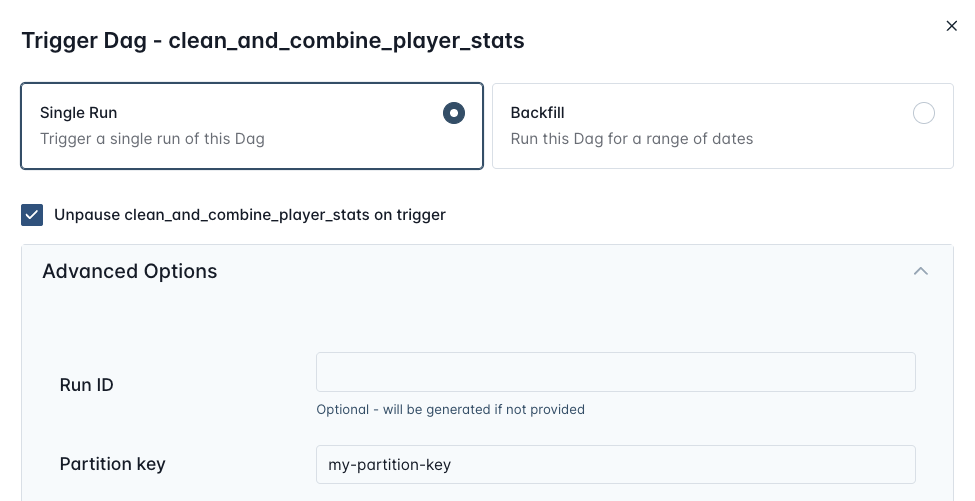
If the transformed partition keys from all required upstream assets don’t align, the downstream Dag will not trigger, instead pending Dag runs are created that each wait for a matching set of asset updates for each individual partition key. Manual Dag runs can specify a partition key directly via the Airflow UI and REST API.
Better performance with Async PythonOperator
For years now, Airflow has provided better performance and scalability through deferrable versions of dedicated operators (e.g. SqlExecuteQueryOperator, FivetranOperator, etc.), which offload asynchronous waiting to the triggerer component. But deferrable operators have drawbacks in certain cases, like increased database load and significant overhead from the constant communication between the worker, scheduler, and triggerer. In addition, the PythonOperator has always been Airflow’s most widely used operator, often chosen over dedicated operators for its flexibility. This meant that previously, teams looking to run their own Python for I/O heavy or high concurrency transaction tasks may have had to deal with significant wait times for tasks to complete.
Now, in Airflow 3.2, the PythonOperator natively detects and executes async callables. Simply pass an async def function directly to python_callable, and Airflow executes for you, bypassing the triggerer entirely, while still allowing you to run several async functions in parallel:
from airflow.sdk import dag, task

async def fetch_one():
    import httpx
    async with httpx.AsyncClient(timeout=30) as client:
        response = await client.get("https://httpbin.org/delay/5")
        return response.json()

async def fetch_two():
    import httpx
    async with httpx.AsyncClient(timeout=30) as client:
        response = await client.get("https://httpbin.org/delay/10")
        return response.json()

@dag
def async_example():

    @task
    async def fetch_concurrently():
        import asyncio
        import time
        start = time.monotonic()
        slow, fast = await asyncio.gather(fetch_one(), fetch_two())
        elapsed = time.monotonic() - start
        print(f"Both done in {elapsed:.1f}s")

    fetch_concurrently()

async_example()
There are of course many cases where deferrable operators are still appropriate, including for long running jobs in external systems with well-built provider packages, where you don’t want to write custom Python and operational overhead is not a big concern. But in cases where you need to implement I/O heavy tasks like downloading thousands of files from an SFTP server, or making many API calls, this new functionality will significantly improve performance.
Airflow UI themes
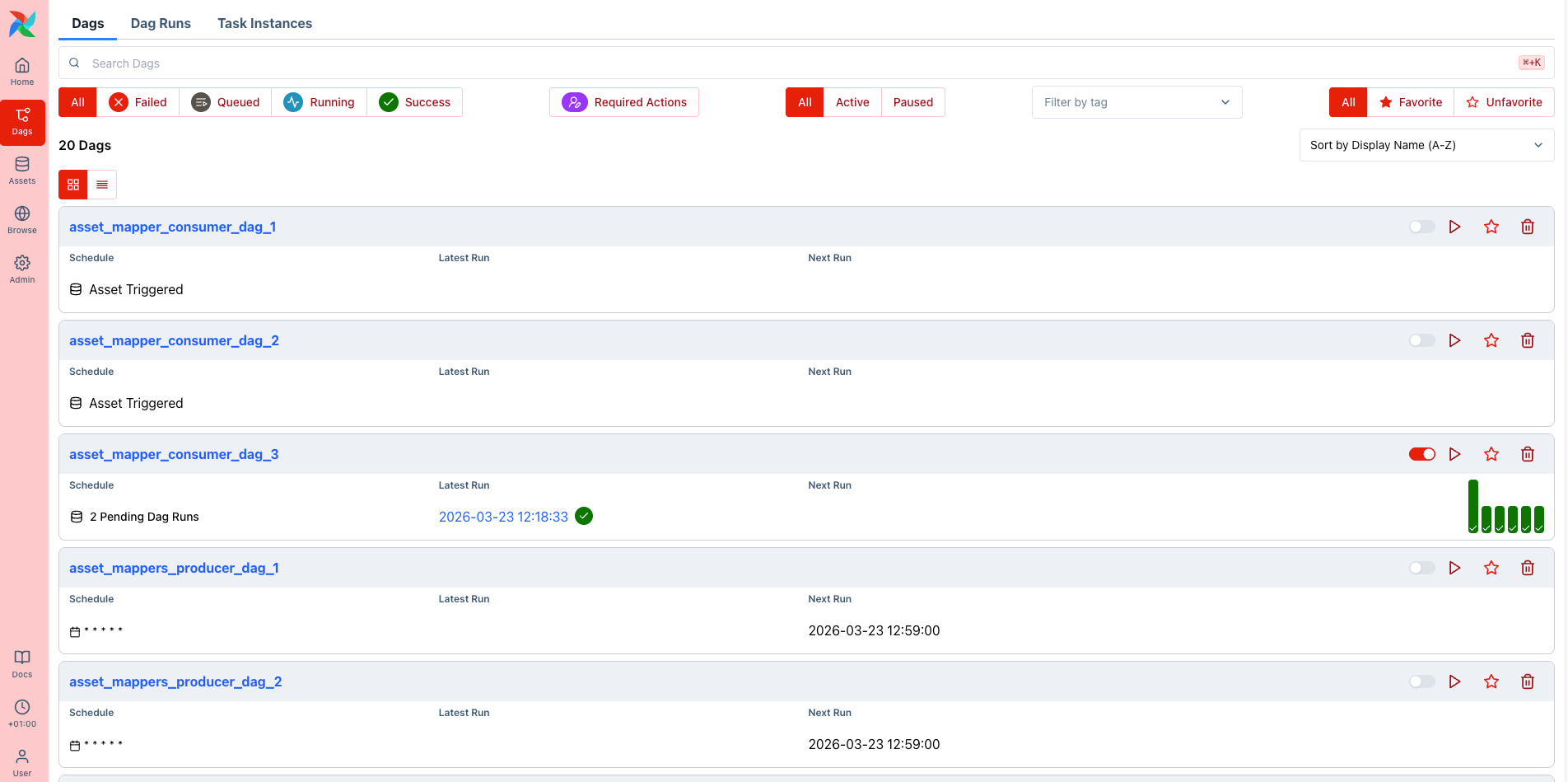
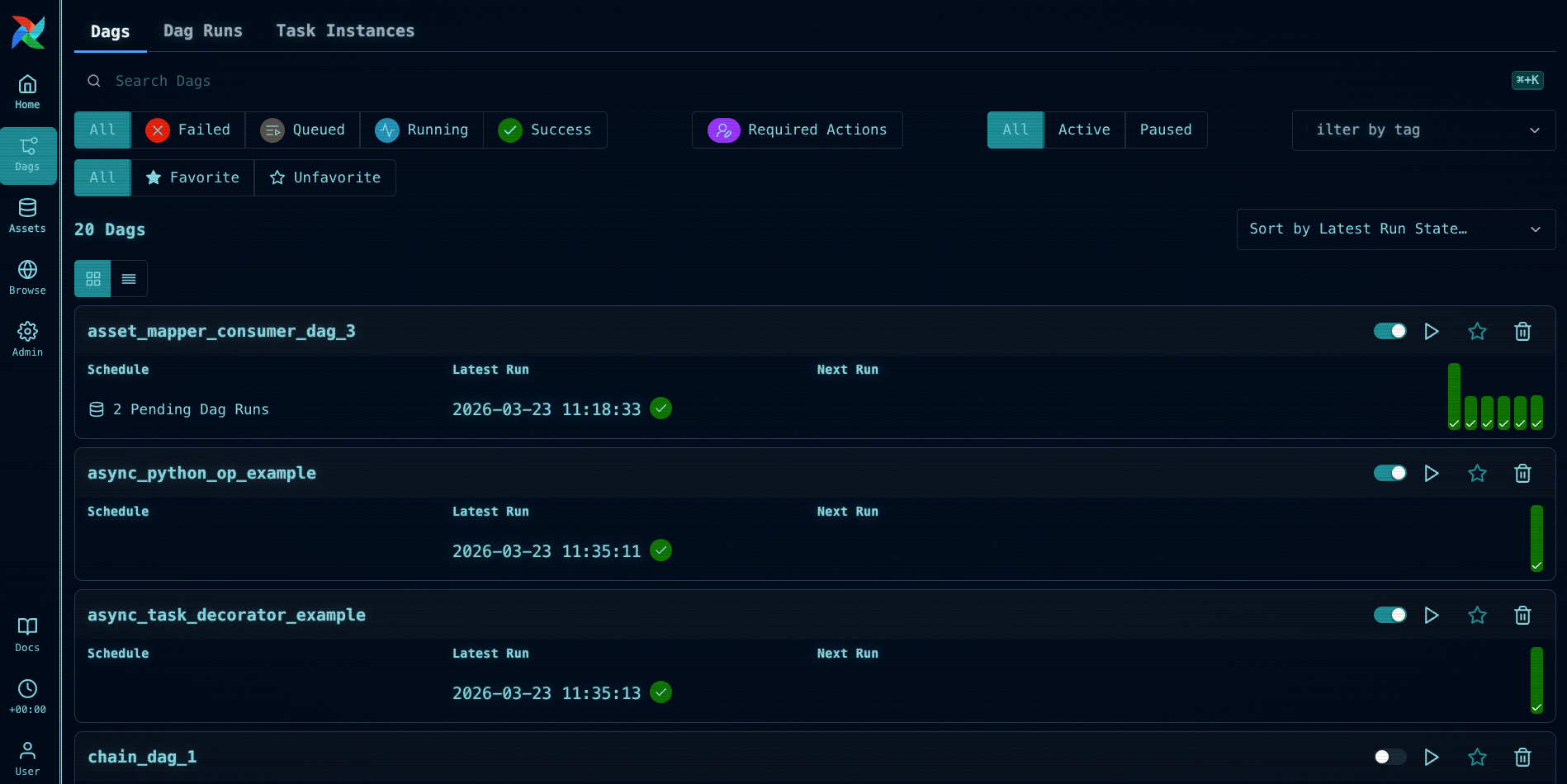
The 3.2 release also contains an exciting feature for everyone who likes to customize their Airflow UI. In addition to the plugin system introduced in Airflow 3.1, you can now change the global Airflow UI color theme by setting the AIRFLOW__API__THEME environment variable.
For example, if you want to ensure that you never confuse your development and production environment again, you can use the below settings to change the colors in one of the environments to a red theme.
AIRFLOW__API__THEME='{
  "tokens": {
    "colors": {
      "brand": {
        "50": { "value": "oklch(0.971 0.013 17.38)" },
        "100": { "value": "oklch(0.936 0.032 17.717)" },
        "200": { "value": "oklch(0.885 0.062 18.334)" },
        "300": { "value": "oklch(0.808 0.114 19.571)" },
        "400": { "value": "oklch(0.704 0.191 22.216)" },
        "500": { "value": "oklch(0.637 0.237 25.331)" },
        "600": { "value": "oklch(0.577 0.245 27.325)" },
        "700": { "value": "oklch(0.505 0.213 27.518)" },
        "800": { "value": "oklch(0.704 0.191 22.216)" },
        "900": { "value": "oklch(0.396 0.141 25.723)" },
        "950": { "value": "oklch(0.258 0.092 26.042)" }
      }
    }
  }
}'
You can even manipulate global CSS to make your innie happy.
And of course, as with all Airflow minor releases, 3.2 has some other great UI updates including a new code Diff between Dag versions, grid view virtualization (only visible rows are rendered, which meaningfully improves performance for large Dags), the ability to add, edit, and delete XCom values directly in the UI, an audit history view for human-in-the-loop approvals, and many improvements to the Gantt chart. There are also a number of smaller UX improvements throughout.
New Provider registry
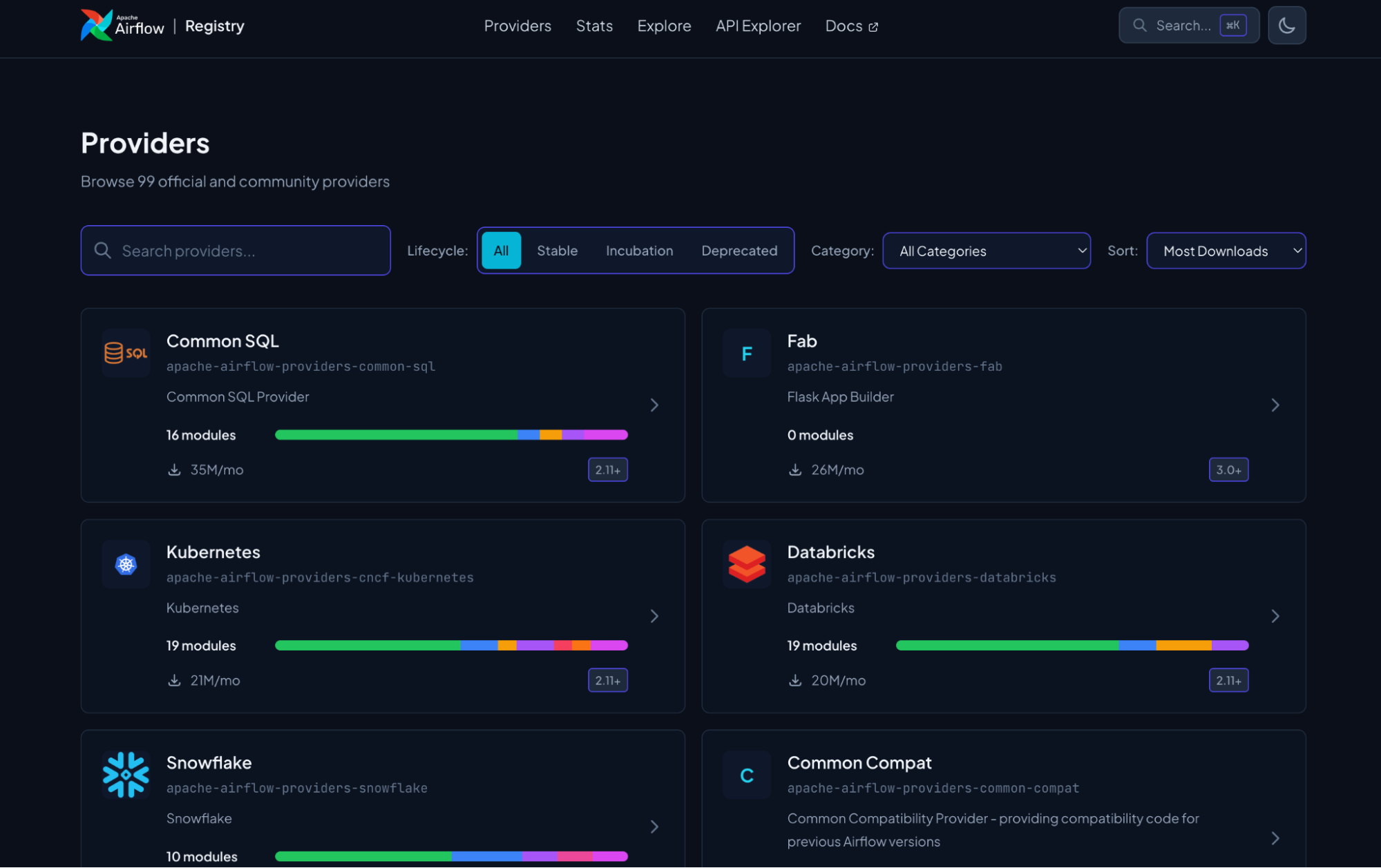
While not officially part of the 3.2 release, another important thing that recently happened in the Airflow ecosystem is the launch of the Airflow Registry. Airflow’s provider ecosystem is one of its biggest strengths. But with 99 official and community providers and over 1,600 modules covering everything from cloud platforms to databases to SaaS tools, discoverability is key. For both humans and robots.
The new Airflow registry is the next iteration of Astronomer’s original provider registry, along with AIP-95 which introduced a formal provider lifecycle. The new site is a searchable catalog of every official provider and module in the ecosystem, where you can browse by category, filter by provider lifecycle stage, explore details like connection types and parameters, and access JSON API endpoints. All of this makes it easier for humans to learn about providers, for the community to build new ones, and for agents to get the right context for Dag authoring.
Deadline alerts
Deadline alerts (AIP-86) were introduced experimentally in Airflow 3.1 as a replacement for the old SLAs feature, which has been removed in Airflow 3. The concept is straightforward: you attach a DeadlineAlert to a Dag, specify a reference point and an interval, and Airflow fires a callback if the Dag run hasn’t completed by the calculated deadline. Reference points can be the Dag run’s logical date, its queued time, or a fixed datetime.
from airflow.sdk import dag, task
from airflow.sdk.definitions.deadline import (
    SyncCallback,
    DeadlineAlert,
    DeadlineReference,
)

from pendulum import duration
from include.callback_functions import sync_callback


@dag(
    deadline=DeadlineAlert(
        reference=DeadlineReference.DAGRUN_QUEUED_AT,
        interval=duration(seconds=10),
        callback=SyncCallback(
            sync_callback,
            kwargs={"alert_type": "time_exceeded", "dag_id": "deadline_alerts_dag"},
        ),
    ),
)
In 3.1, only AsyncCallback was supported, meaning deadline callbacks were executed by the Triggerer. In 3.2, SyncCallback is now also supported. Synchronous callbacks are executed directly by the executor, giving you more flexibility in how and where deadline alert handling runs.
One important thing to understand when deciding when to use deadline alerts is that they run inside Airflow. If your Airflow instance goes down, deadline alerts won’t fire. It is often a good idea to have both Dag-level and platform-level alerts so that you are sure to be notified regardless of what caused the delay. For Astronomer customers, Astro alerts are evaluated outside of Airflow entirely, which means they will still notify you if your Deployment itself is unhealthy or unresponsive. For that reason, many teams may choose to use a combination of deadline alerts and Astro alerts depending on the failure mode they are most concerned about.
Other noteworthy features and improvements
There are many other notable updates in 3.2 to be aware of, including:
- The API server now supports gunicorn as an alternative to uvicorn, enabling rolling worker restarts so workers can be recycled without downtime. To opt in, install
apache-airflow-core[gunicorn]and setserver_type = gunicornin the[api]section of yourairflow.cfg. - The
retry_exponential_backoffparameter is now configurable and accepts a numeric multiplier value instead of a boolean. You can set the exact multiplier you want rather than accepting the hardcoded 2x default, which is useful when the systems your tasks call have specific retry tolerance requirements. - Cleanup for mapped tasks got a big performance boost. Behind the scenes in Airflow, the
rendered_task_instance_fieldstable determines which task instances you can see rendered information for in the UI (or from the API) without needing your Dag to be re-parsed. In 3.2, the query to clean up records from this table was optimized, so for teams with Dags that generate thousands of mapped tasks, this background process will be ~42x faster and will no longer cause scheduler crashes. The config that controls how many rendered fields you see has been renamed to reflect the change in cleanup logic, frommax_num_rendered_ti_fields_per_tasktonum_dag_runs_to_retain_rendered_fields(the old name still works under a deprecation warning). - There is now an Operator-level
render_template_as_native_objoverride. Set it toTrueorFalseon any operator, or leave it asNoneto inherit as before. - You can now specify a custom
data_interval_startanddata_interval_endfor manually triggered Dag runs.
Make sure to check out the full release notes for a complete list of changes.
Get Started
Whether you want to try out the new release or run it in production, the easiest way to get started is to spin up a new Deployment on Astro. If you are not yet an Astronomer customer, you can start a free trial.
Astronomer contributed to key features across this release and provides support from the same team that is actively building Airflow.
If you are still on Airflow 2, check out our upgrading ebook for help getting to Airflow 3.
For a quick reference on everything covered in this release, download our Airflow 3.2 Quick Notes guide.
Conclusion
The Airflow 3.x release cycle continues to move full steam ahead. In 3.2, there are new features and improvements to every part of Airflow, from the Dag authoring interface with the Async PythonOperator, to scheduling with Asset partitions, to the provider ecosystem with the new registry, to the backend with improvements to the API server and Task SDK. The project is moving quickly, and the community driving it is larger and more active than ever.
We are grateful to all the contributors who made this release possible, and we cannot wait to see what you build with it. If you’d like to learn more about the release, we hope you’ll watch the recap of our Introducing Airflow 3.2 webinar on April 7th at 11am ET where we’ll give you a full overview of changes and a live demo of new features.

Get started free.
OR
By proceeding you agree to our Privacy Policy, our Website Terms and to receive emails from Astronomer.