How We Built Cross-Region Disaster Recovery for Astro on Google Cloud
14 min read |
Cross-region disaster recovery (DR) on Astro is now generally available for our GCP data planes. Platform teams running dedicated clusters on Google Cloud can pair a primary and secondary cluster in two regions and fail over their Airflow workloads with a single click. This post covers how we built it on GCP: the architecture, the decisions that are specific to Google Cloud, and what platform teams need to plan for before turning it on.
Why Cross-Region DR Matters for Airflow
Our customers run business-critical data pipelines. Financial services firms use them for regulatory reporting. Healthcare companies use them for patient data processing. When these pipelines stop, the downstream impact is real and immediate.
Teams running Airflow at enterprise scale treat cross-region resilience as a hard requirement. Building it yourself means standing up parallel infrastructure, wiring up replication, and writing custom failover runbooks. That is typically a three-to-six month engineering effort, and maintaining it is a burden that never goes away.
We first shipped DR as a managed platform capability on AWS. (For the architecture behind that release, see our earlier engineering post.) Extending it to Google Cloud meant keeping the same experience, toggle DR on, pick a secondary region, and let the platform handle the rest, while rebuilding the underlying implementation on GCP's primitives. Our targets stayed the same: a recovery time objective (RTO) under 1 hour and a recovery point objective (RPO) under 15 minutes.
The State That Has to Survive a Region Outage
The Astro data plane already withstands the loss of an Availability Zone. On GCP, every dedicated data plane spans three AZs within a region, so an AZ outage degrades but does not stop your workloads. Cross-region DR addresses the larger failure: the loss of an entire region.
Three categories of state need to survive a regional failure, and each gets its own replication strategy:
- Airflow metadata. The database backing Dag runs, task instance metadata, connections, variables, and XComs.
- Task logs. Stored in object storage, needed for debugging and audit trails.
- Container images. Customer-deployed images that must be available in the secondary region.
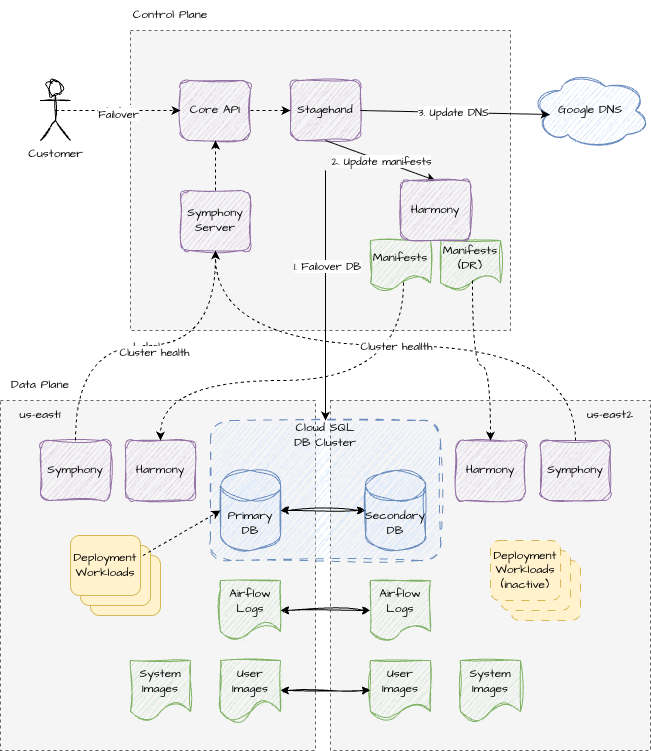
When DR is enabled, a cross-region database replica keeps Deployment metadata in sync, dual-region object storage copies task logs across, and user-deployed images are replicated to the secondary region. We walk through each below.
One Cluster, Two Regions: The Control Plane Model
One of the most consequential design decisions was how to model a DR pair in our control plane, and we made it once for the whole platform rather than per cloud.
We model DR as an extension of the existing cluster record, not as a second, first-class cluster. A dr_region field marks a cluster as DR-enabled, and an is_failed_over flag tracks which region is currently active.
The alternative, modeling the secondary as a separate cluster with its own ID and lifecycle, looked cleaner on the surface but introduced a cascade of problems: duplicated schema that has to stay in sync, special-case guards across dozens of API endpoints, and complicated associations for Deployments, API tokens, and Workspace mappings that are all tied to a single cluster. By treating DR as a property of one cluster, enabling it stays mostly opaque to existing API operations. The control plane sees one cluster. The complexity of running two sets of infrastructure lives in our provisioning and manifest systems, exactly where it belongs.
This is why, after failover, clusters and Deployments keep their IDs, names, namespaces, and system-managed configuration. Every hostname, including the Airflow UI, the Airflow API, and the Remote Execution API URLs, stays the same and simply points at the promoted region.
Region Pairing: The Decision That's Unique to GCP
This is the first place the GCP build diverges sharply from AWS, and it is the first decision a platform team has to make.
On GCP, your secondary region is not a free choice. It must be compatible with your primary region based on Google Cloud's supported dual-region pairings. For example, us-east5 pairs only with us-central1 or us-east1. Custom region pairs are supported only when both regions share the same GCP location, which in practice means both regions sit in the same continent. The Astro UI shows only compatible secondary regions when you configure DR, so you cannot accidentally select an unsupported pair.
This constraint flows directly from how we replicate storage on GCP, which we cover next. The practical takeaway for platform teams: choose your primary region with your DR pairing in mind, because it narrows where your secondary can live.
Storage: Cloud Storage Dual-Region Buckets
On AWS, task logs and the image registry use bi-directional replication between two independent buckets. On GCP, we take a different and simpler path. We use Cloud Storage dual-region buckets.
A dual-region bucket stores data redundantly across two specific regions under a single bucket namespace, and Google replicates objects between them for you. That is why the region pairing rules above exist: the valid secondary regions are the ones that form a supported dual-region configuration with your primary. Because the bucket spans both regions natively, there is no separate reverse-replication step to manage after failover. The bucket is already writable from the promoted region.
By default, dual-region replication keeps 99.9% of newly written objects in sync across both regions within an hour. Teams that need a tighter guarantee can enable the optional Task Logs Replication SLA, which turns on turbo replication for a 15-minute recovery point objective on task logs. Enabling it incurs additional pass-through costs, so it is opt-in per cluster pair.
Database: Cross-Region Metadata Replication with Cloud SQL
The Airflow metadata database has the strictest consistency requirements of the three, and it is the centerpiece of the failover sequence.
For DR-enabled GCP clusters, the metadata database runs on Cloud SQL for PostgreSQL. Enabling DR upgrades the instance to the Enterprise Plus edition, which unlocks cross-region replication and fast failover, and transitions it to a compatible compute family in the process. Astro then provisions a cross-region read replica in the paired region and designates it as the DR replica. Replication is asynchronous, so it keeps the replica continuously in sync without adding meaningful write latency on the primary.
On failover, Astro fails over to the DR replica, which becomes the new primary, and the former primary becomes its replica. Writes to the old primary stop, replication is cut off, and the DR replica begins accepting writes. This typically completes in about five minutes, at which point every Deployment's Dag run history, task instance metadata, connections, variables, and XComs is available in the newly active region.
Failback uses Cloud SQL’s switchover operation rather than an unplanned failover. Switchover coordinates the role change so that returning to the recovered primary region with zero data loss, since the DR replica has been the active writer in the interim.
Compute: A Warm Standby on GKE
The secondary cluster runs on Google Kubernetes Engine in a warm standby mode. It carries just enough of the platform to stay healthy, observable, and ready to take over, without burning resources on idle Airflow workloads between failovers.
Airflow Deployments do not run on the secondary cluster during standby. A Deployment must run in only one region at a time to prevent split-brain behavior with external systems. When failover happens, we scale those Deployments up from zero, which completes well within our RTO budget.
The secondary cluster runs every platform component except the Airflow Deployments themselves, so it stays reconciled, monitored, and ready. Node capacity is handled by the GKE Cluster Autoscaler, which adds nodes for the workloads that land during failover. Because Deployment images are already staged in the secondary region, the main contributor to cold-start time is simply waiting for those nodes to come up, the same as scheduling any Deployment on any cluster.
All GCP dedicated clusters, including DR secondaries, subscribe to the GKE regular release channel, so Google keeps the cluster and its nodes current automatically. Astro applies these upgrades with zero downtime: new capacity is rolled out before old capacity is removed, and running tasks are given a termination grace period of up to 24 hours, so an upgrade never interrupts a Dag mid-run.
Networking: Plan Four Ranges, Not One
GCP networking is the second place the build diverges from AWS, and it needs planning before you enable DR.
On AWS, the secondary cluster can reuse the primary's CIDR ranges by default. On GCP, it cannot. GCP requires four distinct network ranges for the secondary cluster, and Astro does not default any of them from the primary:
- A DR VPC subnet range, used by nodes in the secondary GKE cluster
- A DR Pod range, used by GKE Pods
- A DR Service range, used by Services in the secondary cluster
- A DR Service Peering range, used by private service connections
Each range is required, and each must not overlap with the corresponding range on the primary cluster or with any connected network. Astro uses source network address translation (SNAT) and defaults secondary ranges to RFC 6598 address space to minimize the risk of overlap with your data sources, but with two clusters in play you should confirm none of the four ranges collide with networks you peer into.
Connectivity on GCP is set up with Astronomer support, not self-service. Astro supports a range of options: allowlisting a cluster's external IPs to reach public GCP endpoints, private VPC peering between the Astro VPC and yours, and DNS forwarding or a private DNS zone for hostname resolution. Because a DR pair is two independent clusters, you configure connectivity for the secondary cluster separately from the primary, and you do it with Astronomer support before you rely on failover.
What Fails Over Automatically, and What You Configure
A clear division of responsibility matters more in DR than almost anywhere else, because you find the gaps at the worst possible time. Here is the split.
These transfer to the secondary cluster automatically during failover:
- Deployments and data pipelines
- Dag run history, task instance metadata, and XComs
- Deployment configuration
- Environment variables, connections, Airflow variables, and metrics exports, whether set in Environment Manager or directly on the Deployment
- Task logs, with a guaranteed 15-minute RPO when the Task Logs Replication SLA is enabled
These do not transfer automatically. Configure them on the secondary cluster before you ever trigger a failover:
- Networking and DNS configuration (external IP allowlisting, VPC peering, DNS forwarding), set up with Astronomer support
- imagePullSecrets for Kubernetes Pod Operators, if your Deployments pull from a private registry
- Customer-managed workload identity, covered below
- Any customer-managed network routing on the secondary cluster
Preparing Your Dags for Failover
Because a secondary region can differ from the primary in ways your pipelines care about, connection endpoints, resource sizing, downstream targets, we give your Dags a way to know where they are running.
Astro automatically sets an ASTRONOMER_IS_DR_ENV environment variable on every Deployment in a DR pair. On the secondary cluster it is set to True. On the primary it is not set at all. You can branch on it directly in Dag code:
import os

is_dr = os.environ.get("ASTRONOMER_IS_DR_ENV") == "True"

if is_dr:
    # Use secondary-region connection IDs, adjust resource requests,
    # or skip tasks that should not run during a DR event.
    conn_id = "warehouse_dr"
else:
    conn_id = "warehouse_primary"
Update your Dags to handle this variable before you trigger a failover, not during one. If you would rather not branch in code, you can update connections and environment variables after failover through the Astro API or Terraform instead.
Workload Identity After Failover
If you use Astro-managed workload identity, the same identity applies in both regions and there is nothing extra to do.
If you use customer-managed workload identity, plan for one manual step. When DR is enabled, the secondary cluster uses the Astro-managed identity by default. If you use a customer-managed workload identity in the primary region, configure the same for the secondary region as part of your DR preparation, so a failover does not strand a Deployment without the cloud permissions it needs.
The Failover Model
Failover is a single click in the Astro UI. Under the hood, the API flips the is_failed_over state and our data plane orchestration promotes the secondary region: it fails over the Cloud SQL database to the DR replica, which becomes the new primary, inflates the previously idle Deployments on the secondary GKE cluster, and repoints DNS so every existing hostname now resolves to the promoted region.
Failback is the same operation in reverse. After a failover, Astro automatically enables synchronization in the reverse direction, which keeps the original primary ready to take back over. When the primary region recovers, you fail back with a single click.
For Deployments that use Remote Execution, only the Astro-managed orchestration plane fails over. Your execution plane runs in your own infrastructure and is not part of Astro's region failover, but your Remote Execution Agents reconnect to the promoted secondary automatically.
Enabling DR on New and Existing Clusters
Cross-region DR requires the Enterprise Business Critical tier. There are two paths to turning it on.
New clusters. Enable DR at creation time in the Astro UI. In the cluster's Disaster Recovery section you select the failover region and provide the four DR network ranges, then optionally enable the Task Logs Replication SLA. DR cluster creation is also supported through the Astro API and Terraform.
Existing clusters. Enabling DR on a cluster that is already running is a guided, support-assisted process, and is the one path not available through the API or Terraform. You submit a request from the cluster's Disaster Recovery tab, choose a maintenance window at least five days out, and provide the same four network ranges. On GCP the conversion runs in two phases. First, Astro migrates your existing storage to dual-region buckets using a Cloud Storage bucket relocation, which needs downtime. Then Astro finalizes the relocation and enables cross-region replication, during which each bucket has a brief write outage as its location changes. Plan for one to two hours of maintenance downtime overall, since running and scheduled tasks may need a retry during the window.
Disabling DR deprovisions the secondary cluster along with its compute and the secondary database. The dual-region storage buckets remain in place. Disabling DR cannot be undone without re-enabling it, and it can only be done from the primary region. One thing to plan for: the secondary region is fixed once DR is enabled. It cannot be changed later, even if you disable and re-enable DR.
Programmatic Control: API and Terraform
Platform teams that manage infrastructure as code can create DR-enabled GCP clusters through both the Astro API and Terraform, and can initiate failover and failback the same way. The one exception is enabling DR on an existing cluster, which is not available through the API or Terraform and requires a support request.
RTO, RPO, and Why We Test Failover Constantly
Our targets on GCP match the AWS release: an RTO under 1 hour and an RPO under 15 minutes with the Task Logs Replication SLA enabled. We benchmark those numbers against a realistic load, more than 80 Deployments and over 1,250 concurrent task runs, rather than a toy cluster.
A real DR failover should be a rare event, which is exactly why it has to work the first time you need it. We validate the full failover and failback sequence continuously and include DR-enabled cluster behavior in our integration test suite so the capability stays healthy between the rare moments it gets used for real.
What's Next
DR on Google Cloud extends the cross-region resilience we already deliver on AWS, and Azure support is planned next. We are also refreshing our security and resilience documentation, including the Disaster Recovery whitepaper in the Astronomer Trust Center, to cover the GCP architecture in full.
Get Started
Cross-region DR on GCP requires the Enterprise Business Critical tier. To enable it on your dedicated GCP clusters, or to plan a conversion of an existing cluster, reach out to your account team or contact Astronomer support.
To go deeper on the setup, see the Disaster Recovery documentation, including how to prepare for disaster recovery and set it up on new or existing clusters. To understand how Astro stays resilient within a region before you ever reach a failover, start with the Resilience overview.