What's New in Astro IDE: Fast Mode and Enhanced Skills
4 min read |
Data engineering backlogs keep growing, but teams aren't getting any bigger. And hiring doesn't fix the problem overnight. New engineers spend weeks deciphering massive Dags and untangling complex business logic before they can ship their first pipeline. You need a way to accelerate everyone on your team, whether they're debugging a failing task, understanding an unfamiliar Dag, or refactoring code for Airflow 3.
That's why we built Astro IDE: to help data engineers write production-ready Dags like an Airflow expert—without the wait. And now, we're giving you even more control over how you work.
We’ve made Astro IDE even more powerful, with a set of improvements to our Airflow-native AI code assistant that embeds the power of an Airflow expert at your fingertips, providing the agent with more context, and data engineers more control over how the agent responds.
What’s New in Astro IDE
We’ve shipped three major improvements to make Astro IDE smarter, faster, and even more helpful for complex tasks:
Fast Mode: a new response model that delivers quick, concise answers when speed matters most.
Enhanced skills: we’ve baked in even more Airflow expertise for handling common patterns like Airflow 2 to 3 migrations to help you tackle complex, time consuming tasks, faster than ever. New skills will continue to be added over time, ensuring Astro IDE is always following modern best practices.
Two modes, one goal: Keep you moving
Some tasks need speed. Others need depth. When you're troubleshooting a Dag error or trying to understand someone else's code, you want answers immediately. When you're building new pipelines or refactoring for production, you need to consider every edge case.
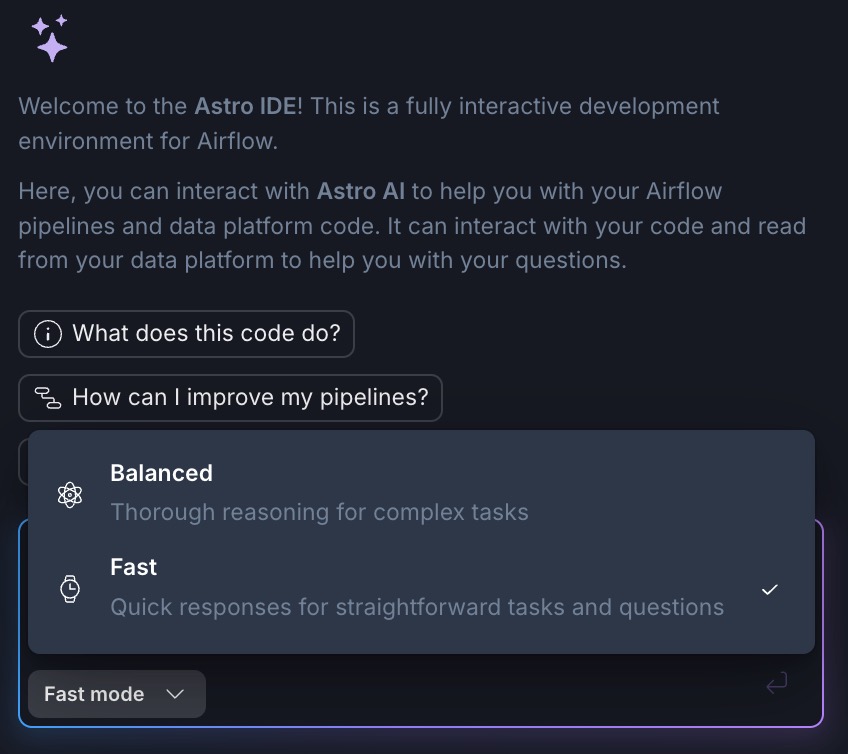
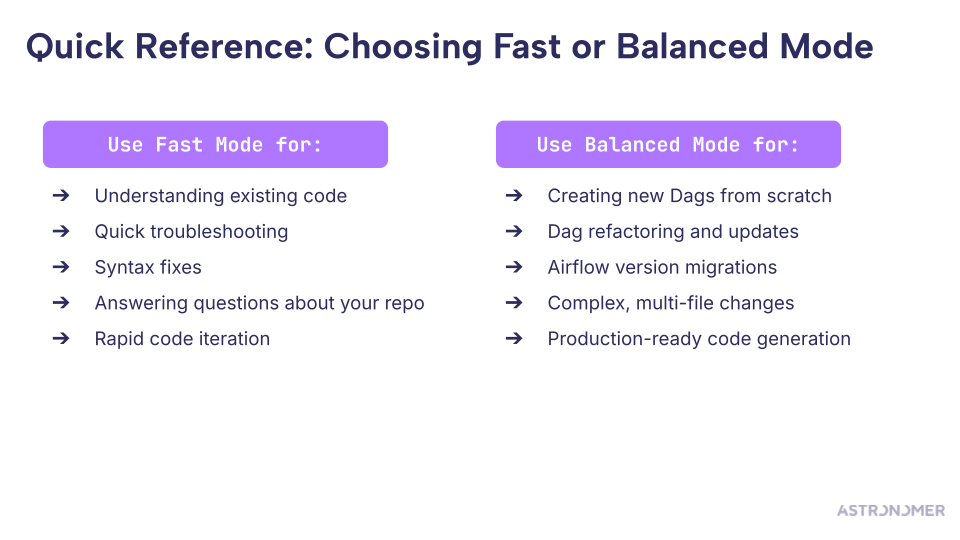
Fast Mode delivers quick, concise responses for lightweight tasks where speed matters—perfect for understanding existing code, quick troubleshooting, syntax fixes, and rapid code iteration.
Example prompts:"Tell me how I can improve this Dag?""Explain what this Dag does in a step-by-step way.""Why is this task failing?""Fix this import error."
* Fast mode delivers responses up to 2-3x faster than Balanced Mode while using half the tokens, making it both quicker and more cost-efficient for lightweight tasks—all while maintaining comparable accuracy.
Balanced Mode (the default) provides thorough, context-rich responses for complex, code-heavy work where depth and accuracy are critical—ideal for creating new Dags from scratch, refactoring and updates (like updating Dags for a new version), and production-ready code generation.
Example prompts:"Create a Dag that ingests data from S3, transforms it with dbt, and loads to Snowflake.""Write a simple FastAPI plugin that works on Astro deployments.""Update this Dag for Airflow 3 compatibility.""Convert this Dag to use dynamic task mapping."
You can toggle between modes at any time, giving you the flexibility to match your AI assistant to the task at hand.
Your always-available Airflow expert: trained to tackle the complex work that slows teams down
Generic AI tools may generate boilerplate code just fine. But when it comes to the complex, time-consuming tasks that require deep Airflow expertise, they fall short.
We've trained Astro IDE to handle exactly those scenarios. Migrating from Airflow 2 to 3? The agent guides you through deprecations, breaking changes, and best practices for modernizing your Dags—work that would normally require hours of research and careful refactoring.
The result: Our AI agent acts like a seasoned Airflow expert sitting next to you, tackling the complex work and accelerating your workflow without requiring you to become an expert in every pattern yourself.
The bottom line
Your workflow isn't one-size-fits-all, so your IDE shouldn't be either. With Fast Mode, follow-up questions, and enhanced Airflow expertise built in, Astro IDE now adapts to how you work—whether you need speed for quick troubleshooting or depth for production-ready code generation.
These improvements make Astro IDE more useful for the work you're already doing: migrating to Airflow 3, updating and optimizing existing Dags, and shipping production-ready Dags 10x faster—all without the hallucinations and refactoring work that slow you down.
Try the Astro IDE today
New to Astro IDE? Start a free trial today and experience how context-aware AI code generation helps you ship Airflow Dags 10x faster—with code that actually works in your environment the first time.
Already using Astro IDE? These improvements are live now. Switch to Fast Mode to test improving an existing Dag or let Astro IDE help you upgrade your Dag code for Airflow 3.
Related content:
Best practices for writing Airflow Dags with AI
Speedrun your first Apache Airflow® Dag run

Get started free.
OR
By proceeding you agree to our Privacy Policy, our Website Terms and to receive emails from Astronomer.