How Blueprint and Astro IDE Redefine Orchestration
18 min read |
In the autumn of 1843, Ada Lovelace made a quiet but radical bet. She wrote detailed operation cards for Charles Babbage's Analytical Engine, a machine she would never operate herself. The engine required a machinist to set its gears. Ada was not that machinist. She was the one who described what the machine should do, trusting that anyone who understood her notation could translate it into motion.
Ada separated the intent of computation from the mechanics of execution. She believed that the power of a general-purpose machine lay not in who could build it, but in how many people could instruct it.

Almost two centuries later, a data architect watches twenty colleagues create Airflow Dags. These colleagues span three teams: data engineering, data science, and portal development. Most of them have never opened the Airflow UI. Most of them do not write Python day to day. Yet every one of them is shipping production pipelines.
For most of these users, Airflow is just an interface. They do not care about the web UI or how the scheduler works. They care about getting their dbt job up and running.
This is the story of how that became possible. And it is the final chapter in our series on the rise of abstraction in data orchestration.
In Part 1, we surveyed the landscape: Python as the foundation, DAG Factory as the bridge between code and config, Blueprint for governed templates, and Astro IDE for AI-assisted authoring. In Part 2, we went deep on DAG Factory, showing how configuration-based authoring turns YAML into a universal language for pipeline creation. We even built Dags inside Minecraft.
Now we arrive at the highest levels of abstraction: Blueprint and the Astro IDE. Together, they answer a question that every scaling data organization eventually confronts: how do you let twenty people build pipelines without twenty people writing Airflow code?
The literacy bottleneck
Before we look at code, let me share something uncomfortable.
In the State of Apache Airflow 2026 survey, the number two most cited challenge was not performance, not cost, not infrastructure. It was lack of Airflow literacy across teams. The people who need pipelines the most are often the people least equipped to build them.
I lived this reality for years. My data engineering team was small. Every department needed orchestration: marketing wanted attribution reports, finance wanted reconciliation jobs, product wanted feature-flag analytics. We became the funnel through which every pipeline request had to pass. The backlog grew. Frustration grew faster. And when people got tired of waiting, they built their own shadow pipelines: cron jobs, Excel macros, manual processes that lived outside our governance and observability systems entirely.
The answer was never "teach everyone Airflow" (we tried though). The answer was to build guardrails that let others contribute safely, through sanctioned channels. Blueprint is the first tool I have seen that makes this practical without compromising on governance.
What is Blueprint?
Blueprint is an open-source Python library from Astronomer (published on PyPI as airflow-blueprint) that introduces a clean separation between two roles:
- Platform teams write reusable templates in Python. Each template is a Blueprint: a class that defines a validated configuration schema and a
render()method that produces Airflow tasks or TaskGroups. - Everyone else composes those templates into Dags using YAML, Python, or a visual drag-and-drop builder in the Astro IDE. For YAML and visual authoring, no Python or Airflow knowledge is required.
This is Ada's insight, made operational. The platform team builds the engine. Others write the operation cards.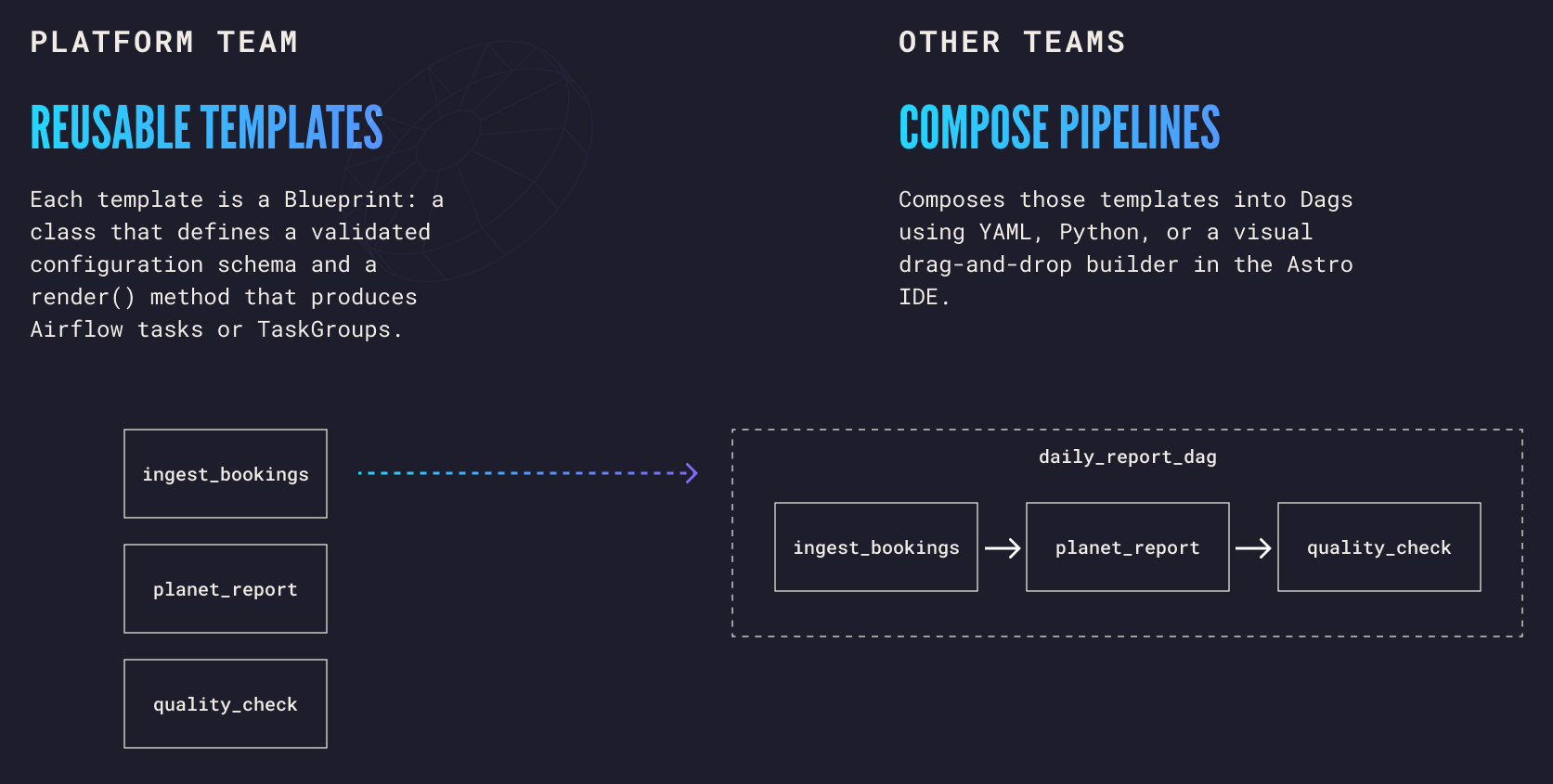
Blueprint by example: AstroTrips
To make this concrete, let's build something real.
AstroTrips is a fictional interplanetary travel company. Customers book trips to the Moon, Mars, and Europa. Each booking generates a payment record (base fare times a planet multiplier, minus any promo code discount). Every day, a pipeline needs to: (1) ingest new booking data, (2) aggregate it into a daily planet revenue report, and (3) validate the report quality before downstream consumption. A separate pipeline fetches weather conditions per planet from an external API.
This is the same scenario we use in Astronomer's public Airflow workshops, where the full pipeline is written as traditional Python Dags: four Dag files, SQL operator imports, chain() calls, task decorators, XCom wiring, asset definitions. Here, we will rebuild it with Blueprint.
Defining blueprints
A blueprint is a Python class that inherits from Blueprint[ConfigType]. The generic parameter is a Pydantic model that defines the configuration schema. The render() method takes a validated config and returns a TaskOrGroup, which is Blueprint's union type: either a single Airflow BaseOperator or a TaskGroup containing multiple tasks. This distinction matters.
A blueprint that wraps a single SQL query returns one operator. A blueprint that orchestrates a multi-step setup (cleanup, schema, fixtures) returns a TaskGroup. Blueprint handles both patterns identically in the YAML layer; the consumer never needs to know the difference.
Here are two blueprints for the AstroTrips daily pipeline: one to ingest booking data, and one to generate a planet revenue report.
from airflow.providers.common.sql.operators.sql import SQLExecuteQueryOperator

from blueprint import BaseModel, Blueprint, Field, TaskOrGroup


class IngestBookingsConfig(BaseModel):
    conn_id: str = Field(description="Airflow connection ID for DuckDB")
    n_bookings: int = Field(
        default=5, ge=1, le=100,
        description="Number of random bookings to generate per run",
    )


class IngestBookings(Blueprint[IngestBookingsConfig]):
    """Generate random booking and payment records for a given execution date."""

    def render(self, config: IngestBookingsConfig) -> TaskOrGroup:
        return SQLExecuteQueryOperator(
            task_id=self.step_id,
            conn_id=config.conn_id,
            sql="generate.sql",
            params={"n_bookings": config.n_bookings},
        )


class PlanetReportConfig(BaseModel):
    conn_id: str = Field(description="Airflow connection ID for DuckDB")


class PlanetReport(Blueprint[PlanetReportConfig]):
    """Aggregate bookings into the daily_planet_report table using an upsert pattern."""

    def render(self, config: PlanetReportConfig) -> TaskOrGroup:
        return SQLExecuteQueryOperator(
            task_id=self.step_id,
            conn_id=config.conn_id,
            sql="report.sql",
            parameters={"reportDate": "{{ ds }}"},
        )
A few things worth noting here. The Blueprint[IngestBookingsConfig] syntax uses Python Generics. Under the hood, Blueprint's __init_subclass__ hook extracts the Pydantic model from the generic parameter at class definition time and validates that all config fields are YAML-serializable. If you accidentally use a datetime or Decimal field, you will get a TypeError before any Dag is ever built.
IngestBookings wraps generate.sql, which generates N random bookings with matching payment records. PlanetReport runs report.sql, which aggregates bookings into a daily revenue report.
The Field(default=5, ge=1, le=100) constraint on n_bookings means Blueprint will reject any configuration where the count is zero, negative, or above 100. The Field(description=...) is not just documentation: when these blueprints appear in the Astro IDE, the description becomes a form label tooltip. Pydantic constraints become real-time form validation. The schema does double duty.
This validation happens at build time, before the Dag ever reaches the Airflow scheduler. Mistakes are caught early.
Both render() methods above return a single SQLExecuteQueryOperator. But not every blueprint is a single task. A setup procedure with cleanup, schema creation, and fixture loading is naturally a TaskGroup:
class SetupDatabase(Blueprint[SetupDatabaseConfig]):
    """Create tables, sequences, and optionally seed the AstroTrips database."""

    def render(self, config: SetupDatabaseConfig) -> TaskOrGroup:
        with TaskGroup(group_id=self.step_id) as group:
            cleanup = SQLExecuteQueryOperator(
                task_id="cleanup",
                conn_id=config.conn_id,
                sql="cleanup.sql",
            )
            schema = SQLExecuteQueryOperator(
                task_id="schema",
                conn_id=config.conn_id,
                sql="schema.sql",
            )
            cleanup >> schema

            if config.seed_data:
                fixtures = SQLExecuteQueryOperator(
                    task_id="fixtures",
                    conn_id=config.conn_id,
                    sql="fixtures.sql",
                )
                schema >> fixtures

        return group
The self.step_id is set automatically from the step name in the YAML, so you never have to worry about naming collisions across Dags. And notice how config.seed_data controls whether the fixtures task is even created. The Dag graph itself adapts to the configuration.
When a YAML consumer references SetupDatabase, they see a TaskGroup in the Airflow UI (cleanup > schema > fixtures). When they reference IngestBookings, they see a single task. The consumer's YAML looks the same in both cases; Blueprint's TaskOrGroup return type handles the difference transparently.
Composing a Dag from YAML
With the blueprints defined, anyone can compose a Dag using a .dag.yaml file:
dag_id: astrotrips_daily_pipeline
schedule: "@daily"
description: "Daily booking ingestion, planet reporting, and data quality validation"

steps:
  ingest:
    blueprint: ingest_bookings
    conn_id: duckdb_astrotrips
    n_bookings: 5

  report:
    blueprint: planet_report
    depends_on: [ingest]
    conn_id: duckdb_astrotrips

  validate:
    blueprint: data_quality_check
    depends_on: [report]
    conn_id: duckdb_astrotrips
    table: daily_planet_report
    not_null_columns:
      - planet_name
    min_distinct_columns:
      - planet_name
    min_distinct_counts:
      - 3
    min_value_columns:
      - total_passengers
    min_values:
      - 1
The YAML is flat and readable. Each step references a blueprint by name and provides configuration values. Dependencies are explicit with depends_on. Everything else (conn_id, n_bookings, table, checks) is passed directly to the blueprint's Pydantic model for validation.
The person writing this YAML does not need to know what
SQLExecuteQueryOperatoris. They do not need to know how Airflow resolves dependencies or how Jinja templates work. They fill in the fields that the platform team exposed, and Blueprint handles the rest.
Loading Dags
The loader script is simple:
"""Discover *.dag.yaml files and build them into Airflow Dags."""

from blueprint import build_all

build_all()
That's it. build_all() discovers all .dag.yaml files in your dags/ directory, finds all Blueprint classes in your Python files, validates every step's configuration against its blueprint's schema, renders the tasks, wires up the dependencies, and registers the resulting Dags with Airflow. Two lines of code replace what would otherwise be dozens of files of hand-crafted Python.
Debugging in the Airflow UI
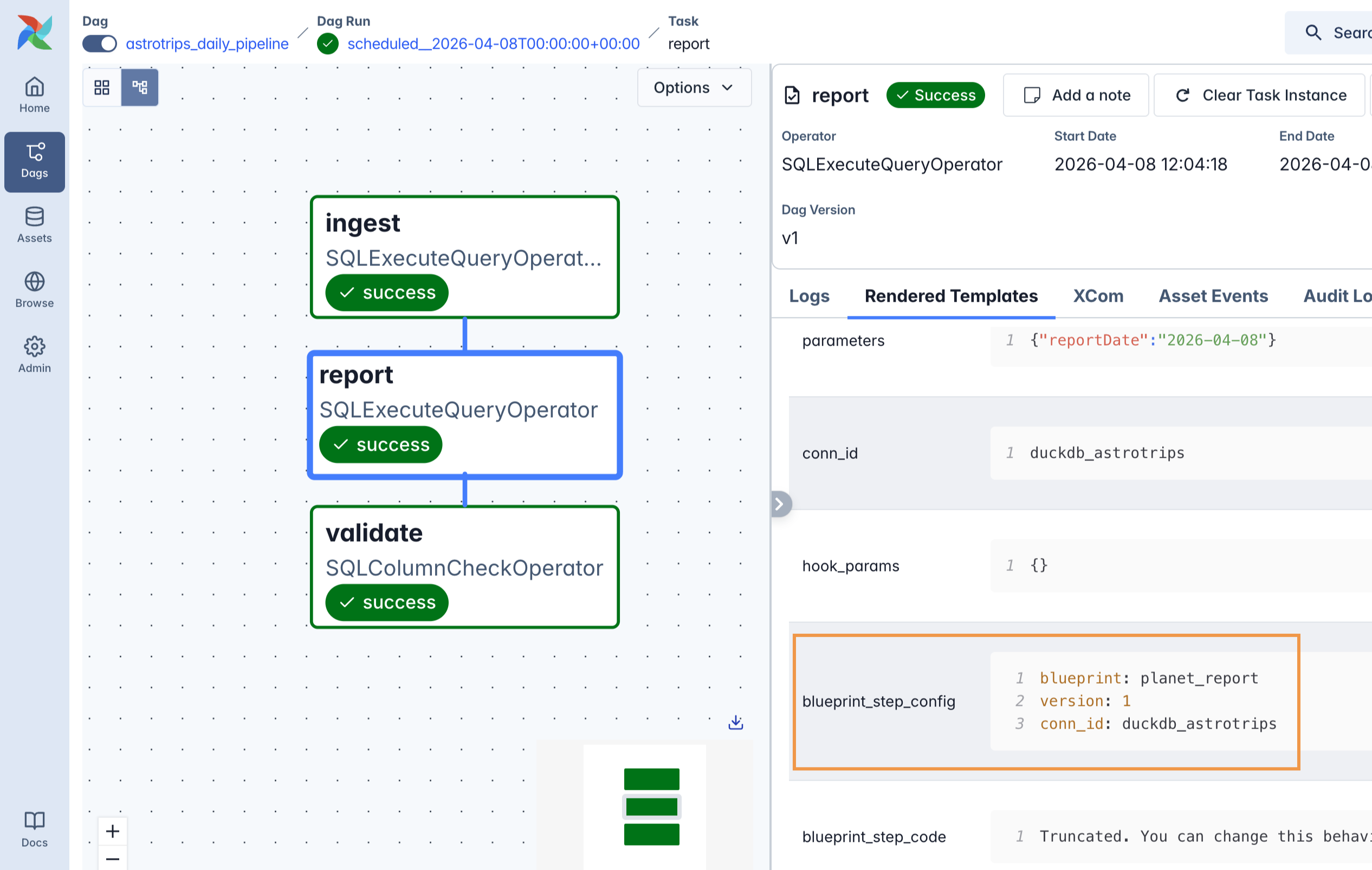
Every task generated by Blueprint carries two extra fields, visible in the Rendered Template tab of the Airflow UI:
blueprint_step_config: the resolved YAML configuration for the stepblueprint_step_code: the full Python source code of the blueprint class
Going deeper: versioning, validation, and Dag arguments
The simple example covers the basics. But real organizations need more. Blueprint's advanced features are where the library earns its place in production.
Versioning
Requirements change. A weather ingestion pipeline that loads everything becomes one that filters by storm risk. Blueprint handles this through class-name versioning: the original class is version 1, and you add a V2 suffix for version 2.
class WeatherIngestConfig(BaseModel):
    conn_id: str = Field(description="Airflow connection ID for DuckDB")


class WeatherIngest(Blueprint[WeatherIngestConfig]):
    """Fetch weather data for all planets and load into planet_weather."""

    def render(self, config: WeatherIngestConfig) -> TaskOrGroup:
        with TaskGroup(group_id=self.step_id) as group:
            get_planets = SQLExecuteQueryOperator(
                task_id="get_planets",
                conn_id=config.conn_id,
                sql="SELECT DISTINCT planet_id FROM planets",
            )

            @task(task_id="extract_planet_ids")
            def extract_planet_ids(query_result):
                return [row[0] for row in query_result]

            @task(task_id="fetch_weather")
            def fetch_weather(planet_id: int, logical_date=None):
                from include.weather_api import get_planet_weather
                return get_planet_weather(planet_id, logical_date.date())

            @task(task_id="load_weather")
            def load_weather(weather_data: list[dict], logical_date=None):
                # ... insert into planet_weather table

            planet_ids = extract_planet_ids(get_planets.output)
            weather_data = fetch_weather.expand(planet_id=planet_ids)
            load_weather(weather_data)

        return group
This blueprint uses dynamic task mapping (.expand()) to create one fetch_weather task per planet at runtime. The number of planets is not known at parse time; it comes from the database.
The TaskGroup encapsulates the entire flow: query planets, fan out, fetch weather, fan in, load. From the YAML consumer's perspective, it is one step called
weather.
A new requirement arrives: filter out readings where storm risk exceeds a threshold. Instead of modifying the original (which would break existing Dags), you create a V2:
class WeatherIngestV2Config(BaseModel):
    conn_id: str = Field(description="Airflow connection ID for DuckDB")
    max_storm_risk: float = Field(
        default=1.0, ge=0.0, le=1.0,
        description="Only load readings with storm_risk at or below this threshold",
    )


class WeatherIngestV2(Blueprint[WeatherIngestV2Config]):
    """Fetch weather for all planets with storm risk filtering."""

    def render(self, config: WeatherIngestV2Config) -> TaskOrGroup:
        # Same structure as v1, but the load step filters:
        # filtered = [w for w in weather_data if w["storm_risk"] <= config.max_storm_risk]
Both versions coexist. Existing Dags that reference weather_ingest without a version number get the latest (v2). Dags that need the old behavior can pin explicitly:
steps:
  # Uses v2 with storm filtering
  weather:
    blueprint: weather_ingest
    version: 2
    conn_id: duckdb_astrotrips
    max_storm_risk: 0.8
This is the kind of operational detail that matters at scale. When you have dozens of Dags referencing a blueprint, you cannot break them all at once when the schema changes. Version pinning gives you a migration path.
Strict validation
Where Blueprint's validation model really shines is in complex configurations. Consider the DataQualityCheck blueprint:
class DataQualityCheckConfig(BaseModel):
    model_config = ConfigDict(extra="forbid")

    conn_id: str = Field(description="Airflow connection ID for DuckDB")
    table: str = Field(description="Table name to validate")
    not_null_columns: list[str] = Field(
        default=[], description="Columns that must contain no null values"
    )
    min_distinct_columns: list[str] = Field(
        default=[], description="Columns to check for minimum distinct value count"
    )
    min_distinct_counts: list[int] = Field(
        default=[], description="Required minimum distinct count per column"
    )
    min_value_columns: list[str] = Field(
        default=[], description="Columns to check for a minimum numeric value"
    )
    min_values: list[int] = Field(
        default=[], description="Minimum allowed value per column"
    )

    @field_validator("min_distinct_counts")
    @classmethod
    def distinct_lengths_match(cls, v: list[int], info) -> list[int]:
        cols = info.data.get("min_distinct_columns", [])
        if len(v) != len(cols):
            raise ValueError("min_distinct_counts must have the same length as min_distinct_columns")
        return v

    @field_validator("min_values")
    @classmethod
    def min_value_lengths_match(cls, v: list[int], info) -> list[int]:
        cols = info.data.get("min_value_columns", [])
        if len(v) != len(cols):
            raise ValueError("min_values must have the same length as min_value_columns")
        return v
Multiple layers of protection here. extra="forbid" catches typos: write tabel instead of table and Blueprint rejects the YAML immediately instead of silently ignoring the misspelled key. Each check category uses a properly typed field: column names are list[str], threshold values are list[int]. The @field_validator on min_distinct_counts and min_values enforces that parallel lists stay in sync: if you name three columns but only provide two thresholds, Blueprint rejects the configuration before any task is created. And because not_null_columns needs no threshold at all, it is just a plain list of column names.
This is governance as code. The platform team defines what is valid. Everyone else gets clear error messages when something is wrong. No ambiguity. No "it worked on my machine."
Dag-level arguments with BlueprintDagArgs
Some settings apply to every Dag in a project, not to individual steps. In AstroTrips, all SQL files live in include/sql/, and Airflow needs a template_searchpath to find them. Blueprint handles this with BlueprintDagArgs:
class AstroTripsDagArgsConfig(BaseModel):
    schedule: str | None = None
    description: str | None = None


class AstroTripsDagArgs(BlueprintDagArgs[AstroTripsDagArgsConfig]):
    """Dag-level arguments for AstroTrips. Sets template_searchpath for SQL files."""

    def render(self, config: AstroTripsDagArgsConfig) -> dict:
        kwargs: dict = {
            "template_searchpath": [f"{AIRFLOW_HOME}/include/sql"],
        }
        if config.schedule is not None:
            kwargs["schedule"] = config.schedule
        if config.description is not None:
            kwargs["description"] = config.description
        return kwargs
This is the mechanism for injecting Dag constructor arguments. The render() method returns a dict of kwargs that get passed to the Airflow DAG() constructor. At most one BlueprintDagArgs subclass may exist per project, and the registry auto-discovers it. The config fields (schedule, description) become the valid top-level keys in your YAML files. You can add owner, retries, tags, or any other Dag-level setting your project needs.
Jinja templating
Blueprint YAML supports Jinja templates for dynamic values. Environment variables, Airflow context, Variables, and Connections are all available:
dag_id: satellite_telemetry
schedule: "@hourly"
description: "Telemetry pipeline for {{ env.SATELLITE_ID | default('SAT-001') }}"

steps:
  scan_signals:
    blueprint: scan
    version: 2
    target: "{{ env.SATELLITE_ID | default('SAT-001') }}_{{ context.ds_nodash }}"
    bands:
      - name: uhf
        ghz: 0.4
      - name: s_band
        ghz: 2.2

  transmit_results:
    blueprint: transmit
    depends_on: [scan_signals]
    destination: "{{ var.get('ground_station', 'DSN-Goldstone') }}"
The context proxy is a clever way to access Airflow variables. Attribute access on it generates Airflow template expressions: {{ context.ds_nodash }} becomes the literal {{ ds_nodash }} that Airflow evaluates at runtime. You get the full power of Airflow's templating engine without leaving YAML.
The CLI
Blueprint includes a command-line interface that platform teams use to manage their blueprints:
# List all available blueprints
blueprint list

# Show a blueprint's schema and example YAML
blueprint describe data_quality_check

# Validate a Dag YAML against its blueprint schemas
blueprint lint dags/daily_pipeline.dag.yaml
The lint command is especially valuable in CI/CD pipelines. Run it on every pull request and you catch configuration errors before they reach the Airflow scheduler. This shifts validation left, from runtime to review time, which is exactly where you want it.
CLI command: blueprint list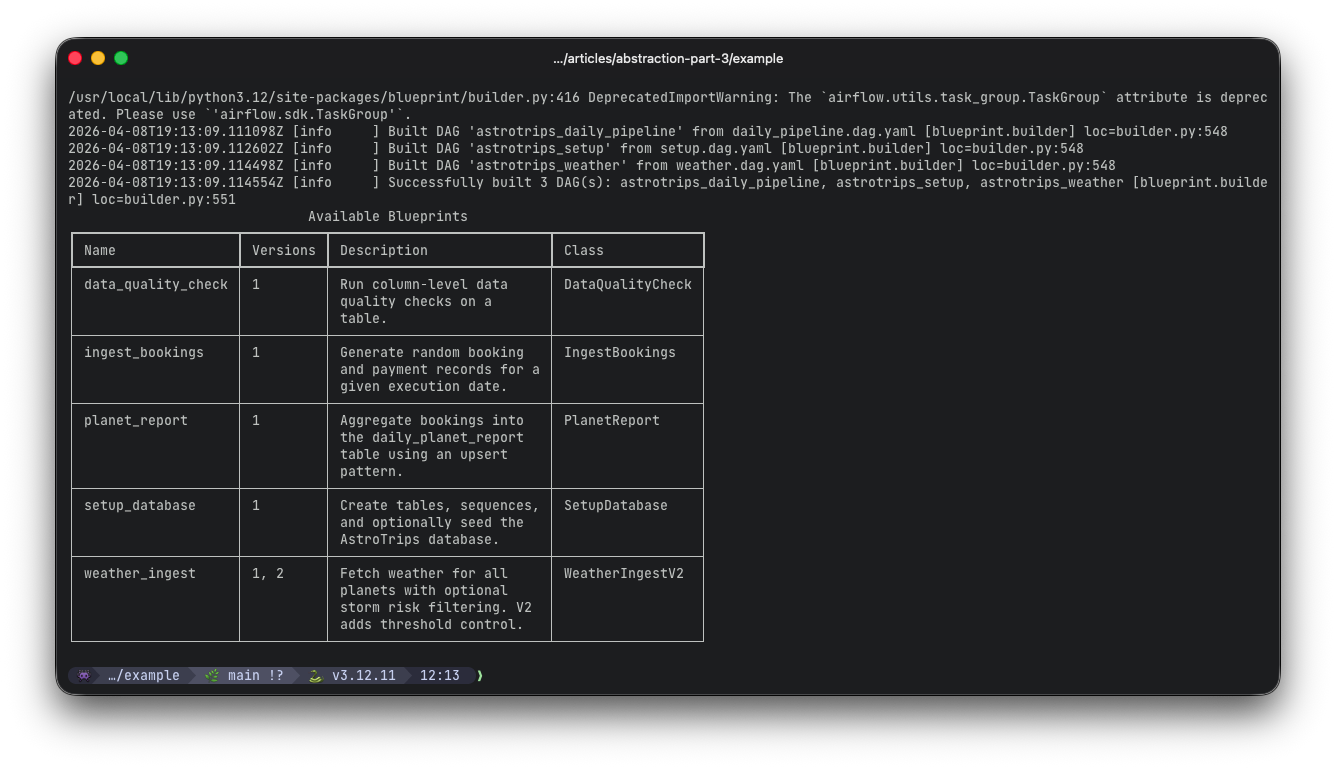
CLI command: blueprint describe data_quality_checks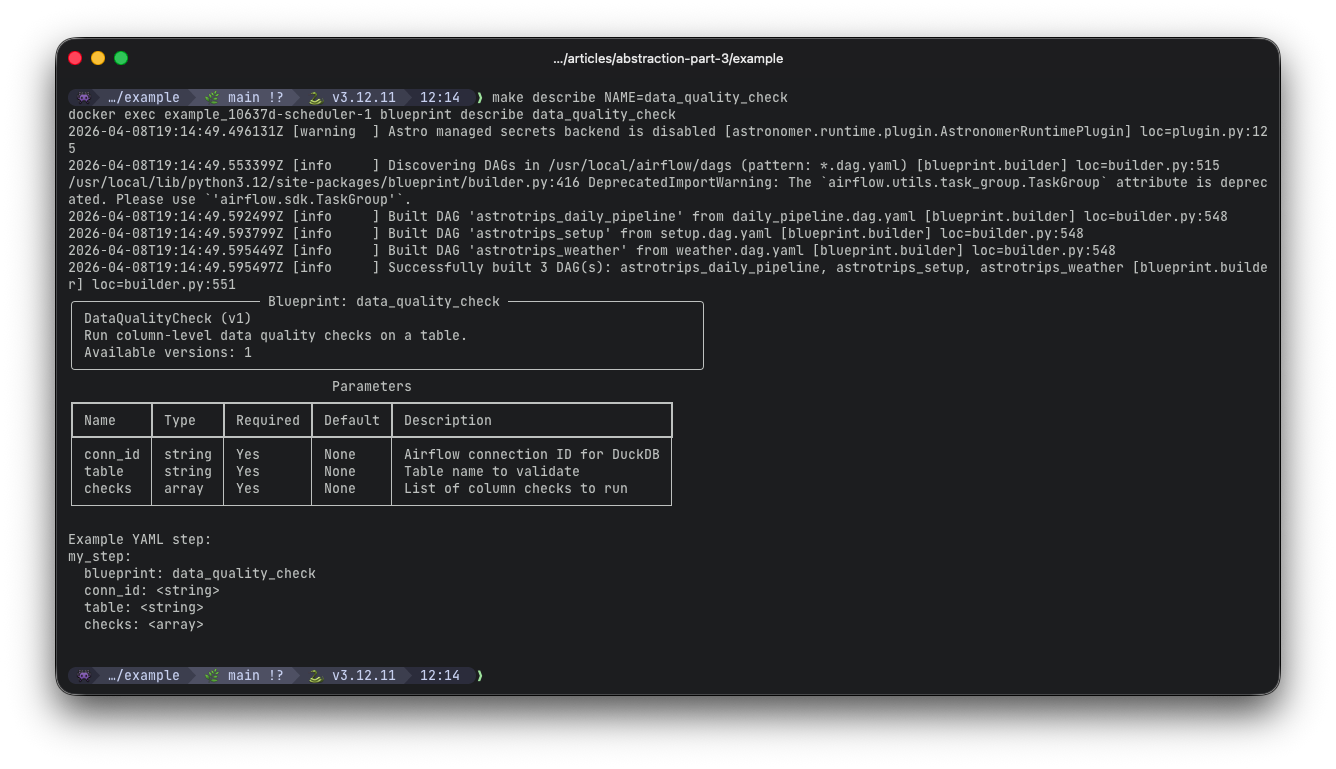
Publishing blueprints for the Astro IDE
There is one more CLI command that deserves its own section, because it is the bridge between Blueprint OSS and the Astro IDE: blueprint schema.
# Generate JSON schema for a single blueprint
blueprint schema ingest_bookings -o blueprint/generated-schemas/ingest_bookings.schema.json

# Generate schemas for all your blueprints
blueprint schema setup_database -o blueprint/generated-schemas/setup_database.schema.json
blueprint schema planet_report -o blueprint/generated-schemas/planet_report.schema.json
blueprint schema data_quality_check -o blueprint/generated-schemas/data_quality_check.schema.json
blueprint schema weather_ingest -o blueprint/generated-schemas/weather_ingest.schema.json

# Generate the Dag-level arguments schema
blueprint schema --dag-args -o blueprint/generated-schemas/dag_args.schema.json
Each command produces a JSON Schema file that fully describes the blueprint's configuration: every field, its type, constraints, defaults, and descriptions. For multi-version blueprints like weather_ingest, the schema uses a oneOf discriminator pattern so the IDE can switch between version forms based on the user's selection.
The key insight here is that publishing is intentional. New blueprints do not appear in the IDE automatically. The platform team decides which blueprints to expose by generating and committing their schemas to
blueprint/generated-schemas/. This is a deliberate governance choice: you control what shows up in the visual builder, not just what exists in the codebase.
The workflow is:
- Platform team writes a new blueprint in Python
- Platform team runs
blueprint schema <name> -o blueprint/generated-schemas/<name>.schema.json - Platform team commits the generated schema to Git
- Astro IDE discovers the schema and renders it in the blueprint library
This means you can have internal, experimental, or in-progress blueprints in your codebase that are not yet available to IDE users. Only when you generate and commit the schema does the blueprint become a building block in the visual builder.
From YAML to visual builder: Blueprint in the Astro IDE
Everything described so far works with any text editor and any Airflow environment. Blueprint OSS is open source, independent, and CLI-first.
But here is where the story gets really exciting.
The Astro IDE takes Blueprint's open-source foundation and adds a visual layer that transforms who can build Dags. In the IDE, users switch to Blueprint mode and the interface reconfigures entirely: the code editor and AI prompt give way to a curated blueprint library, a visual canvas, and form-based configuration panels.
Imagine the AstroTrips blueprints we just built. In the Astro IDE, an analyst would see IngestBookings, PlanetReport, DataQualityCheck, and WeatherIngest listed in the blueprint library. They drag IngestBookings onto the canvas, fill in a form (connection ID, number of bookings), draw a connection to PlanetReport, add a DataQualityCheck downstream, configure the column checks, and hit deploy. The generated output? The exact same .dag.yaml file we wrote by hand earlier.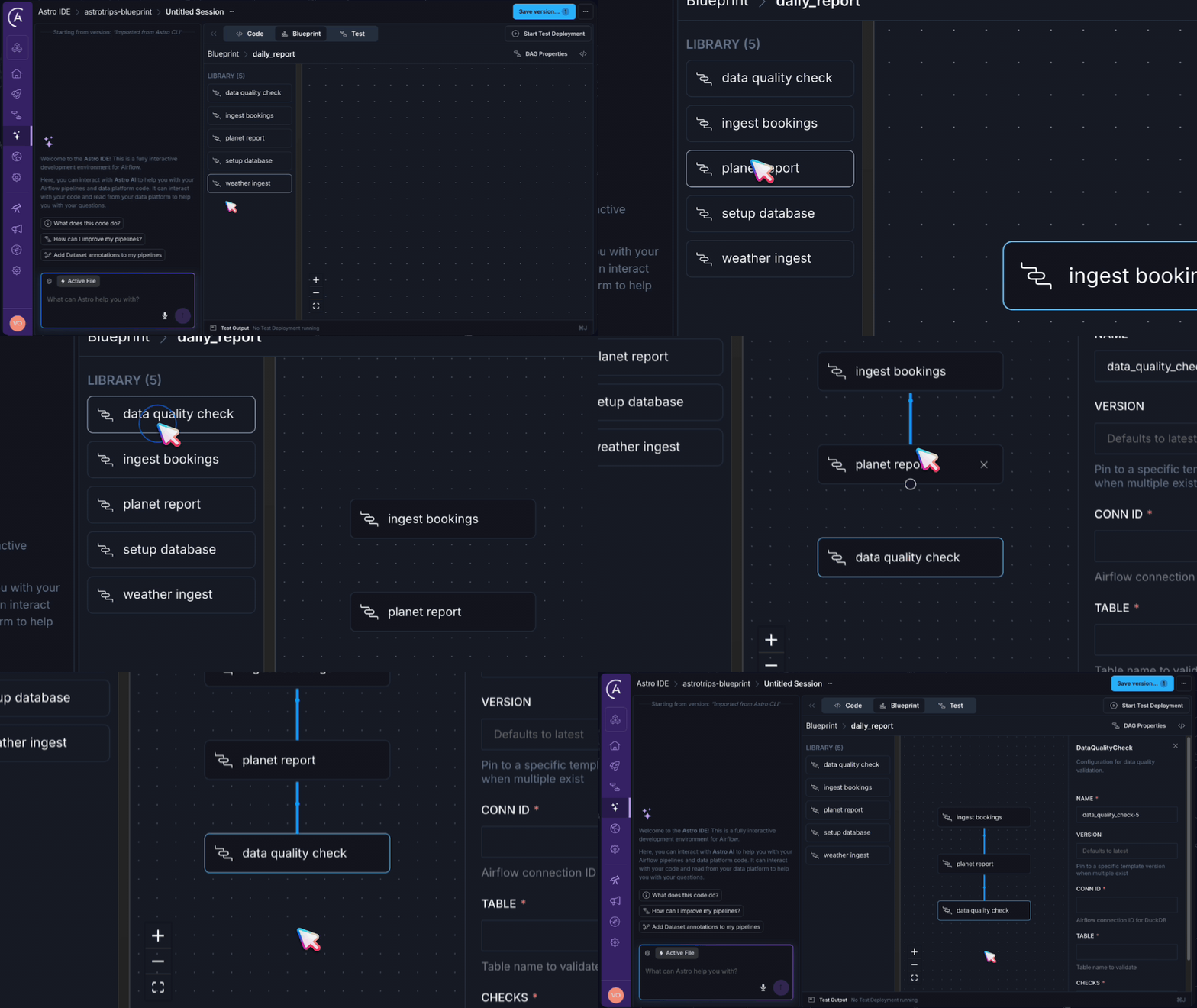
How it works
The workflow follows five phases:
- Orient. See existing Dag YAMLs your team has created, or start a new one.
- Build. Drag blueprints from the library onto the canvas as steps. Click a step to open its configuration form and fill in the fields your platform team has exposed. Draw connections between steps to define dependencies. Steps with no connections run in parallel.
- Configure the schedule. Set the pipeline schedule using a field in the pipeline settings panel.
- Validate. Click Start Test Deployment to spin up an ephemeral Airflow environment and run individual tasks or the full Dag. If errors surface, review them inline. Use Ask AI to Fix for suggestions on configuration issues.
- Ship. Create or select a branch, commit the generated Dag YAML, and follow your team's normal pull request and review process.
The generated output is a plain .dag.yaml file, the exact same format we have been writing by hand. It lives in your Git repository alongside your other project files. The Astro IDE is not a black box. It is a visual editor for a format you already understand.
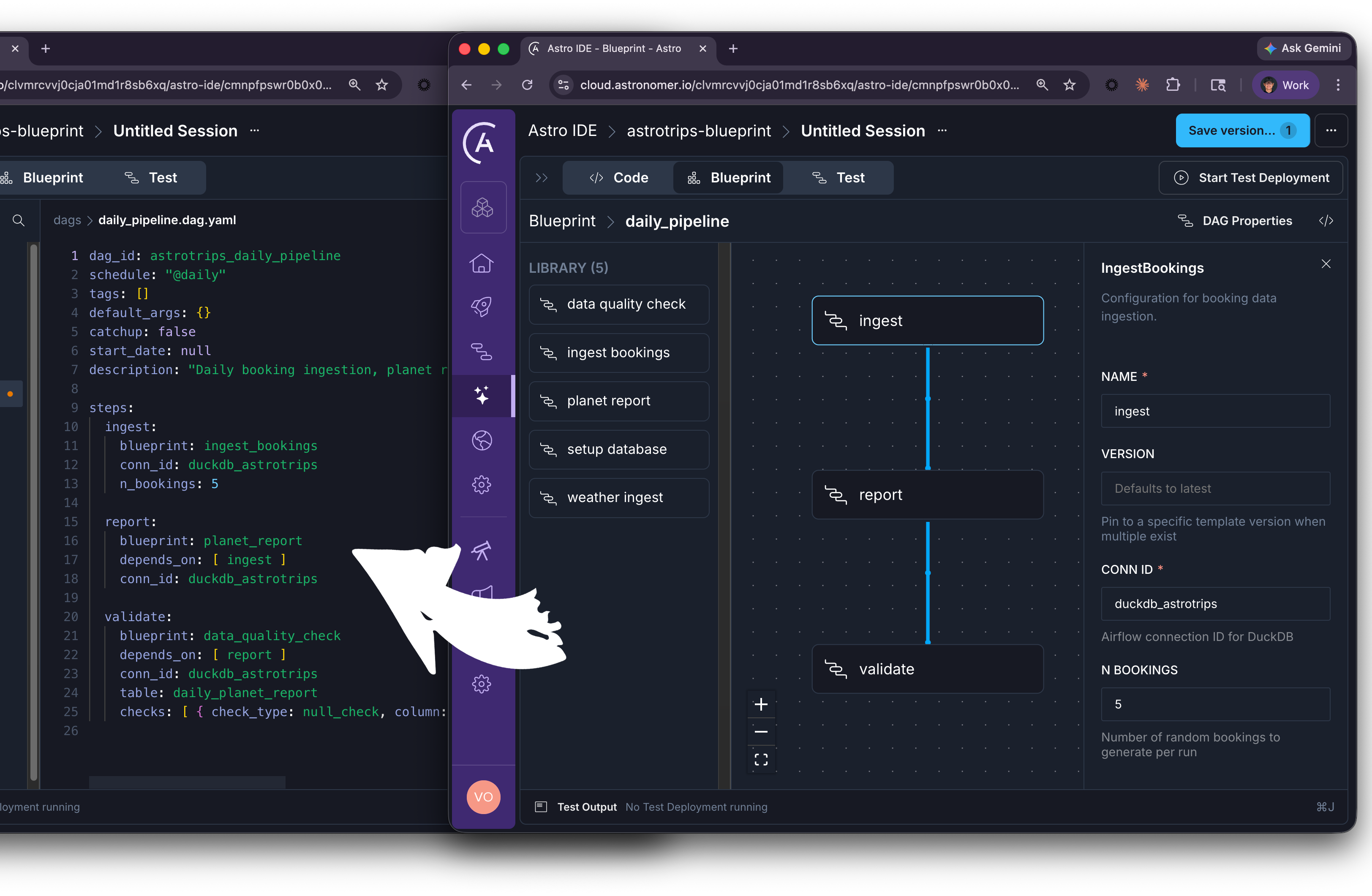
This is a new interface to the same system. The platform team still writes Python. The Dag still runs as a real Airflow Dag. But the person who configures the pipeline does not need to know any of that.
What this means for your team
The pattern that emerges from Blueprint and the Astro IDE is one of governed self-service. The platform team invests once in building well-tested, well-validated blueprints. Everyone else builds Dags from those blueprints, either through YAML or through the visual builder. Quality comes from the template, not from each individual author.
This resolves a tension I felt for years: either gate-keep pipeline creation through a small engineering team (slow, frustrating) or let everyone write Python (risky, inconsistent). Blueprint offers a third path.
- Engineers write the blueprints: well-tested Python classes with Pydantic validation, version management, and operational defaults baked in. These blueprints go through code review and testing like any other production code.
- Analysts and data scientists compose Dags from those blueprints using YAML or the Astro IDE visual builder. They configure the what (connection, table, schedule) without touching the how (operators, SQL templates, retry logic).
- Platform teams enforce standards through the blueprint schemas themselves. Connection patterns, naming conventions, validation rules, all encoded as Pydantic constraints that cannot be bypassed.
The question is not whether your team should adopt a single abstraction level, but which combination of levels matches the skills and needs already present in your organization.
The decision framework, revisited
In Part 1, we introduced a comparison table for the four abstraction levels. With two parts of deep dives behind us, here is the updated view:
| Abstraction levels overview | ||||
|---|---|---|---|---|
| Attribute | Python (Level 1) | DAG Factory (Level 2) | Blueprint (Level 3) | Astro IDE (Level 4) |
| Required Python knowledge | Very High | Medium | Low | Medium |
| Required Airflow knowledge | Very High | Medium | Low | Medium |
| Flexibility | Very High | High | Medium | High |
| Debuggability | Very High | High | Medium | Medium |
| Governance | Low | Medium | Very High | Medium |
| Time-to-value | Slow | Medium | Fast | Fast |


The key insight from this series: these levels are additive, not competitive. A mature data platform runs Python Dags for complex, custom workflows. It uses DAG Factory where teams already think in YAML. It offers Blueprint templates for governed self-service. And it gives the Astro IDE to everyone who needs to get started fast or prefers a visual interface.
No single level wins. The organization that embraces all four wins.
Ada's operation cards
Ada Lovelace never saw her operation cards executed. The Analytical Engine was never completed in her lifetime. But the idea survived: that a machine could be general enough to accept instructions from anyone who understood the notation, not just the person who built the hardware.
Blueprint makes that idea tangible for data orchestration. The platform team builds the engine. The operation cards are YAML files and visual canvases. And the people writing those cards span data engineering, data science, analytics, and beyond.
In Part 1, we watched Ada write Note G by candlelight at Ockham Park. In Part 2, we followed her vision of poetical science, bridging imagination and logic. Here, in the final part, we see her deepest insight realized:
The power of a system is not measured by the complexity it can handle, but by the number of people it can include.
The teams that recognize this will build the data platforms of tomorrow. Not by choosing a single level of abstraction, but by offering the right level to the right person at the right time.
The abstraction series:
- Part 3: How Blueprint and Astro IDE Redefine Orchestration (this post)
Example project: vojay-dev/astrotrips-blueprint
