Cosmos 1.14: Battle-Tested Watcher Mode
6 min read |
Cosmos 1.14 is available now. With over 21 million monthly downloads, Cosmos remains the open-source standard for orchestrating dbt with Apache Airflow®. This release focuses on two things: production-hardening the Watcher execution mode based on real-world feedback, and a comprehensive documentation overhaul that makes Cosmos faster to adopt and easier to scale.
Since Watcher mode launched as experimental, the community adoption rate has been encouraging. Teams running it in production are seeing up to 80% reductions in Dag runtime. In this release, we incorporated the real-world feedback from early adopters to make it even more powerful for building and running dbt pipelines on Airflow.
Watcher Mode: Improved Reliability for Your Hardest Production Scenarios
If you are new to Watcher execution, here is the short version: rather than spawning a new dbt process for each model, seed, or test, Watcher runs a single dbt process per Dag run and uses Airflow sensor tasks running in deferrable mode to track model status in real time. Watcher introduces a very different model for running dbt in Airflow. Teams have seen Dag runtime reductions of up to 80% with the same task-level observability they had before.
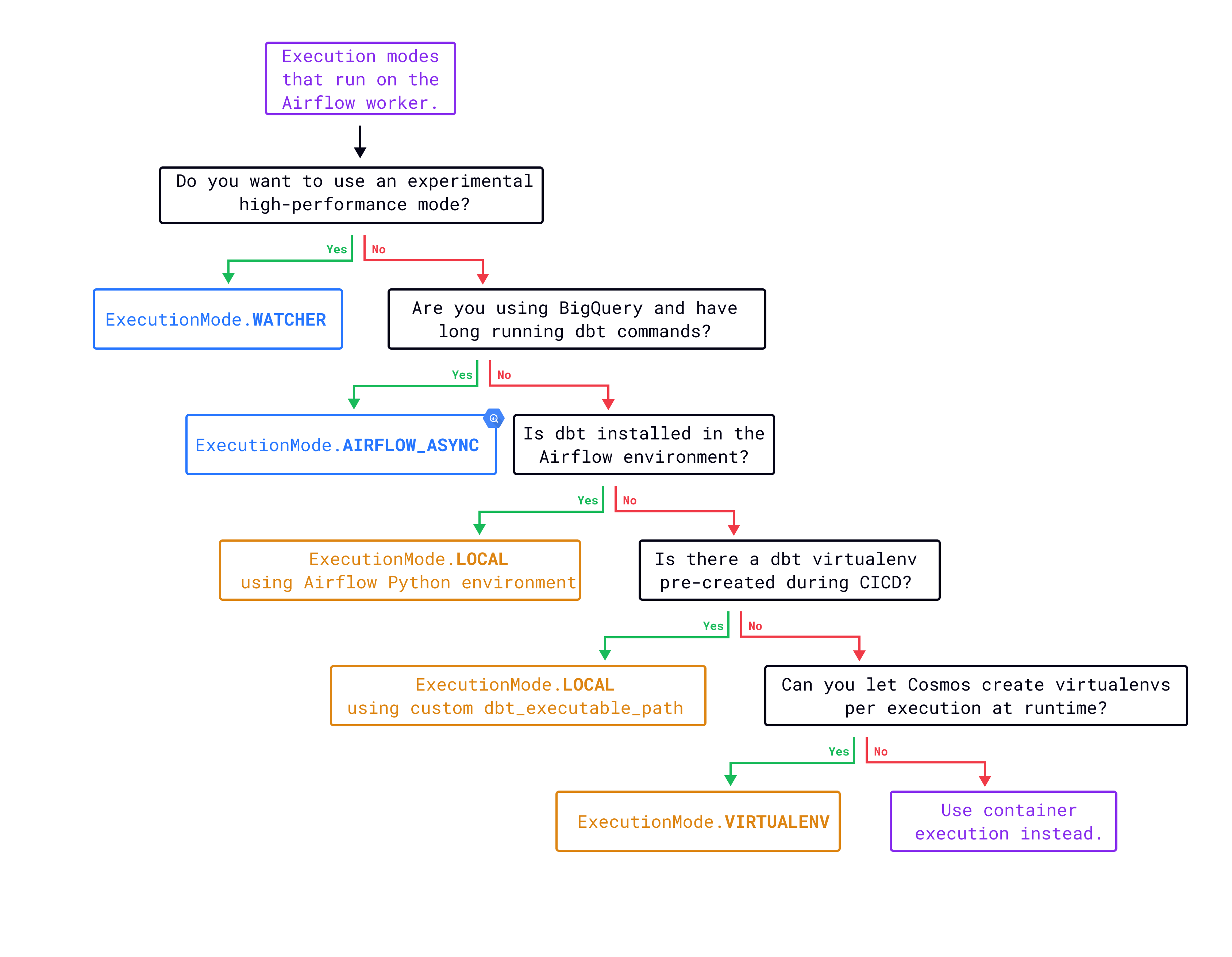
Here is what teams can now rely on Watcher execution mode to handle:
Smarter resource routing for sensor retries. Consumer sensor tasks have two distinct phases: initial polling (lightweight) and retry execution (which runs dbt in Local execution mode and requires more CPU and memory). You can now configure a separate Airflow queue for retry attempts using watcher_dbt_execution_queue, routing retries to workers with sufficient resources. See the Watcher execution mode guide for configuration details.
dbt test visibility now matches model visibility. The TestBehavior.AFTER_EACH used with Watcher execution mode previously inserted an EmptyOperator as a placeholder. It now uses a sensor that watches for updates from the producer task, giving you the same model-level visibility for tests that you get for run tasks.
dbt test results surface as real Airflow task states. Watcher mode now properly maps dbt test node outcomes to the three Airflow task states success, failed, and skipped. You get the same test-level visibility you had in Local mode, without the per-model process overhead.
Failures tell you what actually went wrong. Consumer tasks now log the dbt-core and adapter versions at runtime, and surface model errors directly when a dbt node fails. Debugging no longer means tracing back through producer task logs to find the root cause.
Compiled SQL is now available in subprocess invocation. When running Watcher mode with subprocess invocation, compiled SQL is now correctly populated in consumer tasks. This closes a visibility gap for teams using virtual environments created in their Dockerfile.
Large Dags run more efficiently. The ConsumerWatcher task has been refactored to reduce the number of XCom reads and writes needed to track node state. For Dags with many models, this means lower metadata overhead and more predictable scheduler behavior.
"After recently upgrading to Airflow 3, I figured I would give Cosmos another go & noticed you had implemented Watcher execution mode. After a lot of trial & error with Airflow executor settings, not only does Cosmos seem to finally be a functional tool for our dbt jobs, they are running ~20% faster vs. executing all the commands out of a single BashOperator. Great work!"
Watcher mode continues to improve with each release. If your team is running it in production, we want to hear what you are seeing. Share feedback in the #airflow-dbt channel on the Apache Airflow Slack or open an issue on GitHub.
Run Watcher in Two Lines of Config
No changes to your dbt project required. Upgrade Cosmos and update your execution mode:
pip install astronomer-cosmos~=1.14from cosmos import DbtDag, ExecutionConfig, ExecutionMode
my_cosmos_dag = DbtDag(
# ... your existing config
execution_config=ExecutionConfig(
execution_mode=ExecutionMode.WATCHER
),
)
Teams running Watcher on Kubernetes can use ExecutionMode.WATCHER_KUBERNETES, which pairs the Watcher approach with KubernetesPodOperator for fully containerized dbt execution. See the Watcher Kubernetes execution mode guide for configuration details.
Note: Cosmos 1.14 drops support for Airflow versions earlier than 2.9. Upgrade Airflow before upgrading Cosmos if you are on an older version.
Additionally, upgrading to Airflow 3.1+, allows you to add dbt Docs for several dbt project to the Airflow UI.
Orchestrate Across dbt Projects with dbt Loom
Cosmos now supports dbt-loom, the open-source package that enables cross-referencing models across multiple dbt projects. For teams running dbt Mesh architectures, this means upstream model dependencies render as first-class Airflow tasks with full lineage preserved. You get end-to-end visibility across project boundaries, not just within a single project.
To get started, install dbt-loom and configure your dbt_project.yml to reference the upstream project manifest. Cosmos handles the orchestration from there.
More Improvements Worth Knowing
Understand your pipeline's memory footprint. A new debug mode lets you track task-level memory consumption across Dag runs. This gives you concrete data for execution mode decisions and infrastructure sizing. Early testing confirms Watcher mode carries lower memory overhead than Local mode for most workloads, now you can measure it against your own pipelines.
Navigate large projects without the noise. Cosmos can now organize your Dag into task groups that mirror your dbt project's folder structure. Teams with projects organized by domain, layer, or mart get a cleaner Airflow UI with no changes to the underlying dbt project.
Extend task behavior without the need for custom operator subclasses. A new interceptor concept lets you apply custom logic before individual dbt command execution. This is useful for injecting dynamic dbt vars or runtime environment variables that need access to the full operator definition and Airflow context. Cosmos callbacks and give you the option to inject custom logic after dbt commands execute.
Docs That Actually Help You Find Quick Answers
The Cosmos documentation has been comprehensively restructured. The old organization reflected the API surface. The new structure follows how you actually use Cosmos: getting started, configuring for your environment, and solving real problems in production. The content draws directly from the Practical Guide to Orchestrating dbt with Airflow using Cosmos and covers the most common support topics in a format that lets you self-serve.
The standout new section is Optimize Performance and Troubleshoot with Cosmos, a dedicated resource for teams looking to configure Cosmos effectively from day one and resolve issues faster. If you have pointed teammates at the docs and gotten blank stares, now is the time to send them again.
If you use AI coding agents like Claude Code or Cursor, Astronomer's open-source agent tooling includes dedicated Cosmos skills that bring Airflow and dbt expertise directly into your development environment. The cosmos-dbt-core and cosmos-dbt-fusion skills are available alongside the full library of Airflow-focused skills.
Get Started
pip install astronomer-cosmos~=1.14For full configuration options, check the Cosmos documentation.
Running on Astro? Cosmos 1.14 is available now with seamless dbt deploys support and enhanced observability through Astro Observe.
Ready to go deeper on Watcher mode, execution mode selection, and production best practices? The Practical Guide to Orchestrating dbt with Airflow using Cosmos has been updated for this release to cover the latest Watcher improvements and documentation changes.
