Better together: Astro CLI and Astro IDE
8 min read |
When your environment becomes a wall
The most important feature of a development environment isn't where it runs, but how fast it answers you.
For years, serious engineering meant a local toolchain: package managers, a container environment, and overall a carefully curated environment on your laptop. We all know the feeling of getting a new work laptop, the excitement of setting everything up, followed by the frustration when things don't work as expected.
That local dev environment model is powerful, because it offers control. But often, the cost of that control is exclusion. Every setup of a container environment, every build step, and every complex configuration is a wall that filters out contributors who just want to ship business logic.
And this matters. Coming from a data engineering background myself, I know how stressful it gets when the data engineering team becomes the bottleneck. These days everyone in the organization needs data orchestration, but only a few people have the perfect local setup to build it. This creates a wall that blocks capable contributors, like data scientists or engineers new to Airflow, who could be self-sufficient if the infrastructure didn't get in their way.
By adopting the Astro IDE, you lower that barrier for your technical staff today, while laying the groundwork for even broader self-service tomorrow, with upcoming features like Blueprint, to allow for template based orchestration.
But the definition of a development environment is changing. It's becoming less about the hardware you own and more about the connection you have to your work.
As Bret Victor famously put it:
Creators need an immediate connection to what they're creating. — Bret Victor, Inventing on Principle
That immediate connection is exactly what Dag development needs: the ability to see if your logic works now, without battling infrastructure first.
This is why modern Airflow development is converging on two complementary paths. You can bring the environment to your machine (Astro CLI) for maximum control, debugging power, and reproducibility. Or you can bring the environment to your browser (Astro IDE) for zero-setup, AI-assisted speed that breaks down barriers for new contributors.
The question is not which tool is better, but which feedback loop you need right now, and how to use them together to ship faster.
By the end of this article, you'll have the decision framework you need to match every contributor to their ideal workflow, and to turn orchestration from a bottleneck into a shared capability across your entire team.
Astro CLI
If you like to own your development environment, the Astro CLI is built for you. It gives you an Airflow project structure and a repeatable local Airflow environment you can start with a few commands.
A typical flow looks like this:
# Installation
brew install astro

# Create a project
mkdir my-airflow-project && cd my-airflow-project
astro dev init --from-template
astro dev start
That astro dev start command brings up local Airflow components (each as a container) and gives you a local Airflow UI at https://localhost:8080/. It's a great workflow when you want high-fidelity testing, local debugging, and a clear mental model of what's running where.
Astro IDE
The Astro IDE is a browser-based workspace for Airflow Dag development. Its focus is minimizing friction: no local container setup, and a fast path from idea to validated Dag.
Astro IDE is especially useful when:
- You have less Airflow experience or want to avoid the effort of setting up a local environment.
- You want to prototype quickly.
- You want Airflow-optimized AI assistance that's aware of your Airflow/project context.
- You want a simple way to run pipelines.
Having the code in a browser-based IDE, while still being able to interact with version control, combined with the one-click test environment, are a core productivity win: you skip a lot of the work that typically blocks new contributors (or potentially slows down experienced ones).
Build a loop
DORA (DevOps Research and Assessment) is a research program within Google Cloud dedicated to studying software delivery performance. Its goal is to help organizations get better at getting better.
Research from the DORA team shows:
Teams that can choose their own tools are able to make these choices based on how they work, and the tasks they need to perform. No one knows better than practitioners what they need to be effective, so it's not surprising that practitioner tool choice helps to drive better outcomes.
That is the beauty in the Astro Airflow development ecosystem: you don't need to pick one development solution forever. Instead, to be highly efficient, you can build a loop:
- Astro IDE for speed: prototype, refactor and validate quickly.
- Astro CLI for control: reproduce locally and debug deeply.
- Use the
astro idecommand group (list/import/export) as a bridge between browser-first and local-first workflows.
A data scientist might import their Airflow project repo directly into the Astro IDE and use the integrated AI to implement a basic ETL workflow. Meanwhile, a data engineer can build a MLOps pipeline locally using Docker and the Astro CLI. When ready, the engineer can seamlessly transition to the cloud by running astro ide project export, allowing them to finalize development and generate the pipeline documentation directly in the browser using the AI.
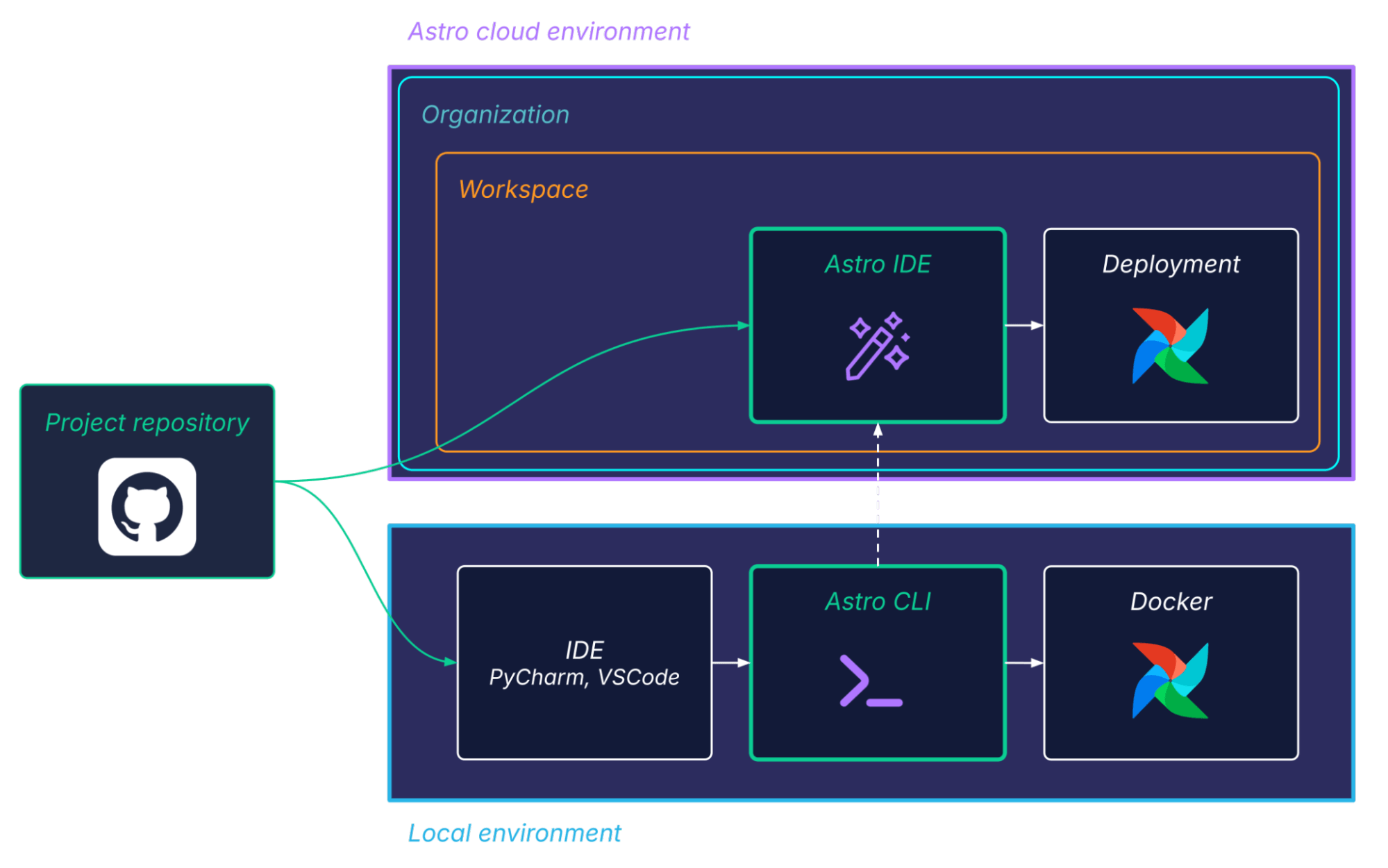
Understanding this interplay of environments is essential. You can work with the same repository locally using the Astro CLI and in your browser using the Astro IDE. Also, if you look at a basic project structure generated by the CLI or IDE, you have a Dockerfile with the base environment.
FROM astrocrpublic.azurecr.io/runtime:3.1-8Whether you start a local environment with astro dev start using the Astro CLI or click Start Test Deployment in the Astro IDE, both use the same base image.
This lets you work on the same project across different environments seamlessly.
Persona cheat sheet
Data engineer
- Start with: Astro CLI / Astro IDE.
- Add: Astro IDE for AI-assisted refactors and quick iterations. Astro CLI for fast local iterations and in-depth debugging.
- Why: You'll value environment control and local debugging first.
Data scientist
- Start with: Astro IDE.
- Add: Astro CLI if/when you need local reproducibility or deeper debugging.
- Why: You'll value focus on business logic and minimal setup overhead.
Workflow comparison
To get a better understanding of the different workflows, let's compare the local-first steps you take with the CLI vs. the validate-first steps you take in the IDE.
Astro CLI
Setup
- Install Git.
- Install Python.
- Install Docker Desktop (or another supported container runtime) and ensure it's running.
- Install the CLI:
- macOS:
brew install astro - Windows:
winget install -e --id Astronomer.Astro
Create project and start local Airflow environment
astro dev init
astro dev start
Iterate
- Dag edits do not need any restart.
- Dependency/build (e.g.,
requirements.txt) changes require rebuild/restart.
astro dev restartPitfalls
Docker issues, port collisions, rebuild cycles, local environment drift between teammates, and the overall setup and maintenance of local development environments.
Astro IDE
Setup and start Airflow environment
- Create a project (connect repo or generate).
- Use the browser-based IDE to implement code changes or prompt, review and accept changes.
- Click Start Test Deployment.
- Run tasks and view logs from the Test tab.
What you skip
Local development environment setup incl. Docker, pulling/building images, port management, and the rebuild to validate loop for many early-stage iterations.
Pitfalls
Focus must be stronger on reviewing AI-generated code.
Decision cards
The following decision cards are a good way to get started and to deepen your understanding of the differences and where the two solutions overlap.
Scoring rule: 5 = strongest support for that attribute.
What 5 means for the different attributes:
- Time-to-first-Dag-run: From nothing to running tasks/logs quickly.
- Local control: You fully own the environment and can match runtime behavior closely.
- Onboarding: Minimal tooling knowledge required.
- Offline friendliness: Works well without relying on cloud features.
- AI-assistance: Context-aware code generation/refactoring for Dag development.

In other words: IDE to go fast, CLI to go deep.
Break the wall
We started this article talking about the wall. Essentially, the barrier that complex local environments place between a contributor and their work.
For a long time, we accepted that this wall was necessary; that serious engineering required serious pain to set up. But as the DORA research highlights, high performance doesn't come from rigid adherence to a single difficult toolchain, but from empowering teams to choose the right tool for the task at hand.
The most effective teams aren't the ones arguing about whether the terminal is superior to the browser. They recognize them as two sides of the same coin.
They use the Astro IDE for development without spending time on a local development environment setup, faster time-to-first-Dag-run by using the integrated AI, and enabling more data practitioners to work on orchestration, while using the Astro CLI for step-by-step debugging in case of complex issues, and for engineers preferring a local environment.
Don't force your data scientists to become Docker experts, and don't force your platform engineers to click through a UI. Build a loop that accommodates both.
The goal isn't to have the most complex setup. The goal is to ship. Choose the tool that lets you do that, right now.

Get started free.
OR
By proceeding you agree to our Privacy Policy, our Website Terms and to receive emails from Astronomer.