Best practices for writing Airflow Dags with AI
18 min read |
Code is a liability
It’s Monday evening. You are sitting at your desk, tired, but facing a deadline tomorrow. You promised to prepare a pipeline to aggregate Salesforce data in Snowflake so your supervisor can run a management report. Your fresh cup of coffee is ready, and the cursor is blinking… in Cursor. You type: Write an Airflow Dag that takes data from Salesforce and loads it into Snowflake.
Two sips of coffee later, the code streams onto your screen. It looks perfect. It imports the right operators, it sets the dependencies, and it even includes comments. You feel a rush of productivity. You just saved three hours of work in three seconds.
But then you try to run it.
The imports reference a provider package you haven’t installed. It also uses deprecated parameters, such as schedule_interval for the Dag, which Airflow deprecated in version 2.4. The logic assumes a schema that doesn’t exist. Instead of using decorators coming with the TaskFlow API, the Dag is defined using the context manager (with DAG(): ...).
You have entered the hallucination spiral in the era of vibe coding, which is a frustrating loop where the AI, lacking any true understanding of the why, simply throws random syntax at the wall. Suddenly, you are debugging rather than developing, and four hours later, you end up with a working version that is less maintainable than if you had written it manually from the start.
It is incredibly easy to generate code that looks right but falls apart in production. In the world of data orchestration, where pipelines manage critical business data, looking right isn’t enough.
This brings us to a fundamental truth that senior engineers have known for years, which is even more relevant in the age of AI: code is a liability. Experience is your asset.
If your knowledge of the business use case is wrong, AI will only help you create a mess faster. Teams don’t fail because they can’t type Python fast enough, instead they fail because the why is missing or inconsistent.
Context is king
The best way to think about AI, whether you are using GitHub Copilot, ChatGPT, Claude Code, the Gemini CLI, or the Astro IDE, is not as a senior architect, but as an infinitely fast, incredibly well-read, but ultimately inexperienced intern.
This intern knows all the details of various programming languages, but they have zero context about your specific platform. They don’t know you are restricted to Airflow 2.7. They don’t know the shape of your raw data in S3 or team-internal rules on how to write data pipelines.
Our job as data engineers is changing. We are no longer just writing syntax, we are providing the context, the constraints, and the guardrails to ensure these powerful tools build something maintainable.
Context is king. That is why specialized AI tools like the Astro IDE are so valuable. They are designed for a specific use case, like Airflow Dag authoring, and are inherently version-aware and context-driven. But even when using such a specialized AI, having a set of best practices in your toolbox for writing Dags with AI is essential.
In this article, we will walk through the best practices for writing Airflow Dags with AI assistance. We will move beyond simple prompting, and look at how to structure your workflow, enforce governance, and use tools like the Astro IDE to turn AI into a true force multiplier.
Start a free Astro trial and experiment with writing and refining Dags in the Astro IDE!
Best practice 1: define the universe first
The most common mistake engineers make with AI is assuming the model knows their environment. It doesn’t. Standard LLMs are trained on a massive average of all Airflow versions, from 1.x to the latest 3.x releases. Without constraints, they will mix and match syntax, giving you a Franken-Dag that fails at runtime.
Before you ask for a single line of logic, you must define the universe the AI lives in. In the prompt engineering world, this is called system prompting or context setting.
If you are using a general tool like ChatGPT or GitHub Copilot, start every session with a context specification block:
Context:
- Airflow Version: 3.1
- Executor: KubernetesExecutor
- Cloud Provider: AWS (us-east-1)
- Constraint: Use TaskFlow API (@task decorator) where possible.
- Constraint: Do not use XComs for large data transfer; use S3 intermediaries.
The Astro IDE advantage: the Astro IDE is trained with curated, version-aware context. It knows which code samples are appropriate for which Airflow version and has carefully reviewed Airflow specific skills to generate code that fits to your Airflow environment.
Best practice 2: the skeleton strategy
A major pitfall of vibe coding is generating too much code at once. When an LLM generates 200 lines of Python in one go, it effectively hallucinates a complex architecture that is hard to review and harder to debug.
Instead, use the skeleton strategy. This approach separates the structure of the Dag from the logic of the tasks.
Step 1: the plan (no code)
Ask the AI to describe the approach in natural language steps first, without generating any code. This forces the model to reason (chain of thought) before it commits to syntax.
Prompt: I need to move data from Salesforce to Snowflake. Outline the steps required, including how we handle authentication and intermediate storage. Do not generate any code.
Depending on the outcome, you can add context about specifics it got wrong as a follow-up, before moving to step 2.
Step 2: the skeleton (graph only)
Ask the AI to focus on the Dag structure as a next step, without implementing the individual tasks. Tell it explicitly to use placeholders by using the EmptyOperator from airflow.providers.standard.operators.empty, like:
from airflow.providers.standard.operators.empty import EmptyOperator

_read_from_salesforce = EmptyOperator(task_id="placeholder_read_from_salesforce")
Also, as you are aware of the use-case, tell the AI explicitly to not generate any documentation or comments this time. This will keep the code more readable at first, and one of our goals should be to fully understand generated code before committing it.
Prompt: Generate the Dag structure for this plan using only
EmptyOperator(from airflow.providers.standard.operators.empty import EmptyOperator) as placeholder. Focus on the dependencies and the graph view. Do not add any logic or comments yet.
Tip: alternatively, you can use the SmoothOperator from airflow.providers.standard.operators.smooth as a placeholder. Watch out for its logs.
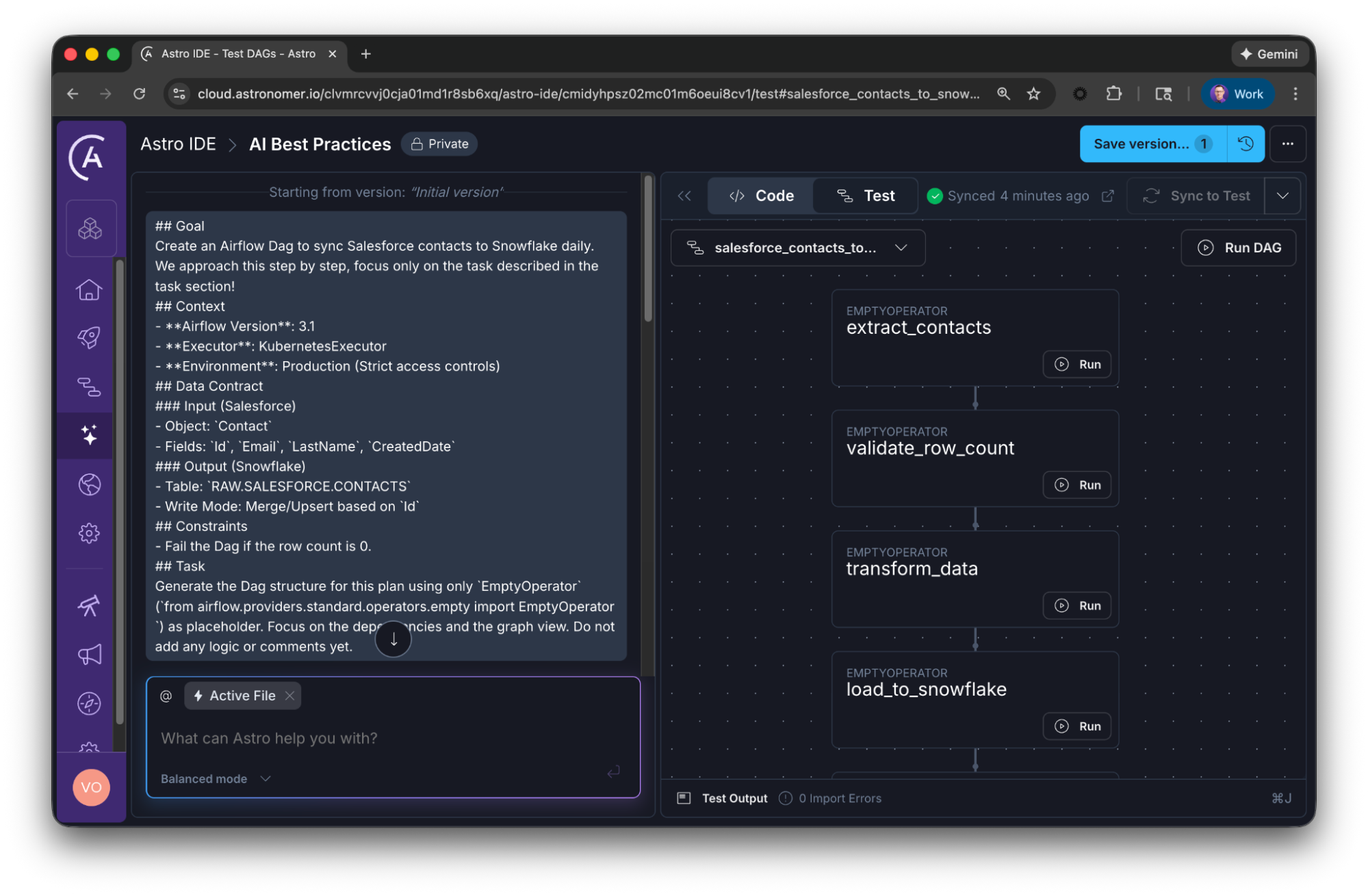
The Astro IDE advantage: since the Astro IDE is fully integrated with Astro, you can launch a fully functional Airflow deployment with one click. View your Dags, trigger tasks directly in the IDE, or open the Airflow UI from there.
Step 3: business logic
Once the graph looks correct in your IDE, iteratively fill in the logic for specific tasks.
Prompt: Now, replace the
xyztask with the actual logic using the...Operator/ the … decorator. Consider the following inputs, outputs and constraints: …
By building the skeleton first, you validate the mental model before you inherit the liability of the code.
Step 4: make it robust and maintainable
Code should be self-explanatory, just by reading it. Comments like the following are useless distraction, as the function name itself is already self-describing:
@task
def transform_orders(orders_df):
    # transform the orders dataframe
    clean_df = orders_df.dropna()  # drop null values
    return clean_df  # return the result
So don’t just vibe code hundreds of lines of documentation, decreasing readability, but be specific and focus on why instead of what:
@task
def transform_orders(orders_df):
    """
    Removes incomplete orders to prevent downstream failure in the billing API.
    """
    return orders_df.dropna()
Prompt: Add a comment describing the business logic and explain the why for the
xyztask only.
You can then also use another prompt, to keep your overall documentation up-to-date.
Also, think about how your Dag and tasks should behave in case of issues. Be selective when changing retry behavior and notifications.
Prompt: Set 3 retries for the tasks
some_taskandsome_other_task. Also add an overall Slack notification using theslack_defaultconnection.
Best practice 3: use golden records for governance
AI models revert to the mean. If you ask for a Snowflake Dag, you will get the average of every Snowflake Dag known to the AI, which often means outdated practices, poor naming conventions, inefficient patterns, or simply not solving your specific problem.
To get code that solves your problem, you need to get more specific. One way is to focus on contract-driven prompting, discussed in the next section. Another one is to use few-shot prompting, to make the generated code look like your team wrote it. To achieve this, provide the AI with golden records. Meaning, examples of what good looks like in your specific organization.
- Reference implementations: Show the AI how your team approaches problems.
- Naming conventions: Show the AI that you prefer
extract_accountsoverget_data. - Custom operators: If your team uses a custom
MyCompanyS3Operator, provide the code for that class as context.
You can define custom rules (e.g., all Dags must have a team tag) or point the AI to reference patterns. The AI then uses these golden records as the baseline for all new code.
Don’t let golden records become stale. Treat them like any other code asset:
- Store them in version control: Create a
/docs/ai-patterns/or/templates/directory in your repository containing your reference Dags and code snippets. - Keep them minimal: A golden record should be the simplest possible example of a pattern.
- Tag and categorize: Organize by use case:
ingestion/,transformation/,export/,monitoring/. This makes it easy to grab the right reference for your prompt. - Review quarterly: As Airflow evolves and your team’s practices mature, update your golden records. A reference Dag using deprecated operators does more harm than good.
Many AI tools support persistent context or custom rules:
- Cursor/Windsurf: Use
.cursorrulesor.windsurfrulesfiles to define project-specific instructions that apply to every prompt. - Custom GPTs: Create a custom GPT with your golden records and governance rules baked into the system prompt.
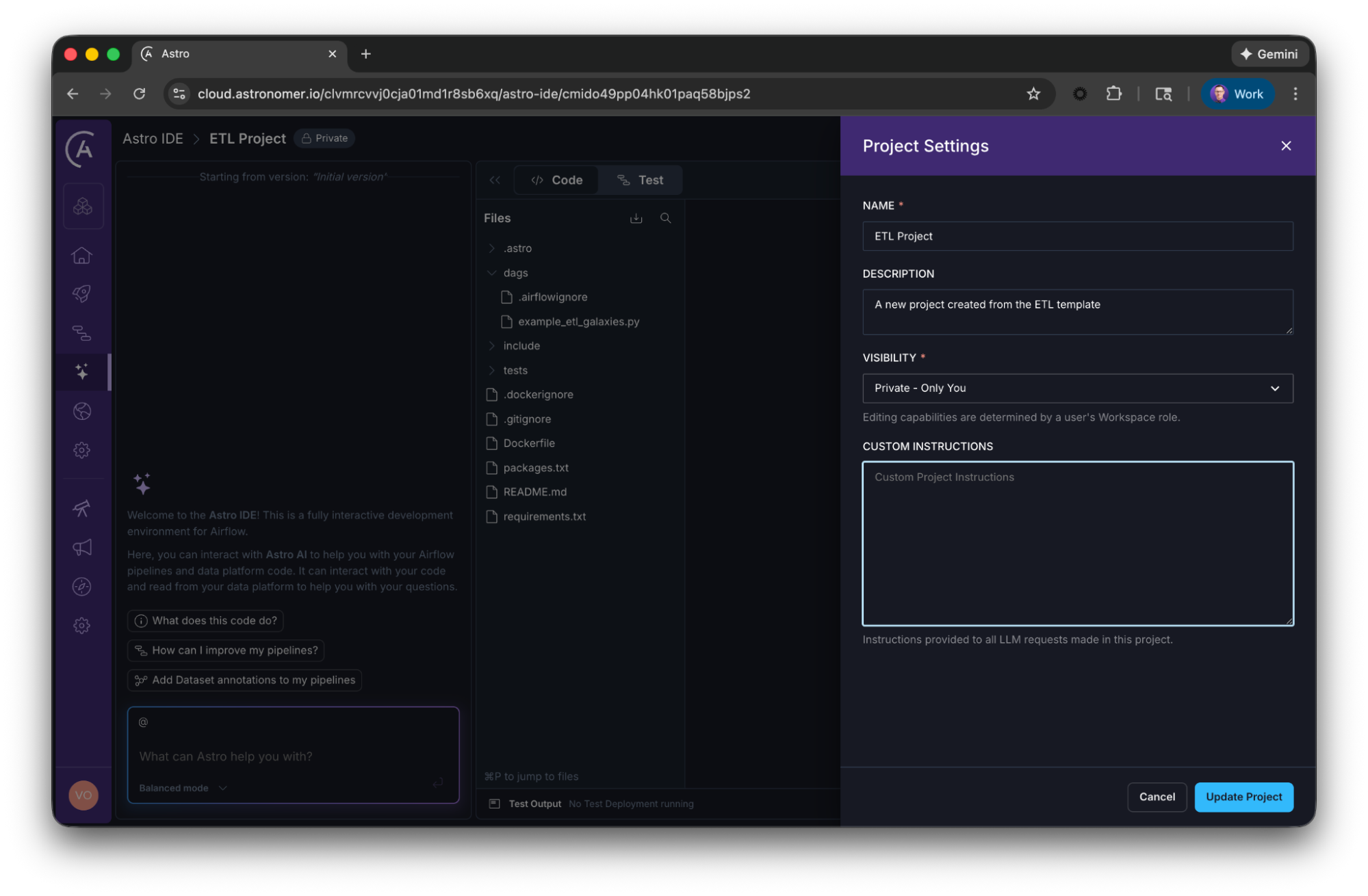
- IDE extensions: Tools like the Astro IDE allow you to define project rules that automatically inject your standards into every generation (in the Astro IDE, click the three dots on the top right -> Project Settings -> Custom Instructions).
Best practice 4: contract-driven prompting
We also must address the most dangerous hallucination: data logic. AI is great at syntax, but terrible at guessing your data schema. If you ask it to transform the data, it will invent column names like customer_id or created_at that might not exist in your source.
To prevent this, adopt contract-driven prompting. Do not just describe the action, describe the interface.
Bad prompt: Write a task to clean the customer data.
Good prompt: Create a transformation task. Input: A Pandas DataFrame from S3 with columns
['id', 'signup_dt', 'raw_name']. Output: A dictionary wheresignup_dtis converted to ISO format andraw_nameis split intofirst_nameandlast_name. Constraint: Handle null values insignup_dtby dropping the row.
By defining the input/output contract, you constrain the AI’s creativity to the implementation details, which is exactly where you want it. You are the architect defining the blueprint, the AI is just the builder laying the bricks.
One critical concept that AI frequently gets wrong is idempotency. An idempotent task produces the same result whether it runs once or multiple times with the same input. This is essential for data pipelines because of backfills and retries of failed tasks. Without idempotency, you risk data duplication or corruption.
However, simply telling the AI to make sure the tasks are idempotent is rarely enough. Idempotency is not a simple attribute but requires a well-defined contract. The AI can only enforce idempotency if you’ve already specified the inputs, outputs, and time boundaries.
For example, instead of a vague constraint like ensure idempotency, be explicit: Each task should process data from midnight to 11:59 PM UTC based on the logical date of the Dag run. Use MERGE/UPSERT to the target table keyed on record_id.
When you prompt, explicitly include idempotency as a constraint, but only after you’ve defined the contract that makes it achievable.
The Astro IDE advantage: unlike generic AI solutions, the Astro IDE already knows about your lineage data, connections, project history, and Astro Workspace settings.
When you prompt in the IDE, it automatically injects these constraints into the model, delivering tailored results.
Best practice 5: write prompts like a technical spec
Since LLMs are trained heavily on software documentation, the most effective prompting format is Markdown. Instead of a stream-of-consciousness paragraph, structure your prompt exactly like a technical specification or a GitHub issue.
Use Headers (#) to separate context from instructions, and Bullet Points (-) to list constraints. This hierarchy forces the model to process requirements systematically rather than getting lost in a wall of text.
The spec prompt structure:
## Goal
Create an Airflow Dag to sync Salesforce contacts to Snowflake daily. We approach this step by step, focus only on the task described in the task section!

## Context
- **Airflow Version**: 3.1
- **Executor**: KubernetesExecutor
- **Environment**: Production (Strict access controls)

## Data Contract
### Input (Salesforce)
- Object: `Contact`
- Fields: `Id`, `Email`, `LastName`, `CreatedDate`

### Output (Snowflake)
- Table: `RAW.SALESFORCE.CONTACTS`
- Write Mode: Merge/Upsert based on `Id`

## Constraints
- Fail the Dag if the row count is 0.

## Task
Generate the Dag structure for this plan using only `EmptyOperator` (`from airflow.providers.standard.operators.empty import EmptyOperator `) as placeholder. Focus on the dependencies and the graph view. Do not add any logic or comments yet.
While Markdown is great for instructions, pseudo-XML tags are a great additional way of formatting raw data. If you need to paste a long SQL query or a JSON schema into your prompt, wrap it in XML tags like <code_snippet> or <schema>. This prevents the AI from confusing your data with your instructions.
Prompt: Analyze the error log below. Focus only on the stack trace inside the
<log>tags. … [2023-10-27] ERROR: Broken pipe …
By combining Markdown structure for the rules and XML tags for the assets, you create a prompt that is hard to misinterpret.
Best practice 6: force the source of truth
Many engineers assume that if an AI knows Airflow, they don’t need to provide documentation unless the feature is brand new. This is a mistake.
The problem isn’t just the knowledge cutoff, but also context contamination.
An LLM has been trained on years of Airflow history. It has seen thousands of tutorials, blog posts and discussions for Airflow 1.10, Airflow 2.9, and Airflow 3.1. It knows the deprecated content just as well as the modern features. When you ask for code, it often defaults to the average of its training data, which usually means outdated patterns.
To fix this, you must treat documentation as a constraint. You need to force the AI to ignore its internal soup of versions and focus on a specific source of truth.
This is where the new /llms.txt standard can become a real time-saver. It is a standardized way for documentation sites to provide machine-readable Markdown.
For Airflow, we highly recommend the Astronomer Docs which support the /llms.txt standard! You can get a clean Markdown version with a click on a button, ready for AI usage.
Just paste that raw Markdown into your prompt or your IDE’s context window.
By doing this, you are anchoring its attention. You are effectively saying: I don’t care what you learned. Use exactly the parameters defined in this text block. This reduces hallucinations by forcing the model to derive its answer from the provided text rather than its fuzzy long-term memory.
The Astro IDE advantage: While general LLMs are trained on the entire noisy history of the internet, the Astro IDE relies on curated, version-aware documentation sourced directly from Astronomer’s Airflow docs. Because the IDE retrieves context based on the specific Airflow version you are running, it naturally eliminates context contamination.
Bonus tip: reverse engineer your prompts
If you are struggling to get the AI to generate code that matches your standards, you might be speaking a different language. A great way to align your mental model with the AI’s vocabulary is reverse prompt engineering.
Instead of guessing what to ask, take a Dag that you wrote manually, one that is good by your standards, production-ready, and follows all your governance rules. Then feed it back to the AI.
Prompt: I am going to paste a production Airflow Dag below. I want you to act as a prompt engineer. Goal: Write the exact, detailed prompt that would have caused you to generate this specific code. Requirement: Be specific about the constraints, the data structures, and the Airflow operator choices required to achieve this result.
The AI will analyze your code and translate it back into instructions. While this is no guarantee to get a perfect prompt for your problems, it will help you learn about what the AI expects to generate certain things. You might discover that to get the specific TaskGroup design you like, the AI expects a specific keyword you usually do not have in your prompts.
You can then save this generated prompt in your personal library.
Summary
Define the universe first
Before requesting code, explicitly establish your universe, like your Airflow version or executor type.
The skeleton strategy
Avoid generating complex code in one go. Start with a natural language plan, then build a structural graph using placeholders, and finally fill in the task logic iteratively.
Use golden records for governance
AI defaults to average coding patterns. Force it to adhere to your team's specific standards by providing golden records.
Contract-driven prompting
Don't just describe actions but interfaces. AI cannot guess your data schema, so you must define the exact inputs, outputs, and constraints.
Write prompts like a technical spec
Structure prompts using Markdown. Organize your request like a spec with clear sections. Use pseudo-XML tags to isolate raw data from instructions.
Force the source of truth
Prevent the use of deprecated patterns by treating documentation as a constraint. Paste relevant sections of current docs into the prompt.
Conclusion
The rise of AI in data engineering does not mean we write less, it means we architect more. The barrier to generating code has dropped to zero, which means the value of verifying and structuring that code has skyrocketed.
We need to learn to assess the correctness of code faster, and focus on the why to ensure we architect business value, rather than vibe code liability.
If you take nothing else from this guide, remember these three shifts in mindset:
- From syntax to context: Don’t memorize the import path for
SQLExecuteQueryOperator. Memorize how to describe your environment so the AI gets it right every time. - From writer to reviewer: Don’t write the Dag from scratch. Write the skeleton, verify the flow, and then let the AI fill in the logic gaps under your strict supervision. Avoid committing code you do not understand and become a reviewer and architect.
- From vibe coding to architecting: Don’t accept the AI’s first draft. Enforce your team’s standards using golden records, project rules, and contract-driven prompting.
One thing you might have noticed, all these best practices have to do with context. How to provide the right context, in the right format, at the right time, to solve a specific problem. We moved from prompt engineering to context engineering when it comes to efficient AI usage. And I believe this journey will continue.
We are still in the early days of AI-assisted orchestration. Tools like the Astro IDE are leading the way by baking these best practices directly into the interface by automating the context injection, enforcing project rules, and providing a safe sandbox to test the AI’s output.
But ultimately, the tool is only as good as the engineer using it. AI can write the code, but it cannot understand the why without your experience.

Get started free.
OR
By proceeding you agree to our Privacy Policy, our Website Terms and to receive emails from Astronomer.