
Get Started Free
Astro vs. Google Managed Service for Apache Airflow (formerly Cloud Composer)

Airflow without the always-on tax.

Powered by Apache Airflow®, augmented with AI.

Trusted by 900+ engineering teams

AutodeskTexas RangersWesTracEverlaneAAAFoursquareMerckPaychexAdobeActivisionMolson CoorsXP IncCircleHimsWynn ResortsT.Rowe PriceE.ONNorthern TrustEnterprise ProductsKaiserBHPMizuhoMotorola SolutionsOptimumRicohSeatWorldpayCencora AutodeskTexas RangersWesTracEverlaneAAAFoursquareMerckPaychexAdobeActivisionMolson CoorsXP IncCircleHimsWynn ResortsT.Rowe PriceE.ONNorthern TrustEnterprise ProductsKaiserBHPMizuhoMotorola SolutionsOptimumRicohSeatWorldpayCencora AutodeskTexas RangersWesTracEverlaneAAAFoursquareMerckPaychexAdobeActivisionMolson CoorsXP IncCircleHimsWynn ResortsT.Rowe PriceE.ONNorthern TrustEnterprise ProductsKaiserBHPMizuhoMotorola SolutionsOptimumRicohSeatWorldpayCencora
WHY ASTRO?

The same Airflow. None of the overhead.

Built to run Apache Airflow reliably at scale, out of the box, without the infrastructure upkeep and rebuild delays Google's Managed Airflow still requires.

  • Spend less time waiting on infrastructure

    Routine changes ship in minutes instead of queuing behind an environment rebuild, so your team spends more of its week building pipelines.

  • Never pay for idle workers

    Workers scale down automatically when there's no task to run; non-prod environments can also be scheduled to pause overnight or on weekends

  • Fewer late-breaking surprises

    Changes are tested before they ship, not discovered after they're already live, with built in CI/CD and local dev tools

  • Isolated environments for every team

    Spin up a new environment in minutes, with its own code, data, and compute, and no new cluster to provision.
COMPARE YOUR OPTIONS

Astro vs. Google Managed Service for Apache Airflow (formerly Cloud Composer)

Astro
Google Managed Airflow
Build faster & better
Local development
Astro CLI or in-browser Astro IDE to build, test, and debug pipelines before they go live — no messy local Docker setup
No local emulator; Dags are commonly tested by uploading to the environment's storage bucket and waiting for the scheduler to sync
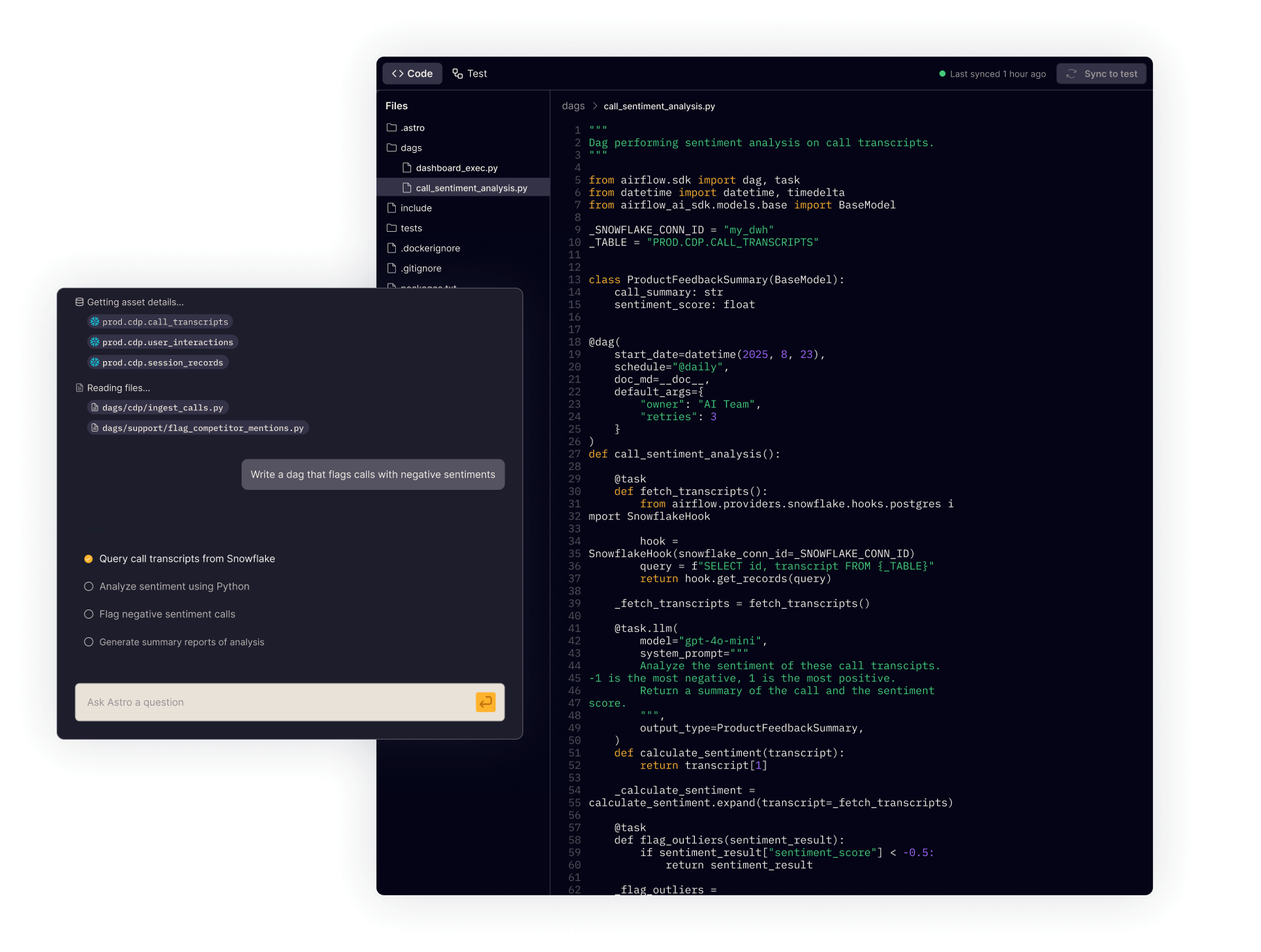
AI-powered Dag authoring
Otto drafts and explains Dags using your actual code and history — not generic suggestions
A separate no-code pipeline builder targets non-engineers; for teams writing real Python Dags, authoring remains manual with no Airflow-specific knowledge base
CI/CD & deployment
Git-based deploys via the Astro CLI, API, or Terraform, with no environment rebuild required; dependency changes test locally first, so a version conflict shows up on your laptop, not mid-update
Manual upload of Dag files to a storage bucket, with no native CI/CD; a separate declarative pipeline builder exists for non-engineers but doesn't cover Python Dag teams
Access to latest Airflow
Guaranteed, near-immediate access to every new Airflow release, as a fully supported production version
Airflow 3 is available but still in Preview; Airflow 2 remains what Google recommends for production, and new versions have historically taken months to reach the platform after Astro already supports them
Run with confidence & efficiency
Multitenancy
Isolated environments per team, with separate code, data, and compute, so one team's mistake can't touch another's
Each team needs its own full environment and cluster, so isolating multiple teams multiplies both infrastructure and cost
Scaling & idle cost
Usage-based across compute and workers; workers scale down automatically when idle, and hibernation pauses unused dev environments entirely
Environment fee, compute, metadata database storage, and network egress are all billed continuously regardless of load — a small environment typically costs $400+ a month minimum, even sitting idle — and Google publishes separate guidance for manually tuning scheduler and worker resources as Dag count grows
Task execution
The Astro Executor runs tasks directly, avoiding common message-broker failure modes; Celery and Kubernetes executors are also available if you need them
Runs on standard Celery or Kubernetes executors on the underlying GKE cluster, with no equivalent purpose-built executor available
Support
24/7 support from the engineers who build Apache Airflow, backed by an SLA that covers Airflow itself
Google Cloud supports the infrastructure only, with no SLA covering Airflow — bugs and scheduler issues escalate to the open-source community
Upgrades
One-click upgrades with a local test step first, and rollback to any deploy from the last 90 days; Otto can also help plan and validate the upgrade itself
Any environment change, including a version upgrade, triggers the same ~25-minute rebuild; larger version jumps can require standing up a new environment entirely
Remote/hybrid execution
Remote Execution Agents let the task itself run on-prem or in another cloud, while Astro handles scheduling and orchestration
Dags can call out to other clouds or on-prem systems through operators, but the task still executes on Google's infrastructure inside a single GCP project and VPC — there's no way to run the task itself elsewhere
Observe & optimize
Pipeline observability
Real-time lineage and SLA monitoring show you why a pipeline failed, not just that it failed
Cloud Monitoring and Cloud Logging cover infrastructure only, with no pipeline lineage or SLA context
AI-assisted investigations
Otto traces failures to root cause using Astronomer's own history of Airflow-specific failure patterns and your team's setup
A built-in investigation tool analyzes logs and suggests fixes using general pattern recognition, without Airflow-specific failure history or memory of your environment

See Astro in action.

Discuss your migration with the Airflow experts and find out what a fully-managed platform can do for your team.

By proceeding you agree to our Privacy Policy, our Website Terms and to receive emails from Astronomer.

FREQUENTLY ASKED QUESTIONS

Do we have to migrate everything at once?

No. Astro runs the same open-source Apache Airflow as Google's Managed Airflow (formerly Cloud Composer), so most teams move workloads over incrementally, environment by environment.

Will our Dags need to be rewritten?

In most cases, no — Dag code is largely portable between the two. Migration work is typically in connections, secrets, and networking/IAM config; GCP-specific hooks or custom plugins should be reviewed.

How does Astro's pricing compare to Cloud Composer?

Astro is usage-based with workers that scale to zero when idle. Google's Managed Airflow bills on Data Compute Units, but the underlying cluster keeps running (and costing money) even when idle. Interested in a tailored comparison? Talk to us.

Will our Astro spend count toward our GCP commitment?

Yes. Astro is available on the Google Cloud Marketplace, so it's billed through your existing GCP account and counts toward your committed spend, with no separate procurement process.

