> ## Documentation Index
> Fetch the complete documentation index at: https://astronomer.io/docs/llms.txt
> Use this file to discover all available pages before exploring further.
# Leverage SLAs for enhanced data quality monitoring
With Service Level Agreements (SLAs) in Astro Observe, you can use monitoring and proactive alerting to help ensure the *timeliness* and *freshness* of the data your Apache Airflow pipelines deliver.
This guide covers:
* Options for implementing SLAs on Astro Observe.
* Use cases for setting up [proactive alerting](/docs/learn/proactive-alerting), timeliness SLAs, and freshness SLAs using Astro Observe.
## Assumed knowledge
To get the most out of this guide, you should have an understanding of:
* What Airflow is and when to use it. See: [Introduction to Apache Airflow](/docs/learn/intro-to-airflow).
* How to start an Astro trial and deploy Airflow dags to the platform. See: [Start your Astro trial](/docs/astro/trial).
* Basics of the Astro Observe UI. See: [Astro Observe overview](/docs/astro/astro-observe).
## Timeliness versus freshness
Service Level Agreements (SLA) are a set of criteria data has to meet in order to meet a business goal related to a [data product](/docs/learn/data-products). In the context of data pipelines, SLAs are often used to monitor the timeliness and freshness of data. For example, a timeliness SLA might be defined to require that a data product has to be delivered everyday by 9am EST, while a freshness SLA might require that the data in the product is never older than 2 hours.
Depending on your use case, you might want to use Astro Observe to define SLAs to monitor your data product's timeliness, freshness, or both.
## Implement SLAs on Astro Observe
On Astro Observe you can define both timeliness and freshness SLAs on your [data products](/docs/astro/create-data-products). After creating an SLA you can set up [proactive alerts](/docs/learn/proactive-alerting) to get notified when an SLA is at risk of being breached.
To set up an SLA on Astro Observe:
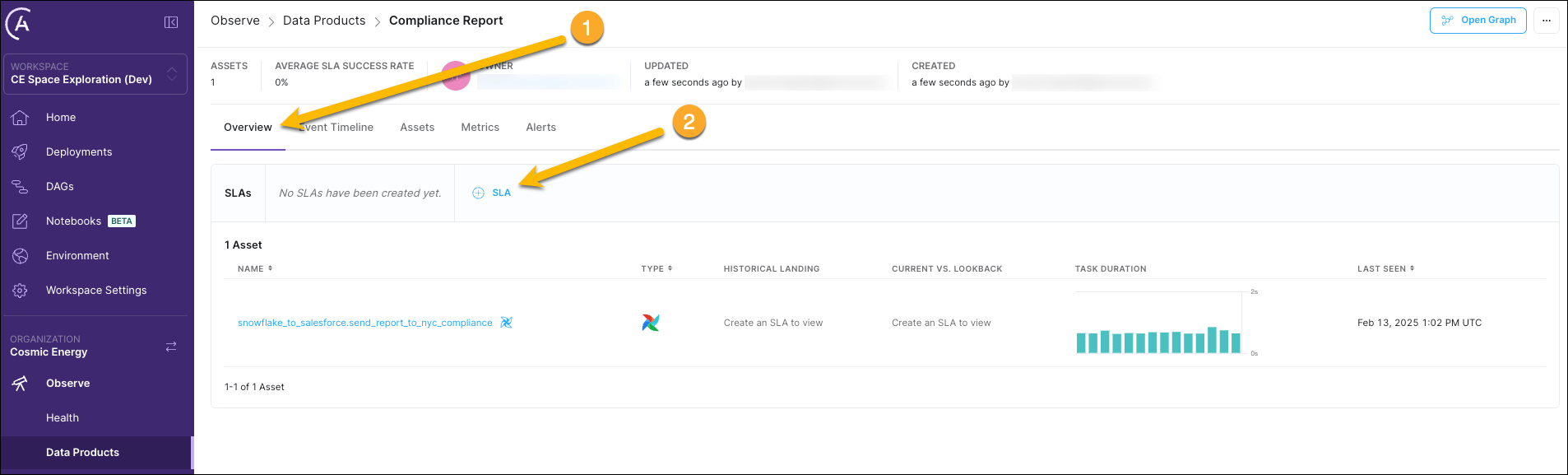
1. Click the **Overview** tab of the data product you want to monitor and then click **+ SLA**.
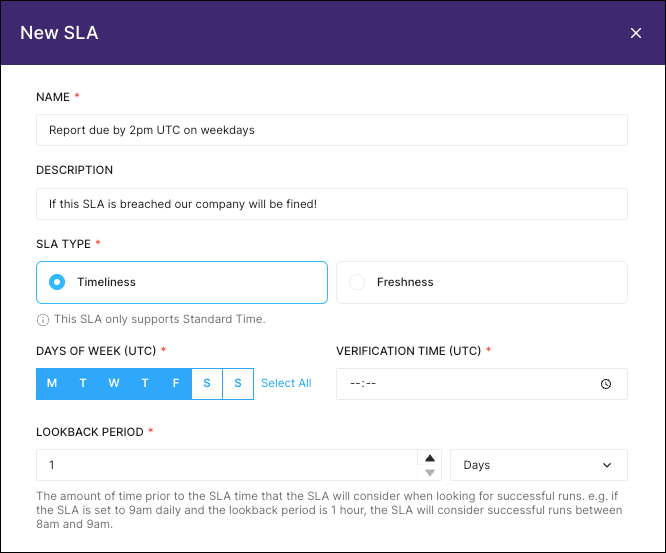
 2. In the drawer that opens, fill out your SLA details:
* **Name**: a descriptive name for the SLA.
* **Description**: a brief description of the SLA, for example the business impact of missing it.
* **SLA Type**: choose between timeliness and freshness.
For a timeliness SLA, define:
* **Days of the Week (UTC)**: the days on which the SLA should be evaluated.
* **Verification Time (UTC)**: the time at which the SLA should be evaluated.
* **Lookback Period**: how recent the data needs to have been updated before the SLA evaluation time in order to be considered fresh. For example a lookback period of 1 hour means that the data needs to have been updated within the last hour at time of SLA evaluation to meet the SLA.
For a freshness SLA, define:
* **Freshness Policy**: how often the data needs to be updated. For example a freshness policy of 2 hours means that this SLA is breached if the data has ever not been updated for more than 2 hours.
2. In the drawer that opens, fill out your SLA details:
* **Name**: a descriptive name for the SLA.
* **Description**: a brief description of the SLA, for example the business impact of missing it.
* **SLA Type**: choose between timeliness and freshness.
For a timeliness SLA, define:
* **Days of the Week (UTC)**: the days on which the SLA should be evaluated.
* **Verification Time (UTC)**: the time at which the SLA should be evaluated.
* **Lookback Period**: how recent the data needs to have been updated before the SLA evaluation time in order to be considered fresh. For example a lookback period of 1 hour means that the data needs to have been updated within the last hour at time of SLA evaluation to meet the SLA.
For a freshness SLA, define:
* **Freshness Policy**: how often the data needs to be updated. For example a freshness policy of 2 hours means that this SLA is breached if the data has ever not been updated for more than 2 hours.
 3. Click **Create SLA** to save your SLA.
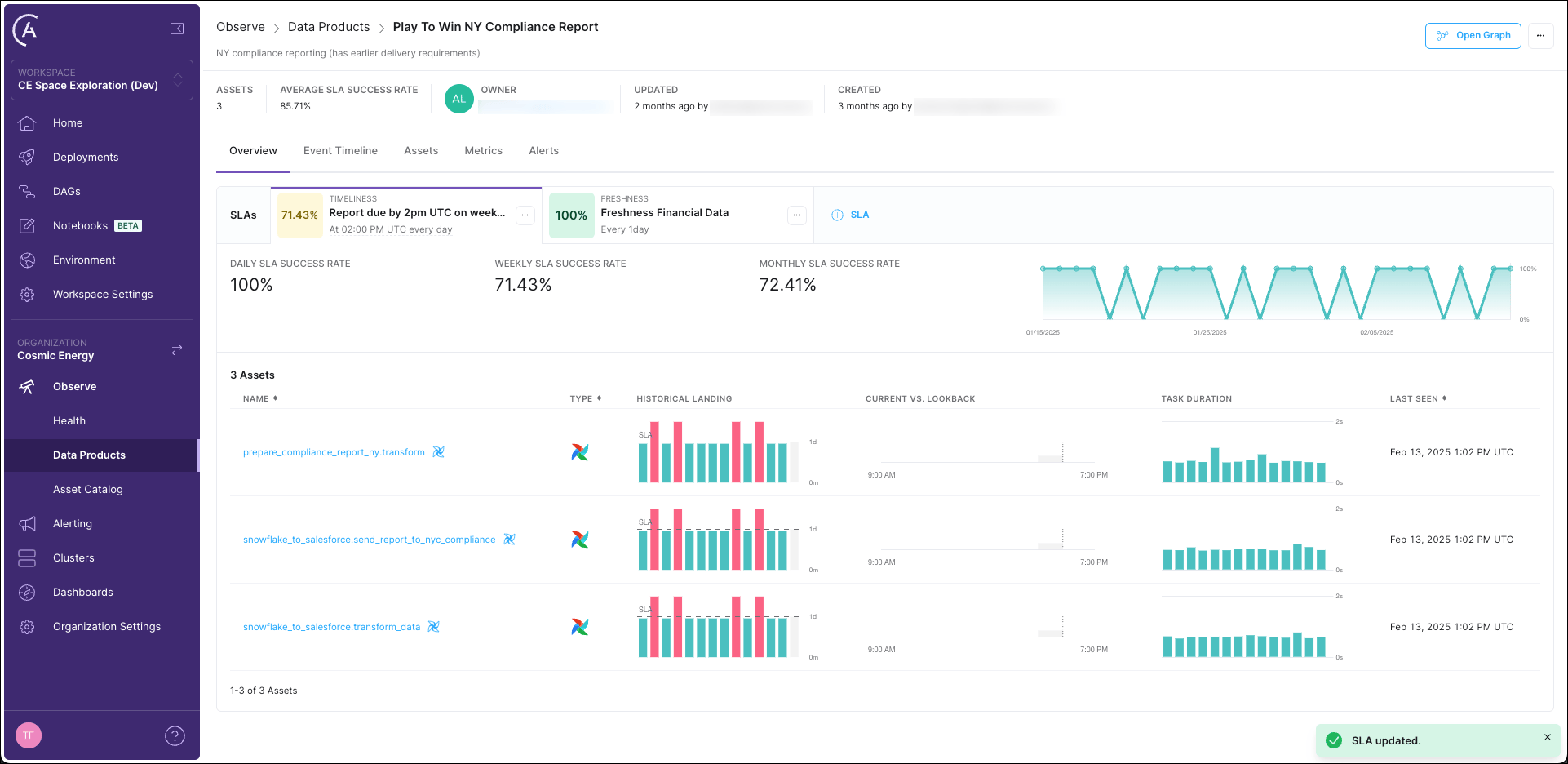
You can see how your data product performed with regards to its SLAs over time in the **Overview** tab of the data product.
3. Click **Create SLA** to save your SLA.
You can see how your data product performed with regards to its SLAs over time in the **Overview** tab of the data product.
 For a more detailed tutorial that includes an example project, see [Get started with Astro Observe](/docs/learn/astro-observe-quickstart).