> ## Documentation Index
> Fetch the complete documentation index at: https://astronomer.io/docs/llms.txt
> Use this file to discover all available pages before exploring further.
# Schedule DAGs in Apache Airflow®
One of the fundamental features of [Apache Airflow®](https://airflow.apache.org/) is the ability to schedule DAGs. Airflow offers many different options for scheduling, from simple cron-based schedules, over [data-aware scheduling](#data-aware-scheduling) with assets to event-driven scheduling based on messages in a queue.
In this guide, you'll learn:
* How to interpret the timestamps associated with a DAG run.
* How to set DAG parameters that control scheduling.
* The options available for scheduling DAGs.
This guide gives an overview of scheduling options. There are a number of related guides that cover specific types of scheduling in more detail:
* [Assets and data-aware scheduling](/docs/learn/airflow-datasets)
* [Event-driven scheduling](/docs/learn/airflow-event-driven-scheduling)
* [Rerun Airflow DAGs and tasks](/docs/learn/rerunning-dags) (including backfilling)
## Assumed knowledge
To get the most out of this guide, you should have an existing knowledge of:
* Basic Airflow concepts. See [Introduction to Apache Airflow](/docs/learn/intro-to-airflow).
* Airflow DAGs. See [Introduction to Airflow DAGs](/docs/learn/dags).
* Date and time modules in Python3. See the [Python documentation on the `datetime` package](https://docs.python.org/3/library/datetime.html) and the [`pendulum` documentation](https://pendulum.eustace.io/docs/).
### DAG run timestamps
A DAG run is a single execution of a DAG attached to a point in time. On the DAG run details page you can see different timestamps associated with your DAG run.
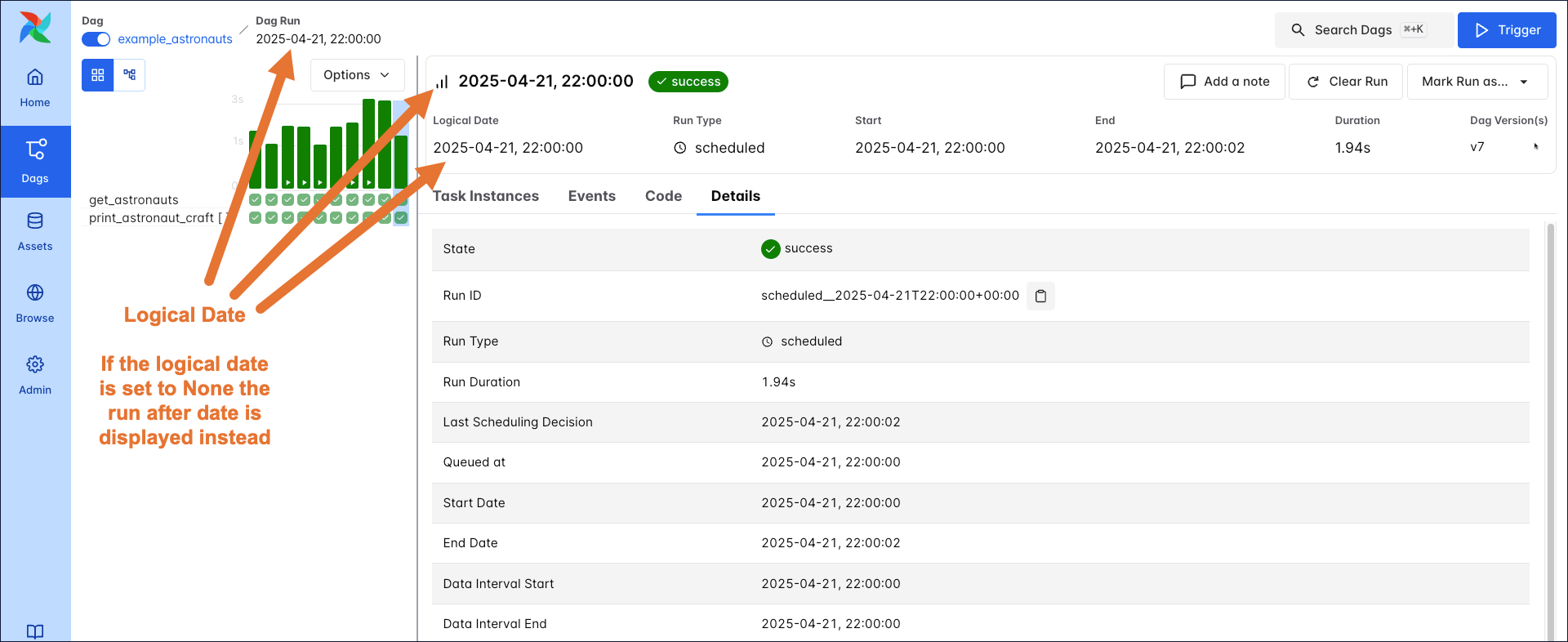 * **Logical Date**: The point in time after which a specific DAG run can start. This timestamp is displayed prominently in the Airflow UI as the main date the DAG run is associated with. The logical date can be set to `None` by the user for DAGs that are triggered using the Airflow REST API or Airflow UI.
* **Run after**: The point in time after which a specific DAG run can start. If a logical date is supplied, the run after date is set to the logical date. If the logical date is `None` the run after date is set to the current time as soon as the DAG run is triggered.
* **Start** and **Start Date**: The time the DAG run actually started. This timestamp is unrelated to the [DAG parameter](#schedule-dag-parameters) `start_date`.
* **End** and **End Date**: The time the DAG run finished. This timestamp is unrelated to the [DAG parameter](#schedule-dag-parameters) `end_date`.
* **Duration** and **Run Duration**: The time it took for the DAG run to complete, difference between the start and end date timestamps.
* **Run ID**: The unique identifier for the DAG run. The run ID is a combination of the type of DAG run, for example `scheduled` and the logical date. If the logical date is `None`, the run after date is used with an added random string suffix to ensure uniqueness. The run ID is used to identify the DAG run in the Airflow metadata database.
* **Last Scheduling Decision**: The last time a scheduler attempted to schedule task instances for this DAG run.
* **Queued at**: The time the first task instance was queued for this DAG run.
There are two additional timestamps that are only meaningful when using the `CronDataIntervalTimetable`.
* **Data Interval Start**: When the `CronDataIntervalTimetable` is used, the data interval start timestamp of a DAG run is equivalent to the run after date of the previous scheduled DAG run of the same DAG. When using other schedules, the data interval start timestamp is equivalent to the run after date of the current DAG run. If the DAG run is triggered with the logical date set to `None`, the data interval start timestamp is also `None`.
* **Data Interval End**: When the `CronDataIntervalTimetable` is used, the data interval start timestamp of a DAG run is equivalent to the run after date of the current scheduled DAG run. If the logical date is set to `None`, the data interval end timestamp is also `None`.
For manual Dag runs via the Airflow UI you have the option to choose **Specify Manually** to provide a custom **Data Interval**.
* **Logical Date**: The point in time after which a specific DAG run can start. This timestamp is displayed prominently in the Airflow UI as the main date the DAG run is associated with. The logical date can be set to `None` by the user for DAGs that are triggered using the Airflow REST API or Airflow UI.
* **Run after**: The point in time after which a specific DAG run can start. If a logical date is supplied, the run after date is set to the logical date. If the logical date is `None` the run after date is set to the current time as soon as the DAG run is triggered.
* **Start** and **Start Date**: The time the DAG run actually started. This timestamp is unrelated to the [DAG parameter](#schedule-dag-parameters) `start_date`.
* **End** and **End Date**: The time the DAG run finished. This timestamp is unrelated to the [DAG parameter](#schedule-dag-parameters) `end_date`.
* **Duration** and **Run Duration**: The time it took for the DAG run to complete, difference between the start and end date timestamps.
* **Run ID**: The unique identifier for the DAG run. The run ID is a combination of the type of DAG run, for example `scheduled` and the logical date. If the logical date is `None`, the run after date is used with an added random string suffix to ensure uniqueness. The run ID is used to identify the DAG run in the Airflow metadata database.
* **Last Scheduling Decision**: The last time a scheduler attempted to schedule task instances for this DAG run.
* **Queued at**: The time the first task instance was queued for this DAG run.
There are two additional timestamps that are only meaningful when using the `CronDataIntervalTimetable`.
* **Data Interval Start**: When the `CronDataIntervalTimetable` is used, the data interval start timestamp of a DAG run is equivalent to the run after date of the previous scheduled DAG run of the same DAG. When using other schedules, the data interval start timestamp is equivalent to the run after date of the current DAG run. If the DAG run is triggered with the logical date set to `None`, the data interval start timestamp is also `None`.
* **Data Interval End**: When the `CronDataIntervalTimetable` is used, the data interval start timestamp of a DAG run is equivalent to the run after date of the current scheduled DAG run. If the logical date is set to `None`, the data interval end timestamp is also `None`.
For manual Dag runs via the Airflow UI you have the option to choose **Specify Manually** to provide a custom **Data Interval**.
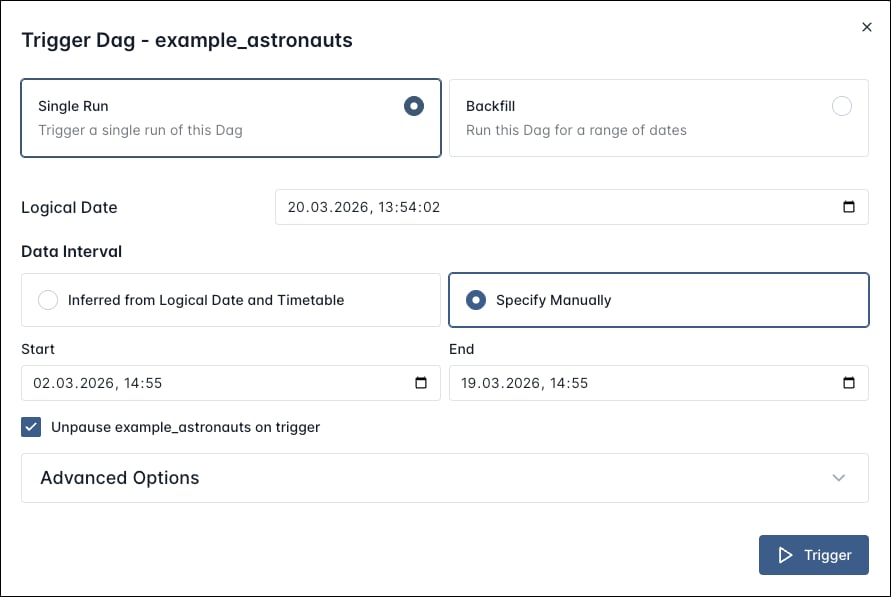 This will create one Dag run where the context variables `data_interval_start` and `data_interval_end` are set to the custom values you provided. This is different from creating a [backfill](/docs/learn/rerunning-dags#backfill) where one Dag run per schedule interval is created for the time period you specified.
For more information on the data intervals and the differences between the `CronDataIntervalTimetable` and the `CronTriggerTimetable`, see the [Airflow documentation](https://airflow.apache.org/docs/apache-airflow/stable/authoring-and-scheduling/timetable.html#timetables-comparisons).
### Schedule DAG parameters
The following parameters ensure your DAGs run at the correct time:
* **`start_date`**: The timestamp after which this DAG can start running. When using the `CronDataIntervalTimetable`, the `start_date` is the moment in time after which the first data interval can start. Default: `None`.
* **`schedule`**: Defines the rules according to which DAG runs are scheduled. This parameter accepts cron expressions, timedelta objects, timetables, and lists of assets. Default: `None`.
* **`end_date`**: The date beyond which the DAG won't run. Default: `None`.
* **`catchup`**: A boolean that determines whether the DAG should automatically fill all runs between its `start_date` and the current date. Default: `False`. Aside from this automatic behavior, you can also manually trigger DAG runs for any date in the past. See [Backfills](/docs/learn/rerunning-dags#backfill) for more information.
The following code snippet defines a DAG with a `start_date` of April 1, 2025, a `schedule` of `@daily`, and an `end_date` of April 1, 2026. The DAG will run every day at midnight UTC, starting on April 1, 2025, and ending on March 31, 2026. It doesn't catch up on any missed runs automatically.
```python wrap theme={null}
from pendulum import datetime
from airflow.sdk import dag
@dag(
start_date=datetime(2025, 4, 1),
schedule="@daily",
end_date=datetime(2026, 4, 1),
)
```
Don't make your DAG's schedule dynamic (for example, `datetime.now()`)! This will cause an error in the Scheduler.
## Time-based schedules
For pipelines with straightforward scheduling needs, you can define a `schedule` in your DAG using:
* A cron expression.
* A cron preset.
* A timedelta object.
Cron expressions are passed to a timetable under the hood. The default timetable used is the CronTriggerTimetable. You can use the [`[scheduler].create_cron_data_intervals` configuration](https://airflow.apache.org/docs/apache-airflow/stable/configurations-ref.html#create-cron-data-intervals) option to switch to using the `CronDataIntervalTimetable` instead, which was the behavior in previous Airflow versions. See [Timetable comparisons](https://airflow.apache.org/docs/apache-airflow/stable/authoring-and-scheduling/timetable.html#timetables-comparisons) for more information.
### Cron expressions
You can pass any cron expression as a string to the `schedule` parameter in your DAG. For example, if you want to schedule your DAG at 4:05 AM every day, you would use `schedule='5 4 * * *'`.
If you need help creating the correct cron expression, see [crontab guru](https://crontab.guru/).
### Cron presets
Airflow can utilize cron presets for common, basic schedules. For example, `schedule='@hourly'` will schedule the DAG to run at the beginning of every hour. For the full list of presets, see [Cron Presets](https://airflow.apache.org/docs/apache-airflow/stable/authoring-and-scheduling/cron.html#cron-presets).
### Timedelta objects
If you want to schedule your DAG on a particular cadence (hourly, every 5 minutes, etc.) rather than at a specific time, you can pass a `timedelta` object imported from the [`datetime` package](https://docs.python.org/3/library/datetime.html) or a `duration` object from the [`pendulum` package](https://pendulum.eustace.io/docs/) to the `schedule` parameter. For example, `schedule=timedelta(minutes=30)` will run the DAG every thirty minutes, and `schedule=timedelta(days=1)` will run the DAG every day.
### Limitations of cron-based schedules
Cron-based schedules run into limitations when dealing with irregular time-based schedules. For example when:
* Scheduling a DAG at different times on different days. For example, 2:00 PM on Thursdays and 4:00 PM on Saturdays.
* Scheduling a DAG daily except for holidays.
* Scheduling a DAG at multiple times daily with uneven intervals. For example, 1:00 PM and 4:30 PM.
Such schedules can be created using [timetables](#timetables).
## Data-aware scheduling
With **Assets**, you can make Airflow aware of updates to data objects. Using that awareness, Airflow can schedule other DAGs when there are updates to these assets. To create an asset-based schedule, pass the names of the asset(s) to the `schedule` parameter. You can create schedules based on conditional logic involving multiple assets, or even combine asset-based schedules with time-based schedules.
This will create one Dag run where the context variables `data_interval_start` and `data_interval_end` are set to the custom values you provided. This is different from creating a [backfill](/docs/learn/rerunning-dags#backfill) where one Dag run per schedule interval is created for the time period you specified.
For more information on the data intervals and the differences between the `CronDataIntervalTimetable` and the `CronTriggerTimetable`, see the [Airflow documentation](https://airflow.apache.org/docs/apache-airflow/stable/authoring-and-scheduling/timetable.html#timetables-comparisons).
### Schedule DAG parameters
The following parameters ensure your DAGs run at the correct time:
* **`start_date`**: The timestamp after which this DAG can start running. When using the `CronDataIntervalTimetable`, the `start_date` is the moment in time after which the first data interval can start. Default: `None`.
* **`schedule`**: Defines the rules according to which DAG runs are scheduled. This parameter accepts cron expressions, timedelta objects, timetables, and lists of assets. Default: `None`.
* **`end_date`**: The date beyond which the DAG won't run. Default: `None`.
* **`catchup`**: A boolean that determines whether the DAG should automatically fill all runs between its `start_date` and the current date. Default: `False`. Aside from this automatic behavior, you can also manually trigger DAG runs for any date in the past. See [Backfills](/docs/learn/rerunning-dags#backfill) for more information.
The following code snippet defines a DAG with a `start_date` of April 1, 2025, a `schedule` of `@daily`, and an `end_date` of April 1, 2026. The DAG will run every day at midnight UTC, starting on April 1, 2025, and ending on March 31, 2026. It doesn't catch up on any missed runs automatically.
```python wrap theme={null}
from pendulum import datetime
from airflow.sdk import dag
@dag(
start_date=datetime(2025, 4, 1),
schedule="@daily",
end_date=datetime(2026, 4, 1),
)
```
Don't make your DAG's schedule dynamic (for example, `datetime.now()`)! This will cause an error in the Scheduler.
## Time-based schedules
For pipelines with straightforward scheduling needs, you can define a `schedule` in your DAG using:
* A cron expression.
* A cron preset.
* A timedelta object.
Cron expressions are passed to a timetable under the hood. The default timetable used is the CronTriggerTimetable. You can use the [`[scheduler].create_cron_data_intervals` configuration](https://airflow.apache.org/docs/apache-airflow/stable/configurations-ref.html#create-cron-data-intervals) option to switch to using the `CronDataIntervalTimetable` instead, which was the behavior in previous Airflow versions. See [Timetable comparisons](https://airflow.apache.org/docs/apache-airflow/stable/authoring-and-scheduling/timetable.html#timetables-comparisons) for more information.
### Cron expressions
You can pass any cron expression as a string to the `schedule` parameter in your DAG. For example, if you want to schedule your DAG at 4:05 AM every day, you would use `schedule='5 4 * * *'`.
If you need help creating the correct cron expression, see [crontab guru](https://crontab.guru/).
### Cron presets
Airflow can utilize cron presets for common, basic schedules. For example, `schedule='@hourly'` will schedule the DAG to run at the beginning of every hour. For the full list of presets, see [Cron Presets](https://airflow.apache.org/docs/apache-airflow/stable/authoring-and-scheduling/cron.html#cron-presets).
### Timedelta objects
If you want to schedule your DAG on a particular cadence (hourly, every 5 minutes, etc.) rather than at a specific time, you can pass a `timedelta` object imported from the [`datetime` package](https://docs.python.org/3/library/datetime.html) or a `duration` object from the [`pendulum` package](https://pendulum.eustace.io/docs/) to the `schedule` parameter. For example, `schedule=timedelta(minutes=30)` will run the DAG every thirty minutes, and `schedule=timedelta(days=1)` will run the DAG every day.
### Limitations of cron-based schedules
Cron-based schedules run into limitations when dealing with irregular time-based schedules. For example when:
* Scheduling a DAG at different times on different days. For example, 2:00 PM on Thursdays and 4:00 PM on Saturdays.
* Scheduling a DAG daily except for holidays.
* Scheduling a DAG at multiple times daily with uneven intervals. For example, 1:00 PM and 4:30 PM.
Such schedules can be created using [timetables](#timetables).
## Data-aware scheduling
With **Assets**, you can make Airflow aware of updates to data objects. Using that awareness, Airflow can schedule other DAGs when there are updates to these assets. To create an asset-based schedule, pass the names of the asset(s) to the `schedule` parameter. You can create schedules based on conditional logic involving multiple assets, or even combine asset-based schedules with time-based schedules.
Simple
```python wrap theme={null}
# from airflow.sdk import Asset
my_asset_1 = Asset("my_asset_1")
my_asset_2 = Asset("my_asset_2")
@dag(
schedule=[my_asset_1, my_asset_2],
# Passing a list of datasets will create an AND condition
)
```
This DAG runs when both `my_asset_1` and `my_asset_2` are updated at least once.
Conditional
```python wrap theme={null}
# from airflow.sdk import Asset
my_asset_1 = Asset("my_asset_1")
my_asset_2 = Asset("my_asset_2")
@dag(
schedule=(my_asset_1 | my_asset_2),
# Use () instead of [] to be able to use conditional dataset scheduling!
)
```
This DAG runs when either `my_asset_1` or `my_asset_2` is updated.
Time
```python wrap theme={null}
# from airflow.sdk import Asset
# from airflow.timetables.assets import AssetOrTimeSchedule
# from airflow.timetables.trigger import CronTriggerTimetable
my_asset_1 = Asset("my_asset_1")
my_asset_2 = Asset("my_asset_2")
@dag(
schedule=AssetOrTimeSchedule(
timetable=CronTriggerTimetable("0 0 * * *", timezone="UTC"),
assets=(my_asset_1 | my_asset_2),
),
# Use () instead of [] to be able to use conditional dataset scheduling!
)
```
This DAG runs every day at midnight UTC and, additionally, whenever either `my_asset_1` or `my_asset_2` is updated.
Assets can be updated by any tasks in any DAG of the same Airflow environment, by calls to the [asset endpoint of the Airflow REST API](https://airflow.apache.org/docs/apache-airflow/stable/stable-rest-api-ref.html), or manually in the Airflow UI.
To learn more about assets and data driven scheduling, see [Assets and Data-Aware Scheduling in Airflow](/docs/learn/airflow-datasets) guide.
Assets can be combined with AssetWatchers to create event-driven schedules. For more information, see [Event-Driven Scheduling](/docs/learn/airflow-event-driven-scheduling).
## Timetables
Each time-based schedule in Airflow is implemented using a timetable under the hood. There are a couple of built-in timetables, including the `CronTriggerTimetable` and `CronDataIntervalTimetable`. If no timetable exists for your use case, you have the option to [create your own custom](https://airflow.apache.org/docs/apache-airflow/stable/howto/timetable.html).
### Continuous timetable
You can run a DAG continuously with a pre-defined timetable. To use the [ContinuousTimetable](https://airflow.apache.org/docs/apache-airflow/stable/_api/airflow/timetables/simple/index.html#module-airflow.timetables.simple.ContinuousTimetable), set the schedule of your DAG to `"@continuous"` and set `max_active_runs` to 1.
```python wrap theme={null}
@dag(
start_date=datetime(2025, 4, 1),
schedule="@continuous",
max_active_runs=1,
)
```
This schedule will create one continuous DAG run, with a new run starting as soon as the previous run has completed, regardless of whether the previous run succeeded or failed. Using a ContinuousTimetable is especially useful when [sensors](/docs/learn/what-is-a-sensor) or [deferrable operators](/docs/learn/deferrable-operators) are used to wait for highly irregular events in external data tools.
Airflow is designed to handle orchestration of data pipelines in batches, and this feature isn't intended for streaming or low-latency processes. If you need to run pipelines more frequently than every minute, consider using Airflow in combination with tools designed specifically for that purpose like [Apache Kafka](/docs/learn/airflow-kafka).