> ## Documentation Index
> Fetch the complete documentation index at: https://astronomer.io/docs/llms.txt
> Use this file to discover all available pages before exploring further.
# Support ticket agent with Apache Airflow®
> Learn how to build a pipeline that drafts replies to support tickets and verifies them with an AI judge and a human reviewer.
## Overview
AI agents can assist employees with parts of their work, often by gathering the relevant information and making a first pass at writing something based on it. A [data exploration agent](/docs/learn/reference-architecture-conversational-analytics) that answers questions for colleagues is an AI data product for *internal* stakeholders. As soon as the generated text is sent to someone outside your company, it becomes an AI data product for *external* stakeholders, and the cost of potential mistakes is higher.
A support ticket agent is one example. An incoming support ticket starts the Dag, which fetches the ticket and uses an agent to draft a reply. The agent has access to product information and to this specific customer's history through tools and MCP servers, so the draft can reference the customer's product plan and past tickets.
Because the reply goes to a customer, the draft needs to pass two verification steps before it is sent: an AI judge, then a person.
This reference architecture is a common base pattern for an external-facing agent. There are two other similar reference architectures available:
* [AI-powered education operations](/docs/learn/reference-architecture-ai-education-operations) routes work across several channels.
* [Context graphs](/docs/learn/reference-architecture-context-graph) captures a decision trace so the agent improves over time.
For general information on how to orchestrate agents with Airflow, see [Agent orchestration with Apache Airflow®](/docs/learn/ai-orchestration-agent).
## Architecture
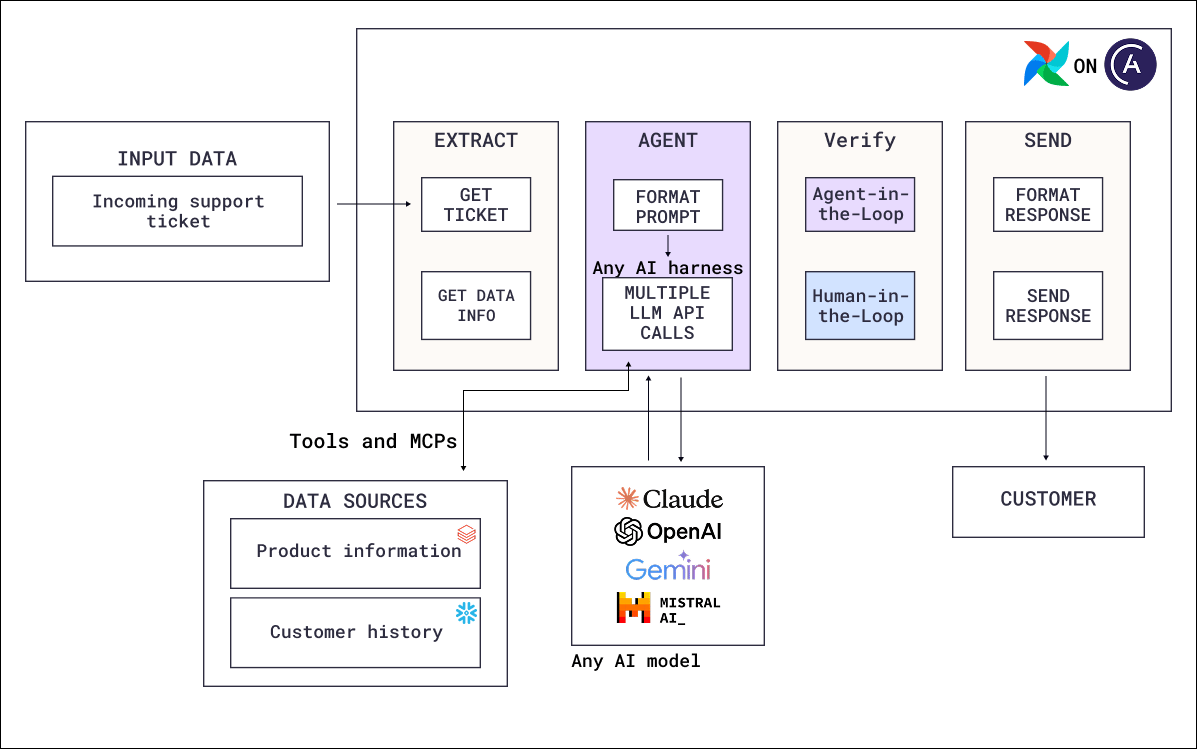 The Dag in this architecture has four steps:
* **Extract**: Deterministic tasks fetch the incoming support ticket that started the Dag, along with the data the agent needs as initial context.
* **Agent**: A tool-calling loop drafting the reply. The agent queries two data sources through tools and MCP servers: product information and customer history.
* **Verify**: Two quality control steps in sequence. An AI-as-a-judge task scores the draft, then a human-in-the-loop task puts it in front of a person. See [Review AI output](/docs/learn/ai-orchestration-overview#review-ai-output) for both patterns and the options a reviewer can respond through.
* **Send**: Deterministic tasks format the approved response and send it to the customer.
### Airflow features
* [**`@task.agent`**](/docs/learn/airflow-common-ai-provider#@task-agent): Runs the drafting agent as a task.
* [**Toolsets**](/docs/learn/airflow-common-ai-provider#toolsets): Give the agent read access to product information and customer history through MCP servers, Airflow hooks, or custom tooling, with the scope defined based on the permissions of the credentials used in the Airflow connection.
* [**`@task.llm`**](/docs/learn/airflow-common-ai-provider#@task-llm): Runs the AI judge. Scoring a finished draft often needs no tools, because the draft and the criteria are both already in the prompt. Only switch to agents or add tools if the review step needs to look up new information or verify against a source of truth system.
* [**Human-in-the-loop**](/docs/learn/airflow-human-in-the-loop): Pauses the Dag until a reviewer approves, edits, or rejects the draft. The reviewer can respond from a channel such as Slack, using the [Airflow REST API](/docs/astro/airflow-api).
* [**Event-driven scheduling**](/docs/learn/airflow-event-driven-scheduling): Starts a Dag run as soon as a new ticket arrives.
* [**Automatic retries**](/docs/learn/rerunning-dags#automatically-retry-tasks): The agent task retries rate limits and transient provider errors.
## Considerations
* **Restrict data access based on the customer.** With a connection that can read every customer's records, customer A's purchase history can end up in customer B's reply. Scope the connection to the customer on the ticket. See [Restrict what an agent can do](/docs/learn/ai-orchestration-agent#restrict-what-an-agent-can-do).
* **Determine when a human review is needed.** The AI judge reduces the review load on human reviewers. If the pipeline consistently produces good responses for low-stakes tickets of a certain topic, you might want to add a routing step to allow these responses to be sent without human review.
* **Give the judge explicit eval criteria.** Score the draft on dimensions with defined levels: whether every product claim appears in the retrieved product information, whether it answers the question the ticket asked, and whether the tone matches your support voice. See [Write a rubric for subjective criteria](/docs/learn/ai-orchestration-model-evals#write-a-rubric-for-subjective-criteria).
* **Fetch what you know the agent needs upstream.** Context such as the customer's plan and open tickets can be retrieved deterministically in an upstream task, which ensures it is always taken into consideration.
* **Decide what happens when the reviewer rejects.** A rejected AI draft can, for example, cause the Dag to regenerate the draft with the reviewer's feedback, escalate to a specialist, or drop the automated reply and assign the ticket to a person.
## Next steps
* Look up decorator and operator parameters in [Orchestrate AI tasks with Apache Airflow® and the Common AI provider](/docs/learn/airflow-common-ai-provider).
* Add the review steps with [Human-in-the-loop workflows with Airflow](/docs/learn/airflow-human-in-the-loop) and [Review AI output](/docs/learn/ai-orchestration-overview#review-ai-output).
* Score whether the replies are useful to customers with [AI product evals](/docs/learn/ai-orchestration-product-evals).
* Make the agent self-improving with [Context graphs for self-improving AI agents with Apache Airflow®](/docs/learn/reference-architecture-context-graph).
* Read the [AI Orchestration with Apache Airflow®](https://www.astronomer.io/ebooks/ai-orchestration-with-apache-airflow/) eBook for the full set of AI orchestration patterns.
* Deploy the Airflow pipelines with a [free trial of Astro](https://www.astronomer.io/lp/signup/).
The Dag in this architecture has four steps:
* **Extract**: Deterministic tasks fetch the incoming support ticket that started the Dag, along with the data the agent needs as initial context.
* **Agent**: A tool-calling loop drafting the reply. The agent queries two data sources through tools and MCP servers: product information and customer history.
* **Verify**: Two quality control steps in sequence. An AI-as-a-judge task scores the draft, then a human-in-the-loop task puts it in front of a person. See [Review AI output](/docs/learn/ai-orchestration-overview#review-ai-output) for both patterns and the options a reviewer can respond through.
* **Send**: Deterministic tasks format the approved response and send it to the customer.
### Airflow features
* [**`@task.agent`**](/docs/learn/airflow-common-ai-provider#@task-agent): Runs the drafting agent as a task.
* [**Toolsets**](/docs/learn/airflow-common-ai-provider#toolsets): Give the agent read access to product information and customer history through MCP servers, Airflow hooks, or custom tooling, with the scope defined based on the permissions of the credentials used in the Airflow connection.
* [**`@task.llm`**](/docs/learn/airflow-common-ai-provider#@task-llm): Runs the AI judge. Scoring a finished draft often needs no tools, because the draft and the criteria are both already in the prompt. Only switch to agents or add tools if the review step needs to look up new information or verify against a source of truth system.
* [**Human-in-the-loop**](/docs/learn/airflow-human-in-the-loop): Pauses the Dag until a reviewer approves, edits, or rejects the draft. The reviewer can respond from a channel such as Slack, using the [Airflow REST API](/docs/astro/airflow-api).
* [**Event-driven scheduling**](/docs/learn/airflow-event-driven-scheduling): Starts a Dag run as soon as a new ticket arrives.
* [**Automatic retries**](/docs/learn/rerunning-dags#automatically-retry-tasks): The agent task retries rate limits and transient provider errors.
## Considerations
* **Restrict data access based on the customer.** With a connection that can read every customer's records, customer A's purchase history can end up in customer B's reply. Scope the connection to the customer on the ticket. See [Restrict what an agent can do](/docs/learn/ai-orchestration-agent#restrict-what-an-agent-can-do).
* **Determine when a human review is needed.** The AI judge reduces the review load on human reviewers. If the pipeline consistently produces good responses for low-stakes tickets of a certain topic, you might want to add a routing step to allow these responses to be sent without human review.
* **Give the judge explicit eval criteria.** Score the draft on dimensions with defined levels: whether every product claim appears in the retrieved product information, whether it answers the question the ticket asked, and whether the tone matches your support voice. See [Write a rubric for subjective criteria](/docs/learn/ai-orchestration-model-evals#write-a-rubric-for-subjective-criteria).
* **Fetch what you know the agent needs upstream.** Context such as the customer's plan and open tickets can be retrieved deterministically in an upstream task, which ensures it is always taken into consideration.
* **Decide what happens when the reviewer rejects.** A rejected AI draft can, for example, cause the Dag to regenerate the draft with the reviewer's feedback, escalate to a specialist, or drop the automated reply and assign the ticket to a person.
## Next steps
* Look up decorator and operator parameters in [Orchestrate AI tasks with Apache Airflow® and the Common AI provider](/docs/learn/airflow-common-ai-provider).
* Add the review steps with [Human-in-the-loop workflows with Airflow](/docs/learn/airflow-human-in-the-loop) and [Review AI output](/docs/learn/ai-orchestration-overview#review-ai-output).
* Score whether the replies are useful to customers with [AI product evals](/docs/learn/ai-orchestration-product-evals).
* Make the agent self-improving with [Context graphs for self-improving AI agents with Apache Airflow®](/docs/learn/reference-architecture-context-graph).
* Read the [AI Orchestration with Apache Airflow®](https://www.astronomer.io/ebooks/ai-orchestration-with-apache-airflow/) eBook for the full set of AI orchestration patterns.
* Deploy the Airflow pipelines with a [free trial of Astro](https://www.astronomer.io/lp/signup/).