> ## Documentation Index
> Fetch the complete documentation index at: https://astronomer.io/docs/llms.txt
> Use this file to discover all available pages before exploring further.
# LLM transformation for product localization with Apache Airflow®
> Learn how to build a pipeline that translates product content into several languages with an LLM.
## Overview
LLMs can transform unstructured data according to rules. Common transformations include converting between formats, for example `.txt` to Markdown; translating between programming languages, for example rewriting legacy code from COBOL to Java or legacy workflows from Control-M to Airflow Dags; and translating between human languages.
Translation between human languages is one of the oldest LLM use cases and the one this architecture covers. Localization can give you an advantage when selling in global markets, and is sometimes legally required, for example for product safety information.
The pipeline fetches a piece of source content, such as a help center article, and translates it into several languages. The input arrives as two lists: the source text and the target languages. Every chunk is translated into every target language, so a ten-chunk article being translated into eight languages creates eighty parallel model calls.
For general information on how to orchestrate LLM calls with Airflow, see [LLM orchestration with Apache Airflow®](/docs/learn/ai-orchestration-llm).
## Architecture
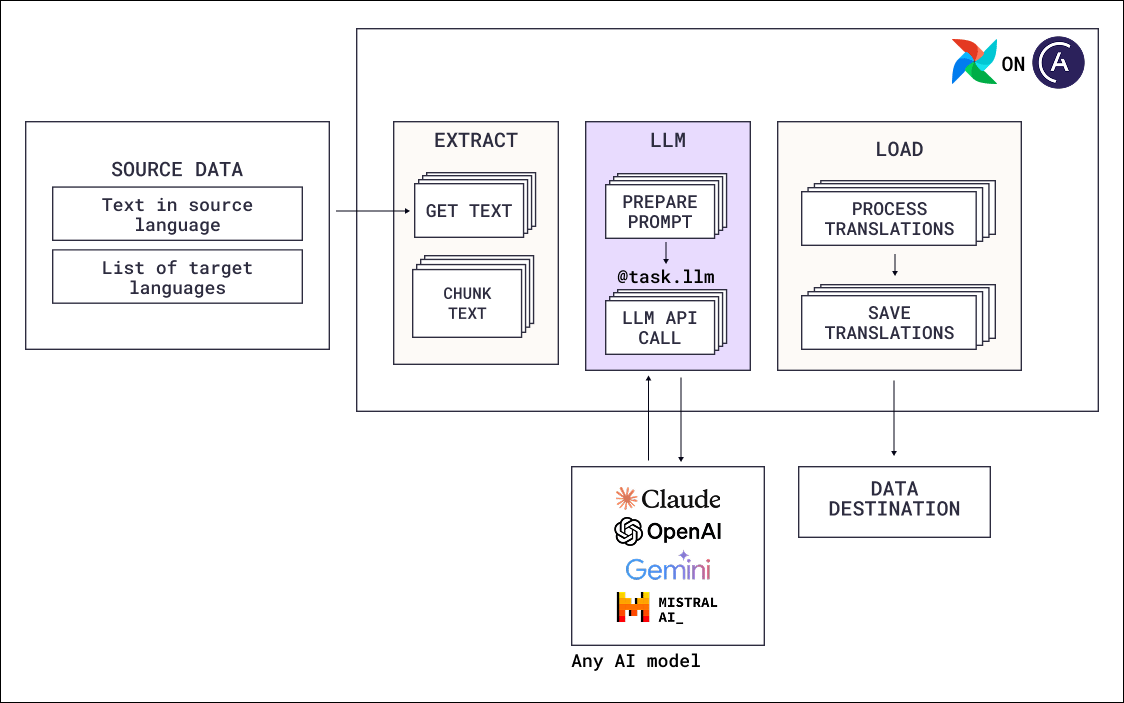 The Dag in this architecture follows an ETL pattern where the transformation is the translation step of the LLM:
* **Extract**: Deterministic tasks fetch the source text and split it into chunks small enough to fit inside one model call. Place chunk boundaries at headings or paragraphs.
* **Transform**: One model call per chunk and target language combination, using `@task.llm`. The system prompt instructs the model to preserve formatting, tone, and technical terminology, and the translation is returned as part of a structured `output_type`.
* **Load**: Deterministic tasks reassemble the translated chunks in order and save them to their destination, for example back into your documentation system.
Each mapped task instance has its chunk index and target language, so the load step can put the pieces back in order per language without relying on task completion order.
### Airflow features
* [**Dynamic task mapping over a cross product**](/docs/learn/dynamic-tasks#cross-product): `expand` over both `text_chunk` and `target_language` creates one task instance per combination.
* [**`@task.llm`**](/docs/learn/airflow-common-ai-provider#@task-llm): Runs each translation as a single model call.
* [**Automatic retries**](/docs/learn/rerunning-dags#automatically-retry-tasks): Parallel translation at this volume can run into rate limits. A retry policy ensures tasks try again in case of transient errors.
* [**Partitioned Dag runs**](/docs/learn/airflow-partitioned-runs): As an alternative to using dynamic task mapping with a cross product, you can create one partitioned Dag run per target language. Scheduling on asset partitions with a segment partition key results in each language creating a separate Dag run, which can be easier to monitor and rerun.
## Considerations
* **Build a terminology pipeline before you scale up languages.** The risk with chunked translation is consistency: a term translated one way in chunk three and differently in chunk seven confuses the reader. For localization work, a separate context engineering pipeline extracts common terms from your documents and produces one canonical translation per term and language. Those term lists are then given to the translating model as reference context.
* **Choose the mapping strategy by how you expect to rerun.** One run with all chunks and languages mapped gives you a single place to interact with the entire process. One Dag run per language using partitioned Dags lets you rerun a single market after a terminology fix without retranslating the rest.
* **Keep the source text as the single source of truth.** Translations are derived data. When the source article changes, the pipeline can rerun for the affected chunks.
* **Decide which content needs human review.** For content where a mistranslation has legal or compliance consequences, such as product safety instructions, add a [human-in-the-loop](/docs/learn/airflow-human-in-the-loop) step per language before publishing.
## Next steps
* Look up decorator and operator parameters in [Orchestrate AI tasks with Apache Airflow® and the Common AI provider](/docs/learn/airflow-common-ai-provider).
* Compare the mapping strategies in [Create dynamic Airflow tasks](/docs/learn/dynamic-tasks) and [Partitioned Dag runs and asset events in Apache Airflow®](/docs/learn/airflow-partitioned-runs).
* Read the [AI Orchestration with Apache Airflow®](https://www.astronomer.io/ebooks/ai-orchestration-with-apache-airflow/) eBook for the full set of AI orchestration patterns.
* Deploy the Airflow pipelines with a [free trial of Astro](https://www.astronomer.io/lp/signup/).
The Dag in this architecture follows an ETL pattern where the transformation is the translation step of the LLM:
* **Extract**: Deterministic tasks fetch the source text and split it into chunks small enough to fit inside one model call. Place chunk boundaries at headings or paragraphs.
* **Transform**: One model call per chunk and target language combination, using `@task.llm`. The system prompt instructs the model to preserve formatting, tone, and technical terminology, and the translation is returned as part of a structured `output_type`.
* **Load**: Deterministic tasks reassemble the translated chunks in order and save them to their destination, for example back into your documentation system.
Each mapped task instance has its chunk index and target language, so the load step can put the pieces back in order per language without relying on task completion order.
### Airflow features
* [**Dynamic task mapping over a cross product**](/docs/learn/dynamic-tasks#cross-product): `expand` over both `text_chunk` and `target_language` creates one task instance per combination.
* [**`@task.llm`**](/docs/learn/airflow-common-ai-provider#@task-llm): Runs each translation as a single model call.
* [**Automatic retries**](/docs/learn/rerunning-dags#automatically-retry-tasks): Parallel translation at this volume can run into rate limits. A retry policy ensures tasks try again in case of transient errors.
* [**Partitioned Dag runs**](/docs/learn/airflow-partitioned-runs): As an alternative to using dynamic task mapping with a cross product, you can create one partitioned Dag run per target language. Scheduling on asset partitions with a segment partition key results in each language creating a separate Dag run, which can be easier to monitor and rerun.
## Considerations
* **Build a terminology pipeline before you scale up languages.** The risk with chunked translation is consistency: a term translated one way in chunk three and differently in chunk seven confuses the reader. For localization work, a separate context engineering pipeline extracts common terms from your documents and produces one canonical translation per term and language. Those term lists are then given to the translating model as reference context.
* **Choose the mapping strategy by how you expect to rerun.** One run with all chunks and languages mapped gives you a single place to interact with the entire process. One Dag run per language using partitioned Dags lets you rerun a single market after a terminology fix without retranslating the rest.
* **Keep the source text as the single source of truth.** Translations are derived data. When the source article changes, the pipeline can rerun for the affected chunks.
* **Decide which content needs human review.** For content where a mistranslation has legal or compliance consequences, such as product safety instructions, add a [human-in-the-loop](/docs/learn/airflow-human-in-the-loop) step per language before publishing.
## Next steps
* Look up decorator and operator parameters in [Orchestrate AI tasks with Apache Airflow® and the Common AI provider](/docs/learn/airflow-common-ai-provider).
* Compare the mapping strategies in [Create dynamic Airflow tasks](/docs/learn/dynamic-tasks) and [Partitioned Dag runs and asset events in Apache Airflow®](/docs/learn/airflow-partitioned-runs).
* Read the [AI Orchestration with Apache Airflow®](https://www.astronomer.io/ebooks/ai-orchestration-with-apache-airflow/) eBook for the full set of AI orchestration patterns.
* Deploy the Airflow pipelines with a [free trial of Astro](https://www.astronomer.io/lp/signup/).