> ## Documentation Index
> Fetch the complete documentation index at: https://astronomer.io/docs/llms.txt
> Use this file to discover all available pages before exploring further.
# Dag-as-a-tool for agents with Apache Airflow®
> Learn how to give an AI agent an Airflow Dag as a tool it can call for more robust and cheaper execution of multi-step skills.
## Overview
In this architecture the agent runs an Airflow Dag through a tool call. The tool calls the [Airflow REST API](/docs/astro/airflow-api), so it can trigger any Dag and use its result. This pattern works both for agents inside a task and for agents in a local harness such as Claude Code.
Often the Dags that are used as tools are built based on existing AI skills. Many skills describe a multi-step workflow you want the agent to follow as diligently as possible. Rewriting the skill as a Dag ensures the steps run with the right dependencies and use deterministic code whenever possible. This also saves tokens, because the agent stops regenerating the code for those steps on every invocation.
Take an employee onboarding skill: create an account in the identity provider, wait for confirmation, create matching accounts in a chat system, source control, and payroll, create role-specific accounts, retry anything that fails, then send a personalized welcome email. The agent re-creates all of that code each time, including the waiting and the retry logic, which are already available as Airflow features. Only the last step needs any AI involvement at all to generate the welcome email.
Once the workflow has been translated into a Dag-as-a-tool, the skill file only needs to contain two steps: run the `onboard_employee` Dag with the new employee's ID, then use the returned account details to write the welcome email.
For more on converting agent skills into Airflow Dags, see [Skills vs. Pipeline: Two Ways to Build the Same AI Workflow](https://medium.com/apache-airflow/skills-vs-pipeline-two-ways-to-build-the-same-ai-workflow-b5dd7088e122) by Vikram Koka.
For general information on how to orchestrate agents with Airflow, see [Agent orchestration with Apache Airflow®](/docs/learn/ai-orchestration-agent).
## Architecture
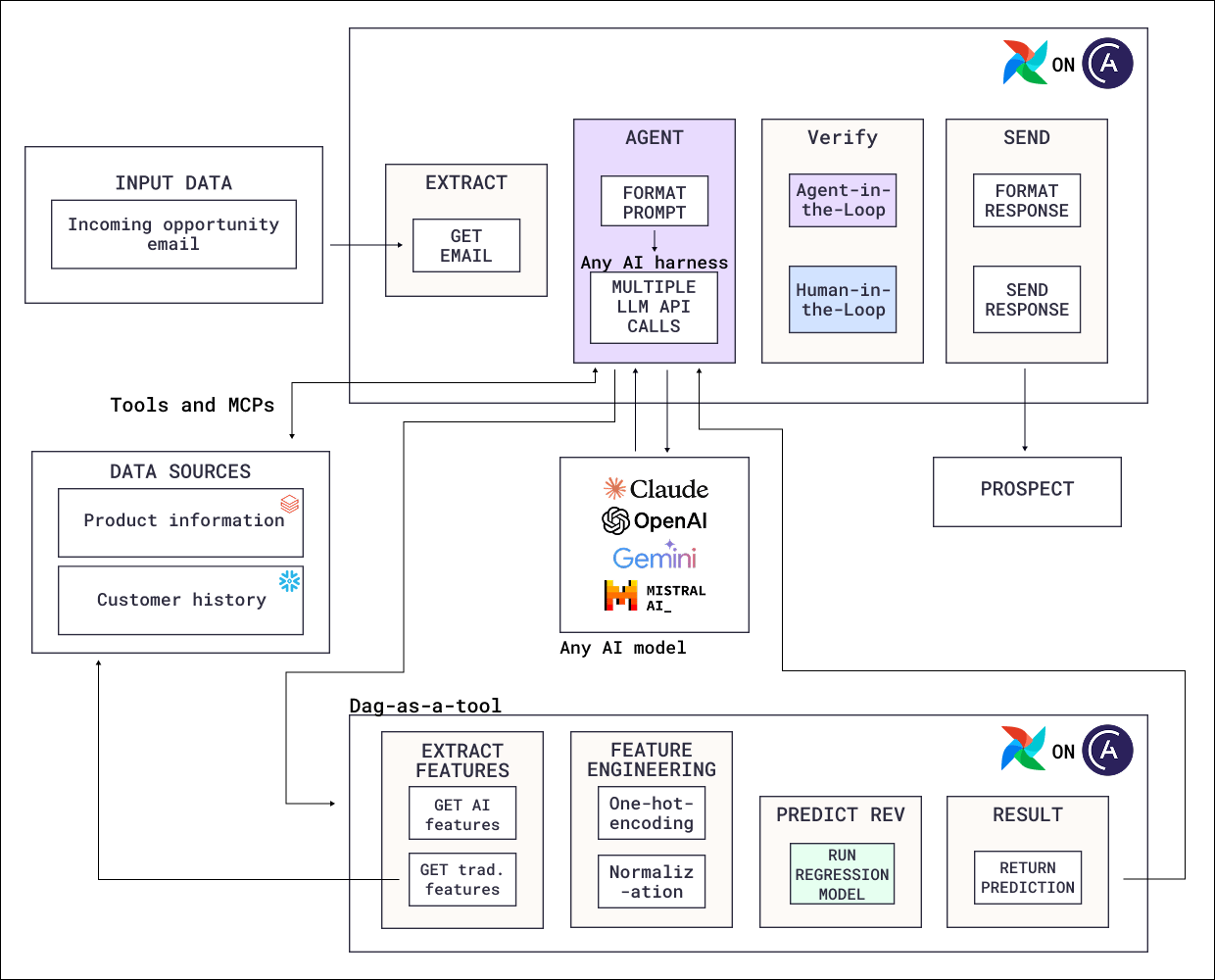 This architecture consists of two Dags, with one being started by a task in the other:
* **The agent Dag**: A sales assistant agent drafts outreach for an incoming opportunity email. It queries product information and customer history through tools and MCP servers, and its draft goes through AI-as-a-judge and human-in-the-loop verification before being sent to the prospect.
* **The Dag used as a tool**: A fully deterministic pipeline that extracts AI and traditional features, engineers them with one-hot encoding and normalization, runs a trained regression model, and returns a prediction of potential revenue from the prospect.
Expected revenue from the opportunity helps the agent determine which product tier and features to highlight in the outreach email. Predicting a continuous value is a regression problem, which a specialized traditional machine learning model handles. So when the agent decides it would benefit from a revenue estimate, it runs the prediction Dag through the Airflow REST API for that opportunity and gets the number back as a tool result.
The Dag used as a tool does not have to be deterministic. Any Dag works, including ones with LLM or agent tasks of their own. The same sales assistant could call the [product localization](/docs/learn/reference-architecture-localization) Dag to translate a reply for a foreign-language inquiry, which has the additional benefit that the outreach email then uses the same localized terms as your product documentation.
### Airflow features
* [**Airflow REST API**](/docs/astro/airflow-api): The interface the agent's tool uses to trigger a Dag run with parameters and read the result.
* [**`@task.agent`**](/docs/learn/airflow-common-ai-provider#@task-agent): Orchestrates the sales assistant agent. The tool that triggers the prediction Dag is one of its toolsets, alongside the product and customer data tools.
* [**Toolsets**](/docs/learn/airflow-common-ai-provider#toolsets): Give the agent access to both the data sources and the Dag trigger.
* [**Human-in-the-loop**](/docs/learn/airflow-human-in-the-loop): The verification task that waits for a human to confirm that the outreach draft is ready to be sent to a prospect.
## Considerations
* **Avoid accidental cycles.** If Dag A contains an agent that can start Dag B, Dag B must not contain an agent that can start Dag A.
* **Use this pattern for work deterministic code can do.** A regression model, a forecasting model, or an existing transformation pipeline is more reliable and less expensive than a language model doing the same work.
* **Use Dag params in your Dag-as-a-tool.** A Dag can be run with different configurations determined by the AI agent using [Dag params](/docs/learn/airflow-params).
* **Return a result alongside relevant context.** For the AI agent to interpret results correctly, it needs to know what the Dag returned, for example which prospect the revenue prediction is for, in which currency, according to which financial metric, and with what confidence interval.
* **Limit the tool to safe actions.** A Dag-as-a-tool should only allow the AI agent to run a specific Dag or set of Dags with defined params.
## Next steps
* Look up decorator and toolset parameters in [Orchestrate AI tasks with Apache Airflow® and the Common AI provider](/docs/learn/airflow-common-ai-provider).
* Trigger Dags programmatically with the [Airflow REST API](/docs/astro/airflow-api).
* Read the [AI Orchestration with Apache Airflow®](https://www.astronomer.io/ebooks/ai-orchestration-with-apache-airflow/) eBook for the full set of AI orchestration patterns.
* Deploy the Airflow pipelines with a [free trial of Astro](https://www.astronomer.io/lp/signup/).
This architecture consists of two Dags, with one being started by a task in the other:
* **The agent Dag**: A sales assistant agent drafts outreach for an incoming opportunity email. It queries product information and customer history through tools and MCP servers, and its draft goes through AI-as-a-judge and human-in-the-loop verification before being sent to the prospect.
* **The Dag used as a tool**: A fully deterministic pipeline that extracts AI and traditional features, engineers them with one-hot encoding and normalization, runs a trained regression model, and returns a prediction of potential revenue from the prospect.
Expected revenue from the opportunity helps the agent determine which product tier and features to highlight in the outreach email. Predicting a continuous value is a regression problem, which a specialized traditional machine learning model handles. So when the agent decides it would benefit from a revenue estimate, it runs the prediction Dag through the Airflow REST API for that opportunity and gets the number back as a tool result.
The Dag used as a tool does not have to be deterministic. Any Dag works, including ones with LLM or agent tasks of their own. The same sales assistant could call the [product localization](/docs/learn/reference-architecture-localization) Dag to translate a reply for a foreign-language inquiry, which has the additional benefit that the outreach email then uses the same localized terms as your product documentation.
### Airflow features
* [**Airflow REST API**](/docs/astro/airflow-api): The interface the agent's tool uses to trigger a Dag run with parameters and read the result.
* [**`@task.agent`**](/docs/learn/airflow-common-ai-provider#@task-agent): Orchestrates the sales assistant agent. The tool that triggers the prediction Dag is one of its toolsets, alongside the product and customer data tools.
* [**Toolsets**](/docs/learn/airflow-common-ai-provider#toolsets): Give the agent access to both the data sources and the Dag trigger.
* [**Human-in-the-loop**](/docs/learn/airflow-human-in-the-loop): The verification task that waits for a human to confirm that the outreach draft is ready to be sent to a prospect.
## Considerations
* **Avoid accidental cycles.** If Dag A contains an agent that can start Dag B, Dag B must not contain an agent that can start Dag A.
* **Use this pattern for work deterministic code can do.** A regression model, a forecasting model, or an existing transformation pipeline is more reliable and less expensive than a language model doing the same work.
* **Use Dag params in your Dag-as-a-tool.** A Dag can be run with different configurations determined by the AI agent using [Dag params](/docs/learn/airflow-params).
* **Return a result alongside relevant context.** For the AI agent to interpret results correctly, it needs to know what the Dag returned, for example which prospect the revenue prediction is for, in which currency, according to which financial metric, and with what confidence interval.
* **Limit the tool to safe actions.** A Dag-as-a-tool should only allow the AI agent to run a specific Dag or set of Dags with defined params.
## Next steps
* Look up decorator and toolset parameters in [Orchestrate AI tasks with Apache Airflow® and the Common AI provider](/docs/learn/airflow-common-ai-provider).
* Trigger Dags programmatically with the [Airflow REST API](/docs/astro/airflow-api).
* Read the [AI Orchestration with Apache Airflow®](https://www.astronomer.io/ebooks/ai-orchestration-with-apache-airflow/) eBook for the full set of AI orchestration patterns.
* Deploy the Airflow pipelines with a [free trial of Astro](https://www.astronomer.io/lp/signup/).