> ## Documentation Index
> Fetch the complete documentation index at: https://astronomer.io/docs/llms.txt
> Use this file to discover all available pages before exploring further.
# Manage task and task group dependencies in Airflow
[Dependencies](https://airflow.apache.org/docs/apache-airflow/stable/core-concepts/tasks.html#relationships) are a powerful and popular Airflow feature. In Airflow, your pipelines are defined as Directed Acyclic Graphs (DAGs). Each task is a node in the graph and dependencies are the directed edges that determine how to move through the graph. Because of this, dependencies are key to following data engineering best practices because they help you define flexible pipelines with atomic tasks.
Throughout this guide, the following terms are used to describe task dependencies:
* **Upstream task**: A task that must reach a specified state before a dependent task can run.
* **Downstream task**: A dependent task that can't run until an upstream task reaches a specified state.
In this guide you'll learn about the many ways you can implement dependencies in Airflow, including:
* Basic task dependencies.
* Dependency functions.
* Dynamic dependencies.
* Dependencies with task groups.
* Dependencies with the TaskFlow API.
* Trigger rules.
To view a video presentation of these concepts, see [Manage Dependencies Between Airflow Deployments, DAGs, and Tasks](https://www.astronomer.io/events/webinars/manage-dependencies-between-airflow-deployments-dags-tasks/).
The focus of this guide is dependencies between tasks in the same DAG. If you need to implement dependencies between DAGs, see [Cross-DAG dependencies](/docs/learn/cross-dag-dependencies).
## Assumed knowledge
To get the most out of this guide, you should have an understanding of:
* Basic Airflow concepts. See [Introduction to Apache Airflow](/docs/learn/intro-to-airflow).
## Basic dependencies
Basic dependencies between Airflow tasks can be set in the following ways:
* Using bit-shift operators (`<<` and `>>`)
* Using the `set_upstream` and `set_downstream` methods
For example, if you have a DAG with four sequential tasks, the dependencies can be set in four ways:
* Using `set_downstream()`:
```python wrap theme={null}
t0.set_downstream(t1)
t1.set_downstream(t2)
t2.set_downstream(t3)
```
* Using `set_upstream()`:
```python wrap theme={null}
t3.set_upstream(t2)
t2.set_upstream(t1)
t1.set_upstream(t0)
```
* Using `>>`:
```python wrap theme={null}
t0 >> t1 >> t2 >> t3
```
* Using `<<`:
```python wrap theme={null}
t3 << t2 << t1 << t0
```
All of these methods are equivalent and result in the DAG shown in the following image:
 Astronomer recommends using a single method consistently. Using both bit-shift operators and `set_upstream`/`set_downstream` in your DAGs can overly complicate your code.
To set a dependency where two downstream tasks are dependent on the same upstream task, use lists or tuples. For example:
```python wrap theme={null}
# Dependencies with lists
t0 >> t1 >> [t2, t3]
# Dependencies with tuples
t0 >> t1 >> (t2, t3)
```
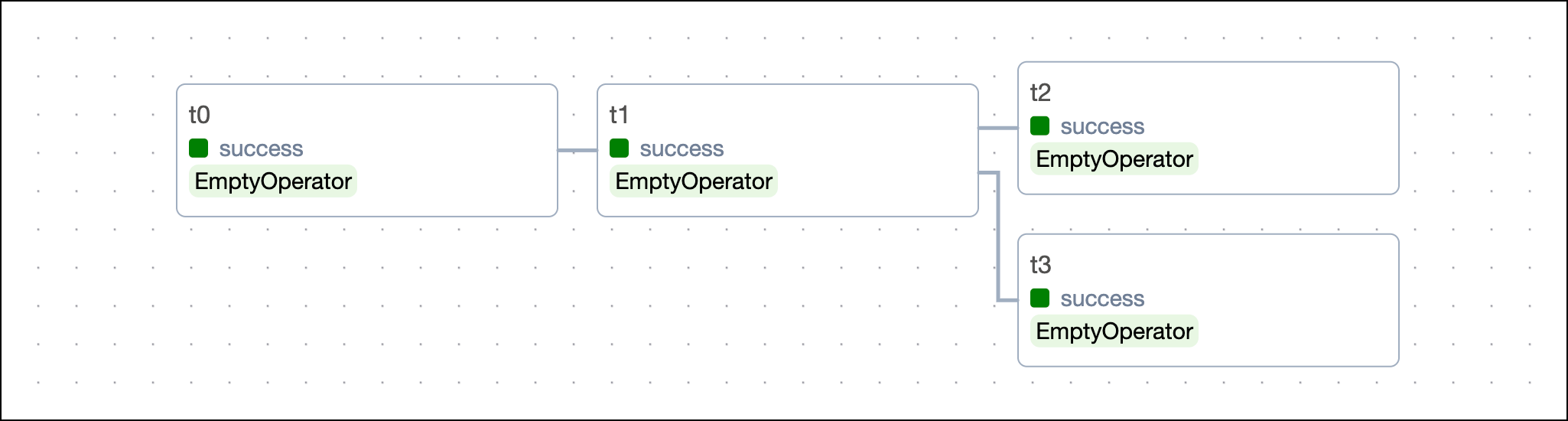
These statements are equivalent and result in the DAG shown in the following image:
Astronomer recommends using a single method consistently. Using both bit-shift operators and `set_upstream`/`set_downstream` in your DAGs can overly complicate your code.
To set a dependency where two downstream tasks are dependent on the same upstream task, use lists or tuples. For example:
```python wrap theme={null}
# Dependencies with lists
t0 >> t1 >> [t2, t3]
# Dependencies with tuples
t0 >> t1 >> (t2, t3)
```
These statements are equivalent and result in the DAG shown in the following image:
 When you use bit-shift operators and the `.set_upstream` and `.set_downstream` method, you can't set dependencies between two lists. For example, `[t0, t1] >> [t2, t3]` returns an error. To set dependencies between lists, use the dependency functions described in the following section.
## Dependency functions
Dependency functions are utilities that let you set dependencies between several tasks or lists of tasks. A common reason to use dependency functions over bit-shift operators is to create dependencies for tasks that were created in a loop and are stored in a list.
```python wrap theme={null}
from airflow.sdk import chain
list_of_tasks = []
for i in range(5):
if i % 3 == 0:
ta = EmptyOperator(task_id=f"ta_{i}")
list_of_tasks.append(ta)
else:
ta = EmptyOperator(task_id=f"ta_{i}")
tb = EmptyOperator(task_id=f"tb_{i}")
tc = EmptyOperator(task_id=f"tc_{i}")
list_of_tasks.append([ta, tb, tc])
chain(*list_of_tasks)
```
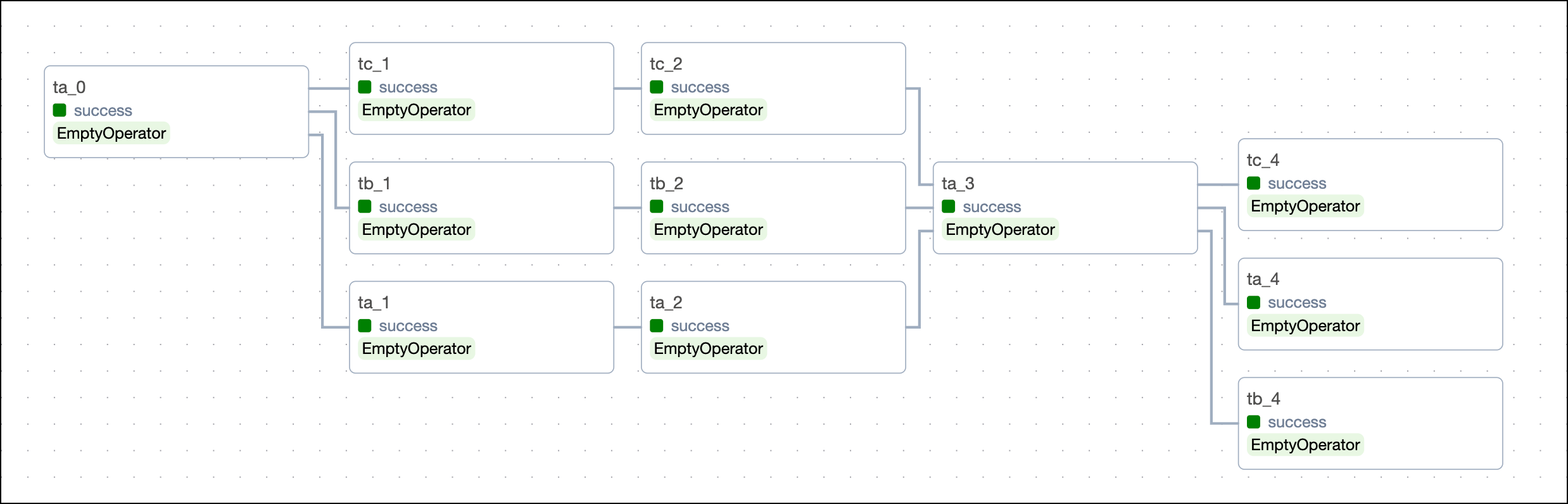
This code creates the following DAG structure:
When you use bit-shift operators and the `.set_upstream` and `.set_downstream` method, you can't set dependencies between two lists. For example, `[t0, t1] >> [t2, t3]` returns an error. To set dependencies between lists, use the dependency functions described in the following section.
## Dependency functions
Dependency functions are utilities that let you set dependencies between several tasks or lists of tasks. A common reason to use dependency functions over bit-shift operators is to create dependencies for tasks that were created in a loop and are stored in a list.
```python wrap theme={null}
from airflow.sdk import chain
list_of_tasks = []
for i in range(5):
if i % 3 == 0:
ta = EmptyOperator(task_id=f"ta_{i}")
list_of_tasks.append(ta)
else:
ta = EmptyOperator(task_id=f"ta_{i}")
tb = EmptyOperator(task_id=f"tb_{i}")
tc = EmptyOperator(task_id=f"tc_{i}")
list_of_tasks.append([ta, tb, tc])
chain(*list_of_tasks)
```
This code creates the following DAG structure:
 ### Use `chain()`
To set parallel dependencies between tasks and lists of tasks of the same length, use the `chain()` function. For example:
```python wrap theme={null}
# from airflow.sdk import chain
chain(t0, t1, [t2, t3, t4], [t5, t6, t7], t8)
```
This code creates the following DAG structure:
### Use `chain()`
To set parallel dependencies between tasks and lists of tasks of the same length, use the `chain()` function. For example:
```python wrap theme={null}
# from airflow.sdk import chain
chain(t0, t1, [t2, t3, t4], [t5, t6, t7], t8)
```
This code creates the following DAG structure:
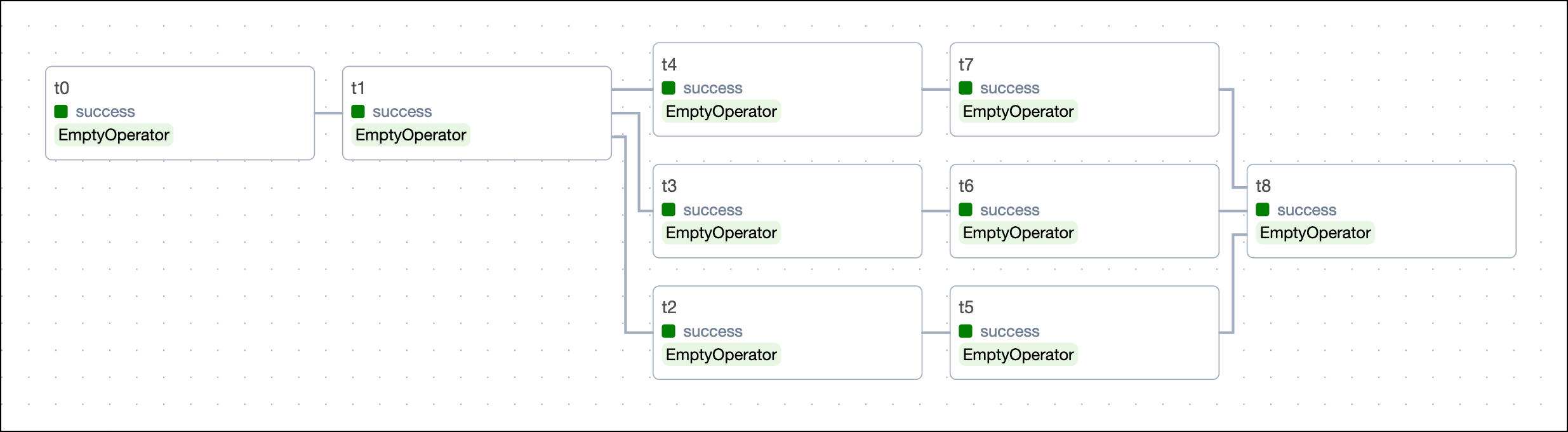 When you use the `chain` function, any lists or tuples that are set to depend directly on each other need to be the same length.
```python wrap theme={null}
chain([t0, t1], [t2, t3]) # this code will work
chain([t0, t1], [t2, t3, t4]) # this code will cause an error
chain([t0, t1], t2, [t3, t4, t5]) # this code will work
```
### Use `chain_linear()`
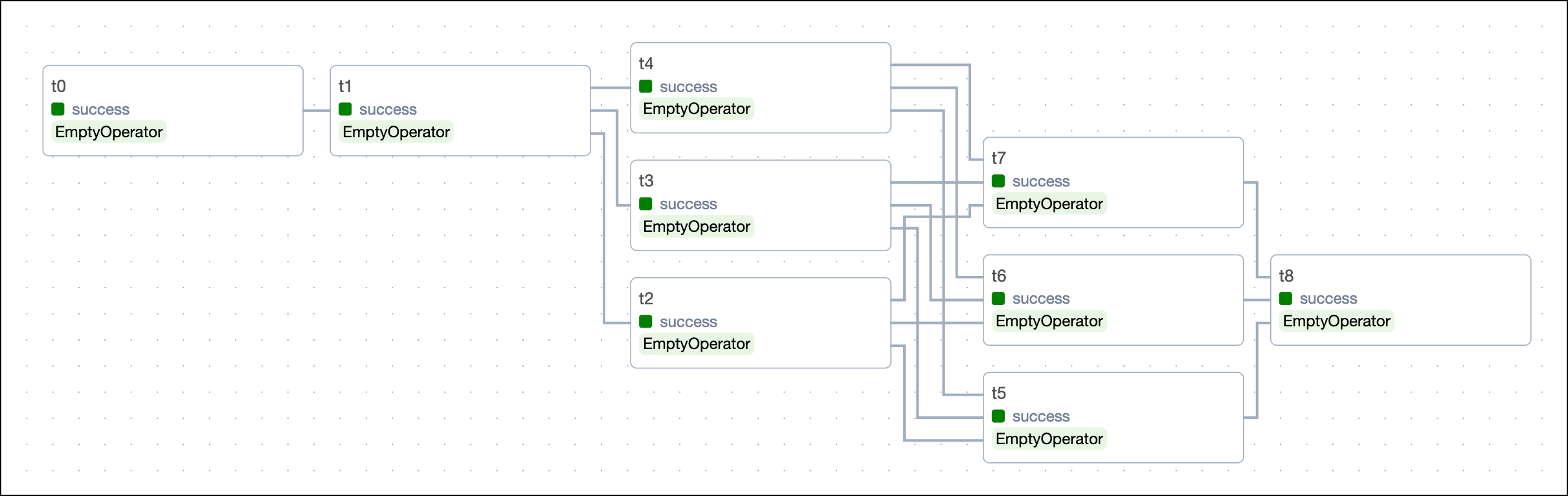
To set interconnected dependencies between tasks and lists of tasks, use the `chain_linear()` function.
Replacing `chain` in the previous example with `chain_linear` creates dependencies where each element in the downstream list will depend on each element in the upstream list.
```python wrap theme={null}
# from airflow.sdk import chain_linear
chain_linear(t0, t1, [t2, t3, t4], [t5, t6, t7], t8)
```
When you use the `chain` function, any lists or tuples that are set to depend directly on each other need to be the same length.
```python wrap theme={null}
chain([t0, t1], [t2, t3]) # this code will work
chain([t0, t1], [t2, t3, t4]) # this code will cause an error
chain([t0, t1], t2, [t3, t4, t5]) # this code will work
```
### Use `chain_linear()`
To set interconnected dependencies between tasks and lists of tasks, use the `chain_linear()` function.
Replacing `chain` in the previous example with `chain_linear` creates dependencies where each element in the downstream list will depend on each element in the upstream list.
```python wrap theme={null}
# from airflow.sdk import chain_linear
chain_linear(t0, t1, [t2, t3, t4], [t5, t6, t7], t8)
```
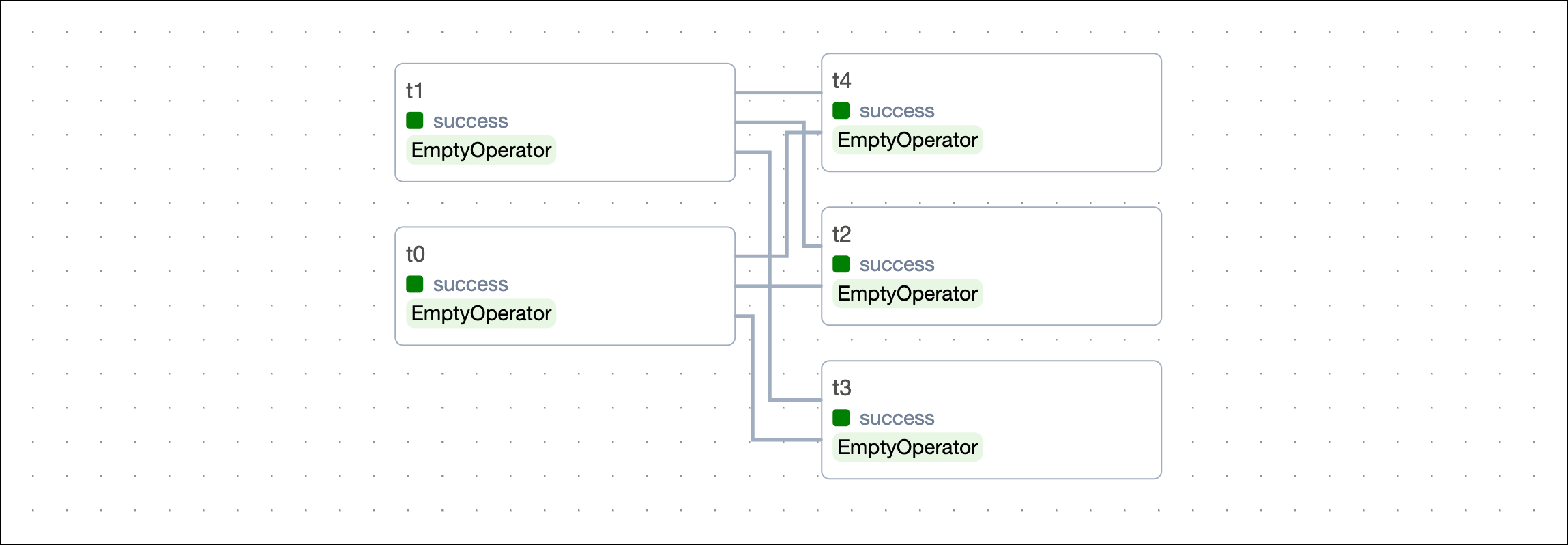
 The `chain_linear()` function can accept lists of any length in any order. For example, the following arguments are valid:
```python wrap theme={null}
chain_linear([t0, t1], [t2, t3, t4])
```
The `chain_linear()` function can accept lists of any length in any order. For example, the following arguments are valid:
```python wrap theme={null}
chain_linear([t0, t1], [t2, t3, t4])
```
 ## Dependencies in dynamic task mapping
Dependencies for [dynamically mapped tasks](/docs/learn/dynamic-tasks) can be set in the same way as regular tasks. Note that when using the default [trigger rule](#trigger-rules) `all_success`, all mapped task instances need to be successful for the downstream task to run. For the purpose of trigger rules, mapped task instances behave like a set of parallel upstream tasks.
## Dependencies in dynamic task mapping
Dependencies for [dynamically mapped tasks](/docs/learn/dynamic-tasks) can be set in the same way as regular tasks. Note that when using the default [trigger rule](#trigger-rules) `all_success`, all mapped task instances need to be successful for the downstream task to run. For the purpose of trigger rules, mapped task instances behave like a set of parallel upstream tasks.
TaskFlow
```python wrap theme={null}
# from airflow.providers.standard.operators.empty import EmptyOperator
# from airflow.sdk import task
start=EmptyOperator(task_id="start")
@task
def multiply(x,y):
return x*y
multiply_obj = multiply.partial(x=2).expand(y=[1,2,3])
# end will only run if all mapped task instances of the multiply task are successful
end = EmptyOperator(task_id="end")
start >> multiply_obj >> end
# all of the following ways of setting dependencies are valid
# multiply_obj.set_downstream(end)
# end.set_upstream(multiply_obj)
# chain(start, multiply_obj, end)
```

Traditional
```python wrap theme={null}
# from airflow.providers.standard.operators.empty import EmptyOperator
# from airflow.providers.standard.operators.python import PythonOperator
start=EmptyOperator(task_id="start")
def multiply_func(x,y):
return x*y
multiply_obj = PythonOperator.partial(
task_id="multiply",
python_callable=multiply_func,
op_args=[2]
).expand(op_kwargs=[{"y": 1}, {"y": 2}, {"y": 3}])
# end will only run if all mapped task instances of the multiply task are successful
end = EmptyOperator(task_id="end")
start >> multiply_obj >> end
# all of the following ways of setting dependencies are valid
# multiply_obj.set_downstream(end)
# end.set_upstream(multiply_obj)
# chain(start, multiply_obj, end)
```

## Task group dependencies
[Task groups](/docs/learn/task-groups) logically group tasks in the Airflow UI and can be [mapped dynamically](/docs/learn/task-groups#generate-task-groups-dynamically-at-runtime). This section will explain how to set dependencies between task groups.
Dependencies can be set both inside and outside of a task group. For example, in the following DAG code there is a start task, a task group with two dependent tasks, and an end task. All of these tasks need to happen sequentially. The dependencies between the two tasks in the task group are set within the task group's context (`t1 >> t2`). The dependencies between the task group and the start and end tasks are set within the DAG's context (`t0 >> tg1() >> t3`).
TaskFlow
```python wrap theme={null}
# from airflow.providers.standard.operators.empty import EmptyOperator
# from airflow.sdk import task_group
t0 = EmptyOperator(task_id="start")
# Start task group definition
@task_group(
group_id="group1"
)
def tg1():
t1 = EmptyOperator(task_id="task1")
t2 = EmptyOperator(task_id="task2")
t1 >> t2
# End task group definition
t3 = EmptyOperator(task_id="end")
# Set task group's (tg1) dependencies
t0 >> tg1() >> t3
```
Traditional
```python wrap theme={null}
# from airflow.providers.standard.operators.empty import EmptyOperator
# from airflow.sdk import TaskGroup
t0 = EmptyOperator(task_id="start")
# Start task group definition
with TaskGroup(group_id="group1") as tg1:
t1 = EmptyOperator(task_id="task1")
t2 = EmptyOperator(task_id="task2")
t1 >> t2
# End task group definition
t3 = EmptyOperator(task_id="end")
# Set task group's (tg1) dependencies
t0 >> tg1 >> t3
```
This image shows the resulting DAG:
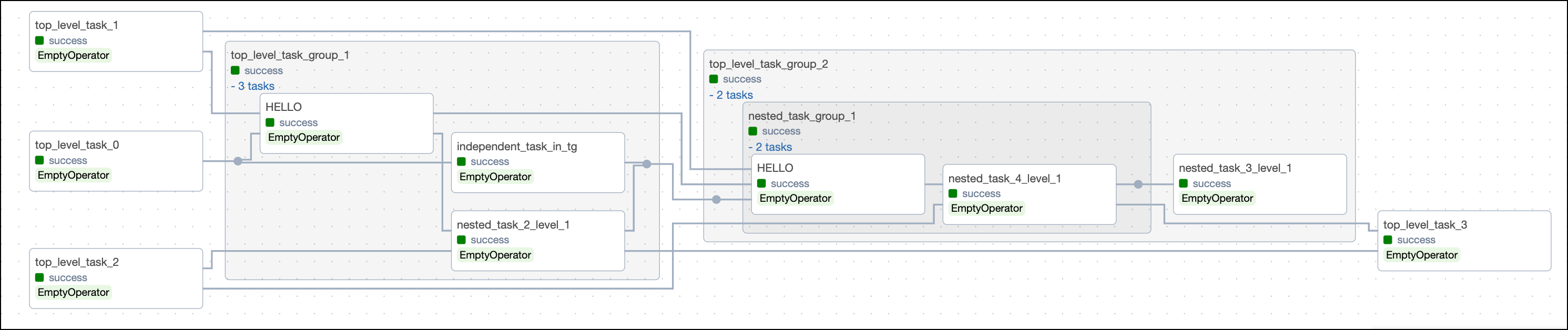
 You can also set dependencies between task groups, between tasks inside and out of task groups, and even between tasks in different (nested) task groups.
The image below shows types of dependencies that can be set between tasks and task groups. You can find the code that created this DAG in a GitHub repository both for the [TaskFlow API](https://github.com/astronomer/webinar-task-groups/blob/main/dags/example_complex_dependencies_1.py) and [traditional version](https://github.com/astronomer/webinar-task-groups/blob/main/dags/example_complex_dependencies_2.py).
You can also set dependencies between task groups, between tasks inside and out of task groups, and even between tasks in different (nested) task groups.
The image below shows types of dependencies that can be set between tasks and task groups. You can find the code that created this DAG in a GitHub repository both for the [TaskFlow API](https://github.com/astronomer/webinar-task-groups/blob/main/dags/example_complex_dependencies_1.py) and [traditional version](https://github.com/astronomer/webinar-task-groups/blob/main/dags/example_complex_dependencies_2.py).
 ## TaskFlow API dependencies
The [TaskFlow API](/docs/learn/airflow-decorators) `@task` decorator allows you to easily turn Python functions into Airflow tasks.
If your DAG has several tasks that are defined with the `@task` decorator and use each other's output, you can use inferred dependencies through the TaskFlow API. For example, in the following DAG there are two dependent tasks, `get_a_cat_fact` and `print_the_cat_fact`. To set the dependencies, you pass the called function of the upstream task as a positional argument to the downstream task (`print_the_cat_fact(get_a_cat_fact())`):
```python expandable wrap theme={null}
from airflow.decorators import dag, task
from datetime import datetime
import requests
import json
url = "http://catfact.ninja/fact"
default_args = {"start_date": datetime(2021, 1, 1)}
@dag(schedule="@daily", default_args=default_args, catchup=False)
def xcom_taskflow_dag():
@task
def get_a_cat_fact():
"""
Gets a cat fact from the CatFacts API
"""
res = requests.get(url)
return {"cat_fact": json.loads(res.text)["fact"]}
@task
def print_the_cat_fact(cat_fact: str):
"""
Prints the cat fact
"""
print("Cat fact for today:", cat_fact)
# run some further cat analysis here
# Invoke functions to create tasks and define dependencies
print_the_cat_fact(get_a_cat_fact())
xcom_taskflow_dag()
```
This image shows the resulting DAG:
## TaskFlow API dependencies
The [TaskFlow API](/docs/learn/airflow-decorators) `@task` decorator allows you to easily turn Python functions into Airflow tasks.
If your DAG has several tasks that are defined with the `@task` decorator and use each other's output, you can use inferred dependencies through the TaskFlow API. For example, in the following DAG there are two dependent tasks, `get_a_cat_fact` and `print_the_cat_fact`. To set the dependencies, you pass the called function of the upstream task as a positional argument to the downstream task (`print_the_cat_fact(get_a_cat_fact())`):
```python expandable wrap theme={null}
from airflow.decorators import dag, task
from datetime import datetime
import requests
import json
url = "http://catfact.ninja/fact"
default_args = {"start_date": datetime(2021, 1, 1)}
@dag(schedule="@daily", default_args=default_args, catchup=False)
def xcom_taskflow_dag():
@task
def get_a_cat_fact():
"""
Gets a cat fact from the CatFacts API
"""
res = requests.get(url)
return {"cat_fact": json.loads(res.text)["fact"]}
@task
def print_the_cat_fact(cat_fact: str):
"""
Prints the cat fact
"""
print("Cat fact for today:", cat_fact)
# run some further cat analysis here
# Invoke functions to create tasks and define dependencies
print_the_cat_fact(get_a_cat_fact())
xcom_taskflow_dag()
```
This image shows the resulting DAG:
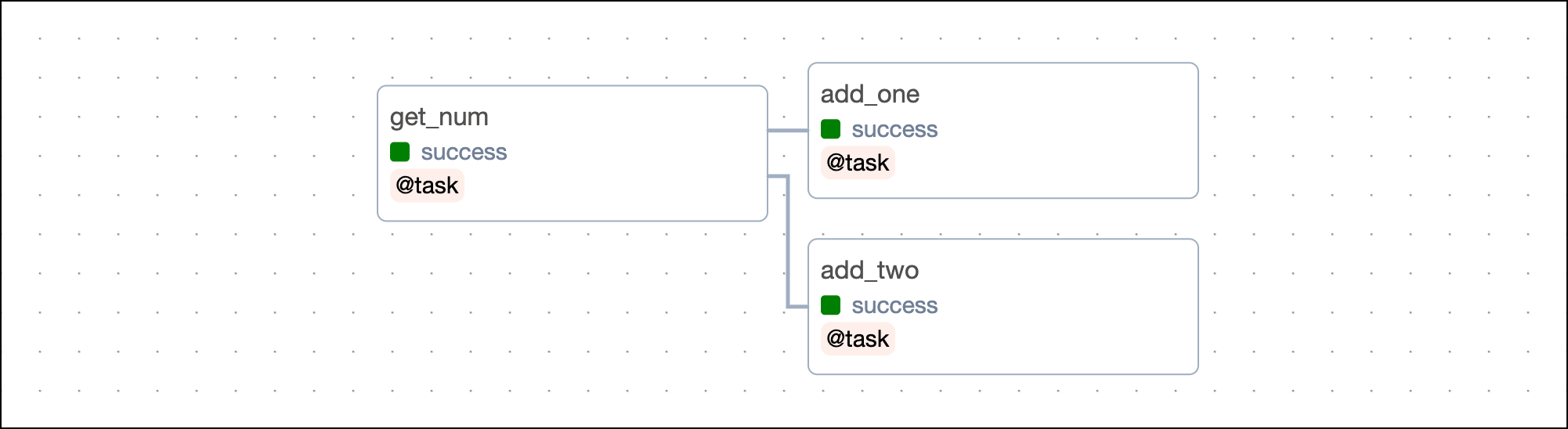
 Note that you can also assign the called function to an object and then pass that object to the downstream task. This way of defining dependencies is often easier to read and allows you to set the same task as an upstream dependency to multiple other tasks.
```python wrap theme={null}
# from airflow.sdk import task
@task
def get_num():
return 42
@task
def add_one(num):
return num + 1
@task
def add_two(num):
return num + 2
num = get_num()
add_one(num)
add_two(num)
```
Note that you can also assign the called function to an object and then pass that object to the downstream task. This way of defining dependencies is often easier to read and allows you to set the same task as an upstream dependency to multiple other tasks.
```python wrap theme={null}
# from airflow.sdk import task
@task
def get_num():
return 42
@task
def add_one(num):
return num + 1
@task
def add_two(num):
return num + 2
num = get_num()
add_one(num)
add_two(num)
```
 If your DAG contains a mix of Python function tasks defined with decorators and tasks defined with traditional operators, you can set the dependencies by assigning the decorated task invocation to a variable and then defining the dependencies normally. For example, in the DAG below the `my_task_1` task is defined by the `@task` decorator and invoked with `_my_task_1 = my_task_1()`. The `my_task_1` variable is used in the last line to define dependencies.
```python wrap theme={null}
# from airflow.sdk import dag, task
# from airflow.providers.standard.operators.empty import EmptyOperator
@dag
def my_dag():
@task
def my_task_1():
pass
_my_task_1 = my_task_1()
my_task_2 = EmptyOperator(task_id="my_task_2")
chain(
_my_task_1,
my_task_2,
)
my_dag()
```
To learn how to pass information between TaskFlow decorators and traditional tasks, see [Mixing TaskFlow decorators with traditional operators](/docs/learn/airflow-decorators#mixing-taskflow-decorators-with-traditional-operators).
## Trigger rules
When you set dependencies between tasks, the default Airflow behavior is to run a task only when all upstream tasks have succeeded. You can use [trigger rules](https://airflow.apache.org/docs/apache-airflow/stable/core-concepts/dags.html#trigger-rules) to change this default behavior.
The following options are available:
* `all_success`: (default) The task runs only when all upstream tasks have succeeded.
* `all_failed`: The task runs only when all upstream tasks are in a failed or upstream\_failed state.
* `all_done`: The task runs once all upstream tasks are done with their execution.
* `all_skipped`: The task runs only when all upstream tasks have been skipped.
* `one_failed`: The task runs when at least one upstream task has failed.
* `one_success`: The task runs when at least one upstream task has succeeded.
* `one_done`: The task runs when at least one upstream task has either succeeded or failed.
* `none_failed`: The task runs only when all upstream tasks have succeeded or been skipped.
* `none_failed_min_one_success`: The task runs only when all upstream tasks haven't failed or `upstream_failed`, and at least one upstream task has succeeded.
* `none_skipped`: The task runs only when no upstream task is in a skipped state.
* `always`: The task runs at any time.
Learn more about trigger rules in the [Airflow trigger rules](/docs/learn/airflow-trigger-rules) guide.
If your DAG contains a mix of Python function tasks defined with decorators and tasks defined with traditional operators, you can set the dependencies by assigning the decorated task invocation to a variable and then defining the dependencies normally. For example, in the DAG below the `my_task_1` task is defined by the `@task` decorator and invoked with `_my_task_1 = my_task_1()`. The `my_task_1` variable is used in the last line to define dependencies.
```python wrap theme={null}
# from airflow.sdk import dag, task
# from airflow.providers.standard.operators.empty import EmptyOperator
@dag
def my_dag():
@task
def my_task_1():
pass
_my_task_1 = my_task_1()
my_task_2 = EmptyOperator(task_id="my_task_2")
chain(
_my_task_1,
my_task_2,
)
my_dag()
```
To learn how to pass information between TaskFlow decorators and traditional tasks, see [Mixing TaskFlow decorators with traditional operators](/docs/learn/airflow-decorators#mixing-taskflow-decorators-with-traditional-operators).
## Trigger rules
When you set dependencies between tasks, the default Airflow behavior is to run a task only when all upstream tasks have succeeded. You can use [trigger rules](https://airflow.apache.org/docs/apache-airflow/stable/core-concepts/dags.html#trigger-rules) to change this default behavior.
The following options are available:
* `all_success`: (default) The task runs only when all upstream tasks have succeeded.
* `all_failed`: The task runs only when all upstream tasks are in a failed or upstream\_failed state.
* `all_done`: The task runs once all upstream tasks are done with their execution.
* `all_skipped`: The task runs only when all upstream tasks have been skipped.
* `one_failed`: The task runs when at least one upstream task has failed.
* `one_success`: The task runs when at least one upstream task has succeeded.
* `one_done`: The task runs when at least one upstream task has either succeeded or failed.
* `none_failed`: The task runs only when all upstream tasks have succeeded or been skipped.
* `none_failed_min_one_success`: The task runs only when all upstream tasks haven't failed or `upstream_failed`, and at least one upstream task has succeeded.
* `none_skipped`: The task runs only when no upstream task is in a skipped state.
* `always`: The task runs at any time.
Learn more about trigger rules in the [Airflow trigger rules](/docs/learn/airflow-trigger-rules) guide.