}
}'
```
The main parameters to configure for the [SmtpNotifier](https://airflow.apache.org/registry/providers/smtp#smtp-smtp-SmtpNotifier) are:
* `smtp_conn_id`: The ID of the Airflow connection to your SMTP server. Default: `smtp_default`.
* `to`: The email address to send the email to. You can provide a single email address as a string or multiple in a list. Default: `None`. This parameter is required.
* `cc`: The email address to send the email to as a carbon copy. You can provide a single email address as a string or multiple in a list. Default: `None`.
* `bcc`: The email address to send the email to as a blind carbon copy. You can provide a single email address as a string or multiple in a list. Default: `None`.
* `from_email`: The email address to send the email from. Default: `None`.
* `subject`: The subject of the email. Default: `None`.
* `html_content`: The HTML content of the email. Default: `None`.
* `files`: The files to attach to the email as a list of file paths. Default: `None`.
* `custom_headers`: A dictionary of custom headers to add to the email. Default: `None`.
You provide the instantiated notifier class directly to any [callback parameter](#airflow-callbacks) to send emails when that callback is triggered. To add information about the Dag run to the email, use [Jinja templating](/docs/learn/templating). All parameters listed above other than `smtp_conn_id` are templatable.
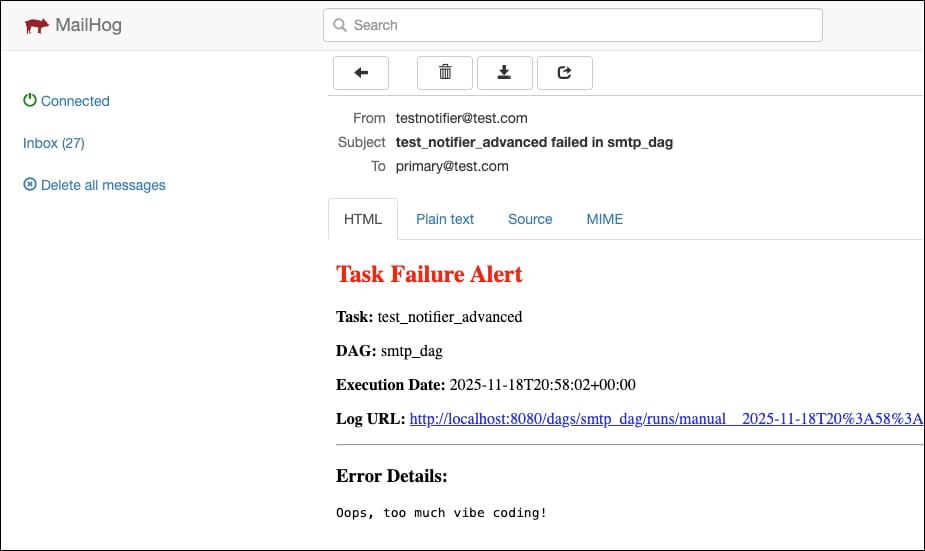
For example, to send an email notification when a task fails that includes information about the task, as well as the error message (`{{ exception }}`) and a link to the task's log (`{{ ti.log_url }}`), you can use the SmtpNotifier as shown in the code example below.
```python expandable wrap theme={null}
@task(
on_failure_callback=SmtpNotifier(
from_email="testnotifier@test.com",
to=["primary@test.com"],
cc=["manager@test.com", "team-lead@test.com"],
bcc=["audit@test.com", "monitoring@test.com"],
subject="{{ ti.task_id }} failed in {{ dag.dag_id }}",
html_content="""
Task Failure Alert
Task: {{ ti.task_id }}
DAG: {{ dag.dag_id }}
Execution Date: {{ ts }}
Log URL: {{ ti.log_url }}
Error Details:
{{ exception }}
""",
files=["include/debug_info.json"],
custom_headers={
"X-Priority": "1",
"X-Airflow-DAG": "{{ dag.dag_id }}",
"X-Airflow-Task": "{{ ti.task_id }}",
"Reply-To": "airflow-support@test.com"
}
)
)
def test_notifier_advanced():
raise Exception("Oops, too much vibe coding!")
```
The resulting email looks like this:
 If you'd like to test email formatting locally without connecting to a real SMTP server, you can use [MailHog](https://github.com/mailhog/MailHog) in a local Docker container to catch emails and view them in a web interface. Start the MailHog server using `docker run -d -p 1025:1025 -p 8025:8025 mailhog/mailhog` and use the following connection string:
```text wrap theme={null}
AIRFLOW_CONN_SMTP_DEFAULT='{
"conn_type":"smtp",
"host":"localhost",
"port":1025,
"login":"",
"password":"",
"extra":{
"disable_ssl":true,
"disable_tls":true
}
}'
```
### Use the `EmailOperator`
You can use the `EmailOperator` to create dedicated tasks in your Dags to send emails. As with the `SmtpNotifier`, you need to have the [SMTP provider](https://airflow.apache.org/registry/providers/smtp/) installed and create an [Airflow connection](/docs/learn/connections) to your SMTP server. The main parameters are analogous to the `SmtpNotifier`.
```python wrap theme={null}
from airflow.providers.smtp.operators.smtp import EmailOperator
EmailOperator(
task_id="send_email",
conn_id="smtp_default",
from_email="caller@mydomain.io",
to="receiver@mydomain.io",
subject="Test Email",
html_content="This is a test email"
)
```
### (Legacy) Email notifications using configuration variables
In older Airflow versions it was common to configure email notifications using a mix of configuration variables and task parameters. This approach is being deprecated in Airflow 3.0 and will be removed in a future version.
To configure email notifications using configuration variables, both the [SMTP](https://airflow.apache.org/docs/apache-airflow/stable/configurations-ref.html#smtp) configuration variables and the `email` task parameter are needed. Note that you can't use an `AIRFLOW_CONN_` connection with the email configuration parameters in Airflow 3.
The SMTP configuration variables define the connection to your SMTP server.
```text wrap theme={null}
AIRFLOW__SMTP__SMTP_HOST=
AIRFLOW__SMTP__SMTP_PORT=
AIRFLOW__SMTP__SMTP_USER=
AIRFLOW__SMTP__SMTP_PASSWORD=
AIRFLOW__SMTP__SMTP_SSL=
AIRFLOW__SMTP__SMTP_TLS=
AIRFLOW__SMTP__SMTP_MAIL_FROM=
```
In order for a task to be able to send an email if it fails or retries, you need to provide the `email` task parameter to the task to specify who to send the email to.
It is common to provide this in the `default_args` parameter of a Dag to apply it to all tasks in the Dag.
```python wrap theme={null}
from airflow.sdk import dag
@dag(
default_args={
"email": ["myname@mydomain.com"],
}
)
def my_dag():
```
But you can also provide it at the task level to override the default.
```python wrap theme={null}
@task(email=["myfriend@mydomain.com"])
def test():
print("Test")
raise Exception("Test Exception")
```
If you want a task to only send emails when it fails, set the `email_on_retry` parameter to `False`, if you want it to only send emails when it retries, set the `email_on_failure` parameter to `False`.
Most of the `AIRFLOW__EMAIL__` configuration variables are no longer supported in Airflow 3.0 for SMTP-based email notifications. Some of those parameters are still used when utilizing other email notification methods such as SendGrid or Amazon SES, see [Email Configuration](https://airflow.apache.org/docs/apache-airflow/stable/howto/email-config.html) in the Airflow documentation for more information.
## Airflow callbacks
In Airflow you can define actions to be taken based on different Dag or task states using `*_callback` parameters:
* `on_success_callback`: Invoked when a task or Dag succeeds.
* `on_failure_callback`: Invoked when a task or Dag fails.
* `on_skipped_callback` : Invoked when a task is skipped. This callback only exists at the task level, and is only invoked when an `AirflowSkipException` is raised, not when a task is skipped due to other reasons, like a trigger rule.
* `on_execute_callback`: Invoked right before a task begins executing. This callback only exists at the task level.
* `on_retry_callback`: Invoked when a task is retried. This callback only exists at the task level.
You can provide any Python callable or [Airflow notifiers](#pre-built-notifiers) to the `*_callback` parameters. To execute multiple functions, you can provide several callback items to the same callback parameter in a list.
### Set Dag-level callbacks
To define a notification at the Dag level, you can set the `*_callback` parameter in your Dag instantiation. Dag-level notifications will trigger callback functions based on the terminal state of the entire Dag run. The example below shows one function being executed when the Dag succeeds and two functions being executed when the Dag fails (one custom function and one `SlackNotifier`).
```python wrap theme={null}
from airflow.sdk import dag
from airflow.providers.slack.notifications.slack_notifier import SlackNotifier
def my_success_callback_function(context):
pass
def my_failure_callback_function(context):
pass
@dag(
on_success_callback=my_success_callback_function,
on_failure_callback=[
my_failure_callback_function,
SlackNotifier(
slack_conn_id="slack_conn",
text="Dag failed",
channel="alerts"
)
],
)
```
Deadline alerts, which are executed when a Dag run exceeds a user-defined time threshold replace the removed SLA feature used with the `sla` and `sla_miss_callback` parameters. See [Deadline alerts](https://airflow.apache.org/docs/apache-airflow/stable/howto/deadline-alerts.html) in the Airflow documentation for more information.
Astronomer customers should use [Astro alerts](/docs/astro/alerts) and [Astro Observe](/docs/astro/astro-observe) to define timeliness and freshness SLAs.
### Set task-level callbacks
To apply a task-level callback to each task in your Dag, you can pass the callback function to the `default_args` parameter. Items listed in the dictionary provided to the `default_args` parameter will be set for each task in the Dag. While the example shows one callback function being assigned to each callback parameter, you can provide multiple callback functions and/or notifiers to the same callback parameter in a list as well.
```python wrap theme={null}
from airflow.sdk import dag
def my_execute_callback_function(context):
pass
def my_retry_callback_function(context):
pass
def my_success_callback_function(context):
pass
def my_failure_callback_function(context):
pass
def my_skipped_callback_function(context):
pass
@dag(
default_args={
"on_execute_callback": my_execute_callback_function,
"on_retry_callback": my_retry_callback_function,
"on_success_callback": my_success_callback_function,
"on_failure_callback": my_failure_callback_function,
"on_skipped_callback": my_skipped_callback_function,
}
)
```
For use cases where an individual task should use a specific callback, the task-level callback parameters can be defined in the task instantiation. Callbacks defined at the individual task level will override callbacks passed in using `default_args`.
If you'd like to test email formatting locally without connecting to a real SMTP server, you can use [MailHog](https://github.com/mailhog/MailHog) in a local Docker container to catch emails and view them in a web interface. Start the MailHog server using `docker run -d -p 1025:1025 -p 8025:8025 mailhog/mailhog` and use the following connection string:
```text wrap theme={null}
AIRFLOW_CONN_SMTP_DEFAULT='{
"conn_type":"smtp",
"host":"localhost",
"port":1025,
"login":"",
"password":"",
"extra":{
"disable_ssl":true,
"disable_tls":true
}
}'
```
### Use the `EmailOperator`
You can use the `EmailOperator` to create dedicated tasks in your Dags to send emails. As with the `SmtpNotifier`, you need to have the [SMTP provider](https://airflow.apache.org/registry/providers/smtp/) installed and create an [Airflow connection](/docs/learn/connections) to your SMTP server. The main parameters are analogous to the `SmtpNotifier`.
```python wrap theme={null}
from airflow.providers.smtp.operators.smtp import EmailOperator
EmailOperator(
task_id="send_email",
conn_id="smtp_default",
from_email="caller@mydomain.io",
to="receiver@mydomain.io",
subject="Test Email",
html_content="This is a test email"
)
```
### (Legacy) Email notifications using configuration variables
In older Airflow versions it was common to configure email notifications using a mix of configuration variables and task parameters. This approach is being deprecated in Airflow 3.0 and will be removed in a future version.
To configure email notifications using configuration variables, both the [SMTP](https://airflow.apache.org/docs/apache-airflow/stable/configurations-ref.html#smtp) configuration variables and the `email` task parameter are needed. Note that you can't use an `AIRFLOW_CONN_` connection with the email configuration parameters in Airflow 3.
The SMTP configuration variables define the connection to your SMTP server.
```text wrap theme={null}
AIRFLOW__SMTP__SMTP_HOST=
AIRFLOW__SMTP__SMTP_PORT=
AIRFLOW__SMTP__SMTP_USER=
AIRFLOW__SMTP__SMTP_PASSWORD=
AIRFLOW__SMTP__SMTP_SSL=
AIRFLOW__SMTP__SMTP_TLS=
AIRFLOW__SMTP__SMTP_MAIL_FROM=
```
In order for a task to be able to send an email if it fails or retries, you need to provide the `email` task parameter to the task to specify who to send the email to.
It is common to provide this in the `default_args` parameter of a Dag to apply it to all tasks in the Dag.
```python wrap theme={null}
from airflow.sdk import dag
@dag(
default_args={
"email": ["myname@mydomain.com"],
}
)
def my_dag():
```
But you can also provide it at the task level to override the default.
```python wrap theme={null}
@task(email=["myfriend@mydomain.com"])
def test():
print("Test")
raise Exception("Test Exception")
```
If you want a task to only send emails when it fails, set the `email_on_retry` parameter to `False`, if you want it to only send emails when it retries, set the `email_on_failure` parameter to `False`.
Most of the `AIRFLOW__EMAIL__` configuration variables are no longer supported in Airflow 3.0 for SMTP-based email notifications. Some of those parameters are still used when utilizing other email notification methods such as SendGrid or Amazon SES, see [Email Configuration](https://airflow.apache.org/docs/apache-airflow/stable/howto/email-config.html) in the Airflow documentation for more information.
## Airflow callbacks
In Airflow you can define actions to be taken based on different Dag or task states using `*_callback` parameters:
* `on_success_callback`: Invoked when a task or Dag succeeds.
* `on_failure_callback`: Invoked when a task or Dag fails.
* `on_skipped_callback` : Invoked when a task is skipped. This callback only exists at the task level, and is only invoked when an `AirflowSkipException` is raised, not when a task is skipped due to other reasons, like a trigger rule.
* `on_execute_callback`: Invoked right before a task begins executing. This callback only exists at the task level.
* `on_retry_callback`: Invoked when a task is retried. This callback only exists at the task level.
You can provide any Python callable or [Airflow notifiers](#pre-built-notifiers) to the `*_callback` parameters. To execute multiple functions, you can provide several callback items to the same callback parameter in a list.
### Set Dag-level callbacks
To define a notification at the Dag level, you can set the `*_callback` parameter in your Dag instantiation. Dag-level notifications will trigger callback functions based on the terminal state of the entire Dag run. The example below shows one function being executed when the Dag succeeds and two functions being executed when the Dag fails (one custom function and one `SlackNotifier`).
```python wrap theme={null}
from airflow.sdk import dag
from airflow.providers.slack.notifications.slack_notifier import SlackNotifier
def my_success_callback_function(context):
pass
def my_failure_callback_function(context):
pass
@dag(
on_success_callback=my_success_callback_function,
on_failure_callback=[
my_failure_callback_function,
SlackNotifier(
slack_conn_id="slack_conn",
text="Dag failed",
channel="alerts"
)
],
)
```
Deadline alerts, which are executed when a Dag run exceeds a user-defined time threshold replace the removed SLA feature used with the `sla` and `sla_miss_callback` parameters. See [Deadline alerts](https://airflow.apache.org/docs/apache-airflow/stable/howto/deadline-alerts.html) in the Airflow documentation for more information.
Astronomer customers should use [Astro alerts](/docs/astro/alerts) and [Astro Observe](/docs/astro/astro-observe) to define timeliness and freshness SLAs.
### Set task-level callbacks
To apply a task-level callback to each task in your Dag, you can pass the callback function to the `default_args` parameter. Items listed in the dictionary provided to the `default_args` parameter will be set for each task in the Dag. While the example shows one callback function being assigned to each callback parameter, you can provide multiple callback functions and/or notifiers to the same callback parameter in a list as well.
```python wrap theme={null}
from airflow.sdk import dag
def my_execute_callback_function(context):
pass
def my_retry_callback_function(context):
pass
def my_success_callback_function(context):
pass
def my_failure_callback_function(context):
pass
def my_skipped_callback_function(context):
pass
@dag(
default_args={
"on_execute_callback": my_execute_callback_function,
"on_retry_callback": my_retry_callback_function,
"on_success_callback": my_success_callback_function,
"on_failure_callback": my_failure_callback_function,
"on_skipped_callback": my_skipped_callback_function,
}
)
```
For use cases where an individual task should use a specific callback, the task-level callback parameters can be defined in the task instantiation. Callbacks defined at the individual task level will override callbacks passed in using `default_args`.
TaskFlow
```python wrap theme={null}
from airflow.sdk import task
def my_execute_callback_function(context):
pass
def my_retry_callback_function(context):
pass
def my_success_callback_function(context):
pass
def my_failure_callback_function(context):
pass
def my_skipped_callback_function(context):
pass
@task(
on_execute_callback=my_execute_callback_function,
on_retry_callback=my_retry_callback_function,
on_success_callback=my_success_callback_function,
on_failure_callback=my_failure_callback_function,
on_skipped_callback=my_skipped_callback_function,
)
def t1():
return "hello"
```
Traditional
```python wrap theme={null}
from airflow.providers.standard.operators.python import PythonOperator
def my_execute_callback_function(context):
pass
def my_retry_callback_function(context):
pass
def my_success_callback_function(context):
pass
def my_failure_callback_function(context):
pass
def my_skipped_callback_function(context):
pass
def say_hello():
return "hello"
t1 = PythonOperator(
task_id="t1",
python_callable=say_hello,
on_execute_callback=my_execute_callback_function,
on_retry_callback=my_retry_callback_function,
on_success_callback=my_success_callback_function,
on_failure_callback=my_failure_callback_function,
on_skipped_callback=my_skipped_callback_function,
)
```
### Pre-built notifiers
[Airflow notifiers](https://airflow.apache.org/docs/apache-airflow/stable/howto/notifications.html) are pre-built or custom classes and can be used to standardize and modularize the functions you use to send notifications. Notifiers can be passed to the relevant `*_callback` parameter of your Dag depending on what event you want to trigger the notification.
You can find a full list of all pre-built notifiers created for Airflow providers [here](https://airflow.apache.org/docs/apache-airflow-providers/core-extensions/notifications.html) and connect to [many more services](https://github.com/caronc/apprise/wiki) through the [AppriseNotifier](https://airflow.apache.org/docs/apache-airflow-providers-apprise/stable/_api/airflow/providers/apprise/notifications/apprise/index.html).
Notifiers are defined in provider packages or imported from the `include` folder and can be used across any of your Dags. This feature has the advantage that community members can define and share functionality previously used in callback functions as Airflow modules, creating pre-built callbacks to send notifications to other data tools.
#### Example pre-built notifier: Slack
An example of a community provided pre-built notifier is the [SlackNotifier](https://airflow.apache.org/docs/apache-airflow-providers-slack/stable/_api/airflow/providers/slack/notifications/slack/index.html#module-airflow.providers.slack.notifications.slack).
It can be imported from the Slack provider package and used with any `*_callback` function:
```python expandable wrap theme={null}
"""
Example showing how to use the SlackNotifier. Needs a Slack connection set
up with Slack API Token for a Slack bot (starts with 'xoxb-...')
"""
from airflow.sdk import dag, task
from pendulum import datetime
from airflow.providers.slack.notifications.slack_notifier import SlackNotifier
SLACK_CONNECTION_ID = "slack_conn"
SLACK_CHANNEL = "alerts"
SLACK_MESSAGE = """
Hello! The {{ ti.task_id }} task is saying hi :wave:
Today is the {{ ds }} and this task finished with the state: {{ ti.state }} :tada:.
"""
@dag
def slack_notifier_example_dag():
@task(
on_success_callback=SlackNotifier(
slack_conn_id=SLACK_CONNECTION_ID,
text=SLACK_MESSAGE,
channel=SLACK_CHANNEL,
),
)
def post_to_slack():
return 10
post_to_slack()
slack_notifier_example_dag()
```
The Dag above has one task sending a notification to Slack. It uses a Slack [Airflow connection](/docs/learn/connections) with the connection ID `slack_conn`.
 ### Custom notifiers
If no notifier exists for your use case you can write your own! An Airflow notifier can be created by inheriting from the `BaseNotifier` class and defining the action which should be taken in case the notifier is used in the `.notify()` method.
```python wrap theme={null}
from airflow.sdk import BaseNotifier
class MyNotifier(BaseNotifier):
"""
Basic notifier, prints the task_id, state and a message.
"""
template_fields = ("message",)
def __init__(self, message):
self.message = message
def notify(self, context):
t_id = context["ti"].task_id
t_state = context["ti"].state
print(
f"Hi from MyNotifier! {t_id} finished as: {t_state} and says {self.message}"
)
```
To use the custom notifier in a Dag, provide its instantiation to any callback parameter. For example:
### Custom notifiers
If no notifier exists for your use case you can write your own! An Airflow notifier can be created by inheriting from the `BaseNotifier` class and defining the action which should be taken in case the notifier is used in the `.notify()` method.
```python wrap theme={null}
from airflow.sdk import BaseNotifier
class MyNotifier(BaseNotifier):
"""
Basic notifier, prints the task_id, state and a message.
"""
template_fields = ("message",)
def __init__(self, message):
self.message = message
def notify(self, context):
t_id = context["ti"].task_id
t_state = context["ti"].state
print(
f"Hi from MyNotifier! {t_id} finished as: {t_state} and says {self.message}"
)
```
To use the custom notifier in a Dag, provide its instantiation to any callback parameter. For example:
TaskFlow
```python wrap theme={null}
from airflow.sdk import task
def say_hello():
return "hello"
@task(
on_failure_callback=MyNotifier(message="Hello failed!"),
)
def t1():
return "hello"
```
Traditional
```python wrap theme={null}
from airflow.providers.standard.operators.python import PythonOperator
def say_hello():
return "hello"
t1 = PythonOperator(
task_id="t1",
python_callable=say_hello,
on_failure_callback=MyNotifier(message="Hello failed!"),
)
```