> ## Documentation Index
> Fetch the complete documentation index at: https://astronomer.io/docs/llms.txt
> Use this file to discover all available pages before exploring further.
# Running asynchronous processes in Apache Airflow®
Apache Airflow supports two approaches for running asynchronous Python code: async tasks, which refers to running async functions provided to the `@task` decorator or the `PythonOperator`, and deferrable operators. Async tasks run concurrent async code directly on workers, while deferrable operators offload long-running polling to the [triggerer component](/docs/learn/airflow-components), releasing the worker slot. Both approaches use Python's [asyncio](https://docs.python.org/3/library/asyncio.html) library.
## Assumed knowledge
To get the most out of this guide, you should have an understanding of:
* Airflow operators. See [Operators 101](/docs/learn/what-is-an-operator).
* Airflow sensors. See [Sensors 101](/docs/learn/what-is-a-sensor).
* Python's [asyncio](https://docs.python.org/3/library/asyncio.html) library.
## When to use async tasks vs deferrable operators
Airflow provides two distinct mechanisms for asynchronous execution. The right choice depends on what your task does while it waits.
| | Async tasks | Deferrable operators |
| ---------------- | ------------------------------------------------------------------------------------------------------------------------------------------------------------------------------------------ | ------------------------------------------------------------------------------------------------------------------------------------------------------------- |
| **Use when** | You want to run concurrent operations within a single task, for example making multiple API calls in parallel and/or fetching larger amounts of data asynchronously from multiple sources. | You want a task to wait for an external condition such as a file landing or a job completing and you expect long wait times. |
| **How it works** | The worker runs your `async def` function directly, including `await` and `asyncio.gather` calls. | The task pauses, releases the worker slot, and submits a trigger to the triggerer process. |
| **Runs on** | Worker | Triggerer |
| **Worker slot** | Occupied for the duration of the task | Released while the task is deferred |
| **Requires** | Airflow 3.2+ | A running triggerer process and a deferrable operator for the use case. You can create your own [custom deferrable operators](#create-a-deferrable-operator). |
## Async tasks
In Airflow 3.2+, workers can run `async def` functions natively. You can define an async function as a task using the `@task` decorator or the `PythonOperator`. The worker executes the function in an asyncio event loop, allowing you to use `await`, `asyncio.gather`, and other asyncio patterns directly.
### Async @task decorator
The following example Dag defines an async task that fetches data from two endpoints concurrently using `asyncio.gather`. Both requests run in parallel, completing in roughly 10 seconds instead of the 15 seconds it would take to fetch them sequentially.
```python wrap theme={null}
from airflow.sdk import dag, task
async def fetch_one():
import httpx
async with httpx.AsyncClient(timeout=30) as client:
response = await client.get("https://httpbin.org/delay/5")
return response.json()
async def fetch_two():
import httpx
async with httpx.AsyncClient(timeout=30) as client:
response = await client.get("https://httpbin.org/delay/10")
return response.json()
@dag
def async_example():
@task
async def fetch_concurrently():
import asyncio
import time
start = time.monotonic()
slow, fast = await asyncio.gather(fetch_one(), fetch_two())
elapsed = time.monotonic() - start
print(f"Both done in {elapsed:.1f}s")
fetch_concurrently()
async_example()
```
### Async `PythonOperator`
You can also pass an async callable to the `PythonOperator`:
```python wrap theme={null}
from airflow.sdk import dag
from airflow.providers.standard.operators.python import PythonOperator
async def my_async_function():
import asyncio
await asyncio.sleep(1)
return "done"
@dag
def async_python_operator_example():
PythonOperator(
task_id="async_task",
python_callable=my_async_function,
)
async_python_operator_example()
```
## Deferrable operators
Deferrable operators use the Python [asyncio](https://docs.python.org/3/library/asyncio.html) library to efficiently run tasks waiting for an external resource to finish. When a task is deferred, it releases its worker slot and submits a trigger to the triggerer process. This frees up your workers and allows you to use resources more effectively.
### Terms and concepts
Review the following terms and concepts to gain a better understanding of deferrable operator functionality:
* [asyncio](https://docs.python.org/3/library/asyncio.html): A Python library used as the foundation for multiple asynchronous frameworks. This library is core to deferrable operator functionality, and is used when writing triggers.
* Triggers: Small, asynchronous sections of Python code. Due to their asynchronous nature, they coexist efficiently in a single process known as the triggerer.
* Triggerer: An Airflow service similar to a scheduler or a worker that runs an [asyncio event loop](https://docs.python.org/3/library/asyncio-eventloop.html#asyncio-event-loop) in your Airflow environment. Running a triggerer is essential for using deferrable operators.
* Deferred: An Airflow task state indicating that a task has paused its execution, released the worker slot, and submitted a trigger to be picked up by the triggerer process.
### How deferrable operators work
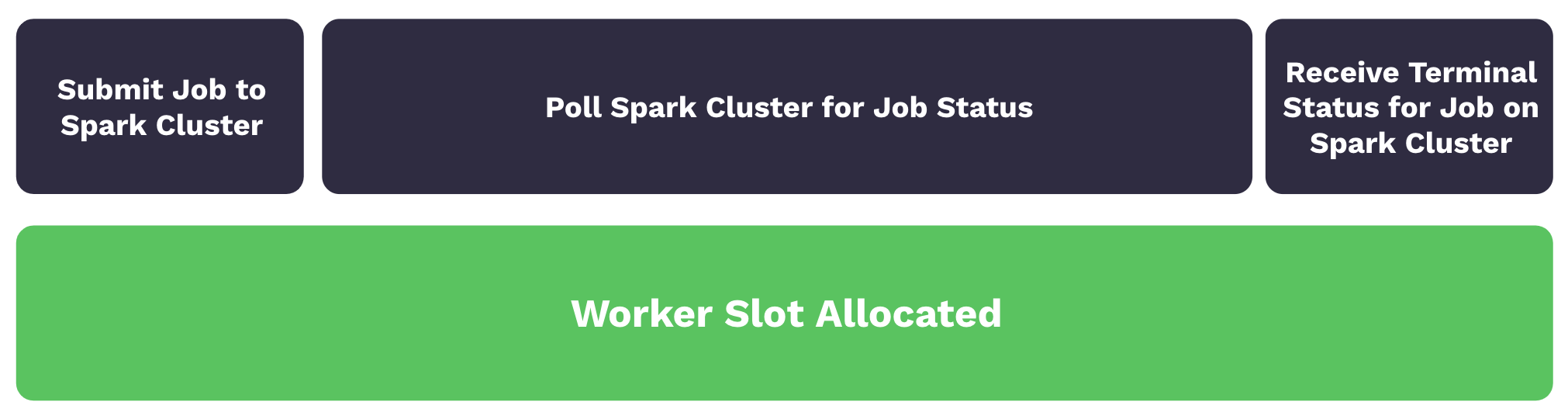
With traditional operators, a task submits a job to an external system such as a Spark cluster and then polls the job status until it is completed. Although the task isn't doing significant work, it still occupies a worker slot during the polling process. As worker slots are occupied, tasks are queued and start times are delayed. The following image illustrates this process:
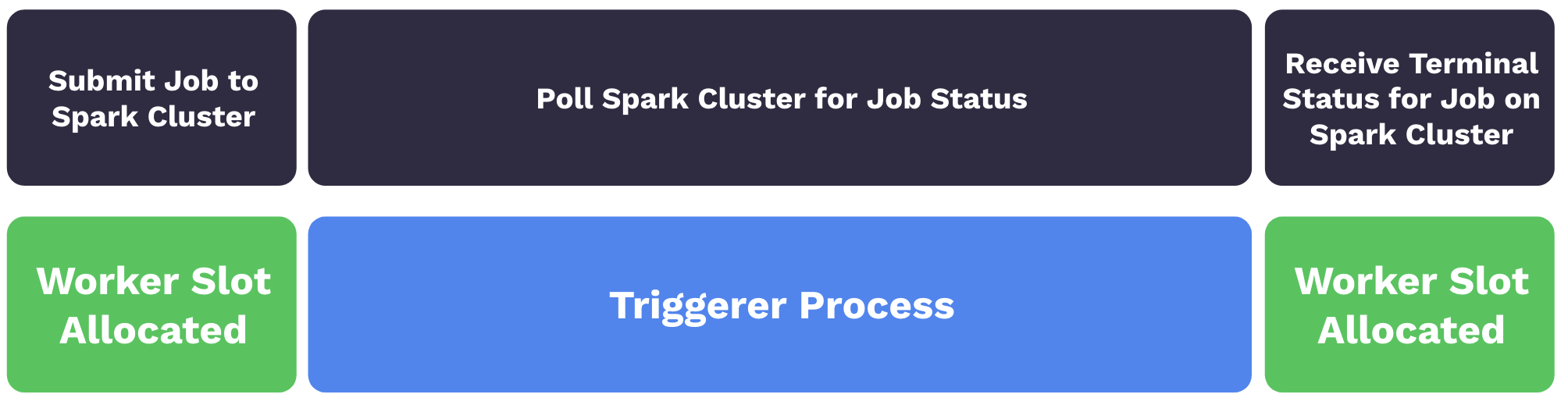
 With deferrable operators, worker slots are released when a task is polling for the job status. When the task is deferred, the polling process is offloaded as a trigger to the triggerer, and the worker slot becomes available. The triggerer can run many asynchronous polling tasks concurrently, and this prevents polling tasks from occupying your worker resources. When the terminal status for the job is received, the operator resumes the task, taking up a worker slot while it finishes. The following image illustrates the process:
 Some deferrable operators directly enter a deferred state without going to a worker first, see [Triggering Deferral from Start](https://airflow.apache.org/docs/apache-airflow/stable/authoring-and-scheduling/deferring.html#triggering-deferral-from-task-start).
### Benefits
There are numerous benefits to using deferrable operators:
* Reduced resource consumption: Depending on the available resources and the workload of your triggers, you can run hundreds to thousands of deferred tasks in a single triggerer process. This can lead to a reduction in the number of workers needed to run tasks during periods of high concurrency. With fewer workers needed, you can scale down the underlying infrastructure of your Airflow environment.
* Resiliency against restarts: Triggers are stateless by design. This means your deferred tasks aren't set to a failure state if a triggerer needs to be restarted due to a deployment or infrastructure issue. When a triggerer is back up and running in your environment, your deferred tasks resume.
When you can't use a deferrable operator for a longer running sensor task, such as when you can't run a triggerer, Astronomer recommends using a sensor in [`reschedule` mode](https://airflow.apache.org/docs/apache-airflow/stable/core-concepts/sensors.html) to reduce unnecessary resource overhead. See the [Airflow documentation](https://airflow.apache.org/docs/apache-airflow/stable/authoring-and-scheduling/deferring.html#difference-between-mode-reschedule-and-deferrable-true-in-sensors) for details about the differences between deferrable operators and sensors in `reschedule` mode.
### Use deferrable operators
Deferrable operators should be used whenever you have tasks that occupy a worker slot while polling for a condition in an external system. For example, using deferrable operators for sensor tasks can provide efficiency gains and reduce operational costs.
#### Start a triggerer
To use deferrable operators, you must have a triggerer running in your Airflow environment. On Astro the triggerer is automatically configured for every Deployment. If you are using Astro Private Cloud, see [Configure a Deployment on Astro Private Cloud - Triggerer](/docs/astro-private-cloud/v-2-x/configure-deployment#triggerer).
If you aren't using Astro, run `airflow triggerer` to start a triggerer process in your Airflow environment. Your output should look similar to the following image:
Some deferrable operators directly enter a deferred state without going to a worker first, see [Triggering Deferral from Start](https://airflow.apache.org/docs/apache-airflow/stable/authoring-and-scheduling/deferring.html#triggering-deferral-from-task-start).
### Benefits
There are numerous benefits to using deferrable operators:
* Reduced resource consumption: Depending on the available resources and the workload of your triggers, you can run hundreds to thousands of deferred tasks in a single triggerer process. This can lead to a reduction in the number of workers needed to run tasks during periods of high concurrency. With fewer workers needed, you can scale down the underlying infrastructure of your Airflow environment.
* Resiliency against restarts: Triggers are stateless by design. This means your deferred tasks aren't set to a failure state if a triggerer needs to be restarted due to a deployment or infrastructure issue. When a triggerer is back up and running in your environment, your deferred tasks resume.
When you can't use a deferrable operator for a longer running sensor task, such as when you can't run a triggerer, Astronomer recommends using a sensor in [`reschedule` mode](https://airflow.apache.org/docs/apache-airflow/stable/core-concepts/sensors.html) to reduce unnecessary resource overhead. See the [Airflow documentation](https://airflow.apache.org/docs/apache-airflow/stable/authoring-and-scheduling/deferring.html#difference-between-mode-reschedule-and-deferrable-true-in-sensors) for details about the differences between deferrable operators and sensors in `reschedule` mode.
### Use deferrable operators
Deferrable operators should be used whenever you have tasks that occupy a worker slot while polling for a condition in an external system. For example, using deferrable operators for sensor tasks can provide efficiency gains and reduce operational costs.
#### Start a triggerer
To use deferrable operators, you must have a triggerer running in your Airflow environment. On Astro the triggerer is automatically configured for every Deployment. If you are using Astro Private Cloud, see [Configure a Deployment on Astro Private Cloud - Triggerer](/docs/astro-private-cloud/v-2-x/configure-deployment#triggerer).
If you aren't using Astro, run `airflow triggerer` to start a triggerer process in your Airflow environment. Your output should look similar to the following image:
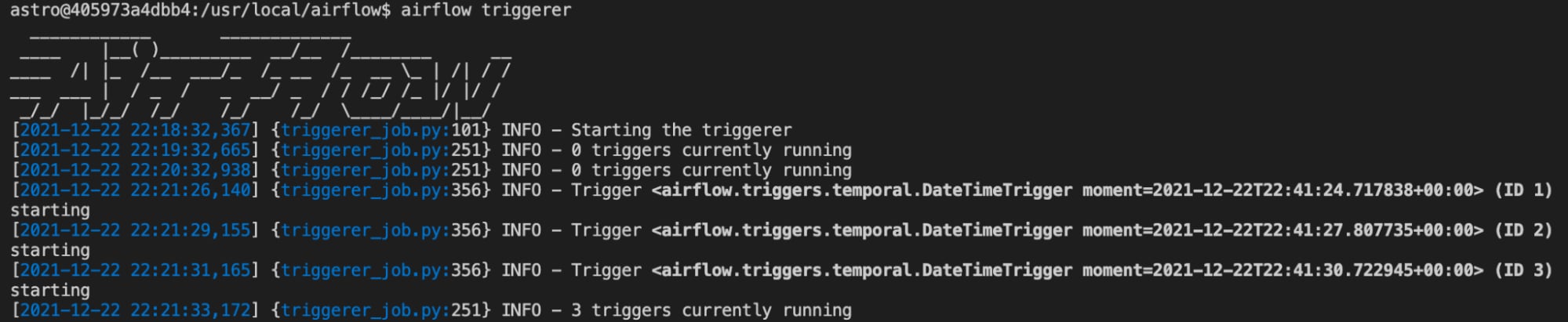 As tasks are raised into a deferred state, triggers are registered in the triggerer. You can set the number of concurrent triggers that can run in a single triggerer process with the [`default_capacity`](https://airflow.apache.org/docs/apache-airflow/stable/configurations-ref.html#triggerer) configuration setting in Airflow. This config can also be set with the `AIRFLOW__TRIGGERER__DEFAULT_CAPACITY` environment variable. The default value is `1000`.
#### Use deferrable versions of operators
Many Airflow operators, such as the [`TriggerDagRunOperator`](https://airflow.apache.org/registry/providers/standard#standard-trigger_dagrun-TriggerDagRunOperator) and the [`WasbBlobSensor`](https://airflow.apache.org/registry/providers/microsoft-azure#microsoft-azure-wasb-WasbBlobSensor), can be set to run in deferrable mode using the `deferrable` parameter. You can check if the operator you want to use has a `deferrable` parameter in the [Airflow Registry](https://airflow.apache.org/registry/).
To always use the deferrable version of an operator if it's available, set the Airflow config `operators.default_deferrable` to `True`. You can do so by defining the following environment variable in your Airflow environment:
```text wrap theme={null}
AIRFLOW__OPERATORS__DEFAULT_DEFERRABLE=True
```
After you set the variable, all operators with a `deferrable` parameter run as their deferrable version by default. You can override the config setting at the operator level using the `deferrable` parameter directly:
```python wrap theme={null}
trigger_dag_run = TriggerDagRunOperator(
task_id="task_in_downstream_dag",
trigger_dag_id="downstream_dag",
wait_for_completion=True,
poke_interval=20,
deferrable=False, # turns off deferrable mode just for this operator instance
)
```
You can find a list of operators that support deferrable mode in the [Airflow documentation](https://airflow.apache.org/docs/apache-airflow-providers/core-extensions/deferrable-operator-ref.html).
Previously, before the `deferrable` parameter was available in regular operators, deferrable operators were implemented as standalone operators, usually with an `-Async` suffix. Some of these operators are still available. For example, the `DateTimeSensor` doesn't have a `deferrable` parameter, but has a deferrable version called `DateTimeSensorAsync`.
The [Astronomer providers](https://github.com/astronomer/astronomer-providers) package, which contained many `-Async` operators, is deprecated. The functionality from most of these operators is integrated into their original operator version in the relevant Airflow provider package.
### Example: Deferrable sensor
The following example Dag is scheduled to run every minute between its `start_date` and its `end_date`. Every Dag run contains one sensor task that will potentially take up to 20 minutes to complete.
```python wrap theme={null}
from airflow.decorators import dag
from airflow.sensors.date_time import DateTimeSensor
from pendulum import datetime
@dag(
start_date=datetime(2024, 5, 23, 20, 0),
end_date=datetime(2024, 5, 23, 20, 19),
schedule="* * * * *",
catchup=True,
)
def sync_dag_2():
DateTimeSensor(
task_id="sync_task",
target_time="""{{ macros.datetime.utcnow() + macros.timedelta(minutes=20) }}""",
)
sync_dag_2()
```
Using `DateTimeSensor`, one worker slot is taken up by every sensor that runs. By using the deferrable version of this sensor, `DateTimeSensorAsync`, you can achieve full concurrency while freeing up your workers to complete additional tasks across your Airflow environment.
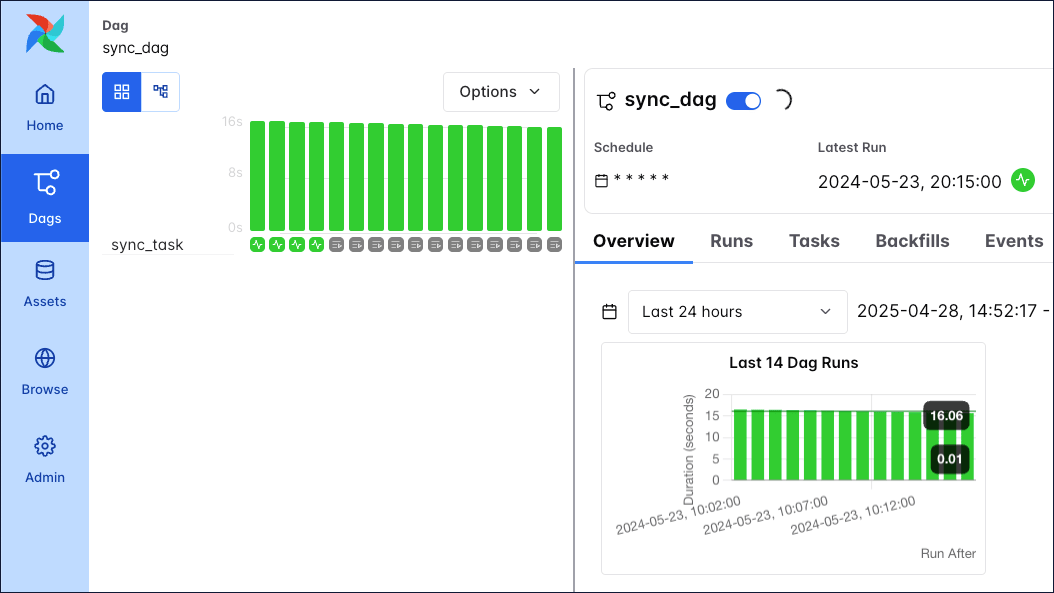
In the following image, running the Dag produces 16 running task instances, each containing one active `DateTimeSensor` taking up one worker slot.
As tasks are raised into a deferred state, triggers are registered in the triggerer. You can set the number of concurrent triggers that can run in a single triggerer process with the [`default_capacity`](https://airflow.apache.org/docs/apache-airflow/stable/configurations-ref.html#triggerer) configuration setting in Airflow. This config can also be set with the `AIRFLOW__TRIGGERER__DEFAULT_CAPACITY` environment variable. The default value is `1000`.
#### Use deferrable versions of operators
Many Airflow operators, such as the [`TriggerDagRunOperator`](https://airflow.apache.org/registry/providers/standard#standard-trigger_dagrun-TriggerDagRunOperator) and the [`WasbBlobSensor`](https://airflow.apache.org/registry/providers/microsoft-azure#microsoft-azure-wasb-WasbBlobSensor), can be set to run in deferrable mode using the `deferrable` parameter. You can check if the operator you want to use has a `deferrable` parameter in the [Airflow Registry](https://airflow.apache.org/registry/).
To always use the deferrable version of an operator if it's available, set the Airflow config `operators.default_deferrable` to `True`. You can do so by defining the following environment variable in your Airflow environment:
```text wrap theme={null}
AIRFLOW__OPERATORS__DEFAULT_DEFERRABLE=True
```
After you set the variable, all operators with a `deferrable` parameter run as their deferrable version by default. You can override the config setting at the operator level using the `deferrable` parameter directly:
```python wrap theme={null}
trigger_dag_run = TriggerDagRunOperator(
task_id="task_in_downstream_dag",
trigger_dag_id="downstream_dag",
wait_for_completion=True,
poke_interval=20,
deferrable=False, # turns off deferrable mode just for this operator instance
)
```
You can find a list of operators that support deferrable mode in the [Airflow documentation](https://airflow.apache.org/docs/apache-airflow-providers/core-extensions/deferrable-operator-ref.html).
Previously, before the `deferrable` parameter was available in regular operators, deferrable operators were implemented as standalone operators, usually with an `-Async` suffix. Some of these operators are still available. For example, the `DateTimeSensor` doesn't have a `deferrable` parameter, but has a deferrable version called `DateTimeSensorAsync`.
The [Astronomer providers](https://github.com/astronomer/astronomer-providers) package, which contained many `-Async` operators, is deprecated. The functionality from most of these operators is integrated into their original operator version in the relevant Airflow provider package.
### Example: Deferrable sensor
The following example Dag is scheduled to run every minute between its `start_date` and its `end_date`. Every Dag run contains one sensor task that will potentially take up to 20 minutes to complete.
```python wrap theme={null}
from airflow.decorators import dag
from airflow.sensors.date_time import DateTimeSensor
from pendulum import datetime
@dag(
start_date=datetime(2024, 5, 23, 20, 0),
end_date=datetime(2024, 5, 23, 20, 19),
schedule="* * * * *",
catchup=True,
)
def sync_dag_2():
DateTimeSensor(
task_id="sync_task",
target_time="""{{ macros.datetime.utcnow() + macros.timedelta(minutes=20) }}""",
)
sync_dag_2()
```
Using `DateTimeSensor`, one worker slot is taken up by every sensor that runs. By using the deferrable version of this sensor, `DateTimeSensorAsync`, you can achieve full concurrency while freeing up your workers to complete additional tasks across your Airflow environment.
In the following image, running the Dag produces 16 running task instances, each containing one active `DateTimeSensor` taking up one worker slot.
 Because Airflow imposes default limits on the number of active runs of the same Dag or number of active tasks in a Dag across all runs, you'll have to scale up Airflow to concurrently run any other Dags and tasks as described in the [Scaling Airflow to optimize performance](/docs/learn/airflow-scaling-workers) guide.
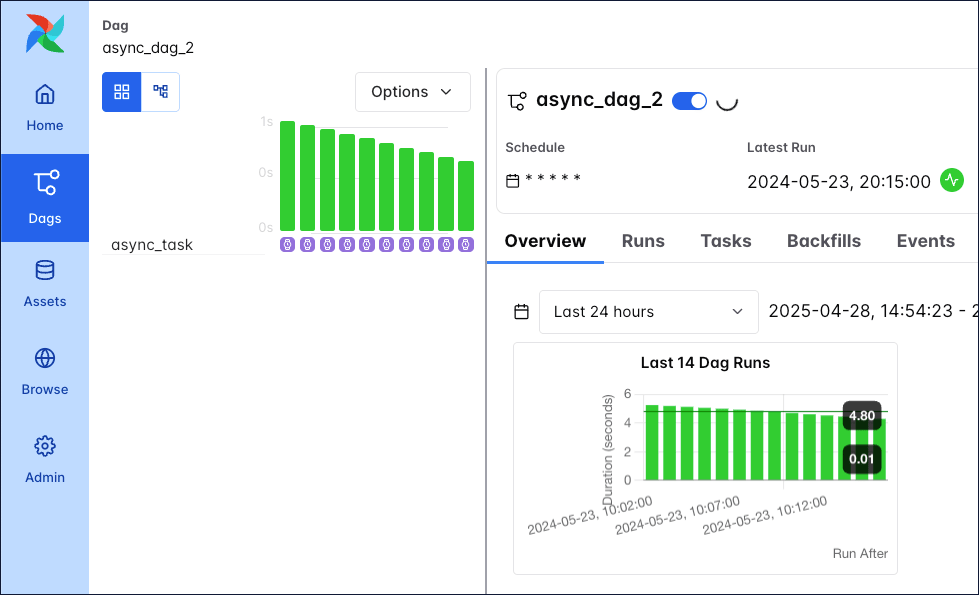
Switching out the `DateTimeSensor` for `DateTimeSensorAsync` creates 16 running Dag instances, but the tasks for these Dags are in a deferred state which doesn't take up a worker slot. The only difference in the Dag code is using the deferrable operator `DateTimeSensorAsync` over `DateTimeSensor`:
```python wrap theme={null}
from airflow.decorators import dag
from pendulum import datetime
from airflow.sensors.date_time import DateTimeSensorAsync
@dag(
start_date=datetime(2024, 5, 23, 20, 0),
end_date=datetime(2024, 5, 23, 20, 19),
schedule="* * * * *",
catchup=True,
)
def async_dag_2():
DateTimeSensorAsync(
task_id="async_task",
target_time="""{{ macros.datetime.utcnow() + macros.timedelta(minutes=20) }}""",
)
async_dag_2()
```
In the following image, all tasks are shown in a deferred (violet) state. Tasks in other Dags can use the available worker slots, making the deferrable operator more cost and time-efficient.
Because Airflow imposes default limits on the number of active runs of the same Dag or number of active tasks in a Dag across all runs, you'll have to scale up Airflow to concurrently run any other Dags and tasks as described in the [Scaling Airflow to optimize performance](/docs/learn/airflow-scaling-workers) guide.
Switching out the `DateTimeSensor` for `DateTimeSensorAsync` creates 16 running Dag instances, but the tasks for these Dags are in a deferred state which doesn't take up a worker slot. The only difference in the Dag code is using the deferrable operator `DateTimeSensorAsync` over `DateTimeSensor`:
```python wrap theme={null}
from airflow.decorators import dag
from pendulum import datetime
from airflow.sensors.date_time import DateTimeSensorAsync
@dag(
start_date=datetime(2024, 5, 23, 20, 0),
end_date=datetime(2024, 5, 23, 20, 19),
schedule="* * * * *",
catchup=True,
)
def async_dag_2():
DateTimeSensorAsync(
task_id="async_task",
target_time="""{{ macros.datetime.utcnow() + macros.timedelta(minutes=20) }}""",
)
async_dag_2()
```
In the following image, all tasks are shown in a deferred (violet) state. Tasks in other Dags can use the available worker slots, making the deferrable operator more cost and time-efficient.
 ### High availability
Triggers are designed to be highly available. You can implement this by starting multiple triggerer processes. Similar to the [HA scheduler](https://airflow.apache.org/docs/apache-airflow/stable/administration-and-deployment/scheduler.html#running-more-than-one-scheduler), Airflow ensures that they co-exist with correct locking and high availability. See [High Availability](https://airflow.apache.org/docs/apache-airflow/stable/authoring-and-scheduling/deferring.html#high-availability) for more information on this topic.
### Create a deferrable operator
If you have an operator that would benefit from being asynchronous but doesn't yet exist in OSS Airflow, you can create your own by writing a deferrable operator and trigger class. You can also defer a task several times if needed.
Get a template for a custom deferrable operator and custom trigger class by clicking the dropdown. Make sure to adjust the classpath for your trigger's `.serialize` method (currently `include.deferrable_operator_template.MyTrigger`) to match your file structure.
### High availability
Triggers are designed to be highly available. You can implement this by starting multiple triggerer processes. Similar to the [HA scheduler](https://airflow.apache.org/docs/apache-airflow/stable/administration-and-deployment/scheduler.html#running-more-than-one-scheduler), Airflow ensures that they co-exist with correct locking and high availability. See [High Availability](https://airflow.apache.org/docs/apache-airflow/stable/authoring-and-scheduling/deferring.html#high-availability) for more information on this topic.
### Create a deferrable operator
If you have an operator that would benefit from being asynchronous but doesn't yet exist in OSS Airflow, you can create your own by writing a deferrable operator and trigger class. You can also defer a task several times if needed.
Get a template for a custom deferrable operator and custom trigger class by clicking the dropdown. Make sure to adjust the classpath for your trigger's `.serialize` method (currently `include.deferrable_operator_template.MyTrigger`) to match your file structure.
Click to view the template code
```python expandable wrap theme={null}
from __future__ import annotations
import asyncio
import time
from asgiref.sync import sync_to_async
from typing import Any, Sequence, AsyncIterator
from airflow.configuration import conf
from airflow.models.baseoperator import BaseOperator
from airflow.triggers.base import BaseTrigger, TriggerEvent
from airflow.utils.context import Context
class MyTrigger(BaseTrigger):
"""
This is an example of a custom trigger that waits for a binary random choice
between 0 and 1 to be 1.
Args:
poll_interval (int): How many seconds to wait between async polls.
my_kwarg_passed_into_the_trigger (str): A kwarg that is passed into the trigger.
Returns:
my_kwarg_passed_out_of_the_trigger (str): A kwarg that is passed out of the trigger.
"""
def __init__(
self,
poll_interval: int = 60,
my_kwarg_passed_into_the_trigger: str = "notset",
my_kwarg_passed_out_of_the_trigger: str = "notset",
# you can add more arguments here
):
super().__init__()
self.poll_interval = poll_interval
self.my_kwarg_passed_into_the_trigger = my_kwarg_passed_into_the_trigger
self.my_kwarg_passed_out_of_the_trigger = my_kwarg_passed_out_of_the_trigger
def serialize(self) -> tuple[str, dict[str, Any]]:
"""
Serialize MyTrigger arguments and classpath.
All arguments must be JSON serializable.
This will be returned by the trigger when it is complete and passed as `event` to the
`execute_complete` method of the deferrable operator.
"""
return (
"include.deferrable_operator_template.MyTrigger", # this is the classpath for the Trigger
{
"poll_interval": self.poll_interval,
"my_kwarg_passed_into_the_trigger": self.my_kwarg_passed_into_the_trigger,
"my_kwarg_passed_out_of_the_trigger": self.my_kwarg_passed_out_of_the_trigger,
# you can add more kwargs here
},
)
# The run method is an async generator that yields TriggerEvents when the desired condition is met
async def run(self) -> AsyncIterator[TriggerEvent]:
while True:
result = (
await self.my_trigger_function()
) # The my_trigger_function is awaited and where the condition is checked
if result == 1:
self.log.info(f"Result was 1, thats the number! Triggering event.")
self.log.info(
f"Kwarg passed in was: {self.my_kwarg_passed_into_the_trigger}"
)
# This is how you pass data out of the trigger, by setting attributes that get serialized
self.my_kwarg_passed_out_of_the_trigger = "apple"
self.log.info(
f"Kwarg to be passed out is: {self.my_kwarg_passed_out_of_the_trigger}"
)
# Fire the trigger event! This gets a worker to execute the operator's `execute_complete` method
yield TriggerEvent(self.serialize())
return # The return statement prevents the trigger from running again
else:
self.log.info(
f"Result was not the one we are waiting for. Sleeping for {self.poll_interval} seconds."
)
# If the condition is not met, the trigger sleeps for the poll_interval
# this code can run multiple times until the condition is met
await asyncio.sleep(self.poll_interval)
# This is the function that is awaited in the run method
@sync_to_async
def my_trigger_function(self) -> str:
"""
This is where what you are waiting for goes For example a call to an
API to check for the state of a cloud resource.
This code can run multiple times until the condition is met.
"""
import random
randint = random.choice([0, 1])
self.log.info(f"Random number: {randint}")
return randint
class MyOperator(BaseOperator):
"""
Deferrable operator that waits for a binary random choice between 0 and 1 to be 1.
Args:
wait_for_completion (bool): Whether to wait for the trigger to complete.
poke_interval (int): How many seconds to wait between polls,
both in deferrable or sensor mode.
deferrable (bool): Whether to defer the operator. If set to False,
the operator will act as a sensor.
Returns:
str: A kwarg that is passed through the trigger and returned by the operator.
"""
template_fields: Sequence[str] = (
"wait_for_completion",
"poke_interval",
)
ui_color = "#73deff"
def __init__(
self,
*,
# you can add more arguments here
wait_for_completion: bool = False,
poke_interval: int = 60,
deferrable: bool = conf.getboolean(
"operators", "default_deferrable", fallback=False
), # this default is a convention to be able to set the operator to deferrable in the config
# using AIRFLOW__OPERATORS__DEFAULT_DEFERRABLE=True
**kwargs,
) -> None:
super().__init__(**kwargs)
self.wait_for_completion = wait_for_completion
self.poke_interval = poke_interval
self._defer = deferrable
def execute(self, context: Context):
# Add code you want to be executed before the deferred part here (this code only runs once)
# turns operator into sensor/deferred operator
if self.wait_for_completion:
# Starting the deferral process
if self._defer:
self.log.info(
"Operator in deferrable mode. Starting the deferral process."
)
self.defer(
trigger=MyTrigger(
poll_interval=self.poke_interval,
my_kwarg_passed_into_the_trigger="lemon",
# you can pass information into the trigger here
),
method_name="execute_complete",
kwargs={"kwarg_passed_to_execute_complete": "tomato"},
# kwargs get passed through to the execute_complete method
)
else: # regular sensor part
while True:
self.log.info("Operator in sensor mode. Polling.")
time.sleep(self.poke_interval)
import random
# This is where you would check for the condition you are waiting for
# when using the operator as a regular sensor
# This code can run multiple times until the condition is met
randint = random.choice([0, 1])
self.log.info(f"Random number: {randint}")
if randint == 1:
self.log.info("Result was 1, thats the number! Continuing.")
return randint
self.log.info(
"Result was not the one we are waiting for. Sleeping."
)
else:
self.log.info("Not waiting for completion.")
# Add code you want to be executed after the deferred part here (this code only runs once)
# you can have as many deferred parts as you want in an operator
def execute_complete(
self,
context: Context,
event: tuple[str, dict[str, Any]],
kwarg_passed_to_execute_complete: str, # make sure to add the kwargs you want to pass through
):
"""Execute when the trigger is complete. This code only runs once."""
self.log.info("Trigger is complete.")
self.log.info(f"Event: {event}") # printing the serialized event
# you can push additional data to XCom here
context["ti"].xcom_push(
"message_from_the_trigger", event[1]["my_kwarg_passed_out_of_the_trigger"]
)
return kwarg_passed_to_execute_complete # the returned value gets pushed to XCom as `return_value`
```
Note that when developing a custom trigger, you need to restart your triggerer to pick up any changes you make, since the triggerer caches the trigger classes. Additionally, all information you pass between the triggerer and the worker must be JSON serializable.
See [Writing Deferrable Operators](https://airflow.apache.org/docs/apache-airflow/stable/authoring-and-scheduling/deferring.html#writing-deferrable-operators) for more information.
You can implement direct deferral without the task ever being picked back up by a worker. The following code shows a deferrable operator circumventing the `.execute()` method. When using this template, make sure to adjust the classpath for your trigger (currently `include.deferrable_operator_template.MyTrigger`) in both the `.serialize` method and the `StartTriggerArgs` to match your file structure.
Click to view the template code
```python expandable wrap theme={null}
from __future__ import annotations
import asyncio
import time
from asgiref.sync import sync_to_async
from typing import Any, Sequence, AsyncIterator
from airflow.configuration import conf
from airflow.models.baseoperator import BaseOperator
from airflow.triggers.base import BaseTrigger, TriggerEvent
from airflow.utils.context import Context
from airflow.triggers.base import StartTriggerArgs
class MyTrigger(BaseTrigger):
"""
This is an example of a custom trigger that waits for a binary random choice
between 0 and 1 to be 1.
Args:
poll_interval (int): How many seconds to wait between async polls.
my_kwarg_passed_into_the_trigger (str): A kwarg that is passed into the trigger.
Returns:
my_kwarg_passed_out_of_the_trigger (str): A kwarg that is passed out of the trigger.
"""
def __init__(
self,
poll_interval: int = 60,
my_kwarg_passed_into_the_trigger: str = "notset",
my_kwarg_passed_out_of_the_trigger: str = "notset",
# you can add more arguments here
):
super().__init__()
self.poll_interval = poll_interval
self.my_kwarg_passed_into_the_trigger = my_kwarg_passed_into_the_trigger
self.my_kwarg_passed_out_of_the_trigger = my_kwarg_passed_out_of_the_trigger
def serialize(self) -> tuple[str, dict[str, Any]]:
"""
Serialize MyTrigger arguments and classpath.
All arguments must be JSON serializable.
This will be returned by the trigger when it is complete and passed as `event` to the
`execute_complete` method of the deferrable operator.
"""
return (
"include.custom_deferrable_operator.MyTrigger", # this is the classpath for the Trigger
{
"poll_interval": self.poll_interval,
"my_kwarg_passed_into_the_trigger": self.my_kwarg_passed_into_the_trigger,
"my_kwarg_passed_out_of_the_trigger": self.my_kwarg_passed_out_of_the_trigger,
# you can add more kwargs here
},
)
# The run method is an async generator that yields TriggerEvents when the desired condition is met
async def run(self) -> AsyncIterator[TriggerEvent]:
while True:
result = (
await self.my_trigger_function()
) # The my_trigger_function is awaited and where the condition is checked
if result == 1:
self.log.info(f"Result was 1, thats the number! Triggering event.")
self.log.info(
f"Kwarg passed in was: {self.my_kwarg_passed_into_the_trigger}"
)
# This is how you pass data out of the trigger, by setting attributes that get serialized
self.my_kwarg_passed_out_of_the_trigger = "apple"
self.log.info(
f"Kwarg to be passed out is: {self.my_kwarg_passed_out_of_the_trigger}"
)
# Fire the trigger event! This gets a worker to execute the operator's `execute_complete` method
yield TriggerEvent(self.serialize())
return # The return statement prevents the trigger from running again
else:
self.log.info(
f"Result was not the one we are waiting for. Sleeping for {self.poll_interval} seconds."
)
# If the condition is not met, the trigger sleeps for the poll_interval
# this code can run multiple times until the condition is met
await asyncio.sleep(self.poll_interval)
# This is the function that is awaited in the run method
@sync_to_async
def my_trigger_function(self) -> str:
"""
This is where what you are waiting for goes For example a call to an
API to check for the state of a cloud resource.
This code can run multiple times until the condition is met.
"""
import random
randint = random.choice([0, 1])
self.log.info(f"Random number: {randint}")
return randint
class MyDeferrableOperator(BaseOperator):
"""
Deferrable operator that waits for a binary random choice between 0 and 1 to be 1.
Args:
wait_for_completion (bool): Whether to wait for the trigger to complete.
poke_interval (int): How many seconds to wait between polls,
both in deferrable or sensor mode.
deferrable (bool): Whether to defer the operator. If set to False,
the operator will act as a sensor.
Returns:
str: A kwarg that is passed through the trigger and returned by the operator.
"""
template_fields: Sequence[str] = (
"wait_for_completion",
"poke_interval",
)
ui_color = "#73deff"
# --------------------------------------------------------- #
# New implementation directly starting the trigger - Part 1 #
# --------------------------------------------------------- #
start_trigger_args = StartTriggerArgs(
trigger_cls="include.custom_deferrable_operator.MyTrigger",
trigger_kwargs={
"poll_interval": 60,
"my_kwarg_passed_into_the_trigger": "lemon",
},
next_method="execute_complete",
next_kwargs={"kwarg_passed_to_execute_complete": "tomato"},
timeout=None,
)
start_from_trigger = True
def __init__(
self,
*,
# you can add more arguments here
wait_for_completion: bool = False,
poke_interval: int = 60,
deferrable: bool = conf.getboolean(
"operators", "default_deferrable", fallback=False
), # this default is a convention to be able to set the operator to deferrable in the config
# using AIRFLOW__OPERATORS__DEFAULT_DEFERRABLE=True
**kwargs,
) -> None:
super().__init__(**kwargs)
self.wait_for_completion = wait_for_completion
self.poke_interval = poke_interval
self._defer = deferrable
# --------------------------------------------------------- #
# New implementation directly starting the trigger - Part 2 #
# --------------------------------------------------------- #
self.start_trigger_args.trigger_kwargs = dict(
poll_interval=self.poke_interval,
my_kwarg_passed_into_the_trigger="lemon",
)
def execute_complete(
self,
context: Context,
event: tuple[str, dict[str, Any]],
kwarg_passed_to_execute_complete: str, # make sure to add the kwargs you want to pass through
):
"""Execute when the trigger is complete. This code only runs once."""
self.log.info("Trigger is complete.")
self.log.info(f"Event: {event}") # printing the serialized event
# you can push additional data to XCom here
context["ti"].xcom_push(
"message_from_the_trigger", event[1]["my_kwarg_passed_out_of_the_trigger"]
)
return kwarg_passed_to_execute_complete # the returned value gets pushed to XCom as `return_value`
```
See [Triggering Deferral from Start](https://airflow.apache.org/docs/apache-airflow/stable/authoring-and-scheduling/deferring.html#triggering-deferral-from-task-start) for more details and code examples.