> ## Documentation Index
> Fetch the complete documentation index at: https://astronomer.io/docs/llms.txt
> Use this file to discover all available pages before exploring further.
# Data quality and Airflow
Data quality is fundamental to trustworthy analytics and AI. Silent data issues, like missing records, schema changes, or duplicate entries, can go undetected until dashboards break or models fail. By then, the damage is done.
This guide covers Dag-level checks with SQL check operators, platform-level checks with Astro Observe, and third-party frameworks, giving you the tools to build a comprehensive data quality strategy.
SQL check operators that run as part of your pipeline, with full control over failure behavior and notifications.
Astro Observe monitors that run independently of Dag execution, with table-level lineage and event-driven checks.
Great Expectations, dbt tests, and Soda Core for additional validation capabilities.
## Types of data quality challenges
* **Volume anomalies**: Unexpected spikes or drops in row counts.
* **Schema drift**: Column types changing without notice.
* **Completeness issues**: Null values in critical fields.
* **Duplicate records**: Compromising uniqueness constraints.
* **Business rule violations**: Negative amounts, invalid dates, orphaned records.
## Two approaches to data quality
Data quality checks can be implemented at two levels. You often need both: Dag-level checks catch issues before bad data propagates, while platform-level checks provide coverage even when Airflow itself has problems. This also includes checks when data lands, before any Dag processes potentially problematic data.
| | Dag-level checks | Platform-level checks |
| ----------------- | ----------------------------------------------------- | ------------------------------------------------------------------------- |
| **Execution** | Run as part of your pipeline | Run independently of Dag execution |
| **Blocking** | Can be blocking (see the following note) | Non-blocking: alert without stopping pipelines |
| **Configuration** | Require Dag code changes and deployment | Configure through an independent UI, no deployment |
| **Expertise** | Require Dag authoring expertise | Require no Dag authoring expertise |
| **Availability** | Can't check data when there is a problem with Airflow | Monitor data even if there is a problem with Airflow |
| **Lineage** | Dag-level lineage | Table-level lineage |
| **Ideal for** | Critical validations that demand pipeline actions | Critical validations and ongoing monitoring that runs independent of Dags |
**Dag-level checks do not have to stop your pipeline**
You have several options to control failure behavior:
1. **Trigger rules**: Use trigger rules like `all_done` or `none_failed_min_one_success` on downstream tasks to continue despite failed checks. See [Airflow trigger rules](/docs/learn/airflow-trigger-rules).
2. **Shell exit code handling**: When calling third-party frameworks through `@task.bash`, append `|| true` or `|| exit 0` to prevent non-zero exit codes from failing the task.
3. **Skip instead of fail**: Set `skip_on_exit_code` in `@task.bash(...)` to mark tasks as skipped rather than failed.
**Important**: Even when a task fails but the Dag succeeds (through trigger rules), task-level `on_failure_callback` still fires, ensuring you can get notified about check failures without blocking your pipeline.
## Choose a tool
Which tool you choose is determined by the needs and preferences of your organization. Astronomer recommends using Dag-level checks with SQL check operators if you want to:
* Write checks without needing to set up software in addition to Airflow.
* Write checks as Python dictionaries and in SQL.
* Use any SQL statement that returns a single row of booleans as a data quality check.
* Implement many different downstream dependencies depending on the outcome of different checks.
* Have full observability of which checks failed from within Airflow task logs, including the full SQL statements of failed checks.
Astronomer recommends using Dag-level checks with a data validation framework such as Great Expectations or Soda in the following circumstances:
* You want to collect the results of your data quality checks in a central place.
* You prefer to write checks in JSON (Great Expectations) or YAML (Soda).
* Most or all of your checks can be implemented by the predefined checks in the solution of your choice.
* You want to abstract your data quality checks from the Dag code.
In both cases, Astronomer recommends running platform-level checks for Airflow-independent data quality checks across your business-critical data products.
## Dag-level checks with Airflow
### When to use each operator
| Use case | Recommended operator |
| ---------------------------- | --------------------------- |
| Primary key validation | `SQLColumnCheckOperator` |
| Null/duplicate checks | `SQLColumnCheckOperator` |
| Value range validation | `SQLColumnCheckOperator` |
| Row count thresholds | `SQLTableCheckOperator` |
| Cross-column business rules | `SQLTableCheckOperator` |
| Aggregate validations | `SQLTableCheckOperator` |
| Compare to expected value | `SQLValueCheckOperator` |
| Compare to historical data | `SQLIntervalCheckOperator` |
| Min/max threshold validation | `SQLThresholdCheckOperator` |
| Complex multi-table queries | `SQLCheckOperator` |
### SQL check operators
To access the SQL check operators, install the [Common SQL provider](https://airflow.apache.org/registry/providers/common-sql/):
```text wrap theme={null}
apache-airflow-providers-common-sql
```
Import and use them within your Dag:
```python wrap theme={null}
from airflow.providers.common.sql.operators.sql import (
SQLColumnCheckOperator,
SQLTableCheckOperator,
SQLCheckOperator,
SQLValueCheckOperator,
SQLIntervalCheckOperator,
SQLThresholdCheckOperator,
)
```
The `SQLCheckOperator` is the most generic check operator. It runs any SQL query and evaluates the result, giving you enough freedom to cover complex business rules. The check fails if any returned value evaluates to `False` in Python (for example, `0`, `None`, empty string).
```python wrap theme={null}
_check_no_orphaned_payments = SQLCheckOperator(
task_id="check_no_orphaned_payments",
conn_id=_DB_CONN_ID,
sql="""
SELECT COUNT(*) = 0
FROM payments p
LEFT JOIN bookings b ON p.booking_id = b.booking_id
WHERE b.booking_id IS NULL
""",
)
```
The `SQLColumnCheckOperator` validates individual columns using built-in check types. Define a `column_mapping` dictionary to run multiple checks in a single task.
**Built-in check types:**
| Check | Description |
| ---------------- | ------------------------- |
| `null_check` | Count of NULL values |
| `unique_check` | Count of duplicate values |
| `distinct_check` | Count of unique values |
| `min` | Minimum value in column |
| `max` | Maximum value in column |
**Comparison options:**
* `equal_to`, `greater_than`, `geq_to` (`>=`)
* `less_than`, `leq_to` (`<=`)
* `tolerance` (percentage threshold, as a fraction: `0.1` = 10%)
```python wrap theme={null}
_check_columns = SQLColumnCheckOperator(
task_id="check_non_promo_bookings_columns",
conn_id=_DB_CONN_ID,
table="bookings",
partition_clause="promo_code IS NOT NULL",
column_mapping={
"booking_id": {
"null_check": {"equal_to": 0},
"unique_check": {"equal_to": 0},
},
"passengers": {
"min": {"geq_to": 1},
"max": {"leq_to": 10, "tolerance": 0.05}, # 5% tolerance
},
},
)
```
**partition\_clause**
The optional `partition_clause` is an additional WHERE filter applied before the checks. It can be added at the operator level (partitions all checks), at the column level in the column mapping (partitions all checks for that column), or at the check level (partitions just that check).
The `SQLTableCheckOperator` runs custom SQL expressions against a given table that must evaluate to `true`. It is suited for business rules spanning multiple columns or requiring aggregations.
```python wrap theme={null}
_check_report_business_rules = SQLTableCheckOperator(
task_id="check_report_business_rules",
conn_id=_DB_CONN_ID,
table="daily_planet_report",
checks={
"net_fare_not_negative": {
"check_statement": "total_net_fare_usd >= 0",
},
"discounts_leq_gross": {
"check_statement": "total_discounts_usd <= total_gross_fare_usd",
},
"has_rows_for_today": {
"check_statement": "COUNT(*) >= 1",
"partition_clause": "report_date = '{{ ds }}'",
},
},
)
```
The `SQLTableCheckOperator` also supports an optional `partition_clause` on check level for an additional WHERE filter applied before the check.
Performs a simple value check by comparing a SQL result to an expected value (`pass_value`). The value can be of any type. For numerical values, you can set an additional tolerance percentage.
```python wrap theme={null}
_check_planet_count = SQLValueCheckOperator(
task_id="check_planet_count",
conn_id=_DB_CONN_ID,
sql="SELECT COUNT(*) FROM planets",
pass_value=3,
tolerance=0.1, # 10% tolerance
)
```
Verify that metrics defined as SQL expressions remain within tolerance compared to those from previous days (`days_back`). This utility helps track how values change over time and identify potential outliers.
```python wrap theme={null}
_check_bookings_vs_last_week = SQLIntervalCheckOperator(
task_id="check_bookings_vs_last_week",
conn_id=_DB_CONN_ID,
table="bookings",
date_filter_column="CAST(booked_at AS DATE)",
days_back=-7,
ratio_formula="max_over_min",
metrics_thresholds={"COUNT(*)": 3}, # max 3x deviation
)
```
**Defaults**
The default for `days_back` is `-7`, and `ds` for the `date_filter_column`. Always set `date_filter_column` explicitly to your table's actual date column.
Performs a value check against a minimum and maximum threshold.
```python wrap theme={null}
_check_avg_fare_in_range = SQLThresholdCheckOperator(
task_id="check_avg_fare_in_range",
conn_id=_DB_CONN_ID,
sql="SELECT AVG(amount_usd) FROM payments",
min_threshold=40000,
max_threshold=80000,
)
```
**SQL expression thresholds**
Thresholds can also be SQL expressions, not just numeric values. For example: `min_threshold="SELECT MIN(target_avg) FROM benchmarks"`.
### Notifications
Detecting data quality issues is only part of the story. The other part is raising awareness. To be notified when a data quality check fails, combine the `on_failure_callback` task parameter with [Airflow notifiers](/docs/learn/error-notifications-in-airflow).
**Slack example:**
To use the `SlackNotifier`, install the following package:
```text wrap theme={null}
apache-airflow-providers-slack
```
In the templated text field, you can access the table through `task.table` and the actual quality issue through `exception`.
````python wrap theme={null}
from airflow.providers.slack.notifications.slack import SlackNotifier
SQLTableCheckOperator(
task_id="business_rule_checks",
on_failure_callback=SlackNotifier(
slack_conn_id="slack_default",
text="""
Data quality checks failed for table: `{{ task.table }}`!
```
{{ exception }}
```
""",
channel="#data-alerts",
),
...
)
````
**SlackNotifier**
The `SlackNotifier` requires a properly configured Slack connection. In this case, the connection ID is `slack_default`.
**AppriseNotifier**
The `AppriseNotifier` supports 100+ notification services (Slack, Email, PagerDuty, Teams, etc.) through a unified interface. Install it using `apache-airflow-providers-apprise`.
### Check patterns
Astronomer recommends running **column checks first** (field-level validation), followed by **table checks** (business logic), and then proceed with downstream processing.
Additionally, use **task groups** to organize your data quality checks and use the `default_args` parameter to configure notifications for all checks at once.
```python wrap theme={null}
@task_group(
default_args={
"on_failure_callback": notify_dq_failure,
},
)
def data_quality_checks():
_column_checks = SQLColumnCheckOperator(...)
_table_checks = SQLTableCheckOperator(...)
```
## Platform-level checks with Astro Observe
**Astro Observe** delivers pipeline-aware data observability purpose-built for Airflow, giving your team visibility into the health, quality, and performance of your business-critical data products across the modern data stack.
Astro Observe data quality helps you monitor tables to ensure data accuracy, completeness, and integrity across your pipelines. It allows you to track key metrics such as column null percentages, schema changes, and table row counts to detect anomalies or unexpected shifts in your data.
Astro Observe is only available to Astro customers.
### Create a connection
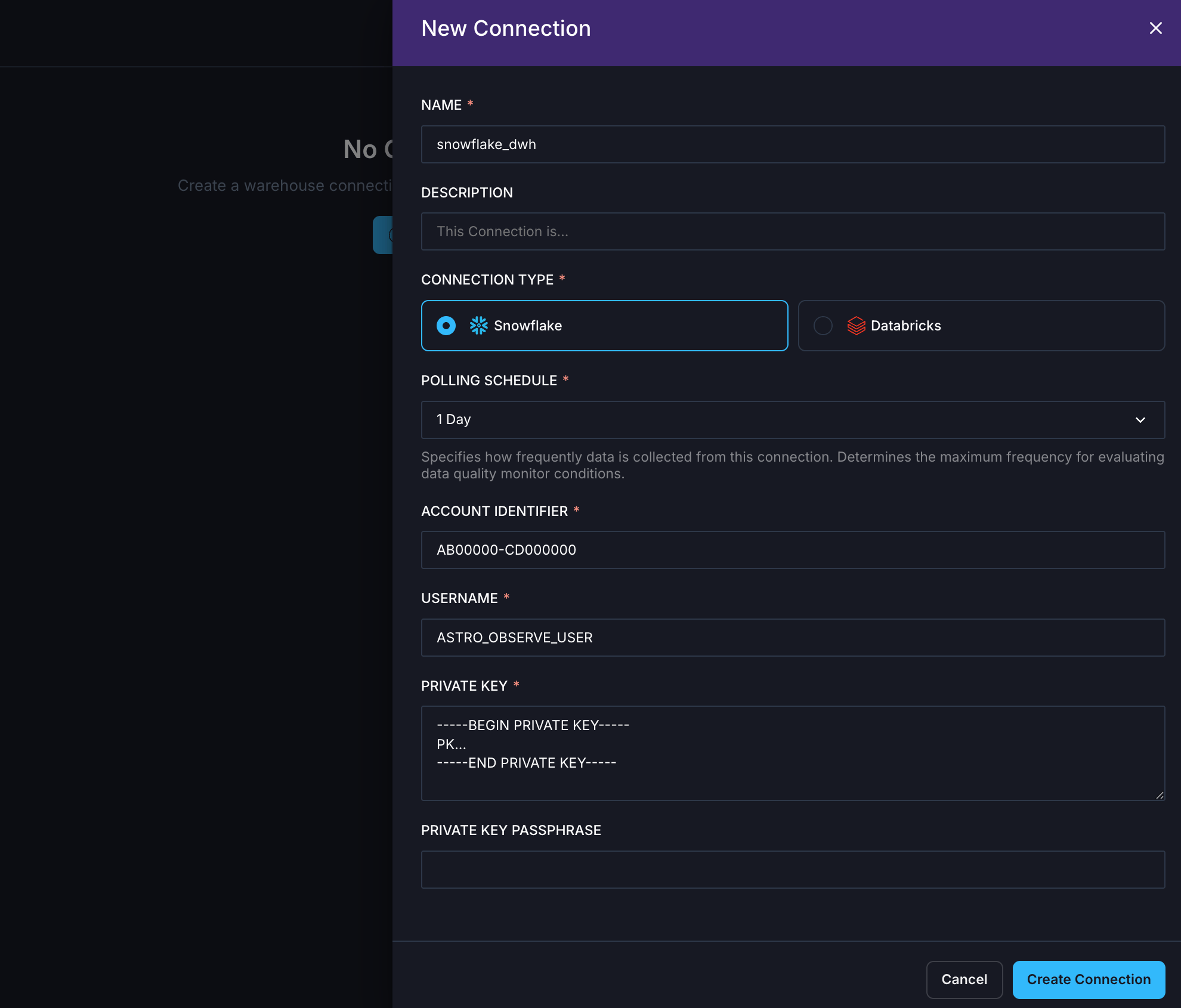
Before connecting to Astro Observe, configure the necessary permissions for your data platform. Navigate to **Observe** → **Connections** to create a new connection.
 ### Asset catalog
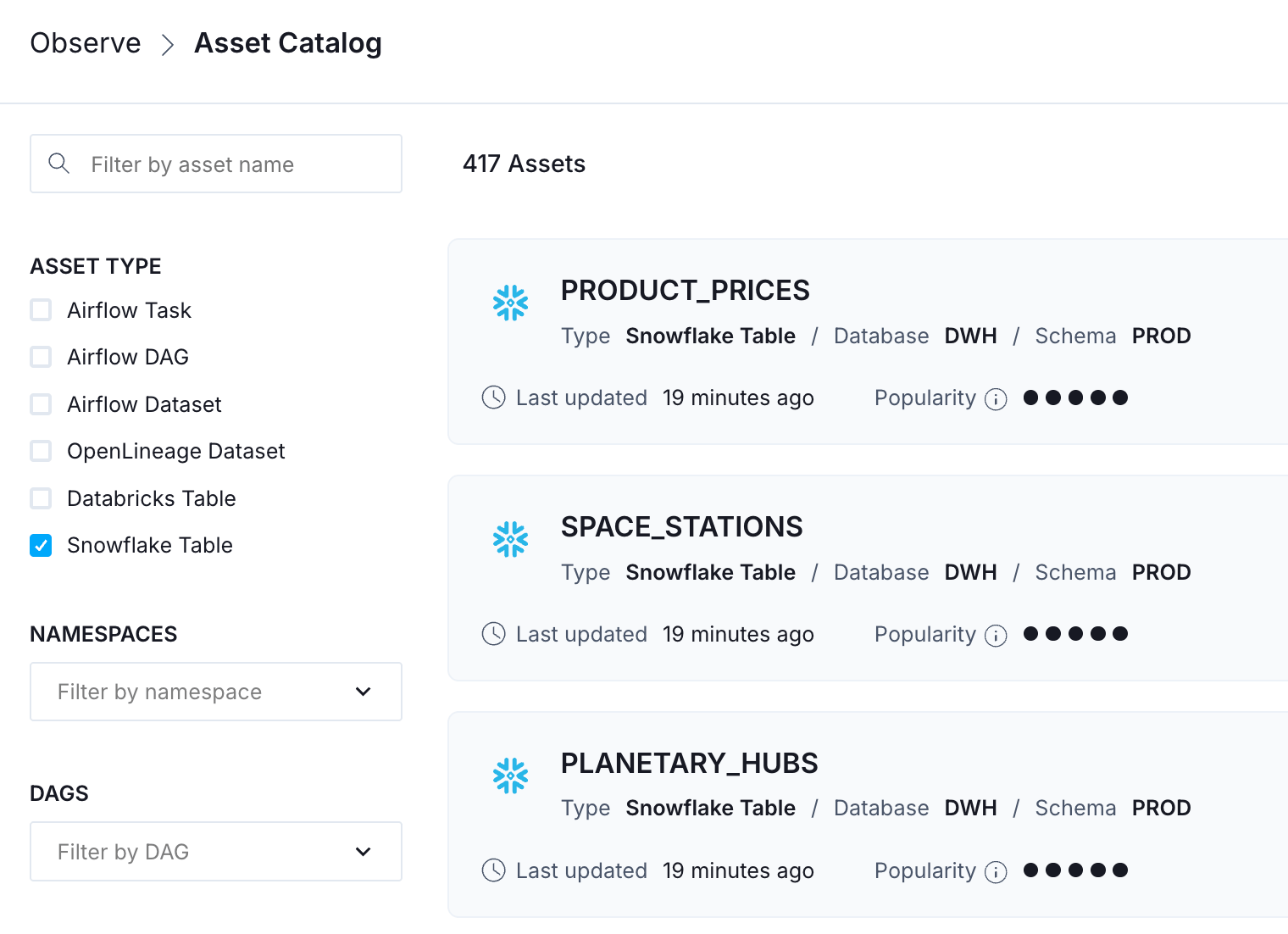
Once connected, warehouse tables appear in the Asset Catalog alongside Airflow Dags, tasks, and datasets. Each table shows:
* **Table popularity score**: Helping you prioritize monitoring on frequently accessed tables.
* **Schema details**: Column names and types.
* **Lineage**: Upstream assets and downstream dependencies.
### Asset catalog
Once connected, warehouse tables appear in the Asset Catalog alongside Airflow Dags, tasks, and datasets. Each table shows:
* **Table popularity score**: Helping you prioritize monitoring on frequently accessed tables.
* **Schema details**: Column names and types.
* **Lineage**: Upstream assets and downstream dependencies.
 ### Table-level lineage
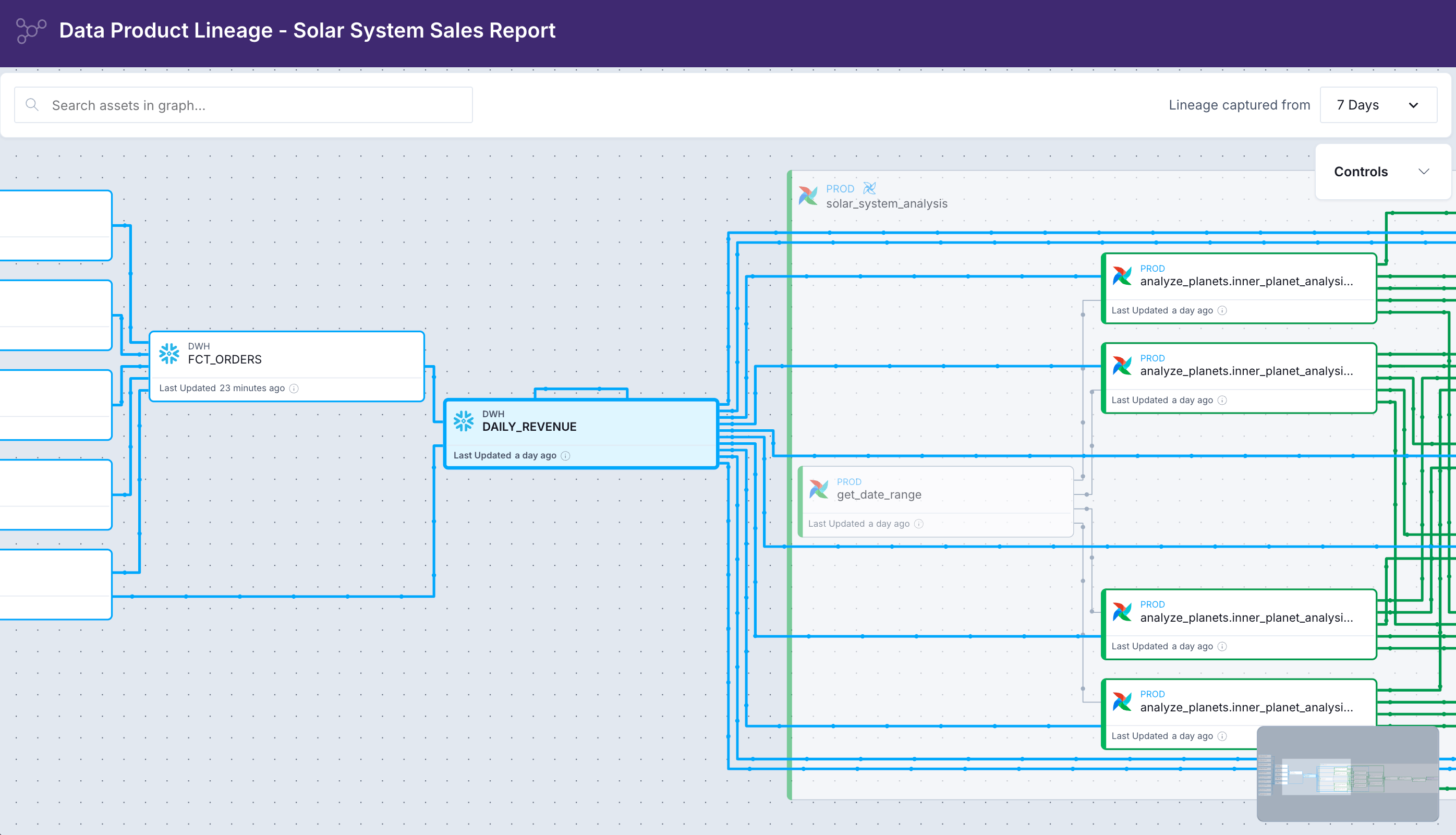
Data quality is also about context and understanding dependencies across Dag borders. **Table-level lineage in Astro Observe starts where Airflow stops.** It spans across Dags and shows upstream and downstream assets, including other Dags, tags, and tables from your warehouse.
With **impact analysis** for upstream and downstream assets, you gain platform-level data quality insights.
When a data quality alert fires, Astro Observe shows you which Airflow Dag and task wrote the failing table, what upstream dependencies fed into it, and which data products downstream are now at risk.
### Table-level lineage
Data quality is also about context and understanding dependencies across Dag borders. **Table-level lineage in Astro Observe starts where Airflow stops.** It spans across Dags and shows upstream and downstream assets, including other Dags, tags, and tables from your warehouse.
With **impact analysis** for upstream and downstream assets, you gain platform-level data quality insights.
When a data quality alert fires, Astro Observe shows you which Airflow Dag and task wrote the failing table, what upstream dependencies fed into it, and which data products downstream are now at risk.
 ### Monitors
Navigate to **Observe** → **Data Quality** → **Monitors** to see an overview of existing monitors, and to create new ones using **+ Monitor**.
Monitors are configurable data quality checks that run against your warehouse tables. Each monitor defines **what** to check, **when** to run, and **how** to alert. Astro Observe supports three scopes of monitors:
* **Table monitors**: Monitor data quality metrics for database tables.
* **Data product monitors**: Monitor data product health and pipeline failures.
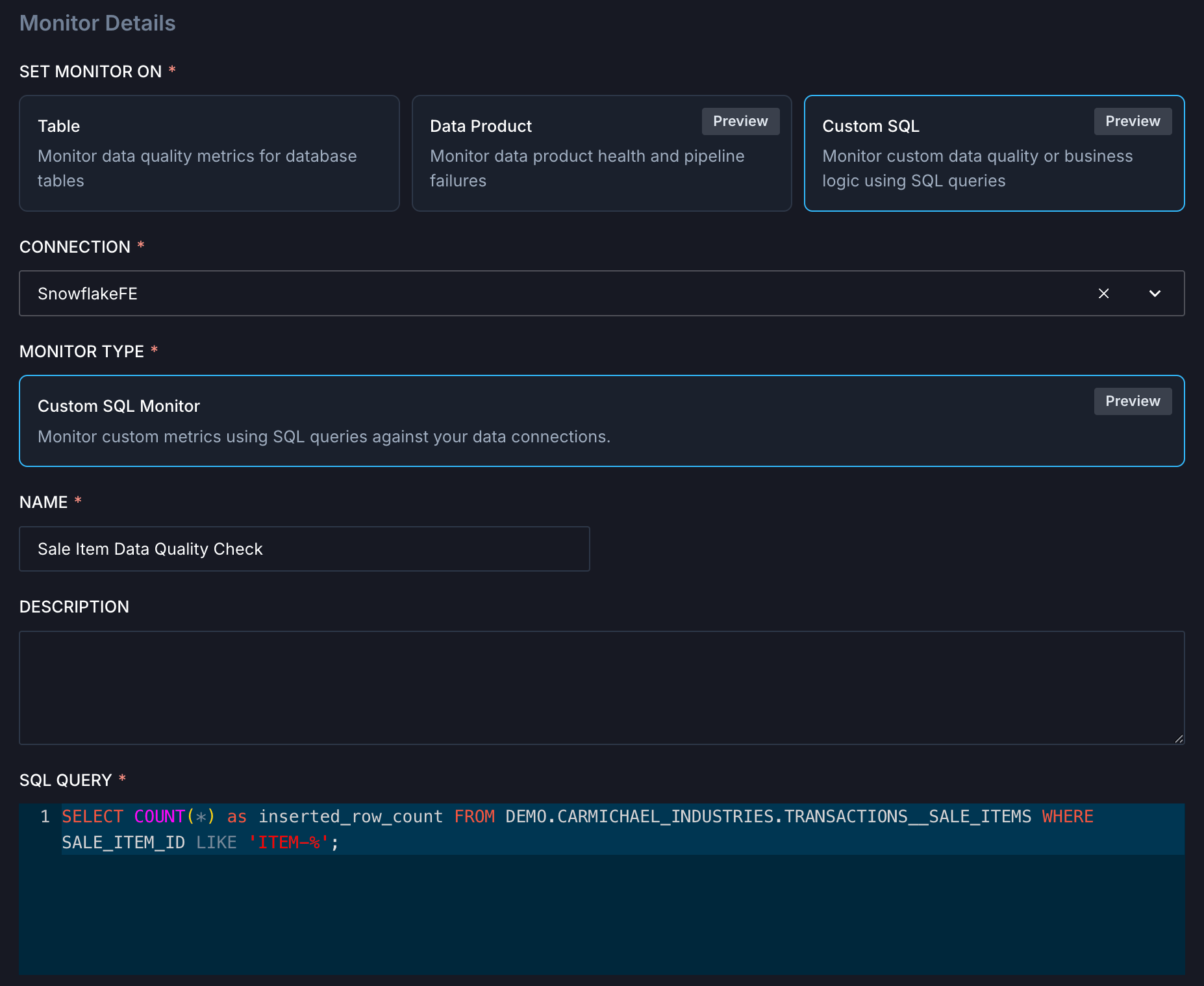
* **Custom SQL**: Monitor custom data quality or business logic using SQL queries.
When a monitor's condition is breached, it creates an **alert** with a severity level and notifies you through your configured channels.
### Table monitors
Table monitors check data quality for one specific table and support the following types:
* **Row volume change**: Send an alert when any query causes a change in number of rows above the specified range.
* **Column null percentage**: Monitor the percentage of null values in specific columns.
* **Table schema change**: Track schema changes and detect modifications in column types or structures.
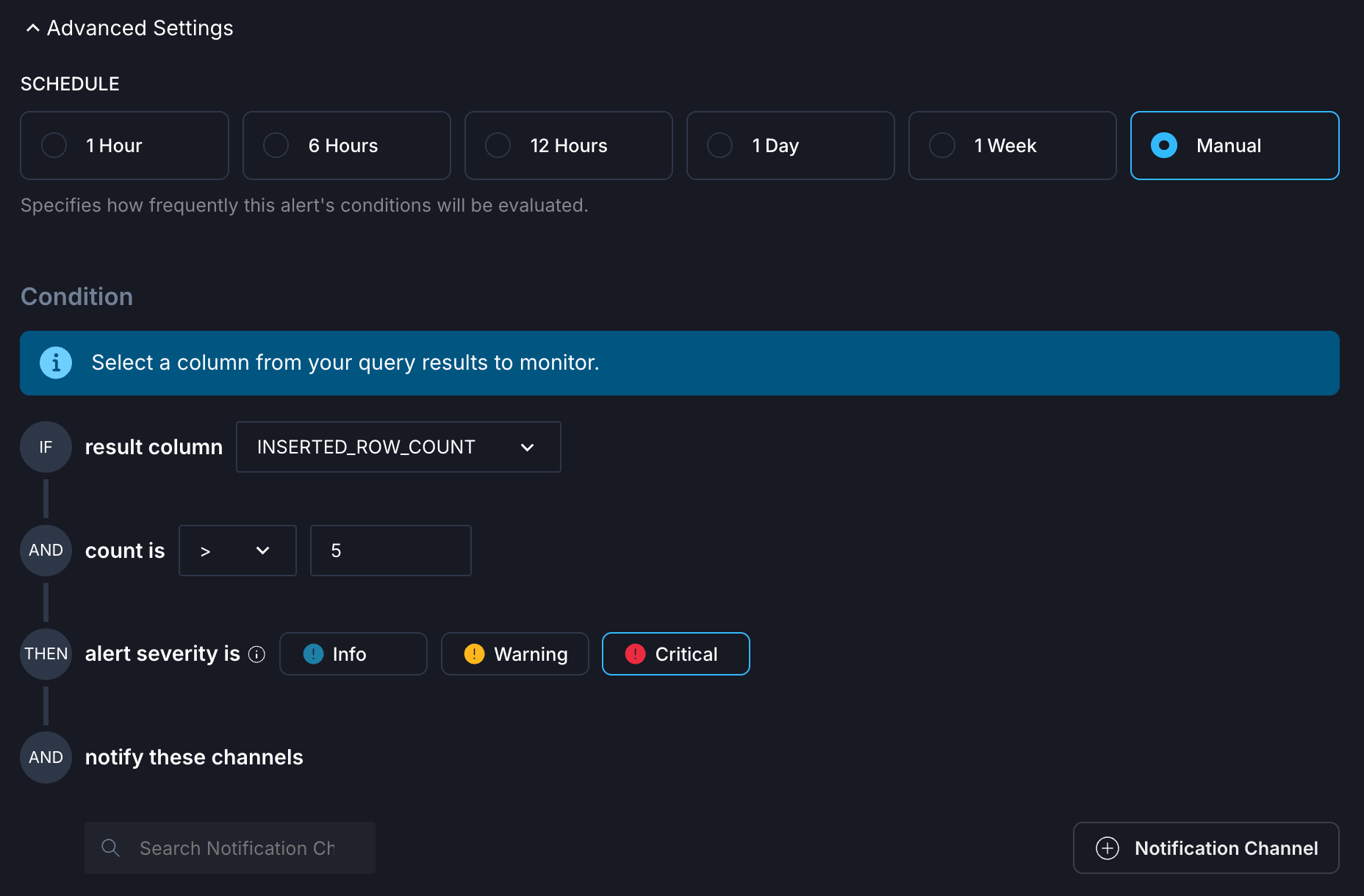
For each type, you can configure **conditions**, such as how large the difference in row count must be before triggering an alert or which columns to check for null values. In addition, you can select a **schedule** to define how frequently the conditions should be evaluated. You can also select **notification channels**. Observe supports Email, Slack, PagerDuty, Dag triggers, and Opsgenie out of the box.
### Monitors
Navigate to **Observe** → **Data Quality** → **Monitors** to see an overview of existing monitors, and to create new ones using **+ Monitor**.
Monitors are configurable data quality checks that run against your warehouse tables. Each monitor defines **what** to check, **when** to run, and **how** to alert. Astro Observe supports three scopes of monitors:
* **Table monitors**: Monitor data quality metrics for database tables.
* **Data product monitors**: Monitor data product health and pipeline failures.
* **Custom SQL**: Monitor custom data quality or business logic using SQL queries.
When a monitor's condition is breached, it creates an **alert** with a severity level and notifies you through your configured channels.
### Table monitors
Table monitors check data quality for one specific table and support the following types:
* **Row volume change**: Send an alert when any query causes a change in number of rows above the specified range.
* **Column null percentage**: Monitor the percentage of null values in specific columns.
* **Table schema change**: Track schema changes and detect modifications in column types or structures.
For each type, you can configure **conditions**, such as how large the difference in row count must be before triggering an alert or which columns to check for null values. In addition, you can select a **schedule** to define how frequently the conditions should be evaluated. You can also select **notification channels**. Observe supports Email, Slack, PagerDuty, Dag triggers, and Opsgenie out of the box.
 ### Data product monitors
A **[data product](/docs/learn/data-products)** is a composition of assets that, taken together, deliver a result with business relevance. It captures the end-to-end data lifecycle, and all elements that are involved in creating the product. Dags, tasks, and tables can all be assets of data products.
Data product monitors check data product health and pipeline failures. They send alerts when any upstream or final Dag in the data product fails.
### Custom SQL monitors
Custom SQL monitors are currently available for Snowflake only.
Custom SQL monitors check data quality or business logic using SQL queries against your data connections. Write a SQL query that returns a numerical value you want to monitor. The query results are then used to configure conditions.
```sql wrap theme={null}
SELECT COUNT(*) AS inserted_row_count
FROM DEMO.CARMICHAEL_INDUSTRIES.TRANSACTIONS__SALE_ITEMS
WHERE SALE_ITEM_ID LIKE 'ITEM-%';
```
Custom SQL monitors can also run **when data lands in a table**, allowing downstream consumers to be notified of data quality issues immediately.
### Data product monitors
A **[data product](/docs/learn/data-products)** is a composition of assets that, taken together, deliver a result with business relevance. It captures the end-to-end data lifecycle, and all elements that are involved in creating the product. Dags, tasks, and tables can all be assets of data products.
Data product monitors check data product health and pipeline failures. They send alerts when any upstream or final Dag in the data product fails.
### Custom SQL monitors
Custom SQL monitors are currently available for Snowflake only.
Custom SQL monitors check data quality or business logic using SQL queries against your data connections. Write a SQL query that returns a numerical value you want to monitor. The query results are then used to configure conditions.
```sql wrap theme={null}
SELECT COUNT(*) AS inserted_row_count
FROM DEMO.CARMICHAEL_INDUSTRIES.TRANSACTIONS__SALE_ITEMS
WHERE SALE_ITEM_ID LIKE 'ITEM-%';
```
Custom SQL monitors can also run **when data lands in a table**, allowing downstream consumers to be notified of data quality issues immediately.
 ### Alerts overview
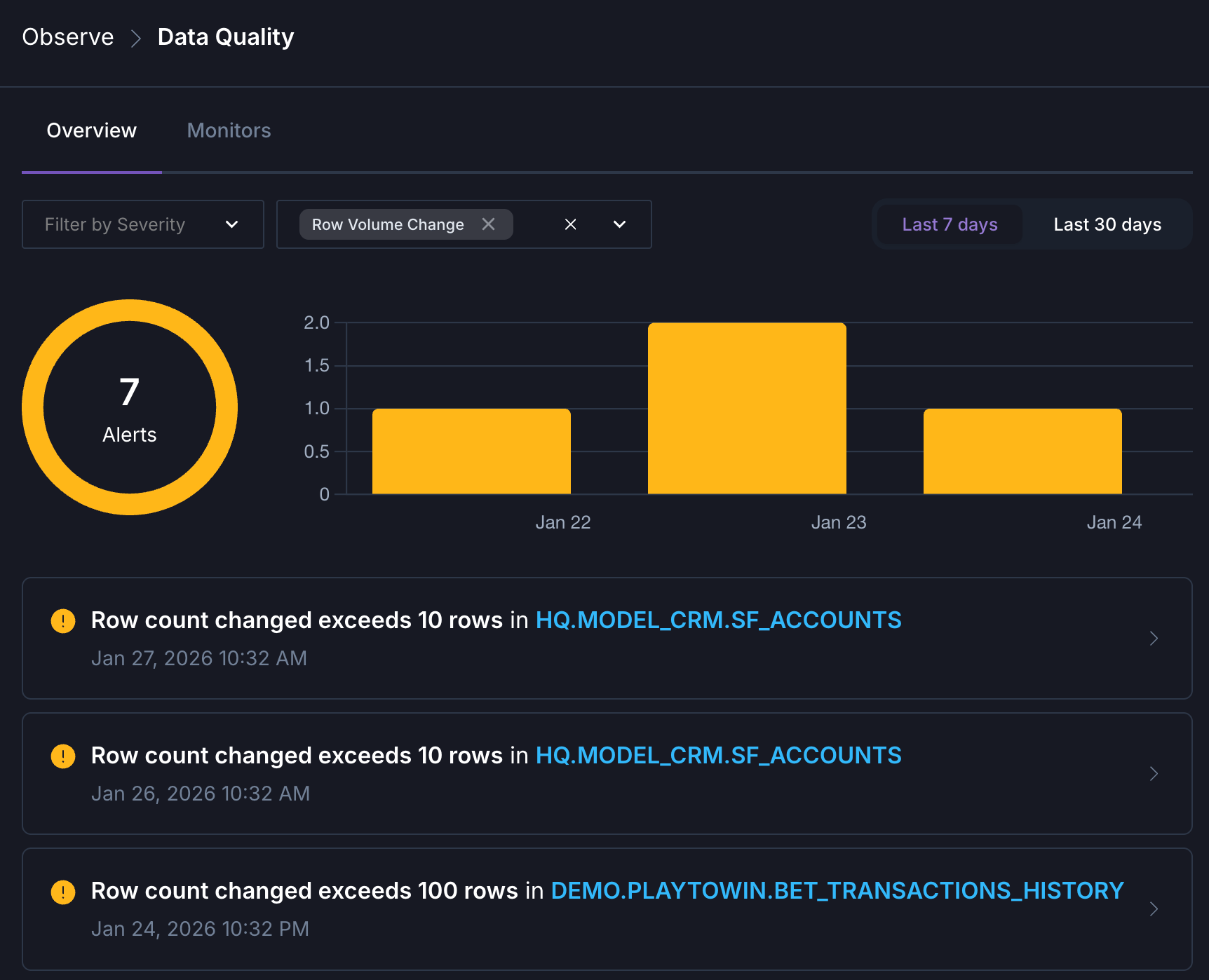
In addition to proactive alerting, you can get an overview of alerts triggered by your monitors by navigating to **Observe** → **Data Quality**.
### Alerts overview
In addition to proactive alerting, you can get an overview of alerts triggered by your monitors by navigating to **Observe** → **Data Quality**.
 ## Third-party frameworks
### Great Expectations
The [airflow-provider-great-expectations](https://great-expectations.github.io/airflow-provider-great-expectations/latest/getting-started/) package provides operators for running Great Expectations validations directly in your Dags.
When deciding which operator fits your use case, consider:
1. **Where is your data?** In memory as a DataFrame, or in an external data source?
2. **Do you need to trigger actions?** Such as sending notifications or updating external systems based on validation results.
3. **What Data Context do you need?** Ephemeral for stateless validations, or persistent to track results over time.
| Scenario | Recommended operator |
| ------------------------------------------------------------- | ------------------------------ |
| Data already in memory as Pandas or Spark DataFrame | `GXValidateDataFrameOperator` |
| Data in a database, warehouse, or file system | `GXValidateBatchOperator` |
| Need to trigger Slack notifications, emails, or other actions | `GXValidateCheckpointOperator` |
| Want full GX Core features with ValidationDefinitions | `GXValidateCheckpointOperator` |
See [Orchestrate Great Expectations with Airflow](/docs/learn/airflow-great-expectations) to learn how to use these operators in your Dag.
### dbt tests
If you use dbt with Airflow through [Cosmos](/docs/learn/airflow-dbt), use dbt's built-in testing framework:
* **Schema tests**: `unique`, `not_null`, `accepted_values`, `relationships`.
* **Custom tests**: SQL-based assertions for business-specific validation.
See [Orchestrate dbt Core with Airflow](/docs/learn/airflow-dbt) for integration patterns.
### Soda Core
Run [Soda](/docs/learn/soda-data-quality) checks using `@task.bash`:
```python wrap theme={null}
@task.bash
def soda_scan():
return "soda scan -d snowflake -c soda_config.yml checks.yml"
```
## Quick reference
| Approach | Best for | Trade-offs |
| ------------------------------ | ----------------------------------------------- | --------------------------- |
| `SQLColumnCheckOperator` | Column-level validation (null, unique, min/max) | Requires code changes |
| `SQLTableCheckOperator` | Business rules, aggregations | Requires code changes |
| `SQLValueCheckOperator` | Compare to expected value with tolerance | Simple comparisons only |
| `SQLIntervalCheckOperator` | Compare to historical data | Requires consistent history |
| `SQLThresholdCheckOperator` | Min/max bounds validation | Simple bounds only |
| `SQLCheckOperator` | Complex multi-table queries | Most flexible, most verbose |
| Observe table monitors | Common patterns, no code | Scheduled only |
| Observe custom SQL | Business rules, event-driven | Snowflake only (for now) |
| `GXValidateDataFrameOperator` | In-memory DataFrame validation | Requires data in memory |
| `GXValidateBatchOperator` | Database/file validation using BatchDefinition | More setup than DataFrame |
| `GXValidateCheckpointOperator` | Full GX features with actions | Most configuration required |
| dbt tests | Model-layer validation | Requires dbt |
| Soda Core | Declarative YAML-based checks | Additional tool |
## Conclusion
Data quality is a continuous practice that evolves with your data ecosystem. **Dag-level checks** give you precise control within your pipelines, catching issues before bad data propagates downstream.
**Platform-level checks with Astro Observe** extend that coverage beyond your Dags, monitoring data the moment it lands, tracing issues through table-level lineage, and providing the full context needed to assess impact and resolve problems fast.
**The most resilient data teams use both.** Dag-level SQL check operators for your critical validations, then layer on platform-level monitors in Astro Observe for broader coverage, event-driven checks, and the observability context that connects data quality to your entire DataOps ecosystem.
## Third-party frameworks
### Great Expectations
The [airflow-provider-great-expectations](https://great-expectations.github.io/airflow-provider-great-expectations/latest/getting-started/) package provides operators for running Great Expectations validations directly in your Dags.
When deciding which operator fits your use case, consider:
1. **Where is your data?** In memory as a DataFrame, or in an external data source?
2. **Do you need to trigger actions?** Such as sending notifications or updating external systems based on validation results.
3. **What Data Context do you need?** Ephemeral for stateless validations, or persistent to track results over time.
| Scenario | Recommended operator |
| ------------------------------------------------------------- | ------------------------------ |
| Data already in memory as Pandas or Spark DataFrame | `GXValidateDataFrameOperator` |
| Data in a database, warehouse, or file system | `GXValidateBatchOperator` |
| Need to trigger Slack notifications, emails, or other actions | `GXValidateCheckpointOperator` |
| Want full GX Core features with ValidationDefinitions | `GXValidateCheckpointOperator` |
See [Orchestrate Great Expectations with Airflow](/docs/learn/airflow-great-expectations) to learn how to use these operators in your Dag.
### dbt tests
If you use dbt with Airflow through [Cosmos](/docs/learn/airflow-dbt), use dbt's built-in testing framework:
* **Schema tests**: `unique`, `not_null`, `accepted_values`, `relationships`.
* **Custom tests**: SQL-based assertions for business-specific validation.
See [Orchestrate dbt Core with Airflow](/docs/learn/airflow-dbt) for integration patterns.
### Soda Core
Run [Soda](/docs/learn/soda-data-quality) checks using `@task.bash`:
```python wrap theme={null}
@task.bash
def soda_scan():
return "soda scan -d snowflake -c soda_config.yml checks.yml"
```
## Quick reference
| Approach | Best for | Trade-offs |
| ------------------------------ | ----------------------------------------------- | --------------------------- |
| `SQLColumnCheckOperator` | Column-level validation (null, unique, min/max) | Requires code changes |
| `SQLTableCheckOperator` | Business rules, aggregations | Requires code changes |
| `SQLValueCheckOperator` | Compare to expected value with tolerance | Simple comparisons only |
| `SQLIntervalCheckOperator` | Compare to historical data | Requires consistent history |
| `SQLThresholdCheckOperator` | Min/max bounds validation | Simple bounds only |
| `SQLCheckOperator` | Complex multi-table queries | Most flexible, most verbose |
| Observe table monitors | Common patterns, no code | Scheduled only |
| Observe custom SQL | Business rules, event-driven | Snowflake only (for now) |
| `GXValidateDataFrameOperator` | In-memory DataFrame validation | Requires data in memory |
| `GXValidateBatchOperator` | Database/file validation using BatchDefinition | More setup than DataFrame |
| `GXValidateCheckpointOperator` | Full GX features with actions | Most configuration required |
| dbt tests | Model-layer validation | Requires dbt |
| Soda Core | Declarative YAML-based checks | Additional tool |
## Conclusion
Data quality is a continuous practice that evolves with your data ecosystem. **Dag-level checks** give you precise control within your pipelines, catching issues before bad data propagates downstream.
**Platform-level checks with Astro Observe** extend that coverage beyond your Dags, monitoring data the moment it lands, tracing issues through table-level lineage, and providing the full context needed to assess impact and resolve problems fast.
**The most resilient data teams use both.** Dag-level SQL check operators for your critical validations, then layer on platform-level monitors in Astro Observe for broader coverage, event-driven checks, and the observability context that connects data quality to your entire DataOps ecosystem.