> ## Documentation Index
> Fetch the complete documentation index at: https://astronomer.io/docs/llms.txt
> Use this file to discover all available pages before exploring further.
# Cross-DAG dependencies
When designing Airflow DAGs, it is often best practice to put all related tasks in the same DAG. However, it's sometimes necessary to create dependencies between your DAGs. In this scenario, one node of a DAG is its own complete DAG, rather than just a single task. Throughout this guide, the following terms are used to describe DAG dependencies:
* **Upstream DAG**: A DAG that must reach a specified state before a downstream DAG can run
* **Downstream DAG**: A DAG that can't run until an upstream DAG reaches a specified state
The Airflow topic [Cross-DAG Dependencies](https://airflow.apache.org/docs/apache-airflow/stable/howto/operator/external_task_sensor.html#cross-dag-dependencies), indicates cross-DAG dependencies can be helpful in the following situations:
* A DAG should only run after one or more assets have been updated by tasks in other DAGs.
* Two DAGs are dependent, but they have different schedules.
* Two DAGs are dependent, but they are owned by different teams.
* A task depends on another task but for a different execution date.
In this guide, you'll review the methods for implementing cross-DAG dependencies, including how to implement dependencies if your dependent DAGs are located in different Airflow deployments.
## Assumed knowledge
To get the most out of this guide, you should have an understanding of:
* Dependencies in Airflow. See [Managing Dependencies in Apache Airflow](/docs/learn/managing-dependencies).
* Airflow DAGs. See [Introduction to Airflow DAGs](/docs/learn/dags).
* Airflow operators. See [Operators 101](/docs/learn/what-is-an-operator).
* Airflow sensors. See [Sensors 101](/docs/learn/what-is-a-sensor).
## Implement cross-DAG dependencies
There are multiple ways to implement cross-DAG dependencies in Airflow, including:
* [Data-aware scheduling using assets](/docs/learn/airflow-datasets).
* The [`TriggerDagRunOperator`](https://airflow.apache.org/registry/providers/standard#standard-trigger_dagrun-TriggerDagRunOperator).
* The [`ExternalTaskSensor`](https://airflow.apache.org/registry/providers/standard#standard-external_task-ExternalTaskSensor).
* The [Airflow API](https://airflow.apache.org/docs/apache-airflow/stable/stable-rest-api-ref.html).
In this section, you'll learn how and when you should use each method and how to view dependencies in the Airflow UI.
### Asset dependencies
The most common way to define cross-DAG dependencies is by using [assets](/docs/learn/airflow-datasets). DAGs that access the same data can have explicit, visible relationships, and DAGs can be scheduled based on updates to this data.
You should use this method if you have a downstream DAG that should only run after an asset has been updated by an upstream DAG, especially if those updates are irregular. This type of dependency also provides you with increased observability into the dependencies between your DAGs and assets in the Airflow UI.
Using assets requires knowledge of the following scheduling concepts:
* **Producing task**: A task that updates a specific asset, defined by its `outlets` parameter.
* **Consuming DAG**: A DAG that runs as soon as a specific asset is updated.
Any task can be made into a producing task by providing one or more assets to the `outlets` parameter. For example:
```python wrap theme={null}
from airflow.sdk import Asset
from airflow.providers.standard.operators.empty import EmptyOperator
asset1 = Asset('asset1')
# producing task in the upstream DAG
EmptyOperator(
task_id="producing_task",
outlets=[asset1] # flagging to Airflow that asset1 was updated
)
```
The following downstream DAG is scheduled to run after `asset1` has been updated by providing it to the `schedule` parameter.
```python wrap theme={null}
from airflow.sdk import Asset, dag
asset1 = Asset('asset1')
# consuming DAG
@dag(schedule=[asset1])
```
See [Assets and data-aware scheduling in Airflow](/docs/learn/airflow-datasets) to learn more.
### `TriggerDagRunOperator`
The `TriggerDagRunOperator` is a straightforward method of implementing cross-DAG dependencies from an upstream DAG. This operator allows you to have a task in one DAG that triggers another DAG in the same Airflow environment. For more information about this operator, see [`TriggerDagRunOperator`](https://airflow.apache.org/registry/providers/standard#standard-trigger_dagrun-TriggerDagRunOperator).
You can trigger a downstream DAG with the `TriggerDagRunOperator` from any point in the upstream DAG. If you set the operator's `wait_for_completion` parameter to `True`, the upstream DAG pauses and then resumes only after the downstream DAG has finished running. This waiting process can be deferred to the triggerer by setting the parameter, `deferrable`, to True. This setting turns the operator into a [deferrable operator](/docs/learn/deferrable-operators), which increases Airflow's scalability and can reduce cost.
A common use case for this implementation is when an upstream DAG fetches new testing data for a machine learning pipeline, runs and tests a model, and publishes the model's prediction. In case of the model underperforming, the `TriggerDagRunOperator` is used to start a separate DAG that retrains the model while the upstream DAG waits. Once the model is retrained and tested by the downstream DAG, the upstream DAG resumes and publishes the new model's results.
The [schedule](/docs/learn/scheduling-in-airflow) of the downstream DAG is independent of the runs triggered by the `TriggerDagRunOperator`. To run a DAG solely with the `TriggerDagRunOperator`, set the DAG's `schedule` parameter to `None`. Note that the dependent DAG must be unpaused to get triggered.
The following example DAG implements the `TriggerDagRunOperator` to trigger a DAG with the `dag_id` `dependent_dag` between two other tasks. Since both the `wait_for_completion` and the `deferrable` parameters of the `trigger_dependent_dag` task in the `trigger_dagrun_dag` are set to `True`, the task is deferred until the `dependent_dag` has finished its run. Once the `trigger_dagrun_dag` task completes, the `end_task` will run.
TaskFlow
```python expandable wrap theme={null}
from airflow.decorators import dag, task
from airflow.operators.trigger_dagrun import TriggerDagRunOperator
from pendulum import datetime, duration
@task
def start_task(task_type):
return f"The {task_type} task has completed."
@task
def end_task(task_type):
return f"The {task_type} task has completed."
# Default settings applied to all tasks
default_args = {
"owner": "airflow",
"depends_on_past": False,
"email_on_failure": False,
"email_on_retry": False,
"retries": 1,
"retry_delay": duration(minutes=5),
}
@dag(
start_date=datetime(2023, 1, 1),
max_active_runs=1,
schedule="@daily",
default_args=default_args,
catchup=False,
)
def trigger_dagrun_dag():
trigger_dependent_dag = TriggerDagRunOperator(
task_id="trigger_dependent_dag",
trigger_dag_id="dependent_dag",
wait_for_completion=True,
deferrable=True, # Note that this parameter only exists in Airflow 2.6+
)
start_task("starting") >> trigger_dependent_dag >> end_task("ending")
trigger_dagrun_dag()
```
Traditional
```python expandable wrap theme={null}
from airflow import DAG
from airflow.operators.python import PythonOperator
from airflow.operators.trigger_dagrun import TriggerDagRunOperator
from pendulum import datetime, duration
def print_task_type(**kwargs):
print(f"The {kwargs['task_type']} task has completed.")
# Default settings applied to all tasks
default_args = {
"owner": "airflow",
"depends_on_past": False,
"email_on_failure": False,
"email_on_retry": False,
"retries": 1,
"retry_delay": duration(minutes=5),
}
with DAG(
dag_id="trigger_dagrun_dag",
start_date=datetime(2023, 1, 1),
max_active_runs=1,
schedule="@daily",
default_args=default_args,
catchup=False,
) as dag:
start_task = PythonOperator(
task_id="start_task",
python_callable=print_task_type,
op_kwargs={"task_type": "starting"},
)
trigger_dependent_dag = TriggerDagRunOperator(
task_id="trigger_dependent_dag",
trigger_dag_id="dependent_dag",
wait_for_completion=True,
deferrable=True, # Note that this parameter only exists in Airflow 2.6+
)
end_task = PythonOperator(
task_id="end_task",
python_callable=print_task_type,
op_kwargs={"task_type": "ending"},
)
start_task >> trigger_dependent_dag >> end_task
```
If your dependent DAG requires a config input or a specific logical date, you can specify them in the operator using the `conf` and `logical_date` params respectively.
You can set `skip_when_already_exists` to `True` to keep the operator from attempting to trigger runs that have already occurred, and failing as a result. This can happen when trying to rerun DAGs and tasks. Additionally, you can set `fail_when_dag_is_paused` to fail the task instantiated with the `TriggerDagRunOperator` if the dependent DAG is paused.
### `ExternalTaskSensor`
To create cross-DAG dependencies from a downstream DAG, consider using one or more [ExternalTaskSensors](https://airflow.apache.org/registry/providers/standard#standard-external_task-ExternalTaskSensor). The downstream DAG will pause until a task is completed in the upstream DAG before resuming.
This method of creating cross-DAG dependencies is especially useful when you have a downstream DAG with different branches that depend on different tasks in one or more upstream DAGs. Instead of defining an entire DAG as being downstream of another DAG as you do with assets, you can set a specific task in a downstream DAG to wait for a task to finish in an upstream DAG.
For example, you could have upstream tasks modifying different tables in a data warehouse and one downstream DAG running one branch of data quality checks for each of those tables. You can use one `ExternalTaskSensor` at the start of each branch to make sure that the checks running on each table only start after the update to the specific table is finished.
You use the `ExternalTaskSensor` in deferrable mode using `deferrable=True`. For more info on deferrable operators and their benefits, see [Deferrable Operators](/docs/learn/deferrable-operators)
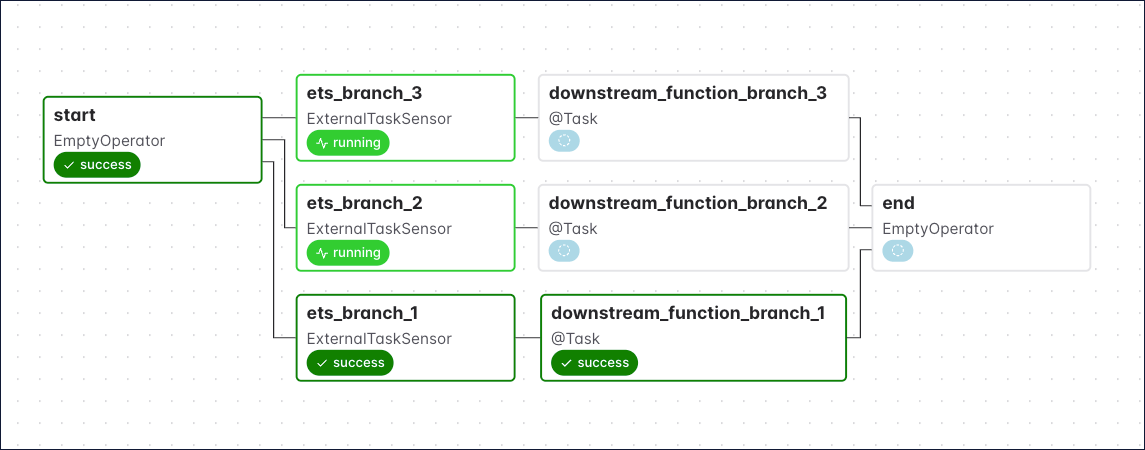
The following example DAG uses three ExternalTaskSensors at the start of three parallel branches in the same DAG.
TaskFlow
```python expandable wrap theme={null}
from airflow.decorators import dag, task
from airflow.sensors.external_task import ExternalTaskSensor
from airflow.operators.empty import EmptyOperator
from pendulum import datetime, duration
@task
def downstream_function_branch_1():
print("Upstream DAG 1 has completed. Starting tasks of branch 1.")
@task
def downstream_function_branch_2():
print("Upstream DAG 2 has completed. Starting tasks of branch 2.")
@task
def downstream_function_branch_3():
print("Upstream DAG 3 has completed. Starting tasks of branch 3.")
default_args = {
"owner": "airflow",
"depends_on_past": False,
"email_on_failure": False,
"email_on_retry": False,
"retries": 1,
"retry_delay": duration(minutes=5),
}
@dag(
start_date=datetime(2022, 8, 1),
max_active_runs=3,
schedule="*/1 * * * *",
catchup=False,
)
def external_task_sensor_taskflow_dag():
start = EmptyOperator(task_id="start")
end = EmptyOperator(task_id="end")
ets_branch_1 = ExternalTaskSensor(
task_id="ets_branch_1",
external_dag_id="upstream_dag_1",
external_task_id="my_task",
allowed_states=["success"],
failed_states=["failed", "skipped"],
)
task_branch_1 = downstream_function_branch_1()
ets_branch_2 = ExternalTaskSensor(
task_id="ets_branch_2",
external_dag_id="upstream_dag_2",
external_task_id="my_task",
allowed_states=["success"],
failed_states=["failed", "skipped"],
)
task_branch_2 = downstream_function_branch_2()
ets_branch_3 = ExternalTaskSensor(
task_id="ets_branch_3",
external_dag_id="upstream_dag_3",
external_task_id="my_task",
allowed_states=["success"],
failed_states=["failed", "skipped"],
)
task_branch_3 = downstream_function_branch_3()
start >> [ets_branch_1, ets_branch_2, ets_branch_3]
ets_branch_1 >> task_branch_1
ets_branch_2 >> task_branch_2
ets_branch_3 >> task_branch_3
[task_branch_1, task_branch_2, task_branch_3] >> end
external_task_sensor_taskflow_dag()
```
Traditional
```python expandable wrap theme={null}
from airflow import DAG
from airflow.operators.python import PythonOperator
from airflow.sensors.external_task import ExternalTaskSensor
from airflow.operators.empty import EmptyOperator
from pendulum import datetime, duration
def downstream_function_branch_1():
print("Upstream DAG 1 has completed. Starting tasks of branch 1.")
def downstream_function_branch_2():
print("Upstream DAG 2 has completed. Starting tasks of branch 2.")
def downstream_function_branch_3():
print("Upstream DAG 3 has completed. Starting tasks of branch 3.")
default_args = {
"owner": "airflow",
"depends_on_past": False,
"email_on_failure": False,
"email_on_retry": False,
"retries": 1,
"retry_delay": duration(minutes=5),
}
with DAG(
"external-task-sensor-dag",
start_date=datetime(2022, 8, 1),
max_active_runs=3,
schedule="*/1 * * * *",
catchup=False,
) as dag:
start = EmptyOperator(task_id="start")
end = EmptyOperator(task_id="end")
ets_branch_1 = ExternalTaskSensor(
task_id="ets_branch_1",
external_dag_id="upstream_dag_1",
external_task_id="my_task",
allowed_states=["success"],
failed_states=["failed", "skipped"],
)
task_branch_1 = PythonOperator(
task_id="task_branch_1",
python_callable=downstream_function_branch_1,
)
ets_branch_2 = ExternalTaskSensor(
task_id="ets_branch_2",
external_dag_id="upstream_dag_2",
external_task_id="my_task",
allowed_states=["success"],
failed_states=["failed", "skipped"],
)
task_branch_2 = PythonOperator(
task_id="task_branch_2",
python_callable=downstream_function_branch_2,
)
ets_branch_3 = ExternalTaskSensor(
task_id="ets_branch_3",
external_dag_id="upstream_dag_3",
external_task_id="my_task",
allowed_states=["success"],
failed_states=["failed", "skipped"],
)
task_branch_3 = PythonOperator(
task_id="task_branch_3",
python_callable=downstream_function_branch_3,
)
start >> [ets_branch_1, ets_branch_2, ets_branch_3]
ets_branch_1 >> task_branch_1
ets_branch_2 >> task_branch_2
ets_branch_3 >> task_branch_3
[task_branch_1, task_branch_2, task_branch_3] >> end
```
In this DAG:
* `ets_branch_1` waits for the `my_task` task of `upstream_dag_1` to complete before moving on to execute `task_branch_1`.
* `ets_branch_2` waits for the `my_task` task of `upstream_dag_2` to complete before moving on to execute `task_branch_2`.
* `ets_branch_3` waits for the `my_task` task of `upstream_dag_3` to complete before moving on to execute `task_branch_3`.
These processes happen in parallel and are independent of each other. The graph view shows the state of the DAG after `my_task` in `upstream_dag_1` has finished which caused `ets_branch_1` and `task_branch_1` to run. `ets_branch_2` and `ets_branch_3` are still waiting for their upstream tasks to finish.
 If you want the downstream DAG to wait for the entire upstream DAG to finish instead of a specific task, you can set the `external_task_id` to `None`. In the example above, you specified that the external task must have a state of `success` for the downstream task to succeed, as defined by the `allowed_states` and `failed_states`.
In the previous example, the upstream DAG (`example_dag`) and downstream DAG (`external-task-sensor-dag`) must have the same start date and schedule interval. This is because the `ExternalTaskSensor` will look for completion of the specified task or DAG at the same `logical_date`. To look for completion of the external task at a different date, you can make use of either of the `execution_delta` or `execution_date_fn` parameters (these are described in more detail in the documentation linked above).
### Airflow API
The [Airflow API](https://airflow.apache.org/docs/apache-airflow/stable/stable-rest-api-ref.html) is another way of creating cross-DAG dependencies. To use the API to trigger a DAG run, you can make a POST request to the `DAGRuns` endpoint.
The following script shows how to trigger a DAG run using the Airflow API, for cross-dag dependencies, you would run this code inside an `@task` decorated function in your upstream DAG.
```python expandable wrap theme={null}
import requests
# Replace with your Airflow instance details
USERNAME = "admin"
PASSWORD = "admin"
HOST = "http://localhost:8080/"
MY_DAG = "example_dag" # The id of the DAG you want to trigger
def get_jwt_token():
token_url = f"{HOST}/auth/token"
payload = {"username": USERNAME, "password": PASSWORD}
headers = {"Content-Type": "application/json"}
response = requests.post(token_url, json=payload, headers=headers)
token = response.json().get("access_token")
return token
def run_dag(dag_id, logical_date=None):
event_payload = {"conf": {"param1": "Hello World"}, "logical_date": logical_date}
token = get_jwt_token()
if token:
url = f"{HOST}/api/v2/dags/{dag_id}/dagRuns"
headers = {"Authorization": f"Bearer {token}"}
response = requests.post(url, json=event_payload, headers=headers)
print(response.status_code)
print(response.json())
else:
raise Exception("Failed to get JWT token")
if __name__ == "__main__":
run_dag(dag_id=MY_DAG, logical_date=None)
```
You can also update an asset using the API by making a POST request to the `Assets` endpoint.
## Cross-deployment dependencies
To implement cross-DAG dependencies on two different Airflow environments on Astro, follow the guidance in [Cross-deployment dependencies](/docs/astro/best-practices/cross-deployment-dependencies).
If you want the downstream DAG to wait for the entire upstream DAG to finish instead of a specific task, you can set the `external_task_id` to `None`. In the example above, you specified that the external task must have a state of `success` for the downstream task to succeed, as defined by the `allowed_states` and `failed_states`.
In the previous example, the upstream DAG (`example_dag`) and downstream DAG (`external-task-sensor-dag`) must have the same start date and schedule interval. This is because the `ExternalTaskSensor` will look for completion of the specified task or DAG at the same `logical_date`. To look for completion of the external task at a different date, you can make use of either of the `execution_delta` or `execution_date_fn` parameters (these are described in more detail in the documentation linked above).
### Airflow API
The [Airflow API](https://airflow.apache.org/docs/apache-airflow/stable/stable-rest-api-ref.html) is another way of creating cross-DAG dependencies. To use the API to trigger a DAG run, you can make a POST request to the `DAGRuns` endpoint.
The following script shows how to trigger a DAG run using the Airflow API, for cross-dag dependencies, you would run this code inside an `@task` decorated function in your upstream DAG.
```python expandable wrap theme={null}
import requests
# Replace with your Airflow instance details
USERNAME = "admin"
PASSWORD = "admin"
HOST = "http://localhost:8080/"
MY_DAG = "example_dag" # The id of the DAG you want to trigger
def get_jwt_token():
token_url = f"{HOST}/auth/token"
payload = {"username": USERNAME, "password": PASSWORD}
headers = {"Content-Type": "application/json"}
response = requests.post(token_url, json=payload, headers=headers)
token = response.json().get("access_token")
return token
def run_dag(dag_id, logical_date=None):
event_payload = {"conf": {"param1": "Hello World"}, "logical_date": logical_date}
token = get_jwt_token()
if token:
url = f"{HOST}/api/v2/dags/{dag_id}/dagRuns"
headers = {"Authorization": f"Bearer {token}"}
response = requests.post(url, json=event_payload, headers=headers)
print(response.status_code)
print(response.json())
else:
raise Exception("Failed to get JWT token")
if __name__ == "__main__":
run_dag(dag_id=MY_DAG, logical_date=None)
```
You can also update an asset using the API by making a POST request to the `Assets` endpoint.
## Cross-deployment dependencies
To implement cross-DAG dependencies on two different Airflow environments on Astro, follow the guidance in [Cross-deployment dependencies](/docs/astro/best-practices/cross-deployment-dependencies).