> ## Documentation Index
> Fetch the complete documentation index at: https://astronomer.io/docs/llms.txt
> Use this file to discover all available pages before exploring further.
# Blueprint: A Dag writing abstraction with a no-code interface in the Astro IDE
**Preview**
The no-code UI for blueprint within the Astro IDE is in [Preview](/docs/astro/feature-previews).
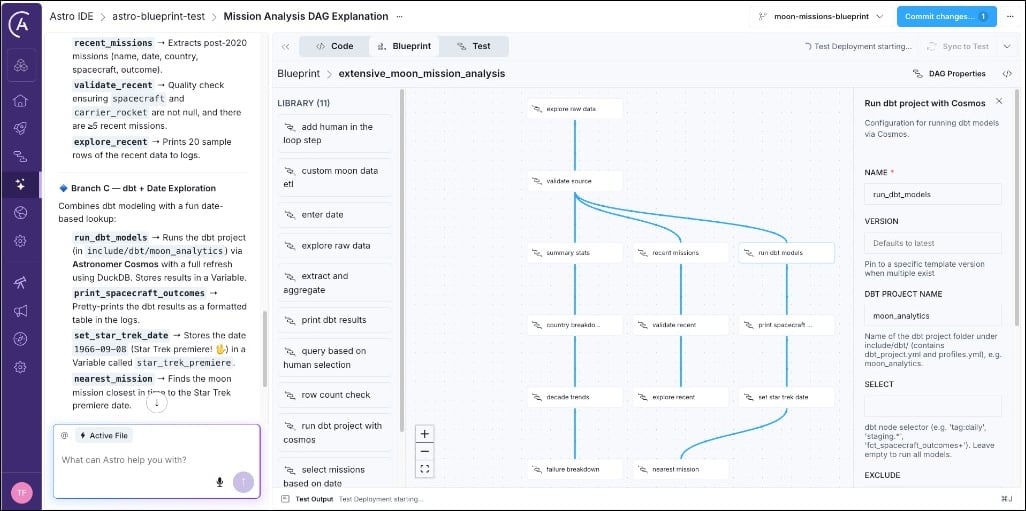
Blueprint is a template-based Dag authoring system built on the open-source [airflow-blueprint](https://github.com/astronomer/blueprint) package, which is compatible with any Airflow 3 environment. When using this package, data engineers define reusable *blueprints* in Python, and other team members can compose those blueprints into Dags, either through YAML configuration or in a no-code drag-and-drop interface in the [Astro IDE](/docs/astro/ide-overview).
 For data engineers and platform teams. Learn how to define reusable blueprints in Python and make them available to your team members in the [Astro IDE](/docs/astro/ide-overview).
For analysts, data scientists, and other team members, who prefer a no-code interface for defining workflows. Learn how to build pipelines from templates using the [Astro IDE](/docs/astro/ide-overview).
## What can a blueprint do?
A blueprint can contain any logic you can write in Python. If you are familiar with Airflow, you can think of a blueprint as a self-contained [task group](/docs/learn/task-groups) containing one or more tasks defined with [operators](/docs/learn/what-is-an-operator) or [decorators](/docs/learn/airflow-decorators). The blueprint author writes the logic in Python and end users assemble one or more blueprints into an Airflow Dag either using YAML or the drag-and-drop no-code interface in the [Astro IDE](/docs/astro/ide-overview).
Here are some examples of what you can do with a blueprint:
* Execute SQL queries against a data warehouse
* Run a [dbt](/docs/learn/airflow-dbt) project using [Cosmos](https://github.com/astronomer/astronomer-cosmos)
* Orchestrate an AI agent or large language model (LLM) call
* Add [human-in-the-loop](/docs/learn/airflow-human-in-the-loop) approval steps
* Run [data quality](/docs/learn/data-quality) checks on a table
* Execute a complex multi-step workflow while only exposing a few key configuration parameters
The blueprint author decides which configuration options to expose, for example, to hide Airflow internals like retries, or entire (sets of) operators, for example, performing clean up tasks after an ETL pipeline. End users see only the fields relevant to their use case, for example, the SQL query they'd like to execute or the prompt they want to give to an AI agent.
## When to use Blueprint
Blueprint is a good fit when:
* You want to encode workflow patterns in Python so analysts, data scientists, and other team members can compose and change Dags through YAML or the no-code UI without writing Python code.
* You have recurring pipeline patterns (extract-transform-load, model training, report generation) that differ only in configuration and benefit from standardization.
For data engineers and platform teams. Learn how to define reusable blueprints in Python and make them available to your team members in the [Astro IDE](/docs/astro/ide-overview).
For analysts, data scientists, and other team members, who prefer a no-code interface for defining workflows. Learn how to build pipelines from templates using the [Astro IDE](/docs/astro/ide-overview).
## What can a blueprint do?
A blueprint can contain any logic you can write in Python. If you are familiar with Airflow, you can think of a blueprint as a self-contained [task group](/docs/learn/task-groups) containing one or more tasks defined with [operators](/docs/learn/what-is-an-operator) or [decorators](/docs/learn/airflow-decorators). The blueprint author writes the logic in Python and end users assemble one or more blueprints into an Airflow Dag either using YAML or the drag-and-drop no-code interface in the [Astro IDE](/docs/astro/ide-overview).
Here are some examples of what you can do with a blueprint:
* Execute SQL queries against a data warehouse
* Run a [dbt](/docs/learn/airflow-dbt) project using [Cosmos](https://github.com/astronomer/astronomer-cosmos)
* Orchestrate an AI agent or large language model (LLM) call
* Add [human-in-the-loop](/docs/learn/airflow-human-in-the-loop) approval steps
* Run [data quality](/docs/learn/data-quality) checks on a table
* Execute a complex multi-step workflow while only exposing a few key configuration parameters
The blueprint author decides which configuration options to expose, for example, to hide Airflow internals like retries, or entire (sets of) operators, for example, performing clean up tasks after an ETL pipeline. End users see only the fields relevant to their use case, for example, the SQL query they'd like to execute or the prompt they want to give to an AI agent.
## When to use Blueprint
Blueprint is a good fit when:
* You want to encode workflow patterns in Python so analysts, data scientists, and other team members can compose and change Dags through YAML or the no-code UI without writing Python code.
* You have recurring pipeline patterns (extract-transform-load, model training, report generation) that differ only in configuration and benefit from standardization.