> ## Documentation Index
> Fetch the complete documentation index at: https://astronomer.io/docs/llms.txt
> Use this file to discover all available pages before exploring further.
# Task state store in Apache Airflow®
The task state store, added in [Apache Airflow®](https://airflow.apache.org/) 3.3, allows you to save information that persists between task retries. This makes the task state store suitable for storing external job IDs and intra-task checkpoints.
In this guide, you'll learn:
* When to use the task state store, and how it compares to XCom, deferrable operators, and the asset state store.
* How to set, get, delete, and clear values in the task state store.
* How to view and edit entries in the Airflow UI and through the Airflow REST API.
* How to create a custom operator that uses the task state store through the `ResumableJobMixin`.
* How to configure the task state store.
The task state store holds information for a specific task instance. Airflow 3.3 also introduced the asset state store, which holds information attached to a specific [Airflow asset](/docs/learn/airflow-datasets). See the [asset state store section](/docs/learn/airflow-advanced-asset-scheduling#asset-state-store) of the advanced asset-based scheduling guide for more information.
## Assumed knowledge
To get the most out of this guide, you should have an understanding of:
* Basic Airflow concepts. See [Introduction to Apache Airflow](/docs/learn/intro-to-airflow).
* Airflow operators. See [Airflow operators](/docs/learn/what-is-an-operator).
* Airflow decorators. See [Introduction to the TaskFlow API and Airflow decorators](/docs/learn/airflow-decorators).
## When to use the task state store
Use the task state store to persist information about a task instance's own working state so that a later attempt of the same task instance, for example after a worker crash or retry, can access it. You can:
* Store the ID of a long-running external process, such as a Spark job or a model fine-tuning job, so a retry reconnects to the running job instead of submitting a duplicate.
* Store an intra-task checkpoint, such as the last page or offset processed, so a retry doesn't restart from the beginning.
* Store several pieces of state for one task instance, such as a status and a row count, and update them as the task runs.
When using the default task state store backend, Airflow saves entries to the metadata database, and stored values must be JSON serializable (except `None`). See [task state store configuration](#task-state-store-configuration) for information on implementing a custom task state store backend.
### Task state store vs. XCom
Both the task state store and [XCom](/docs/learn/airflow-passing-data-between-tasks) store small pieces of data attached to an individual task instance. The main difference is that Airflow clears XComs on retries, while task state entries persist.
| | Task state store | XCom |
| ------------------------ | -------------------------------------------------------------------------- | ---------------------------------------------------------------- |
| Purpose | Persist a task instance's working state across retries | Pass data from a task to downstream tasks |
| Retry behavior | Preserved across retries | Cleared on retries |
| Read by | The same task instance, on a later attempt | Downstream tasks in the same or other Dag runs |
| Access from within tasks | `context["task_state_store"].set`, `.get`, `.delete`, and `.clear` methods | `context["ti"].xcom_push` and `context["ti"].xcom_pull` |
| Retention | Time-based, `NEVER_EXPIRE`, or clear-on-success | Tied to the task instance, removed when the task instance reruns |
### Task state store vs. deferrable operators
The task state store, together with the `ResumableJobMixin`, and [deferrable operators](/docs/learn/deferrable-operators) are both used in the context of long-running external jobs. Which to choose is often a question of personal preference. Deferrable operators free the worker slot while waiting and require a triggerer. The `ResumableJobMixin` keeps the worker slot but makes a synchronous operator crash-safe/durable by reconnecting to a running job.
| | Task state store with `ResumableJobMixin` | Deferrable operators |
| ----------------------------------- | ---------------------------------------------------------- | ------------------------------------------- |
| Best for | Retry safety for synchronous operators without a triggerer | Very long running tasks |
| Frees the worker slot while waiting | No | Yes |
| Requires a triggerer | No | Yes |
| Programming model | Synchronous `execute` method | Async trigger and `execute_complete` method |
### Task state store vs. asset state store
The task state store and the asset state store have a similar key-value interface, but they are scoped differently.
| | Task state store | Asset state store |
| ---------------- | ------------------------------------------ | ------------------------------------------------------------------- |
| Attached to | A single task instance | An [Airflow asset](/docs/learn/airflow-datasets) |
| Accessed through | `context["task_state_store"]` | `context["asset_state_store"]` |
| Read by | The same task instance, on a later attempt | Any task with the asset in its `inlets` or `outlets` parameter |
| Retention | Configurable (default: 30 days) | No retention limit, cleared explicitly or when you delete the asset |
For more information on the asset state store, see the [asset state store section](/docs/learn/airflow-advanced-asset-scheduling#asset-state-store) of the advanced asset-based scheduling guide.
## How to use the task state store
You have several options to interact with the task state store:
* [In your task code](#task-state-store-examples) using the [methods](#task-state-store-methods) available in the `task_state_store` key of the [Airflow context](/docs/learn/airflow-context) in:
* A `@task`-decorated function using the TaskFlow API.
* A `python_callable` passed to a `PythonOperator`.
* The `execute` method of a custom operator, created by subclassing `BaseOperator` or any [existing traditional operator](https://airflow.apache.org/registry/).
* [In the Airflow UI](#task-state-store-in-the-airflow-ui)
* [With the Airflow REST API](#task-state-store-api-endpoints)
For custom operators built to resume a process after a retry a mixin is available, see [ResumableJobMixin](#resumablejobmixin).
### Task state store methods
The task state store exposes four methods: `set`, `get`, `delete`, and `clear`.
`set(key, value, *, retention=None)` writes or overwrites the value for a key, in this case the PID of a long-running remote shell command. The keyword-only `retention` argument controls when the entry is automatically deleted:
* A `timedelta`, to delete the entry after the given duration from the time of the write. Airflow computes the expiry timestamp on the worker before sending the value to the API server.
* `NEVER_EXPIRE`, to exclude the entry from the automatic cleanup process and keep it until it is manually deleted.
* `None`, the default, to fall back to the environment's `AIRFLOW__STATE_STORE__DEFAULT_RETENTION_DAYS` configuration (default: 30 days).
```python wrap theme={null}
# task_state_store = context["task_state_store"]
task_state_store.set("remote_pid", 239, retention=timedelta(days=28))
```
`get(key, default=None)` returns the stored value, or `default` if the key doesn't exist. For example, if a previous try of a task instance already started a long running shell command and saved the PID in the task state store, a later retry can `get` the PID in order to check if the command is still running, and if that is the case, wait on the existing command to finish instead of rerunning it from the start.
```python wrap theme={null}
remote_pid = task_state_store.get("remote_pid", default=None)
```
`delete(key)` deletes a single key. It does nothing if the key doesn't exist.
```python wrap theme={null}
task_state_store.delete("remote_pid")
```
`clear()` deletes all task state store keys for the task instance.
```python wrap theme={null}
task_state_store.clear()
```
### Task state store examples
The following examples start a long-running shell command on a remote host and store its process ID (PID) in the task state store with the `set` method. If the first try fails and the task is retried, it uses the `get` method to reconnect to the still-running command instead of launching a new one.
TaskFlow API
```python {17,21} expandable wrap theme={null}
from pendulum import duration
from airflow.sdk import task
from airflow.providers.ssh.hooks.ssh import SSHHook
def _ssh_exec(command):
hook = SSHHook(ssh_conn_id="ssh_default")
with hook.get_conn() as client:
_, stdout, _ = client.exec_command(command)
output = stdout.read().decode().strip()
exit_status = stdout.channel.recv_exit_status()
return exit_status, output
@task(retries=10, retry_delay=duration(minutes=10))
def run_ssh_command(launch_cmd, check_cmd, out_file, task_state_store=None):
remote_pid = task_state_store.get("remote_pid")
if remote_pid is None:
_, remote_pid = _ssh_exec(launch_cmd.replace("{out_file}", out_file))
task_state_store.set("remote_pid", remote_pid)
print(f"Reconnecting to remote PID {remote_pid} from a previous attempt.")
exit_status, output = _ssh_exec(
check_cmd.replace("{pid}", remote_pid).replace("{out_file}", out_file)
)
print(f"Remote job output: {output}")
if exit_status != 0:
raise RuntimeError(f"Remote job {remote_pid} failed with exit status {exit_status}.")
run_ssh_command(
launch_cmd=(
"nohup sh -c 'sleep 60; rc=$?; echo finished > {out_file}; "
"echo $rc > {out_file}.rc' >/dev/null 2>&1 & echo $!"
),
check_cmd=(
"while kill -0 {pid} 2>/dev/null; do sleep 2; done; "
"rc=$(cat {out_file}.rc 2>/dev/null); cat {out_file}; "
'[ "$rc" = "0" ]'
),
out_file="/tmp/log_{{ run_id }}.out",
)
```
`PythonOperator`
```python {17,21} expandable wrap theme={null}
from pendulum import duration
from airflow.providers.standard.operators.python import PythonOperator
from airflow.providers.ssh.hooks.ssh import SSHHook
def _ssh_exec(command):
hook = SSHHook(ssh_conn_id="ssh_default")
with hook.get_conn() as client:
_, stdout, _ = client.exec_command(command)
output = stdout.read().decode().strip()
exit_status = stdout.channel.recv_exit_status()
return exit_status, output
def _run_ssh_command_func(launch_cmd, check_cmd, out_file, task_state_store=None):
remote_pid = task_state_store.get("remote_pid")
if remote_pid is None:
_, remote_pid = _ssh_exec(launch_cmd.replace("{out_file}", out_file))
task_state_store.set("remote_pid", remote_pid)
print(f"Reconnecting to remote PID {remote_pid} from a previous attempt.")
exit_status, output = _ssh_exec(
check_cmd.replace("{pid}", remote_pid).replace("{out_file}", out_file)
)
print(f"Remote job output: {output}")
if exit_status != 0:
raise RuntimeError(f"Remote job {remote_pid} failed with exit status {exit_status}.")
PythonOperator(
task_id="run_ssh_command",
python_callable=_run_ssh_command_func,
op_kwargs={
"launch_cmd": (
"nohup sh -c 'sleep 60; rc=$?; echo finished > {out_file}; "
"echo $rc > {out_file}.rc' >/dev/null 2>&1 & echo $!"
),
"check_cmd": (
"while kill -0 {pid} 2>/dev/null; do sleep 2; done; "
"rc=$(cat {out_file}.rc 2>/dev/null); cat {out_file}; "
'[ "$rc" = "0" ]'
),
"out_file": "/tmp/log_{{ run_id }}.out",
},
retries=10,
retry_delay=duration(minutes=10),
)
```
Custom operator
```python {27,28,32} expandable wrap theme={null}
from pendulum import duration
from airflow.sdk.bases.operator import BaseOperator
from airflow.providers.ssh.hooks.ssh import SSHHook
def _ssh_exec(command):
hook = SSHHook(ssh_conn_id="ssh_default")
with hook.get_conn() as client:
_, stdout, _ = client.exec_command(command)
output = stdout.read().decode().strip()
exit_status = stdout.channel.recv_exit_status()
return exit_status, output
class MyCustomOperator(BaseOperator):
template_fields = ("launch_cmd", "check_cmd", "out_file")
def __init__(self, *, launch_cmd, check_cmd, out_file, **kwargs):
super().__init__(**kwargs)
self.launch_cmd = launch_cmd
self.check_cmd = check_cmd
self.out_file = out_file
def execute(self, context):
tss = context["task_state_store"]
remote_pid = tss.get("remote_pid")
if remote_pid is None:
_, remote_pid = _ssh_exec(self.launch_cmd.replace("{out_file}", self.out_file))
tss.set("remote_pid", remote_pid)
self.log.info(f"Reconnecting to remote PID {remote_pid} from a previous attempt.")
exit_status, output = _ssh_exec(
self.check_cmd.replace("{pid}", remote_pid).replace("{out_file}", self.out_file)
)
self.log.info(f"Remote job output: {output}")
if exit_status != 0:
raise RuntimeError(f"Remote job {remote_pid} failed with exit status {exit_status}.")
MyCustomOperator(
task_id="run_ssh_command",
launch_cmd=(
"nohup sh -c 'sleep 60; rc=$?; echo finished > {out_file}; "
"echo $rc > {out_file}.rc' >/dev/null 2>&1 & echo $!"
),
check_cmd=(
"while kill -0 {pid} 2>/dev/null; do sleep 2; done; "
"rc=$(cat {out_file}.rc 2>/dev/null); cat {out_file}; "
'[ "$rc" = "0" ]'
),
out_file="/tmp/log_{{ run_id }}.out",
retries=10,
retry_delay=duration(minutes=10),
)
```
Extended traditional operator
```python {22,23,28} expandable wrap theme={null}
"""
Custom extension of the SSHOperator that stores the remote PID
in the task state store and reconnects to it on a retry.
"""
from airflow.providers.ssh.operators.ssh import SSHOperator
from pendulum import duration
import base64
class MyCustomSSHOperator(SSHOperator):
template_fields = ("launch_cmd", "check_cmd", "out_file", *SSHOperator.template_fields)
def __init__(self, *, launch_cmd, check_cmd, out_file, **kwargs):
super().__init__(**kwargs)
self.launch_cmd = launch_cmd
self.check_cmd = check_cmd
self.out_file = out_file
def execute(self, context):
tss = context["task_state_store"]
remote_pid = tss.get("remote_pid")
if remote_pid is None:
self.command = self.launch_cmd.replace("{out_file}", self.out_file)
remote_pid = base64.b64decode(super().execute(context)).decode().strip()
tss.set("remote_pid", remote_pid)
self.log.info(f"Reconnecting to remote PID {remote_pid} from a previous attempt.")
self.command = self.check_cmd.replace("{pid}", remote_pid).replace("{out_file}", self.out_file)
return super().execute(context)
MyCustomSSHOperator(
task_id="run_ssh_command",
ssh_conn_id="ssh_default",
launch_cmd=(
"nohup sh -c 'sleep 60; rc=$?; echo finished > {out_file}; "
"echo $rc > {out_file}.rc' >/dev/null 2>&1 & echo $!"
),
check_cmd=(
"while kill -0 {pid} 2>/dev/null; do sleep 2; done; "
"rc=$(cat {out_file}.rc 2>/dev/null); cat {out_file}; "
'[ "$rc" = "0" ]'
),
out_file="/tmp/log_{{ run_id }}.out",
cmd_timeout=120,
retries=10,
retry_delay=duration(minutes=10),
)
```
### Task state store in the Airflow UI
You can view and edit task state store entries for any task instance in the Airflow UI.
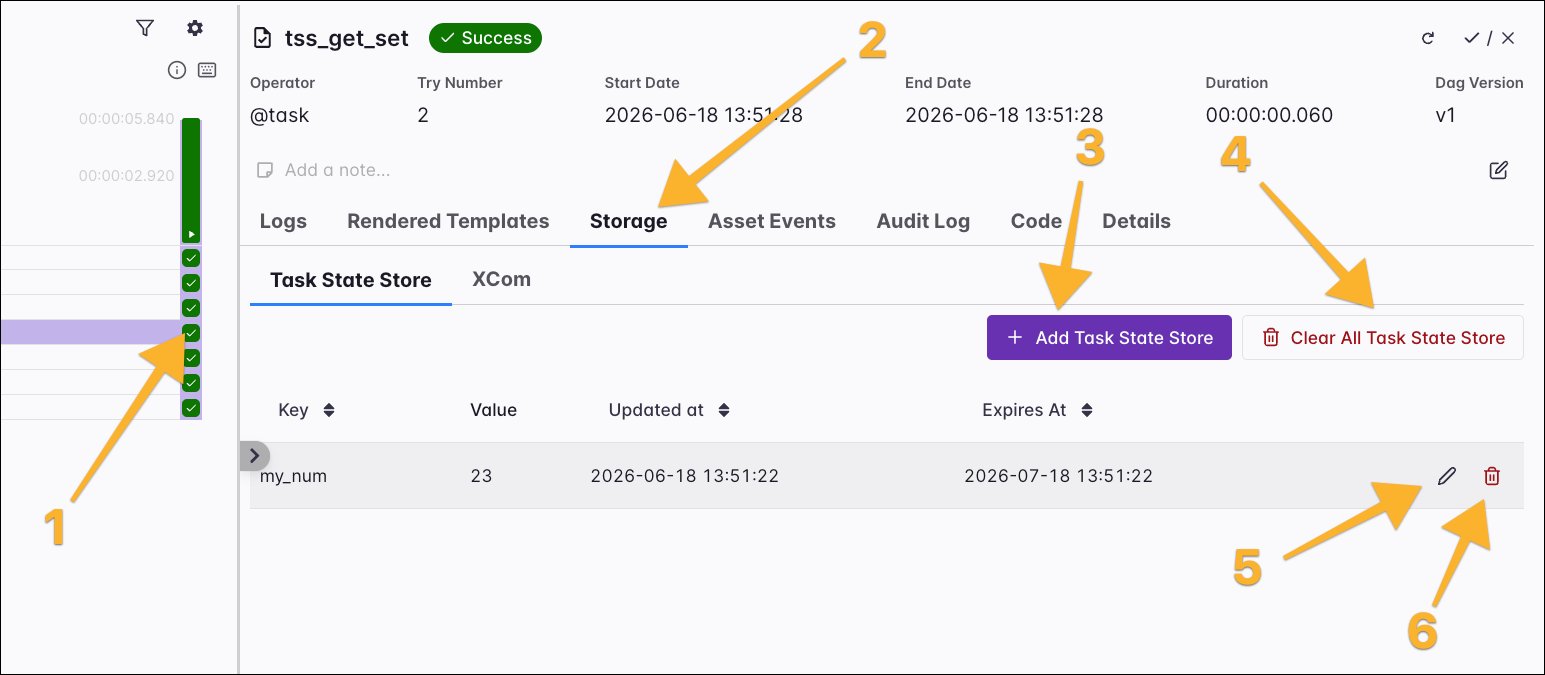 To reach the task state store of a specific task instance, select the task instance square in the grid (1), open the **Storage** tab (2), then select the **Task State Store** tab. From here, you can:
* Add an entry with **Add Task State Store** (3).
* Remove all entries for the task instance with **Clear All Task State Store** (4).
* Edit an entry (5).
* Delete an entry (6).
When you select **Add Task State Store** (3), the **Add Task State Store** window appears. Enter a **Key** and **Value** for the entry, then choose when it expires:
* **Default (30 days)**: Use the default retention period for this Airflow environment, set by the `default_retention_days` configuration.
* **Never**: The entry never expires.
* **Custom**: The entry expires at the date and time you select.
To reach the task state store of a specific task instance, select the task instance square in the grid (1), open the **Storage** tab (2), then select the **Task State Store** tab. From here, you can:
* Add an entry with **Add Task State Store** (3).
* Remove all entries for the task instance with **Clear All Task State Store** (4).
* Edit an entry (5).
* Delete an entry (6).
When you select **Add Task State Store** (3), the **Add Task State Store** window appears. Enter a **Key** and **Value** for the entry, then choose when it expires:
* **Default (30 days)**: Use the default retention period for this Airflow environment, set by the `default_retention_days` configuration.
* **Never**: The entry never expires.
* **Custom**: The entry expires at the date and time you select.
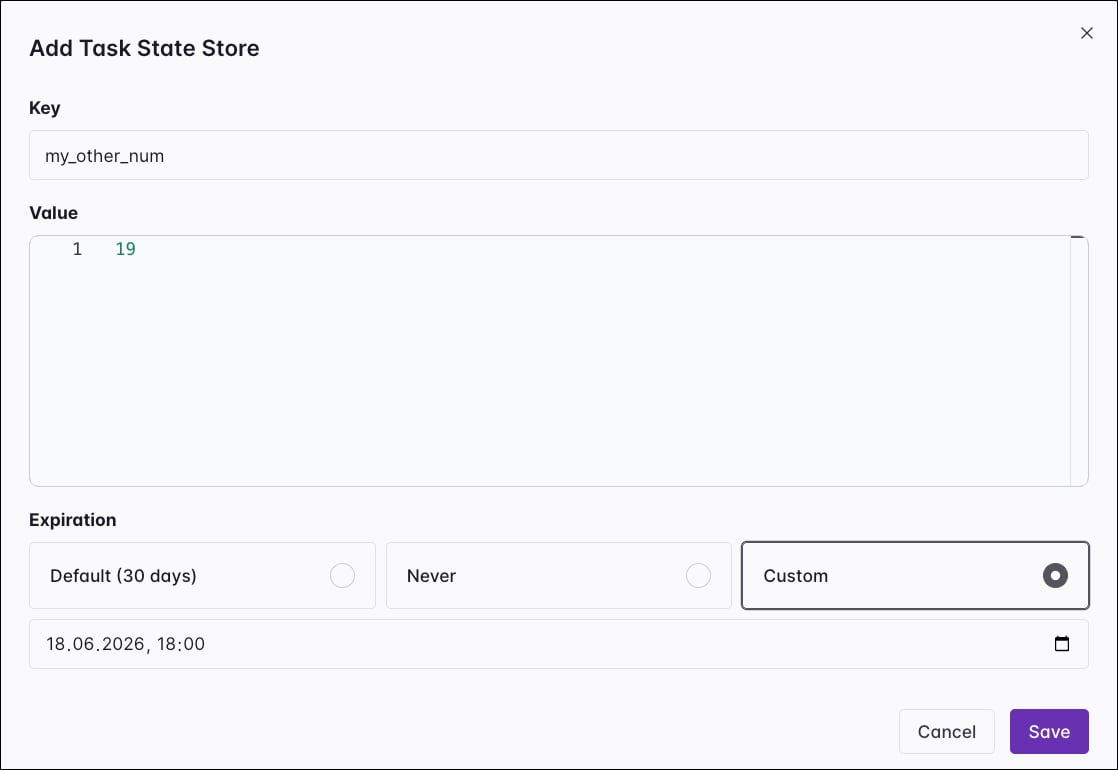 Select **Save** to store the entry.
### Task state store API endpoints
The [Airflow REST API](https://airflow.apache.org/docs/apache-airflow/stable/stable-rest-api-ref.html) exposes task state store operations under each task instance's `state-store` path:
```text wrap theme={null}
/dags/{dag_id}/dagRuns/{dag_run_id}/taskInstances/{task_id}/state-store
```
| Operation | Method and path |
| ------------------------------------- | ------------------------------ |
| List all entries for a task instance | `GET .../state-store` |
| Get one entry | `GET .../state-store/{key}` |
| Create or overwrite an entry | `PUT .../state-store/{key}` |
| Update an entry | `PATCH .../state-store/{key}` |
| Delete one entry | `DELETE .../state-store/{key}` |
| Clear all entries for a task instance | `DELETE .../state-store` |
The REST API limits each individual value to `max_value_storage_bytes` (64 KB by default) and rejects a larger value with a `422` error. For the request and response schemas of each operation, see the [Airflow REST API reference](https://airflow.apache.org/docs/apache-airflow/stable/stable-rest-api-ref.html).
### `ResumableJobMixin`
For custom operators that submit one long-running external job and poll for its completion, you can use the [`ResumableJobMixin`](https://airflow.apache.org/docs/task-sdk/stable/resumable-job-mixin.html). After submitting the job, the mixin persists the external job ID to the task state store before polling starts. On a retry, the mixin reads the stored ID and reconnects to the running job instead of submitting a duplicate. The `SparkSubmitOperator` in the Apache Spark provider (`6.2.0+`) uses this mixin to reconnect to a running Spark application after a retry.
To use the mixin, inherit from `ResumableJobMixin`, call `execute_resumable(context)` from your `execute` method, and write the following six methods to determine how to interact with your external system:
* `submit_job(context)`: Submit the job and return its external ID. The mixin stores this value in the task state store.
* `get_job_status(external_id, context)`: Query the external system and return its raw status string.
* `is_job_active(status)`: Return `True` if the job is still running and can be reconnected to.
* `is_job_succeeded(status)`: Return `True` if the job completed successfully.
* `poll_until_complete(external_id, context)`: Block until the job reaches a terminal state, and raise on failure.
* `get_job_result(external_id, context)`: Return the job result after completion, or `None` if not applicable.
```python wrap theme={null}
from typing import Any
from airflow.sdk import BaseOperator, ResumableJobMixin
class MyCustomResumableJobOperator(ResumableJobMixin, BaseOperator):
external_id_key = "my_job_id"
def execute(self, context):
return self.execute_resumable(context)
def submit_job(self, context) -> str:
return self.hook.submit(...) # Return the external job ID.
def get_job_status(self, external_id, context) -> str:
return self.hook.get_status(external_id)
def is_job_active(self, status: str) -> bool:
return status in ("RUNNING", "PENDING")
def is_job_succeeded(self, status: str) -> bool:
return status == "SUCCEEDED"
def poll_until_complete(self, external_id, context) -> None:
self.hook.wait(external_id)
def get_job_result(self, external_id, context) -> Any:
return None
```
On a retry, the mixin reads the stored ID and checks the current job status:
* If the job is still active, the mixin reconnects and continues polling.
* If the job already succeeded, the mixin returns the result without resubmitting.
* If the job is in a terminal failure state, the mixin submits a fresh job.
The `external_id_key` class attribute sets the key used to store the job ID. The default is `remote_job_id`.
There is a small window between `submit_job` returning and the mixin persisting the ID to the task state store. If the worker crashes in that window, the retry doesn't have the ID and submits a fresh job. For most workloads this window is negligible.
## Task state store configuration
You can configure the task state store with the `[state_store]` configs.
| Environment variable | Default | Description |
| ------------------------------------------------ | ----------------- | ----------------------------------------------------------------------------------------------------------------------------------------------------------------------------------------------------------------------------------------------- |
| `AIRFLOW__STATE_STORE__BACKEND` | Metastore backend | Dotted path to the class that implements state storage. |
| `AIRFLOW__STATE_STORE__DEFAULT_RETENTION_DAYS` | `30` | Number of days after which entries written without an explicit retention expire. Set to `0` to disable time-based cleanup. Changing this value doesn't affect entries that already exist. |
| `AIRFLOW__STATE_STORE__CLEAR_ON_SUCCESS` | `False` | When `True`, delete all task state store entries for a task instance when it completes successfully. |
| `AIRFLOW__STATE_STORE__STATE_CLEANUP_BATCH_SIZE` | `0` | Number of rows deleted per batch during cleanup. `0` deletes all matching rows in a single statement. |
| `AIRFLOW__STATE_STORE__MAX_VALUE_STORAGE_BYTES` | `65535` | Maximum size in bytes of a single value written through the public REST API. The API rejects a larger value with a `422` error. The execution API doesn't block worker writes; they log a warning and proceed. Set to `0` to disable the limit. |
The `clear_on_success` and `default_retention_days` options apply to the task state store only. They don't affect the [asset state store](/docs/learn/airflow-advanced-asset-scheduling#asset-state-store).
By default, the task state store and asset state store persist entries in the Airflow metadata database. To store entries elsewhere, you can provide a custom backend. See the [Apache Airflow task and asset state store configuration documentation](http://apache-airflow-docs.s3-website.eu-central-1.amazonaws.com/docs/apache-airflow/stable/administration-and-deployment/task-and-asset-state-store.html) for more information.
Select **Save** to store the entry.
### Task state store API endpoints
The [Airflow REST API](https://airflow.apache.org/docs/apache-airflow/stable/stable-rest-api-ref.html) exposes task state store operations under each task instance's `state-store` path:
```text wrap theme={null}
/dags/{dag_id}/dagRuns/{dag_run_id}/taskInstances/{task_id}/state-store
```
| Operation | Method and path |
| ------------------------------------- | ------------------------------ |
| List all entries for a task instance | `GET .../state-store` |
| Get one entry | `GET .../state-store/{key}` |
| Create or overwrite an entry | `PUT .../state-store/{key}` |
| Update an entry | `PATCH .../state-store/{key}` |
| Delete one entry | `DELETE .../state-store/{key}` |
| Clear all entries for a task instance | `DELETE .../state-store` |
The REST API limits each individual value to `max_value_storage_bytes` (64 KB by default) and rejects a larger value with a `422` error. For the request and response schemas of each operation, see the [Airflow REST API reference](https://airflow.apache.org/docs/apache-airflow/stable/stable-rest-api-ref.html).
### `ResumableJobMixin`
For custom operators that submit one long-running external job and poll for its completion, you can use the [`ResumableJobMixin`](https://airflow.apache.org/docs/task-sdk/stable/resumable-job-mixin.html). After submitting the job, the mixin persists the external job ID to the task state store before polling starts. On a retry, the mixin reads the stored ID and reconnects to the running job instead of submitting a duplicate. The `SparkSubmitOperator` in the Apache Spark provider (`6.2.0+`) uses this mixin to reconnect to a running Spark application after a retry.
To use the mixin, inherit from `ResumableJobMixin`, call `execute_resumable(context)` from your `execute` method, and write the following six methods to determine how to interact with your external system:
* `submit_job(context)`: Submit the job and return its external ID. The mixin stores this value in the task state store.
* `get_job_status(external_id, context)`: Query the external system and return its raw status string.
* `is_job_active(status)`: Return `True` if the job is still running and can be reconnected to.
* `is_job_succeeded(status)`: Return `True` if the job completed successfully.
* `poll_until_complete(external_id, context)`: Block until the job reaches a terminal state, and raise on failure.
* `get_job_result(external_id, context)`: Return the job result after completion, or `None` if not applicable.
```python wrap theme={null}
from typing import Any
from airflow.sdk import BaseOperator, ResumableJobMixin
class MyCustomResumableJobOperator(ResumableJobMixin, BaseOperator):
external_id_key = "my_job_id"
def execute(self, context):
return self.execute_resumable(context)
def submit_job(self, context) -> str:
return self.hook.submit(...) # Return the external job ID.
def get_job_status(self, external_id, context) -> str:
return self.hook.get_status(external_id)
def is_job_active(self, status: str) -> bool:
return status in ("RUNNING", "PENDING")
def is_job_succeeded(self, status: str) -> bool:
return status == "SUCCEEDED"
def poll_until_complete(self, external_id, context) -> None:
self.hook.wait(external_id)
def get_job_result(self, external_id, context) -> Any:
return None
```
On a retry, the mixin reads the stored ID and checks the current job status:
* If the job is still active, the mixin reconnects and continues polling.
* If the job already succeeded, the mixin returns the result without resubmitting.
* If the job is in a terminal failure state, the mixin submits a fresh job.
The `external_id_key` class attribute sets the key used to store the job ID. The default is `remote_job_id`.
There is a small window between `submit_job` returning and the mixin persisting the ID to the task state store. If the worker crashes in that window, the retry doesn't have the ID and submits a fresh job. For most workloads this window is negligible.
## Task state store configuration
You can configure the task state store with the `[state_store]` configs.
| Environment variable | Default | Description |
| ------------------------------------------------ | ----------------- | ----------------------------------------------------------------------------------------------------------------------------------------------------------------------------------------------------------------------------------------------- |
| `AIRFLOW__STATE_STORE__BACKEND` | Metastore backend | Dotted path to the class that implements state storage. |
| `AIRFLOW__STATE_STORE__DEFAULT_RETENTION_DAYS` | `30` | Number of days after which entries written without an explicit retention expire. Set to `0` to disable time-based cleanup. Changing this value doesn't affect entries that already exist. |
| `AIRFLOW__STATE_STORE__CLEAR_ON_SUCCESS` | `False` | When `True`, delete all task state store entries for a task instance when it completes successfully. |
| `AIRFLOW__STATE_STORE__STATE_CLEANUP_BATCH_SIZE` | `0` | Number of rows deleted per batch during cleanup. `0` deletes all matching rows in a single statement. |
| `AIRFLOW__STATE_STORE__MAX_VALUE_STORAGE_BYTES` | `65535` | Maximum size in bytes of a single value written through the public REST API. The API rejects a larger value with a `422` error. The execution API doesn't block worker writes; they log a warning and proceed. Set to `0` to disable the limit. |
The `clear_on_success` and `default_retention_days` options apply to the task state store only. They don't affect the [asset state store](/docs/learn/airflow-advanced-asset-scheduling#asset-state-store).
By default, the task state store and asset state store persist entries in the Airflow metadata database. To store entries elsewhere, you can provide a custom backend. See the [Apache Airflow task and asset state store configuration documentation](http://apache-airflow-docs.s3-website.eu-central-1.amazonaws.com/docs/apache-airflow/stable/administration-and-deployment/task-and-asset-state-store.html) for more information.