> ## Documentation Index
> Fetch the complete documentation index at: https://astronomer.io/docs/llms.txt
> Use this file to discover all available pages before exploring further.
# Airflow pools
One of the benefits of Apache Airflow is that it is built to scale. With the right supporting infrastructure, you can run many tasks in parallel seamlessly. Unfortunately, horizontal scalability also necessitates some guardrails. For example, you might have many tasks that interact with the same source system, such as an API or database, that you don't want to overwhelm with requests. Airflow [pools](https://airflow.apache.org/docs/apache-airflow/stable/administration-and-deployment/pools.html) are designed for exactly this use case.
Pools allow you to limit parallelism for an arbitrary set of tasks, allowing you to control when your tasks are run. They are often used in cases where you want to limit the number of parallel tasks that do a certain thing. For example, tasks that make requests to the same API or database, or tasks that run on a GPU node of a Kubernetes cluster.
In this guide, you'll learn basic Airflow pool concepts, how to create and assign pools, and what you can and can't do with pools. You'll also implement some sample DAGs that use pools to fulfill simple requirements.
## Assumed knowledge
To get the most out of this guide, you should have an understanding of:
* Airflow operators. See [Operators 101](/docs/learn/what-is-an-operator).
* The basics of scaling Airflow. See [Scaling out Airflow](/docs/learn/airflow-scaling-workers).
## Create a pool
There are three ways you can create and manage pools in Airflow:
* The Airflow UI: Go to **Admin** > **Pools** and add a new record. You can define a name, the number of slots, and a description.
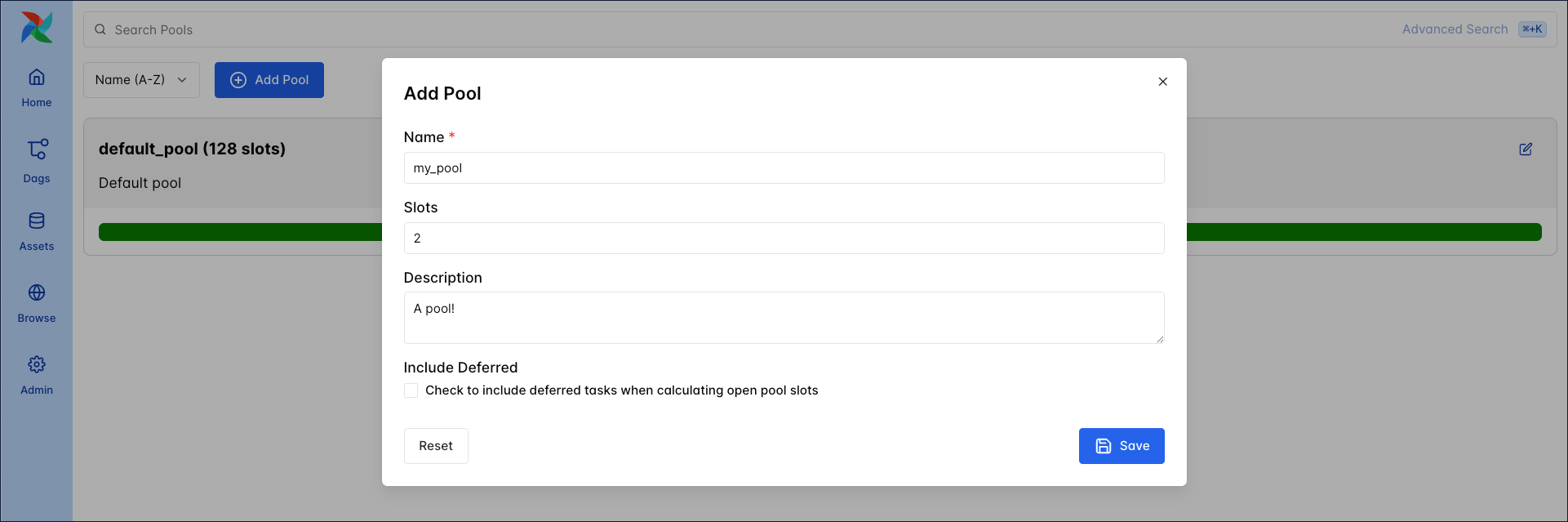 * The Airflow CLI: Run the `airflow pools` command with the `set` subcommand to create a new pool. See the [Airflow CLI documentation](https://airflow.apache.org/docs/apache-airflow/stable/cli-and-env-variables-ref.html#pools) for the full list of pool commands. With the Airflow CLI, you can also import pools from a JSON file with the `import` subcommand. This can be useful if you have a large number of pools to define and doing so programmatically would be more efficient.
* The Airflow REST API: To create a pool, submit a POST request with the name and number of slots as the payload. For more information on working with pools from the API, see the [API documentation](https://airflow.apache.org/docs/apache-airflow/stable/stable-rest-api-ref.html#operation/post_pool).
## Assign tasks to a pool
By default, all tasks in Airflow get assigned to the `default_pool` which has 128 slots. You can modify the number of slots, but you can't remove the default pool. Tasks can be assigned to other pools by updating the `pool` parameter. This parameter is part of the `BaseOperator`, so it can be used with any operator.
* The Airflow CLI: Run the `airflow pools` command with the `set` subcommand to create a new pool. See the [Airflow CLI documentation](https://airflow.apache.org/docs/apache-airflow/stable/cli-and-env-variables-ref.html#pools) for the full list of pool commands. With the Airflow CLI, you can also import pools from a JSON file with the `import` subcommand. This can be useful if you have a large number of pools to define and doing so programmatically would be more efficient.
* The Airflow REST API: To create a pool, submit a POST request with the name and number of slots as the payload. For more information on working with pools from the API, see the [API documentation](https://airflow.apache.org/docs/apache-airflow/stable/stable-rest-api-ref.html#operation/post_pool).
## Assign tasks to a pool
By default, all tasks in Airflow get assigned to the `default_pool` which has 128 slots. You can modify the number of slots, but you can't remove the default pool. Tasks can be assigned to other pools by updating the `pool` parameter. This parameter is part of the `BaseOperator`, so it can be used with any operator.
TaskFlow
```python wrap theme={null}
@task(task_id="task_a", pool="my_pool")
def sleep_function():
```
Traditional
```python wrap theme={null}
task_a = PythonOperator(
task_id="task_a", python_callable=sleep_function, pool="my_pool"
)
```
When tasks are assigned to a pool, they are scheduled as normal until all of the pool's slots are filled. As slots become available, the remaining queued tasks start running.
If you assign a task to a pool that doesn't exist, then the task isn't scheduled when the DAG runs. There are currently no errors or checks for this in the Airflow UI, so be sure to double check the name of the pool that you're assigning a task to.
You can control which tasks in the pool run first by assigning [priority weights](https://airflow.apache.org/docs/apache-airflow/stable/administration-and-deployment/priority-weight.html). These are assigned at the pool level with the `priority_weights` parameter. Higher values get higher priority in the executor queue. You can define your own custom `weight_rule`, see [Custom Weight Rule](https://airflow.apache.org/docs/apache-airflow/stable/administration-and-deployment/priority-weight.html#custom-weight-rule).
For example, in the DAG snippet below `task_a` and `task_b` are both assigned to the `single_task_pool` which has one slot. `task_b` has a priority weight of 2, while `task_a` has the default priority weight of 1. Therefore, `task_b` is executed first.
TaskFlow
```python wrap theme={null}
@task
def sleep_function(x):
time.sleep(x)
@dag
def pool_dag():
sleep_function.override(task_id="task_a", pool="single_task_pool")(5)
sleep_function.override(
task_id="task_b", pool="single_task_pool", priority_weight=2
)(10)
pool_dag()
```
Traditional
```python wrap theme={null}
def sleep_function(x):
time.sleep(x)
with DAG(
dag_id="pool_dag",
) as dag:
task_a = PythonOperator(
task_id="task_a",
python_callable=sleep_function,
pool="single_task_pool",
op_args=[5],
)
task_b = PythonOperator(
task_id="task_b",
python_callable=sleep_function,
pool="single_task_pool",
priority_weight=2,
op_args=[10],
)
```
Additionally, you can configure the number of slots occupied by a task by updating the `pool_slots` parameter (the default is 1). Modifying this value could be useful in cases where you are using pools to manage resource utilization.
## Pool limitations
When working with pools, keep in mind the following limitations:
* Each task can only be assigned to a single pool.
* Pools are meant to control parallelism for task Instances. If you need to place limits on the number of concurrent DagRuns for a single DAG or all DAGs, use the `max_active_runs` or `core.max_active_runs_per_dag` parameters.
## Example: Limit tasks hitting an API endpoint
This example shows how to implement a pool to control the number of tasks hitting an API endpoint.
In this scenario, five tasks across two different DAGs hit the API and may run concurrently based on the DAG schedules. However, to limit the tasks hitting the API at a time to three, you'll create a pool named `api_pool` with three slots. You'll also prioritize the tasks in the `pool_priority_dag` when the pool is full.
In the `pool_priority_dag` below, all three of the tasks hit the API endpoint and should all be assigned to the pool, so you define the `pool` argument in the DAG `default_args` to apply to all tasks. You also want all three of these tasks to have the same priority weight and for them to be prioritized over tasks in the second DAG, so you assign a `priority_weight` of three as a default argument. This value is arbitrary. To prioritize these tasks, you can assign any integer that is higher than the priority weights defined in the second DAG.
TaskFlow
```python expandable wrap theme={null}
from pendulum import datetime, duration
import requests
from airflow.decorators import dag, task
@task
def api_function(**kwargs):
url = "http://catfact.ninja/fact"
res = requests.get(url)
return res.json()
@dag(
start_date=datetime(2021, 8, 1),
schedule="*/30 * * * *",
catchup=False,
default_args={
"pool": "api_pool",
"retries": 1,
"retry_delay": duration(minutes=5),
"priority_weight": 3,
},
)
def pool_priority_dag():
api_function.override(task_id="task_a")()
api_function.override(task_id="task_b")()
api_function.override(task_id="task_c")()
pool_priority_dag()
```
Traditional
```python wrap theme={null}
from pendulum import datetime, duration
import requests
from airflow import DAG
from airflow.operators.python import PythonOperator
def api_function(**kwargs):
url = "http://catfact.ninja/fact"
res = requests.get(url)
return res.json()
with DAG(
"pool_priority_dag",
start_date=datetime(2021, 8, 1),
schedule="*/30 * * * *",
catchup=False,
default_args={
"pool": "api_pool",
"retries": 1,
"retry_delay": duration(minutes=5),
"priority_weight": 3,
},
) as dag:
task_a = PythonOperator(task_id="task_a", python_callable=api_function)
task_b = PythonOperator(task_id="task_b", python_callable=api_function)
task_c = PythonOperator(task_id="task_c", python_callable=api_function)
```
In the `pool_chill_dag` DAG, there are two tasks that hit the API endpoint that should be assigned to the pool, but there are also two other tasks that don't hit the API. Therefore, you assign the pool and priority weights in the `PythonOperator` instantiations.
To prioritize `task_x` over `task_y` while keeping both at a lower priority than the tasks in the first DAG, you assign `task_x` a priority weight of 2 and leave `task_y` with the default priority weight of 1.
TaskFlow
```python expandable wrap theme={null}
from pendulum import datetime, duration
import requests
from airflow.decorators import dag, task
from airflow.operators.empty import EmptyOperator
@task
def api_function(**kwargs):
url = "http://catfact.ninja/fact"
res = requests.get(url)
return res.json()
@dag(
start_date=datetime(2023, 1, 1),
schedule="*/30 * * * *",
catchup=False,
default_args={"retries": 1, "retry_delay": duration(minutes=5)},
)
def pool_unimportant_dag():
task_w = EmptyOperator(task_id="start")
task_x = api_function.override(
task_id="task_x",
pool="api_pool",
priority_weight=2,
)()
task_y = api_function.override(task_id="task_y", pool="api_pool")()
task_z = EmptyOperator(task_id="end")
task_w >> [task_x, task_y] >> task_z
pool_unimportant_dag()
```
Traditional
```python expandable wrap theme={null}
from pendulum import datetime, duration
import requests
from airflow import DAG
from airflow.operators.empty import EmptyOperator
from airflow.operators.python import PythonOperator
def api_function(**kwargs):
url = "http://catfact.ninja/fact"
res = requests.get(url)
return res.json()
with DAG(
"pool_unimportant_dag",
start_date=datetime(2023, 1, 1),
schedule="*/30 * * * *",
catchup=False,
default_args={"retries": 1, "retry_delay": duration(minutes=5)},
) as dag:
task_w = EmptyOperator(task_id="start")
task_x = PythonOperator(
task_id="task_x",
python_callable=api_function,
pool="api_pool",
priority_weight=2,
)
task_y = PythonOperator(
task_id="task_y", python_callable=api_function, pool="api_pool"
)
task_z = EmptyOperator(task_id="end")
task_w >> [task_x, task_y] >> task_z
```