> ## Documentation Index
> Fetch the complete documentation index at: https://astronomer.io/docs/llms.txt
> Use this file to discover all available pages before exploring further.
# Orchestrate Pinecone operations with Apache Airflow
This page hasn't yet been updated for Airflow 3. The concepts shown are relevant, but some code may need to be updated. If you run any examples, take care to update import statements and watch for any other breaking changes.
[Pinecone](https://www.pinecone.io/) is a proprietary vector database platform designed for handling large-scale vector based AI applications. The [Pinecone Airflow provider](https://airflow.apache.org/docs/apache-airflow-providers-pinecone/stable/index.html) offers modules to easily integrate Pinecone with Airflow.
In this tutorial you'll use Airflow to create vector embeddings of series descriptions, create an index in your Pinecone project, ingest the vector embeddings into that index, and query Pinecone to get a suggestion for your next binge-watchable series based on your current mood.
## Why use Airflow with Pinecone?
Integrating Pinecone with Airflow provides a robust solution for managing large-scale vector search workflows in your AI applications. Pinecone specializes in efficient vector storage and similarity search, which is essential for leveraging advanced models like language transformers or deep neural networks.
By combining Pinecone with Airflow, you can:
* Use Airflow's [data-driven scheduling](/docs/learn/airflow-datasets) to run operations in Pinecone based on upstream events in your data ecosystem, such as when a new model is trained or a new dataset is available.
* Run dynamic queries with [dynamic task mapping](/docs/learn/dynamic-tasks), for example to parallelize vector ingestion or search operations to improve performance.
* Add Airflow features like [retries](/docs/learn/rerunning-dags#automatically-retry-tasks) and [alerts](/docs/learn/error-notifications-in-airflow) to your Pinecone operations. Retries protect your MLOps pipelines from transient failures, and alerts notify you of events like task failures or missed service level agreements (SLAs).
## Time to complete
This tutorial takes approximately 30 minutes to complete.
## Assumed knowledge
To get the most out of this tutorial, make sure you have an understanding of:
* The basics of Pinecone. See [Pinecone Introduction](https://docs.pinecone.io/docs/overview).
* The basics of vector embeddings. See [Vector Embeddings for Developers: The Basics](https://www.pinecone.io/learn/vector-embeddings-for-developers/).
* Airflow fundamentals, such as writing DAGs and defining tasks. See [Get started with Apache Airflow](/docs/learn/get-started-with-airflow).
* Airflow decorators. See [Introduction to the TaskFlow API and Airflow decorators](/docs/learn/airflow-decorators).
* Airflow operators. See [Operators 101](/docs/learn/what-is-an-operator).
* Airflow hooks. See [Hooks 101](/docs/learn/what-is-a-hook).
## Prerequisites
* The [Astro CLI](/docs/cli/v1.43/get-started-cli).
* A [Pinecone account](https://app.pinecone.io/?sessionType=signup) with an [API key](https://docs.pinecone.io/docs/authentication). You can use a free tier account for this tutorial.
* An OpenAI API key of at least [tier 1](https://platform.openai.com/docs/guides/rate-limits/usage-tiers) if you want to use OpenAI for vectorization. If you don't want to use OpenAI you can adapt the `create_embeddings` function at the start of the DAG to use a different vectorizer. Note that you will likely need to adjust the `EMBEDDING_MODEL_DIMENSIONS` parameter in the DAG if you use a different vectorizer.
The example code from this tutorial is also available on [GitHub](https://github.com/astronomer/airflow-pinecone-tutorial).
## Step 1: Configure your Astro project
1. Create a new Astro project:
```sh wrap theme={null}
$ mkdir astro-pinecone-tutorial && cd astro-pinecone-tutorial
$ astro dev init
```
2. Add the following two lines to your `requirements.txt` file to install the [Pinecone Airflow Provider](https://airflow.apache.org/docs/apache-airflow-providers-pinecone/stable/index.html) and [OpenAI Python client](https://platform.openai.com/docs/libraries) in your Astro project:
```text wrap theme={null}
apache-airflow-providers-pinecone==1.0.0
openai==1.3.2
```
3. Add the following environment variables to your Astro project `.env` file. These variables store the configuration for an [Airflow connection](/docs/learn/connections) to your Pinecone account and allow you to use the OpenAI API. Provide your own values for `` (for example `gcp-starter`), `` and ``:
```text wrap theme={null}
AIRFLOW_CONN_PINECONE_DEFAULT='{
"conn_type": "pinecone",
"login": "",
"password": ""
}'
OPENAI_API_KEY=""
```
## Step 2: Add your data
The DAG in this tutorial runs a query on vectorized series descriptions, which were mostly retrieved from [IMDB](https://www.imdb.com/) with added domain expert inputs.
1. In your Astro project `include` directory, create a file called `series_data.txt`.
2. Copy and paste the following text into the file:
```text wrap theme={null}
1 ::: Star Trek: Discovery (2017) ::: sci-fi ::: Ten years before Kirk, Spock, and the Enterprise, the USS Discovery discovers new worlds and lifeforms using a new innovative mushroom based propulsion system.
2 ::: Feel Good (2020) ::: romance ::: The series follows recovering addict and comedian Mae, who is trying to control the addictive behaviors and intense romanticism that permeate every facet of their life.
3 ::: For All Mankind (2019) ::: sci-fi ::: The series dramatizes an alternate history depicting "what would have happened if the global space race had never ended" after the Soviet Union succeeds in the first crewed Moon landing ahead of the United States.
4 ::: The Legend of Korra (2012) ::: anime ::: Avatar Korra fights to keep Republic City safe from the evil forces of both the physical and spiritual worlds.
5 ::: Mindhunter (2017) ::: crime ::: In the late 1970s, two FBI agents broaden the realm of criminal science by investigating the psychology behind murder and end up getting too close to real-life monsters.
6 ::: The Umbrella Academy (2019) ::: adventure ::: A family of former child heroes, now grown apart, must reunite to continue to protect the world.
7 ::: Star Trek: Picard (2020) ::: sci-fi ::: Follow-up series to Star Trek: The Next Generation (1987) and Star Trek: Nemesis (2002) that centers on Jean-Luc Picard in the next chapter of his life.
8 ::: Invasion (2021) ::: sci-fi ::: Earth is visited by an alien species that threatens humanity's existence. Events unfold in real time through the eyes of five ordinary people across the globe as they struggle to make sense of the chaos unraveling around them.
```
## Step 3: Create your DAG
1. In your Astro project `dags` folder, create a file called `query_series_vectors.py`.
2. Copy the following code into the file:
```python expandable wrap theme={null}
"""
## Use the Pinecone Airflow Provider to generate and query vectors for series descriptions
This DAG runs a simple MLOps pipeline that uses the Pinecone Airflow Provider to import
series descriptions, generate vectors for them, and query the vectors for series based on
a user-provided mood.
"""
from airflow.decorators import dag, task
from airflow.models.param import Param
from airflow.models.baseoperator import chain
from airflow.providers.pinecone.operators.pinecone import PineconeIngestOperator
from airflow.providers.pinecone.hooks.pinecone import PineconeHook
from pendulum import datetime
from openai import OpenAI
import uuid
import re
import os
PINECONE_INDEX_NAME = "series-to-watch"
DATA_FILE_PATH = "include/series_data.txt"
PINECONE_CONN_ID = "pinecone_default"
EMBEDDING_MODEL = "text-embedding-ada-002"
EMBEDDING_MODEL_DIMENSIONS = 1536
def generate_uuid5(identifier: list) -> str:
"Create a UUID5 from a list of strings and return the uuid as a string."
name = "/".join([str(i) for i in identifier])
namespace = uuid.NAMESPACE_DNS
uuid_obj = uuid.uuid5(namespace=namespace, name=name)
return str(uuid_obj)
def create_embeddings(text: str, model: str) -> list:
"""Create embeddings for a text with the OpenAI API."""
client = OpenAI(api_key=os.environ["OPENAI_API_KEY"])
response = client.embeddings.create(input=text, model=model)
embeddings = response.data[0].embedding
return embeddings
@dag(
start_date=datetime(2023, 10, 18),
schedule=None,
catchup=False,
tags=["Pinecone"],
params={"series_mood": Param("A series about astronauts.", type="string")},
)
def query_series_vectors():
@task
def import_data_func(text_file_path: str) -> list:
"Import data from a text file and return it as a list of dicts."
with open(text_file_path, "r") as f:
lines = f.readlines()
num_skipped_lines = 0
descriptions = []
data = []
for line in lines:
parts = line.split(":::")
title_year = parts[1].strip()
match = re.match(r"(.+) \((\d{4})\)", title_year)
try:
title, year = match.groups()
year = int(year)
except:
num_skipped_lines += 1
continue
genre = parts[2].strip()
description = parts[3].strip()
descriptions.append(description)
data.append(
{
"id": generate_uuid5(
identifier=[title, year, genre, description]
), # an `id` property is required for Pinecone
"metadata": {
"title": title,
"year": year,
"genre": genre,
"description": description, # this is the text we'll embed
},
}
)
return data
series_data = import_data_func(text_file_path=DATA_FILE_PATH)
@task
def vectorize_series_data(series_data: dict, model: str) -> dict:
"Create embeddings for the series descriptions."
response = create_embeddings(
text=series_data["metadata"]["description"], model=model
)
series_data["values"] = response
return series_data
vectorized_data = vectorize_series_data.partial(model=EMBEDDING_MODEL).expand(
series_data=series_data
)
@task
def vectorize_user_mood(model: str, **context) -> list:
"Create embeddings for the user mood."
user_mood = context["params"]["series_mood"]
response = create_embeddings(text=user_mood, model=model)
return response
@task
def create_index_if_not_exists(
index_name: str, vector_size: int, pinecone_conn_id: str
) -> None:
"Create a Pinecone index of the provided name if it doesn't already exist."
hook = PineconeHook(conn_id=pinecone_conn_id)
existing_indexes = hook.list_indexes()
if index_name not in existing_indexes:
newindex = hook.create_index(index_name=index_name, dimension=vector_size)
return newindex
else:
print(f"Index {index_name} already exists")
create_index_if_not_exists_obj = create_index_if_not_exists(
vector_size=EMBEDDING_MODEL_DIMENSIONS,
index_name=PINECONE_INDEX_NAME,
pinecone_conn_id=PINECONE_CONN_ID,
)
pinecone_vector_ingest = PineconeIngestOperator(
task_id="pinecone_vector_ingest",
conn_id=PINECONE_CONN_ID,
index_name=PINECONE_INDEX_NAME,
input_vectors=vectorized_data,
)
@task
def query_pinecone(
index_name: str,
pinecone_conn_id: str,
vectorized_user_mood: list,
) -> None:
"Query the Pinecone index with the user mood and print the top result."
hook = PineconeHook(conn_id=pinecone_conn_id)
query_response = hook.query_vector(
index_name=index_name,
top_k=1,
include_values=True,
include_metadata=True,
vector=vectorized_user_mood,
)
print("You should watch: " + query_response["matches"][0]["metadata"]["title"])
print("Description: " + query_response["matches"][0]["metadata"]["description"])
query_pinecone_obj = query_pinecone(
index_name=PINECONE_INDEX_NAME,
pinecone_conn_id=PINECONE_CONN_ID,
vectorized_user_mood=vectorize_user_mood(model=EMBEDDING_MODEL),
)
chain(
create_index_if_not_exists_obj,
pinecone_vector_ingest,
query_pinecone_obj,
)
query_series_vectors()
```
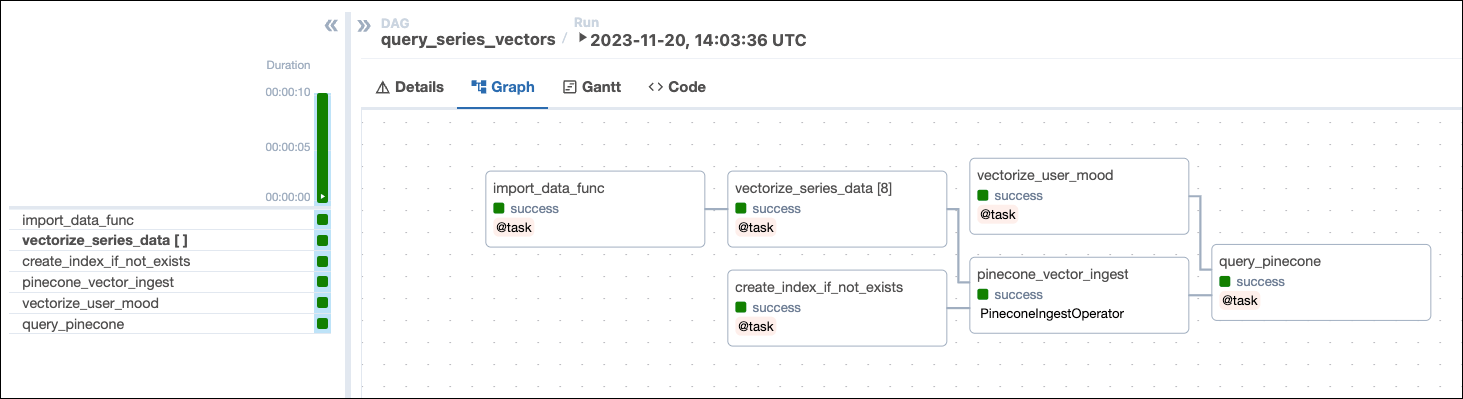
This DAG consists of six tasks to make a simple ML orchestration pipeline.
* The `import_data_func` task defined with the [`@task` decorator](/docs/learn/airflow-decorators) reads the data from the `series_data.txt` file and returns a list of dictionaries containing the series title, year, genre, and description. Note that the task will create a UUID for each series using the `create_uuid` function and add it to the `id` key. Having a unique ID for each series is required for the Pinecone ingestion task.
* The `vectorize_series_data` task is a [dynamic task](/docs/learn/dynamic-tasks) that creates one mapped task instance for each series in the list returned by the `import_data_func` task. The task uses the `create_embeddings` function to generate vector embeddings for each series' description. Note that if you want to use a different vectorizer than OpenAI's `text-embedding-ada-002` you can adjust this function to return your preferred vectors and set the `EMBEDDING_MODEL_DIMENSIONS` parameter in the DAG to the vector size of your model.
* The `vectorize_user_mood` task calls the `create_embeddings` function to generate vector embeddings for the mood the user can provide as an [Airflow param](/docs/learn/airflow-params).
* The `create_index_if_not_exists` task uses the [`PineconeHook`](https://airflow.apache.org/registry/providers/pinecone#pinecone-pinecone-PineconeHook) to connect to your Pinecone instance and retrieve the current list of indexes in your Pinecone environment. If no index of the name `PINECONE_INDEX_NAME` exists yet, the task will create it. Note that with a free tier Pinecone account you can only have one index.
* The `pinecone_vector_ingest` task uses the [`PineconeIngestOperator`](https://airflow.apache.org/registry/providers/pinecone#pinecone-pinecone-PineconeIngestOperator) to ingest the vectorized series data into the index created by the `create_index_if_not_exists` task.
* The `query_pinecone` task performs a vector search in Pinecone to get the series most closely matching the user-provided mood and prints the result to the task logs.
 ## Step 4: Run your DAG
1. Open your Astro project, then run `astro dev start` to run Airflow locally.
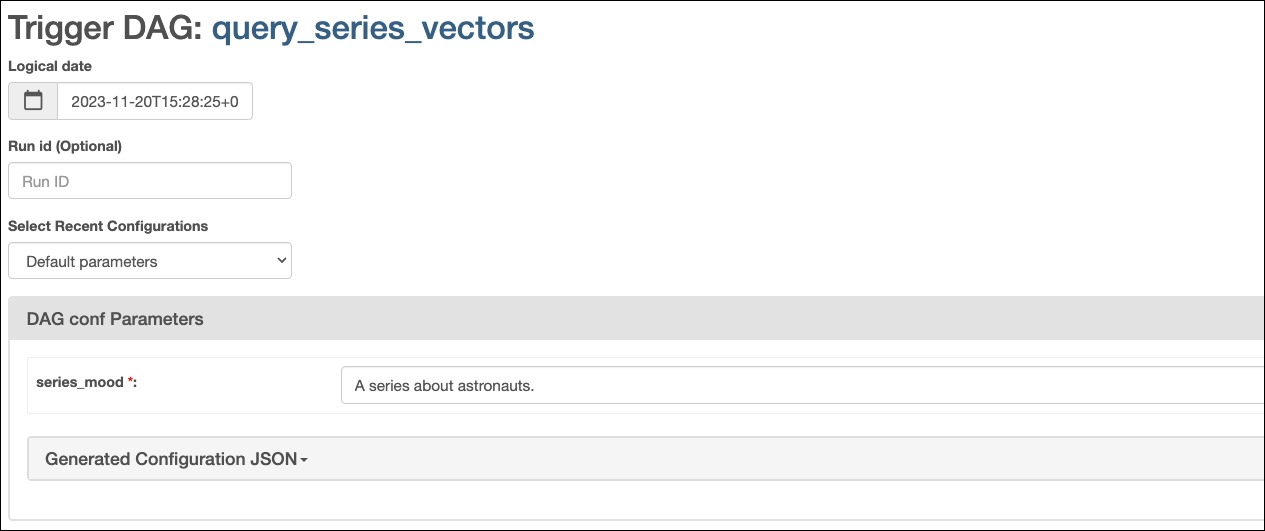
2. Open the Airflow UI at `localhost:8080`, then run the `query_series_vectors` DAG by clicking the **Play** button. Provide your input to the [Airflow param](/docs/learn/airflow-params) for `series_mood`.
## Step 4: Run your DAG
1. Open your Astro project, then run `astro dev start` to run Airflow locally.
2. Open the Airflow UI at `localhost:8080`, then run the `query_series_vectors` DAG by clicking the **Play** button. Provide your input to the [Airflow param](/docs/learn/airflow-params) for `series_mood`.
 3. View your series suggestion in the task logs of the `query_pinecone` task:
```text wrap theme={null}
[2023-11-20, 14:03:48 UTC] {logging_mixin.py:154} INFO - You should watch: For All Mankind
[2023-11-20, 14:03:48 UTC] {logging_mixin.py:154} INFO - Description: The series dramatizes an alternate history depicting "what would have happened if the global space race had never ended" after the Soviet Union succeeds in the first crewed Moon landing ahead of the United States.
```
When watching `For All Mankind`, make sure to have a tab with [Wikipedia](https://en.wikipedia.org) open to compare the alternate timeline with ours and remember, flying spacecraft isn't like driving a car. It doesn't just go where you point it.
## Conclusion
Congrats! You've successfully integrated Airflow and Pinecone! You can now use this tutorial as a starting point to build your own AI applications with Airflow and Pinecone.
3. View your series suggestion in the task logs of the `query_pinecone` task:
```text wrap theme={null}
[2023-11-20, 14:03:48 UTC] {logging_mixin.py:154} INFO - You should watch: For All Mankind
[2023-11-20, 14:03:48 UTC] {logging_mixin.py:154} INFO - Description: The series dramatizes an alternate history depicting "what would have happened if the global space race had never ended" after the Soviet Union succeeds in the first crewed Moon landing ahead of the United States.
```
When watching `For All Mankind`, make sure to have a tab with [Wikipedia](https://en.wikipedia.org) open to compare the alternate timeline with ours and remember, flying spacecraft isn't like driving a car. It doesn't just go where you point it.
## Conclusion
Congrats! You've successfully integrated Airflow and Pinecone! You can now use this tutorial as a starting point to build your own AI applications with Airflow and Pinecone.