> ## Documentation Index
> Fetch the complete documentation index at: https://astronomer.io/docs/llms.txt
> Use this file to discover all available pages before exploring further.
# Run tasks in an isolated environment in Apache Airflow
This page hasn't yet been updated for Airflow 3. The concepts shown are relevant, but some code may need to be updated. If you run any examples, take care to update import statements and watch for any other breaking changes.
It is very common to run a task with different dependencies than your Airflow environment. Your task might need a different Python version than core Airflow, or it has packages that conflict with your other tasks. In these cases, running tasks in an isolated environment can help manage dependency conflicts and enable compatibility with your execution environments.
In Airflow, you have several options for running custom Python code in isolated environments. This guide teaches you how to choose the right isolated environment option for your use case, implement different virtual environment operators and decorators, and access Airflow context and variables in isolated environments.
**Other ways to learn**
There are multiple resources for learning about this topic. See also:
* Astronomer Academy: [Airflow: The `ExternalPythonOperator`](https://academy.astronomer.io/astro-runtime-the-externalpythonoperator).
* Astronomer Academy: [Airflow: The `KubernetesPodOperator`](https://academy.astronomer.io/astro-runtime-the-kubernetespodoperator-1).
* Webinar: [Running Airflow Tasks in Isolated Environments](https://www.astronomer.io/events/webinars/running-airflow-tasks-in-isolated-environments-video/).
* Learn from code: [Isolated environments example DAGs repository](https://github.com/astronomer/learn-demos/tree/airflow-isolated-environments).
This guide covers options to isolate individual tasks in Airflow. If you want to run all of your Airflow tasks in dedicated Kubernetes pods, consider using the [Kubernetes Executor](/docs/learn/airflow-executors-explained#kubernetesexecutor). Astronomer customers can set their Deployments to use the KubernetesExecutor in the Astro UI, see [Manage Airflow executors on Astro](/docs/astro/executors-overview).
## Assumed knowledge
To get the most out of this guide, you should have an understanding of:
* Airflow decorators. See [Introduction to the TaskFlow API and Airflow decorators](/docs/learn/airflow-decorators).
* Airflow operators. See [Airflow operators](/docs/learn/what-is-an-operator).
* Python Virtual Environments. See [Python Virtual Environments: A Primer](https://realpython.com/python-virtual-environments-a-primer/).
* Kubernetes basics. See the [Kubernetes Documentation](https://kubernetes.io/docs/home/).
## When to use isolated environments
There are two situations when you might want to run a task in an isolated environment:
* Your task requires a **different version of Python** than your Airflow environment. Apache Airflow is compatible with and available in Python 3.8, 3.9, 3.10, 3.11, and 3.12. The Astro Runtime has [images](https://quay.io/repository/astronomer/astro-runtime?tab=tags) available for all supported Python versions, so you can run Airflow inside Docker in a reproducible environment. See [Prerequisites](https://airflow.apache.org/docs/apache-airflow/stable/installation/prerequisites.html) for more information.
* Your task requires **different versions of Python packages** that conflict with the package versions installed in your Airflow environment. To know which Python packages are pinned to which versions within Airflow, you can retrieve the full list of constraints for each Airflow version by going to:
```text wrap theme={null}
https://raw.githubusercontent.com/apache/airflow/constraints-/constraints-.txt
```
**Airflow Best Practice**
Make sure to pin all package versions, both in your core Airflow environment (`requirements.txt`) and in your isolated environments. This helps you avoid unexpected behavior due to package updates that might create version conflicts.
### Limitations
When creating isolated environments in Airflow, you might not be able to use common Airflow features or connect to your Airflow environment in the same way you would in a regular Airflow task.
Common limitations include:
* You [can't pass all Airflow context variables](https://airflow.apache.org/docs/apache-airflow/stable/howto/operator/python.html#id1) to a virtual decorator, since Airflow doesn't support serializing `var`, `ti`, and `task_instance` objects. See [Use Airflow context variables in isolated environments](#use-airflow-context-variables-in-isolated-environments).
* You don't have access to your [secrets backend](https://airflow.apache.org/docs/apache-airflow/stable/security/secrets/secrets-backend/index.html) from within the isolated environment. To access your secrets, consider passing them in through [Jinja templating](/docs/learn/templating). See [Use Airflow variables in isolated environments](#use-airflow-variables-in-isolated-environments).
* Installing Airflow itself, or Airflow provider packages in the environment provided to the `@task.external_python` decorator or the `ExternalPythonOperator`, can lead to unexpected behavior. If you need to use Airflow or an Airflow provider module inside your virtual environment, Astronomer recommends using the `@task.virtualenv` decorator or the `PythonVirtualenvOperator` instead. See [Use Airflow packages in isolated environments](#use-airflow-packages-in-isolated-environments).
## Choose an isolated environment option
Airflow provides several options for running tasks in isolated environments.
To run tasks in a dedicated Kubernetes Pod you can use:
* [`@task.kubernetes`](#kubernetes-pod-operator) decorator
* [`KubernetesPodOperator`](#kubernetes-pod-operator) (KPO)
To run tasks in a Python virtual environment you can use:
* [`@task.external_python`](#external-python-operator) decorator / `ExternalPythonOperator` (EPO)
* [`@task.virtualenv`](#virtualenv-operator) decorator / `PythonVirtualenvOperator` (PVO)
* [`@task.branch_external_python`](#virtual-branching-operators) decorator / `BranchExternalPythonOperator` (BEPO)
* [`@task.branch_virtualenv`](#virtual-branching-operators) decorator / `BranchPythonVirtualenvOperator` (BPVO)
The virtual environment decorators have operator equivalents with the same functionality. Astronomer recommends using decorators where possible because they simplify the handling of [XCom](/docs/learn/airflow-passing-data-between-tasks).
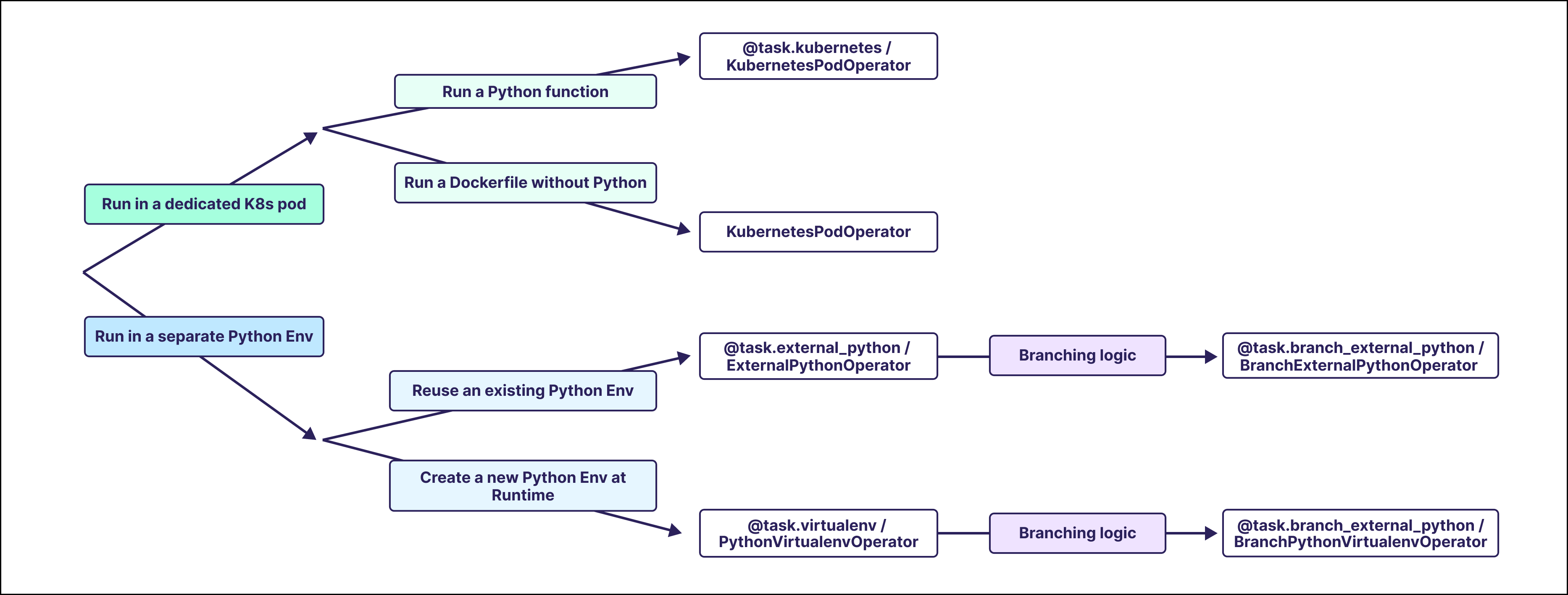 Which option you choose depends on your use case and the requirements of your task. The table below shows which decorators and operators are best for particular use cases.
| Use Case | Implementation Options |
| ---------------------------------------------------------------- | ------------------------------------------------------------------------------------------------------------------------------ |
| Run a Python task in a K8s Pod | [`@task.kubernetes`](#kubernetes-pod-operator),
Which option you choose depends on your use case and the requirements of your task. The table below shows which decorators and operators are best for particular use cases.
| Use Case | Implementation Options |
| ---------------------------------------------------------------- | ------------------------------------------------------------------------------------------------------------------------------ |
| Run a Python task in a K8s Pod | [`@task.kubernetes`](#kubernetes-pod-operator),
[`KubernetesPodOperator`](#kubernetes-pod-operator) |
| Run a Docker image without additional Python code in a K8s Pod | [`KubernetesPodOperator`](#kubernetes-pod-operator) |
| Run a Python task in an existing (reusable) virtual environment | [`@task.external_python`](#external-python-operator),
[`ExternalPythonOperator`](#external-python-operator) |
| Run a Python task in a new virtual environment | [`@task.virtualenv`](#virtualenv-operator),
[`PythonVirtualenvOperator`](#virtualenv-operator) |
| Run branching code in an existing (reusable) virtual environment | [`@task.branch_external_python`](#virtual-branching-operators), [`BranchExternalPythonOperator`](#virtual-branching-operators) |
| Run branching code in a new virtual environment | [`@task.branch_virtualenv`](#virtual-branching-operators), [`BranchPythonVirtualenvOperator`](#virtual-branching-operators) |
| Install different packages for each run of a task | [`PythonVirtualenvOperator`](#virtualenv-operator),
[`BranchPythonVirtualenvOperator`](#virtual-branching-operators) |
Another consideration when choosing an operator is the infrastructure you have available. Operators that run tasks in Kubernetes pods allow you to have full control over the environment and resources used, but they require a Kubernetes cluster. Operators that run tasks in Python virtual environments are easier to set up, but don't provide the same level of control over the environment and resources used.
| Requirements | Decorators | Operators |
| -------------------- | ------------------------------------------------------------------------------------------------------------------------------------------------------------------------------------------------------------------------------------------------------- | ----------------------------------------------------------------------------------------------------------------------------------------------------------------------------------------------------------------------------------------------------------------------- |
| A Kubernetes cluster | [`@task.kubernetes`](#kubernetes-pod-operator) | [`KubernetesPodOperator`](#kubernetes-pod-operator) |
| A Docker image | [`@task.kubernetes`](#kubernetes-pod-operator) (with Python installed) | [`KubernetesPodOperator`](#kubernetes-pod-operator) (with or without Python installed) |
| A Python binary | [`@task.external_python`](#external-python-operator),
[`@task.branch_external_python`](#virtual-branching-operators),
[`@task.virtualenv`](#virtualenv-operator) (\*),
[`@task.branch_virtualenv`](#virtual-branching-operators) (\*) | [`ExternalPythonOperator`](#external-python-operator),
[`BranchExternalPythonOperator`](#virtual-branching-operators),
[`PythonVirtualenvOperator`](#virtualenv-operator) (\*),
[`BranchPythonVirtualenvOperator`](#virtual-branching-operators) (\*) |
\*Only required if you need to use a different Python version than your Airflow environment.
## External Python operator
The ExternalPython operator, `@task.external_python` decorator or `ExternalPythonOperator`, runs a Python function in an existing virtual Python environment, isolated from your Airflow environment. To use the `@task.external_python` decorator or the `ExternalPythonOperator`, you need to create a separate Python environment to reference. You can use any Python binary created by any means.
The easiest way to create a Python environment when using the Astro CLI is with the [Astronomer PYENV BuildKit](https://github.com/astronomer/astro-provider-venv). The BuildKit can be used by adding a comment on the first line of the Dockerfile as shown in the following example. Adding this comment enables you to create virtual environments with the `PYENV` keyword.
```dockerfile wrap theme={null}
# syntax=quay.io/astronomer/airflow-extensions:v1
FROM quay.io/astronomer/astro-runtime:10.3.0-python-3.11
# create a virtual environment for the ExternalPythonOperator and @task.external_python decorator
# using Python 3.9 and install the packages from epo_requirements.txt
PYENV 3.9 epo_pyenv epo_requirements.txt
```
To use the BuildKit, the [Docker BuildKit Backend](https://docs.docker.com/build/buildkit/) needs to be enabled. This is the default as of Docker Desktop version 23.0, but might need to be enabled manually in older versions of Docker.
You can add any Python packages to the virtual environment by putting them into a separate requirements file. In this example, by using the name `epo_requirements.txt`. Make sure to pin all package versions.
```text wrap theme={null}
pandas==1.4.4
```
Installing Airflow itself and Airflow provider packages in isolated environments can lead to unexpected behavior and isn't recommended. If you need to use Airflow or Airflow provider modules inside your virtual environment, Astronomer recommends choosing the `@task.virtualenv` decorator or the `PythonVirtualenvOperator`. See [Use Airflow packages in isolated environments](#use-airflow-packages-in-isolated-environments).
After restarting your Airflow environment, you can use this Python binary by referencing the environment variable `ASTRO_PYENV_`. If you choose an alternative method to create you Python binary, you need to set the `python` parameter of the decorator or operator to the location of your Python binary.
TaskFlow
To run any Python function in your virtual environment, use the `@task.external_python` decorator on it and set the `python` parameter to the location of your Python binary.
```python wrap theme={null}
# from airflow.decorators import task
# import os
@task.external_python(python=os.environ["ASTRO_PYENV_epo_pyenv"])
def my_isolated_task():
import pandas as pd
import sys
print(f"The python version in the virtual env is: {sys.version}")
print(f"The pandas version in the virtual env is: {pd.__version__}")
# your code to run in the isolated environment
```
Traditional
To run any Python function in your virtual environment, define the `python_callable` parameter of the `ExternalPythonOperator` with your Python function, and set the `python` parameter to the location of your Python binary.
```python wrap theme={null}
# from airflow.operators.python import ExternalPythonOperator
# import os
def my_isolated_function():
import pandas as pd
import sys
print(f"The python version in the virtual env is: {sys.version}")
print(f"The pandas version in the virtual env is: {pd.__version__}")
my_isolated_task = ExternalPythonOperator(
task_id="my_isolated_task",
python_callable=my_isolated_function,
python=os.environ["ASTRO_PYENV_epo_pyenv"]
)
```
TaskFlow XCom
You can pass information into and out of the `@task.external_python` decorated task the same way as you would when interacting with a `@task` decorated task, see also [Introduction to the TaskFlow API and Airflow decorators](/docs/learn/airflow-decorators).
```python expandable wrap theme={null}
"""
## Toy example of using the @task.external_python decorator
The @task.external_python decorator is used to run any Python code in an existing isolated Python environment.
"""
from airflow.decorators import dag, task
import pandas as pd
import sys
import os
@dag(
start_date=None,
schedule=None,
doc_md=__doc__,
description="@task.external_python",
default_args={
"owner": "airflow",
"retries": 0,
},
tags=["@task.external_python"],
)
def external_python_decorator_dag():
@task
def upstream_task():
print(f"The python version in the upstream task is: {sys.version}")
print(f"The pandas version in the upstream task is: {pd.__version__}")
return {"num": 1, "word": "hello"}
@task.external_python(python=os.environ["ASTRO_PYENV_epo_pyenv"])
def my_isolated_task(upstream_task_output: dict):
"""
This function runs in an isolated environment.
Args:
upstream_task_output (dict): contains a number and a word.
Returns:
pd.DataFrame: A dictionary containing the transformed inputs.
"""
import pandas as pd
import sys
print(f"The python version in the virtual env is: {sys.version}")
print(f"The pandas version in the virtual env is: {pd.__version__}")
num = upstream_task_output["num"]
word = upstream_task_output["word"]
num_plus_one = num + 1
word_plus_exclamation = word + "!"
df = pd.DataFrame(
{
"num_plus_one": [num_plus_one],
"word_plus_exclamation": [word_plus_exclamation],
},
)
return df
@task
def downstream_task(arg):
print(f"The python version in the downstream task is: {sys.version}")
print(f"The pandas version in the downstream task is: {pd.__version__}")
return arg
downstream_task(my_isolated_task(upstream_task()))
external_python_decorator_dag()
```
Traditional XCom
You can pass information into the `ExternalPythonOperator` by using a [Jinja template](/docs/learn/templating) retrieving [XCom](/docs/learn/airflow-passing-data-between-tasks) values from the [Airflow context](/docs/learn/airflow-context). To pass information out of the `ExternalPythonOperator`, return it from the `python_callable`.
Note that Jinja templates are rendered as strings unless you set `render_template_as_native_obj=True` in the Dag or task definition.
```python expandable wrap theme={null}
"""
## Toy example of using the ExternalPythonOperator
The ExternalPythonOperator is used to run any Python code in an existing isolated Python environment.
"""
from airflow.decorators import dag, task
from airflow.models.baseoperator import chain
from airflow.operators.python import ExternalPythonOperator
import pandas as pd
import sys
import os
def my_isolated_function(num: int, word: str) -> dict:
"""
This function will be passed to the ExternalPythonOperator to
run in an isolated environment.
Args:
num (int): An integer to be incremented by 1.
word (str): A string to have an exclamation mark added to it.
Returns:
pd.DataFrame: A dictionary containing the transformed inputs.
"""
import pandas as pd
import sys
print(f"The python version in the virtual env is: {sys.version}")
print(f"The pandas version in the virtual env is: {pd.__version__}")
num_plus_one = num + 1
word_plus_exclamation = word + "!"
df = pd.DataFrame(
{
"num_plus_one": [num_plus_one],
"word_plus_exclamation": [word_plus_exclamation],
},
)
return df
@dag(
start_date=None,
schedule=None,
doc_md=__doc__,
description="ExternalPythonOperator",
render_template_as_native_obj=True,
default_args={
"owner": "airflow",
"retries": 0,
},
tags=["ExternalPythonOperator"],
)
def external_python_operator_dag():
@task
def upstream_task():
print(f"The python version in the upstream task is: {sys.version}")
print(f"The pandas version in the upstream task is: {pd.__version__}")
return {"num": 1, "word": "hello"}
my_isolated_task = ExternalPythonOperator(
task_id="my_isolated_task",
python_callable=my_isolated_function,
python=os.environ["ASTRO_PYENV_epo_pyenv"],
op_kwargs={
# note that render_template_as_native_obj=True in the DAG definition
# to render num as an integer
"num": "{{ ti.xcom_pull(task_ids='upstream_task')['num']}}",
"word": "{{ ti.xcom_pull(task_ids='upstream_task')['word']}}",
},
)
@task
def downstream_task(arg):
print(f"The python version in the downstream task is: {sys.version}")
print(f"The pandas version in the downstream task is: {pd.__version__}")
return arg
chain(upstream_task(), my_isolated_task, downstream_task(my_isolated_task.output))
external_python_operator_dag()
```
To get a list of all parameters of the `@task.external_python` decorator / `ExternalPythonOperator`, see the [Airflow Registry](https://airflow.apache.org/registry/providers/standard#standard-python-ExternalPythonOperator).
## Virtualenv operator
The Virtualenv operator (`@task.virtualenv` or `PythonVirtualenvOperator`) creates a new virtual environment each time the task runs. If you only specify different package versions and use the same Python version as your Airflow environment, you don't need to create or specify a Python binary.
Installing Airflow itself and Airflow provider packages in isolated environments can lead to unexpected behavior and is generally not recommended. See [Use Airflow packages in isolated environments](#use-airflow-packages-in-isolated-environments).
TaskFlow
Add the pinned versions of the packages to the `requirements` parameter of the `@task.virtualenv` decorator. The decorator creates a new virtual environment at runtime.
```python wrap theme={null}
# from airflow.decorators import task
@task.virtualenv(requirements=["pandas==1.5.1"]) # add your requirements to the list
def my_isolated_task():
import pandas as pd
print(f"The pandas version in the virtual env is: {pd.__version__}")"
# your code to run in the isolated environment
```
Traditional
Add the pinned versions of the packages you need to the `requirements` parameter of the `PythonVirtualenvOperator`. The operator creates a new virtual environment at runtime.
```python wrap theme={null}
# from airflow.operators.python import PythonVirtualenvOperator
def my_isolated_function():
import pandas as pd
print(f"The pandas version in the virtual env is: {pd.__version__}")
# your code to run in the isolated environment
my_isolated_task = PythonVirtualenvOperator(
task_id="my_isolated_task",
python_callable=my_isolated_function,
requirements=[
"pandas==1.5.1",
] # add your requirements to the list
)
```
TaskFlow XCom
You can pass information into and out of the `@task.virtualenv` decorated task using the same process as you would when interacting with a `@task` decorated task. See [Introduction to the TaskFlow API and Airflow decorators](/docs/learn/airflow-decorators) for more detailed information.
```python expandable wrap theme={null}
"""
## Toy example of using the @task.virtualenv decorator
The @task.virtualenv decorator is used to run any Python code in a new isolated Python environment.
"""
from airflow.decorators import dag, task
import pandas as pd
@dag(
start_date=None,
schedule=None,
doc_md=__doc__,
description="@task.virtualenv",
default_args={
"owner": "airflow",
"retries": 0,
},
tags=["@task.virtualenv"],
)
def virtualenv_decorator_dag():
@task
def upstream_task():
print(f"The pandas version in the upstream task is: {pd.__version__}")
return {"num": 1, "word": "hello"}
@task.virtualenv(requirements=["pandas==1.5.1"])
def my_isolated_task(upstream_task_output: dict):
"""
This function runs in an isolated environment.
Args:
upstream_task_output (dict): contains a number and a word.
Returns:
pd.DataFrame: A dictionary containing the transformed inputs.
"""
import pandas as pd
print(f"The pandas version in the virtual env is: {pd.__version__}")
num = upstream_task_output["num"]
word = upstream_task_output["word"]
num_plus_one = num + 1
word_plus_exclamation = word + "!"
df = pd.DataFrame(
{
"num_plus_one": [num_plus_one],
"word_plus_exclamation": [word_plus_exclamation],
},
)
return df
@task
def downstream_task(arg):
print(f"The pandas version in the downstream task is: {pd.__version__}")
return arg
downstream_task(my_isolated_task(upstream_task_output=upstream_task()))
virtualenv_decorator_dag()
```
Traditional XCom
You can pass information into the `PythonVirtualenvOperator` by using a [Jinja template](/docs/learn/templating) to retrieve [XCom](/docs/learn/airflow-passing-data-between-tasks) values from the [Airflow context](/docs/learn/airflow-context). To pass information out of the `PythonVirtualenvOperator`, return it from the `python_callable`.
Note that Jinja templates are rendered as strings unless you set `render_template_as_native_obj=True` in the Dag or task definition.
```python expandable wrap theme={null}
"""
## Toy example of using the PythonVirtualenvOperator
The PythonVirtualenvOperator is used to run any Python code in a new isolated Python environment.
"""
from airflow.decorators import dag, task
from airflow.models.baseoperator import chain
from airflow.operators.python import PythonVirtualenvOperator
import pandas as pd
import sys
def my_isolated_function(num: int, word: str) -> dict:
"""
This function will be passed to the PythonVirtualenvOperator to
run in an isolated environment.
Args:
num (int): An integer to be incremented by 1.
word (str): A string to have an exclamation mark added to it.
Returns:
pd.DataFrame: A dictionary containing the transformed inputs.
"""
import pandas as pd
print(f"The pandas version in the virtual env is: {pd.__version__}")
num_plus_one = num + 1
word_plus_exclamation = word + "!"
df = pd.DataFrame(
{
"num_plus_one": [num_plus_one],
"word_plus_exclamation": [word_plus_exclamation],
},
)
return df
@dag(
start_date=None,
schedule=None,
doc_md=__doc__,
description="PythonVirtualenvOperator",
render_template_as_native_obj=True,
default_args={
"owner": "airflow",
"retries": 0,
},
tags=["PythonVirtualenvOperator"],
)
def python_virtualenv_operator_dag():
@task
def upstream_task():
print(f"The python version in the upstream task is: {sys.version}")
print(f"The pandas version in the upstream task is: {pd.__version__}")
return {"num": 1, "word": "hello"}
my_isolated_task = PythonVirtualenvOperator(
task_id="my_isolated_task",
python_callable=my_isolated_function,
requirements=["pandas==1.5.1"],
op_kwargs={
# note that render_template_as_native_obj=True in the DAG definition
# to render num as an integer
"num": "{{ ti.xcom_pull(task_ids='upstream_task')['num']}}",
"word": "{{ ti.xcom_pull(task_ids='upstream_task')['word']}}",
},
)
@task
def downstream_task(arg):
print(f"The python version in the downstream task is: {sys.version}")
print(f"The pandas version in the downstream task is: {pd.__version__}")
return arg
chain(upstream_task(), my_isolated_task, downstream_task(my_isolated_task.output))
python_virtualenv_operator_dag()
```
Since the `requirements` parameter of the `PythonVirtualenvOperator` is [templatable](/docs/learn/templating), you can use [Jinja templating](/docs/learn/templating) to pass information at runtime. For example, you can use a Jinja template to install a different version of pandas for each run of the task.
```python wrap theme={null}
# from airflow.decorators import task
# from airflow.models.baseoperator import chain
# from airflow.operators.python import PythonVirtualenvOperator
@task
def get_pandas_version():
pandas_version = "1.5.1" # retrieve the pandas version according to your logic
return pandas_version
my_isolated_task = PythonVirtualenvOperator(
task_id="my_isolated_task",
python_callable=my_isolated_function,
requirements=[
"pandas=={{ ti.xcom_pull(task_ids='get_pandas_version') }}",
],
)
chain(get_pandas_version(), my_isolated_task)
```
If your task requires a different Python version than your Airflow environment, you need to install the Python version your task requires in your Airflow environment so the Virtualenv task can use it. Use the [Astronomer PYENV BuildKit](https://github.com/astronomer/astro-provider-venv) to install a different Python version in your Dockerfile.
```dockerfile wrap theme={null}
# syntax=quay.io/astronomer/airflow-extensions:v1
FROM quay.io/astronomer/astro-runtime:10.3.0-python-3.11
PYENV 3.10 pyenv_3_10
```
To use the BuildKit, the [Docker BuildKit Backend](https://docs.docker.com/build/buildkit/) needs to be enabled. This is the default starting in Docker Desktop version 23.0, but might need to be enabled manually in older versions of Docker.
The Python version can be referenced directly using the `python` parameter of the decorator/operator.
TaskFlow
```python wrap theme={null}
# from airflow.decorators import task
@task.virtualenv(
requirements=["pandas==1.5.1"],
python_version="3.10", # specify the Python version
)
def my_isolated_task():
import pandas as pd
import sys
print(f"The python version in the virtual env is: {sys.version}")
print(f"The pandas version in the virtual env is: {pd.__version__}")
# your code to run in the isolated environment
```
Traditional
```python wrap theme={null}
#from airflow.operators.python import PythonVirtualenvOperator
def my_isolated_function():
import pandas as pd
import sys
print(f"The python version in the virtual env is: {sys.version}")
print(f"The pandas version in the virtual env is: {pd.__version__}")
# your code to run in the isolated environment
my_isolated_task = PythonVirtualenvOperator(
task_id="my_isolated_task",
python_callable=my_isolated_function,
requirements=["pandas==1.5.1"],
python_version="3.10", # specify the Python version
)
```
To get a list of all parameters of the `@task.virtualenv` decorator or `PythonVirtualenvOperator`, see the [Airflow Registry](https://airflow.apache.org/registry/providers/standard#standard-python-PythonVirtualenvOperator).
## Kubernetes pod operator
The Kubernetes operator, `@task.kubernetes` decorator or `KubernetesPodOperator`, runs an Airflow task in a dedicated Kubernetes pod. You can use the `@task.kubernetes` to run any custom Python code in a separate Kubernetes pod on a Docker image with Python installed, while the `KubernetesPodOperator` runs any existing Docker image.
To use the `@task.kubernetes` decorator or the `KubernetesPodOperator`, you need to provide a Docker image and have access to a Kubernetes cluster. The following example shows how to use the modules to run a task in a separate Kubernetes pod in the same namespace and Kubernetes cluster as your Airflow environment. For more information on how to use the `KubernetesPodOperator`, see [Use the `KubernetesPodOperator`](/docs/learn/kubepod-operator) and [Run the `KubernetesPodOperator` on Astro](/docs/astro/kubernetespodoperator).
TaskFlow
```python wrap theme={null}
# from airflow.decorators import task
# from airflow.configuration import conf
# if you are running Airflow on Kubernetes, you can get
# the current namespace from the Airflow conf
namespace = conf.get("kubernetes", "NAMESPACE")
@task.kubernetes(
image="",
in_cluster=True,
namespace=namespace,
name="",
get_logs=True,
log_events_on_failure=True,
do_xcom_push=True,
)
def my_isolated_task(num: int):
return num + 1
```
Traditional
```python wrap theme={null}
# from airflow.providers.cncf.kubernetes.operators.pod import KubernetesPodOperator
# from airflow.configuration import conf
# if you are running Airflow on Kubernetes, you can get
# the current namespace from the Airflow conf
namespace = conf.get("kubernetes", "NAMESPACE")
my_isolated_task = KubernetesPodOperator(
task_id="my_isolated_task",
namespace=namespace,
# your Docker image contains the scripts to run in the isolated environment
image="",
name="",
in_cluster=True,
is_delete_operator_pod=True,
get_logs=True,
)
```
## Virtual branching operators
Virtual branching operators allow you to run conditional task logic in an isolated Python environment.
* `@task.branch_external_python` decorator or `BranchExternalPythonOperator`: Run conditional task logic in an existing virtual Python environment.
* `@task.branch_virtualenv` decorator or `BranchPythonVirtualenvOperator`: Run conditional task logic in a newly created virtual Python environment.
To run conditional task logic in an isolated environment, use the branching versions of the virtual environment decorators and operators. You can learn more about branching in Airflow in the [Branching in Airflow](/docs/learn/airflow-branch-operator) guide.
TaskFlow Epo
```python wrap theme={null}
# from airflow.decorators import task
# import os
@task.branch_external_python(python=os.environ["ASTRO_PYENV_epo_pyenv"])
def my_isolated_task():
import pandas as pd
import random
print(f"The pandas version in the virtual env is: {pd.__version__}")
num = random.randint(0, 100)
if num > 50:
# return the task_id of the downstream task that should be executed
return "downstream_task_a"
else:
return "downstream_task_b"
```
Traditional Epo
```python wrap theme={null}
# from airflow.operators.python import BranchExternalPythonOperator
# import os
def my_isolated_function():
import pandas as pd
import random
print(f"The pandas version in the virtual env is: {pd.__version__}")
num = random.randint(0, 100)
if num > 50:
# return the task_id of the downstream task that should be executed
return "downstream_task_a"
else:
return "downstream_task_b"
my_isolated_task = BranchExternalPythonOperator(
task_id="my_isolated_task",
python_callable=my_isolated_function,
python=os.environ["ASTRO_PYENV_epo_pyenv"]
)
```
TaskFlow Venv
```python wrap theme={null}
# from airflow.decorators import task
@task.branch_virtualenv(requirements=["pandas==1.5.3"])
def my_isolated_task():
import pandas as pd
import random
print(f"The pandas version in the virtual env is: {pd.__version__}")
num = random.randint(0, 100)
if num > 50:
# return the task_id of the downstream task that should be executed
return "downstream_task_a"
else:
return "downstream_task_b"
```
Traditional Venv
```python wrap theme={null}
# from airflow.operators.python import BranchPythonVirtualenvOperator
def my_isolated_function():
import pandas as pd
import random
print(f"The pandas version in the virtual env is: {pd.__version__}")
num = random.randint(0, 100)
if num > 50:
# return the task_id of the downstream task that should be executed
return "downstream_task_a"
else:
return "downstream_task_b"
my_isolated_task = BranchPythonVirtualenvOperator(
task_id="my_isolated_task",
python_callable=my_isolated_function,
requirements=["pandas==1.5.1"],
)
```
## Use Airflow context variables in isolated environments
Some variables from the [Airflow context](/docs/learn/airflow-context) can be passed to isolated environments, for example the `logical_date` of the DAG run. Due to compatibility issues, other objects from the context such as `ti` can't be passed to isolated environments. For more information, see the [Airflow documentation](https://airflow.apache.org/docs/apache-airflow/stable/howto/operator/python.html#id1).
TaskFlow Epo
```python wrap theme={null}
# from airflow.decorators import task
# import os
# note that to be able to use the logical date, pendulum needs to be installed in the epo_pyenv
@task.external_python(python=os.environ["ASTRO_PYENV_epo_pyenv"])
def my_isolated_task(logical_date):
print(f"The logical date is: {logical_date}")
# your code to run in the isolated environment
my_isolated_task()
```
Traditional Epo
```python wrap theme={null}
# from airflow.operators.python import ExternalPythonOperator
# import os
def my_isolated_function(logical_date_from_op_kwargs):
print(f"The logical date is: {logical_date_from_op_kwargs}")
# your code to run in the isolated environment
my_isolated_task = ExternalPythonOperator(
task_id="my_isolated_task",
python_callable=my_isolated_function,
# note that to be able to use the logical date, pendulum needs to be installed in the epo_pyenv
python=os.environ["ASTRO_PYENV_epo_pyenv"],
op_kwargs={
"logical_date_from_op_kwargs": "{{ logical_date }}",
},
)
```
TaskFlow Venv
```python wrap theme={null}
# from airflow.decorators import task
@task.virtualenv(
requirements=[
"pandas==1.5.1",
"pendulum==3.0.0",
], # pendulum is needed to use the logical date
)
def my_isolated_task(logical_date):
print(f"The logical date is: {logical_date}")
# your code to run in the isolated environment
```
Traditional Venv
```python wrap theme={null}
# from airflow.operators.python import PythonVirtualenvOperator
def my_isolated_function(logical_date_from_op_kwargs):
print(f"The logical date is: {logical_date_from_op_kwargs}")
# your code to run in the isolated environment
my_isolated_task = PythonVirtualenvOperator(
task_id="my_isolated_task",
python_callable=my_isolated_function,
requirements=[
"pandas==1.5.1",
"pendulum==3.0.0",
], # pendulum is needed to use the logical date
op_kwargs={
"logical_date_from_op_kwargs": "{{ logical_date }}"
},
)
```
## Use Airflow variables in isolated environments
You can inject Airflow variables into isolated environments by using [Jinja templating](/docs/learn/templating) in the `op_kwargs` argument of the `PythonVirtualenvOperator` or `ExternalPythonOperator`. This strategy lets you pass secrets into your isolated environment, which are masked in the logs according to rules described in [Hide sensitive information in Airflow variables](/docs/learn/airflow-variables#hide-sensitive-information-in-airflow-variables).
Traditional Venv
```python wrap theme={null}
# from airflow.operators.python import PythonVirtualenvOperator
def my_isolated_function(password_from_op_kwargs):
print(f"The password is: {password_from_op_kwargs}")
my_isolated_task = PythonVirtualenvOperator(
task_id="my_isolated_task",
python_callable=my_isolated_function,
requirements=["pandas==1.5.1"],
python_version="3.10",
op_kwargs={
"password_from_op_kwargs": "{{ var.value.my_secret }}",
},
)
```
Traditional Epo
```python wrap theme={null}
# from airflow.operators.python import ExternalPythonOperator
# import os
def my_isolated_function(password_from_op_kwargs):
print(f"The password is: {password_from_op_kwargs}")
my_isolated_task = ExternalPythonOperator(
task_id="my_isolated_task",
python_callable=my_isolated_function,
python=os.environ["ASTRO_PYENV_epo_pyenv"],
op_kwargs={
"password_from_op_kwargs": "{{ var.value.my_secret }}",
},
)
```
## Use Airflow packages in isolated environments
Using Airflow packages inside of isolated environments can lead to unexpected behavior and isn't recommended.
If you need to use Airflow or an Airflow provider module inside your virtual environment, use the `@task.virtualenv` decorator or the `PythonVirtualenvOperator` instead of the `@task.external_python` decorator or the `ExternalPythonOperator`.
As of Airflow 2.8, you can cache the virtual environment for reuse by providing a `venv_cache_path` to the `@task.virtualenv` decorator or `PythonVirtualenvOperator`, to speed up subsequent runs of your task.
TaskFlow
```python wrap theme={null}
# from airflow.decorators import task
@task.virtualenv(
requirements=[
"apache-airflow-providers-snowflake==5.3.0",
"apache-airflow==2.8.1",
"pandas==1.5.3",
],
venv_cache_path="/tmp/venv_cache", # optional caching of the virtual environment
)
def my_isolated_task():
from airflow.providers.snowflake.hooks.snowflake import SnowflakeHook
import pandas as pd
hook = SnowflakeHook(snowflake_conn_id="MY_SNOWFLAKE_CONN_ID")
result = hook.get_first("SELECT * FROM MY_TABLE LIMIT 1")
print(f"The pandas version in the virtual env is: {pd.__version__}")
return result
my_isolated_task()
```
Traditional
```python wrap theme={null}
# from airflow.operators.python import PythonVirtualenvOperator
def my_isolated_function():
from airflow.providers.snowflake.hooks.snowflake import SnowflakeHook
import pandas as pd
hook = SnowflakeHook(snowflake_conn_id="MY_SNOWFLAKE_CONN_ID")
result = hook.get_first("SELECT * FROM MY_TABLE LIMIT 1")
print(f"The pandas version in the virtual env is: {pd.__version__}")
return result
my_isolated_task = PythonVirtualenvOperator(
task_id="my_isolated_task",
python_callable=my_isolated_function,
requirements=[
"pandas==1.5.3",
"apache-airflow==2.8.1",
"apache-airflow-providers-snowflake==5.3.0",
],
venv_cache_path="/tmp/venv_cache", # optional caching of the virtual environment
)
```