> ## Documentation Index
> Fetch the complete documentation index at: https://astronomer.io/docs/llms.txt
> Use this file to discover all available pages before exploring further.
# Apache Airflow® Executors
Executors are a configuration property of the [Airflow scheduler component](/docs/learn/airflow-components). The executor you choose for a task determines *where* and *how* a task is run. You can choose from several pre-configured executors that are designed for different use cases, or define your own [custom executor](https://airflow.apache.org/docs/apache-airflow/stable/executor/index.html).
In this guide you'll learn about the executors available in Airflow 3 and how to choose the right one for your use case.
## Assumed knowledge
To get the most out of this guide, you should have an understanding of:
* Basic Airflow concepts. See [Introduction to Apache Airflow](/docs/learn/intro-to-airflow).
* Airflow components. See [Airflow components](/docs/learn/airflow-components).
## How to choose your executor
For production Airflow deployments, there are three main recommended executors you can choose from:
The `AstroExecutor` is a proprietary executor that is exclusively available for Astro users in Airflow 3 Deployments. It uses agents that are managed by the API server component and can be used both for hosted and remote execution mode Deployments.
The `KubernetesExecutor` is a containerized executor that runs each task instance in an individual Kubernetes Pod. On Astro, it can be used for hosted execution mode Deployments in Airflow 2 and Airflow 3.
The `CeleryExecutor` is a queued executor that sends tasks to a Celery broker to be picked up by Celery workers. On Astro, it can be used for hosted execution mode Deployments in Airflow 2 and Airflow 3.
### AstroExecutor
The [AstroExecutor](/docs/astro/astro-executor) is the default for all Airflow 3.x Deployments. It uses agents (workers) that pull their work from the API server component and run them in subprocesses. The API server manages the agent lifecycle and controls task assignment logic, which is more reliable than the `CeleryExecutor`, and starts tasks faster than the `KubernetesExecutor`.
This executor can be used for both [hosted](/docs/astro/execution-mode#hosted-execution) and [remote](/docs/astro/execution-mode#remote-execution) execution mode Deployments on Astro. It is the only executor enabling remote execution on Astro; for remote execution capabilities in other Airflow environments, you can use the [EdgeExecutor](https://airflow.apache.org/docs/apache-airflow-providers-edge3/stable/edge_executor.html).
Choose the `AstroExecutor` for:
* All Airflow 3 Deployments on Astro, unless you have specific requirements to use another executor.
* All remote execution mode Deployments on Astro.
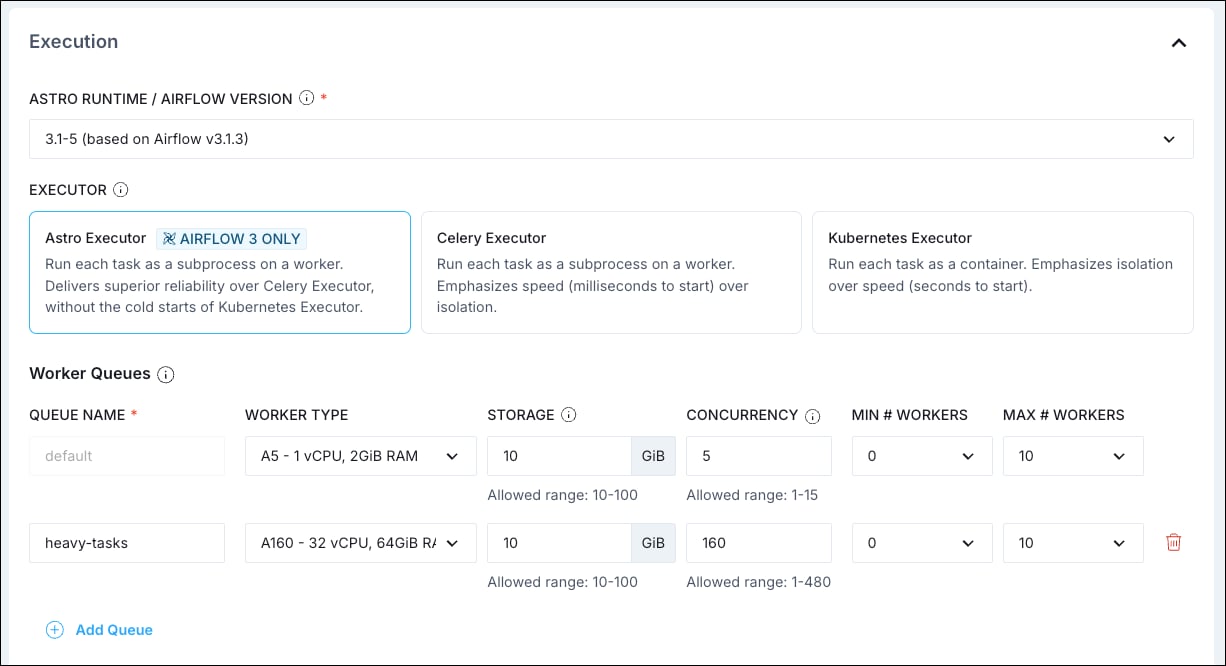
You can use [worker queues](/docs/astro/configure-worker-queues) with the `AstroExecutor` to run tasks on different worker types with varying resource configurations.
### KubernetesExecutor
The `KubernetesExecutor` is a containerized executor, which means every task instance is run in its own Kubernetes Pod. As such, access to a Kubernetes cluster is required to use this executor. The `KubernetesExecutor` allows for full task isolation and fine-grained control over the resources allocated to each task, with the trade-off of a slower task startup time.
Choose the `KubernetesExecutor` for:
* Deployments that require a high degree of task isolation.
* Deployments in which many tasks need to have a specific resource configuration.
There are some additional requirements for using the `KubernetesExecutor`, which are automatically fulfilled in Astro Deployments configured to run with this executor.
* The [Airflow Kubernetes provider](https://airflow.apache.org/registry/providers/cncf-kubernetes/) needs to be installed.
* The Airflow metadata database can't be a SQLite database.
You can customize your Kubernetes Pods by setting a base configuration and overriding it at the individual task level using the `pod_override` parameter. See [Configure tasks to run with the KubernetesExecutor](/docs/astro/kubernetes-executor) for more information on how to configure the `KubernetesExecutor` on Astro and [Kubernetes Executor - Configuration](https://airflow.apache.org/docs/apache-airflow-providers-cncf-kubernetes/stable/kubernetes_executor.html#configuration) for more information on how to configure the `KubernetesExecutor` when running it in a self-hosted Airflow environment.
### CeleryExecutor
The `CeleryExecutor` allows you to scale your workload horizontally by running tasks on multiple [Celery](https://docs.celeryq.dev/en/latest/getting-started/) workers that pick up their tasks from a queue. It can start tasks quickly, since no additional infrastructure needs to be provisioned after the initial setup, and scale horizontally to run many tasks concurrently. Due to these characteristics, the `CeleryExecutor` is a common default choice for Airflow 2 Deployments on Astro and self-managed Airflow 2 and 3 environments.
Choose the `CeleryExecutor` for:
* All Airflow 2 Deployments on Astro, unless you have specific requirements to use the `KubernetesExecutor`.
* Deployments that run consistent workloads with tasks starting frequently.
* Deployments that have high needs for horizontal scaling to run many tasks concurrently.
There are additional requirements for running the `CeleryExecutor`, which are automatically fulfilled in Astro Deployments configured to run with this executor.
* The [Airflow Celery provider](https://airflow.apache.org/registry/providers/celery/) needs to be installed.
* A Celery backend like Redis, RabbitMQ, or Redis Sentinel needs to be installed and configured. Astro Deployments use Redis.
On Astro, you can use [worker queues](/docs/astro/configure-worker-queues) with the `CeleryExecutor` to run tasks on different worker types with varying resource configurations.
To learn more about different configuration options for the `CeleryExecutor`, see [Configure the CeleryExecutor](/docs/astro/celery-executor) for Astro and [Celery Executor](https://airflow.apache.org/docs/apache-airflow-providers-celery/stable/celery_executor.html) for self-managed Airflow environments.
### LocalExecutor
The `LocalExecutor` runs inside the scheduler process and is the simplest option for task execution in Airflow 3, where the `SequentialExecutor` and `DebugExecutor` have been removed. Since the `LocalExecutor` runs in the same process as the scheduler, it doesn't require any additional infrastructure, but it can have an impact on the scheduler's performance when running many tasks.
Choose the `LocalExecutor` for:
* Local development and testing. The [Astro CLI](/docs/cli/v1.43/overview) uses the LocalExecutor.
* Very light production environments for self-managed Airflow environments
The Airflow configuration variable [`[core].parallelism`](https://airflow.apache.org/docs/apache-airflow/stable/configurations-ref.html#parallelism) determines the maximum number of tasks that can run concurrently with the `LocalExecutor` per scheduler. The value needs to be at least 1 (default: 32).
### Other executors
There are a couple of other executors that are available in self-managed Airflow environments.
* **[EdgeExecutor](https://airflow.apache.org/docs/apache-airflow-providers-edge3/stable/edge_executor.html)**: This executor allows you to distribute your tasks to workers in different remote locations through HTTP(s) connections. It is available as part of the [Edge3 provider](https://airflow.apache.org/docs/apache-airflow-providers-edge3/stable/index.html) package for Airflow deployments on version 2.10 or later.
* **[AWS ECS Executor](https://airflow.apache.org/docs/apache-airflow-providers-amazon/stable/executors/ecs-executor.html):** The `AwsEcsExecutor` is a containerized executor that runs each task instance in an individual ECS task. It is available as part of the [Amazon provider](https://airflow.apache.org/docs/apache-airflow-providers-amazon/stable/index.html) package.
* **[AWS Batch Executor](https://airflow.apache.org/docs/apache-airflow-providers-amazon/stable/executors/batch-executor.html):** The `AwsBatchExecutor` runs tasks in separate containers scheduled by AWS Batch. It is available as part of the Amazon provider package.
* **[AWS Lambda Executor](https://airflow.apache.org/docs/apache-airflow-providers-amazon/stable/executors/lambda-executor.html)** ([experimental](https://airflow.apache.org/docs/apache-airflow/stable/release-process.html#experimental-features)): The `AwsLambdaExecutor` submits tasks to AWS Lambda to run asynchronously. It is available as part of the Amazon provider package.
The hybrid executors `CeleryKubernetesExecutor` and `LocalKubernetesExecutor` have been removed in Airflow 3. In a self-managed Airflow environment, you can configure multiple executors instead, see [Configure an executor in self-hosted Airflow](#configure-an-executor-in-self-hosted-airflow).
## Configure an executor on Astro
On Astro you can set your executor during the Deployment creation process. The default executor is the `AstroExecutor`.
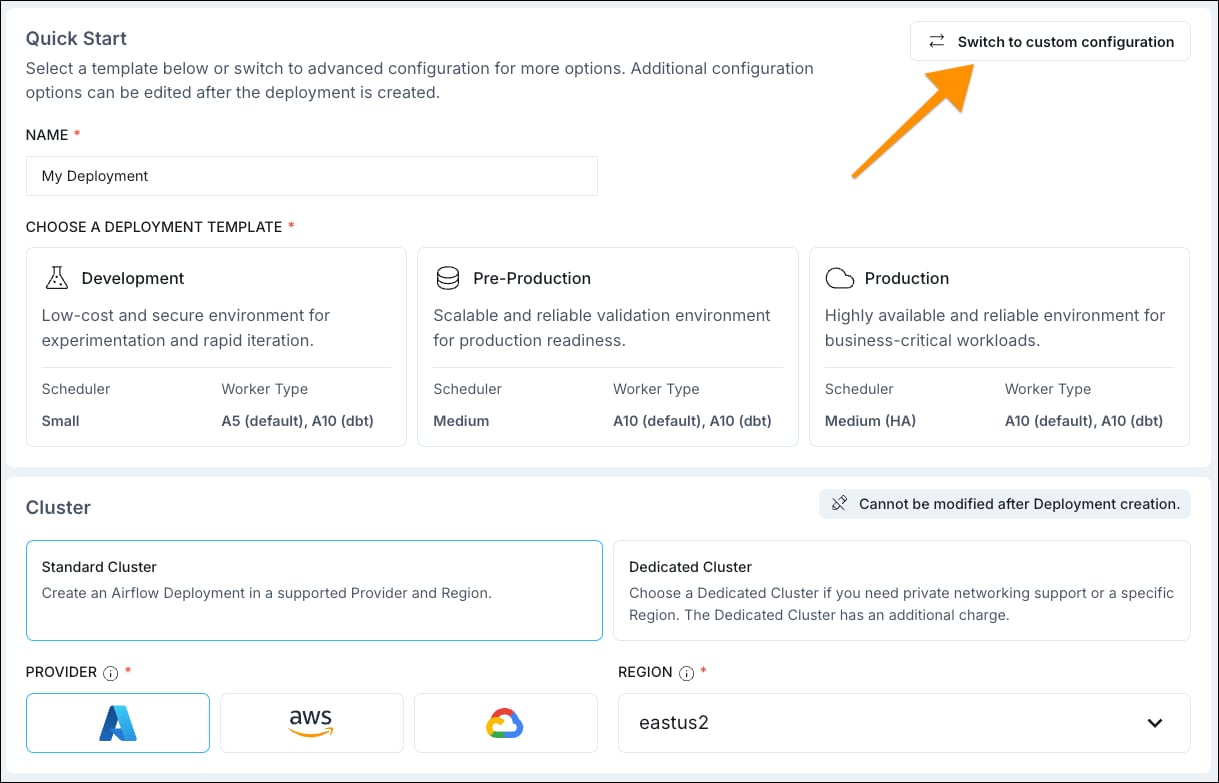
If you are creating your Deployment in the Astro UI, you can further configure the `AstroExecutor` (for example to configure worker queues) or choose a different executor.
1. Click the **Switch to custom configuration** button.
 2. Select a different executor.
 On Astro you can also create Deployments programmatically and set your executor as a configuration option:
* [Astro CLI](/docs/cli/v1.43/astro-deployment-create): set the executor using the `--executor` flag. The options are `AstroExecutor`, `CeleryExecutor`, or `KubernetesExecutor`.
* [Astro API](/docs/astro/api/v-1/deployment/create-a-deployment): set the executor using the `executor` parameter in the `POST` request. The options are `ASTRO`, `CELERY`, or `KUBERNETES`.
* [Astro Terraform Provider](https://registry.terraform.io/providers/astronomer/astro/latest/docs/resources/deployment): set the executor using the `executor` parameter in the `astro_deployment` resource. The options are `ASTRO`, `CELERY`, or `KUBERNETES`.
## Configure an executor in self-hosted Airflow
Open-source Airflow allows you to configure [multiple executors](https://airflow.apache.org/docs/apache-airflow/stable/core-concepts/executor/index.html#using-multiple-executors-concurrently) and assign each task to a different executor using the `executor` parameter.
In your Airflow configuration file, set the `[core].executor` variable to the executor(s) you want to use, separated by a comma.
```text wrap theme={null}
[core]
executor = KubernetesExecutor,CeleryExecutor,MyExecutor:my.custom.module.ExecutorClass
```
You can't use two instances of the same executor in the same Airflow environment.
In your task code, assign the executor to the task using the `executor` parameter. The first executor in the list is the default executor for all tasks where no executor is specified.
```python wrap theme={null}
# from airflow.sdk import task
@task(executor="CeleryExecutor")
def my_task():
pass
# from airflow.providers.standard.operators.bash import BashOperator
BashOperator(
task_id="my_task",
executor="MyExecutor",
bash_command="echo 'Hello World!'",
)
```
On Astro you can also create Deployments programmatically and set your executor as a configuration option:
* [Astro CLI](/docs/cli/v1.43/astro-deployment-create): set the executor using the `--executor` flag. The options are `AstroExecutor`, `CeleryExecutor`, or `KubernetesExecutor`.
* [Astro API](/docs/astro/api/v-1/deployment/create-a-deployment): set the executor using the `executor` parameter in the `POST` request. The options are `ASTRO`, `CELERY`, or `KUBERNETES`.
* [Astro Terraform Provider](https://registry.terraform.io/providers/astronomer/astro/latest/docs/resources/deployment): set the executor using the `executor` parameter in the `astro_deployment` resource. The options are `ASTRO`, `CELERY`, or `KUBERNETES`.
## Configure an executor in self-hosted Airflow
Open-source Airflow allows you to configure [multiple executors](https://airflow.apache.org/docs/apache-airflow/stable/core-concepts/executor/index.html#using-multiple-executors-concurrently) and assign each task to a different executor using the `executor` parameter.
In your Airflow configuration file, set the `[core].executor` variable to the executor(s) you want to use, separated by a comma.
```text wrap theme={null}
[core]
executor = KubernetesExecutor,CeleryExecutor,MyExecutor:my.custom.module.ExecutorClass
```
You can't use two instances of the same executor in the same Airflow environment.
In your task code, assign the executor to the task using the `executor` parameter. The first executor in the list is the default executor for all tasks where no executor is specified.
```python wrap theme={null}
# from airflow.sdk import task
@task(executor="CeleryExecutor")
def my_task():
pass
# from airflow.providers.standard.operators.bash import BashOperator
BashOperator(
task_id="my_task",
executor="MyExecutor",
bash_command="echo 'Hello World!'",
)
```