> ## Documentation Index
> Fetch the complete documentation index at: https://astronomer.io/docs/llms.txt
> Use this file to discover all available pages before exploring further.
# Use DuckDB with Apache Airflow
This page hasn't yet been updated for Airflow 3. The concepts shown are relevant, but some code may need to be updated. If you run any examples, take care to update import statements and watch for any other breaking changes.
[DuckDB](https://duckdb.org/) is an open-source in-process SQL OLAP database management system. It allows you to run complex queries on relational datasets using either local, file-based DuckDB instances, or the cloud service [MotherDuck](https://motherduck.com/). The ability to create a local DuckDB instance is useful for testing complex Airflow pipelines without the need to connect to a remote database.
Airflow can interact with DuckDB in two key ways:
* Use the DuckDB Python package directly in [@task decorated tasks](/docs/learn/airflow-decorators). This method is useful if you want to do ad-hoc analysis in-memory or combine information stored in various DuckDB files.
* Connect to DuckDB using the [DuckDB Airflow provider](https://airflow.apache.org/registry/providers/airflow-provider-duckdb/0.1.0/). The DuckDB Airflow provider is ideal if you access the same DuckDB database from many tasks in your Airflow environment and want to standardize this connection in a central place. You can also use the `DuckDBHook` to create custom operators to modularize your DuckDB interactions from within Airflow.
**Other ways to learn**
There are multiple resources for learning about this topic. See also:
* Webinar: [How to use DuckDB with Airflow](https://www.astronomer.io/events/webinars/how-to-use-duckdb-with-airflow/).
* Example repository: [Astronomer's DuckDB example repository](https://github.com/astronomer/airflow-duckdb-examples).
## Time to complete
This tutorial takes approximately 15 minutes to complete.
## Assumed knowledge
To get the most out of this tutorial, make sure you have an understanding of:
* The basics of DuckDB. See [the DuckDB documentation](https://duckdb.org/docs/guides/index).
* Airflow fundamentals, such as writing DAGs and defining tasks. See [Get started with Apache Airflow](/docs/learn/get-started-with-airflow).
* Airflow decorators. See [Introduction to Airflow decorators](/docs/learn/airflow-decorators).
* Airflow connections. See [Manage connections in Apache Airflow](/docs/learn/connections).
## Prerequisites
* The [Astro CLI](/docs/cli/v1.43/overview).
## Step 1: Configure your Astro project
To use DuckDB with Airflow, install the [DuckDB Airflow provider](https://github.com/astronomer/airflow-provider-duckdb) in your Astro project. This will also install the newest version of the [DuckDB Python package](https://pypi.org/project/duckdb).
1. Create a new Astro project:
```sh wrap theme={null}
$ mkdir astro-duckdb-tutorial && cd astro-duckdb-tutorial
$ astro dev init
```
2. Add the DuckDB Airflow provider to your Astro project `requirements.txt` file.
```text wrap theme={null}
airflow-provider-duckdb==0.2.0
```
3. If you are connecting to MotherDuck, the DuckDB cloud service, you need to use the amd64 version of Astro Runtime to prevent package conflicts. In this case, replace the `FROM` statement in your Dockerfile with the following line:
```Dockerfile wrap theme={null}
FROM --platform=linux/amd64 quay.io/astronomer/astro-runtime:8.6.0
```
If you are only using DuckDB locally, you don't need to modify your Dockerfile.
## Step 2: Create a DAG using the DuckDB Python package
You can use the [DuckDB Python package](https://pypi.org/project/duckdb/) directly in your `@task` decorated tasks. This method doesn't require you to configure an Airflow connection.
1. Start Airflow by running `astro dev start`.
2. Create a new file in your `dags` folder called `duckdb_tutorial_dag_1.py`.
3. Copy and paste the following DAG code into the file:
```python expandable wrap theme={null}
"""
### DuckDB Tutorial DAG 1
This DAG shows how to use the DuckDB package directly in a @task decorated task.
"""
from airflow.decorators import dag, task
from pendulum import datetime
import duckdb
import pandas as pd
@dag(start_date=datetime(2023, 6, 1), schedule=None, catchup=False)
def duckdb_tutorial_dag_1():
@task
def create_pandas_df():
"Create a pandas DataFrame with toy data and return it."
ducks_in_my_garden_df = pd.DataFrame(
{"colors": ["blue", "red", "yellow"], "numbers": [2, 3, 4]}
)
return ducks_in_my_garden_df
@task
def create_duckdb_table_from_pandas_df(ducks_in_my_garden_df):
"Create a table in DuckDB based on a pandas DataFrame and query it"
# change the path to connect to a different database
conn = duckdb.connect("include/my_garden_ducks.db")
conn.sql(
f"""CREATE TABLE IF NOT EXISTS ducks_garden AS
SELECT * FROM ducks_in_my_garden_df;"""
)
sets_of_ducks = conn.sql("SELECT numbers FROM ducks_garden;").fetchall()
for ducks in sets_of_ducks:
print("quack " * ducks[0])
create_duckdb_table_from_pandas_df(ducks_in_my_garden_df=create_pandas_df())
duckdb_tutorial_dag_1()
```
This simple DAG passes a pandas DataFrame from an upstream task to a downstream task. The downstream task uses the DuckDB Python package to create and query a table in DuckDB. You can control the database you connect to by changing the string in the `duckdb.connect()` function:
* Use an empty string to utilize an in-memory database (For example, `duckdb.connect("")`).
* Specify a local file path to create/connect to a local DuckDB database in which your table will persist (For example, `duckdb.connect("include/my_garden_ducks.db")`)
* Specify a MotherDuck connection string without a database to connect to your default MotherDuck database (For example, `duckdb.connect(f"motherduck:?token={YOUR_MOTHERDUCK_TOKEN}")`).
* Specify a MotherDuck connection string with a database to connect to a specific MotherDuck database (For example, `duckdb.connect(f"motherduck:{YOUR_DB}?token={YOUR_MOTHERDUCK_TOKEN}")`)
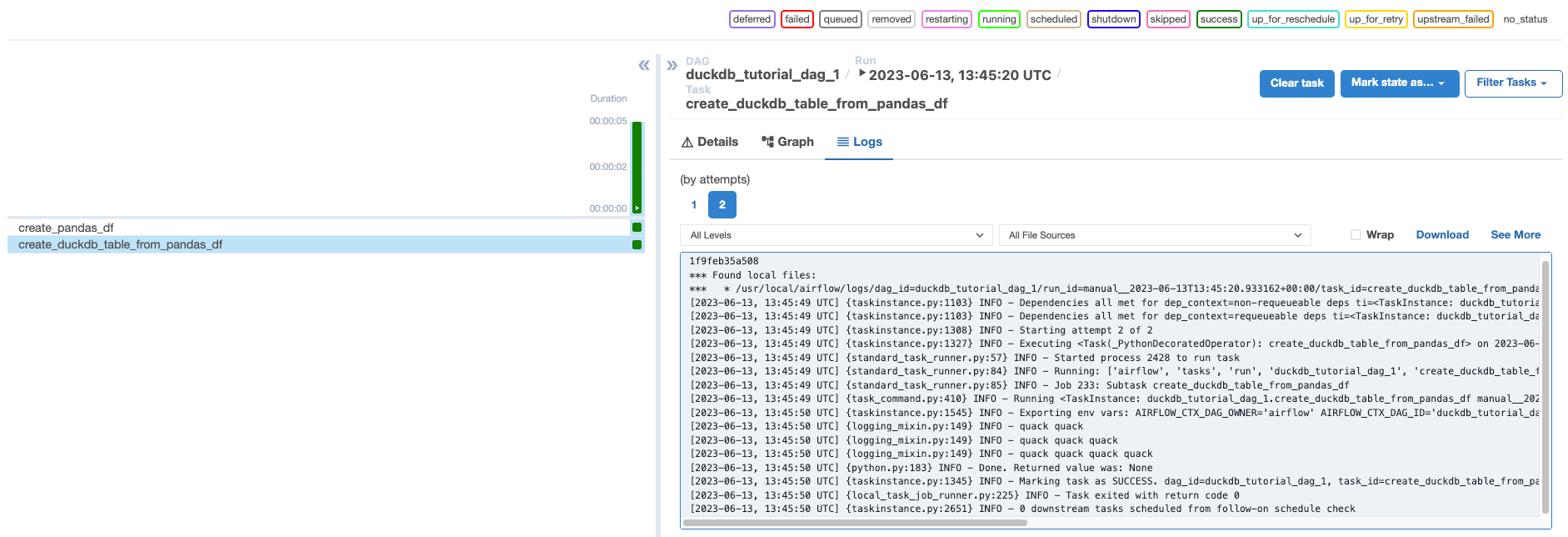
4. Open Airflow at `http://localhost:8080/`. Run the DAG manually by clicking the play button, then click the DAG name to view the DAG in the **Grid** view. In the logs for `create_duckdb_table_from_pandas_df`, you will find a quack for each duck in your garden.
 ## Step 3: Create a DuckDB Airflow connection
Next, you will create a DAG that instead uses the DuckDB Airflow provider. To use the provider, you will need to define an Airflow connection to your DuckDB database.
1. In the Airflow UI, go to **Admin** -> **Connections** and click **+**.
2. Create a new connection named `my_local_duckdb_conn` using the following information:
* **Connection ID**: `my_local_duckdb_conn`.
* **Connection Type**: `DuckDB`.
* **Path to local database file**: `include/my_garden_ducks.db`.
## Step 3: Create a DuckDB Airflow connection
Next, you will create a DAG that instead uses the DuckDB Airflow provider. To use the provider, you will need to define an Airflow connection to your DuckDB database.
1. In the Airflow UI, go to **Admin** -> **Connections** and click **+**.
2. Create a new connection named `my_local_duckdb_conn` using the following information:
* **Connection ID**: `my_local_duckdb_conn`.
* **Connection Type**: `DuckDB`.
* **Path to local database file**: `include/my_garden_ducks.db`.
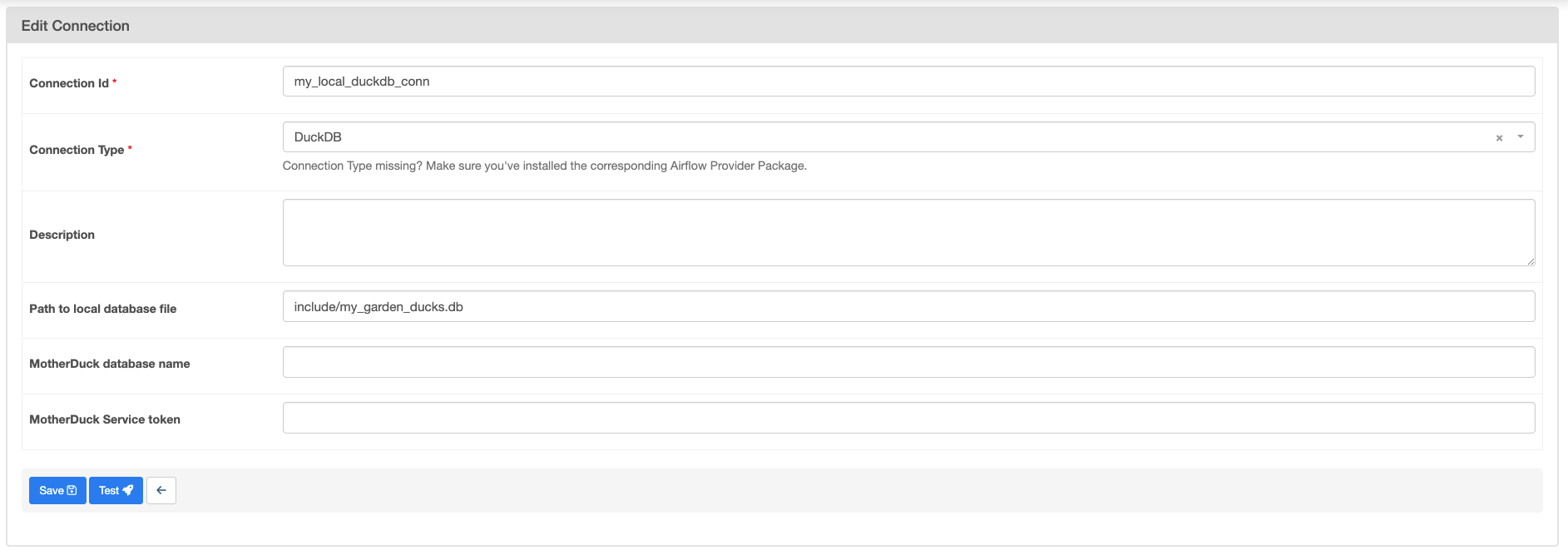 3. Click **Save**. Note that you can't currently test a connection to DuckDB from the Airflow UI.
If you are connecting to MotherDuck, you will need to add your [MotherDuck Service token](https://motherduck.com/docs/authenticating-to-motherduck/) in the **MotherDuck Service token** field and leave the **Path to local database file** field empty. Optionally, you can add a MotherDuck database name in the **MotherDuck database name** field. The default name is the default MotherDuck database (`my_db`).
## Step 4: Create a DAG using the Airflow DuckDB provider
1. Create a new file in your `dags` folder called `duckdb_tutorial_dag_2.py`.
2. Copy and paste the following DAG code into the file:
```python wrap theme={null}
"""
### DuckDB tutorial DAG 2
This DAG shows how to use the DuckDBHook in an Airflow task.
"""
from airflow.decorators import dag, task
from pendulum import datetime
from duckdb_provider.hooks.duckdb_hook import DuckDBHook
DUCKDB_CONN_ID = "my_local_duckdb_conn"
DUCKDB_TABLE_NAME = "ducks_garden"
@dag(start_date=datetime(2023, 6, 1), schedule=None, catchup=False)
def duckdb_tutorial_dag_2():
@task
def query_duckdb(my_table, conn_id):
my_duck_hook = DuckDBHook.get_hook(conn_id)
conn = my_duck_hook.get_conn()
r = conn.execute(f"SELECT * FROM {my_table};").fetchall()
print(r)
return r
query_duckdb(my_table=DUCKDB_TABLE_NAME, conn_id=DUCKDB_CONN_ID)
duckdb_tutorial_dag_2()
```
This simple DAG will query all information from a table in a DuckDB instance. Make sure the table you are querying exists in the DuckDB instance you specified in your DuckDB connection.
3. Open Airflow at `http://localhost:8080/`. Run the DAG manually by clicking the play button.
You can use the `DuckDBHook` to create [custom operators](/docs/learn/airflow-importing-custom-hooks-operators) to modularize your interactions with DuckDB. You can find an example of a [custom DuckDB operator for ingesting Excel files](https://github.com/astronomer/airflow-duckdb-examples/blob/main/include/custom_operators/duckdb_operator.py).
## Conclusion
Congratulations! You successfully used DuckDB with Airflow. Quack!
3. Click **Save**. Note that you can't currently test a connection to DuckDB from the Airflow UI.
If you are connecting to MotherDuck, you will need to add your [MotherDuck Service token](https://motherduck.com/docs/authenticating-to-motherduck/) in the **MotherDuck Service token** field and leave the **Path to local database file** field empty. Optionally, you can add a MotherDuck database name in the **MotherDuck database name** field. The default name is the default MotherDuck database (`my_db`).
## Step 4: Create a DAG using the Airflow DuckDB provider
1. Create a new file in your `dags` folder called `duckdb_tutorial_dag_2.py`.
2. Copy and paste the following DAG code into the file:
```python wrap theme={null}
"""
### DuckDB tutorial DAG 2
This DAG shows how to use the DuckDBHook in an Airflow task.
"""
from airflow.decorators import dag, task
from pendulum import datetime
from duckdb_provider.hooks.duckdb_hook import DuckDBHook
DUCKDB_CONN_ID = "my_local_duckdb_conn"
DUCKDB_TABLE_NAME = "ducks_garden"
@dag(start_date=datetime(2023, 6, 1), schedule=None, catchup=False)
def duckdb_tutorial_dag_2():
@task
def query_duckdb(my_table, conn_id):
my_duck_hook = DuckDBHook.get_hook(conn_id)
conn = my_duck_hook.get_conn()
r = conn.execute(f"SELECT * FROM {my_table};").fetchall()
print(r)
return r
query_duckdb(my_table=DUCKDB_TABLE_NAME, conn_id=DUCKDB_CONN_ID)
duckdb_tutorial_dag_2()
```
This simple DAG will query all information from a table in a DuckDB instance. Make sure the table you are querying exists in the DuckDB instance you specified in your DuckDB connection.
3. Open Airflow at `http://localhost:8080/`. Run the DAG manually by clicking the play button.
You can use the `DuckDBHook` to create [custom operators](/docs/learn/airflow-importing-custom-hooks-operators) to modularize your interactions with DuckDB. You can find an example of a [custom DuckDB operator for ingesting Excel files](https://github.com/astronomer/airflow-duckdb-examples/blob/main/include/custom_operators/duckdb_operator.py).
## Conclusion
Congratulations! You successfully used DuckDB with Airflow. Quack!