> ## Documentation Index
> Fetch the complete documentation index at: https://astronomer.io/docs/llms.txt
> Use this file to discover all available pages before exploring further.
# Dag Versioning and Dag Bundles
Dag versioning, the most frequently requested feature by the Airflow community, is available in Airflow 3.0! This feature allows you to track changes to your Dags over time in the Airflow UI, allowing you to see the complete history of your Dag runs. Dag versioning is automatic and doesn't require any setup. Additionally, versioned Dag bundles allow you to prevent version collisions during code pushes and rerun historical Dags using their original code.
This guide gives an introduction to Dag versioning and Dag bundles, including how to set up a versioned `GitDagBundle`.
## Assumed knowledge
To get the most out of this guide, you should have an existing knowledge of:
* Airflow Dags. See [Introduction to Apache Airflow® Dags](/docs/learn/dags).
* Basic GitHub concepts. See the [GitHub documentation](https://docs.github.com/en).
## Importance of Dag versioning
In Airflow 2, both the Airflow UI and Dag execution always used the latest Dag code. This led to two major constraints:
* **No observability of previous Dag versions**: If you changed a Dag and then, for example, removed a task, all history for previous runs of that task disappeared in the grid and graph view of the Airflow UI.
* **Version collisions during code pushes**: If the code of a Dag changed while a Dag was still running, some tasks of the same run might have been executed using the older version while others used the newer version. This situation carried a significant risk of unintended consequences. For example:
* The older Dag version might use task A to retrieve the name of table X in a relational database for data insertion and task B to insert data into that table.
* If the Dag was updated to change the table from X to Y in the middle of a run, task A (from the old version) might pass the table name X while the updated task B inserted data intended for table Y into table X.
Dag bundles and Dag versioning were introduced in Airflow 3 to address these issues.
## Dag versioning vs Dag bundles
Airflow 3 introduces two new concepts:
* **Dag versioning**: Airflow now keeps track of changes to your Dags. This is automatic and happens no matter which Dag bundle is used.
* A new Dag version is created every time a Dag run is created for a Dag that has undergone a structural change since the last run. A structural change is any change that affects `serdag`. This includes changes to Dag or task parameters, task dependencies, task IDs or adding or removing tasks.
* Each Dag run is associated with a Dag version that is visible in the Airflow UI.
* Whenever a new Dag run is initiated, the scheduler uses the latest version of the Dag to create a run.
* **Dag bundle**: A collection of files containing Dag code and supporting files. Dag bundles are named after the backend they use to store the Dag code. For example, the `LocalDagBundle` uses the local file system to store Dag code, while the `GitDagBundle` uses a Git repository.
* Some Dag bundles are versioned, such as the `GitDagBundle`. A version of a Dag bundle is created by versioning the underlying backend. For example, a new version of the `GitDagBundle` is created by every [Git](https://git-scm.com/doc) commit, whether or not any Dags change.
* The default `LocalDagBundle` isn't versioned.
Dag versioning is automatic in Airflow 3 and doesn't require any setup. Using a Dag bundle other than `LocalDagBundle` requires changes to your Airflow configuration.
## Dag versioning
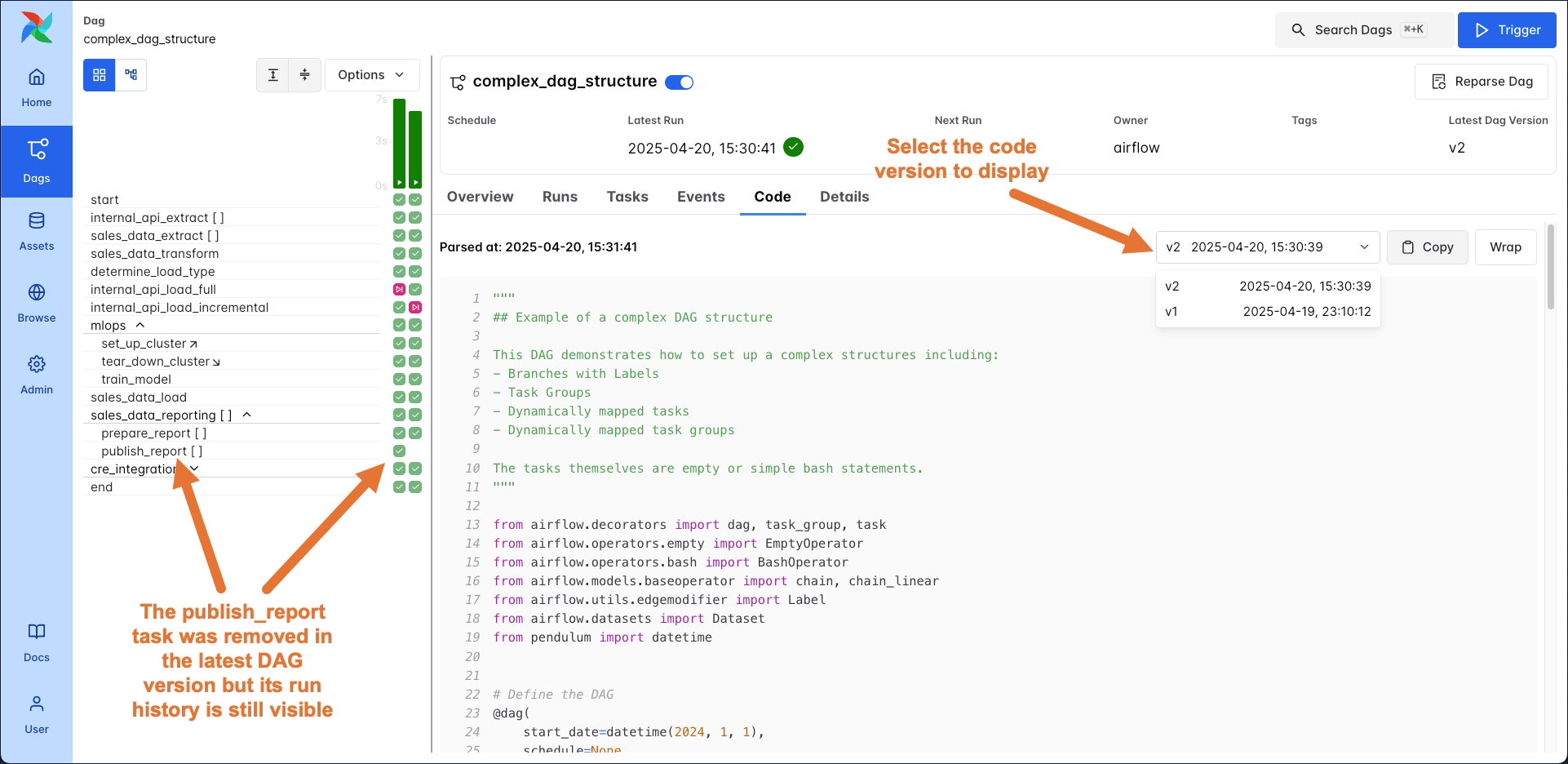
You can view Dag versions in several places in the Airflow UI. In the **Options** menu of the Dag graph, you can select which version of the Dag graph you want to display. The Dag details page also shows the latest available version of the Dag, which is used to create new Dag runs.
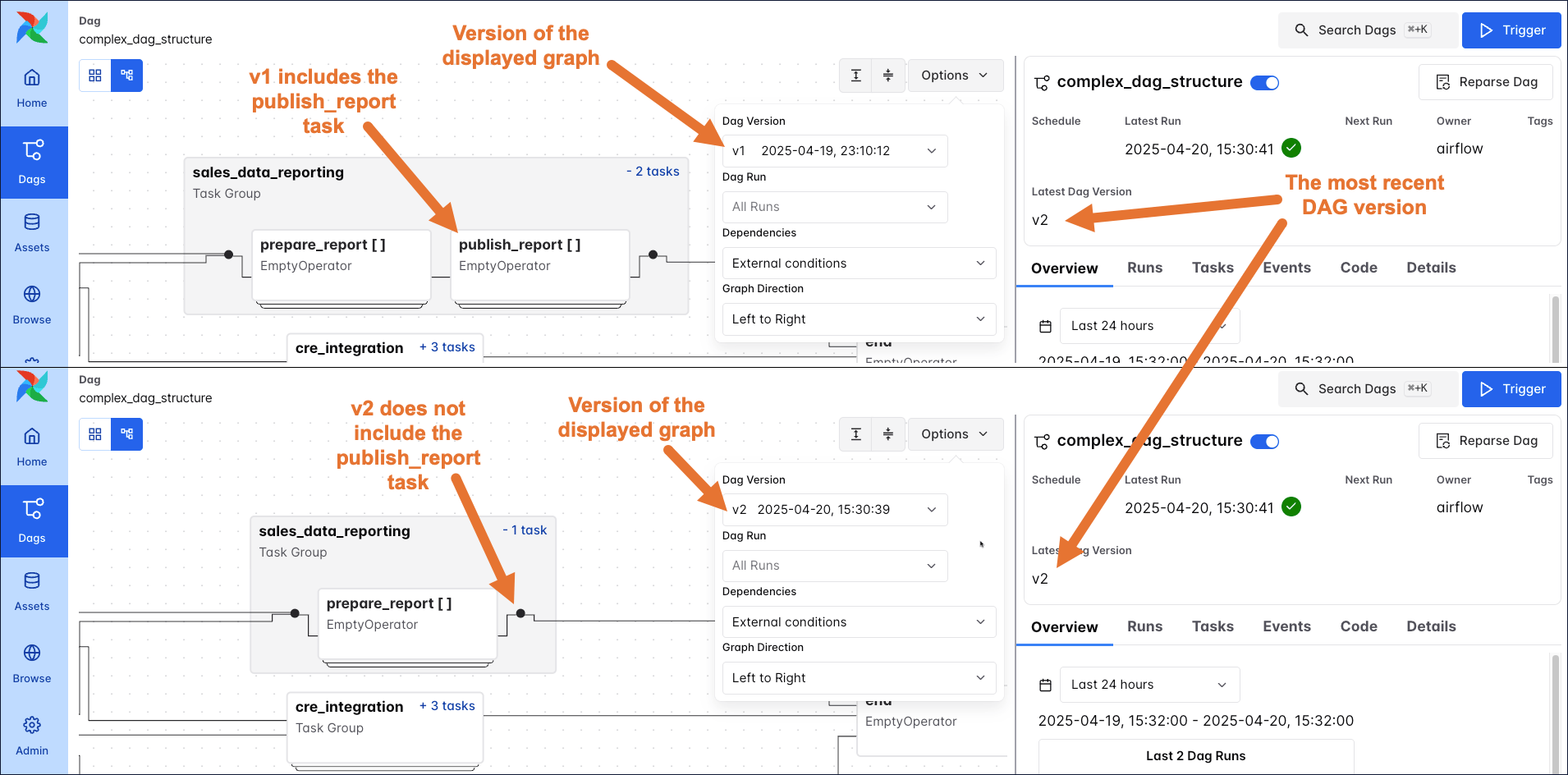 The Dag grid now retains the history for all tasks, even if they were removed in the latest version of the Dag. You can also select which version of the Dag code you want to display in the **Code** tab.
 ## Dag bundles
For Dags running on Astro using Hosted [execution mode](/docs/astro/execution-mode), a specialized versioned Dag bundle is configured automatically, without any need for additional setup. Configuring custom Dag bundles and using several Dag bundles in the same Astro Deployment is only supported when using [Remote Execution mode](/docs/astro/execution-mode#remote-execution). For more information, see [Configure Dag bundles for Remote Execution](/docs/astro/remote-execution-configure-dag-sources).
Dag bundles contain Dag code and supporting files. There are versioned and unversioned Dag bundles; the default Dag bundle (`LocalDagBundle`) isn't versioned, while the `GitDagBundle` is versioned. Support for other Dag bundle backends is planned for future releases.
Versioned and unversioned Dag bundles behave differently in the following situations:
* **Clearing/rerunning a previous Dag run**:
* Unversioned Dag bundle: Airflow uses the current Dag code, that is, the latest version of the Dag.
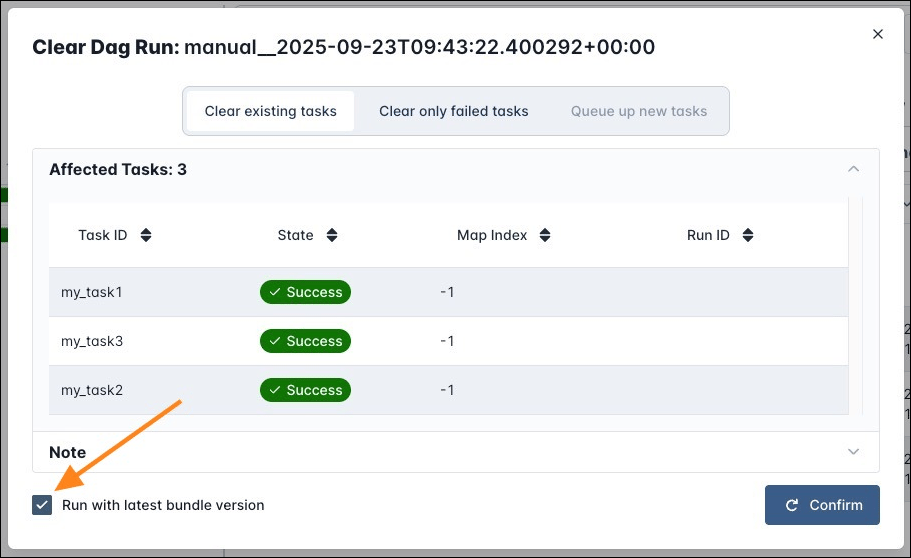
* Versioned Dag bundle: By default, the scheduler uses the Dag version that existed at the time of the Dag run to determine which task instances to create and the workers use the code contained in the Dag bundle version that existed at the time of the original Dag run to execute their tasks. You can configure the rerun behavior, for example by checking the **Run with latest bundle version** box on the clearing form or setting `run_on_latest_version=True` in an API call. For more configuration options see [Run on latest version](#run-on-latest-version).
## Dag bundles
For Dags running on Astro using Hosted [execution mode](/docs/astro/execution-mode), a specialized versioned Dag bundle is configured automatically, without any need for additional setup. Configuring custom Dag bundles and using several Dag bundles in the same Astro Deployment is only supported when using [Remote Execution mode](/docs/astro/execution-mode#remote-execution). For more information, see [Configure Dag bundles for Remote Execution](/docs/astro/remote-execution-configure-dag-sources).
Dag bundles contain Dag code and supporting files. There are versioned and unversioned Dag bundles; the default Dag bundle (`LocalDagBundle`) isn't versioned, while the `GitDagBundle` is versioned. Support for other Dag bundle backends is planned for future releases.
Versioned and unversioned Dag bundles behave differently in the following situations:
* **Clearing/rerunning a previous Dag run**:
* Unversioned Dag bundle: Airflow uses the current Dag code, that is, the latest version of the Dag.
* Versioned Dag bundle: By default, the scheduler uses the Dag version that existed at the time of the Dag run to determine which task instances to create and the workers use the code contained in the Dag bundle version that existed at the time of the original Dag run to execute their tasks. You can configure the rerun behavior, for example by checking the **Run with latest bundle version** box on the clearing form or setting `run_on_latest_version=True` in an API call. For more configuration options see [Run on latest version](#run-on-latest-version).
 * **Clearing/rerunning individual tasks of a previous Dag run**:
* Unversioned Dag bundle: Airflow uses the latest version of the Dag for tasks that are rerun.
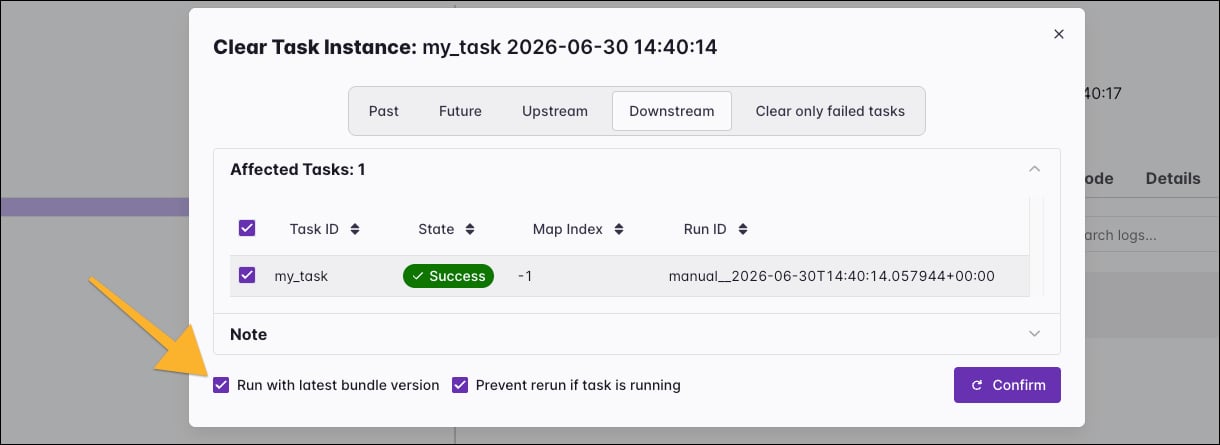
* Versioned Dag bundle: By default, when the run's Dag version differs from the latest and a task instance is cleared in the Airflow UI, Airflow reruns the task using the code in the latest Dag bundle version. To rerun using the version the task originally used, uncheck the **Run with latest bundle version** box. If the task instance is cleared through the API or CLI, the default is to use the Dag bundle version of the original run; set `run_on_latest_version=True` to use the latest version instead. For more configuration options see [Run on latest version](#run-on-latest-version).
* **Clearing/rerunning individual tasks of a previous Dag run**:
* Unversioned Dag bundle: Airflow uses the latest version of the Dag for tasks that are rerun.
* Versioned Dag bundle: By default, when the run's Dag version differs from the latest and a task instance is cleared in the Airflow UI, Airflow reruns the task using the code in the latest Dag bundle version. To rerun using the version the task originally used, uncheck the **Run with latest bundle version** box. If the task instance is cleared through the API or CLI, the default is to use the Dag bundle version of the original run; set `run_on_latest_version=True` to use the latest version instead. For more configuration options see [Run on latest version](#run-on-latest-version).
 * **Backfilling a Dag run**:
* Unversioned Dag bundle: Airflow uses the current Dag code, that is, the latest version of the Dag.
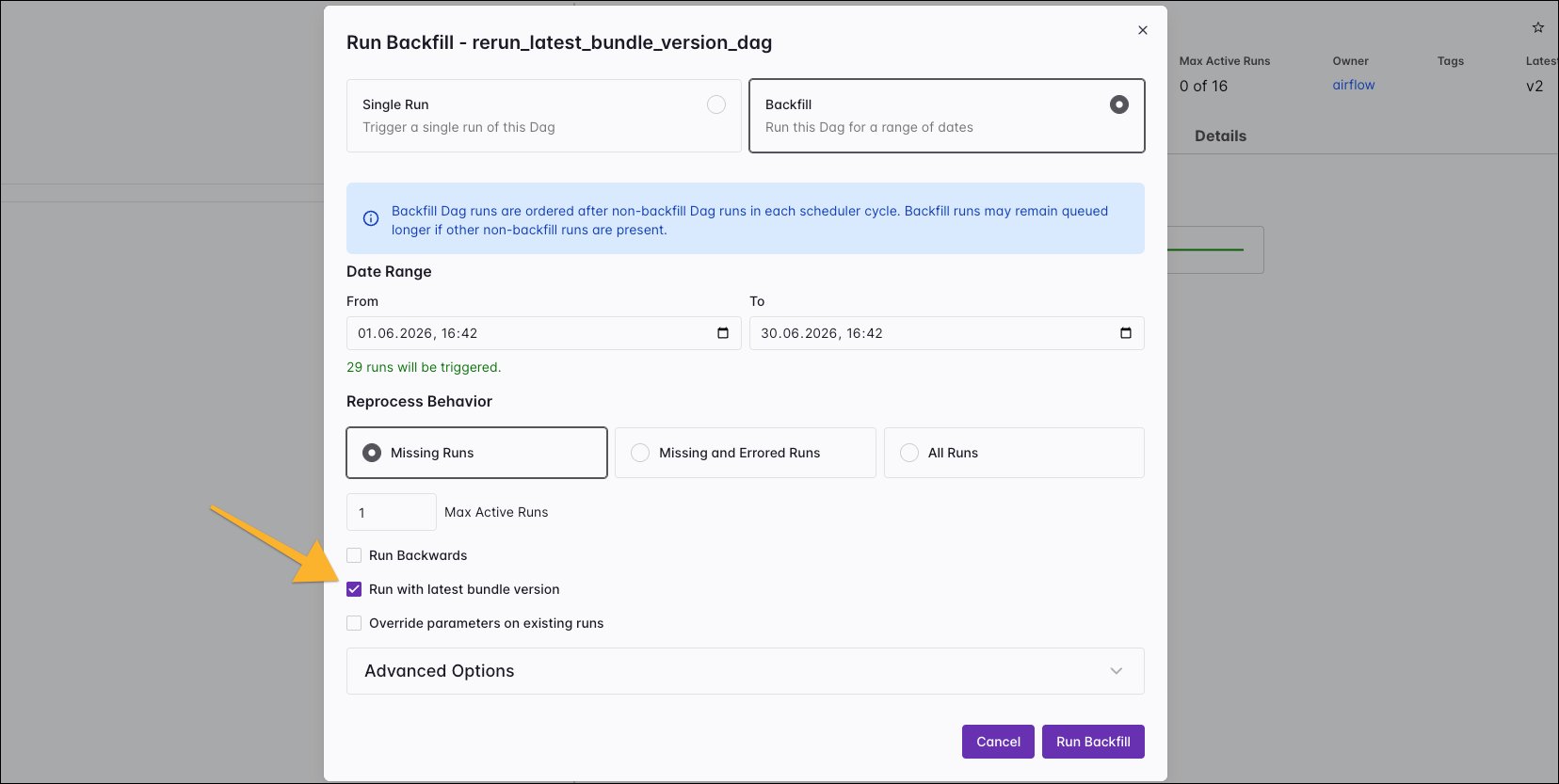
* Versioned Dag bundle: By default, the scheduler uses the latest version of the Dag for *all* Dag runs created in a [backfill](/docs/learn/rerunning-dags#backfill), including re-runs of existing runs when selecting **Missing and Errored Runs** or **All Runs**. You can configure the rerun behavior for *existing* Dag runs within a backfill, for example by unchecking the **Run with latest bundle version** box on the backfill form or setting `run_on_latest_version` in an API call to `False`, to use the original version of the code. Missing runs created in a backfill always use the latest Dag version. For more configuration options see [Run on latest version](#run-on-latest-version).
* **Backfilling a Dag run**:
* Unversioned Dag bundle: Airflow uses the current Dag code, that is, the latest version of the Dag.
* Versioned Dag bundle: By default, the scheduler uses the latest version of the Dag for *all* Dag runs created in a [backfill](/docs/learn/rerunning-dags#backfill), including re-runs of existing runs when selecting **Missing and Errored Runs** or **All Runs**. You can configure the rerun behavior for *existing* Dag runs within a backfill, for example by unchecking the **Run with latest bundle version** box on the backfill form or setting `run_on_latest_version` in an API call to `False`, to use the original version of the code. Missing runs created in a backfill always use the latest Dag version. For more configuration options see [Run on latest version](#run-on-latest-version).
 * **Changing code while a Dag is running**:
* Unversioned Dag bundle: The Dag always uses the current Dag code at the time it starts a task, as in Airflow 2.
* Versioned Dag bundle: The Dag run finishes using the bundle version it started with.
* **Making code changes**:
* Unversioned Dag bundle: Every structural change to the Dag creates a new Dag version.
* Versioned Dag bundle: Every committed or saved structural change to a Dag creates a new version of that Dag. This means with every new bundle version, all Dags that have had structural changes will also have a new Dag version.
See the Airflow documentation on [Dag bundles](https://airflow.apache.org/docs/apache-airflow-providers-git/stable/bundles/index.html) for more information, including how to create a custom Dag bundle.
### Run on latest version
In Airflow 3.3+ you can define defaults for the rerun behavior of Dags stored in versioned Dag bundles at the Dag and configuration level. This determines whether the **Run with latest bundle version** check boxes in the Airflow UI are checked or unchecked by default.
If you set `rerun_with_latest_version=True` any clearing of a Dag run or task instance, as well as any backfill run of the Dag will use the code version from the most recent Dag bundle, unless overridden in the Airflow UI or API call that initiates the run. Conversely, setting this parameter to `False`, will default any cleared run, or run re-created in a backfill to use the original version of its code.
```python wrap theme={null}
@dag(rerun_with_latest_version=True)
```
You can set a default value for your Airflow instance at the configuration level with [`AIRFLOW__CORE__RERUN_WITH_LATEST_VERSION`](http://apache-airflow-docs.s3-website.eu-central-1.amazonaws.com/docs/apache-airflow/stable/configurations-ref.html#rerun-with-latest-version).
### Set up a GitDagBundle
To directly fetch your Dag code from a GitHub repository, you can use the `GitDagBundle`. This bundle is versioned. To configure a `GitDagBundle` for an Astro CLI project, follow these steps:
1. Push your Dag code to a [GitHub repository](https://docs.github.com/en).
2. Install the `git` package in your Astro project by adding it to your `packages.txt` file.
3. Install the [Airflow Git provider](https://airflow.apache.org/docs/apache-airflow-providers-git/stable/index.html) by adding the following to your `requirements.txt` file. Replace `` with the latest version of the provider package.
```text wrap theme={null}
apache-airflow-providers-git==
```
4. Define a Git connection using an environment variable in your `.env` file. Replace `` and `` with the name of your GitHub account and repository, respectively. Replace `github_pat_` with your GitHub personal access token. The token only requires read permissions to the content of the repository.
```text wrap theme={null}
AIRFLOW_CONN_MY_GIT_CONN='{
"conn_type": "git",
"host": "https://github.com//.git",
"password": "github_pat_"
}'
```
5. Change the `[dag_processor].dag_bundle_config_list` configuration to use a `GitDagBundle` by setting the associated environment variable in your `.env` file. Replace `your-bundle-name` with the name you want to give to your Dag bundle. The `subdir` should point to the directory in your GitHub repository where your Dag code is stored. The `tracking_ref` should point to the branch you want to use.
```text wrap theme={null}
AIRFLOW__DAG_PROCESSOR__DAG_BUNDLE_CONFIG_LIST='[
{
"name": "your-bundle-name",
"classpath": "airflow.providers.git.bundles.git.GitDagBundle",
"kwargs": {
"git_conn_id": "my_git_conn",
"subdir": "dags",
"tracking_ref": "main"
}
}
]'
```
6. Restart your project using `astro dev restart` to apply the changes.
## Programmatic Dags and Dag bundles
If you are creating your Dags programmatically, that is, you are using Python code to generate your Dag code and want to use a versioned Dag bundle, you need to ensure that there are no Dag structure changes without a Dag bundle change.
The reason is, that when clearing a Dag run, the scheduler uses the Dag bundle version that existed at the time of the Dag run to determine which task instances to create. The workers use the code contained in the Dag bundle version that existed at the time of the original Dag run to execute their tasks. In the rare case where programmatic Dag creation leads to a Dag structure, and therefore Dag version change without a Dag bundle change, the scheduler and workers will use different Dag versions to create and execute the tasks. This can lead to unexpected behavior.
An example for programmatic Dag creation that is safe to use with a versioned Dag bundle is usage of the [dag-factory](https://pypi.org/project/dag-factory/) or to create tasks in a loop that only changes when the code changes:
```python wrap theme={null}
# this list only changes when the code changes
my_tables = ["TABLE_A", "TABLE_B", "TABLE_C"]
for my_table in my_tables:
@task(
task_id=f"modify_{i}",
)
def modify_table(my_table):
# do something with the table
pass
modify_table(my_table=my_table)
```
If you are using top-level code that connects to an external system (a practice that we caution against, see [Avoid top-level code in your Dag file](/docs/learn/dag-best-practices#avoid-top-level-code-in-your-dag-file)), you might have a change in Dag structure without a change in the Dag bundle. An example would be if the list `my_tables` from the above example is created by querying a database.
* **Changing code while a Dag is running**:
* Unversioned Dag bundle: The Dag always uses the current Dag code at the time it starts a task, as in Airflow 2.
* Versioned Dag bundle: The Dag run finishes using the bundle version it started with.
* **Making code changes**:
* Unversioned Dag bundle: Every structural change to the Dag creates a new Dag version.
* Versioned Dag bundle: Every committed or saved structural change to a Dag creates a new version of that Dag. This means with every new bundle version, all Dags that have had structural changes will also have a new Dag version.
See the Airflow documentation on [Dag bundles](https://airflow.apache.org/docs/apache-airflow-providers-git/stable/bundles/index.html) for more information, including how to create a custom Dag bundle.
### Run on latest version
In Airflow 3.3+ you can define defaults for the rerun behavior of Dags stored in versioned Dag bundles at the Dag and configuration level. This determines whether the **Run with latest bundle version** check boxes in the Airflow UI are checked or unchecked by default.
If you set `rerun_with_latest_version=True` any clearing of a Dag run or task instance, as well as any backfill run of the Dag will use the code version from the most recent Dag bundle, unless overridden in the Airflow UI or API call that initiates the run. Conversely, setting this parameter to `False`, will default any cleared run, or run re-created in a backfill to use the original version of its code.
```python wrap theme={null}
@dag(rerun_with_latest_version=True)
```
You can set a default value for your Airflow instance at the configuration level with [`AIRFLOW__CORE__RERUN_WITH_LATEST_VERSION`](http://apache-airflow-docs.s3-website.eu-central-1.amazonaws.com/docs/apache-airflow/stable/configurations-ref.html#rerun-with-latest-version).
### Set up a GitDagBundle
To directly fetch your Dag code from a GitHub repository, you can use the `GitDagBundle`. This bundle is versioned. To configure a `GitDagBundle` for an Astro CLI project, follow these steps:
1. Push your Dag code to a [GitHub repository](https://docs.github.com/en).
2. Install the `git` package in your Astro project by adding it to your `packages.txt` file.
3. Install the [Airflow Git provider](https://airflow.apache.org/docs/apache-airflow-providers-git/stable/index.html) by adding the following to your `requirements.txt` file. Replace `` with the latest version of the provider package.
```text wrap theme={null}
apache-airflow-providers-git==
```
4. Define a Git connection using an environment variable in your `.env` file. Replace `` and `` with the name of your GitHub account and repository, respectively. Replace `github_pat_` with your GitHub personal access token. The token only requires read permissions to the content of the repository.
```text wrap theme={null}
AIRFLOW_CONN_MY_GIT_CONN='{
"conn_type": "git",
"host": "https://github.com//.git",
"password": "github_pat_"
}'
```
5. Change the `[dag_processor].dag_bundle_config_list` configuration to use a `GitDagBundle` by setting the associated environment variable in your `.env` file. Replace `your-bundle-name` with the name you want to give to your Dag bundle. The `subdir` should point to the directory in your GitHub repository where your Dag code is stored. The `tracking_ref` should point to the branch you want to use.
```text wrap theme={null}
AIRFLOW__DAG_PROCESSOR__DAG_BUNDLE_CONFIG_LIST='[
{
"name": "your-bundle-name",
"classpath": "airflow.providers.git.bundles.git.GitDagBundle",
"kwargs": {
"git_conn_id": "my_git_conn",
"subdir": "dags",
"tracking_ref": "main"
}
}
]'
```
6. Restart your project using `astro dev restart` to apply the changes.
## Programmatic Dags and Dag bundles
If you are creating your Dags programmatically, that is, you are using Python code to generate your Dag code and want to use a versioned Dag bundle, you need to ensure that there are no Dag structure changes without a Dag bundle change.
The reason is, that when clearing a Dag run, the scheduler uses the Dag bundle version that existed at the time of the Dag run to determine which task instances to create. The workers use the code contained in the Dag bundle version that existed at the time of the original Dag run to execute their tasks. In the rare case where programmatic Dag creation leads to a Dag structure, and therefore Dag version change without a Dag bundle change, the scheduler and workers will use different Dag versions to create and execute the tasks. This can lead to unexpected behavior.
An example for programmatic Dag creation that is safe to use with a versioned Dag bundle is usage of the [dag-factory](https://pypi.org/project/dag-factory/) or to create tasks in a loop that only changes when the code changes:
```python wrap theme={null}
# this list only changes when the code changes
my_tables = ["TABLE_A", "TABLE_B", "TABLE_C"]
for my_table in my_tables:
@task(
task_id=f"modify_{i}",
)
def modify_table(my_table):
# do something with the table
pass
modify_table(my_table=my_table)
```
If you are using top-level code that connects to an external system (a practice that we caution against, see [Avoid top-level code in your Dag file](/docs/learn/dag-best-practices#avoid-top-level-code-in-your-dag-file)), you might have a change in Dag structure without a change in the Dag bundle. An example would be if the list `my_tables` from the above example is created by querying a database.