> ## Documentation Index
> Fetch the complete documentation index at: https://astronomer.io/docs/llms.txt
> Use this file to discover all available pages before exploring further.
# Orchestrate Cohere LLMs with Apache Airflow
This page hasn't yet been updated for Airflow 3. The concepts shown are relevant, but some code may need to be updated. If you run any examples, take care to update import statements and watch for any other breaking changes.
[Cohere](https://cohere.com/) is a natural language processing (NLP) platform that provides an API to access large language models (LLMs). The [Cohere Airflow provider](https://airflow.apache.org/docs/apache-airflow-providers-cohere/stable/index.html) offers modules to easily integrate Cohere with Airflow.
In this tutorial, you use Airflow and the Cohere Airflow provider to generate recipe suggestions based on a list of ingredients and countries of recipe origin. Additionally, you create embeddings of the recipes and perform dimensionality reduction using principal component analysis (PCA) to plot recipe similarity in two dimensions.
## Why use Airflow with Cohere?
Cohere provides highly specialized out-of-the box and custom LLMs. Countless applications use these models for both user-facing needs, such as to moderate user-generated content, and internal purposes, like providing insight into customer support tickets.
Integrating Cohere with Airflow into one end-to-end machine learning pipeline allows you to:
* Use Airflow's [data-driven scheduling](/docs/learn/airflow-datasets) to run operations with Cohere LLM endpoints based on upstream events in your data ecosystem, like when new user input is ingested or a new dataset is available.
* Send several requests to a model endpoint in parallel based on upstream events in your data ecosystem or user input with [Airflow params](/docs/learn/airflow-params).
* Add Airflow features like [retries](/docs/learn/rerunning-dags#automatically-retry-tasks) and [alerts](/docs/learn/error-notifications-in-airflow) to your Cohere operations. This is critical for day 2 MLOps operations, for example, to handle model service outages.
* Use Airflow to orchestrate the creation of vector embeddings with Cohere models, which is especially useful for very large datasets that can't be processed automatically by vector databases.
## Time to complete
This tutorial takes approximately 15 minutes to complete (cooking your recommended recipe not included).
## Assumed knowledge
To get the most out of this tutorial, make sure you have an understanding of:
* The basics of the Cohere API. See [Cohere Documentation](https://docs.cohere.com/reference/about).
* The basics of vector embeddings. See the [Cohere Embeddings guide](https://docs.cohere.com/docs/embeddings).
* Airflow fundamentals, such as writing DAGs and defining tasks. See [Get started with Apache Airflow](/docs/learn/get-started-with-airflow).
* Airflow operators. See [Operators 101](/docs/learn/what-is-an-operator).
* Airflow hooks. See [Hooks 101](/docs/learn/what-is-a-hook).
## Prerequisites
* The [Astro CLI](/docs/cli/v1.43/get-started-cli).
* A Cohere API key. You can generate an API key in the [Cohere dashboard](https://dashboard.cohere.com/api-keys), accessible with a Cohere account. A free tier API key is sufficient for this tutorial.
## Step 1: Configure your Astro project
1. Create a new Astro project:
```sh wrap theme={null}
$ mkdir astro-cohere-tutorial && cd astro-cohere-tutorial
$ astro dev init
```
2. Add the following lines to your `requirements.txt` file to install the Cohere Airflow provider and other supporting packages:
```text wrap theme={null}
apache-airflow-providers-cohere==1.0.0
matplotlib==3.8.1
seaborn==0.13.0
scikit-learn==1.3.2
pandas==1.5.3
numpy==1.26.2
adjustText==0.8
```
3. To create an [Airflow connection](/docs/learn/connections) to Cohere, add the following environment variables to your `.env` file. Make sure to provide ``.
```text wrap theme={null}
AIRFLOW_CONN_COHERE_DEFAULT='{
"conn_type": "cohere",
"password": ""
}'
```
## Step 2: Create your DAG
1. In your `dags` folder, create a file called `recipe_suggestions.py`.
2. Copy the following code into the file.
```python expandable wrap theme={null}
"""
## Get recipe suggestions using Cohere's LLMs, embed and visualize the results
This DAG shows how to use the Cohere Airflow provider to interact with the Cohere API.
The DAG generates recipes based on user input via Airflow params, embeds the
responses using Cohere embeddings, and visualizes them in 2 dimensions using PCA,
matplotlib and seaborn.
"""
from airflow.decorators import dag, task
from airflow.models.param import Param
from airflow.models.baseoperator import chain
from airflow.providers.cohere.hooks.cohere import CohereHook
from airflow.providers.cohere.operators.embedding import CohereEmbeddingOperator
from sklearn.metrics.pairwise import euclidean_distances
from sklearn.decomposition import PCA
from adjustText import adjust_text
from pendulum import datetime
import matplotlib.pyplot as plt
import seaborn as sns
import pandas as pd
import numpy as np
COHERE_CONN_ID = "cohere_default"
IMAGE_PATH = "include/recipe_plot.png"
@dag(
start_date=datetime(2023, 11, 1),
schedule=None,
catchup=False,
params={
"countries": Param(
["Switzerland", "Norway", "New Zealand", "Cameroon", "Bhutan", "Chile"],
type="array",
title="Countries of recipe origin",
description="Enter from which countries you would like to get recipes."
+ "List at least two countries.",
),
"pantry_ingredients": Param(
["gruyere", "olives", "potatoes", "onions", "pineapple"],
type="array",
description="List the ingredients you have in your pantry, you'd like to use",
),
"type": Param(
"vegetarian",
type="string",
enum=["vegan", "vegetarian", "omnivore"],
description="Select the type of recipe you'd like to get.",
),
"max_tokens_recipe": Param(
500,
type="integer",
description="Enter the max number of tokens the model should generate.",
),
"randomness_of_recipe": Param(
25,
type="integer",
description=(
"Enter the desired randomness of the recipe on a scale"
+ "from 0 (no randomness) to 50 (full randomness). "
+ "This setting corresponds to 10x the temperature setting in the Cohere API."
),
),
},
)
def recipe_suggestions():
@task
def get_countries_list(**context):
"Pull the list of countries from the context."
countries = context["params"]["countries"]
return countries
@task
def get_ingredients_list(**context):
"Pull the list of ingredients from the context."
ingredients = context["params"]["pantry_ingredients"]
return ingredients
@task
def get_a_recipe(
cohere_conn_id: str, country: str, ingredients_list: list, **context
):
"Get recipes from the Cohere API for your pantry ingredients for a given country."
type = context["params"]["type"]
max_tokens_answer = context["params"]["max_tokens_recipe"]
randomness_of_answer = context["params"]["randomness_of_recipe"]
co = CohereHook(conn_id=cohere_conn_id).get_conn
response = co.generate(
model="command",
prompt=f"Please provide a delicious {type} recipe from {country} "
+ f"that uses as many of these ingredients: {', '.join(ingredients_list)} as possible, "
+ "if you can't find a recipe that uses all of them, suggest an additional desert."
+ "Bonus points if it's a traditional recipe from that country, "
+ "you can name the city or region it's from and you can provide "
+ "vegan alternatives for the ingredients."
+ "Provide the full recipe with all steps and ingredients.",
max_tokens=max_tokens_answer,
temperature=randomness_of_answer / 10,
)
recipe = response.generations[0].text
print(f"Your recipe from {country}")
print(f"for the ingredients {', '.join(ingredients_list)} is:")
print(recipe)
with open(f"include/{country}_recipe.txt", "w") as f:
f.write(recipe)
return recipe
countries_list = get_countries_list()
ingredients_list = get_ingredients_list()
recipes_list = get_a_recipe.partial(
cohere_conn_id=COHERE_CONN_ID, ingredients_list=ingredients_list
).expand(country=countries_list)
get_embeddings = CohereEmbeddingOperator.partial(
task_id="get_embeddings",
conn_id=COHERE_CONN_ID,
).expand(input_text=recipes_list)
@task
def plot_embeddings(embeddings, text_labels, file_name="embeddings_plot.png"):
"Plot the embeddings of the recipes."
embeddings = [x[0] for x in embeddings]
print(text_labels)
pca = PCA(n_components=2)
reduced_embeddings = pca.fit_transform(embeddings)
plt.figure(figsize=(10, 8))
df_embeddings = pd.DataFrame(reduced_embeddings, columns=["PC1", "PC2"])
sns.scatterplot(
df_embeddings, x="PC1", y="PC2", s=100, color="gold", edgecolor="black"
)
font_style = {"color": "black"}
texts = []
for i, label in enumerate(text_labels):
texts.append(
plt.text(
reduced_embeddings[i, 0],
reduced_embeddings[i, 1],
label,
fontdict=font_style,
fontsize=15,
)
)
# prevent overlapping labels
adjust_text(texts, arrowprops=dict(arrowstyle="->", color="red"))
distances = euclidean_distances(reduced_embeddings)
np.fill_diagonal(distances, np.inf) # exclude cases where the distance is 0
n = distances.shape[0]
distances_list = [
(distances[i, j], (i, j)) for i in range(n) for j in range(i + 1, n)
]
distances_list.sort(reverse=True)
legend_handles = []
for dist, (i, j) in distances_list:
(line,) = plt.plot(
[reduced_embeddings[i, 0], reduced_embeddings[j, 0]],
[reduced_embeddings[i, 1], reduced_embeddings[j, 1]],
"gray",
linestyle="--",
alpha=0.3,
)
legend_handles.append(line)
legend_labels = [
f"{text_labels[i]} - {text_labels[j]}: {dist:.2f}"
for dist, (i, j) in distances_list
]
for i in range(len(reduced_embeddings)):
for j in range(i + 1, len(reduced_embeddings)):
plt.plot(
[reduced_embeddings[i, 0], reduced_embeddings[j, 0]],
[reduced_embeddings[i, 1], reduced_embeddings[j, 1]],
"gray",
linestyle="--",
alpha=0.5,
)
plt.legend(
legend_handles,
legend_labels,
title="Distances",
loc="center left",
bbox_to_anchor=(1, 0.5),
)
plt.tight_layout()
plt.title(
"2D Visualization of recipe similarities", fontsize=16, fontweight="bold"
)
plt.xlabel("PCA Component 1", fontdict=font_style)
plt.ylabel("PCA Component 2", fontdict=font_style)
plt.savefig(file_name, bbox_inches="tight")
plt.close()
chain(
get_embeddings,
plot_embeddings(
get_embeddings.output,
text_labels=countries_list,
file_name=IMAGE_PATH,
),
)
recipe_suggestions()
```
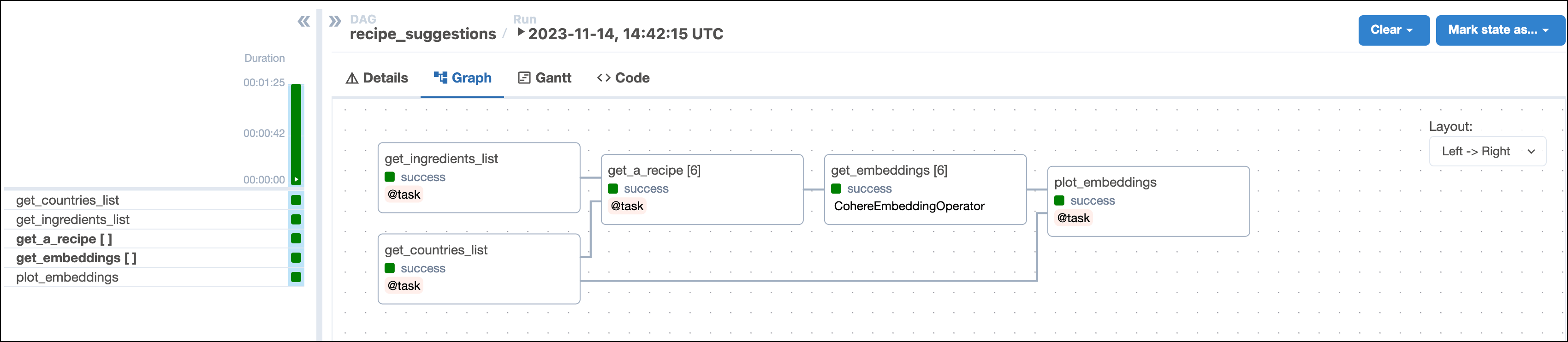
This DAG consists of five tasks to make a simple MLOps pipeline.
* The `get_ingredients` task fetches the list of ingredients that the user found in their pantry and wants to use in their recipe. The input `pantry_ingredients` param is provided by [Airflow params](/docs/learn/airflow-params) when you run the DAG.
* The `get_countries` task uses [Airflow params](/docs/learn/airflow-params) to retrieve the list of user-provided countries to get recipes from.
* The `get_a_recipe` task uses the [`CohereHook`](https://airflow.apache.org/docs/apache-airflow-providers-cohere/stable/_api/airflow/providers/cohere/hooks/cohere/index.html) to connect to the Cohere API and use the [`/generate` endpoint](https://docs.cohere.com/reference/generate) to get a tasty recipe suggestion based on the user's pantry ingredients and one of the countries they provided. This task is [dynamically mapped](/docs/learn/dynamic-tasks) over the list of countries to generate one task instance per country. The recipes are saved as `.txt` files in the `include` folder.
* The `get_embeddings` task uses the [`CohereEmbeddingOperator`](https://airflow.apache.org/docs/apache-airflow-providers-cohere/stable/operators/embedding.html) to generate vector embeddings of the recipes generated by the upstream `get_a_recipe` task. This task is dynamically mapped over the list of recipes to retrieve one set of embeddings per recipe. This pattern allows for efficient parallelization of the vector embedding generation.
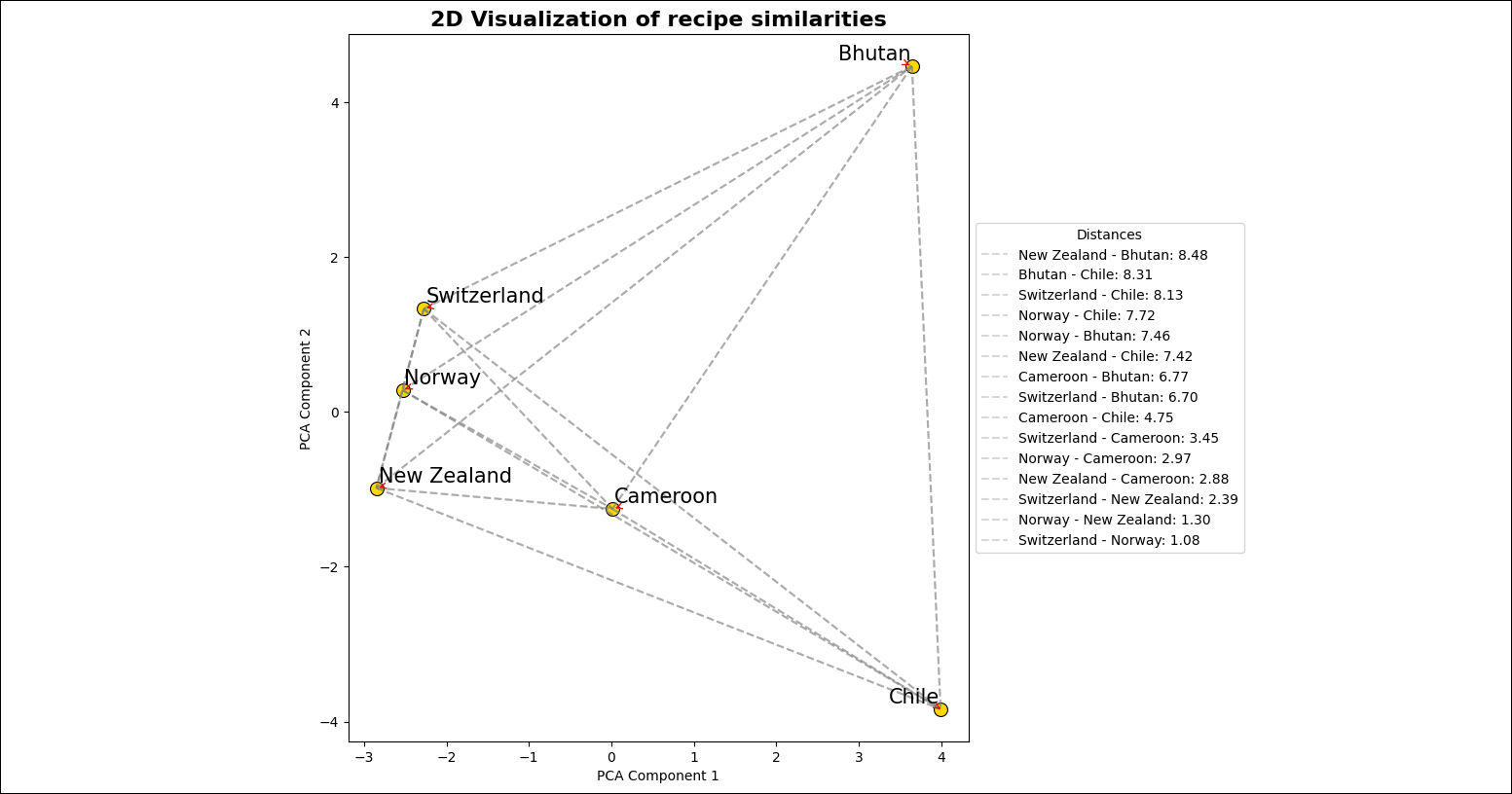
* The `plot_embeddings` task takes the embeddings created by the upstream task and performs dimensionality reduction using [PCA](https://scikit-learn.org/stable/modules/generated/sklearn.decomposition.PCA.html) to plot the embeddings in two dimensions.
 ## Step 3: Run your DAG
1. Run `astro dev start` in your Astro project to start Airflow and open the Airflow UI at `localhost:8080`.
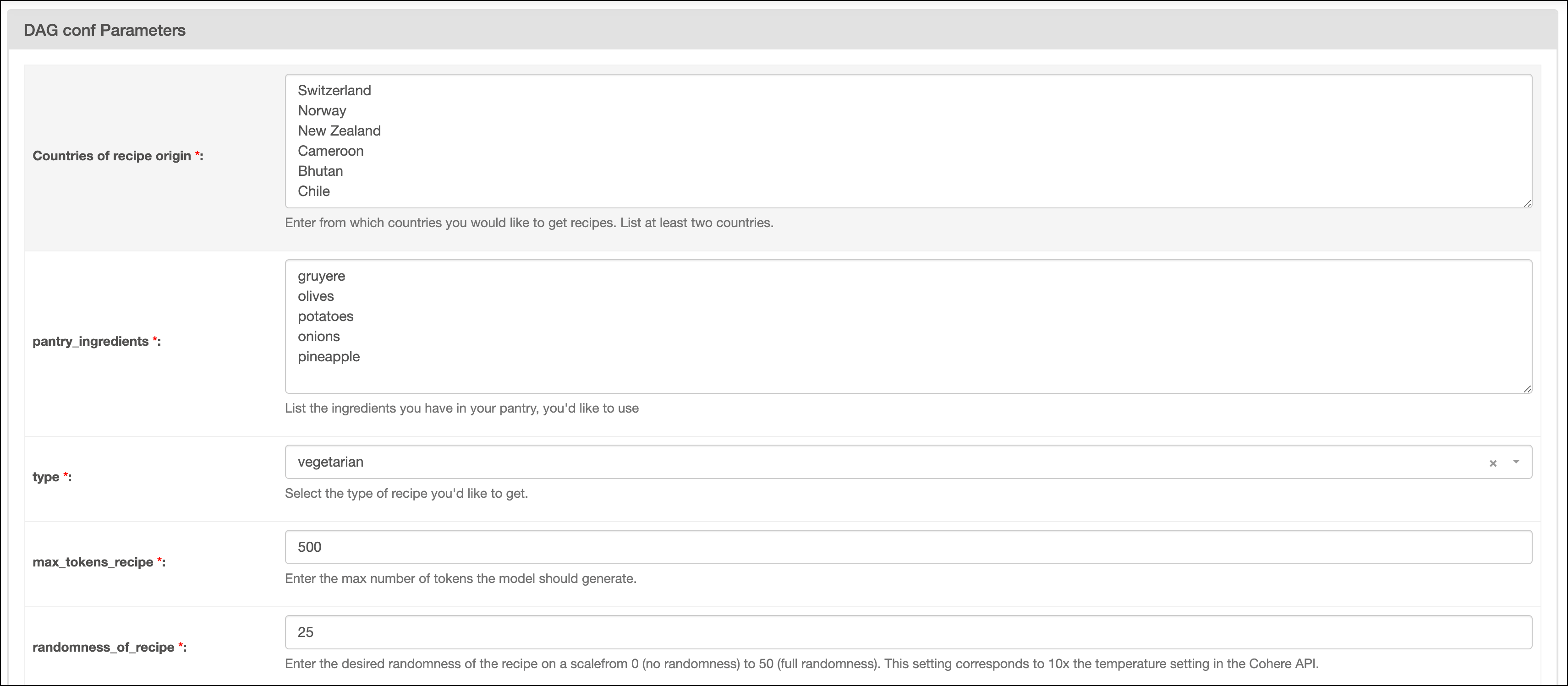
2. In the Airflow UI, run the `recipe_suggestions` DAG by clicking the play button. Then, provide [Airflow params](/docs/learn/airflow-params) for:
* `Countries of recipe origin`: A list of the countries you want to get recipe suggestions from. Make sure to create one line per country and to provide at least two countries.
* `pantry_ingredients`: A list of the ingredients you have in your pantry and want to use in the recipe. Make sure to create one line per ingredient.
* `type`: Select your preferred recipe type.
* `max_tokens_recipe`: The maximum number of tokens available for the recipe.
* `randomness_of_recipe`: The randomness of the recipe. The value provided is divided by 10 and given to the [`temperature` parameter](https://docs.cohere.com/docs/temperature) of the Cohere API. The scale for the param ranges from 0 to 50, with 0 being the most deterministic and 50 being the most random.
## Step 3: Run your DAG
1. Run `astro dev start` in your Astro project to start Airflow and open the Airflow UI at `localhost:8080`.
2. In the Airflow UI, run the `recipe_suggestions` DAG by clicking the play button. Then, provide [Airflow params](/docs/learn/airflow-params) for:
* `Countries of recipe origin`: A list of the countries you want to get recipe suggestions from. Make sure to create one line per country and to provide at least two countries.
* `pantry_ingredients`: A list of the ingredients you have in your pantry and want to use in the recipe. Make sure to create one line per ingredient.
* `type`: Select your preferred recipe type.
* `max_tokens_recipe`: The maximum number of tokens available for the recipe.
* `randomness_of_recipe`: The randomness of the recipe. The value provided is divided by 10 and given to the [`temperature` parameter](https://docs.cohere.com/docs/temperature) of the Cohere API. The scale for the param ranges from 0 to 50, with 0 being the most deterministic and 50 being the most random.
 3. Go to the `include` folder to view the image file created by the `plot_embeddings` task. The image should look similar to the one below.
 ## Step 4: (Optional) Cook your recipe
1. Choose one of the recipes in the `include` folder.
2. Navigate to your kitchen and cook the recipe you generated using Cohere with Airflow.
3. Enjoy!
## Conclusion
Congratulations! You used Airflow and Cohere to get recipe suggestions based on your pantry items. You can now use Airflow to orchestrate Cohere operations in your own machine learning pipelines.
## Step 4: (Optional) Cook your recipe
1. Choose one of the recipes in the `include` folder.
2. Navigate to your kitchen and cook the recipe you generated using Cohere with Airflow.
3. Enjoy!
## Conclusion
Congratulations! You used Airflow and Cohere to get recipe suggestions based on your pantry items. You can now use Airflow to orchestrate Cohere operations in your own machine learning pipelines.