> ## Documentation Index
> Fetch the complete documentation index at: https://astronomer.io/docs/llms.txt
> Use this file to discover all available pages before exploring further.
# @asset syntax in Apache Airflow®
The `@asset` decorator is a shorthand to create one Dag with one task that updates an [asset](/docs/learn/airflow-datasets). This decorator is used in the asset-oriented approach to writing Dags which constitutes a mindset shift to put the data asset front and center. Whether you use the asset-oriented or task-oriented approach to writing Dags is a matter of preference. Dags created using the asset-oriented approach are shown like any other Dag in the Airflow UI.
In this guide, you'll learn:
* How to use `@asset` to create a Dag with one task that updates an asset.
* How to use `@asset.multi` to create a Dag with one task that updates multiple assets.
If you are looking for instructions on how to use asset-based scheduling in Airflow with the `Asset` object, see [Basic asset-based scheduling in Apache Airflow®](/docs/learn/airflow-datasets), as well as [Advanced asset-based scheduling](/docs/learn/airflow-advanced-asset-scheduling).
The `@asset` decorator is an example of a Dag authoring paradigm (asset-oriented) that is different from the task-oriented approach. To learn more about different Dag authoring paradigms, check out the free [Apache Airflow® orchestration paradigms eBook](https://www.astronomer.io/ebooks/apache-airflow-orchestration-paradigms).
## Assumed knowledge
To get the most out of this guide, you should have an existing knowledge of:
* Airflow basic asset-based scheduling. See [Basic asset-based scheduling in Apache Airflow®](/docs/learn/airflow-datasets).
* Airflow decorators. See [Introduction to the TaskFlow API and Airflow decorators](/docs/learn/airflow-decorators).
## Use @asset
The following code snippet defines a Dag with the Dag ID `my_asset` that runs on a `@daily` schedule. It contains one task with the task ID `my_asset` that, upon successful completion updates an asset with the name `my_asset`.
```python wrap theme={null}
from airflow.sdk import asset
@asset(schedule="@daily")
def my_asset():
# your task logic here
pass
```
You can schedule assets based on other assets to create data-centric pipelines. Since each `@asset` decorator creates one Dag, data needs to be passed between tasks using cross-Dag XComs. The following shows the same simple ETL pipeline accomplished using the asset-oriented and the task-oriented approach.
Asset
```python expandable wrap theme={null}
from airflow.sdk import asset
@asset(schedule="@daily")
def extracted_data():
return {"a": 1, "b": 2}
@asset(schedule=extracted_data)
def transformed_data(context):
data = context["ti"].xcom_pull(
dag_id="extracted_data",
task_ids="extracted_data",
key="return_value",
include_prior_dates=True,
)
return {k: v * 2 for k, v in data.items()}
@asset(schedule=transformed_data)
def loaded_data(context):
data = context["task_instance"].xcom_pull(
dag_id="transformed_data",
task_ids="transformed_data",
key="return_value",
include_prior_dates=True,
)
summed_data = sum(data.values())
print(f"Summed data: {summed_data}")
```
Task
```python expandable wrap theme={null}
from airflow.sdk import Asset, dag, task
@dag(schedule="@daily")
def extract_dag():
@task(outlets=[Asset("extracted_data")])
def extract_task():
return {"a": 1, "b": 2}
extract_task()
extract_dag()
@dag(schedule=[Asset("extracted_data")])
def transform_dag():
@task(outlets=[Asset("transformed_data")])
def transform_task(**context):
data = context["ti"].xcom_pull(
dag_id="extract_dag",
task_ids="extract_task",
key="return_value",
include_prior_dates=True,
)
return {k: v * 2 for k, v in data.items()}
transform_task()
transform_dag()
@dag(schedule=[Asset("transformed_data")])
def load_dag():
@task
def load_task(**context):
data = context["ti"].xcom_pull(
dag_id="transform_dag",
task_ids="transform_task",
key="return_value",
include_prior_dates=True,
)
summed_data = sum(data.values())
print(f"Summed data: {summed_data}")
load_task()
load_dag()
```
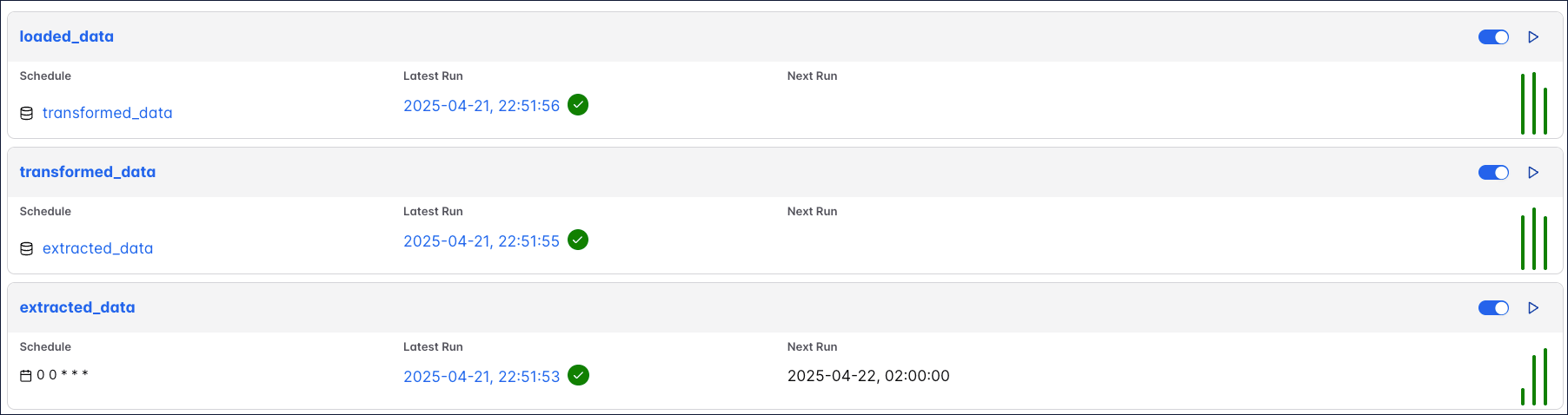
The code above creates three Dags that depend on each other, each containing one task that updates one asset:
 ## @`asset.multi`
To update several assets from the same Dag written with the asset-oriented approach, you can use `@asset.multi`. The code example below will create one Dag with the Dag ID `my_multi_asset` that contains one task called `my_multi_asset` that, upon successful completion, updates two assets with the names `asset_a` and `asset_b`.
```python wrap theme={null}
from airflow.sdk import Asset, asset
@asset.multi(schedule="@daily", outlets=[Asset("asset_a"), Asset("asset_b")])
def my_multi_asset():
pass
```
## @`asset.multi`
To update several assets from the same Dag written with the asset-oriented approach, you can use `@asset.multi`. The code example below will create one Dag with the Dag ID `my_multi_asset` that contains one task called `my_multi_asset` that, upon successful completion, updates two assets with the names `asset_a` and `asset_b`.
```python wrap theme={null}
from airflow.sdk import Asset, asset
@asset.multi(schedule="@daily", outlets=[Asset("asset_a"), Asset("asset_b")])
def my_multi_asset():
pass
```