> ## Documentation Index
> Fetch the complete documentation index at: https://astronomer.io/docs/llms.txt
> Use this file to discover all available pages before exploring further.
# Advanced asset-based scheduling in Apache Airflow®
With Assets, Dags that access the same data can have explicit, visible relationships, and Dags can be scheduled based on updates to these assets. This feature helps make Airflow data-aware and expands Airflow scheduling capabilities beyond time-based methods such as cron.
The basics of asset-based scheduling, including fundamental concepts and terminology, are covered in [Basic asset-based scheduling in Apache Airflow®](/docs/learn/airflow-datasets). This guide covers advanced asset-based scheduling concepts.
In this guide, you'll learn:
* How to use conditional asset scheduling to schedule a Dag based on an asset expression.
* How to use combined asset and time-based scheduling to schedule a Dag based on both a time-based schedule (cron or any other [Timetable](https://airflow.apache.org/docs/apache-airflow/stable/authoring-and-scheduling/timetable.html)) plus whenever an asset expression is fulfilled.
* How to use partitioned asset schedules.
* How to attach extra information to, and retrieve extra information from, asset events.
* How to use asset aliases to create dynamic asset schedules.
* How to use asset listeners to run code when certain asset events occur anywhere in your Airflow instance.
Assets can be used to schedule a Dag based on messages in a message queue. This sub-type of data-aware scheduling is called event-driven scheduling. See [Schedule Dags based on Events in a Message Queue](/docs/learn/airflow-event-driven-scheduling) for more information.
Assets are a fundamental scheduling paradigm in Airflow. To learn more about when to use assets vs other scheduling paradigms, check out the free [Apache Airflow® orchestration paradigms eBook](https://www.astronomer.io/ebooks/apache-airflow-orchestration-paradigms).
This guide covers data-aware schedules with Assets, for more information on the `@asset` decorator shorthand see [@asset syntax in Apache Airflow®](/docs/learn/airflow-asset-decorator).
## Assumed knowledge
To get the most out of this guide, you should have an existing knowledge of:
* Airflow scheduling concepts. See [Schedule Dags in Airflow](/docs/learn/scheduling-in-airflow).
* Basic asset-based scheduling. See [Basic asset-based scheduling in Apache Airflow®](/docs/learn/airflow-datasets).
## Advanced asset concepts
When using asset-based scheduling, updates are produced to assets, creating **asset events**. These updates can be created by different [methods](/docs/learn/airflow-datasets#updating-an-asset), the most common one being to set the `outlets` parameter of a task to a list of assets to update upon successful completion. Dags can be scheduled based on asset events created for one or more assets, and tasks can be given access to all events attached to an asset by defining the asset as one of their `inlets`.
In addition to these fundamental concepts covered in the [Basic asset-based scheduling in Apache Airflow®](/docs/learn/airflow-datasets) guide, when using advanced techniques for asset-based scheduling, you should understand the following terms:
* **Asset expression**: a logical expression using AND (`&`) and OR (`|`) operators to define the schedule of a Dag scheduled on updates to several assets.
* **AssetAlias**: an object that can be associated with one or more assets and used to create schedules based on assets created at runtime, see [Asset aliases](#asset-aliases).
* **Metadata**: a class to attach `extra` information to an asset event from within the producer task. This functionality can be used to pass asset event-related metadata between tasks, see [Attach extra information](#attach-extra-information) and [Retrieve extra information](#retrieve-extra-information).
* **AssetWatcher**: a class that is used in [event-driven scheduling](/docs/learn/airflow-event-driven-scheduling) to watch for a `TriggerEvent` caused by a message in a message queue.
* **Queued asset event**: It is common to have Dags scheduled to run as soon as a set of assets have received at least one update each. While there are still asset events missing to trigger the Dag, all asset events for other assets the Dag is scheduled on are queued asset events. A queued asset event is defined by its asset, timestamp and the Dag it is queuing for. One asset event can create a queued asset event for several Dags. You can access queued asset events for a specific Dag or a specific asset programmatically, using the [Airflow REST API](https://airflow.apache.org/docs/apache-airflow/stable/stable-rest-api-ref.html#operation/get_asset_queued_events).
The **Assets** tab in the [Airflow UI](/docs/learn/airflow-ui) provides a list of active assets in your Airflow environment with an asset graph for each asset showing its dependencies to Dags and other assets, see [Asset graph](/docs/learn/airflow-datasets#asset-graph) for more information.
Airflow is only aware of updates to assets that occur by tasks, API calls, or in the Airflow UI, see [Methods to update an asset](/docs/learn/airflow-datasets#updating-an-asset). It doesn't monitor updates to assets that occur outside of Airflow. For example, Airflow won't notice if you manually add a file to an S3 bucket referenced by an asset. See [When not to use Airflow assets](/docs/learn/airflow-datasets#when-not-to-use-airflow-assets) for more information.
Assets events are only registered by Dags or listeners in the same Airflow environment. If you want to create cross-Deployment dependencies with Assets you will need to use the [Airflow REST API](https://airflow.apache.org/docs/apache-airflow/stable/stable-rest-api-ref.html) to create an asset event in the Airflow environment where your downstream Dag is located. See the [Cross-deployment dependencies](/docs/astro/best-practices/cross-deployment-dependencies#assets-example) for an example implementation on Astro.
## Conditional asset scheduling
When using [basic asset-based scheduling](/docs/learn/airflow-datasets), you can schedule a Dag based on one or more assets by providing a list of assets to the `schedule` parameter. If you provide more than one asset, the Dag will run when all of the assets have received at least one update each.
For more complex scheduling needs, you can use conditional asset scheduling to schedule a Dag based on an asset expression.
An asset expression is a logical expression using AND (`&`) and OR (`|`) operators to define the schedule of a Dag scheduled on updates to several assets. The asset expression is given to the `schedule` parameter, wrapped in `()`.
For example, to schedule a Dag on an update to *either* `asset1`, `asset2`, `asset3`, or `asset4`, you can use the following syntax.
TaskFlow
```python wrap theme={null}
from airflow.sdk import Asset, dag
@dag(
schedule=(
Asset("asset1")
| Asset("asset2")
| Asset("asset3")
| Asset("asset4")
), # Use () instead of [] to be able to use conditional asset scheduling!
)
def downstream1_on_any():
# your tasks here
downstream1_on_any()
```
Traditional
```python wrap theme={null}
from airflow.sdk import Asset, DAG
with DAG(
dag_id="downstream1_on_any",
schedule=(
Asset("asset1")
| Asset("asset2")
| Asset("asset3")
| Asset("asset4")
), # Use () instead of [] to be able to use conditional asset scheduling!
):
# your tasks here
```
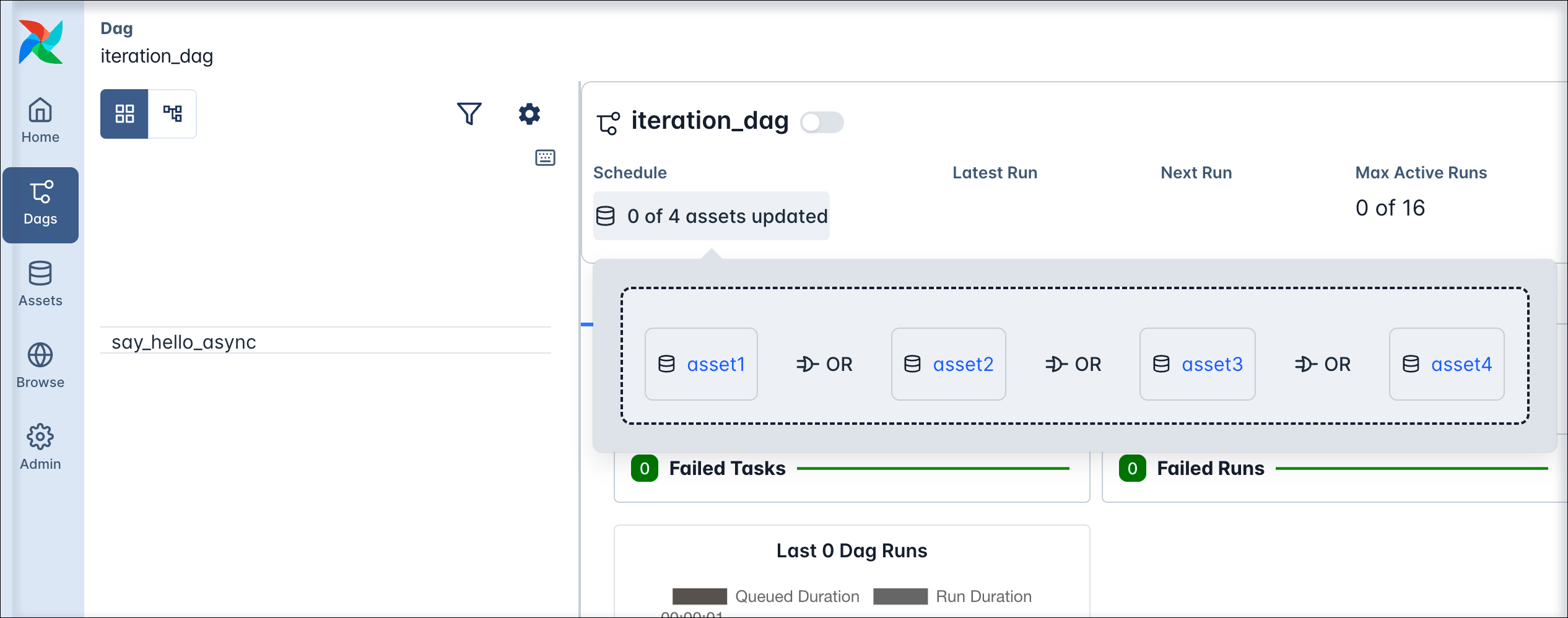
The `downstream1_on_any` Dag is triggered whenever *any* of the assets `asset1`, `asset2`, `asset3`, or `asset4` are updated. The schedule of the Dag is listed as **x of 4 Assets updated** in the Airflow UI, you can see the asset expression that defines the schedule as a pop up when clicking on the schedule.
 You can also combine the logical operators to create more complex expressions. For example, to schedule a Dag on an update to either `asset1` or `asset2` and either `asset3` or `asset4`, you can use the following syntax:
TaskFlow
```python wrap theme={null}
from airflow.sdk import Asset, dag
@dag(
schedule=(
(Asset("asset1") | Asset("asset2"))
& (Asset("asset3") | Asset("asset4"))
), # Use () instead of [] to be able to use conditional asset scheduling!
)
def downstream2_one_in_each_group():
# your tasks here
downstream2_one_in_each_group()
```
Traditional
```python wrap theme={null}
from airflow.sdk import Asset, DAG
with DAG(
dag_id="downstream2_one_in_each_group",
schedule=(
(Asset("asset1") | Asset("asset2"))
& (Asset("asset3") | Asset("asset4"))
), # Use () instead of [] to be able to use conditional asset scheduling!
):
# your tasks here
```
## Combined asset and time-based scheduling
You can combine asset-based scheduling with time-based scheduling with the `AssetOrTimeSchedule` timetable. A Dag scheduled with this timetable will run either when its `timetable` condition is met or when its `asset` condition is met. You can use any [Timetable](https://airflow.apache.org/docs/apache-airflow/stable/authoring-and-scheduling/timetable.html) in the `timetable` parameter.
The following Dag runs on a time-based schedule defined by the `0 0 * * *` cron expression, which is every day at midnight. The Dag also runs when either `asset3` or `asset4` is updated.
TaskFlow
```python wrap theme={null}
from airflow.sdk import Asset, dag, task
from pendulum import datetime
from airflow.timetables.assets import AssetOrTimeSchedule
from airflow.timetables.trigger import CronTriggerTimetable
@dag(
start_date=datetime(2025, 3, 1),
schedule=AssetOrTimeSchedule(
timetable=CronTriggerTimetable("0 0 * * *", timezone="UTC"),
assets=(Asset("asset3") | Asset("asset4")),
# Use () instead of [] to be able to use conditional asset scheduling!
)
)
def toy_downstream3_asset_and_time_schedule():
# your tasks here
toy_downstream3_asset_and_time_schedule()
```
Traditional
```python wrap theme={null}
from airflow.sdk import Asset, DAG
from pendulum import datetime
from airflow.timetables.assets import AssetOrTimeSchedule
from airflow.timetables.trigger import CronTriggerTimetable
with DAG(
dag_id="toy_downstream3_asset_and_time_schedule",
start_date=datetime(2024, 3, 1),
schedule=AssetOrTimeSchedule(
timetable=CronTriggerTimetable("0 0 * * *", timezone="UTC"),
assets=(Asset("asset3") | Asset("asset4")),
# Use () instead of [] to be able to use conditional asset scheduling!
)
):
# your tasks here
```
## Partitioned asset schedules
Airflow 3.2 introduced the concept of [partitioned Dag runs and partitioned asset events](/docs/learn/airflow-partitioned-runs), which have a `partition_key` attached to them. The partition key can be used in tasks in a partitioned Dag run to partition data, for example in a SQL statement.
To schedule a Dag based on *partitioned* asset events, you set its `schedule` parameter to an instance of `PartitionedAssetTimetable`.
```python wrap theme={null}
from airflow.sdk import dag, PartitionedAssetTimetable, Asset
@dag(schedule=PartitionedAssetTimetable(assets=Asset("my_partitioned_asset")))
```
This Dag will only be triggered when the `my_partitioned_asset` is updated by a *partitioned* asset event, not by regular asset events.
You can modify the partition key by providing a `partition_key_mapper` to the `PartitionedAssetTimetable` instance, for example to change the time grain of the partition key to daily or weekly.
There are three ways to create a partitioned asset event:
* By updating an asset manually in the Airflow UI and providing a `partition_key` in the asset event creation dialog.
* By updating an asset using the [Airflow REST API](https://airflow.apache.org/docs/apache-airflow/stable/stable-rest-api-ref.html#operation/create_asset_event) and providing a `partition_key` in the request body.
* By updating an asset using the `outlets` parameter of a task in a Dag that is scheduled using a `CronPartitionTimetable` timetable.
For more information on partitioned Dag runs and asset events, see the [Partitioned Dag runs and asset events in Apache Airflow®](/docs/learn/airflow-partitioned-runs) guide.
Partitioned asset events created by a task in a Dag using the `CronPartitionTimetable` timetable are intended for partition-aware downstream scheduling, and don't trigger non-partition-aware Dags.
## Asset event extras
You can attach extra information to an asset event and retrieve it in downstream tasks. This is useful for passing metadata between tasks, including tasks located in different Dags, for example information about the asset event you are working with.
Asset event extras are attached to individual asset events. If you want to attach information to the asset itself, see [asset state store](#asset-state-store).
### Attach extra information
When updating an asset in the Airflow UI or making a [`POST` request](https://airflow.apache.org/docs/apache-airflow/stable/stable-rest-api-ref.html#operation/create_asset_event) to the Airflow REST API, you can attach extra information to the asset event by providing an `extra` JSON payload.
You can add extra information from within the producing task using either the `Metadata` class or accessing `outlet_events` from the Airflow context. The information passed needs to be JSON serializable.
To use the `Metadata` class to attach information to an asset, follow the example in the code snippet below. Make sure that the asset used in the metadata class is also defined as an outlet in the producer task.
TaskFlow
```python wrap theme={null}
# from airflow.sdk import Asset, Metadata, task
my_asset_1 = Asset("x-asset1")
@task(outlets=[my_asset_1])
def attach_extra_using_metadata():
num = 23
yield Metadata(my_asset_1, {"myNum": num})
return "hello :)"
attach_extra_using_metadata()
```
Traditional
```python wrap theme={null}
# from airflow.providers.standard.operators.python import PythonOperator
# from airflow.sdk import Asset, Metadata
my_asset_1 = Asset("x-asset1")
def attach_extra_using_metadata_func():
num = 23
yield Metadata(my_asset_1, {"myNum": num})
return "hello :)"
attach_extra_using_metadata = PythonOperator(
task_id="attach_extra_using_metadata",
python_callable=my_function,
outlets=[my_asset_1]
)
```
You can also access the `outlet_events` from the Airflow context directly to add an extra dictionary to an asset event.
TaskFlow
```python wrap theme={null}
from airflow.sdk import Asset, Metadata, task
my_asset_2 = Asset("x-asset2")
@task(outlets=[my_asset_2])
def use_outlet_events(outlet_events): # outlet_events is pulled out of the Context
num = 19
outlet_events[my_asset_2].extra = {"my_num": num}
return "hello :)"
use_outlet_events()
```
Traditional
```python wrap theme={null}
# from airflow.providers.standard.operators.python import PythonOperator
# from airflow.sdk import Asset, Metadata
my_asset_2 = Asset("x-asset2")
def attach_extra_using_metadata_func():
num = 19
context["outlet_events"][my_asset_2].extra = {"my_num": num}
return "hello :)"
attach_extra_using_metadata = PythonOperator(
task_id="attach_extra_using_metadata",
python_callable=my_function,
outlets=[my_asset_2]
)
```
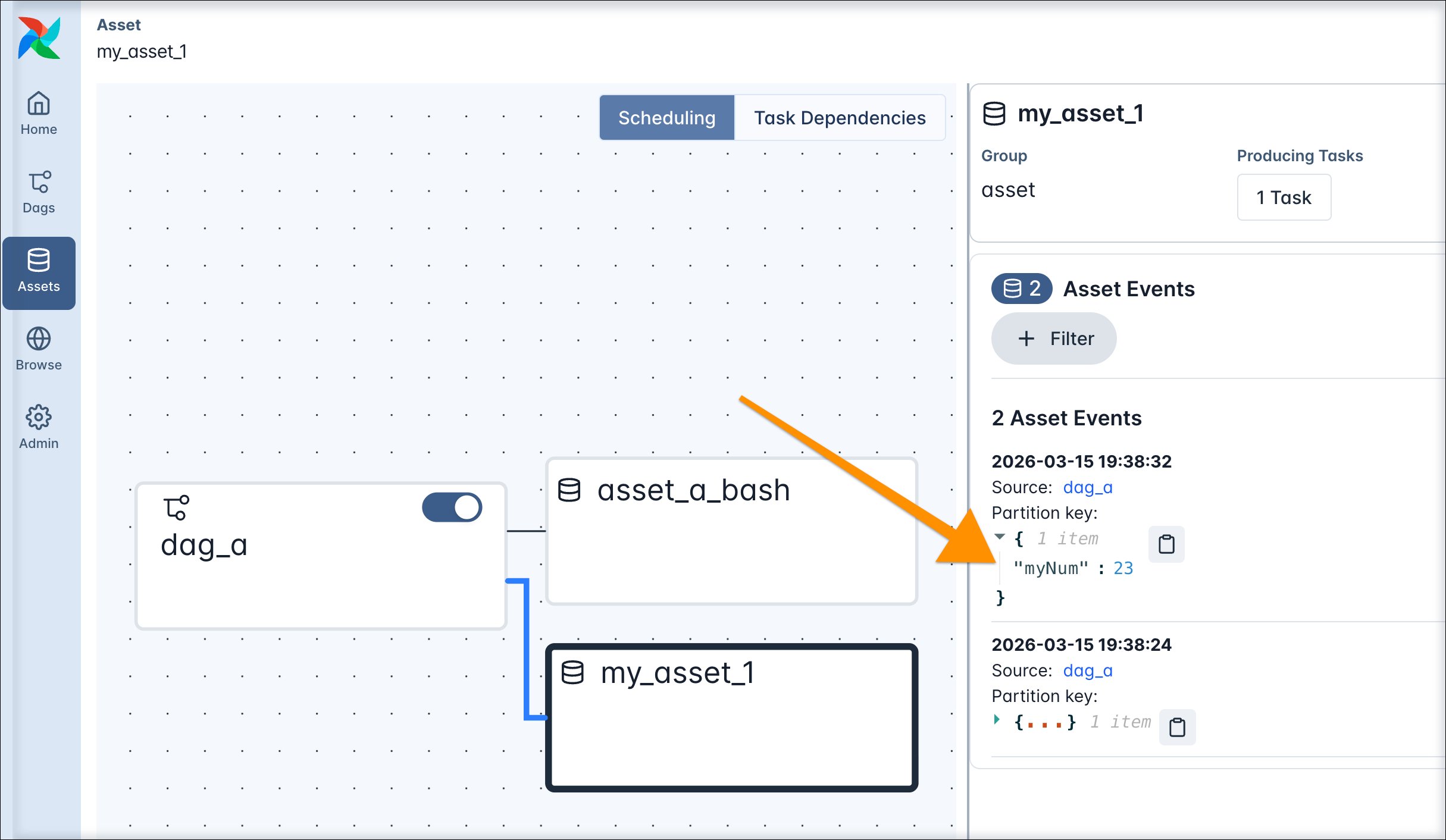
Asset extras can be viewed in the Airflow UI in the asset graph of an asset.
 ### Retrieve extra information
Extras attached to asset events can be programmatically retrieved from within Airflow tasks. Any Airflow task instance in a Dag run has access to the list of assets that were involved in triggering that specific Dag run. Additionally, you can give any Airflow task access to all asset events of a specific asset by providing the asset to the task's `inlets` parameter. Defining inlets doesn't affect the schedule of the Dag.
To access all asset events that were involved in triggering a Dag run within a TaskFlow API task, you can pull `triggering_asset_events` from the [Airflow context](/docs/learn/airflow-context). In a traditional operator, you can use [Jinja templating](/docs/learn/templating) in any templateable field of the operator to access information in the Airflow context.
### Retrieve extra information
Extras attached to asset events can be programmatically retrieved from within Airflow tasks. Any Airflow task instance in a Dag run has access to the list of assets that were involved in triggering that specific Dag run. Additionally, you can give any Airflow task access to all asset events of a specific asset by providing the asset to the task's `inlets` parameter. Defining inlets doesn't affect the schedule of the Dag.
To access all asset events that were involved in triggering a Dag run within a TaskFlow API task, you can pull `triggering_asset_events` from the [Airflow context](/docs/learn/airflow-context). In a traditional operator, you can use [Jinja templating](/docs/learn/templating) in any templateable field of the operator to access information in the Airflow context.
TaskFlow
```python wrap theme={null}
# from airflow.sdk import task
@task
def get_extra_triggering_run(triggering_asset_events):
# triggering_asset_events - all events that triggered this specific Dag run, and is pulled from the Context
# the loop below wont run if the Dag is manually triggered
for asset, asset_list in triggering_asset_events.items():
print(asset, asset_list)
print(asset_list[0].extra)
# you can also fetch the run_id and other information about the upstream Dags
print(asset_list[0].source_run_id)
```
Traditional
```python wrap theme={null}
# from airflow.operators.bash import BashOperator
get_extra_triggering_run_bash = BashOperator(
task_id="get_extra_triggering_run_bash",
# This statement errors when there are no triggering events, for example in a manual Dag run!
bash_command="echo {{ (triggering_asset_events.values() | first | first).extra }} ",
)
```
If you want to access asset extras independently from which asset events triggered a Dag run, you have the option to directly provide an asset to a task as an inlet. In a TaskFlow API task you can fetch the `inlet_events` from the [Airflow context](/docs/learn/airflow-context).
```python wrap theme={null}
# from airflow.sdk import Asset, task
my_asset_2 = Asset("x-asset2")
# note that my_asset_2 does not need to be part of the Dags schedule
# you can provide as many inlets as you wish
@task(inlets=[my_asset_2])
def get_extra_inlet(inlet_events): # inlet_events is pulled out of the Context
# inlet_events are listed earliest to latest by timestamp
asset_events = inlet_events[my_asset_2]
# protect against the asset not existing
if len(asset_events) == 0:
print(f"No asset_events for {my_asset_2.uri}")
else:
# accessing the latest asset event for this asset
# if the extra does not exist, return None
my_extra = asset_events[-1].extra
print(my_extra)
get_extra_inlet()
```
## Asset state store
The asset state store, added in Airflow 3.3, lets you store key-value pairs attached to assets. Stored values must be JSON-serializable.
Tasks in any Dag can access information in the asset state store of any asset given to the task in its `inlets` or `outlets`.
Use the asset state store when you want to persist a small piece of information for an asset across Dag runs, such as a watermark, a cursor, or the ID of the last processed record.
Asset state stores are attached to assets. If you want to attach information to individual asset events, see [asset event extras](#asset-event-extras).
To add an asset state store entry from within a Dag, access the `asset_state_store` from the Airflow context and `.set` a new entry:
```python wrap theme={null}
from airflow.sdk import task, Asset
my_asset = Asset("my_asset")
@task(outlets=[my_asset])
def write_state(asset_state_store=None): # retrieves context["asset_state_store"] directly
asset_state_store[my_asset].set("watermark", "2026-06-22T00:00:00")
write_state()
```
Similarly, you can use `.get` to read information from the `asset_state_store`:
```python wrap theme={null}
from airflow.sdk import task, Asset
my_asset = Asset("my_asset")
@task(inlets=[my_asset])
def read_state(asset_state_store=None):
watermark = asset_state_store[my_asset].get("watermark", default=None)
read_state()
```
You can delete information from the asset state store by using the `.delete(key)` and `.clear()` methods.
```python wrap theme={null}
from airflow.sdk import task, Asset
my_asset = Asset("my_asset")
@task(inlets=[my_asset])
def read_state(asset_state_store=None):
asset_state_store[my_asset].delete("watermark")
asset_state_store[my_asset].clear() # remove all key-value pairs from the asset
read_state()
```
For a task with exactly one concrete inlet or outlet, you can call the methods directly on `asset_state_store` without needing to provide the specific asset object.
```python wrap theme={null}
@task(inlets=[my_asset])
def read_state(asset_state_store=None):
watermark = asset_state_store.get("watermark")
```
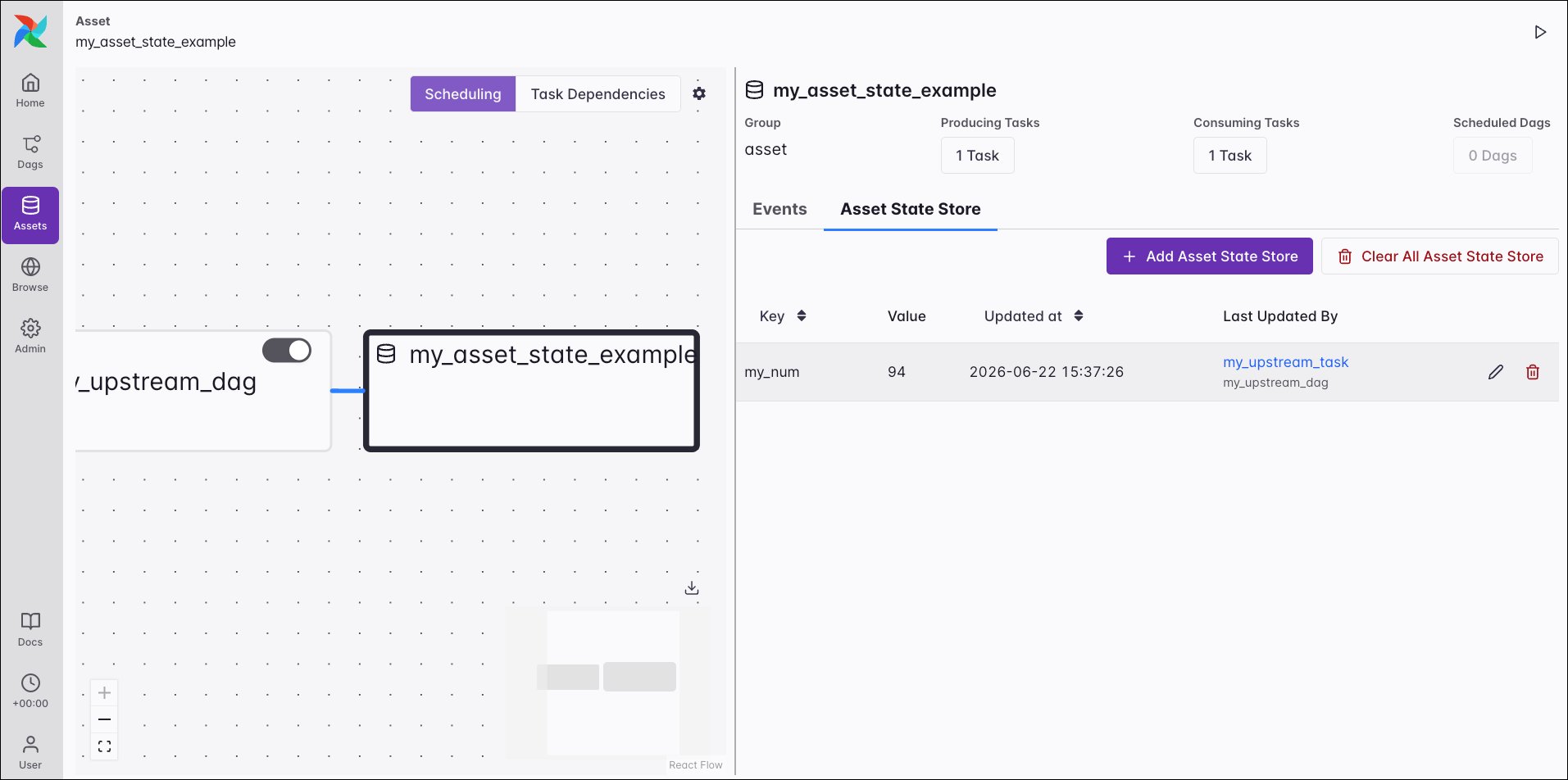
You can also view and modify asset state store entries in the Airflow UI. Go to **Assets**, select an asset, then open the **Asset State Store** tab.
 Endpoints to get, set, delete, and clear entries in the asset state store are available in the [Airflow REST API](https://airflow.apache.org/docs/apache-airflow/stable/stable-rest-api-ref.html).
In contrast to [task state store](/docs/learn/airflow-task-state-store) entries, asset state store entries don't have a retention limit.
## Asset aliases
You have the option to create asset aliases to schedule Dags based on assets with names generated at runtime. An asset alias is defined by a unique `name` string and can be used in place of a regular asset in `outlets` and `schedules`. Any number of asset events updating different assets can be attached to an asset alias.
There are two ways to add an asset event to an asset alias:
* Using the `Metadata` class.
* Using `outlet_events` pulled from the Airflow context.
See the code below for examples, note how the name of the asset is determined at runtime inside the producing task.
Endpoints to get, set, delete, and clear entries in the asset state store are available in the [Airflow REST API](https://airflow.apache.org/docs/apache-airflow/stable/stable-rest-api-ref.html).
In contrast to [task state store](/docs/learn/airflow-task-state-store) entries, asset state store entries don't have a retention limit.
## Asset aliases
You have the option to create asset aliases to schedule Dags based on assets with names generated at runtime. An asset alias is defined by a unique `name` string and can be used in place of a regular asset in `outlets` and `schedules`. Any number of asset events updating different assets can be attached to an asset alias.
There are two ways to add an asset event to an asset alias:
* Using the `Metadata` class.
* Using `outlet_events` pulled from the Airflow context.
See the code below for examples, note how the name of the asset is determined at runtime inside the producing task.
Metadata
```python wrap theme={null}
# from airflow.sdk import Asset, AssetAlias, Metadata, task
my_alias_name = "my_alias"
@task(outlets=[AssetAlias(my_alias_name)])
def attach_event_to_alias_metadata():
bucket_name = "my-bucket" # determined at runtime, for example based on upstream input
yield Metadata(
asset=Asset(f"updated_{bucket_name}"),
extra={"k": "v"}, # extra has to be provided, can be {}
alias=AssetAlias(my_alias_name),
)
attach_event_to_alias_metadata()
```
Context
```python wrap theme={null}
# from airflow.sdk import Asset, AssetAlias, Metadata, task
my_alias_name = "my_alias"
@task(outlets=[AssetAlias(my_alias_name)])
def attach_event_to_alias_context(outlet_events): # outlet_events is pulled out of the Context
bucket_name = "my-other-bucket" # determined at runtime, for example based on upstream input
outlet_events[AssetAlias(my_alias_name)].add(
Asset(f"updated_{bucket_name}"), extra={"k": "v"}
) # extra is optional
attach_event_to_alias_context()
```
In the consuming Dag you can use an asset alias in place of a regular asset.
```python {6} wrap theme={null}
from airflow.sdk import AssetAlias, dag
from airflow.providers.standard.operators.empty import EmptyOperator
my_alias_name = "my_alias"
@dag(schedule=[AssetAlias(my_alias_name)])
def my_consumer_dag():
EmptyOperator(task_id="empty_task")
my_consumer_dag()
```
Once the `my_producer_dag` containing the `attach_event_to_alias_metadata` task completes successfully, reparsing of all Dags scheduled on the asset alias `my_alias` is automatically triggered. This reparsing step attaches the `updated_{bucket_name}` asset to the `my_alias` asset alias and the schedule resolves, triggering one run of the `my_consumer_dag`.
Any further asset event for the `updated_{bucket_name}` asset will now trigger the `my_consumer_dag`. If you attach asset events for several assets to the same asset alias, a Dag scheduled on that asset alias will run as soon as any of the assets that were ever attached to the asset alias receive an update.
See [Scheduling based on asset aliases](https://airflow.apache.org/docs/apache-airflow/stable/authoring-and-scheduling/asset-scheduling.html#scheduling-based-on-asset-aliases) for more information and examples of using asset aliases.
To use asset aliases with traditional operators, you need to attach the asset event to the alias inside the operator logic. If you are using operators besides the `PythonOperator`, you can either do so in a custom operator's `.execute` method or by passing a `post_execute` callable to existing operators ([experimental](https://airflow.apache.org/docs/apache-airflow/stable/release-process.html#experimental-features)). Use `outlet_events` when attaching asset events to aliases in traditional or custom operators. Note that for [deferrable operators](/docs/learn/deferrable-operators), attaching an asset event to an alias is only supported in the `execute_complete` or `post_execute` method.
```python wrap theme={null}
def _attach_event_to_alias(context, result): # result = the return value of the execute method
# use any logic to determine the URI
uri = "s3://my-bucket/my_file.txt"
context["outlet_events"][AssetAlias(my_alias_name)].add(Asset(uri))
BashOperator(
task_id="t2",
bash_command="echo hi",
outlets=[AssetAlias(my_alias_name)],
post_execute=_attach_event_to_alias, # using the post_execute parameter is experimental
)
```
Click to view an example of a custom operator attaching an asset event to an asset alias.
```python expandable wrap theme={null}
"""
### AssetAlias in a custom operator
"""
from airflow.sdk import Asset, AssetAlias, dag
from airflow.sdk.bases.operator import BaseOperator
import logging
t_log = logging.getLogger("airflow.task")
my_alias_name = "my-alias"
# custom operator producing to an asset alias
class MyOperator(BaseOperator):
"""
Simple example operator that attaches an asset event to an asset alias.
:param my_bucket_name: (str) The name of the bucket to use in the asset name.
"""
# define the .__init__() method that runs when the DAG is parsed
def __init__(self, my_bucket_name, my_alias_name, *args, **kwargs):
# initialize the parent operator
super().__init__(*args, **kwargs)
# assign class variables
self.my_bucket_name = my_bucket_name
self.my_alias_name = my_alias_name
def execute(self, context):
# add your custom operator logic here
# use any logic to derive the dataset URI
my_asset_name = f"updated_{self.my_bucket_name}"
context["outlet_events"][AssetAlias(self.my_alias_name)].add(
Asset(my_asset_name)
)
return "hi :)"
# define the .post_execute() method that runs after the execute method (optional)
# result is the return value of the execute method
def post_execute(self, context, result=None):
# write to Airflow task logs
self.log.info("Post-execution step")
# It is also possible to add events to the alias in the post_execute method
@dag
def asset_alias_custom_operator():
MyOperator(
task_id="t1",
my_bucket_name="my-bucket",
my_alias_name=my_alias_name,
outlets=[AssetAlias(my_alias_name)],
)
asset_alias_custom_operator()
```
## Asset listeners
A listener is a type of [Airflow plugin](/docs/learn/using-airflow-plugins) that can be used to run custom code when certain events occur anywhere in your Airflow instance. There are four listener hooks relating to asset events:
* `on_asset_created`: runs when a new asset is created.
* `on_asset_alias_created`: runs when a new asset alias is created.
* `on_asset_changed`: runs when any asset change occurs.
* `on_asset_event_emitted`: runs when an asset event is emitted, generally called together with `on_asset_changed`.
To implement a listener, you need to create a `@hookimpl`-decorated function for your listener hook of choice and then register them in an Airflow plugin.
```python expandable wrap theme={null}
from airflow.plugins_manager import AirflowPlugin
from airflow.listeners.types import AssetEvent
from airflow.serialization.definitions.assets import SerializedAsset, SerializedAssetAlias
from airflow.listeners import hookimpl
@hookimpl
def on_asset_created(asset: SerializedAsset):
"""Execute when a new asset is created."""
@hookimpl
def on_asset_alias_created(asset_alias: SerializedAssetAlias):
"""Execute when a new asset alias is created."""
@hookimpl
def on_asset_changed(asset: SerializedAsset):
"""Execute when asset change is registered."""
@hookimpl
def on_asset_event_emitted(asset_event: AssetEvent):
"""
Execute when an asset event is emitted.
This is generally called together with ``on_asset_changed``, but with
information on the emitted event instead.
"""
class MyListenerPlugin(AirflowPlugin):
name = "my_listener_plugin"
listeners = [
on_asset_created,
on_asset_alias_created,
on_asset_changed,
on_asset_event_emitted,
]
```
See the [Airflow documentation](https://airflow.apache.org/docs/apache-airflow/stable/administration-and-deployment/listeners.html) for more information on listeners.