> ## Documentation Index
> Fetch the complete documentation index at: https://astronomer.io/docs/llms.txt
> Use this file to discover all available pages before exploring further.
# AI orchestration with Apache Airflow®
Calling a large language model (LLM), whether as a single inference or as an agentic loop, is mostly a black-box interaction with a model provider's API. Everything around that call is the production work: assembling the context the model sees, shaping prompts, validating outputs, handling unusable responses, capping what a run can spend, recording what the model did, and measuring whether the result was any good.
*AI orchestration* is running that work, and the model call itself, as tasks in an [Apache Airflow®](https://airflow.apache.org/) Dag. The context a model receives comes from the same databases, object storage, and APIs your existing pipelines already move data between, and the model's output usually lands back in one of them. That makes the surrounding work data engineering, with a non-deterministic step in the middle.
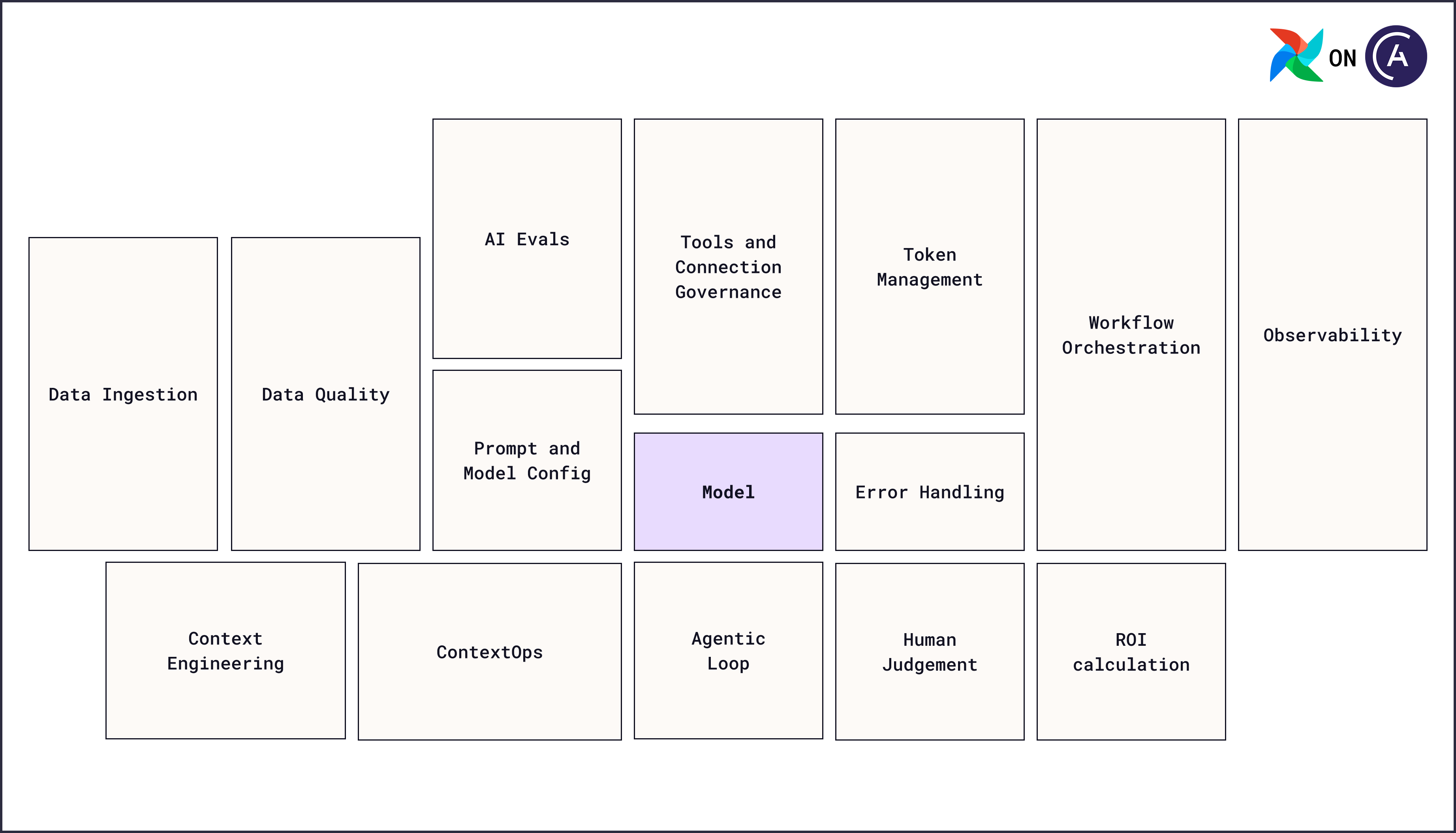 Every part of that surrounding system is an orchestration concern: what runs when, what data each step receives, what happens to the output, and what happens when a step fails.
This Learn section covers running AI inside your pipelines. For the separate question of using AI to help you write pipelines, see [Data engineering with AI](/docs/learn/local-data-engineering-with-ai-overview).
* **[Why Airflow for AI orchestration](#why-airflow-for-ai-orchestration)**: The advantages of orchestrating AI tasks within Airflow Dags.
* **[Basic concepts in AI orchestration](#basic-concepts-in-ai-orchestration)**: The core terms, the [micro and macro orchestration](#micro-and-macro-orchestration) split, and how to [choose between LLM, agent, and multi-agent orchestration](#choose-between-llm-agent-and-multi-agent-orchestration).
* **[LLM orchestration with Apache Airflow®](/docs/learn/ai-orchestration-llm)**: How to run a single model inference as a task, with upstream tasks preparing the context and downstream tasks consuming the result.
* **[Agent orchestration](/docs/learn/ai-orchestration-agent)**: How to run a model in a tool-calling loop as a task, and how to govern the tools and connections that loop can reach.
* **[AI model evals](/docs/learn/ai-orchestration-model-evals)**: How to evaluate the AI output and store the model evaluation information alongside agent traces gathered from your micro orchestrator.
* **[AI product evals](/docs/learn/ai-orchestration-product-evals)**: How to gather downstream signals to evaluate whether an AI data product is useful.
* **[Orchestrate AI tasks with Apache Airflow® and the Common AI provider](/docs/learn/airflow-common-ai-provider)**: The parameter reference for the decorators and operators the other pages use.
## Why Airflow for AI orchestration
Using Airflow to orchestrate AI tasks offers many benefits:
* **Tool agnosticism**: With Airflow you can orchestrate actions in any system that has an API. This means you can use any AI [harness](#basic-concepts-in-ai-orchestration) with Airflow, including popular harnesses like [LangChain, CrewAI, or Temporal](/docs/learn/ai-orchestration-llm#start-with-the-harness-you-already-have).
* **Provider ecosystem**: For many common data tools, [pre-built provider packages](https://airflow.apache.org/registry/) are available to simplify and standardize your orchestration. Most providers contain [Airflow hooks](/docs/learn/what-is-a-hook) that can be turned into agent tools with the `HookToolset` of the Common AI provider.
* **Common AI provider**: Airflow has a native LLM and agent harness built on PydanticAI, which connects to models from many different providers. To switch your model, for example from OpenAI to Anthropic, you can change the connection configuration without changing the task code.
* **Connections**: [Airflow connections](/docs/learn/connections) contain credentials to connect to other systems. When using Airflow to orchestrate AI tasks, your AI provider connection and HookToolset connections can be stored and governed in the same location as the connections to your databases.
* **Task dependencies**: Context engineering, the AI task, and the processing of AI output are tasks in one Dag, and Airflow allows you to define the [dependencies](/docs/learn/managing-dependencies) between them. The AI task's result is available downstream through [XCom](/docs/learn/airflow-passing-data-between-tasks).
* **Scheduling**: Airflow has a wide variety of scheduling options. You can run your AI tasks on a [time-based schedule](/docs/learn/scheduling-in-airflow), on an [event-driven schedule](/docs/learn/airflow-event-driven-scheduling) when a message or a ticket arrives, or on an [asset-driven schedule](/docs/learn/airflow-datasets) after the pipelines that produce the context complete.
* **Dynamic task mapping**: You can define tasks in Airflow so one AI task definition creates one mapped task instance per input at runtime, each with its own logs, retries, and result. See [Create dynamic Airflow tasks](/docs/learn/dynamic-tasks).
* **Retries**: Rate limits, provider outages, and timeouts are transient failures that Airflow retries. [Retry policies](/docs/learn/rerunning-dags#retry-policies) allow you to control the retry decision and delay per exception type or with custom rules. You can even use an LLM to make retry decisions at runtime with the `LLMRetryPolicy` of the Common AI provider.
* **Human-in-the-loop**: The Airflow standard provider has human-in-the-loop operators that allow you to add a task that waits for human input. You can approve, reject, and edit AI output directly in the Airflow UI or through the [Airflow REST API endpoints](/docs/learn/airflow-human-in-the-loop#human-in-the-loop-api-endpoints). See [Human-in-the-loop workflows with Apache Airflow®](/docs/learn/airflow-human-in-the-loop).
* **Execution environments**: AI tasks can run on Airflow workers, in [isolated environments](/docs/learn/airflow-isolated-environments) when a harness has conflicting dependencies, or on your own infrastructure with [remote execution](/docs/astro/remote-execution-overview).
## Basic concepts in AI orchestration
Core concepts to understand before you put a model call into a pipeline:
* **Model**: The LLM itself, running with a model provider (for example, Claude Sonnet) or on your own infrastructure. It takes in context and produces output.
* **Harness**: The code around the model that builds the API request, parses the response, enforces the output schema, and, for agents, runs the tool-calling loop. Common harnesses are the [Common AI provider](/docs/learn/airflow-common-ai-provider), built on [PydanticAI](https://pydantic.dev/docs/ai/overview/), LangChain, LangGraph, CrewAI, and Temporal, or one you write yourself around a provider's API.
* **Context window**: The fixed maximum number of tokens one model call can hold, covering the system prompt, the user prompt, tool descriptions, tool results, and the model's own response.
* **Context**: The data in the context window for one model call. *Context engineering* is filling that window with the right information for the next step, and [AI context engineering with Apache Airflow®](https://www.astronomer.io/ebooks/ai-context-engineering-with-apache-airflow/) covers the pipeline patterns that produce it.
* **Tools**: Functions a model can call to read from or act on an external system. They separate an agent from a single model call, and they're where most of the risk sits: a model that can call a tool can perform any action that tool allows.
* **Agent**: A system with a reasoning layer (the model, planning and deciding) and an action layer (the tools that act on real systems), running the model in a loop until it decides it's finished. Unlike a single model call, an agent picks its own next step, so the sequence of calls isn't known before the task runs.
* **Human-in-the-loop (HITL)**: A step that pauses until a person approves, rejects, or edits an AI-generated output, available as [human-in-the-loop operators](/docs/learn/airflow-human-in-the-loop) in the standard provider and as parameters on several Common AI decorators.
* **AI-as-a-judge**: A step where an additional model call scores the output of a previous one, for example rating a drafted reply for accuracy and tone. Also called LLM- or agent-as-a-judge, it's how you score criteria you can describe in plain language but can't express as a deterministic check.
* **Eval**: A repeatable, scored test of AI output, run against fixed inputs so you can compare one prompt, model, or pipeline version against another. An eval scores the final output (*end-to-end*), a single step such as the model call that picked a tool (*component-level*), or the whole trace of reasoning and tool calls (*trajectory*). Those scopes stop at the output, and Airflow extends them to the business value delivered, because it already connects to the systems those signals live in.
This section covers *data-driven* AI: models orchestrated as part of a data pipeline, running on a schedule, in a batch, or on demand. That's distinct from *app-driven* AI, where a model answers a single user request in real time inside a microservice, such as a chat application. App-driven AI typically only uses micro orchestration, but it still produces outputs you can evaluate with a pipeline.
## Micro and macro orchestration
An AI pipeline has two layers of orchestration, and they belong to different tools:
* **Macro orchestration** is what Airflow does around the model call: deciding when it runs, passing runtime context into the prompt, creating many parallel model calls from one task definition, retrying transient failures, governing the tools and connections the task can use, and routing the output.
* **Micro orchestration** is what the harness does inside the task: building the API request, parsing the response, enforcing the output schema, tracking token usage, and, for agents, running the tool-calling loop.
**Airflow is harness agnostic.** You pick the micro orchestration tool, and Airflow handles the macro orchestration either way. Any harness runs inside a regular `@task`, because a `@task` is just Python. That holds for an agent loop as much as for a single model call. See [Start with the harness you already have](/docs/learn/ai-orchestration-llm#start-with-the-harness-you-already-have) for the same single model call written in four frameworks, and [Move tools between harnesses](/docs/learn/ai-orchestration-agent#move-tools-between-harnesses) for using tools you already have with an agent task.
Astronomer recommends the [Common AI provider](/docs/learn/airflow-common-ai-provider), the Airflow-native harness, for new AI tasks. Credentials come from an Airflow connection, and output validation, spend limits, human review, and tracing are task parameters rather than framework code. Existing harness code keeps running in a plain `@task`, so you can move over one task at a time.
## Choose between LLM, agent, and multi-agent orchestration
All three patterns call the same underlying models. The difference is how many times the model runs, whether it can act on its own, and how many specialized models are involved.
| Pattern | What happens in the task | Use it when |
| ---------------------------------------------------------- | ---------------------------------------------------------------------------------------------------------------------------------------------------------------- | ----------------------------------------------------------------------------------------------- |
| [LLM orchestration](/docs/learn/ai-orchestration-llm) | One model call. A system prompt and a user prompt (including context fetched by upstream tasks) go in, one response comes out. | The work is a single transformation of data: summarize, classify, extract, translate, or draft. |
| [Agent orchestration](/docs/learn/ai-orchestration-agent) | A model call loop. The model calls tools, reads the results, and decides what to do next until it's finished. | The task needs to look something up, act on an external system, or decide its own next step. |
| [Multi-agent orchestration](/docs/learn/ai-orchestration-agent) | Several agent tasks with dependencies between them, for example one agent routing work to specialized downstream agents, or agents checking each other's output. | The work splits into distinct roles, or a decision benefits from more than one perspective. |
Start with an LLM task. A large share of AI use cases are single transformations that don't need tools, and an LLM task is cheaper, faster, and far easier to reason about than an agent loop. Move to an agent task when the model needs to discover information at runtime that you can't fetch deterministically in an upstream task, and to multiple agents when the work splits into roles that one agent's context window can't cover.
## Review AI output
LLM tasks and agent tasks both produce output that downstream tasks process. You can add quality control steps directly in your pipeline.
* **AI-as-a-judge**: one or more downstream tasks score the output with an additional model call. Use separate tasks when the criteria are independent, for example one scoring factual accuracy against a system of record and one scoring tone.
* **Human-in-the-loop (HITL)**: a task that waits for a human to make a decision and/or provide further input.
For human-in-the-loop decisions you can use parameters directly on the `@task.llm` or `@task.agent` task or dedicated human-in-the-loop operators.
| What the reviewer does | Use |
| --------------------------------------------------------------------------------------------------- | ---------------------------------------------------------------------------------------------------------------------------------------------------------------- |
| Approve, reject, or edit one finished output | `require_approval` on [`@task.llm`](/docs/learn/ai-orchestration-llm#generation-with-human-approval), which shows the output under **Required Action** |
| Read the output, send feedback in natural language, and let the agent regenerate until they approve | `enable_hitl_review` on [`@task.agent`](/docs/learn/ai-orchestration-agent#downstream-review-of-agent-outputs), which adds a **HITL Review** tab to the task instance |
| Pick one of several downstream paths, or supply structured input | A human-in-the-loop operator as a downstream task |
For the operators, their parameters, and the REST API endpoints a reviewer can respond through, see [Human-in-the-loop workflows with Apache Airflow®](/docs/learn/airflow-human-in-the-loop).
## Non-determinism and idempotency
LLMs aren't deterministic, so tasks that call them aren't [idempotent](/docs/learn/dag-best-practices#review-idempotency) by definition. Rerunning or backfilling a Dag with an AI task can produce a different result from the same input.
What you can achieve is a pipeline where each task produces the same *kind* of output, even when the exact content differs. An LLM summarizing an email might return a slightly different summary on a rerun, but it still returns one summary for one email. To get there:
* Keep every non-AI task idempotent, so the only source of variation in a rerun is the model call itself.
* Keep AI tasks as atomic as possible. One model call that does one thing is easier to retry, evaluate, and reason about than one that does several.
* Mark AI-derived data as such, for example with an `ai_` column prefix, because a backfill can produce different values from the same source text.
## From prototype to production
Three properties separate an AI prototype from a production pipeline. Each of the following pages applies them to its own pattern:
* **Control** over what a run can spend and do: caps on requests and tokens, an enforced output schema, scoped connections and tools, and a human approval gate for anything that leaves your organization. Prompt instructions are not a control. What an AI task can actually do is limited by the permission scope of the connections and tools you give it.
* **Observability** into what a run actually did: the Common AI provider emits OpenTelemetry GenAI spans for each model call and tool call and routes them through Airflow's existing exporter, so token usage and latency are attributed to a Dag ID, run ID, and try number. Tracing tells you what a run cost and how long it took. It doesn't tell you whether the output was any good. For that, see [AI model evals](/docs/learn/ai-orchestration-model-evals).
* **Recoverability** when a run fails: at scale, some fraction of model calls fail for transient reasons: rate limits, provider outages, or timeouts. Airflow retries handle those, and [retry policies](/docs/learn/rerunning-dags#retry-policies) let you decide the response per exception type instead of retrying everything the same way. For agents, durable execution saves the output of completed model and tool calls in between Airflow retries of a task.
## Next steps
* Run a single model inference as a task with [LLM orchestration with Apache Airflow®](/docs/learn/ai-orchestration-llm).
* Give a model tools and multi-step reasoning with [Agent orchestration](/docs/learn/ai-orchestration-agent).
* Evaluate the output of the AI with [AI model evals](/docs/learn/ai-orchestration-model-evals).
* Measure whether the AI data product is useful and optimize for business value with [AI product evals](/docs/learn/ai-orchestration-product-evals).
* Look up decorator and operator parameters in [Orchestrate AI tasks with Apache Airflow® and the Common AI provider](/docs/learn/airflow-common-ai-provider).
Every part of that surrounding system is an orchestration concern: what runs when, what data each step receives, what happens to the output, and what happens when a step fails.
This Learn section covers running AI inside your pipelines. For the separate question of using AI to help you write pipelines, see [Data engineering with AI](/docs/learn/local-data-engineering-with-ai-overview).
* **[Why Airflow for AI orchestration](#why-airflow-for-ai-orchestration)**: The advantages of orchestrating AI tasks within Airflow Dags.
* **[Basic concepts in AI orchestration](#basic-concepts-in-ai-orchestration)**: The core terms, the [micro and macro orchestration](#micro-and-macro-orchestration) split, and how to [choose between LLM, agent, and multi-agent orchestration](#choose-between-llm-agent-and-multi-agent-orchestration).
* **[LLM orchestration with Apache Airflow®](/docs/learn/ai-orchestration-llm)**: How to run a single model inference as a task, with upstream tasks preparing the context and downstream tasks consuming the result.
* **[Agent orchestration](/docs/learn/ai-orchestration-agent)**: How to run a model in a tool-calling loop as a task, and how to govern the tools and connections that loop can reach.
* **[AI model evals](/docs/learn/ai-orchestration-model-evals)**: How to evaluate the AI output and store the model evaluation information alongside agent traces gathered from your micro orchestrator.
* **[AI product evals](/docs/learn/ai-orchestration-product-evals)**: How to gather downstream signals to evaluate whether an AI data product is useful.
* **[Orchestrate AI tasks with Apache Airflow® and the Common AI provider](/docs/learn/airflow-common-ai-provider)**: The parameter reference for the decorators and operators the other pages use.
## Why Airflow for AI orchestration
Using Airflow to orchestrate AI tasks offers many benefits:
* **Tool agnosticism**: With Airflow you can orchestrate actions in any system that has an API. This means you can use any AI [harness](#basic-concepts-in-ai-orchestration) with Airflow, including popular harnesses like [LangChain, CrewAI, or Temporal](/docs/learn/ai-orchestration-llm#start-with-the-harness-you-already-have).
* **Provider ecosystem**: For many common data tools, [pre-built provider packages](https://airflow.apache.org/registry/) are available to simplify and standardize your orchestration. Most providers contain [Airflow hooks](/docs/learn/what-is-a-hook) that can be turned into agent tools with the `HookToolset` of the Common AI provider.
* **Common AI provider**: Airflow has a native LLM and agent harness built on PydanticAI, which connects to models from many different providers. To switch your model, for example from OpenAI to Anthropic, you can change the connection configuration without changing the task code.
* **Connections**: [Airflow connections](/docs/learn/connections) contain credentials to connect to other systems. When using Airflow to orchestrate AI tasks, your AI provider connection and HookToolset connections can be stored and governed in the same location as the connections to your databases.
* **Task dependencies**: Context engineering, the AI task, and the processing of AI output are tasks in one Dag, and Airflow allows you to define the [dependencies](/docs/learn/managing-dependencies) between them. The AI task's result is available downstream through [XCom](/docs/learn/airflow-passing-data-between-tasks).
* **Scheduling**: Airflow has a wide variety of scheduling options. You can run your AI tasks on a [time-based schedule](/docs/learn/scheduling-in-airflow), on an [event-driven schedule](/docs/learn/airflow-event-driven-scheduling) when a message or a ticket arrives, or on an [asset-driven schedule](/docs/learn/airflow-datasets) after the pipelines that produce the context complete.
* **Dynamic task mapping**: You can define tasks in Airflow so one AI task definition creates one mapped task instance per input at runtime, each with its own logs, retries, and result. See [Create dynamic Airflow tasks](/docs/learn/dynamic-tasks).
* **Retries**: Rate limits, provider outages, and timeouts are transient failures that Airflow retries. [Retry policies](/docs/learn/rerunning-dags#retry-policies) allow you to control the retry decision and delay per exception type or with custom rules. You can even use an LLM to make retry decisions at runtime with the `LLMRetryPolicy` of the Common AI provider.
* **Human-in-the-loop**: The Airflow standard provider has human-in-the-loop operators that allow you to add a task that waits for human input. You can approve, reject, and edit AI output directly in the Airflow UI or through the [Airflow REST API endpoints](/docs/learn/airflow-human-in-the-loop#human-in-the-loop-api-endpoints). See [Human-in-the-loop workflows with Apache Airflow®](/docs/learn/airflow-human-in-the-loop).
* **Execution environments**: AI tasks can run on Airflow workers, in [isolated environments](/docs/learn/airflow-isolated-environments) when a harness has conflicting dependencies, or on your own infrastructure with [remote execution](/docs/astro/remote-execution-overview).
## Basic concepts in AI orchestration
Core concepts to understand before you put a model call into a pipeline:
* **Model**: The LLM itself, running with a model provider (for example, Claude Sonnet) or on your own infrastructure. It takes in context and produces output.
* **Harness**: The code around the model that builds the API request, parses the response, enforces the output schema, and, for agents, runs the tool-calling loop. Common harnesses are the [Common AI provider](/docs/learn/airflow-common-ai-provider), built on [PydanticAI](https://pydantic.dev/docs/ai/overview/), LangChain, LangGraph, CrewAI, and Temporal, or one you write yourself around a provider's API.
* **Context window**: The fixed maximum number of tokens one model call can hold, covering the system prompt, the user prompt, tool descriptions, tool results, and the model's own response.
* **Context**: The data in the context window for one model call. *Context engineering* is filling that window with the right information for the next step, and [AI context engineering with Apache Airflow®](https://www.astronomer.io/ebooks/ai-context-engineering-with-apache-airflow/) covers the pipeline patterns that produce it.
* **Tools**: Functions a model can call to read from or act on an external system. They separate an agent from a single model call, and they're where most of the risk sits: a model that can call a tool can perform any action that tool allows.
* **Agent**: A system with a reasoning layer (the model, planning and deciding) and an action layer (the tools that act on real systems), running the model in a loop until it decides it's finished. Unlike a single model call, an agent picks its own next step, so the sequence of calls isn't known before the task runs.
* **Human-in-the-loop (HITL)**: A step that pauses until a person approves, rejects, or edits an AI-generated output, available as [human-in-the-loop operators](/docs/learn/airflow-human-in-the-loop) in the standard provider and as parameters on several Common AI decorators.
* **AI-as-a-judge**: A step where an additional model call scores the output of a previous one, for example rating a drafted reply for accuracy and tone. Also called LLM- or agent-as-a-judge, it's how you score criteria you can describe in plain language but can't express as a deterministic check.
* **Eval**: A repeatable, scored test of AI output, run against fixed inputs so you can compare one prompt, model, or pipeline version against another. An eval scores the final output (*end-to-end*), a single step such as the model call that picked a tool (*component-level*), or the whole trace of reasoning and tool calls (*trajectory*). Those scopes stop at the output, and Airflow extends them to the business value delivered, because it already connects to the systems those signals live in.
This section covers *data-driven* AI: models orchestrated as part of a data pipeline, running on a schedule, in a batch, or on demand. That's distinct from *app-driven* AI, where a model answers a single user request in real time inside a microservice, such as a chat application. App-driven AI typically only uses micro orchestration, but it still produces outputs you can evaluate with a pipeline.
## Micro and macro orchestration
An AI pipeline has two layers of orchestration, and they belong to different tools:
* **Macro orchestration** is what Airflow does around the model call: deciding when it runs, passing runtime context into the prompt, creating many parallel model calls from one task definition, retrying transient failures, governing the tools and connections the task can use, and routing the output.
* **Micro orchestration** is what the harness does inside the task: building the API request, parsing the response, enforcing the output schema, tracking token usage, and, for agents, running the tool-calling loop.
**Airflow is harness agnostic.** You pick the micro orchestration tool, and Airflow handles the macro orchestration either way. Any harness runs inside a regular `@task`, because a `@task` is just Python. That holds for an agent loop as much as for a single model call. See [Start with the harness you already have](/docs/learn/ai-orchestration-llm#start-with-the-harness-you-already-have) for the same single model call written in four frameworks, and [Move tools between harnesses](/docs/learn/ai-orchestration-agent#move-tools-between-harnesses) for using tools you already have with an agent task.
Astronomer recommends the [Common AI provider](/docs/learn/airflow-common-ai-provider), the Airflow-native harness, for new AI tasks. Credentials come from an Airflow connection, and output validation, spend limits, human review, and tracing are task parameters rather than framework code. Existing harness code keeps running in a plain `@task`, so you can move over one task at a time.
## Choose between LLM, agent, and multi-agent orchestration
All three patterns call the same underlying models. The difference is how many times the model runs, whether it can act on its own, and how many specialized models are involved.
| Pattern | What happens in the task | Use it when |
| ---------------------------------------------------------- | ---------------------------------------------------------------------------------------------------------------------------------------------------------------- | ----------------------------------------------------------------------------------------------- |
| [LLM orchestration](/docs/learn/ai-orchestration-llm) | One model call. A system prompt and a user prompt (including context fetched by upstream tasks) go in, one response comes out. | The work is a single transformation of data: summarize, classify, extract, translate, or draft. |
| [Agent orchestration](/docs/learn/ai-orchestration-agent) | A model call loop. The model calls tools, reads the results, and decides what to do next until it's finished. | The task needs to look something up, act on an external system, or decide its own next step. |
| [Multi-agent orchestration](/docs/learn/ai-orchestration-agent) | Several agent tasks with dependencies between them, for example one agent routing work to specialized downstream agents, or agents checking each other's output. | The work splits into distinct roles, or a decision benefits from more than one perspective. |
Start with an LLM task. A large share of AI use cases are single transformations that don't need tools, and an LLM task is cheaper, faster, and far easier to reason about than an agent loop. Move to an agent task when the model needs to discover information at runtime that you can't fetch deterministically in an upstream task, and to multiple agents when the work splits into roles that one agent's context window can't cover.
## Review AI output
LLM tasks and agent tasks both produce output that downstream tasks process. You can add quality control steps directly in your pipeline.
* **AI-as-a-judge**: one or more downstream tasks score the output with an additional model call. Use separate tasks when the criteria are independent, for example one scoring factual accuracy against a system of record and one scoring tone.
* **Human-in-the-loop (HITL)**: a task that waits for a human to make a decision and/or provide further input.
For human-in-the-loop decisions you can use parameters directly on the `@task.llm` or `@task.agent` task or dedicated human-in-the-loop operators.
| What the reviewer does | Use |
| --------------------------------------------------------------------------------------------------- | ---------------------------------------------------------------------------------------------------------------------------------------------------------------- |
| Approve, reject, or edit one finished output | `require_approval` on [`@task.llm`](/docs/learn/ai-orchestration-llm#generation-with-human-approval), which shows the output under **Required Action** |
| Read the output, send feedback in natural language, and let the agent regenerate until they approve | `enable_hitl_review` on [`@task.agent`](/docs/learn/ai-orchestration-agent#downstream-review-of-agent-outputs), which adds a **HITL Review** tab to the task instance |
| Pick one of several downstream paths, or supply structured input | A human-in-the-loop operator as a downstream task |
For the operators, their parameters, and the REST API endpoints a reviewer can respond through, see [Human-in-the-loop workflows with Apache Airflow®](/docs/learn/airflow-human-in-the-loop).
## Non-determinism and idempotency
LLMs aren't deterministic, so tasks that call them aren't [idempotent](/docs/learn/dag-best-practices#review-idempotency) by definition. Rerunning or backfilling a Dag with an AI task can produce a different result from the same input.
What you can achieve is a pipeline where each task produces the same *kind* of output, even when the exact content differs. An LLM summarizing an email might return a slightly different summary on a rerun, but it still returns one summary for one email. To get there:
* Keep every non-AI task idempotent, so the only source of variation in a rerun is the model call itself.
* Keep AI tasks as atomic as possible. One model call that does one thing is easier to retry, evaluate, and reason about than one that does several.
* Mark AI-derived data as such, for example with an `ai_` column prefix, because a backfill can produce different values from the same source text.
## From prototype to production
Three properties separate an AI prototype from a production pipeline. Each of the following pages applies them to its own pattern:
* **Control** over what a run can spend and do: caps on requests and tokens, an enforced output schema, scoped connections and tools, and a human approval gate for anything that leaves your organization. Prompt instructions are not a control. What an AI task can actually do is limited by the permission scope of the connections and tools you give it.
* **Observability** into what a run actually did: the Common AI provider emits OpenTelemetry GenAI spans for each model call and tool call and routes them through Airflow's existing exporter, so token usage and latency are attributed to a Dag ID, run ID, and try number. Tracing tells you what a run cost and how long it took. It doesn't tell you whether the output was any good. For that, see [AI model evals](/docs/learn/ai-orchestration-model-evals).
* **Recoverability** when a run fails: at scale, some fraction of model calls fail for transient reasons: rate limits, provider outages, or timeouts. Airflow retries handle those, and [retry policies](/docs/learn/rerunning-dags#retry-policies) let you decide the response per exception type instead of retrying everything the same way. For agents, durable execution saves the output of completed model and tool calls in between Airflow retries of a task.
## Next steps
* Run a single model inference as a task with [LLM orchestration with Apache Airflow®](/docs/learn/ai-orchestration-llm).
* Give a model tools and multi-step reasoning with [Agent orchestration](/docs/learn/ai-orchestration-agent).
* Evaluate the output of the AI with [AI model evals](/docs/learn/ai-orchestration-model-evals).
* Measure whether the AI data product is useful and optimize for business value with [AI product evals](/docs/learn/ai-orchestration-product-evals).
* Look up decorator and operator parameters in [Orchestrate AI tasks with Apache Airflow® and the Common AI provider](/docs/learn/airflow-common-ai-provider).