> ## Documentation Index
> Fetch the complete documentation index at: https://astronomer.io/docs/llms.txt
> Use this file to discover all available pages before exploring further.
# Use Airflow setup/ teardown to run data quality checks in an MLOps pipeline
To get valuable insight from machine learning models, you need to make sure that the data you use to train them is high quality. This project demonstrates a best-practice pattern using [setup/ teardown tasks](/docs/learn/2.x/airflow-setup-teardown), [SQL check operators](/docs/learn/2.x/airflow-sql-data-quality), [task groups](/docs/learn/2.x/task-groups), [Airflow datasets](/docs/learn/2.x/airflow-datasets) and the [Astro Python SDK](https://astro-sdk-python.readthedocs.io/en/stable/) to run integrated [data quality](/docs/learn/2.x/data-quality) checks on a relational table before training a classification model. The table creation pattern shown is modeled after Astronomer's internal ETL pipelines.
This example uses synthetic data about roses and tries to predict each rose's cultivar based on its stem length, month of blooming, petal size, and leaf size.
 ## Before you start
Before trying this example, make sure you have:
* The [Astro CLI](/docs/cli/v1.43/overview).
## Clone the project
Clone the example project from the [Astronomer GitHub](https://github.com/astronomer/use-case-setup-teardown-data-quality.git). To keep your credentials secure when you deploy this project to your own git repository, create a file called `.env` with the contents of the `.env_example` file in the project root directory.
The repository is configured to create and use a local [Postgres](https://www.postgresql.org/) instance, accessible on port `5433`. You do not need to define connections or access external tools.
## Run the project
To run the example project, open your project directory and run:
```sh wrap theme={null}
astro dev start
```
This command builds your project and spins up 5 containers on your machine to run it:
* The Airflow webserver, which runs the Airflow UI and can be accessed at `https://localhost:8080/`.
* The Airflow scheduler, which is responsible for monitoring and triggering tasks.
* The Airflow triggerer, which is an Airflow component used to run [deferrable operators](/docs/learn/2.x/deferrable-operators).
* The Airflow metadata database, which is a Postgres database that runs on port `5432`.
* A local [Postgres](https://www.postgresql.org/) instance, that runs on port `5433`. This is the database that the DAGs in this project use to store the rose data.
To run the project, unpause both DAGs. The `create_rose_table` DAG will start its first run automatically. The `rose_classification` DAG is scheduled on a [dataset](/docs/learn/2.x/airflow-datasets) and will start as soon as the last task in the `create_rose_table` DAG finishes successfully.
Congratulations! You ran an end to end pipeline from creating a table in a best practice pattern including two sets of efficient data quality checks to model training and plotting! Use this project as a blueprint to build your own data-driven pipelines.
## Project contents
### Data source
The data in this example is generated using the [`generate_rose_data`](https://github.com/astronomer/use-case-setup-teardown-data-quality/blob/main/include/generate_rose_data.py) script. The script creates a CSV file in `include` that contains synthetic data about three cultivars of roses: [Damask Rose (Rosa damascena)](https://en.wikipedia.org/wiki/Rosa_%C3%97_damascena), [Tea Rose (Rosa odorata)](https://en.wikipedia.org/wiki/Rosa_%C3%97_odorata), and [Moss Rose (Rosa centifolia)](https://en.wikipedia.org/wiki/Rosa_%C3%97_centifolia).
You can use a classification model with the generated data to predict the cultivar of a rose with an accuracy of around 70-80%. Adjust the parameters in the script and rerun it to generate different data.
### Project overview
This project consists of two DAGs, `create_rose_table` and `rose_classification` which is scheduled on a task in the first DAG completing successfully using an [Airflow dataset](/docs/learn/2.x/airflow-datasets).
## Before you start
Before trying this example, make sure you have:
* The [Astro CLI](/docs/cli/v1.43/overview).
## Clone the project
Clone the example project from the [Astronomer GitHub](https://github.com/astronomer/use-case-setup-teardown-data-quality.git). To keep your credentials secure when you deploy this project to your own git repository, create a file called `.env` with the contents of the `.env_example` file in the project root directory.
The repository is configured to create and use a local [Postgres](https://www.postgresql.org/) instance, accessible on port `5433`. You do not need to define connections or access external tools.
## Run the project
To run the example project, open your project directory and run:
```sh wrap theme={null}
astro dev start
```
This command builds your project and spins up 5 containers on your machine to run it:
* The Airflow webserver, which runs the Airflow UI and can be accessed at `https://localhost:8080/`.
* The Airflow scheduler, which is responsible for monitoring and triggering tasks.
* The Airflow triggerer, which is an Airflow component used to run [deferrable operators](/docs/learn/2.x/deferrable-operators).
* The Airflow metadata database, which is a Postgres database that runs on port `5432`.
* A local [Postgres](https://www.postgresql.org/) instance, that runs on port `5433`. This is the database that the DAGs in this project use to store the rose data.
To run the project, unpause both DAGs. The `create_rose_table` DAG will start its first run automatically. The `rose_classification` DAG is scheduled on a [dataset](/docs/learn/2.x/airflow-datasets) and will start as soon as the last task in the `create_rose_table` DAG finishes successfully.
Congratulations! You ran an end to end pipeline from creating a table in a best practice pattern including two sets of efficient data quality checks to model training and plotting! Use this project as a blueprint to build your own data-driven pipelines.
## Project contents
### Data source
The data in this example is generated using the [`generate_rose_data`](https://github.com/astronomer/use-case-setup-teardown-data-quality/blob/main/include/generate_rose_data.py) script. The script creates a CSV file in `include` that contains synthetic data about three cultivars of roses: [Damask Rose (Rosa damascena)](https://en.wikipedia.org/wiki/Rosa_%C3%97_damascena), [Tea Rose (Rosa odorata)](https://en.wikipedia.org/wiki/Rosa_%C3%97_odorata), and [Moss Rose (Rosa centifolia)](https://en.wikipedia.org/wiki/Rosa_%C3%97_centifolia).
You can use a classification model with the generated data to predict the cultivar of a rose with an accuracy of around 70-80%. Adjust the parameters in the script and rerun it to generate different data.
### Project overview
This project consists of two DAGs, `create_rose_table` and `rose_classification` which is scheduled on a task in the first DAG completing successfully using an [Airflow dataset](/docs/learn/2.x/airflow-datasets).
 The [`create_rose_table`](https://github.com/astronomer/use-case-setup-teardown-data-quality/blob/main/dags/create_rose_table.py) DAG contains a [task group](/docs/learn/2.x/task-groups) with a table creation pattern that includes two types of data quality checks:
* Checks that stop the pipeline if data doesn't pass the checks.
* Checks that log a warning but don't stop the pipeline.
The first type of checks are run on a temporary table that is created and dropped using [setup/ teardown tasks](/docs/learn/2.x/airflow-setup-teardown), which is an efficient way to handle data quality check failures.
The [`create_rose_table`](https://github.com/astronomer/use-case-setup-teardown-data-quality/blob/main/dags/create_rose_table.py) DAG contains a [task group](/docs/learn/2.x/task-groups) with a table creation pattern that includes two types of data quality checks:
* Checks that stop the pipeline if data doesn't pass the checks.
* Checks that log a warning but don't stop the pipeline.
The first type of checks are run on a temporary table that is created and dropped using [setup/ teardown tasks](/docs/learn/2.x/airflow-setup-teardown), which is an efficient way to handle data quality check failures.
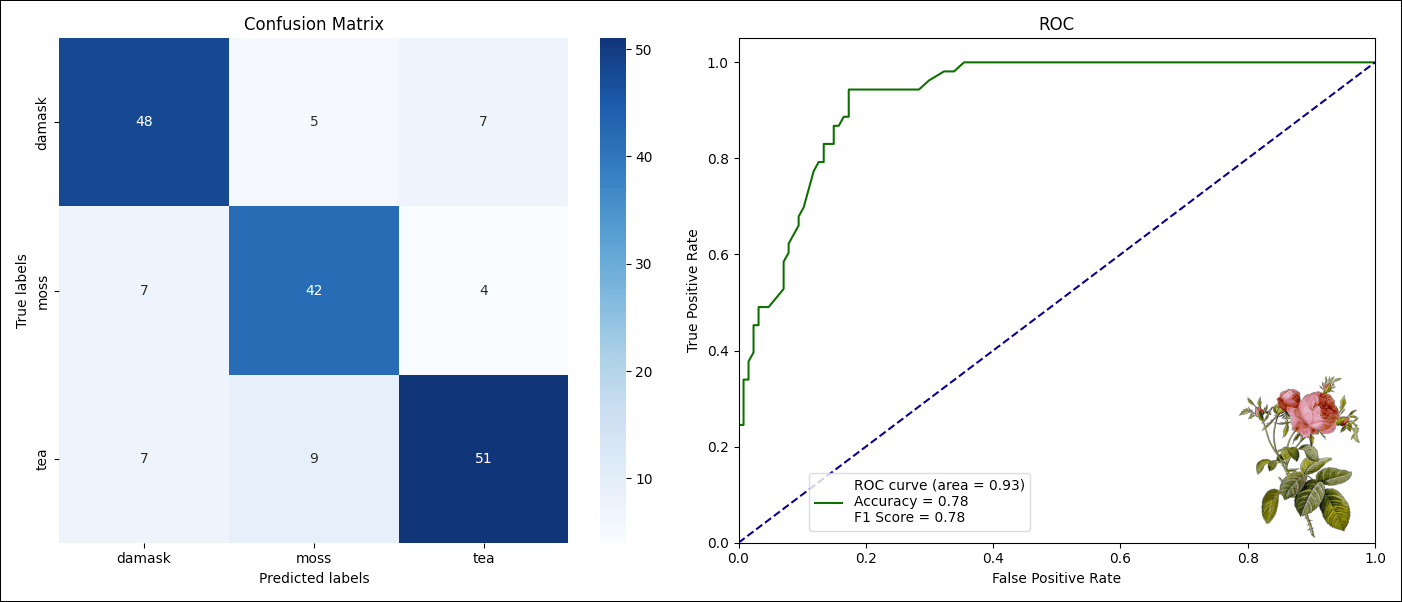
 The [`rose_classification`](https://github.com/astronomer/use-case-setup-teardown-data-quality/blob/main/dags/rose_classification.py) DAG engineers machine learning features based on the table created by the `create_rose_table` DAG and then trains a classification model to predict the `rose_type` column based on these features. The last task plots model results.
 ### Project code
This use case showcases [setup/ teardown tasks](/docs/learn/2.x/airflow-setup-teardown) in a data quality use case, as well as how to use [Airflow datasets](/docs/learn/2.x/airflow-datasets) and the [Astro Python SDK](https://astro-sdk-python.readthedocs.io/en/stable/), an open-source package created by Astronomer to simplify DAG writing with Python functions. The result is a complete ELT and ML pipeline example.
#### Create table DAG
The [`create_rose_table`](https://github.com/astronomer/use-case-setup-teardown-data-quality/blob/main/dags/create_rose_table.py) DAG is organized using nested [task groups](/docs/learn/2.x/task-groups). This pattern has two advantages: It makes it easier to navigate the DAG graph, and it gives you the ability to [template the task group pattern](/docs/learn/2.x/task-groups#custom-task-group-classes) and turn it into a reusable module.
The create table pattern shown in this example starts with creating and populating a temporary table. This is especially helpful in production when the target table is already in use, for example when serving a dashboard or machine learning model. Both creating the table (`create_tmp`) and loading data into the table (`load_data_into_tmp`) are defined as setup tasks. The task which drops the temporary table (`drop_tmp`) is the corresponding teardown task.
The full setup/ teardown workflow includes all tasks shown in the following DAG graph:
### Project code
This use case showcases [setup/ teardown tasks](/docs/learn/2.x/airflow-setup-teardown) in a data quality use case, as well as how to use [Airflow datasets](/docs/learn/2.x/airflow-datasets) and the [Astro Python SDK](https://astro-sdk-python.readthedocs.io/en/stable/), an open-source package created by Astronomer to simplify DAG writing with Python functions. The result is a complete ELT and ML pipeline example.
#### Create table DAG
The [`create_rose_table`](https://github.com/astronomer/use-case-setup-teardown-data-quality/blob/main/dags/create_rose_table.py) DAG is organized using nested [task groups](/docs/learn/2.x/task-groups). This pattern has two advantages: It makes it easier to navigate the DAG graph, and it gives you the ability to [template the task group pattern](/docs/learn/2.x/task-groups#custom-task-group-classes) and turn it into a reusable module.
The create table pattern shown in this example starts with creating and populating a temporary table. This is especially helpful in production when the target table is already in use, for example when serving a dashboard or machine learning model. Both creating the table (`create_tmp`) and loading data into the table (`load_data_into_tmp`) are defined as setup tasks. The task which drops the temporary table (`drop_tmp`) is the corresponding teardown task.
The full setup/ teardown workflow includes all tasks shown in the following DAG graph:
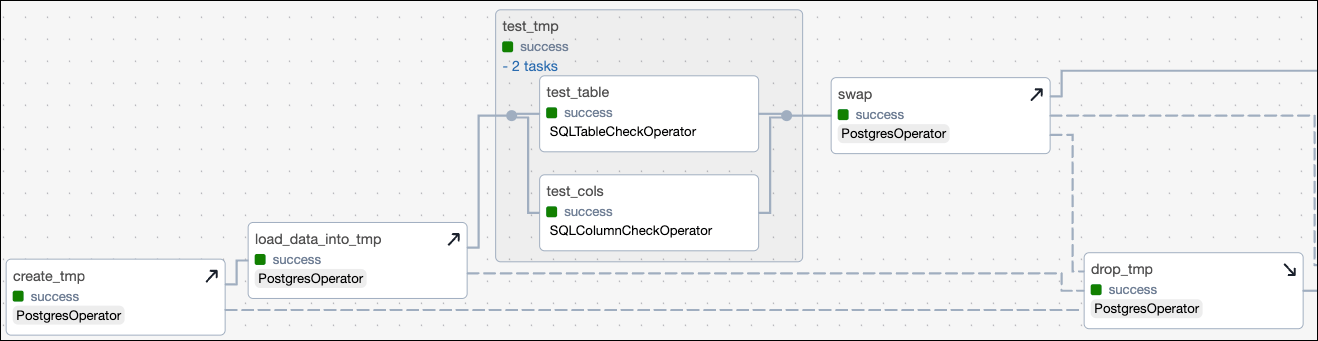 In the following code snippet, the setup/ teardown workflow is created by calling the `.as_teardown` method on a regular Airflow task object and supplying all associated setup tasks to the `setups` parameter. The `test_tmp` task group and the `swap` task are automatically determined to be in scope of the setup/ teardown workflow because they lie in between the setup and teardown tasks in the dependency structure.
```python expandable wrap theme={null}
create_tmp = PostgresOperator(
task_id="create_tmp",
# SQL statement to create a temporary table
)
load_data_into_tmp = PostgresOperator(
task_id="load_data_into_tmp",
# SQL statement to load data from a local CSV into the temp table
)
@task_group
def test_tmp():
# data quality checks (see code snippet below)
swap = PostgresOperator(
task_id="swap",
# SQL statement to swap the temporary table with the target table
)
drop_tmp = PostgresOperator(
task_id="drop_tmp",
# SQL statement to drop the temporary table
)
# ...
# define task dependencies
chain(
create_tmp,
load_data_into_tmp,
test_tmp(),
swap,
drop_tmp,
# ...
)
# define setup/ teardown relationship
drop_tmp.as_teardown(setups=[create_tmp, load_data_into_tmp])
```
Data quality checks are defined using the two [SQL check operators](/docs/learn/2.x/airflow-sql-data-quality): [`SQLColumnCheckOperator`](https://airflow.apache.org/registry/providers/common-sql#common-sql-sql-SQLColumnCheckOperator) and [`SQLTableCheckOperator`](https://airflow.apache.org/registry/providers/common-sql#common-sql-sql-SQLTableCheckOperator).
The `test_cols` task runs checks on individual columns of the temporary table, in this case to check that the `petal_size_cm`, `stem_length_cm` and `leaf_size_cm` columns contain values in a reasonable range for the rose cultivars. To see more examples of defining data quality check statements in the `SQLColumnCheckOperator` and `SQLTableCheckOperator`, see the [Run data quality checks using SQL check operators](/docs/learn/2.x/airflow-sql-data-quality).
```python wrap theme={null}
SQLColumnCheckOperator(
task_id="test_cols",
retry_on_failure="True",
table=f"{SCHEMA_NAME}.{TABLE_NAME}_tmp",
column_mapping={
"petal_size_cm": {"min": {"geq_to": 5}, "max": {"leq_to": 11}},
"stem_length_cm": {"min": {"geq_to": 19}, "max": {"leq_to": 51}},
"leaf_size_cm": {"min": {"geq_to": 3}, "max": {"leq_to": 9}},
},
accept_none="True",
)
```
The `test_table` task runs checks on the table to make sure that there's enough rows for the downstream model to be trained, and that the `rose_type` column only contains three cultivars.
```python wrap theme={null}
SQLTableCheckOperator(
task_id="test_table",
retry_on_failure="True",
table=f"{SCHEMA_NAME}.{TABLE_NAME}_tmp",
checks={
"row_count_check": {"check_statement": "COUNT(*) > 500"},
"rose_type_check": {
"check_statement": "rose_type IN ('damask', 'tea', 'moss')"
},
},
)
```
If the new data passes the data quality checks, the temporary table is swapped with the target table. The SQL statement that swaps the table is wrapped in a `DO` block that checks if the target table already exists and creates a backup table if it does.
```python wrap theme={null}
swap = PostgresOperator(
task_id="swap",
sql=f"""
DO
$$
BEGIN
IF EXISTS (
SELECT 1 FROM information_schema.tables
WHERE table_name = '{TABLE_NAME}' AND table_schema = 'public'
)
THEN
EXECUTE 'ALTER TABLE ' || '{TABLE_NAME}' || ' RENAME TO ' || '{TABLE_NAME}_backup';
END IF;
END
$$;
CREATE TABLE {TABLE_NAME} AS SELECT * FROM {TABLE_NAME}_tmp;
""",
)
```
In this demo pipeline, the backup table will be dropped after the swap and drop of the temporary table is successful. In a production pipeline, you might consider delaying dropping the backup table to allow for a rollback in case the new table contains errors that weren't anticipated by the existing data quality checks.
The `swap` task creates the backup table, which is why it's defined as a setup task. The associated teardown task is `drop_backup`, the task that drops the backup table. Defining this second setup/ teardown workflow ensures that the backup table is dropped even if the dropping of the temporary table isn't successful, ensuring idempotency of the DAG.
```python wrap theme={null}
swap = PostgresOperator(
task_id="swap",
# SQL statement to swap the temporary table with the target table
)
# ...
drop_backup = PostgresOperator(
task_id="drop_backup",
# SQL statement to drop the backup table
)
# ...
chain(
# ...
swap,
drop_tmp,
drop_backup,
# ...
)
# define setup/ teardown relationship
# ...
drop_backup.as_teardown(setups=[swap])
```
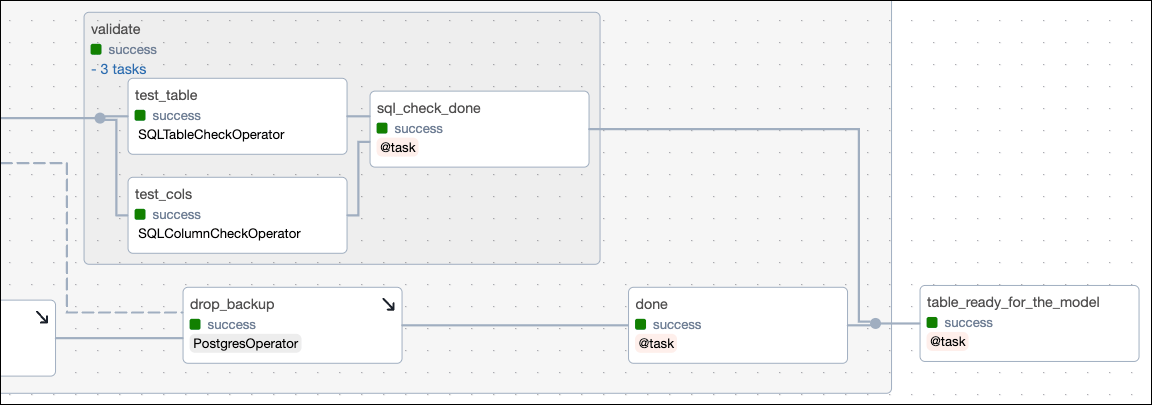
In the second half of the task group, the nested `validate` task group runs non-halting data quality checks on the target table. These checks are defined using the same two SQL check operators as the halting checks on the temporary table. If the data fails the checks in this second task group, the pipeline won't be stopped, but the check failures are printed to the logs. It is common to set up [notifications](/docs/learn/2.x/error-notifications-in-airflow) to alert relevant data stakeholders of these check failures.
In the following code snippet, the setup/ teardown workflow is created by calling the `.as_teardown` method on a regular Airflow task object and supplying all associated setup tasks to the `setups` parameter. The `test_tmp` task group and the `swap` task are automatically determined to be in scope of the setup/ teardown workflow because they lie in between the setup and teardown tasks in the dependency structure.
```python expandable wrap theme={null}
create_tmp = PostgresOperator(
task_id="create_tmp",
# SQL statement to create a temporary table
)
load_data_into_tmp = PostgresOperator(
task_id="load_data_into_tmp",
# SQL statement to load data from a local CSV into the temp table
)
@task_group
def test_tmp():
# data quality checks (see code snippet below)
swap = PostgresOperator(
task_id="swap",
# SQL statement to swap the temporary table with the target table
)
drop_tmp = PostgresOperator(
task_id="drop_tmp",
# SQL statement to drop the temporary table
)
# ...
# define task dependencies
chain(
create_tmp,
load_data_into_tmp,
test_tmp(),
swap,
drop_tmp,
# ...
)
# define setup/ teardown relationship
drop_tmp.as_teardown(setups=[create_tmp, load_data_into_tmp])
```
Data quality checks are defined using the two [SQL check operators](/docs/learn/2.x/airflow-sql-data-quality): [`SQLColumnCheckOperator`](https://airflow.apache.org/registry/providers/common-sql#common-sql-sql-SQLColumnCheckOperator) and [`SQLTableCheckOperator`](https://airflow.apache.org/registry/providers/common-sql#common-sql-sql-SQLTableCheckOperator).
The `test_cols` task runs checks on individual columns of the temporary table, in this case to check that the `petal_size_cm`, `stem_length_cm` and `leaf_size_cm` columns contain values in a reasonable range for the rose cultivars. To see more examples of defining data quality check statements in the `SQLColumnCheckOperator` and `SQLTableCheckOperator`, see the [Run data quality checks using SQL check operators](/docs/learn/2.x/airflow-sql-data-quality).
```python wrap theme={null}
SQLColumnCheckOperator(
task_id="test_cols",
retry_on_failure="True",
table=f"{SCHEMA_NAME}.{TABLE_NAME}_tmp",
column_mapping={
"petal_size_cm": {"min": {"geq_to": 5}, "max": {"leq_to": 11}},
"stem_length_cm": {"min": {"geq_to": 19}, "max": {"leq_to": 51}},
"leaf_size_cm": {"min": {"geq_to": 3}, "max": {"leq_to": 9}},
},
accept_none="True",
)
```
The `test_table` task runs checks on the table to make sure that there's enough rows for the downstream model to be trained, and that the `rose_type` column only contains three cultivars.
```python wrap theme={null}
SQLTableCheckOperator(
task_id="test_table",
retry_on_failure="True",
table=f"{SCHEMA_NAME}.{TABLE_NAME}_tmp",
checks={
"row_count_check": {"check_statement": "COUNT(*) > 500"},
"rose_type_check": {
"check_statement": "rose_type IN ('damask', 'tea', 'moss')"
},
},
)
```
If the new data passes the data quality checks, the temporary table is swapped with the target table. The SQL statement that swaps the table is wrapped in a `DO` block that checks if the target table already exists and creates a backup table if it does.
```python wrap theme={null}
swap = PostgresOperator(
task_id="swap",
sql=f"""
DO
$$
BEGIN
IF EXISTS (
SELECT 1 FROM information_schema.tables
WHERE table_name = '{TABLE_NAME}' AND table_schema = 'public'
)
THEN
EXECUTE 'ALTER TABLE ' || '{TABLE_NAME}' || ' RENAME TO ' || '{TABLE_NAME}_backup';
END IF;
END
$$;
CREATE TABLE {TABLE_NAME} AS SELECT * FROM {TABLE_NAME}_tmp;
""",
)
```
In this demo pipeline, the backup table will be dropped after the swap and drop of the temporary table is successful. In a production pipeline, you might consider delaying dropping the backup table to allow for a rollback in case the new table contains errors that weren't anticipated by the existing data quality checks.
The `swap` task creates the backup table, which is why it's defined as a setup task. The associated teardown task is `drop_backup`, the task that drops the backup table. Defining this second setup/ teardown workflow ensures that the backup table is dropped even if the dropping of the temporary table isn't successful, ensuring idempotency of the DAG.
```python wrap theme={null}
swap = PostgresOperator(
task_id="swap",
# SQL statement to swap the temporary table with the target table
)
# ...
drop_backup = PostgresOperator(
task_id="drop_backup",
# SQL statement to drop the backup table
)
# ...
chain(
# ...
swap,
drop_tmp,
drop_backup,
# ...
)
# define setup/ teardown relationship
# ...
drop_backup.as_teardown(setups=[swap])
```
In the second half of the task group, the nested `validate` task group runs non-halting data quality checks on the target table. These checks are defined using the same two SQL check operators as the halting checks on the temporary table. If the data fails the checks in this second task group, the pipeline won't be stopped, but the check failures are printed to the logs. It is common to set up [notifications](/docs/learn/2.x/error-notifications-in-airflow) to alert relevant data stakeholders of these check failures.
 Validation level checks often contain more stringent checks than the halting checks, for example to make sure that the data is not only in a reasonable range, but also within the expected range. The following checks test our data against more narrow ranges than the checks in the `test_cols` task and ensured the `blooming_month` information matches our expectations.
```python wrap theme={null}
@task_group
def validate():
test_cols = SQLColumnCheckOperator(
task_id="test_cols",
retry_on_failure="True",
table=f"{SCHEMA_NAME}.{TABLE_NAME}",
column_mapping={
"petal_size_cm": {"min": {"geq_to": 5}, "max": {"leq_to": 10}},
"stem_length_cm": {"min": {"geq_to": 20}, "max": {"leq_to": 50}},
"leaf_size_cm": {"min": {"geq_to": 4}, "max": {"leq_to": 8}},
},
accept_none="True",
)
test_table = SQLTableCheckOperator(
task_id="test_table",
retry_on_failure="True",
table=f"{SCHEMA_NAME}.{TABLE_NAME}",
checks={
"row_count_check": {"check_statement": "COUNT(*) > 800"},
"at_least_20_tea_check": {
"check_statement": "COUNT(*) >= 20",
"partition_clause": "rose_type = 'tea'",
},
"month_check": {
"check_statement": "blooming_month IN ('April', 'May', 'June', 'July', 'August', 'September')"
},
},
)
```
No matter the outcome of the data quality checks in the `validate` task group, the pipeline will continue because the `sql_check_done` task uses the [trigger rule](/docs/learn/2.x/airflow-trigger-rules) `all_done` to be successful always.
```python wrap theme={null}
@task(trigger_rule="all_done")
def sql_check_done():
return "Additional data quality checks are done!"
```
If you change the trigger rule of the `sql_check_done` task and the `done` task running after the `drop_backup` task, you can change the impact that failures have on the larger pipeline. For example, you might want to set the trigger rule of the `sql_check_done` task to `all_success` during development to only continue the pipeline if the data passes validation checks, or you might set the trigger rule of the `done` task to `all_done` to allow the pipeline to continue using the old table if the swapping in of the new table fails.
Lastly, the `table_ready_for_the_model` task produces to the [Airflow dataset](/docs/learn/2.x/airflow-datasets) `postgres://public/roses` to trigger the downstream `rose_classification` DAG.
```python wrap theme={null}
@task(
outlets=[Dataset(f"postgres://{SCHEMA_NAME}/{TABLE_NAME}")],
)
def table_ready_for_the_model():
return "The table is ready, modeling can begin!"
```
#### ML DAG
Airflow [datasets](/docs/learn/2.x/airflow-datasets) let you schedule DAGs based on when a specific file or database is updated in a separate DAG. In this example, the ML DAG [`rose_classification`](https://github.com/astronomer/use-case-setup-teardown-data-quality/blob/main/dags/rose_classification.py) is scheduled to run as soon as the `roses` table is updated by the upstream DAG.
```python wrap theme={null}
@dag(
start_date=datetime(2023, 8, 1),
schedule=[Dataset(f"postgres://{SCHEMA_NAME}/{TABLE_NAME}")],
catchup=False,
tags=["classification"],
)
```
The first task of the ML DAG takes care of feature engineering. By using the [@`aql.dataframe`](https://astro-sdk-python.readthedocs.io/en/stable/astro/sql/operators/dataframe.html) decorator, the `roses` table is ingested directly as a [pandas DataFrame](https://pandas.pydata.org/docs/reference/api/pandas.DataFrame.html).
The `feature_engineering` task creates a train-test split, scales the numeric features, and one-hot encodes the categorical feature `blooming_month` using functions from [scikit-learn](https://scikit-learn.org/stable/index.html). The resulting sets of train and test data are returned as a dictionary of pandas DataFrames.
```python expandable wrap theme={null}
@aql.dataframe
def feature_engineering(df: pd.DataFrame):
from sklearn.model_selection import train_test_split
from sklearn.preprocessing import StandardScaler
# converting column names to str for the Scaler
df.columns = [str(col).replace("'", "").replace('"', "") for col in df.columns]
df = pd.get_dummies(df, columns=["blooming_month"], drop_first=True)
X = df.drop(["rose_type", "index"], axis=1)
y = df["rose_type"]
X_train, X_test, y_train, y_test = train_test_split(
X, y, test_size=0.2, random_state=42
)
scaler = StandardScaler()
X_train_scaled = pd.DataFrame(
scaler.fit_transform(X_train), columns=X_train.columns, index=X_train.index
)
X_test_scaled = pd.DataFrame(
scaler.transform(X_test), columns=X_test.columns, index=X_test.index
)
train_data = pd.concat([X_train_scaled, y_train], axis=1)
test_data = pd.concat([X_test_scaled, y_test], axis=1)
return {
"train_data": train_data,
"test_data": test_data,
}
# ...
roses_features = feature_engineering(
df=Table(
conn_id=POSTGRES_CONN_ID,
name=TABLE_NAME,
metadata=Metadata(
schema=SCHEMA_NAME,
),
)
)
```
The `train_model` task ingests the dictionary and trains a [RandomForestClassifier](https://scikit-learn.org/stable/modules/generated/sklearn.ensemble.RandomForestClassifier.html#sklearn.ensemble.RandomForestClassifier) on the training data. The fitted model is then used to predict the `rose_type` of the test data.
The `train_model` task prints the [accuracy](https://scikit-learn.org/stable/modules/model_evaluation.html#accuracy-score), [f1-score](https://scikit-learn.org/stable/modules/generated/sklearn.metrics.f1_score.html#sklearn.metrics.f1_score), and a classification report to the logs and returns a dictionary of model results for the downstream plotting task.
```python expandable wrap theme={null}
@task
def train_model(input_data):
from sklearn.ensemble import RandomForestClassifier
from sklearn.metrics import (
accuracy_score,
f1_score,
classification_report,
roc_curve,
)
train_data = input_data["train_data"]
test_data = input_data["test_data"]
X_train = train_data.drop(["rose_type"], axis=1)
y_train = train_data["rose_type"]
X_test = test_data.drop(["rose_type"], axis=1)
y_test = test_data["rose_type"]
clf = RandomForestClassifier(n_estimators=1000, random_state=23)
clf.fit(X_train, y_train)
y_pred = clf.predict(X_test)
acc = accuracy_score(y_test, y_pred)
f1 = f1_score(y_test, y_pred, average="weighted")
fpr, tpr, thresholds = roc_curve(
y_test, clf.predict_proba(X_test)[:, 1], pos_label=clf.classes_[1]
)
print("Accuracy:", acc)
print("F1-Score:", f1)
print(classification_report(y_test, y_pred))
labels_df = pd.DataFrame(clf.classes_)
true_vs_pred = pd.concat(
[y_test, pd.Series(y_pred, index=y_test.index)],
axis=1,
)
true_vs_pred.columns = ["y_test", "y_pred"]
roc_df = pd.DataFrame({"fpr": fpr, "tpr": tpr, "thresholds": thresholds})
return {
"true_vs_pred": true_vs_pred,
"labels_df": labels_df,
"accuracy": acc,
"f1_score": f1,
"roc_df": roc_df,
}
```
Lastly, the model results are plotted using [matplotlib](https://matplotlib.org/) and [seaborn](https://seaborn.pydata.org/) in the `plot_results` task. The plot is saved in the `include` directory of the local Astro project. If you are running this pipeline in production, make sure to save this file to persistent storage.
```python expandable wrap theme={null}
@task
def plot_results(input):
from sklearn.metrics import (
confusion_matrix,
auc,
)
true_vs_pred = input["true_vs_pred"]
labels_df = input["labels_df"]
acc = input["accuracy"]
f1 = input["f1_score"]
tpr = input["roc_df"]["tpr"]
fpr = input["roc_df"]["fpr"]
y_test = true_vs_pred["y_test"]
y_pred = true_vs_pred["y_pred"]
fig, ax = plt.subplots(1, 2, figsize=(14, 6))
labels = labels_df.iloc[:, 0].to_list()
cm = confusion_matrix(y_test, y_pred, labels=labels)
sns.heatmap(
cm,
annot=True,
fmt="g",
cmap="Blues",
ax=ax[0],
xticklabels=labels,
yticklabels=labels,
)
ax[0].set_xlabel("Predicted labels")
ax[0].set_ylabel("True labels")
ax[0].set_title("Confusion Matrix")
roc_auc = auc(fpr, tpr)
label_text = (
f"ROC curve (area = {roc_auc:.2f})"
f"\nAccuracy = {acc:.2f}"
f"\nF1 Score = {f1:.2f}"
)
ax[1].plot(fpr, tpr, color="darkgreen", label=label_text)
ax[1].plot([0, 1], [0, 1], color="navy", linestyle="--")
ax[1].set_xlim([0.0, 1.0])
ax[1].set_ylim([0.0, 1.05])
ax[1].set_xlabel("False Positive Rate")
ax[1].set_ylabel("True Positive Rate")
ax[1].set_title("ROC")
ax[1].legend(loc="lower left", bbox_to_anchor=(0.10, 0.01))
img = plt.imread("include/rosa_centifolia.png")
ax_ratio = ax[1].get_data_ratio()
img_ratio = img.shape[1] / img.shape[0]
width = 0.2
height = width * 1.3 / (img_ratio * ax_ratio)
x_start = 0.78
y_start = 0
extent = [x_start, x_start + width, y_start, y_start + height]
ax[1].imshow(img, aspect="auto", extent=extent, zorder=1)
plt.tight_layout()
plt.savefig("include/results.png")
```
The [`aql.cleanup`](https://astro-sdk-python.readthedocs.io/en/stable/astro/sql/operators/cleanup.html) task is run in parallel to the rest of the DAG and cleans up any temporary tables after they're no longer needed.
## See also
* Documentation: [Astro Python SDK](https://astro-sdk-python.readthedocs.io/en/stable/index.html).
* Guide: [Setup/ teardown](/docs/learn/2.x/airflow-setup-teardown).
* Tutorial: [SQL check operators](/docs/learn/2.x/airflow-sql-data-quality).
Validation level checks often contain more stringent checks than the halting checks, for example to make sure that the data is not only in a reasonable range, but also within the expected range. The following checks test our data against more narrow ranges than the checks in the `test_cols` task and ensured the `blooming_month` information matches our expectations.
```python wrap theme={null}
@task_group
def validate():
test_cols = SQLColumnCheckOperator(
task_id="test_cols",
retry_on_failure="True",
table=f"{SCHEMA_NAME}.{TABLE_NAME}",
column_mapping={
"petal_size_cm": {"min": {"geq_to": 5}, "max": {"leq_to": 10}},
"stem_length_cm": {"min": {"geq_to": 20}, "max": {"leq_to": 50}},
"leaf_size_cm": {"min": {"geq_to": 4}, "max": {"leq_to": 8}},
},
accept_none="True",
)
test_table = SQLTableCheckOperator(
task_id="test_table",
retry_on_failure="True",
table=f"{SCHEMA_NAME}.{TABLE_NAME}",
checks={
"row_count_check": {"check_statement": "COUNT(*) > 800"},
"at_least_20_tea_check": {
"check_statement": "COUNT(*) >= 20",
"partition_clause": "rose_type = 'tea'",
},
"month_check": {
"check_statement": "blooming_month IN ('April', 'May', 'June', 'July', 'August', 'September')"
},
},
)
```
No matter the outcome of the data quality checks in the `validate` task group, the pipeline will continue because the `sql_check_done` task uses the [trigger rule](/docs/learn/2.x/airflow-trigger-rules) `all_done` to be successful always.
```python wrap theme={null}
@task(trigger_rule="all_done")
def sql_check_done():
return "Additional data quality checks are done!"
```
If you change the trigger rule of the `sql_check_done` task and the `done` task running after the `drop_backup` task, you can change the impact that failures have on the larger pipeline. For example, you might want to set the trigger rule of the `sql_check_done` task to `all_success` during development to only continue the pipeline if the data passes validation checks, or you might set the trigger rule of the `done` task to `all_done` to allow the pipeline to continue using the old table if the swapping in of the new table fails.
Lastly, the `table_ready_for_the_model` task produces to the [Airflow dataset](/docs/learn/2.x/airflow-datasets) `postgres://public/roses` to trigger the downstream `rose_classification` DAG.
```python wrap theme={null}
@task(
outlets=[Dataset(f"postgres://{SCHEMA_NAME}/{TABLE_NAME}")],
)
def table_ready_for_the_model():
return "The table is ready, modeling can begin!"
```
#### ML DAG
Airflow [datasets](/docs/learn/2.x/airflow-datasets) let you schedule DAGs based on when a specific file or database is updated in a separate DAG. In this example, the ML DAG [`rose_classification`](https://github.com/astronomer/use-case-setup-teardown-data-quality/blob/main/dags/rose_classification.py) is scheduled to run as soon as the `roses` table is updated by the upstream DAG.
```python wrap theme={null}
@dag(
start_date=datetime(2023, 8, 1),
schedule=[Dataset(f"postgres://{SCHEMA_NAME}/{TABLE_NAME}")],
catchup=False,
tags=["classification"],
)
```
The first task of the ML DAG takes care of feature engineering. By using the [@`aql.dataframe`](https://astro-sdk-python.readthedocs.io/en/stable/astro/sql/operators/dataframe.html) decorator, the `roses` table is ingested directly as a [pandas DataFrame](https://pandas.pydata.org/docs/reference/api/pandas.DataFrame.html).
The `feature_engineering` task creates a train-test split, scales the numeric features, and one-hot encodes the categorical feature `blooming_month` using functions from [scikit-learn](https://scikit-learn.org/stable/index.html). The resulting sets of train and test data are returned as a dictionary of pandas DataFrames.
```python expandable wrap theme={null}
@aql.dataframe
def feature_engineering(df: pd.DataFrame):
from sklearn.model_selection import train_test_split
from sklearn.preprocessing import StandardScaler
# converting column names to str for the Scaler
df.columns = [str(col).replace("'", "").replace('"', "") for col in df.columns]
df = pd.get_dummies(df, columns=["blooming_month"], drop_first=True)
X = df.drop(["rose_type", "index"], axis=1)
y = df["rose_type"]
X_train, X_test, y_train, y_test = train_test_split(
X, y, test_size=0.2, random_state=42
)
scaler = StandardScaler()
X_train_scaled = pd.DataFrame(
scaler.fit_transform(X_train), columns=X_train.columns, index=X_train.index
)
X_test_scaled = pd.DataFrame(
scaler.transform(X_test), columns=X_test.columns, index=X_test.index
)
train_data = pd.concat([X_train_scaled, y_train], axis=1)
test_data = pd.concat([X_test_scaled, y_test], axis=1)
return {
"train_data": train_data,
"test_data": test_data,
}
# ...
roses_features = feature_engineering(
df=Table(
conn_id=POSTGRES_CONN_ID,
name=TABLE_NAME,
metadata=Metadata(
schema=SCHEMA_NAME,
),
)
)
```
The `train_model` task ingests the dictionary and trains a [RandomForestClassifier](https://scikit-learn.org/stable/modules/generated/sklearn.ensemble.RandomForestClassifier.html#sklearn.ensemble.RandomForestClassifier) on the training data. The fitted model is then used to predict the `rose_type` of the test data.
The `train_model` task prints the [accuracy](https://scikit-learn.org/stable/modules/model_evaluation.html#accuracy-score), [f1-score](https://scikit-learn.org/stable/modules/generated/sklearn.metrics.f1_score.html#sklearn.metrics.f1_score), and a classification report to the logs and returns a dictionary of model results for the downstream plotting task.
```python expandable wrap theme={null}
@task
def train_model(input_data):
from sklearn.ensemble import RandomForestClassifier
from sklearn.metrics import (
accuracy_score,
f1_score,
classification_report,
roc_curve,
)
train_data = input_data["train_data"]
test_data = input_data["test_data"]
X_train = train_data.drop(["rose_type"], axis=1)
y_train = train_data["rose_type"]
X_test = test_data.drop(["rose_type"], axis=1)
y_test = test_data["rose_type"]
clf = RandomForestClassifier(n_estimators=1000, random_state=23)
clf.fit(X_train, y_train)
y_pred = clf.predict(X_test)
acc = accuracy_score(y_test, y_pred)
f1 = f1_score(y_test, y_pred, average="weighted")
fpr, tpr, thresholds = roc_curve(
y_test, clf.predict_proba(X_test)[:, 1], pos_label=clf.classes_[1]
)
print("Accuracy:", acc)
print("F1-Score:", f1)
print(classification_report(y_test, y_pred))
labels_df = pd.DataFrame(clf.classes_)
true_vs_pred = pd.concat(
[y_test, pd.Series(y_pred, index=y_test.index)],
axis=1,
)
true_vs_pred.columns = ["y_test", "y_pred"]
roc_df = pd.DataFrame({"fpr": fpr, "tpr": tpr, "thresholds": thresholds})
return {
"true_vs_pred": true_vs_pred,
"labels_df": labels_df,
"accuracy": acc,
"f1_score": f1,
"roc_df": roc_df,
}
```
Lastly, the model results are plotted using [matplotlib](https://matplotlib.org/) and [seaborn](https://seaborn.pydata.org/) in the `plot_results` task. The plot is saved in the `include` directory of the local Astro project. If you are running this pipeline in production, make sure to save this file to persistent storage.
```python expandable wrap theme={null}
@task
def plot_results(input):
from sklearn.metrics import (
confusion_matrix,
auc,
)
true_vs_pred = input["true_vs_pred"]
labels_df = input["labels_df"]
acc = input["accuracy"]
f1 = input["f1_score"]
tpr = input["roc_df"]["tpr"]
fpr = input["roc_df"]["fpr"]
y_test = true_vs_pred["y_test"]
y_pred = true_vs_pred["y_pred"]
fig, ax = plt.subplots(1, 2, figsize=(14, 6))
labels = labels_df.iloc[:, 0].to_list()
cm = confusion_matrix(y_test, y_pred, labels=labels)
sns.heatmap(
cm,
annot=True,
fmt="g",
cmap="Blues",
ax=ax[0],
xticklabels=labels,
yticklabels=labels,
)
ax[0].set_xlabel("Predicted labels")
ax[0].set_ylabel("True labels")
ax[0].set_title("Confusion Matrix")
roc_auc = auc(fpr, tpr)
label_text = (
f"ROC curve (area = {roc_auc:.2f})"
f"\nAccuracy = {acc:.2f}"
f"\nF1 Score = {f1:.2f}"
)
ax[1].plot(fpr, tpr, color="darkgreen", label=label_text)
ax[1].plot([0, 1], [0, 1], color="navy", linestyle="--")
ax[1].set_xlim([0.0, 1.0])
ax[1].set_ylim([0.0, 1.05])
ax[1].set_xlabel("False Positive Rate")
ax[1].set_ylabel("True Positive Rate")
ax[1].set_title("ROC")
ax[1].legend(loc="lower left", bbox_to_anchor=(0.10, 0.01))
img = plt.imread("include/rosa_centifolia.png")
ax_ratio = ax[1].get_data_ratio()
img_ratio = img.shape[1] / img.shape[0]
width = 0.2
height = width * 1.3 / (img_ratio * ax_ratio)
x_start = 0.78
y_start = 0
extent = [x_start, x_start + width, y_start, y_start + height]
ax[1].imshow(img, aspect="auto", extent=extent, zorder=1)
plt.tight_layout()
plt.savefig("include/results.png")
```
The [`aql.cleanup`](https://astro-sdk-python.readthedocs.io/en/stable/astro/sql/operators/cleanup.html) task is run in parallel to the rest of the DAG and cleans up any temporary tables after they're no longer needed.
## See also
* Documentation: [Astro Python SDK](https://astro-sdk-python.readthedocs.io/en/stable/index.html).
* Guide: [Setup/ teardown](/docs/learn/2.x/airflow-setup-teardown).
* Tutorial: [SQL check operators](/docs/learn/2.x/airflow-sql-data-quality).